
DjangoQL: Advanced search language for Django (iplweb fork with i18n)

Project description
DjangoQL




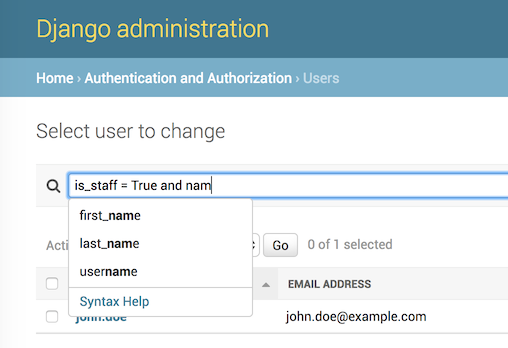
Advanced search language for Django, with auto-completion. Supports logical operators, parenthesis, table joins, and works with any Django model. Tested on Python 3.10–3.14, Django 5.2 and 6.0. The auto-completion feature has been tested in Chrome, Firefox, Safari, IE9+.
This is a community fork.
djangoql-iplwebis a fork of the original DjangoQL by ivelum — install the upstream package fromdjangoqlon PyPI. This fork adds internationalization (i18n) of error messages and modernized packaging/tooling.These changes are offered back to the upstream project. If the original maintainers merge them, please switch back to the upstream
djangoqlpackage — this fork exists only to make the improvements available in the meantime, and will defer to upstream once they land there.It is published on PyPI as
djangoql-iplweb, but the import name staysdjangoql(soINSTALLED_APPSandimport djangoqlare unchanged).
See a video: DjangoQL demo
Contents
- Features
- Supported versions
- Installation
- Add it to your Django admin
- Using DjangoQL with the standard Django admin search
- Internationalization (i18n)
- Language reference
- DjangoQL Schema
- Custom search fields
- Can I use it outside of Django admin?
- Using completion widget outside of Django admin
Features
- Python-like query syntax: logical operators (
and,or), parenthesis, and the full set of comparison operators - Searches across model relations via joins, e.g.
author.last_name = "Tolstoy" - Works with any Django model and drops into the Django admin with a single mixin
- Live auto-completion of model field names and values in the admin
- Configurable schema to restrict searchable models/fields and provide suggestion options
- Custom search fields for annotations and fully custom search logic
- Internationalized error messages with translation catalogs for 11 locales
- Usable outside the Django admin, including a standalone JavaScript completion widget
Supported versions
DjangoQL is tested against the following Django × Python combinations:
| Django | 3.10 | 3.11 | 3.12 | 3.13 | 3.14 |
|---|---|---|---|---|---|
| 5.2 LTS | ✓ | ✓ | ✓ | ✓ | ✓ |
| 6.0 | — | — | ✓ | ✓ | ✓ |
Installation
Using uv (recommended):
$ uv add djangoql-iplweb
Using pip:
$ pip install djangoql-iplweb
Add 'djangoql' to INSTALLED_APPS in your settings.py:
INSTALLED_APPS = [
    ...
    'djangoql',
    ...
]
Add it to your Django admin
Adding DjangoQLSearchMixin to your model admin will replace the standard Django search functionality with DjangoQL search. Example:
from django.contrib import admin

from djangoql.admin import DjangoQLSearchMixin

from .models import Book


@admin.register(Book)
class BookAdmin(DjangoQLSearchMixin, admin.ModelAdmin):
    pass
Using DjangoQL with the standard Django admin search
DjangoQL will recognize if you have defined search_fields in your ModelAdmin class, and doing so will allow you to choose between an advanced search with DjangoQL and a standard Django search (as specified by search fields). Example:
@admin.register(Book)
class BookAdmin(DjangoQLSearchMixin, admin.ModelAdmin):
    search_fields = ('title', 'author__name')
For the example above, a checkbox that controls search mode will appear near the search input. If the checkbox is on, then DjanqoQL search is used. There is also an option that controls if that checkbox is enabled by default - djangoql_completion_enabled_by_default (set to True by default):
@admin.register(Book)
class BookAdmin(DjangoQLSearchMixin, admin.ModelAdmin):
    search_fields = ('title', 'author__name')
    djangoql_completion_enabled_by_default = False
If you don't want two search modes, simply remove search_fields from your ModelAdmin class.
Internationalization (i18n)
User-facing error messages produced by the lexer, parser, schema validator and suggestions API are wrapped with gettext_lazy and ship with translation catalogs for several locales. The locale used at runtime follows Django's standard request-locale resolution (LANGUAGE_CODE, LocaleMiddleware, Accept-Language, etc.). If a translation is missing for a given message or locale, the original English string is used.
Supplied locales:
pl- Polish (hand-written, native)de- German (auto-translated, review welcome)fr- French (auto-translated, review welcome)es- Spanish (auto-translated, review welcome)ru- Russian (auto-translated, review welcome)uk- Ukrainian (auto-translated, review welcome)pt_BR- Brazilian Portuguese (auto-translated, review welcome)it- Italian (auto-translated, review welcome)nl- Dutch (auto-translated, review welcome)ja- Japanese (auto-translated, review welcome)zh_Hans- Simplified Chinese (auto-translated, review welcome)
Each locale lives under djangoql/locale/<code>/LC_MESSAGES/. The .mo files are shipped in the package, so no extra build step is required at install time. To add a new language or improve an existing one, edit the corresponding django.po file and run django-admin compilemessages from the djangoql/ directory (requires the gettext system package). PRs for native-speaker review of any auto-translated locale are very welcome.
Language reference
DjangoQL is shipped with comprehensive Syntax Help, which can be found in Django admin (see the Syntax Help link in auto-completion popup). Here's a quick summary:
DjangoQL's syntax resembles Python's, with some minor differences. Basically you just reference model fields as you would in Python code, then apply comparison and logical operators and parenthesis. DjangoQL is case-sensitive.
- model fields: exactly as they are defined in Python code. Access nested properties via
., for exampleauthor.last_name; - strings can be enclosed in either double quotes or single quotes. To escape a quote, use
\"for double quotes or\'for single quotes. You can also use single quotes to enclose strings containing double quotes, and vice versa; - boolean and null values:
True,False,None. Please note that they can be combined only with equality operators, so you can writepublished = False or date_published = None, butpublished > Falsewill cause an error; - logical operators:
and,or; - comparison operators:
=,!=,<,<=,>,>=- work as you expect;
- string-specific comparison operators:
startswith,not startswith,endswith,not endswith- work as you expect. Test whether or not a string contains a substring:~and!~(translated into__icontainsunder the hood). Example:name endswith "peace" or author.last_name ~ "tolstoy"; - date-specific comparison operators, compare by date part:
~and!~. Example:date_published ~ "2021-11"- find books published in Nov, 2021; - test a value vs. list:
in,not in. Example:pk in (2, 3).
DjangoQL Schema
Schema defines limitations - what you can do with a DjangoQL query. If you don't specify any schema, DjangoQL will provide a default schema for you. This will walk recursively through all model fields and relations and include everything it finds in the schema, so users would be able to search through everything. Sometimes this is not what you want, either due to DB performance or security concerns. If you'd like to limit search models or fields, you should define a schema. Here's an example:
class UserQLSchema(DjangoQLSchema):
    exclude = (Book,)
    suggest_options = {
        Group: ['name'],
    }

    def get_fields(self, model):
        if model == Group:
            return ['name']
        return super(UserQLSchema, self).get_fields(model)


@admin.register(User)
class CustomUserAdmin(DjangoQLSearchMixin, UserAdmin):
    djangoql_schema = UserQLSchema
In the example above we created a schema that does 3 things:
- excludes the Book model from search via
excludeoption. Instead ofexcludeyou may also useinclude, which limits a search to listed models only; - limits available search fields for Group model to only the
namefield , in the.get_fields()method; - enables completion options for Group names via
suggest_options.
An important note about suggest_options: it looks for the choices model field parameter first, and if it's not specified - it will synchronously pull all values for given model fields, so you should avoid large querysets there. If you'd like to define custom suggestion options, see below.
Custom search fields
Deeper search customization can be achieved with custom search fields. Custom search fields can be used to search by annotations, define custom suggestion options, or define fully custom search logic. In djangoql.schema, DjangoQL defines the following base field classes that you may subclass to define your own behavior:
IntFieldFloatFieldStrFieldBoolFieldDateFieldDateTimeFieldRelationField
Here are examples for common use cases:
Search by queryset annotations:
from djangoql.schema import DjangoQLSchema, IntField


class UserQLSchema(DjangoQLSchema):
    def get_fields(self, model):
        fields = super(UserQLSchema, self).get_fields(model)
        if model == User:
            fields += [IntField(name='groups_count')]
        return fields


@admin.register(User)
class CustomUserAdmin(DjangoQLSearchMixin, UserAdmin):
    djangoql_schema = UserQLSchema

    def get_queryset(self, request):
        qs = super(CustomUserAdmin, self).get_queryset(request)
        return qs.annotate(groups_count=Count('groups'))
Let's take a closer look at what's happening in the example above. First, we add groups_count annotation to the queryset that is used by Django admin in the CustomUserAdmin.get_queryset() method. It would contain the number of groups a user belongs to. As our queryset now pulls this column, we can filter by it. It just needs to be included in the schema. In UserQLSchema.get_fields() we define a custom integer search field for the User model. Its name should match the name of the column in our queryset.
Custom suggestion options
from djangoql.schema import DjangoQLSchema, StrField


class GroupNameField(StrField):
    model = Group
    name = 'name'
    suggest_options = True

    def get_options(self, search):
        return super(GroupNameField, self)\
            .get_options(search)\
            .annotate(users_count=Count('user'))\
            .order_by('-users_count')


class UserQLSchema(DjangoQLSchema):
    def get_fields(self, model):
        if model == Group:
            return ['id', GroupNameField()]
        return super(UserQLSchema, self).get_fields(model)


@admin.register(User)
class CustomUserAdmin(DjangoQLSearchMixin, UserAdmin):
    djangoql_schema = UserQLSchema
In this example we've defined a custom GroupNameField that sorts suggestions for group names by popularity (no. of users in a group) instead of default alphabetical sorting.
Custom search lookup
DjangoQL base fields provide two basic methods that you can override to substitute either search column, search value, or both - .get_lookup_name() and .get_lookup_value(value):
class UserDateJoinedYear(IntField):
    name = 'date_joined_year'

    def get_lookup_name(self):
        return 'date_joined__year'


class UserQLSchema(DjangoQLSchema):
    def get_fields(self, model):
        fields = super(UserQLSchema, self).get_fields(model)
        if model == User:
            fields += [UserDateJoinedYear()]
        return fields


@admin.register(User)
class CustomUserAdmin(DjangoQLSearchMixin, UserAdmin):
    djangoql_schema = UserQLSchema
In this example we've defined the custom date_joined_year search field for users, and used the built-in Django __year filter option in .get_lookup_name() to filter by date year only. Similarly you can use .get_lookup_value(value) hook to modify a search value before it's used in the filter.
Fully custom search lookup
.get_lookup_name() and .get_lookup_value(value) hooks cover many simple use cases, but sometimes they're not enough and you want a fully custom search logic. In such cases you can override main .get_lookup() method of a field. Example below demonstrates User age search:
from djangoql.schema import DjangoQLSchema, IntField


class UserAgeField(IntField):
    """
    Search by given number of full years
    """
    model = User
    name = 'age'

    def get_lookup_name(self):
        """
        We'll be doing comparisons vs. this model field
        """
        return 'date_joined'

    def get_lookup(self, path, operator, value):
        """
        The lookup should support with all operators compatible with IntField
        """
        if operator == 'in':
            result = None
            for year in value:
                condition = self.get_lookup(path, '=', year)
                result = condition if result is None else result | condition
            return result
        elif operator == 'not in':
            result = None
            for year in value:
                condition = self.get_lookup(path, '!=', year)
                result = condition if result is None else result & condition
            return result

        value = self.get_lookup_value(value)
        search_field = '__'.join(path + [self.get_lookup_name()])
        year_start = self.years_ago(value + 1)
        year_end = self.years_ago(value)
        if operator == '=':
            return (
                Q(**{'%s__gt' % search_field: year_start}) &
                Q(**{'%s__lte' % search_field: year_end})
            )
        elif operator == '!=':
            return (
                Q(**{'%s__lte' % search_field: year_start}) |
                Q(**{'%s__gt' % search_field: year_end})
            )
        elif operator == '>':
            return Q(**{'%s__lt' % search_field: year_start})
        elif operator == '>=':
            return Q(**{'%s__lte' % search_field: year_end})
        elif operator == '<':
            return Q(**{'%s__gt' % search_field: year_end})
        elif operator == '<=':
            return Q(**{'%s__gte' % search_field: year_start})

    def years_ago(self, n):
        timestamp = now()
        try:
            return timestamp.replace(year=timestamp.year - n)
        except ValueError:
            # February 29
            return timestamp.replace(month=2, day=28, year=timestamp.year - n)


class UserQLSchema(DjangoQLSchema):
    def get_fields(self, model):
        fields = super(UserQLSchema, self).get_fields(model)
        if model == User:
            fields += [UserAgeField()]
        return fields


@admin.register(User)
class CustomUserAdmin(DjangoQLSearchMixin, UserAdmin):
    djangoql_schema = UserQLSchema
Can I use it outside of Django admin?
Sure. You can add DjangoQL search functionality to any Django model using DjangoQLQuerySet:
from django.db import models

from djangoql.queryset import DjangoQLQuerySet


class Book(models.Model):
    name = models.CharField(max_length=255)
    author = models.ForeignKey('auth.User')

    objects = DjangoQLQuerySet.as_manager()
With the example above you can perform a search like this:
qs = Book.objects.djangoql(
    'name ~ "war" and author.last_name = "Tolstoy"'
)
It returns a normal queryset, so you can extend it and reuse if necessary. The following code works fine:
print(qs.count())
Alternatively you can add DjangoQL search to any existing queryset, even if it's not an instance of DjangoQLQuerySet:
from django.contrib.auth.models import User

from djangoql.queryset import apply_search

qs = User.objects.all()
qs = apply_search(qs, 'groups = None')
print(qs.exists())
Schemas can be specified either as a queryset option, or passed to .djangoql() queryset method directly:
class BookQuerySet(DjangoQLQuerySet):
    djangoql_schema = BookSchema


class Book(models.Model):
    ...

    objects = BookQuerySet.as_manager()

# Now, Book.objects.djangoql() will use BookSchema by default:
Book.objects.djangoql('name ~ "Peace")  # uses BookSchema

# Overriding default queryset schema with AnotherSchema:
Book.objects.djangoql('name ~ "Peace", schema=AnotherSchema)
You can also provide schema as an option for apply_search()
qs = User.objects.all()
qs = apply_search(qs, 'groups = None', schema=CustomSchema)
Using completion widget outside of Django admin
The completion widget is not tightly coupled to Django admin, so you can easily use it outside of the admin if you want. The widget is available on npm as a standalone package. See the source code and the docs in the djangoql-completion repo on GitHub.
The completion widget is also bundled with the djangoql-iplweb Python package on PyPI. If you're not using Webpack or another JavaScript bundler, you can use the pre-built version that ships with the Python package. Here is an example:
Template code, completion_demo.html:
{% load static %}
<!DOCTYPE html>
<html lang="en">
<head>
  <meta charset="UTF-8">
  <title>DjangoQL completion demo</title>
  <link rel="stylesheet" type="text/css" href="{% static 'djangoql/css/completion.css' %}" />
  <script src="{% static 'djangoql/js/completion.js' %}"></script>
</head>
<body>

  <form action="" method="get">
    <p style="color: red">{{ error }}</p>
    <textarea name="q" cols="40" rows="1" autofocus>{{ q }}</textarea>
  </form>

  <ul>
  {% for item in search_results %}
    <li>{{ item }}</li>
  {% endfor %}
  </ul>

  <script>
    DjangoQL.DOMReady(function () {
      new DjangoQL({
        // either JS object with a result of DjangoQLSchema(MyModel).as_dict(),
        // or an URL from which this information could be loaded asynchronously
        introspections: {{ introspections|safe }},

        // css selector for query input or HTMLElement object.
        // It should be a textarea
        selector: 'textarea[name=q]',

        // optional, you can provide URL for Syntax Help link here.
        // If not specified, Syntax Help link will be hidden.
        syntaxHelp: null,

        // optional, enable textarea auto-resize feature. If enabled,
        // textarea will automatically grow its height when entered text
        // doesn't fit, and shrink back when text is removed. The purpose
        // of this is to see full search query without scrolling, could be
        // helpful for really long queries.
        autoResize: true
      });
    });
  </script>
</body>
</html>
And in your views.py:
import json

from django.contrib.auth.models import Group, User
from django.shortcuts import render_to_response
from django.views.decorators.http import require_GET

from djangoql.exceptions import DjangoQLError
from djangoql.queryset import apply_search
from djangoql.schema import DjangoQLSchema
from djangoql.serializers import DjangoQLSchemaSerializer


class UserQLSchema(DjangoQLSchema):
    include = (User, Group)
    suggest_options = {
        Group: ['name'],
    }


@require_GET
def completion_demo(request):
    q = request.GET.get('q', '')
    error = ''
    query = User.objects.all().order_by('username')
    if q:
        try:
            query = apply_search(query, q, schema=UserQLSchema)
        except DjangoQLError as e:
            query = query.none()
            error = str(e)
    # You may want to use SuggestionsAPISerializer and an additional API
    # endpoint (see in djangoql.views) for asynchronous suggestions loading
    introspections = DjangoQLSchemaSerializer().serialize(
      UserQLSchema(query.model),
    )
    return render_to_response('completion_demo.html', {
        'q': q,
        'error': error,
        'search_results': query,
        'introspections': json.dumps(introspections),
    })
Supported by
This fork is graciously supported and maintained by iplweb.

License
MIT
Release history Release notifications | RSS feed


Download files
Download the file for your platform. If you're not sure which to choose, learn more about installing packages.
Source Distribution
Built Distribution
Filter files by name, interpreter, ABI, and platform.
If you're not sure about the file name format, learn more about wheel file names.
Copy a direct link to the current filters
File details
Details for the file djangoql_iplweb-0.20.0.tar.gz.
File metadata
- Download URL: djangoql_iplweb-0.20.0.tar.gz
- Upload date:
- Size: 237.5 kB
- Tags: Source
- Uploaded using Trusted Publishing? No
- Uploaded via: uv/0.11.14 {"installer":{"name":"uv","version":"0.11.14","subcommand":["publish"]},"python":null,"implementation":{"name":null,"version":null},"distro":{"name":"macOS","version":null,"id":null,"libc":null},"system":{"name":null,"release":null},"cpu":null,"openssl_version":null,"setuptools_version":null,"rustc_version":null,"ci":null}
File hashes
| Algorithm | Hash digest | |
|---|---|---|
| SHA256 |
1adeaea0b833de690a35a1d997a79050ed7cb24f5880fccf25d2b6874d71a04a
|
|
| MD5 |
e9bf6bdef93e0db9747251fc83d9bd09
|
|
| BLAKE2b-256 |
313556ee3aabb65b91c571539e0463d4b26657ee323f69f9dd100e074bb1da10
|
File details
Details for the file djangoql_iplweb-0.20.0-py3-none-any.whl.
File metadata
- Download URL: djangoql_iplweb-0.20.0-py3-none-any.whl
- Upload date:
- Size: 258.2 kB
- Tags: Python 3
- Uploaded using Trusted Publishing? No
- Uploaded via: uv/0.11.14 {"installer":{"name":"uv","version":"0.11.14","subcommand":["publish"]},"python":null,"implementation":{"name":null,"version":null},"distro":{"name":"macOS","version":null,"id":null,"libc":null},"system":{"name":null,"release":null},"cpu":null,"openssl_version":null,"setuptools_version":null,"rustc_version":null,"ci":null}
File hashes
| Algorithm | Hash digest | |
|---|---|---|
| SHA256 |
461f4de134f8e780b0504ce8d8677f64d81370154c0c4c31a3944779ec19044c
|
|
| MD5 |
1117e6327a7a2b7d3a23e4043ce5e1b4
|
|
| BLAKE2b-256 |
9e6c7460a657626ef205cb8b4af8bd8c2cc5712923bee7f0efc519dcfde32745
|






