
DjangoQL: Advanced search language for Django (iplweb fork with i18n)

Project description
DjangoQL





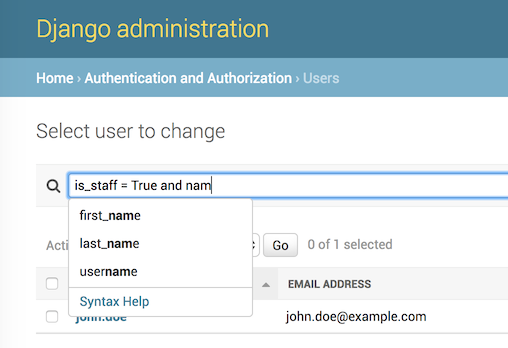
Advanced search language for Django, with auto-completion. Supports logical operators, parenthesis, table joins, and works with any Django model. Tested on Python 3.10–3.14, Django 5.2 and 6.0. The auto-completion feature has been tested in Chrome, Firefox, Safari, IE9+.
This is a community fork.
djangoql-iplwebis a fork of the original DjangoQL by ivelum — install the upstream package fromdjangoqlon PyPI. This fork adds internationalization (i18n) of error messages and modernized packaging/tooling.These changes are offered back to the upstream project. If the original maintainers merge them, please switch back to the upstream
djangoqlpackage — this fork exists only to make the improvements available in the meantime, and will defer to upstream once they land there.It is published on PyPI as
djangoql-iplweb, but the import name staysdjangoql(soINSTALLED_APPSandimport djangoqlare unchanged).
See a video: DjangoQL demo
Features
- Python-like query syntax: logical operators (
and,or), parenthesis, and the full set of comparison operators - Searches across model relations via joins, e.g.
author.last_name = "Tolstoy" - Works with any Django model and drops into the Django admin with a single mixin
- Live auto-completion of model field names and values in the admin
- Configurable schema to restrict searchable models/fields and provide suggestion options
- Custom search fields for annotations and fully custom search logic
- Internationalized error messages with translation catalogs for 11 locales
- Usable outside the Django admin, including a standalone JavaScript completion widget
Installation
Using uv (recommended):
$ uv add djangoql-iplweb
Using pip:
$ pip install djangoql-iplweb
Add 'djangoql' to INSTALLED_APPS in your settings.py:
INSTALLED_APPS = [
    ...
    'djangoql',
    ...
]
For full setup instructions and usage examples, see the Documentation below.
Documentation
📖 Full documentation: https://iplweb.github.io/djangoql-iplweb/
The site is built with MkDocs from the docs/ directory. Key pages:
- Installation — complete setup guide
- Django admin integration —
DjangoQLSearchMixinand admin search modes - Language reference — query syntax, operators, and examples
- Schema & custom fields — restrict searchable models/fields, custom search fields
- Derived fields — date/time parts, relation aggregates, custom search logic
- Outside the admin —
DjangoQLQuerySetandapply_search() - Completion widget — standalone JS widget outside the admin
- Internationalization — i18n support and supplied locales
Supported by
This fork is graciously supported and maintained by iplweb.

License
MIT
Release history Release notifications | RSS feed


Download files
Download the file for your platform. If you're not sure which to choose, learn more about installing packages.
Source Distribution
Built Distribution
Filter files by name, interpreter, ABI, and platform.
If you're not sure about the file name format, learn more about wheel file names.
Copy a direct link to the current filters
File details
Details for the file djangoql_iplweb-0.21.0.tar.gz.
File metadata
- Download URL: djangoql_iplweb-0.21.0.tar.gz
- Upload date:
- Size: 230.9 kB
- Tags: Source
- Uploaded using Trusted Publishing? No
- Uploaded via: uv/0.9.2
File hashes
| Algorithm | Hash digest | |
|---|---|---|
| SHA256 |
d65e696b234be1082b3d8216922001b3267ccb4d98eb1ac98b7bd909c6f49057
|
|
| MD5 |
03a0db407d1fd707d43b8bba0bce10dc
|
|
| BLAKE2b-256 |
46813bdfae4611dc83680f938211fe1bf1f34fd44e47d2295120905c7fd6f839
|
File details
Details for the file djangoql_iplweb-0.21.0-py3-none-any.whl.
File metadata
- Download URL: djangoql_iplweb-0.21.0-py3-none-any.whl
- Upload date:
- Size: 257.0 kB
- Tags: Python 3
- Uploaded using Trusted Publishing? No
- Uploaded via: uv/0.9.2
File hashes
| Algorithm | Hash digest | |
|---|---|---|
| SHA256 |
bb86c84938fa4b9a8a8e9f7582d9716d0bacdbc6288c99c485dc0e8cd8f0b8d3
|
|
| MD5 |
d105297e62982caee92d57ee0d6f57b8
|
|
| BLAKE2b-256 |
a2d7895e46505d4faf9058a7acdadb635880a55c0caffd6b627f36db067468fe
|






