
Excitation of exciting systems through differentiable model predictive excitation

Project description
Differentiable Model Predictive Excitation (DMPE):
This repository implements an algorithm for the excitation of systems with unknown (usually non-linear) dynamics. The inner workings and lines of thought are outlined within the corresponding publication. If you found this repository useful for your research, please cite the current preprint version as:
@Article{Vater2024,
  author      = {Vater, Hendrik and Wallscheid, Oliver},
  title       = {Differentiable Model Predictive Excitation: Generating Optimal Data Sets for Learning of Dynamical System Models},
  journal     = {TechRxiv preprint},
  year        = {2024},
  doi         = {10.36227/techrxiv.172840381.16440835/v1},
}
Installation:
Simplest way, using Python >= 3.11:
pip install dmpe
- Intended for a Linux system using an NVIDIA GPU where CUDA is set up
- Theoretically, it can be used without a GPU and also on Windows, but performance will likely be suboptimal and the results are not exactly reproducible with the GPU/Linux results.
- Depends on
exciting_environments - As of now, the requirements/dependencies are strict. It is likely that other versions work as well, but the given setup has been used extensively. (The requirements will likely be extended in the future.)
- As this repository is actively being worked on, it is possible that a more recent version is accessible in the
DMPEGitHub repository.
Alternative installation:
⚠️: As of now, the momentary state of
exciting environmentsis not compatible with this version ofdmpe. The commit with SHA hasha1f828839a1b744cdce24b25e5fb1d12878b0ca6is to be used to ensure compatiblity. Other options are to installexciting environmentsvia pip (pip install exciting-environments) which is also compatible with this state ofdmpe.
Download the current state of the exciting_environments repository, e.g.:
git clone git@github.com:ExcitingSystems/exciting-environments.git
and install it in your python environment by moving to the downloaded folder and running pip install ..
Then, download the DMPE source code, e.g.:
git clone git@github.com:ExcitingSystems/DMPE.git
Afterwards, install it from within the repository folder via pip install -e . for an editable version or with pip install . if you do not plan to make changes to the code.
Structure:
The repository is structured as follows:
dmpe/contains the source code for the DMPE algorithm and also for the GOATS algorithms from the related work.eval/contains the code used in the experiments in the corresponding publication [Vater2024].dev/contains jupyter notebooks that are intended for development on the repository.examples/contains some examples to get startedfig/contains example images (e.g., for the README)
Basic Usage:
To apply the algorithms onto a system, the systems structure must comply to a specific API (Naturally, this can be adapted in the future. Please open an issue or write an e-mail to vater@lea.uni-paderborn.de, if you are interested in discussing this). Example environments following this API can be found in the exciting_environments repository.
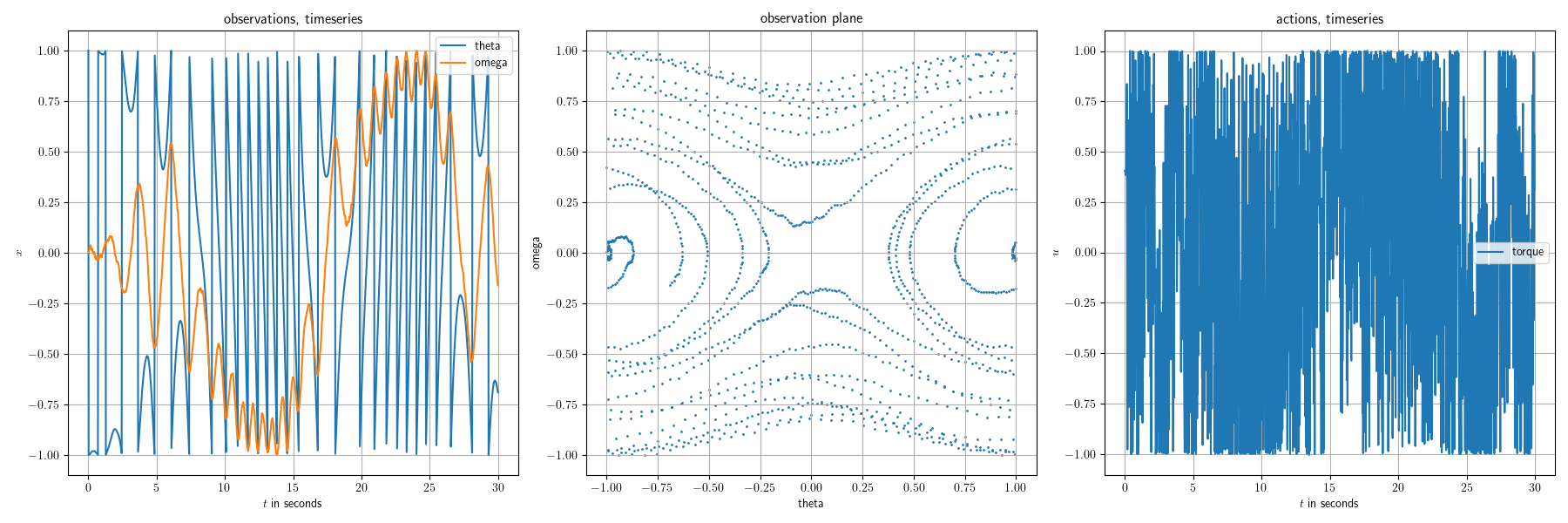
Using the algorithm for such an environment is as simple as:
import jax.numpy as jnp
import diffrax

import exciting_environments as excenvs
from dmpe.models.models import NeuralEulerODEPendulum
from dmpe.algorithms import excite_with_dmpe
from dmpe.algorithms.algorithm_utils import default_dmpe_parameterization


env = excenvs.make(
    env_id="Pendulum-v0",
    batch_size=1,
    action_constraints={"torque": 5},
    static_params={"g": 9.81, "l": 1, "m": 1},
    solver=diffrax.Tsit5(),
    tau=2e-2,
)

def featurize_theta(obs):
    """Transform angle information with sin() and cos()."""
    feat_obs = jnp.stack([jnp.sin(obs[..., 0] * jnp.pi), jnp.cos(obs[..., 0] * jnp.pi), obs[..., 1]], axis=-1)
    return feat_obs

# get default parameterization
exp_params, proposed_actions, loader_key, expl_key = default_dmpe_parameterization(
    env, seed=0, featurize=featurize_theta, model_class=NeuralEulerODEPendulum
)
exp_params["n_time_steps"] = 1000  # reduce to N=1000 steps

# run excitation
observations, actions, model, density_estimate, losses, proposed_actions = excite_with_dmpe(
    env,
    exp_params,
    proposed_actions,
    loader_key,
    expl_key,
)

# visualize
from dmpe.evaluation.plotting_utils import plot_sequence
import matplotlib.pyplot as plt
import matplotlib as mpl
mpl.rcParams['text.usetex'] = True
mpl.rcParams.update({'font.size': 10})
mpl.rcParams['text.latex.preamble']=r"\usepackage{bm}\usepackage{amsmath}"

fig = plot_sequence(observations, actions, env.tau, env.obs_description, env.action_description)
plt.show()


Download files
Download the file for your platform. If you're not sure which to choose, learn more about installing packages.
Source Distribution
Built Distribution
Filter files by name, interpreter, ABI, and platform.
If you're not sure about the file name format, learn more about wheel file names.
Copy a direct link to the current filters
File details
Details for the file dmpe-0.1.2.tar.gz.
File metadata
- Download URL: dmpe-0.1.2.tar.gz
- Upload date:
- Size: 43.9 kB
- Tags: Source
- Uploaded using Trusted Publishing? No
- Uploaded via: twine/6.1.0 CPython/3.11.11
File hashes
| Algorithm | Hash digest | |
|---|---|---|
| SHA256 |
17d3fabafc0ded656a4aa6e61b407a0bbcaf8d8d7462fd72d78298825afedbe8
|
|
| MD5 |
221c347fc37bec556e021b768be4666b
|
|
| BLAKE2b-256 |
1401d13f022f28292b70c853290caed4eabd6390e2238e4ab2994c74e7c55ec6
|
File details
Details for the file dmpe-0.1.2-py3-none-any.whl.
File metadata
- Download URL: dmpe-0.1.2-py3-none-any.whl
- Upload date:
- Size: 50.3 kB
- Tags: Python 3
- Uploaded using Trusted Publishing? No
- Uploaded via: twine/6.1.0 CPython/3.11.11
File hashes
| Algorithm | Hash digest | |
|---|---|---|
| SHA256 |
7193167f1b28fff0c11544ae57a76747324c81317d8498f3c561b06609878d9e
|
|
| MD5 |
d6e320d5938d56ce55934c37e5aa1914
|
|
| BLAKE2b-256 |
5b88c99c0f591e77ac38b9c1f882baf8b5f54aedc7e6582c8c4ba1b07231e826
|






