
DoCoreAI
Autonomous AI Cost Governance — Without Logging a Single Prompt
Enterprise AI teams shouldn't have to choose between privacy and visibility. DoCoreAI delivers both — and then autonomously governs the spend.





The Problem Enterprise AI Teams Face Today
Your team ships an AI feature. Usage grows. Then one of two things happens.
Option A — You log everything. Prompts, responses, full request bodies. Now your compliance team is blocking the rollout. Legal wants a data retention policy. Security calls it a liability. The AI pilot stalls.
Option B — You skip logging. No compliance risk, but now you're flying blind. Costs spike overnight with no warning. A single bad deployment burns through the monthly budget by Tuesday. There's no audit trail, no governance, no way to explain the bill.
And even when logging is solved, the spending problem remains. LLM costs do not self-regulate. Without active budget control, a traffic surge at 10 AM can exhaust the entire day's budget by noon. There are no native guardrails in any LLM provider SDK. No pacing, no prediction, no automatic intervention. You either overspend or you build all of that yourself.
Enterprise AI teams have been forced to choose between privacy and visibility — and then left to solve cost control entirely on their own. DoCoreAI eliminates all three problems.
What DoCoreAI Does
DoCoreAI sits between your application and any LLM provider — OpenAI, Anthropic, Google, Groq, AWS Bedrock — and acts as an autonomous cost and governance layer. It instruments every LLM call your application makes: tracking cost, tokens, latency, and governance decisions — without ever capturing prompt content, response content, or user data.
It learns your actual usage patterns. It predicts what each request genuinely needs. It replaces the wasteful default token ceiling with a precise ML prediction. It paces your budget intelligently across the full day and across the full week, accounting for day-of-week traffic patterns. When its own accuracy degrades, it retrains automatically. Your prompts never leave your network.
This is not observability. Observability shows you what happened after the bill arrives. DoCoreAI predicts, paces, and controls spend before overruns occur — autonomously, on every request.
Projected outcome: 40–70% reduction in LLM spend, based on token waste patterns observed across 20+ enterprise AI deployments.
See It in Action

Architecture — Privacy by Design
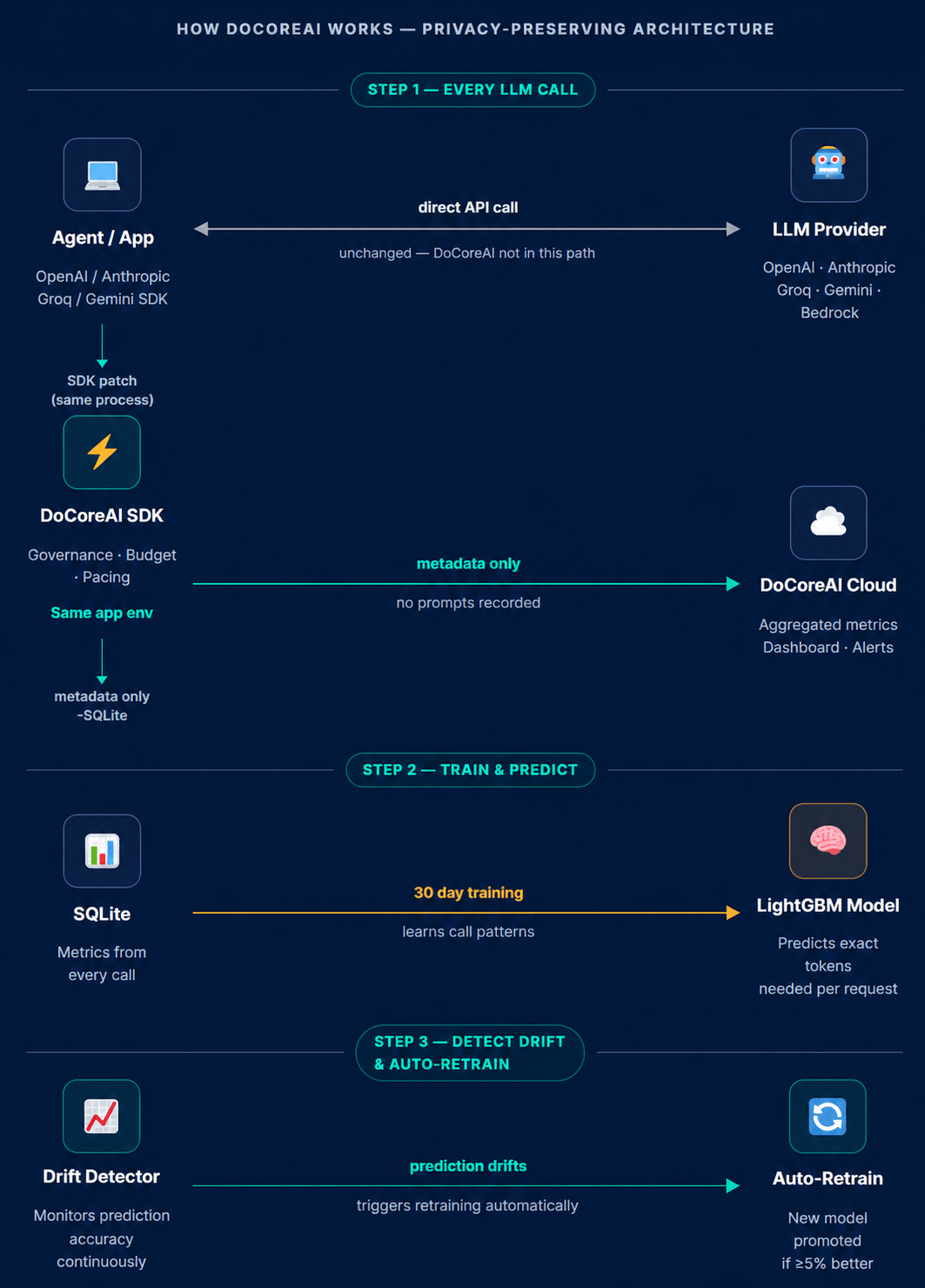
DoCoreAI runs as a sidecar in the same Python environment as your application. It monkey-patches all active LLM SDK calls automatically at startup — no imports, no wrappers, no changes to your existing code. Every request passes through governance checks, token prediction, budget validation, pacing adjustment, and soft limit injection before the LLM call is made. After the response arrives, actuals are compared to predictions and fed back into the learning loop.
No gateway. No proxy sits between your application and the LLM. DoCoreAI intercepts calls at the SDK level — meaning zero additional latency on the network path, and no new security surface for compliance teams to audit.
Fails open by design. If DoCoreAI encounters any error, the LLM call proceeds normally. Governance never blocks your application.
Six Core Capabilities
1 — Autonomous Cost Governance
The pacing engine distributes your daily budget intelligently across 24 hours, adjusted for your deployment's actual peak patterns by hour of day and day of week. When spend runs ahead of pace, token ceilings tighten automatically. When spend is behind, headroom opens up. Your budget works for you across the full month — not just the first Tuesday.
2 — Privacy-First by Architecture
Only metadata is ever collected: timestamp, model name, token count, estimated cost, latency, and governance decision. Prompt text, response content, and user identifiers are never captured, never stored, never transmitted. Compliance teams can approve deployment on day one. Security teams can audit the local metadata database directly on request.
3 — Agentic & Multi-Turn Governance (v2.2.0)
DoCoreAI automatically detects agentic workflows and multi-turn conversations. Each session is tracked as a logical unit — with its own budget allocation, cost accumulation, and governance ceiling. Tool-calling agents and long-running conversations are governed as coherent workloads, not disconnected individual calls. A single agentic pipeline that makes 20 LLM calls is tracked as one governed session with one combined cost.
4 — Intelligent Daily Pacing (v2.2.0)
Two-layer pacing derived from your observed usage patterns. Intraday: the system learns which hours of the day carry the most spend and shapes the budget curve accordingly — a business-hours-heavy deployment gets more headroom at 2 PM, not a flat hourly split. Interday: day-of-week multipliers mean Tuesday's higher traffic gets more budget than Sunday's quiet period — from the same monthly envelope, distributed correctly.
5 — Self-Improving Prediction Engine
A LightGBM model trained on your deployment's actual telemetry predicts the completion token count for each incoming request. When prediction accuracy degrades — detected by the hourly drift monitor — the system automatically retrains on recent data, runs an A/B test against the previous champion model, and promotes the winner without any human action. Your governance engine gets smarter the longer it runs.
6 — Executive Reporting Suite (v2.2.0)
Seven built-in reports cover every governance stakeholder:
- Report 1 — Governance Maturity Scorecard — Five-axis radar chart: cost control, model accuracy, PII hygiene, adoption coverage, deployment experience
- Report 2 — Governance Dividend — Daily and cumulative spend saved by active governance vs. uncontrolled baseline
- Report 4 — AI Adoption Velocity — How quickly AI governance is spreading across your environments
- Report 5 — Executive AI Briefing — CFO-ready one-page summary with Claude-generated governance narrative
- Report 6 — Training & Model Health Panel — Live view of training progress, prediction accuracy, and A/B test status
- Report 7 — Budget Trajectory Forecast — Real-time intraday spend curve with projected budget hit time
- Report 9 — AI Spend Forecast (v2.1 roadmap) — 1M / 3M / 6M / 12M spend projections using historical patterns
How the Cost Reduction Works
The default max_tokens on most LLM calls is set to 2,000 or higher — a safe ceiling, not a real estimate. Most responses need a fraction of that. You pay for the ceiling.
DoCoreAI replaces that ceiling with a prediction.
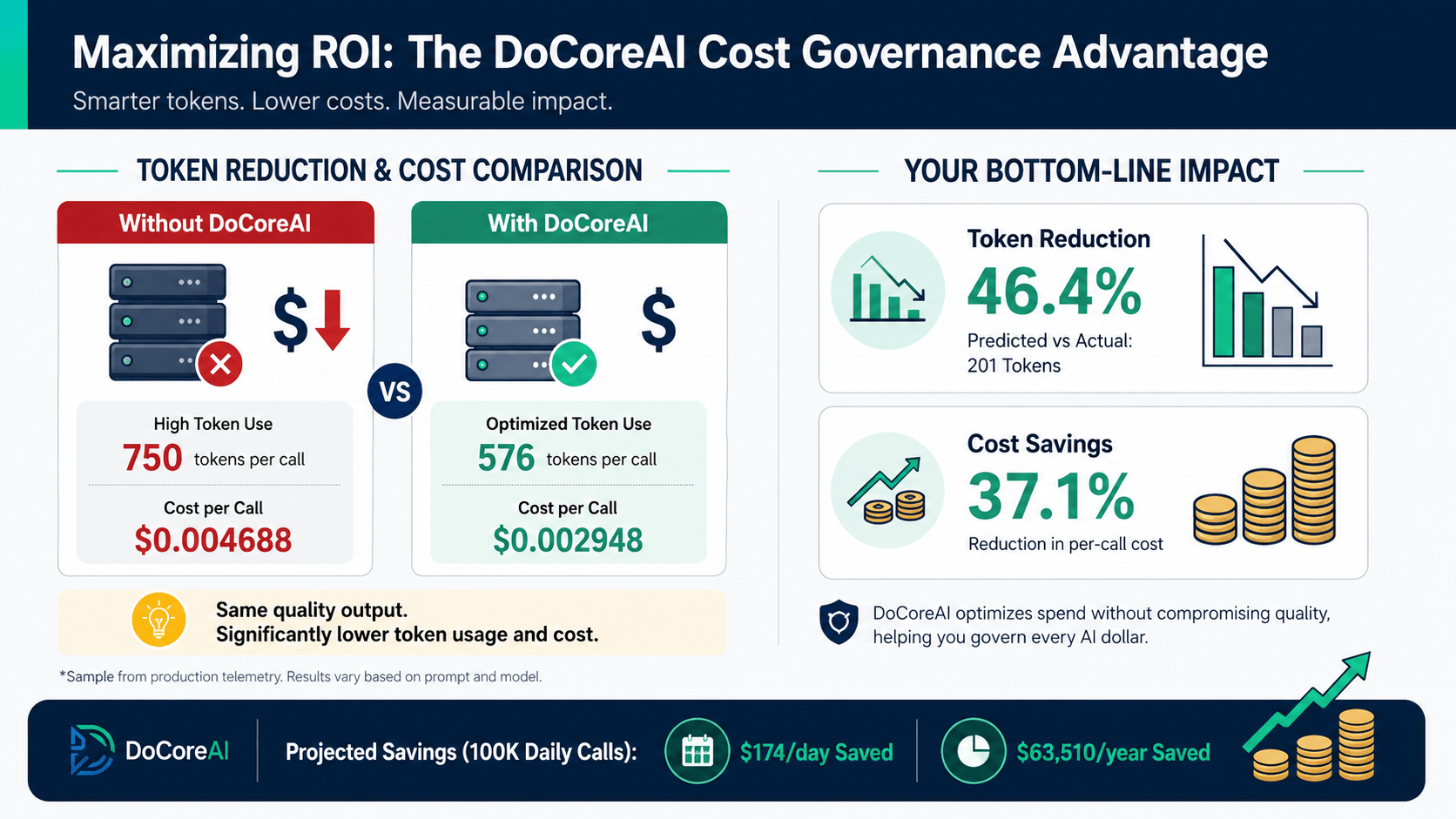
Real example — GPT-4o:
| Without governance | With governance | |
|---|---|---|
| Prompt tokens | 750 | 750 (unchanged) |
| Output tokens | 750 (ceiling) | 576 (predicted) |
| Cost per call | $0.004688 | $0.002948 |
| Savings | 37.1% |
At 100,000 daily calls, that single optimisation saves approximately $174/day — $63,510/year per deployment. Before pacing, soft limits, or session governance are applied.
Quick Start
Requirements: Python 3.12+ · pip · A free org token from docoreai.com
Supported platforms: Windows (actively tested). macOS and Linux — testing in progress; the codebase is pure Python and is expected to work. Report any platform issues at docoreai.com/docs.
Step 1 — Install DoCoreAI in the same environment as your application:
pip install docoreai
Step 2 — Generate your org token at docoreai.com and configure:
docoreai config
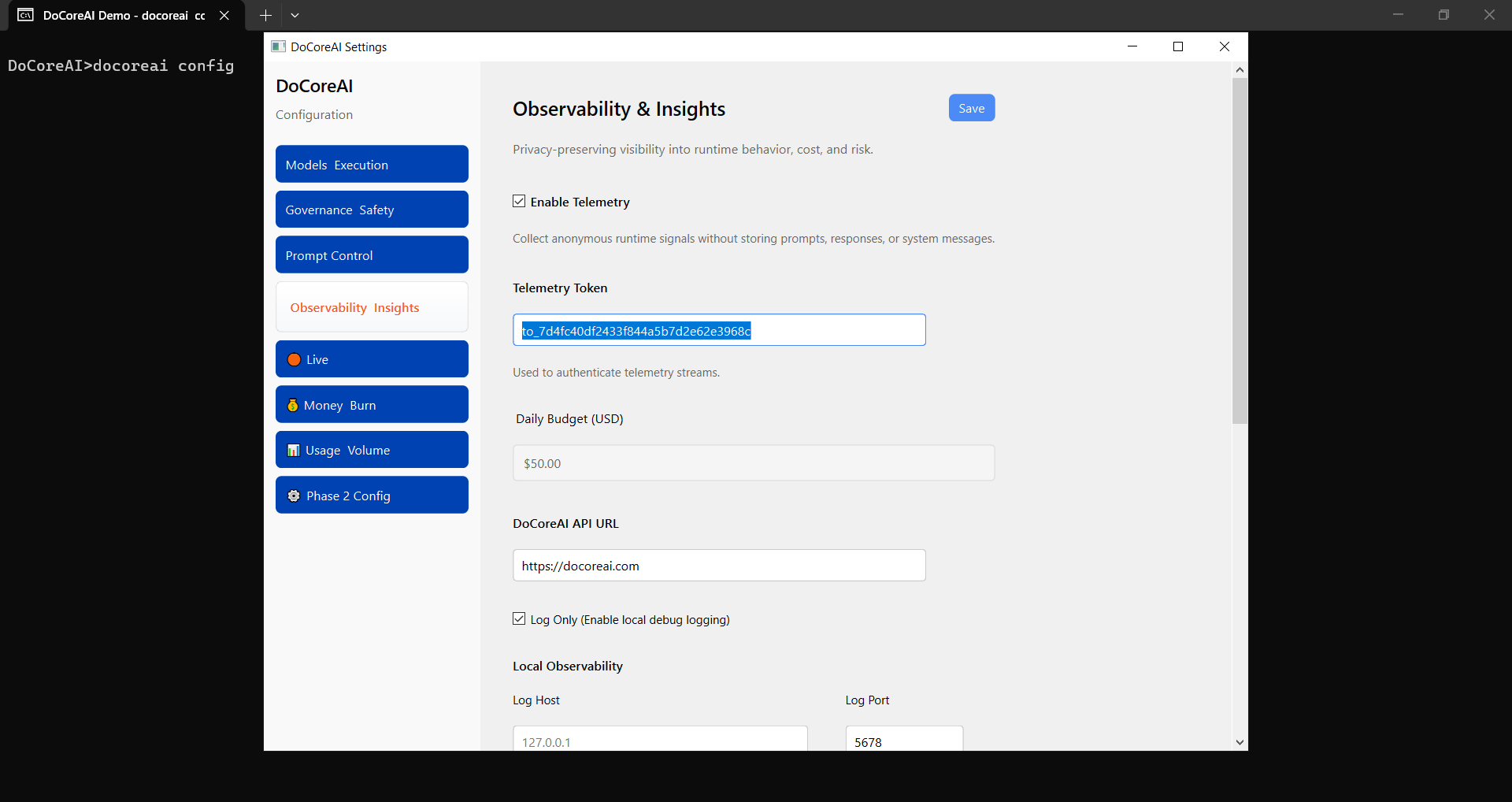
Step 3 — Start DoCoreAI alongside your application:
docoreai start
DoCoreAI automatically intercepts all LLM SDK calls in your environment. No changes to your application code are required. No restarts. No imports.
Confirming it is working:
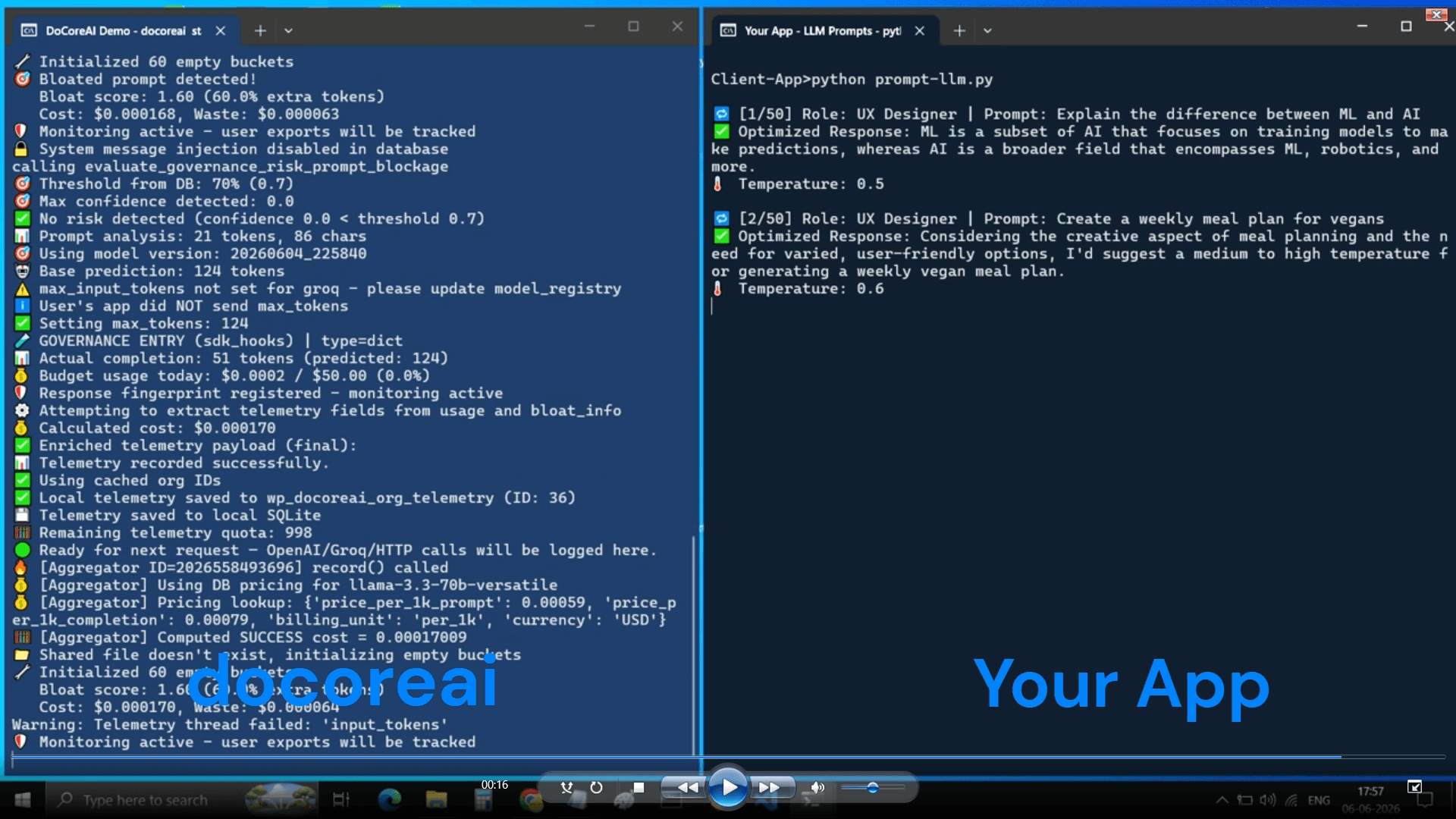
No prompt content. No response content. Just the signal that matters.
Training window: DoCoreAI observes your real usage patterns for 14 days (or 30,000 prompts — whichever comes first) before activating full ML-driven governance. During this window, the per-call ceiling and daily hard cap are enforced immediately. The adaptive pacing and prediction engine activate after training completes.
To stop DoCoreAI:
Ctrl+C
# Graceful shutdown — active requests complete, patches cleanly removed
Dashboard Reports
The DoCoreAI cloud dashboard is live and operational. Telemetry syncs from your local environment to your dashboard automatically on every call.
For the CTO or CFO reviewing AI spend:
- Daily cost vs. budget — real-time spend curve against your ceiling, by hour
- Governance Dividend — how much DoCoreAI has saved vs. uncontrolled baseline
- Budget trajectory — projected time to budget hit, with severity colour coding
- Provider and model breakdown — cost attribution across the full stack
For the VP Engineering or engineering manager:
- Adoption velocity — what percentage of environments are governed
- Session tracking — agentic workflow cost and multi-turn conversation cost as coherent units
- Pacing events — throttle decisions logged with rationale
For the compliance or governance officer:
- PII detection events — what was caught, when, and what action was taken
- Governance decision log — auditable record of every enforcement event
- Maturity scorecard — five-axis governance health at a glance
For the developer monitoring prediction quality:
- Model health panel — prediction accuracy (MAE) trending over time
- Drift events — when the model degraded and what triggered retraining
- A/B test results — champion vs. challenger performance, promotion or rollback
For Consulting Firms
DoCoreAI provides the evidence layer that AI governance consulting engagements currently lack.
Assessment methodology today relies on interviews, document reviews, and manual cost analysis — because there is no infrastructure that surfaces real AI usage data without creating a compliance liability. Clients cannot give consultants access to their LLM logs. The governance analysis is shallow because the evidence base is thin.
DoCoreAI changes what is available to bring to the table:
- Real-time cost attribution by team, project, and environment — not estimates derived from invoices
- Governance decision logs — what was enforced, when, and why — auditable and exportable
- Token waste quantification — the exact dollar value of inefficiency, per model, per environment
- PII detection events — evidence of where sensitive data was caught before reaching the LLM
- Budget pacing history — demonstrates autonomous governance operating continuously, not just assessed once
The Executive AI Briefing report (Report 5) is designed specifically for this context — a CFO-ready one-page summary with a Claude-generated governance narrative, exportable as a PDF slide for board presentations.
Real-World Use Cases
Preventing budget exhaustion — SaaS platforms A marketing campaign triggers a customer surge. Without pacing, the daily budget is exhausted by 11 AM and the service is throttled for 13 hours. DoCoreAI detects the spike, applies graduated token ceiling reductions, and keeps the service running for the full 24 hours on the same budget.
Agentic pipeline cost control — AI-native products A document processing agent makes 15–20 LLM calls per user request. Each call is individually small, but the session total is significant. DoCoreAI tracks the entire agentic workflow as one governed session — allocating a session budget, accumulating cost across turns, and throttling if the session approaches its ceiling.
Enterprise compliance — regulated industries A healthcare or financial services team needs full AI observability but cannot log prompt content. DoCoreAI's metadata-only telemetry delivers complete cost and governance visibility with zero prompt retention. Nothing that touches a compliance boundary ever leaves the local environment.
Handling day-of-week traffic variance — enterprise deployments Monday carries three times the LLM traffic of Sunday. A flat daily budget means Monday throttles at 4 PM and Sunday has unused headroom. DoCoreAI's interday pacing learns the weekly pattern and distributes the weekly budget proportionally — Monday gets more, Sunday gets less, and the weekly envelope is respected.
Supported Providers
Works out of the box with any combination. No provider-specific configuration required — DoCoreAI detects and wraps all active SDKs automatically at startup.
- OpenAI — GPT-4o, GPT-4 Turbo, GPT-4, GPT-3.5, and all variants
- Anthropic — Claude 3.5, Claude 3, and newer — including system prompt token tracking
- Google — Gemini 1.5 Pro, Gemini Pro, and Gemini Ultra
- AWS Bedrock — All foundation models via a dedicated adapter: Anthropic Claude, Amazon Titan, Meta Llama, Mistral, Cohere. Model ID format differences handled automatically.
- Groq — Llama, Mixtral, and all Groq-hosted models
- Ollama — Local model deployments
Multi-LLM orchestration: LangChain, CrewAI, AutoGen, and custom orchestration frameworks are all supported transparently. DoCoreAI patches at the SDK level — whatever framework sits above it, the governance fires on every call.
Privacy vs. Visibility — How DoCoreAI Solves Both
| Capability | Traditional APM / Observability | DoCoreAI |
|---|---|---|
| Prompt storage | ✗ Required | ✓ Never stored |
| Response storage | ✗ Required | ✓ Never stored |
| User data captured | ✗ Often yes | ✓ Never |
| Cost tracking | ✓ | ✓ Real-time, per call |
| Token-level visibility | Partial | ✓ Per request, all providers |
| System prompt cost tracking | ✗ | ✓ v2.2.0 |
| Autonomous budget control | ✗ | ✓ |
| Intelligent pacing (intraday + interday) | ✗ | ✓ v2.2.0 |
| Agentic session governance | ✗ | ✓ v2.2.0 |
| Multi-turn conversation tracking | ✗ | ✓ v2.2.0 |
| PII detection at edge | ✗ | ✓ |
| No gateway required | ✗ Gateway needed | ✓ SDK-level only |
| Multi-LLM / multi-provider | Partial | ✓ All major providers |
| Executive reporting suite | ✗ | ✓ 7 reports |
| Compliance-ready architecture | ✗ | ✓ |
| Self-improving prediction model | ✗ | ✓ Auto-retrain + A/B test |
| Closed source / IP protected | ✗ | ✓ from v2.0 |
| SOC2 | Varies | In progress |
Installation
# Install
pip install docoreai

# Configure with your org token (generate free at docoreai.com)
docoreai config

# Start
docoreai start

# Stop (graceful — patches cleanly removed, active requests complete)
Ctrl+C
v2.2.0 is the current release. Production use is welcomed and encouraged — real deployment data is what makes the prediction models improve fastest. Report issues and get support at docoreai.com/docs.
Documentation
Full documentation, configuration reference, and integration guides:
Covers: training window configuration · auto-retrain settings · A/B testing · soft limits · pacing engine · session governance · budget modes · retention policies · multi-provider setup · troubleshooting · developer API reference.
Research & Prior Art
The architecture and methodology underpinning DoCoreAI — including the privacy-first telemetry design, the LightGBM-based token prediction pipeline, and the autonomous pacing engine — are documented in a peer-reviewed technical whitepaper establishing prior art:
doi.org/10.5281/zenodo.20774715
The whitepaper covers: SDK-level interception without gateway dependency · metadata-only telemetry design · learned budget distribution · drift detection and automatic retraining · compliance architecture for regulated industries.
Design Partner Programme
We are actively working with enterprise teams who are running LLMs in production and need real cost governance — not just dashboards.
If your organisation is deploying AI at scale and wrestling with budget predictability, compliance constraints, or the need for defensible governance evidence for your board or audit committee, this is built for your problem.
What design partners receive: direct founder access · custom configuration support · early access to enterprise features · input into the product roadmap · white-glove onboarding and integration support.
What we ask in return: honest feedback · real deployment data to improve the prediction models · a willingness to co-develop the enterprise use case.
Built With
Python 3.12 · LightGBM · SQLite · scikit-learn · wrapt · Prophet (forecast roadmap) · WordPress REST API · Chart.js · PHP 8.x
Stats
- 33,000+ PyPI downloads
- 20+ enterprise AI deployments informing the design
- 40–70% projected LLM cost reduction
- 3 commands to production-ready governance
- 15 minutes average integration time
DoCoreAI — because your compliance team and your engineering team should both be able to say yes.
1 maintainer

Download files
Download the file for your platform. If you're not sure which to choose, learn more about installing packages.
Source Distribution
Built Distribution
Filter files by name, interpreter, ABI, and platform.
If you're not sure about the file name format, learn more about wheel file names.
Copy a direct link to the current filters
File details
Details for the file docoreai-2.2.0.tar.gz.
File metadata
- Download URL: docoreai-2.2.0.tar.gz
- Upload date:
- Size: 291.9 kB
- Tags: Source
- Uploaded using Trusted Publishing? No
- Uploaded via: twine/6.2.0 CPython/3.13.5
File hashes
| Algorithm | Hash digest | |
|---|---|---|
| SHA256 |
0208a26a3d55eb62295581455bec1fd68fe89b5a4548f4b450c1a690d035b4ee
|
|
| MD5 |
4876e5840df807d7ba54f9bca0c40f19
|
|
| BLAKE2b-256 |
c6a172e1da3ceca736a360ae6eeb97e173d891bc936ca9027d475863540aca44
|
File details
Details for the file docoreai-2.2.0-py3-none-any.whl.
File metadata
- Download URL: docoreai-2.2.0-py3-none-any.whl
- Upload date:
- Size: 341.2 kB
- Tags: Python 3
- Uploaded using Trusted Publishing? No
- Uploaded via: twine/6.2.0 CPython/3.13.5
File hashes
| Algorithm | Hash digest | |
|---|---|---|
| SHA256 |
f849d8fd97bae70b82822e89dc605be546ecf7eb86c2811d9177d4af2867c3f9
|
|
| MD5 |
592c73e292f667f0b45c8ff238d8756b
|
|
| BLAKE2b-256 |
de4f6f9f126245e9204a9a34c05741fe542403ca8051f34b73528543f7af9773
|







