





Documents in. Possibilities out.
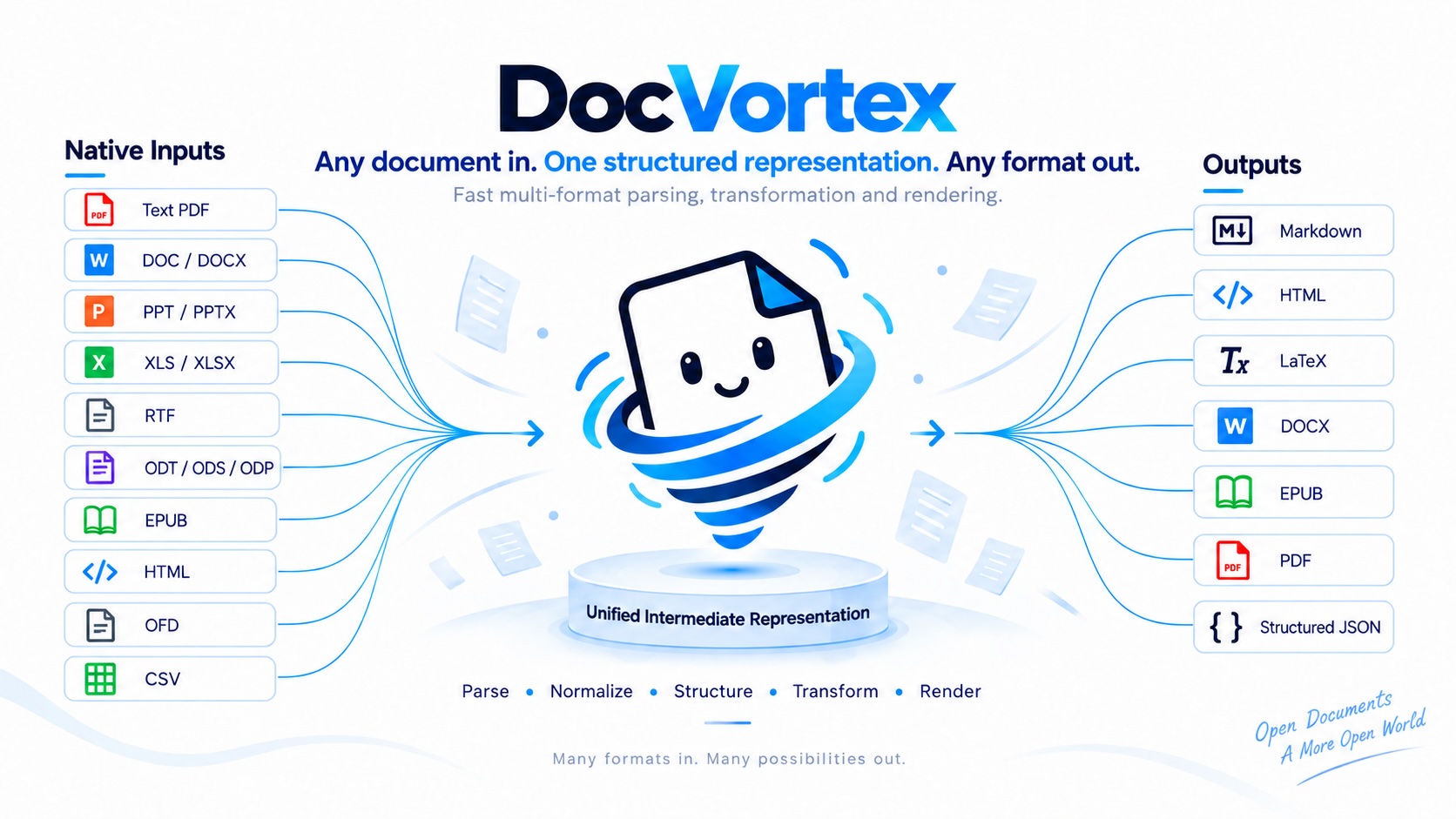
DocVortex is a standalone Python engine for parsing and converting documents. It reads native text and document structure into a unified representation, then exports the result in the formats your workflow needs.
- Multi-format input — read text PDFs, Office files, OpenDocument files, EPUB, HTML, OFD, CSV and TSV.
- Parse once, export many times — reuse the same result for Markdown, HTML, LaTeX, DOCX, EPUB, PDF and structured JSON.
- Portable results — save document structure and image assets in a Bundle, then export again without the source file.
- Composable APIs — use the complete pipeline or integrate analysis, postprocessing and rendering separately.
Native parsing works without an OCR or VLM inference service. Use DocVortex directly through its CLI or Python SDK.
Quick start
Requires Python 3.10–3.14.
Install
pip install docvortex
Command line
Convert a text PDF to Markdown:
docvortex convert report.pdf --format markdown --output output/report.md
Replace report.pdf with a local file in any supported input format.
Use --format to choose the output; run docvortex convert --help for options.
The root-level --log-level option controls loguru output and defaults to info.
It must precede the command; DOCVORTEX_LOG_LEVEL=warning can also configure it.
Python
Parse a document once and export it twice:
import docvortex

result = docvortex.parse("report.pdf")
result.export("output/report.md", output_format="markdown")
result.export("output/report.docx", output_format="docx")
The result owns its document structure and assets, so further exports do not
reopen or reparse the source. Existing output files are protected by default;
use overwrite=True in Python or --overwrite in the CLI to replace them.
Supported formats
Native inputs · 20 formats
| Document family | File extensions |
|---|---|
| PDF with native text | .pdf |
| Word & rich text | .doc, .docx, .rtf |
| Presentations | .ppt, .pptx |
| Spreadsheets | .xls, .xlsx, .csv, .tsv |
| OpenDocument | .odt, .ods, .odp |
| E-books | .epub |
| Web documents | .html, .htm, .shtml |
| Web archives | .mhtml, .mht |
| Open Fixed-layout Document | .ofd |
Outputs · 7 formats
| Output | --format / output_format |
|---|---|
| Markdown | markdown |
| HTML | html |
| LaTeX | latex |
| Word document | docx |
| EPUB e-book | epub |
pdf |
|
| Structured JSON | structured_content |
PPT/PPTX and XLS/XLSX are input formats only. Structured JSON is an export format; the document JSON protocol separately defines the analysis and intermediate representations.
Save now, export later
A Bundle packages the parsed document and its image assets for reuse across processes or machines. Load it whenever you need another output format:
import docvortex

result = docvortex.parse("report.pdf")
result.save_bundle("output/report.bundle")

restored = docvortex.load_bundle("output/report.bundle")
restored.export("output/report.epub", output_format="epub")
The restored result works without the original file. See the usage guide for Bundle contents, asset handling and overwrite rules.
Need only the title, authors or other source properties?
docvortex.extract_metadata()
reads metadata without parsing the document body.
Choose the right workflow
- Text PDFs: native parsing uses the document's existing text and structure. Scanned pages requiring OCR need an external OCR or inference service.
- PDF classification:
docvortex classify report.pdfreturnstxtorocr. Classification is explicit and does not start inference; parsing does not automatically switch backends. - PDF export: PDF sources with page geometry default to block layout restoration, with selectable text and HTML-based tables; charts retain region images. Other sources and older results use semantic reflow. Use
--pdf-layout original|reflowto select explicitly; fonts, line breaks and drawing instructions are not reproduced losslessly. See PDF output layout.
Documentation
| Guide | What you will find |
|---|---|
| Usage | Stage APIs, PDF pages, classification, images and Bundles |
| Agent skill | CLI and Python SDK workflows for agents; copy the entire skills/docvortex folder to reuse |
| Examples | Local samples for PDF, Office, EPUB, web documents and OFD with a runnable demo |
| Metadata | Source properties and per-format coverage |
| JSON protocol | Document schemas, extensions and protocol migration |
| HTML protocol | Semantic markers and round trips |
| Public SDK & migration | Supported integration boundaries and the 0.4 upgrade |
| Rendering ownership | DocVortex exports and MinerU-specific renderers |
Development
See Repository architecture for directory responsibilities, the Python/Rust boundary, and pure Python or native development commands.
From a local checkout:
uv venv
uv pip install -e ".[test,dev]"
uv run --no-project python -m pytest -q
uv run --no-project ruff check src
uv run --no-project ruff format --check src
uv build
Bug reports and contributions are welcome. When reporting a parsing issue, include a reproducible command and a sample document you can share in GitHub Issues.
License
DocVortex project code is released under the MIT License.
1 maintainer

Metadata
1 maintainer
Release files for docvortex 0.5.1
For a detailed explanation of source distributions (sdists) and built distributions (wheels), please see the package formats documentation.
Source distribution (sdist)
| File | Size | Uploaded | |
|---|---|---|---|
| docvortex-0.5.1.tar.gz | 47.7 MB | Details |
Built distributions (wheels)
| File | Reset | |||
|---|---|---|---|---|
| docvortex-0.5.1-py3-none-any.whl | Python 3 | none | any | Details |
| docvortex-0.5.1-cp310-abi3-win_amd64.whl | CPython 3.10 | abi3 | Windows x86-64 | Details |
| docvortex-0.5.1-cp310-abi3-manylinux_2_28_x86_64.whl | CPython 3.10 | abi3 | Linux glibc 2.28+ x86-64 | Details |
| docvortex-0.5.1-cp310-abi3-manylinux_2_28_aarch64.whl | CPython 3.10 | abi3 | Linux glibc 2.28+ ARM64 | Details |
| docvortex-0.5.1-cp310-abi3-macosx_11_0_arm64.whl | CPython 3.10 | abi3 | macOS 11.0+ ARM64 | Details |
| docvortex-0.5.1-cp310-abi3-macosx_10_13_x86_64.whl | CPython 3.10 | abi3 | macOS 10.13+ x86-64 | Details |
Total release size: 72.3 MB
Release files / docvortex-0.5.1.tar.gz
| Download URL | docvortex-0.5.1.tar.gz |
|---|---|
| Size | 47.7 MB |
| Tags | Source |
|
SHA-256 checksum How to use checksums |
83cc47b42b4c9c5d9a582d7977d56ec7d4dbd54c1a64dcdcaeed26aa71962baf
|
|
BLAKE2b-256 checksum How to use checksums |
c26d47e6f89a1a2fcbfde0a82484465d8e1632dad64b6651bcc80142b5f25e56
|
| Upload date | |
|
Uploaded using Trusted Publishing? What is trusted publishing? |
Yes |
| Uploaded via |
twine/7.0.0 CPython/3.13.14
|
Provenance
Provenance describes where a file came from. On PyPI, provenance is shared via attestations, which provide a verifiable record of the build or publishing details. View details, limitations and caveats.


PyPI Publish Attestation
PyPI verified that this artifact, at this checksum, originated from the publisher listed below.
Signed by GitHub Actions, verified by PyPI on Sep 26, 2026.
Transparency logRelease files / docvortex-0.5.1-py3-none-any.whl
| Download URL | docvortex-0.5.1-py3-none-any.whl |
|---|---|
| Size | 3.7 MB |
| Tags | Python 3 |
|
SHA-256 checksum How to use checksums |
2d8986fb8e6b89dfb474adb83bf802e6107f61d68794dce965ee3bcafef49e5f
|
|
BLAKE2b-256 checksum How to use checksums |
1f93c217503d7c375a370585ba0874a438d7a2bb3ff342c9bd9ac049a4f31724
|
| Upload date | |
|
Uploaded using Trusted Publishing? What is trusted publishing? |
Yes |
| Uploaded via |
twine/7.0.0 CPython/3.13.14
|
Provenance
Provenance describes where a file came from. On PyPI, provenance is shared via attestations, which provide a verifiable record of the build or publishing details. View details, limitations and caveats.
PyPI Publish Attestation
PyPI verified that this artifact, at this checksum, originated from the publisher listed below.
Signed by GitHub Actions, verified by PyPI on Sep 26, 2026.
Transparency logRelease files / docvortex-0.5.1-cp310-abi3-win_amd64.whl
| Download URL | docvortex-0.5.1-cp310-abi3-win_amd64.whl |
|---|---|
| Size | 4.1 MB |
| Tags | CPython 3.10 Windows x86-64 abi3 |
|
SHA-256 checksum How to use checksums |
da8ea8b0da45b32383928ea83a93c0aa7917886f5b1bf84e98fdb76bc82f8c2d
|
|
BLAKE2b-256 checksum How to use checksums |
56fddc2953126e3429678a3133e0636faef654ddb2413f09ea8e4bf21f6464c4
|
| Upload date | |
|
Uploaded using Trusted Publishing? What is trusted publishing? |
Yes |
| Uploaded via |
twine/7.0.0 CPython/3.13.14
|
Provenance
Provenance describes where a file came from. On PyPI, provenance is shared via attestations, which provide a verifiable record of the build or publishing details. View details, limitations and caveats.
PyPI Publish Attestation
PyPI verified that this artifact, at this checksum, originated from the publisher listed below.
Signed by GitHub Actions, verified by PyPI on Sep 26, 2026.
Transparency logRelease files / docvortex-0.5.1-cp310-abi3-manylinux_2_28_x86_64.whl
| Download URL | docvortex-0.5.1-cp310-abi3-manylinux_2_28_x86_64.whl |
|---|---|
| Size | 4.2 MB |
| Tags | CPython 3.10 Linux glibc 2.28+ x86-64 abi3 |
|
SHA-256 checksum How to use checksums |
ff5e5476c3ad99335ed39192f6b332c70531c1b6ebfb1ae1a189ff51fa31c46d
|
|
BLAKE2b-256 checksum How to use checksums |
ec7381f19460f18adea5ede8023f6c2dccf6d1c12508638832d16f77c45c962b
|
| Upload date | |
|
Uploaded using Trusted Publishing? What is trusted publishing? |
Yes |
| Uploaded via |
twine/7.0.0 CPython/3.13.14
|
Provenance
Provenance describes where a file came from. On PyPI, provenance is shared via attestations, which provide a verifiable record of the build or publishing details. View details, limitations and caveats.
PyPI Publish Attestation
PyPI verified that this artifact, at this checksum, originated from the publisher listed below.
Signed by GitHub Actions, verified by PyPI on Sep 26, 2026.
Transparency logRelease files / docvortex-0.5.1-cp310-abi3-manylinux_2_28_aarch64.whl
| Download URL | docvortex-0.5.1-cp310-abi3-manylinux_2_28_aarch64.whl |
|---|---|
| Size | 4.2 MB |
| Tags | CPython 3.10 Linux glibc 2.28+ ARM64 abi3 |
|
SHA-256 checksum How to use checksums |
a467ef51021076b37c55b9cfc746c80561b2949358745850e5b6a29f6f646623
|
|
BLAKE2b-256 checksum How to use checksums |
e3dbda34fa5a859add4913abc74fa2082c8a2ae9aec4de650d2235ee5edfe748
|
| Upload date | |
|
Uploaded using Trusted Publishing? What is trusted publishing? |
Yes |
| Uploaded via |
twine/7.0.0 CPython/3.13.14
|
Provenance
Provenance describes where a file came from. On PyPI, provenance is shared via attestations, which provide a verifiable record of the build or publishing details. View details, limitations and caveats.
PyPI Publish Attestation
PyPI verified that this artifact, at this checksum, originated from the publisher listed below.
Signed by GitHub Actions, verified by PyPI on Sep 26, 2026.
Transparency logRelease files / docvortex-0.5.1-cp310-abi3-macosx_11_0_arm64.whl
| Download URL | docvortex-0.5.1-cp310-abi3-macosx_11_0_arm64.whl |
|---|---|
| Size | 4.2 MB |
| Tags | CPython 3.10 abi3 macOS 11.0+ ARM64 |
|
SHA-256 checksum How to use checksums |
fe5d0e59b7881ea88a987720b5d984b4c15edfa474f165dee170325ddb59d2e5
|
|
BLAKE2b-256 checksum How to use checksums |
338505be7efac5dd260e7e7c307b533ee854d8a00c9976dd59215ca75374105a
|
| Upload date | |
|
Uploaded using Trusted Publishing? What is trusted publishing? |
Yes |
| Uploaded via |
twine/7.0.0 CPython/3.13.14
|
Provenance
Provenance describes where a file came from. On PyPI, provenance is shared via attestations, which provide a verifiable record of the build or publishing details. View details, limitations and caveats.
PyPI Publish Attestation
PyPI verified that this artifact, at this checksum, originated from the publisher listed below.
Signed by GitHub Actions, verified by PyPI on Sep 26, 2026.
Transparency logRelease files / docvortex-0.5.1-cp310-abi3-macosx_10_13_x86_64.whl
| Download URL | docvortex-0.5.1-cp310-abi3-macosx_10_13_x86_64.whl |
|---|---|
| Size | 4.2 MB |
| Tags | CPython 3.10 abi3 macOS 10.13+ x86-64 |
|
SHA-256 checksum How to use checksums |
5d4e8fa05a66492b0eb9237528584e85d1d265cd7d815ebd05efa1107abf8fbc
|
|
BLAKE2b-256 checksum How to use checksums |
0374c8bbd2be52d9a490cf4f9004b32e41aca5874c66165f0dfa17251d22e3d9
|
| Upload date | |
|
Uploaded using Trusted Publishing? What is trusted publishing? |
Yes |
| Uploaded via |
twine/7.0.0 CPython/3.13.14
|
Provenance
Provenance describes where a file came from. On PyPI, provenance is shared via attestations, which provide a verifiable record of the build or publishing details. View details, limitations and caveats.
PyPI Publish Attestation
PyPI verified that this artifact, at this checksum, originated from the publisher listed below.
Signed by GitHub Actions, verified by PyPI on Sep 26, 2026.
Transparency log













