
Agent memory with graph-based spreading activation retrieval and principled forgetting. 84.8% on LongMemEval.

Project description
Dory
Persistent memory for AI agents. Graph-based retrieval, principled forgetting, and a local SQLite-backed memory graph. No server required.
pip install dory-memory
from dory import DoryMemory

mem = DoryMemory()
mem.observe("User prefers local-first AI")
mem.observe("User switched from llama.cpp to MLX — 25% faster")

print(mem.query("what does the user prefer for inference?"))
# → MLX (updated preference, supersedes llama.cpp)
Current benchmark result: 84.8% on LongMemEval (500-question oracle split, Haiku judge) — all-time best. Temporal-reasoning 90.2%, single-session-assistant 89.3%. See Benchmark results and Reproducing the benchmark.
v1.0.0 — verbatim extraction from assistant turns, supplementary FTS sweep for multi-session retrieval, all-time best benchmark score.
The problem
Every session, your agent starts from zero. Many systems that claim to "remember" still reduce memory to retrieval over a flat list of notes.
The deeper problem: naive context injection makes things worse. Research (Chroma, 2025) shows all major frontier models degrade starting at 500–750 tokens of context. Dumping everything into a prompt creates noise that degrades performance on the things that actually matter.
What Dory does
Four memory types
| Type | What it stores | Status |
|---|---|---|
| Episodic | Past events, sessions, experiences | ✓ |
| Semantic | Facts, preferences, entities, relationships | ✓ |
| Procedural | Skills, workflows, repeatable processes | ✓ |
| Working | Ephemeral session-scoped facts; auto-archived after consolidation | ✓ |
Spreading activation retrieval — relevant memories can pull in connected memories through the graph. "payments API" activates "Stripe" activates "webhook handler" activates "retry logic" because those things co-occurred.
Cacheable prefix output — Dory splits output into a stable prefix (unchanged until memory changes, enabling prompt cache hits) and a dynamic suffix (query-specific). This is designed to reduce prompt churn and make repeated agent calls cheaper.
Principled forgetting — three decay zones: active, archived, expired. Scores based on recency + frequency + relevance. Archived memories are queryable for historical context ("what was true in January?"). Nothing is ever deleted — only decayed.
Bi-temporal conflict resolution — when a fact changes, the old version is archived with a SUPERSEDES edge and a timestamp. Full provenance for every update.
Zero-server stack — single SQLite file. FTS5 for keyword search, adjacency tables for the graph. Works offline and stays easy to inspect locally.
Quick start
from dory import DoryMemory

mem = DoryMemory()

# Add memories manually
mem.observe("User is migrating the auth system from JWT to OAuth2", node_type="EVENT")
mem.observe("User prefers async Python over synchronous frameworks", node_type="PREFERENCE")
mem.observe("The migration deadline is end of Q2", node_type="EVENT")

# Query — returns context to inject into your LLM prompt
context = mem.query("auth migration deadline")
print(context)

# End of session: consolidate, decay, promote core memories
mem.consolidate()  # flush() is a kept alias

# See your graph in the browser
mem.visualize()
# Or explicitly opt into the remote D3 interactive view
mem.visualize(allow_remote_js=True)
Or from the command line:
dory visualize                    # local-only fallback view, no remote JS
dory visualize --remote-assets    # full interactive D3 view
dory show               # print stats + core memories
dory query "topic"      # spreading activation from the terminal
dory explain <node_id>  # provenance chain: what superseded it, what it supersedes
With auto-extraction (Dory extracts memories from conversation turns automatically):
mem = DoryMemory(extract_model="qwen3:8b")                  # local via Ollama (5 GB)
mem = DoryMemory(extract_model="qwen3:14b")                 # local via Ollama (9 GB, better quality)
mem = DoryMemory(                                           # Claude
    extract_model="claude-haiku-4-5-20251001",
    extract_backend="anthropic",
    extract_api_key="sk-ant-...",
)
mem = DoryMemory(                                           # GPT / Grok / any compat
    extract_model="gpt-4o-mini",
    extract_backend="openai",
    extract_api_key="sk-...",
)

# Log turns — extraction happens automatically every N turns
mem.add_turn("user", "I need to add rate limiting to the API today")
mem.add_turn("assistant", "What backend are you using?")

# Build API-ready messages with prompt caching
result = mem.build_context("rate limiting API")
messages = result.as_anthropic_messages(user_query)   # Anthropic SDK w/ cache_control
messages = result.as_openai_messages(user_query)      # OpenAI / compat
MCP server (Claude Code / Claude Desktop)
pip install 'dory-memory[mcp]'

# Find the installed binary path (needed if installed in a venv)
which dory-mcp

# Register globally across all Claude Code projects
claude mcp add --scope user dory -- /full/path/to/dory-mcp --db ~/.dory/engram.db
The --db path defaults to ~/.dory/engram.db if omitted. You can also set DORY_DB_PATH as an environment variable.
Verify the server connected:
claude mcp list # should show dory ✓ Connected
Five tools are exposed: dory_query, dory_observe, dory_consolidate, dory_visualize, dory_stats.
For a practical repo-local workflow with tools like Codex and Claude Code, see
docs/AGENT_MEMORY_WORKFLOW.md.
For shared memory between Codex and Claude Code, see
docs/CODEX_INTEGRATION.md.
REST API + browser extension
Run Dory as a local HTTP server and use it from any browser-based AI chat:
pip install 'dory-memory[serve]'
dory serve                  # starts on http://127.0.0.1:7341
dory serve --port 8080      # custom port
dory serve --db ~/my.db     # custom database
Endpoints: GET /health · GET /query?topic=... · POST /observe · POST /ingest · GET /stats · GET /nodes
Browser extension — persistent memory sidebar for claude.ai, chatgpt.com, gemini.google.com, and perplexity.ai:
- Start
dory serve - In Chrome:
chrome://extensions→ "Load unpacked" → selectDory/browser-extension/ - Open any supported chat site — the Dory panel slides in from the right
The panel queries your memory graph on page load, re-queries after each AI response, and auto-extracts memories from every conversation turn in the background. Cmd+Shift+M toggles the panel.
Claude Desktop — add to claude_desktop_config.json:
{
  "mcpServers": {
    "dory": {
      "command": "/full/path/to/dory-mcp",
      "args": ["--db", "/Users/you/.dory/engram.db"]
    }
  }
}
Visualization
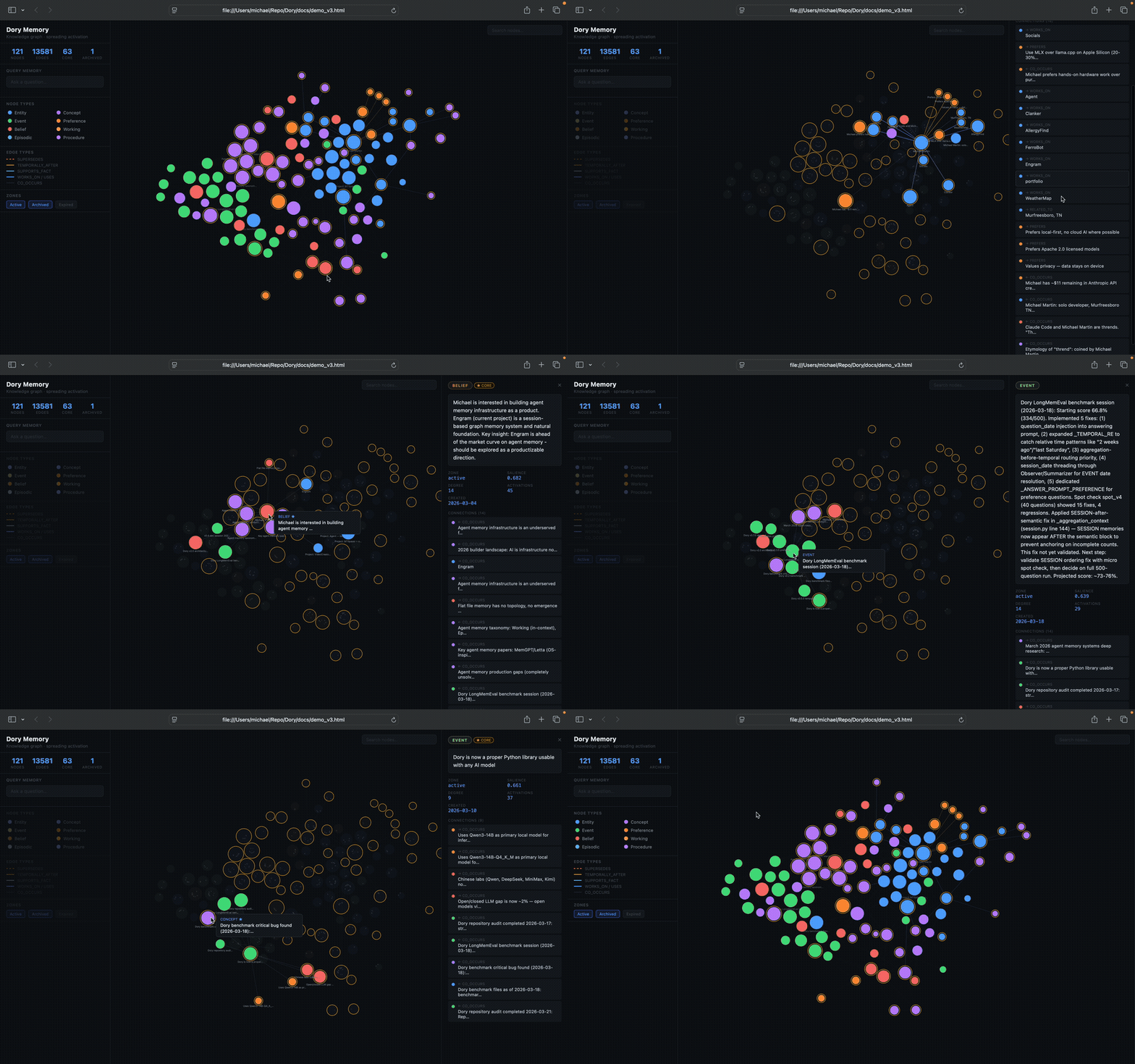
The hosted demo uses the fully interactive D3 view.
Locally, generated visualizations now default to a local-only fallback page that
shows the full node and edge data without loading remote JavaScript. If you want
the old interactive graph locally, opt in with allow_remote_js=True or
dory visualize --remote-assets.
Framework adapters
LangChain — drop-in BaseMemory replacement:
from dory.adapters.langchain import DoryMemoryAdapter
from langchain.chains import ConversationChain
from langchain_anthropic import ChatAnthropic

memory = DoryMemoryAdapter(
    extract_model="claude-haiku-4-5-20251001",
    extract_backend="anthropic",
    extract_api_key="sk-ant-...",
)
chain = ConversationChain(llm=ChatAnthropic(model="claude-sonnet-4-6"), memory=memory)
LangGraph — graph nodes with the (state) -> state signature:
from dory.adapters.langgraph import DoryMemoryNode, MemoryState
from langgraph.graph import StateGraph, START, END

mem = DoryMemoryNode(extract_model="claude-haiku-4-5-20251001", extract_backend="anthropic")

builder = StateGraph(MemoryState)
builder.add_node("load_memory", mem.load_context)
builder.add_node("record_turn", mem.record_turn)
builder.add_edge(START, "load_memory")
builder.add_edge("load_memory", "record_turn")
builder.add_edge("record_turn", END)
graph = builder.compile()
Multi-agent — shared memory pool with thread-safe writes and agent attribution:
from dory.adapters.multi_agent import SharedMemoryPool

pool = SharedMemoryPool(db_path="shared.db")
pool.observe("User prefers dark mode", agent_id="agent-1")
pool.add_turn("user", "Let's ship it", agent_id="agent-2", session_id="s1")
results = pool.query("UI preferences")
Async API
All DoryMemory methods have async counterparts — safe to await from FastAPI, LangGraph, and any async framework:
context = await mem.aquery("current topic")
result  = await mem.abuild_context("current topic")
await mem.aadd_turn("user", "message")
node_id = await mem.aobserve("User prefers JWT", node_type="PREFERENCE")
stats   = await mem.aconsolidate()  # aflush() is a kept alias
Export / import
from dory.export.jsonld import JSONLDExporter

exporter = JSONLDExporter(graph)
exporter.export("memory.jsonld.json")
JSONLDExporter.import_into(graph, "memory.jsonld.json")
Security notes
Security and hardening guidance lives in:
SECURITY.mddocs/HARDENING_2026-03-29.mddocs/REPO_CLEANUP_2026-03-29.md
What Dory is, and is not
Dory is currently best suited for:
- local-first agent workflows
- single-user or small-team memory graphs
- tool integrations such as Claude Code, MCP clients, and Python agent stacks
Dory is not yet a hosted, managed memory platform. The current tradeoff is deliberate: favor a transparent local library over a multi-tenant service.
How it works
Knowledge graph
Every piece of information is a typed node: ENTITY, CONCEPT, EVENT, PREFERENCE, BELIEF, PROCEDURE, SESSION (episodic narrative), SESSION_SUMMARY (structured episodic). Edges between them are typed and weighted: USES, WORKS_ON, PREFERS, SUPERSEDES, CO_OCCURS, SUPPORTS_FACT, TEMPORALLY_AFTER, etc.
Salience is computed from connectivity, activation frequency, and recency. High-salience nodes become core memories — they anchor the stable context prefix.
Observer
Every N conversation turns, the Observer calls an LLM to extract structured memories. Extractions carry confidence scores — anything below threshold is logged but not written to the graph.
Backends: Ollama (default), Anthropic (Claude), or any OpenAI-compatible endpoint.
Prefixer
Builds context in two parts:
[stable prefix]         ← core memories + key relationships
                          same bytes across turns → prompt cache hits

[dynamic suffix]        ← spreading activation for this specific query
                          + recent episodic observations
Decayer
score = recency_weight  × exp(-λ × days_since_activation)
      + frequency_weight × log(1 + activation_count)
      + relevance_weight × salience
Nodes below the active floor → archived. Below the archive floor → expired. Core memories are shielded with a configurable multiplier.
Reflector
Near-duplicate detection (Jaccard ≥ 0.82): merges duplicates, keeping the higher-salience node and rewiring edges. Supersession detection (Jaccard in [0.45, 0.82), shared subject): archives the older node, adds SUPERSEDES provenance edge. Old observations compressed into summaries.
Architecture
dory/
├── graph.py          ← nodes, edges, salience computation
├── schema.py         ← NodeType, EdgeType, zone constants
├── activation.py     ← spreading activation engine
├── consolidation.py  ← edge decay, strengthen, prune, promote/demote core
├── session.py        ← session-level helpers: query, observe, write_turn, end_session
├── memory.py         ← DoryMemory — high-level API (sync + async)
├── visualize.py      ← D3.js interactive graph visualization
├── mcp_server.py     ← MCP tools (dory_query, dory_observe, dory_consolidate, …)
├── rest_server.py    ← FastAPI REST server (dory serve, localhost:7341)
├── store.py          ← SQLite backend (nodes, edges, FTS5, observations)
│
├── pipeline/
│   ├── observer.py   ← LLM extraction of memories from conversation turns
│   ├── summarizer.py ← episodic layer: SESSION nodes from conversation turns
│   ├── prefixer.py   ← stable prefix + dynamic suffix builder
│   ├── decayer.py    ← node decay scoring + zone management
│   └── reflector.py  ← dedup, supersession, observation compression
│
├── adapters/
│   ├── langchain.py   ← DoryMemoryAdapter (BaseMemory drop-in)
│   ├── langgraph.py   ← DoryMemoryNode (StateGraph integration)
│   └── multi_agent.py ← SharedMemoryPool (thread-safe multi-agent)
│
└── export/
    └── jsonld.py      ← JSON-LD round-trip export/import

browser-extension/         ← Manifest V3 Chrome extension (memory sidebar)
├── manifest.json
├── background.js          ← service worker, all API calls to localhost
├── content/               ← site-specific content scripts
│   ├── base.js            ← sidebar DOM + shared logic
│   ├── claude.js          ← claude.ai
│   ├── chatgpt.js         ← chatgpt.com
│   ├── gemini.js          ← gemini.google.com
│   └── perplexity.js      ← perplexity.ai
└── sidebar/sidebar.css    ← panel styles
Local LLM setup
ollama pull qwen3:14b          # extraction
ollama pull nomic-embed-text   # embeddings (768-dim, offline after pull)
OpenAI-compatible endpoint (llama.cpp server, vLLM, etc.):
obs = Observer(graph, backend="openai", base_url="http://localhost:8000", model="qwen3")
Vector search activates automatically once nomic-embed-text is available. Falls back to FTS5 BM25 if no embedding model is running.
Decay zones
| Zone | Behavior | How to query |
|---|---|---|
active |
Retrieved in all normal queries | graph.all_nodes() (default) |
archived |
Invisible to normal queries | graph.all_nodes(zone="archived") |
expired |
Completely invisible | graph.all_nodes(zone=None) |
Memory is never deleted — only decayed. Archived and expired nodes retain full provenance and can be restored if reactivated. The one exception: exact structural duplicates detected by the Reflector are hard-merged (lower-salience copy removed, edges rewired to the winner).
Feature snapshot
| Feature | Dory |
|---|---|
| Principled forgetting (decay + true deletion) | ✓ |
| Spreading activation retrieval | ✓ |
| Cacheable prefix output | ✓ |
| Bi-temporal conflict resolution | ✓ |
| Zero-server local stack (SQLite) | ✓ |
| Drop-in Python library | ✓ |
| REST API + browser extension | ✓ |
| Apache 2.0 | ✓ |
Graph topology — what flat search can't do
Run examples/demo_topology.py to see six live graph traversals:
Q1 · Supersession — "What was the inference backend before MLX replaced it?"

  ┌ BEFORE  [PREFERENCE]  Prefers llama.cpp — cross-platform, well-supported
  │         zone=archived  archived=2026-03-01
  ├─SUPERSEDES──▶
  └ AFTER   [PREFERENCE]  Prefers MLX over llama.cpp on Apple Silicon (20-30% faster)

  ✗ Flat search: returns both nodes with equal score. No directionality. No timestamp.

──────────────────────────────────────────────────────────────────────
Q4 · Semantic Path — "How does the local-first preference connect to the model choice?"

  ● [CONCEPT]    Local-first AI — data stays on device, no cloud
    └─[CO_OCCURS]──▶
  ● [PREFERENCE] Prefers local-first — no data leaves device unless necessary
    └─[PREFERS]──▶
  ● [ENTITY]     Developer
    └─[WORKS_ON]──▶
  ● [ENTITY]     Agent project
    └─[CO_OCCURS]──▶
  ● [EVENT]      [2026-03-01] Switched inference backend to local Ollama instance

  ✗ Flat search: returns both endpoints as separate results. No connecting path.
| Query | Traversal | What it answers |
|---|---|---|
| Q1 Supersession | SUPERSEDES edges |
What changed and when |
| Q2 Chronicle | TEMPORALLY_AFTER chain |
Full session history in order |
| Q3 Dependencies | USES traversal (depth 2) |
What a project actually needs |
| Q4 Semantic Path | BFS across typed edges | How two concepts connect |
| Q5 Provenance | SUPPORTS_FACT traversal |
What proves a specific fact |
| Q6 Belief Grounding | SUPPORTS_FACT + BELIEF |
Which beliefs have evidence |
Benchmark results
LongMemEval (ICLR 2025), oracle split, 500 questions.
| Version | Extract | Answer | n | Score |
|---|---|---|---|---|
| v0.1 | Haiku | Haiku | 500 | 54.4% |
| v0.1 | Sonnet | Sonnet | 500 | 66.8% |
| v0.3 | Sonnet | Sonnet (direct API) | 500 | 79.8% |
| v0.4 | Haiku | Claude Code (MCP) | 500 | 80.6% |
| v0.5 | Haiku | Claude Code (MCP) | 500 | 79.6% |
| v0.6 | Haiku | Claude Code (MCP) | 500 | 84.0% |
| v0.7 | Haiku | Claude Code (MCP) | 500 | 84.2% |
| v0.8 | Sonnet | Claude Code (MCP) | 500 | 84.2% |
| v1.0 | Opus 4.8 | Opus 4.8 | 500 | 84.8% |
Category breakdown for v1.0 (Opus 4.8 extract + answer, Haiku judge):
| Category | Score | Δ vs v0.8 |
|---|---|---|
| single-session-user | 91.4% | -2.9pp |
| temporal-reasoning | 90.2% | +7.5pp |
| single-session-assistant | 89.3% | +8.9pp |
| multi-session | 80.5% | -3.0pp |
| knowledge-update | 83.3% | -3.9pp |
| single-session-preference | 60.0% | -10.0pp |
v1.0 gains are driven by the verbatim extraction fix (+8.9pp on ss-assistant) and Opus 4.8's stronger temporal reasoning (+7.5pp). Multi-session improved significantly from v0.9.3 (68.4% → 80.5%) due to the FTS sweep fix.
Artifacts:
Note: LongMemEval oracle split uses pre-filtered context (~15K tokens per question). Performance with live, unfiltered conversations will differ.
Reproducing the benchmark
Canonical benchmark entry points live under benchmarks/.
Full oracle run with the checked-in harness:
cd Dory
source .env
./run_benchmark.sh
That script runs with Haiku for both extract and answer by default. For the v1.0 result (Opus 4.8):
python3 benchmarks/longmemeval.py \
  --data benchmarks/data/longmemeval/longmemeval_oracle.json \
  --output benchmarks/predictions_$(date +%Y%m%d_%H%M%S).jsonl \
  --backend anthropic \
  --extract-model claude-opus-4-8 \
  --answer-model claude-opus-4-8 \
  --api-key "$ANTHROPIC_API_KEY" \
  --verbose
Then evaluate the predictions:
source .env
ANTHROPIC_API_KEY="$ANTHROPIC_API_KEY" \
python3 benchmarks/evaluate_qa_claude.py \
  benchmarks/predictions_YYYYMMDD_HHMMSS.jsonl \
  benchmarks/data/longmemeval/longmemeval_oracle.json
For cheaper iteration, use a spot dataset first:
python3 benchmarks/longmemeval.py \
  --data benchmarks/spot_micro.json \
  --output benchmarks/predictions_spot.jsonl \
  --backend anthropic \
  --extract-model claude-haiku-4-5-20251001 \
  --answer-model claude-haiku-4-5-20251001 \
  --api-key "$ANTHROPIC_API_KEY"
Benchmark caveats:
- LongMemEval oracle is a filtered-context benchmark, not a raw multi-month transcript benchmark.
- Claude Code MCP runs and direct API runs are both useful, but they are not identical execution environments.
- Exact scores can move with prompt, extraction logic, model version, and evaluation backend updates.
Current priorities
- SS-preference retrieval — v1.0 regressed on preference questions (70% → 60%) because Opus 4.8 extracts more PREFERENCE nodes than Haiku, causing the 15-node cap to cut relevant entries. Raising the cap to 30 is a targeted one-line fix.
- Multi-session aggregation ceiling — off-by-one counting failures persist for questions requiring all instances of a fact across many sessions. The FTS sweep fix helped (68.4% → 80.5%) but retrieval is still capped at 60 nodes; some questions need more.
- True forgetting — nodes move active → archived → expired but are never deleted. Add hard deletion after N consolidation cycles in the expired zone.
- Privacy layer —
privacy_levelfield on Node (default/private/sensitive),dory forget <query>for immediate deletion,dory exportfor portability.
Research basis
- LongMemEval (ICLR 2025) — evaluation benchmark
- Collins & Loftus (1975) — spreading activation in semantic memory
- Hebb (1949) — neurons that fire together wire together
- Hopfield (1982) — associative memory energy landscape (Nobel Prize in Physics, 2024)
License
Apache 2.0 — see LICENSE.
Named after Dory from Finding Nemo, because most agent sessions still have the memory of a goldfish.
Release history Release notifications | RSS feed


Download files
Download the file for your platform. If you're not sure which to choose, learn more about installing packages.
Source Distribution
Built Distribution
Filter files by name, interpreter, ABI, and platform.
If you're not sure about the file name format, learn more about wheel file names.
Copy a direct link to the current filters
File details
Details for the file dory_memory-1.0.1.tar.gz.
File metadata
- Download URL: dory_memory-1.0.1.tar.gz
- Upload date:
- Size: 111.8 kB
- Tags: Source
- Uploaded using Trusted Publishing? No
- Uploaded via: twine/6.2.0 CPython/3.14.4
File hashes
| Algorithm | Hash digest | |
|---|---|---|
| SHA256 |
da91773a58969dda76e9db4add3d9dd92113dd74b1e4106c7155c61ea5dc53d4
|
|
| MD5 |
44f968ae01ad4e58d33b3723fad5c3e8
|
|
| BLAKE2b-256 |
2ef37ee3e34f1bdd419e2e07063fb2fbaebcbe654e03a216fdee41f16f8b2701
|
File details
Details for the file dory_memory-1.0.1-py3-none-any.whl.
File metadata
- Download URL: dory_memory-1.0.1-py3-none-any.whl
- Upload date:
- Size: 99.3 kB
- Tags: Python 3
- Uploaded using Trusted Publishing? No
- Uploaded via: twine/6.2.0 CPython/3.14.4
File hashes
| Algorithm | Hash digest | |
|---|---|---|
| SHA256 |
7dec7bd09ec14f308d32e8a67a6a9b36a52b28d0a91a76b9d7dc58a480271aec
|
|
| MD5 |
b456adb1bf7f097b94a77b8f91d4f02a
|
|
| BLAKE2b-256 |
e344adb8ae96675e0c94d7d187bb370cf85e2d92798bf855f08201fde7a9fa43
|






