
A reusable django [DRF] application that handles auditing of requests, logins and process

Project description
DRF Audit Trail
A reusable Django DRF application for auditing requests, logins, and custom processes.
Features
- HTTP request auditing (
RequestAuditEvent) - Login and logout auditing (
LoginAuditEvent) - Structured audit log entries (
AuditLogEntry) - Custom process auditing (
ProcessAuditEvent,StepAuditEvent,RegistrationAuditEvent) - Integration with SimpleJWT
- Django Async support
- Thread safe
- Error and stacktrace tracking
- PDF report generation
Installation
pip install drf-audit-trail
Configuration
In your settings.py:
INSTALLED_APPS = [
    ...
    "drf_audit_trail",
]

MIDDLEWARE = [
    ...
    "drf_audit_trail.middleware.RequestLoginAuditEventMiddleware",
]
Database
You can use a separate database for audit data:
DATABASES = {
    "default":  {
        "ENGINE": "django.db.backends.sqlite3",
        "NAME": BASE_DIR / "db.sqlite3",
    },
    "audit_trail": {
        "ENGINE": "django.db.backends.sqlite3",
        "NAME": BASE_DIR / "audit_trail.sqlite3",
    },
}

DRF_AUDIT_TRAIL_DATABASE_ALIAS = "audit_trail"  # Audit database alias
DJANGO_DEFAULT_DATABASE_ALIAS = "default"  # Default database alias

DATABASE_ROUTERS = ["drf_audit_trail.database_router.DRFAuditTrail"]
Available Settings
Add to your settings.py as needed:
DRF_AUDIT_TRAIL_REQUEST_AUDIT_URLS = [r"^(?!/admin/jsi18n/).*$"]  # Monitored URLs (regex)
DRF_AUDIT_TRAIL_AUTH_URL = [
    "/api/token/",
    "/admin/login/",
    "/api/logout/",
    "/admin/logout/",
]  # Authentication endpoints
DRF_AUDIT_TRAIL_AUTH_STATUS_CODE_FAILED = 401  # Auth failure status code
DRF_AUDIT_TRAIL_NOTSAVE_REQUEST_BODY_URLS = ['/api/token']  # Endpoints that do not save request body
DRF_AUDIT_TRAIL_USER_ROLE_GETTER = "drf_audit_trail.utils.get_user_role_by_django_groups"  # Active user role getter
DRF_AUDIT_TRAIL_DEFAULT_SYSTEM_ACTOR_IDENTIFIER = "system"  # Default identifier for system audit events
DRF_AUDIT_TRAIL_DEFAULT_SYSTEM_ACTOR_ROLE = "System"  # Default role for system audit events
DRF_AUDIT_TRAIL_USER_PK_NAME = "pk"  # User PK field name
All settings are optional and have sensible defaults.
Audit Models
- RequestAuditEvent: HTTP request auditing.
- LoginAuditEvent: Login/logout auditing.
- AuditLogEntry: Structured, report-friendly audit entries for user or system actions. Entries can be linked to a
RequestAuditEventor stored without a request for background/system activity. The audited object is referenced generically withcontent_type,object_id, andobject_repr, so application-specific concepts stay outside the reusable package. - ProcessAuditEvent: Represents the entire process execution.
- StepAuditEvent: Represents each step that belongs to the process.
- RegistrationAuditEvent: Represents each execution record created during the process flow.
How Process Auditing Works
Process auditing is organized as a hierarchy:
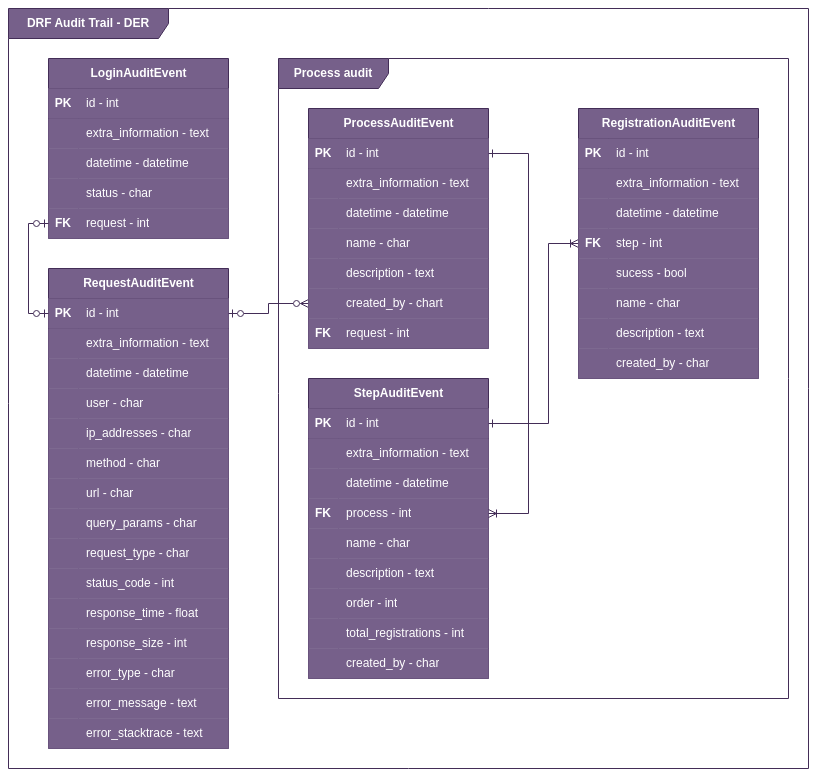
ProcessAuditEventis the process as a whole.StepAuditEventcontains all steps that belong to that process.RegistrationAuditEventstores each record executed inside the process flow.
This means:
- one process can have many steps
- one step can have many registrations
- each registration tells what happened during the execution of that step
Typical examples of registrations are:
- validation succeeded
- validation failed
- database save completed
- external integration returned an error
The structure below illustrates this relationship:

Example Usage in a View
from rest_framework.views import APIView
from rest_framework.response import Response

class TestAPIView(APIView):
    def get(self, request, *args, **kwargs):
        drf_request_audit_event = request.META.get("drf_request_audit_event")
        drf_request_audit_event["extra_informations"] = {
            "data": "Example of extra information"
        }
        return Response("ok")
Example: Structured Audit Log
Use audit_log when you need a flat, report-friendly audit entry tied to the current request.
When old_values or new_values are set, field_name must also be provided.
When both old_values and new_values are set, reason_for_change must also
be provided before the audit entry is saved.
from drf_audit_trail.audit_log import audit_log


@audit_log(
    event_type="Update",
    action_description="Updated product price",
    field_name="price",
)
def update_product(request, product_id, audit_log):
    product = Product.objects.get(pk=product_id)
    old_price = product.price

    product.price = request.data["price"]
    product.save()

    audit_log.set_content_object(product)
    audit_log.old_values = str(old_price)
    audit_log.new_values = str(product.price)
    audit_log.reason_for_change = request.data.get("reason_for_change")
    audit_log.extra_informations = {"source": "api"}
For multiple field changes, add one entry per changed field:
audit_log.add_field_change(
    field_name="price",
    old_values="10.00",
    new_values="12.00",
    reason_for_change="Correction after review",
)
For system actions without a request:
from drf_audit_trail.audit_log import record_system_event

record_system_event(
    event_type="System Action",
    action_description="Auto-save product",
    actor_identifier="system",
    content_object=product,
    field_name="autosaved",
    new_values=True,
)
old_values, new_values, and extra_informations are stored in TextField columns with JSON serialization. Admin exports format old and new values as human-readable text instead of raw JSON.
If actor_role is not set in the decorator or draft, DRF Audit Trail calls DRF_AUDIT_TRAIL_USER_ROLE_GETTER to resolve it from the active user. The default getter uses the first Django group assigned to the user. You can configure a custom dotted path; the callable should accept (user, request=None).
Optional Manager/QuerySet Audit
For projects that prefer model-level auditing without decorating every view, use
AuditedManager. This is independent from @audit_log and only affects models
that use the audited manager.
The public API is exposed from drf_audit_trail.manager_audit. Internally, this
is organized as a package with separate modules for context handling, audited
managers/models, audit planning, snapshots, and audit entry scheduling.
from django.db import models
from django.contrib import admin
from drf_audit_trail.manager_audit import AuditedModel


class Product(AuditedModel):
    FIELD_UPDATE_ACTION_DESCRIPTIONS = {
        "name": "Product name updated",
        "price": "Product price updated",
    }

    name = models.CharField(max_length=255)
    price = models.DecimalField(max_digits=10, decimal_places=2)


@admin.register(Product)
class ProductAdmin(admin.ModelAdmin):
    pass
Configure global defaults and optional per-model overrides:
DRF_AUDIT_TRAIL_MANAGER_AUDIT = {
    "enabled": True,
    "default_fields": "__all__",
    "default_exclude_fields": ["created_at", "updated_at"],
    "reason_for_change_key": "reason_for_change",
    "default_reason": None,
    "default_extra_informations_getter": None,
    "default_value_serializer": "raw",  # raw | text | dotted.path.to.callable
    "foreign_key_value_serializer": "repr",  # repr | pk | pk_and_repr
    "file_value_serializer": "name",  # name | path | name_and_path
    "image_value_serializer": "name",  # name | path | name_and_path
    "field_value_serializers": {
        # Optional global per-field override
        # "quantity": "text",
    },
    "default_action_descriptions": {
        "create": "Created object",
        "update": "Updated object",
        "delete": "Deleted object",
    },
    "models": {
        "core.Product": {
            "fields": ["name", "price"],
            "require_reason": False,
            "extra_informations_getter": None,
            "field_value_serializers": {
                # Optional model-specific field overrides
                # "price": "text",
            },
            "action_descriptions": {
                "update": "Updated product",
            },
        }
    },
}
Using AuditedModel or AuditedManager is the opt-in that enables model-level
audit. The models setting is only needed for per-model overrides such as
fields, descriptions, reason policy, serializers, or extra information getters.
This feature does not install audit hooks on ordinary Django models.
Models can define FIELD_UPDATE_ACTION_DESCRIPTIONS to customize update
descriptions per changed field. Runtime
audit_model_context(action_description="...") takes precedence;
fields missing from the model dictionary fall back to configured
action_descriptions.
Use default_extra_informations_getter or a model-specific
extra_informations_getter to populate filter metadata globally. This is useful
for project-specific scopes such as organization_id, sponsor_id, study_id,
or site_id.
def audit_scope(*, instance, action, request=None, field_name=None, **kwargs):
    return {
        "organization_id": instance.organization_id,
        "sponsor_id": instance.pk,
        "action": action,
        "field_name": field_name,
    }
Getter values are merged with audit_model_context(extra_informations={...})
when both are dictionaries. Context values win on duplicate keys.
old_values and new_values for manager-level update events now store a single
formatted value for the audited field (instead of a JSON object repeating the
field name).
Serializer selection priority for manager-level update values:
models["app.Model"]["field_value_serializers"][field]- global
field_value_serializers[field] - type-level serializer (
image/file/foreign_key) default_value_serializer
Built-in serializer names:
- Generic:
raw,text - Relation fields (
ForeignKey,OneToOneField):repr,pk,pk_and_repr - File/Image fields:
name,path,name_and_path
Defaults in this library version:
default_value_serializer = "raw"foreign_key_value_serializer = "repr"file_value_serializer = "name"image_value_serializer = "name"
This means, by default:
- regular scalar fields keep their native type in
old_values_data/new_values_data(example:int,bool,dict) - relations are stored as a user-friendly
repr(instead of only PK) - files/images store filename/path value (
name)
Example with different models and field types:
DRF_AUDIT_TRAIL_MANAGER_AUDIT = {
    "enabled": True,
    "default_fields": "__all__",

    # Global defaults
    "default_value_serializer": "raw",
    "foreign_key_value_serializer": "repr",
    "file_value_serializer": "name",
    "image_value_serializer": "name_and_path",

    # Optional global field-name overrides (applies to any model with this field name)
    "field_value_serializers": {
        "metadata": "text",  # force JSONField/dict to string
    },

    "models": {
        "core.Product": {
            "fields": ["name", "price", "category", "photo", "metadata"],
            "field_value_serializers": {
                "price": "text",          # Decimal as text
                "category": "pk_and_repr", # include pk and repr for FK
                "photo": "path",          # absolute/storage path for image
            },
        },
        "core.Supplier": {
            "fields": ["name", "contract_file"],
            "file_value_serializer": "name_and_path",
        },
    },
}
You can also provide a custom callable serializer (callable object or dotted path import string):
"default_value_serializer": "my_project.audit.serializers.serialize_value"
Callable signature:
def serialize_value(*, obj, field, raw_value):
    return ...
The same custom serializer strategy can be used in:
default_value_serializerforeign_key_value_serializerfile_value_serializerimage_value_serializerfield_value_serializers
Use a context when a specific flow needs a custom reason, actor, descriptions, or field set:
from drf_audit_trail.manager_audit import audit_model_context


with audit_model_context(
    request=request,
    reason_for_change=request.data.get("reason_for_change"),
    action_description="Updated consensus during review",
    model=Product,
    fields=["price"],
):
    Product.objects.filter(pk=product_id).update(price="12.00")
For create events, prefer object-level entries without reason_for_change;
reserve reasons for updates, deletes, or custom actions where a change needs
business justification.
When no explicit reason is provided, manager-level audit reads the global
reason_for_change_key from request.data, request.POST, or a JSON request
body. The default key is reason_for_change. A string applies to every changed
field; a dictionary maps field_name to a field-specific reason. This request
fallback only applies to field-level update entries.
model accepts a model class, model instance, queryset, manager, or model label.
If the selected model has no configured fields, all concrete non-primary-key
fields are tracked, except auto timestamp fields such as created_at and
updated_at.
AuditedModel captures instance.save() and instance.delete(), so Django
Admin, forms, DRF serializers, and regular application code are covered when they
mutate model instances. Its default manager also captures create(),
get_or_create(), update_or_create(), queryset update(), queryset delete(),
bulk_create(), and bulk_update(). It writes one object-level AuditLogEntry
for create/delete events without field_name, old_values, or new_values, and
one AuditLogEntry per changed field for update events, after
transaction.on_commit(). Raw SQL and models that do not inherit the base class
are intentionally outside this layer and can keep using @audit_log.
PostgreSQL Trigger Audit Models
drf_audit_trail.pg_audit_models is the PostgreSQL-trigger based audit API. It
captures database changes in PostgreSQL and stores one ActionLog row for the
action context plus one DiffLog row per changed column.
This API is different from AuditLogEntry and AuditedManager: the change
capture happens in the database. Python is mainly responsible for setting the
action context, such as user, URL, actor type, reason for change, and optional
filter metadata.
Use it in production when:
- the primary database is PostgreSQL;
- audited tables have a simple primary key.
id,BigAutoField, UUID, and custom primary-key column names are supported; - migrations and triggers have been validated in staging with a realistic schema;
- reports and filters can read from
ActionLogandDiffLog; - the project does not require the exact
AuditLogEntryrow schema.
It is not a one-to-one replacement for every AuditLogEntry workflow. It is a
good replacement when the goal is centralized PostgreSQL-level change capture,
including changes that do not pass through AuditedManager.
Install it as a Django app:
INSTALLED_APPS = [
    # ...
    "drf_audit_trail.pg_audit_models",
]

MIDDLEWARE = [
    # ...
    "drf_audit_trail.pg_audit_models.middleware.PGAuditModelsMiddleware",
]
Run migrations normally:
python manage.py migrate
The migrations create the audit tables and the PostgreSQL function used by the
triggers. After migrations, the post_migrate hook creates triggers for the
configured audited tables and removes old managed triggers that no longer match
the current settings.
On project runtime startup, the app also synchronizes triggers automatically on
the first request or first database connection after Django apps are ready, when
the PostgreSQL audit schema already exists. This avoids database access inside
AppConfig.ready() while still covering changes to DRF_AUDIT_TRAIL_PG_AUDIT,
including audit_all_models=True, after the project is restarted.
Automatic sync is skipped for migration/test/utility commands and when the audit
tables or fn_log_update() function do not exist yet. First installation still
uses migrate/post_migrate.
The automatic sync uses django.core.signals.request_started and
django.db.backends.signals.connection_created, which are available in Django
4.2 LTS and Django 5.x.
If you want to force synchronization manually, run:
python manage.py sync_pg_audit_triggers
To verify the current database without changing it:
python manage.py sync_pg_audit_triggers --check
Use --database <alias> when the audited PostgreSQL database is not default.
There is no schema setting. The implementation keeps the original behavior and
targets tables in public.
Configure audited models in settings.py:
DRF_AUDIT_TRAIL_PG_AUDIT = {
    "models": ("auth.User", "core.Category", "core.Product"),
}
Or audit all models except selected apps/models:
DRF_AUDIT_TRAIL_PG_AUDIT = {
    "audit_all_models": True,
    "excluded_apps": ["sessions", "admin"],
    "excluded_models": ["auth.Permission"],
}
pg_audit_models is always excluded internally, even with
audit_all_models=True or excluded_apps=[].
models accepts:
- Django labels, such as
"core.Product"; - lower-case Django labels, such as
"core.product"; - database table names, such as
"core_product"; - model classes, such as
Product; "__all__"to audit all models, respecting exclusions.
Supported settings:
DRF_AUDIT_TRAIL_PG_AUDIT = {
    "audit_all_models": False,
    "models": None,
    "excluded_apps": [],
    "excluded_models": [],

    "api_views_modules": [],
    "api_views_module_suffixes": ["views", "api.views"],
    "api_views_actions": [
        "list",
        "create",
        "retrieve",
        "update",
        "partial_update",
        "destroy",
    ],
    "api_views_methods": ["get", "post", "put", "patch", "delete"],

    "django_views_modules": [],
    "django_views_module_suffixes": ["views"],
    "django_views_methods": ["get", "post", "put", "patch", "delete"],

    "reason_for_change_key": "reason_for_change",
    "default_extra_informations_getter": None,
}
When the app is installed, patching is always enabled for Django Admin, DRF
viewsets, DRF APIViews, DRF generic views, and Django class-based views.
@action methods on DRF viewsets are always patched.
By default, the patcher imports app.views and app.api.views for DRF/API
views, and app.views for Django views. If a view module path is a package, its
children are imported recursively, so layouts like app/api/views/products.py
are supported.
For custom layouts:
DRF_AUDIT_TRAIL_PG_AUDIT = {
    "models": ("core.Product",),
    "api_views_modules": [
        "core.api.views.products",
        "billing.api.views.invoices",
    ],
    "api_views_module_suffixes": ["views", "api.views", "api.viewsets"],
    "django_views_modules": [
        "public.web.views.products",
    ],
    "django_views_module_suffixes": ["views", "web.views"],
}
Supported view types:
from rest_framework import mixins
from rest_framework.viewsets import GenericViewSet


class ProductViewSet(mixins.CreateModelMixin, mixins.UpdateModelMixin, GenericViewSet):
    queryset = Product.objects.all()
    serializer_class = ProductSerializer
from rest_framework.views import APIView


class SendProductReviewAPIView(APIView):
    audit_model = Product

    def post(self, request, product_id):
        product = Product.objects.get(pk=product_id)
        product.status = "review"
        product.save()
from django.views import View


class ProductArchiveView(View):
    model = Product

    def post(self, request, product_id):
        product = Product.objects.get(pk=product_id)
        product.archived = True
        product.save(update_fields=["archived"])
The audited model is resolved in this order:
audit_modelmodelqueryset.modelserializer_class.Meta.model
ActionLog.extra_informations is a nullable JSONField with a GIN index. It is
not populated by default. Use it only for application-specific filter metadata,
such as organization_id, study_id, site_id, or tenant_id. Do not duplicate
technical request context there; ActionLog already has first-class fields for
source, username, actor_type, and url.
Optional global getter:
def get_pg_audit_extra_informations(
    *,
    request=None,
    model=None,
    ref_name=None,
    ref_id=None,
    **kwargs,
):
    user = getattr(request, "user", None)
    organization_id = getattr(user, "organization_id", None)
    if organization_id is None:
        return None
    return {"organization_id": organization_id}
DRF_AUDIT_TRAIL_PG_AUDIT = {
    "models": ("core.Product",),
    "default_extra_informations_getter": "core.audit.get_pg_audit_extra_informations",
}
You can also provide metadata for a specific operation:
from drf_audit_trail.pg_audit_models import audit


with audit(
    source="products.import",
    extra_informations={"import_id": import_job.pk},
):
    Product.objects.create(name="Imported product")
Querying by metadata:
from drf_audit_trail.pg_audit_models.models import ActionLog


ActionLog.objects.filter(extra_informations__study_id=10)
ActionLog.objects.filter(extra_informations__tenant_id="acme")
DiffLog.reason_for_change stores the reason per changed column. It can be set
explicitly in the audit context or read from the request body. The default request
key is reason_for_change.
{
  "name": "New name",
  "reason_for_change": "Correction requested by support"
}
For field-specific reasons:
{
  "name": "New name",
  "category": 10,
  "reason_for_change": {
    "name": "Spelling correction",
    "category": "Moved to the correct category"
  }
}
When the reason is a dictionary, Django field names are normalized to database
column names. For example, category also fills category_id.
For async jobs, management commands, consumers, and other non-user flows, use
system_audit:
from drf_audit_trail.pg_audit_models import system_audit


with system_audit(
    source="emails.send_welcome",
    reason_for_change="Welcome email sent",
):
    user.last_welcome_email_sent_at = timezone.now()
    user.save(update_fields=["last_welcome_email_sent_at"])
This creates ActionLog.actor_type = "System" and
ActionLog.username = "system".
Querying logs:
from drf_audit_trail.pg_audit_models.models import ActionLog, DiffLog


actions = ActionLog.objects.filter(
    actor_type=ActionLog.USER,
    ref_name="core_product",
).order_by("-executed_at")

diffs = DiffLog.objects.filter(
    action_log__in=actions,
    column_name="status",
).select_related("action_log")
ActionLog stores the action context. DiffLog stores each changed column.
Changes outside a request, audit(), or system_audit() are still captured by
the trigger, but they may not have username, explicit actor_type, url,
reason_for_change, or extra_informations. Wrap background jobs and raw SQL
flows with system_audit() or audit() when context matters.
If no ActionLog rows are created after inserting/updating/deleting an audited
model, check trigger installation first:
python manage.py sync_pg_audit_triggers --check
If the command reports missing triggers, run:
python manage.py sync_pg_audit_triggers
The patcher only sets request/action context around Django Admin, DRF views, and
Django views. It is not responsible for inserting audit rows. The PostgreSQL
trigger inserts ActionLog and DiffLog; therefore, no rows usually means the
table is not configured as audited, the database is not PostgreSQL, migrations
were not run, or startup/manual trigger sync could not run.
Audit Log Admin Exports
The Django admin changelists for AuditLogEntry and
pg_audit_models.ActionLog include CSV, XLS, and PDF export buttons. Exports use
the currently filtered admin queryset and include who pulled the report, when it
was pulled, and the filters applied.
ActionLogAdmin reuses the same export templates and rendering flow as
AuditLogEntryModelAdmin. Because the PostgreSQL audit models use a different
schema, the admin resolves report fields from ActionLog plus its related
DiffLog rows. Each changed column is exported as one report row.
ActionLogAdmin exports these columns:
Timestamp (UTC)fromActionLog.executed_atUsernamefromActionLog.usernameUser Roleas blank, becauseActionLogdoes not store a role fieldEvent TypefromDiffLog.event_typeAction SourcefromActionLog.sourceObjectfrom the audited table/model name plusref_idField Namefrom the resolvedDiffLog.column_nameOld ValueandNew ValuefromDiffLog.old_valueandDiffLog.new_valueReason for ChangefromDiffLog.reason_for_changeSystem/User ActionfromActionLog.actor_typeURLfromActionLog.url
The exported ActionLog filename prefix is pg_action_log_report. CSV exports
include a UTF-8 BOM for Excel compatibility. XLS exports render the shared HTML
table template as .xls, and PDF exports render the shared PDF template through
WeasyPrint.
Reusable Report Export Classes
Projects that need report exports outside the Django admin can reuse
AuditLogReportExporter and AuditLogReportExportActionMixin. The exporter
contains the shared CSV, XLS, and PDF rendering flow. The mixin can be added to
a DRF viewset by setting report_exporter_class; it applies the viewset's
filter_queryset() pipeline before generating the report.
The package does not register an API route for this integration. The consuming project is responsible for adding the mixin to its viewset and defining its URL, queryset, filters, authentication, and permissions.
Filters that depend on the consuming application's domain, such as Sponsor, Study, Site, Subject, or Investigator, should be implemented by that application. DRF Audit Trail keeps the reusable model generic and does not add project-specific fields such as sponsor, study, or site.
Customizing Audit Log Admin Filters
Projects can unregister the default admin and register their own subclass of AuditLogEntryModelAdmin.
To expose any stored actor role as a regular Django admin filter:
from django.contrib import admin
from django.contrib.admin.sites import NotRegistered

from drf_audit_trail.admin import AuditLogEntryModelAdmin
from drf_audit_trail.models import AuditLogEntry


try:
    admin.site.unregister(AuditLogEntry)
except NotRegistered:
    pass


@admin.register(AuditLogEntry)
class ProjectAuditLogEntryAdmin(AuditLogEntryModelAdmin):
    list_filter = AuditLogEntryModelAdmin.list_filter + ("actor_role",)
To expose only an explicit Investigator role filter:
from django.contrib import admin
from django.contrib.admin import SimpleListFilter
from django.contrib.admin.sites import NotRegistered

from drf_audit_trail.admin import AuditLogEntryModelAdmin
from drf_audit_trail.models import AuditLogEntry


class InvestigatorRoleFilter(SimpleListFilter):
    title = "Role"
    parameter_name = "role"

    def lookups(self, request, model_admin):
        return (("investigator", "Investigator"),)

    def queryset(self, request, queryset):
        if self.value() == "investigator":
            return queryset.filter(actor_role="Investigator")
        return queryset


try:
    admin.site.unregister(AuditLogEntry)
except NotRegistered:
    pass


@admin.register(AuditLogEntry)
class ProjectAuditLogEntryAdmin(AuditLogEntryModelAdmin):
    list_filter = AuditLogEntryModelAdmin.list_filter + (InvestigatorRoleFilter,)
Diagrams
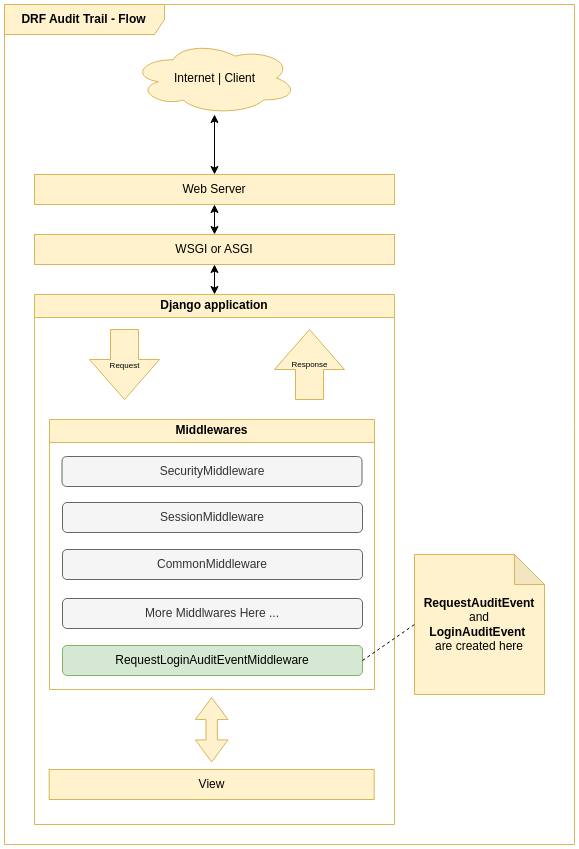
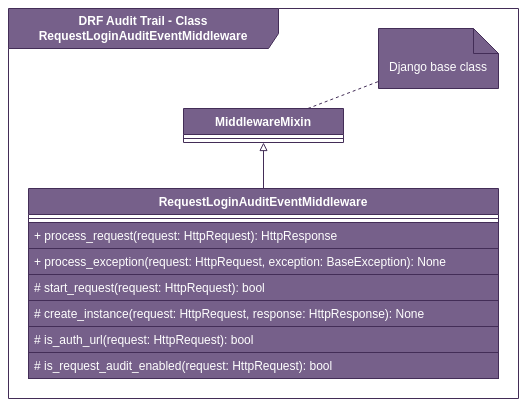
Note: These diagrams were created before the latest structured audit log changes. They may not be 100% accurate for the current implementation. Until the diagrams are updated, use the textual documentation in this README as the source of truth.
Audit Flow
ERD
Middleware Class Diagram
Example: Process Auditing
To audit custom business processes, use the process audit utilities:
from drf_audit_trail.models import (
    ProcessAuditEvent,
    RegistrationAuditEvent,
    StepAuditEvent,
)
from drf_audit_trail.process_audit import ProcessAudit


class CreateProductProcessAudit(ProcessAudit):
    def create_process(self) -> ProcessAuditEvent:
        return self.save_model(ProcessAuditEvent(name="Criar produto"))

    def create_steps(self, process: ProcessAuditEvent):
        self.step_validation = self.save_model(
            StepAuditEvent(
                name="Validação dos Dados",
                order=1,
                process=process,
                total_registrations=2,
            )
        )

        self.step_save_db = self.save_model(
            StepAuditEvent(
                name="Salvar no banco de dados",
                order=2,
                process=process,
            )
        )

    def create_registration_step_validation_code(
        self, success, name=None, **extra_fields
    ):
        name = name or "Codigo do produto validados com sucesso"
        return self.save_model(
            RegistrationAuditEvent(
                name=name, step=self.step_validation, success=success, **extra_fields
            )
        )

    def create_registration_step_validation(self, success, name=None, **extra_fields):
        name = name or "Dados de criação validados com sucesso"
        return self.save_model(
            RegistrationAuditEvent(
                name=name, step=self.step_validation, success=success, **extra_fields
            )
        )

    def create_registration_save_db(self, success, name=None, **extra_fields):
        name = name or "Salvar no banco de dados"
        return self.save_model(
            RegistrationAuditEvent(
                step=self.step_save_db, success=success, name=name, **extra_fields
            )
        )


class ProductViewSet(ModelViewSet):
    serializer_class = ProductSerializer
    queryset = Product.objects.all()

    def create(self, request, *args, **kwargs):
        process_audit = CreateProductProcessAudit(request)

        serializer = self.get_serializer(data=request.data)
        if serializer.is_valid():
            process_audit.create_registration_step_validation_code(True)
            process_audit.create_registration_step_validation(True)
        else:
            if serializer.errors.get("code") is not None:
                process_audit.create_registration_step_validation_code(
                    False,
                    "Error de validação de codigo",
                    description=json.dumps(serializer.errors.get("code")),
                )
            validation_errors = json.dumps(serializer.errors)
            process_audit.create_registration_step_validation(
                False, "Erros de validação", description=validation_errors
            )
            raise ValidationError(serializer.errors)

        try:
            self.perform_create(serializer)
            process_audit.create_registration_save_db(True)
        except BaseException as e:
            process_audit.create_registration_save_db(False, e.__str__())
            raise

        headers = self.get_success_headers(serializer.data)
        return Response(serializer.data, status=201, headers=headers)
Handling Long Data and Preventing Database Errors
Starting from version X.X.X, DRF Audit Trail automatically prevents DataError (e.g., StringDataRightTruncation) when saving audit events, even when request parameters (like URLs or query strings) exceed the database limit.
How does it work?
- Fields sensitive to length, such as
urlandquery_paramsin theRequestAuditEventmodel, use a custom field that automatically truncates values exceeding the database limit (e.g., 2048 characters). - When truncation occurs, a warning is logged via Python (
drf_audit_trail.truncation), enabling traceability. - This ensures the audit middleware never causes a request to fail due to oversized data, making the solution robust for public APIs or endpoints with extensive parameters.
Example of truncation log
WARNING drf_audit_trail.truncation: Truncating value for field 'url' to 2048 characters. Original length: 3010.
Notes
- Truncation is transparent to the library user.
- To audit this behavior, set the log level to
WARNINGin thedrf_audit_trail.truncationlogger. - This behavior applies to all fields of type
TruncatingCharField.
License
MIT License
Notes
- All settings are optional and have default values.
- For advanced customization, see the code and docstrings.
- For questions, check the docstrings or open an issue.
Release history Release notifications | RSS feed


Download files
Download the file for your platform. If you're not sure which to choose, learn more about installing packages.
Source Distribution
Built Distribution
Filter files by name, interpreter, ABI, and platform.
If you're not sure about the file name format, learn more about wheel file names.
Copy a direct link to the current filters
File details
Details for the file drf_audit_trail-0.5.6.tar.gz.
File metadata
- Download URL: drf_audit_trail-0.5.6.tar.gz
- Upload date:
- Size: 78.7 kB
- Tags: Source
- Uploaded using Trusted Publishing? No
- Uploaded via: poetry/2.2.1 CPython/3.10.12 Linux/7.0.11-76070011-generic
File hashes
| Algorithm | Hash digest | |
|---|---|---|
| SHA256 |
40a14305f6d017839a85f1374eca98bc14425cb9b7d6ff7c5b96d8c4c86b4ef6
|
|
| MD5 |
e31ef2fe03c8f3510b73a39e8b3bd782
|
|
| BLAKE2b-256 |
dc8527c30d0402377f2b5f44a5f66eda82758d4d079d94f3399e22fc26745e73
|
File details
Details for the file drf_audit_trail-0.5.6-py3-none-any.whl.
File metadata
- Download URL: drf_audit_trail-0.5.6-py3-none-any.whl
- Upload date:
- Size: 101.1 kB
- Tags: Python 3
- Uploaded using Trusted Publishing? No
- Uploaded via: poetry/2.2.1 CPython/3.10.12 Linux/7.0.11-76070011-generic
File hashes
| Algorithm | Hash digest | |
|---|---|---|
| SHA256 |
e853d808d6ed728477ff7a420d83e037c6c7c70a34e0969a96d42a8d6b9e3f45
|
|
| MD5 |
0bf2ea9f8ae41e1a1996e4975e808e45
|
|
| BLAKE2b-256 |
f03f119388685e634e607aa901de1ffb72a4397b19a203afb1c9ebd9e19369ab
|






