
A reusable django [DRF] application that handles auditing of requests, logins and process

Project description
DRF Audit Trail
A reusable Django DRF application for auditing requests, logins, and custom processes.
Features
- HTTP request auditing (
RequestAuditEvent) - Login and logout auditing (
LoginAuditEvent) - Structured audit log entries (
AuditLogEntry) - Custom process auditing (
ProcessAuditEvent,StepAuditEvent,RegistrationAuditEvent) - Integration with SimpleJWT
- Django Async support
- Thread safe
- Error and stacktrace tracking
- PDF report generation
Installation
pip install drf-audit-trail
Configuration
In your settings.py:
INSTALLED_APPS = [
    ...
    "drf_audit_trail",
]

MIDDLEWARE = [
    ...
    "drf_audit_trail.middleware.RequestLoginAuditEventMiddleware",
]
Database
You can use a separate database for audit data:
DATABASES = {
    "default":  {
        "ENGINE": "django.db.backends.sqlite3",
        "NAME": BASE_DIR / "db.sqlite3",
    },
    "audit_trail": {
        "ENGINE": "django.db.backends.sqlite3",
        "NAME": BASE_DIR / "audit_trail.sqlite3",
    },
}

DRF_AUDIT_TRAIL_DATABASE_ALIAS = "audit_trail"  # Audit database alias
DJANGO_DEFAULT_DATABASE_ALIAS = "default"  # Default database alias

DATABASE_ROUTERS = ["drf_audit_trail.database_router.DRFAuditTrail"]
Available Settings
Add to your settings.py as needed:
DRF_AUDIT_TRAIL_REQUEST_AUDIT_URLS = [r"^(?!/admin/jsi18n/).*$"]  # Monitored URLs (regex)
DRF_AUDIT_TRAIL_AUTH_URL = [
    "/api/token/",
    "/admin/login/",
    "/api/logout/",
    "/admin/logout/",
]  # Authentication endpoints
DRF_AUDIT_TRAIL_AUTH_STATUS_CODE_FAILED = 401  # Auth failure status code
DRF_AUDIT_TRAIL_NOTSAVE_REQUEST_BODY_URLS = ['/api/token']  # Endpoints that do not save request body
DRF_AUDIT_TRAIL_USER_ROLE_GETTER = "drf_audit_trail.utils.get_user_role_by_django_groups"  # Active user role getter
DRF_AUDIT_TRAIL_DEFAULT_SYSTEM_ACTOR_IDENTIFIER = "system"  # Default identifier for system audit events
DRF_AUDIT_TRAIL_DEFAULT_SYSTEM_ACTOR_ROLE = "System"  # Default role for system audit events
DRF_AUDIT_TRAIL_USER_PK_NAME = "pk"  # User PK field name
All settings are optional and have sensible defaults.
Audit Models
- RequestAuditEvent: HTTP request auditing.
- LoginAuditEvent: Login/logout auditing.
- AuditLogEntry: Structured, report-friendly audit entries for user or system actions. Entries can be linked to a
RequestAuditEventor stored without a request for background/system activity. The audited object is referenced generically withcontent_type,object_id, andobject_repr, so application-specific concepts stay outside the reusable package. - ProcessAuditEvent: Represents the entire process execution.
- StepAuditEvent: Represents each step that belongs to the process.
- RegistrationAuditEvent: Represents each execution record created during the process flow.
How Process Auditing Works
Process auditing is organized as a hierarchy:
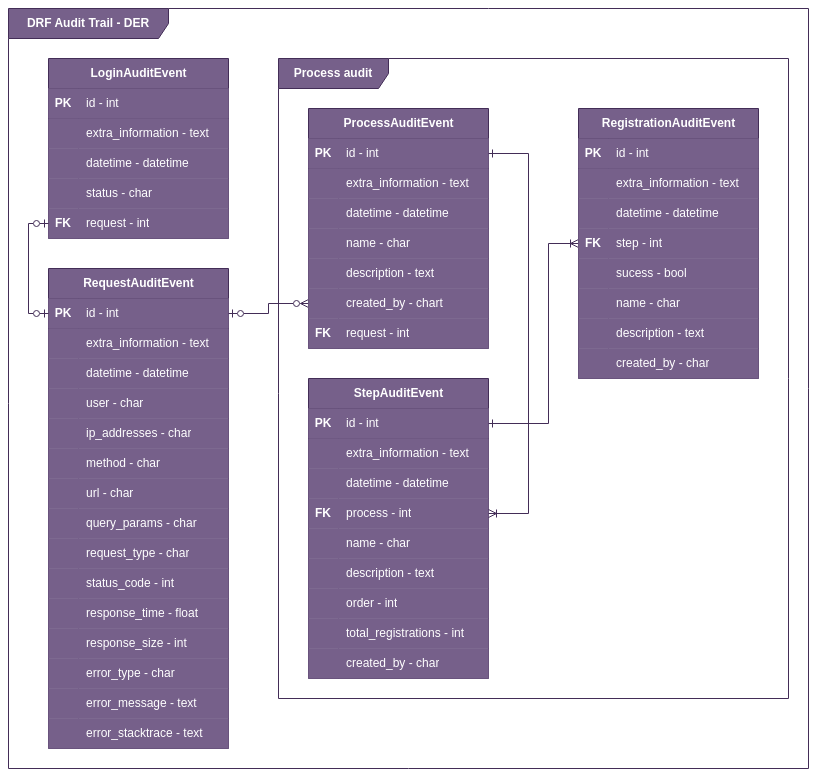
ProcessAuditEventis the process as a whole.StepAuditEventcontains all steps that belong to that process.RegistrationAuditEventstores each record executed inside the process flow.
This means:
- one process can have many steps
- one step can have many registrations
- each registration tells what happened during the execution of that step
Typical examples of registrations are:
- validation succeeded
- validation failed
- database save completed
- external integration returned an error
The structure below illustrates this relationship:

Example Usage in a View
from rest_framework.views import APIView
from rest_framework.response import Response

class TestAPIView(APIView):
    def get(self, request, *args, **kwargs):
        drf_request_audit_event = request.META.get("drf_request_audit_event")
        drf_request_audit_event["extra_informations"] = {
            "data": "Example of extra information"
        }
        return Response("ok")
Example: Structured Audit Log
Use audit_log when you need a flat, report-friendly audit entry tied to the current request.
When old_values or new_values are set, field_name must also be provided.
When both old_values and new_values are set, reason_for_change must also
be provided before the audit entry is saved.
from drf_audit_trail.audit_log import audit_log


@audit_log(
    event_type="Update",
    action_description="Updated product price",
    field_name="price",
)
def update_product(request, product_id, audit_log):
    product = Product.objects.get(pk=product_id)
    old_price = product.price

    product.price = request.data["price"]
    product.save()

    audit_log.set_content_object(product)
    audit_log.old_values = str(old_price)
    audit_log.new_values = str(product.price)
    audit_log.reason_for_change = request.data.get("reason_for_change")
    audit_log.extra_informations = {"source": "api"}
For multiple field changes, add one entry per changed field:
audit_log.add_field_change(
    field_name="price",
    old_values="10.00",
    new_values="12.00",
    reason_for_change="Correction after review",
)
For system actions without a request:
from drf_audit_trail.audit_log import record_system_event

record_system_event(
    event_type="System Action",
    action_description="Auto-save product",
    actor_identifier="system",
    content_object=product,
    field_name="autosaved",
    new_values=True,
)
old_values, new_values, and extra_informations are stored in TextField columns with JSON serialization. Admin exports format old and new values as human-readable text instead of raw JSON.
If actor_role is not set in the decorator or draft, DRF Audit Trail calls DRF_AUDIT_TRAIL_USER_ROLE_GETTER to resolve it from the active user. The default getter uses the first Django group assigned to the user. You can configure a custom dotted path; the callable should accept (user, request=None).
Audit Log Admin Exports
The Django admin changelist for AuditLogEntry includes CSV, XLS, and PDF export buttons. Exports use the currently filtered admin queryset and include who pulled the report, when it was pulled, and the filters applied.
Filters that depend on the consuming application's domain, such as Sponsor, Study, Site, Subject, or Investigator, should be implemented by that application. DRF Audit Trail keeps the reusable model generic and does not add project-specific fields such as sponsor, study, or site.
Customizing Audit Log Admin Filters
Projects can unregister the default admin and register their own subclass of AuditLogEntryModelAdmin.
To expose any stored actor role as a regular Django admin filter:
from django.contrib import admin
from django.contrib.admin.sites import NotRegistered

from drf_audit_trail.admin import AuditLogEntryModelAdmin
from drf_audit_trail.models import AuditLogEntry


try:
    admin.site.unregister(AuditLogEntry)
except NotRegistered:
    pass


@admin.register(AuditLogEntry)
class ProjectAuditLogEntryAdmin(AuditLogEntryModelAdmin):
    list_filter = AuditLogEntryModelAdmin.list_filter + ("actor_role",)
To expose only an explicit Investigator role filter:
from django.contrib import admin
from django.contrib.admin import SimpleListFilter
from django.contrib.admin.sites import NotRegistered

from drf_audit_trail.admin import AuditLogEntryModelAdmin
from drf_audit_trail.models import AuditLogEntry


class InvestigatorRoleFilter(SimpleListFilter):
    title = "Role"
    parameter_name = "role"

    def lookups(self, request, model_admin):
        return (("investigator", "Investigator"),)

    def queryset(self, request, queryset):
        if self.value() == "investigator":
            return queryset.filter(actor_role="Investigator")
        return queryset


try:
    admin.site.unregister(AuditLogEntry)
except NotRegistered:
    pass


@admin.register(AuditLogEntry)
class ProjectAuditLogEntryAdmin(AuditLogEntryModelAdmin):
    list_filter = AuditLogEntryModelAdmin.list_filter + (InvestigatorRoleFilter,)
Diagrams
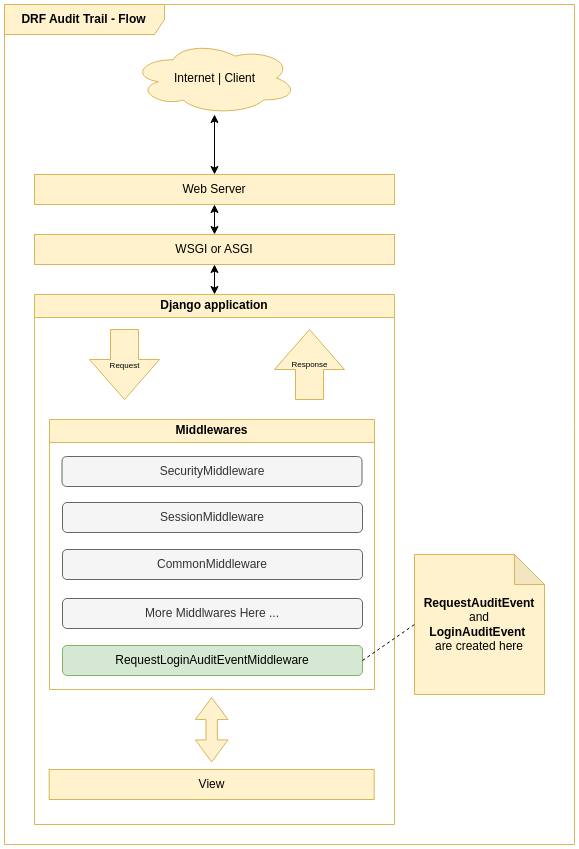
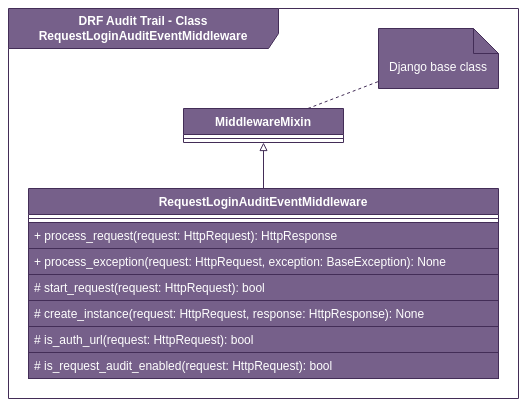
Note: These diagrams were created before the latest structured audit log changes. They may not be 100% accurate for the current implementation. Until the diagrams are updated, use the textual documentation in this README as the source of truth.
Audit Flow
ERD
Middleware Class Diagram
Example: Process Auditing
To audit custom business processes, use the process audit utilities:
from drf_audit_trail.models import (
    ProcessAuditEvent,
    RegistrationAuditEvent,
    StepAuditEvent,
)
from drf_audit_trail.process_audit import ProcessAudit


class CreateProductProcessAudit(ProcessAudit):
    def create_process(self) -> ProcessAuditEvent:
        return self.save_model(ProcessAuditEvent(name="Criar produto"))

    def create_steps(self, process: ProcessAuditEvent):
        self.step_validation = self.save_model(
            StepAuditEvent(
                name="Validação dos Dados",
                order=1,
                process=process,
                total_registrations=2,
            )
        )

        self.step_save_db = self.save_model(
            StepAuditEvent(
                name="Salvar no banco de dados",
                order=2,
                process=process,
            )
        )

    def create_registration_step_validation_code(
        self, success, name=None, **extra_fields
    ):
        name = name or "Codigo do produto validados com sucesso"
        return self.save_model(
            RegistrationAuditEvent(
                name=name, step=self.step_validation, success=success, **extra_fields
            )
        )

    def create_registration_step_validation(self, success, name=None, **extra_fields):
        name = name or "Dados de criação validados com sucesso"
        return self.save_model(
            RegistrationAuditEvent(
                name=name, step=self.step_validation, success=success, **extra_fields
            )
        )

    def create_registration_save_db(self, success, name=None, **extra_fields):
        name = name or "Salvar no banco de dados"
        return self.save_model(
            RegistrationAuditEvent(
                step=self.step_save_db, success=success, name=name, **extra_fields
            )
        )


class ProductViewSet(ModelViewSet):
    serializer_class = ProductSerializer
    queryset = Product.objects.all()

    def create(self, request, *args, **kwargs):
        process_audit = CreateProductProcessAudit(request)

        serializer = self.get_serializer(data=request.data)
        if serializer.is_valid():
            process_audit.create_registration_step_validation_code(True)
            process_audit.create_registration_step_validation(True)
        else:
            if serializer.errors.get("code") is not None:
                process_audit.create_registration_step_validation_code(
                    False,
                    "Error de validação de codigo",
                    description=json.dumps(serializer.errors.get("code")),
                )
            validation_errors = json.dumps(serializer.errors)
            process_audit.create_registration_step_validation(
                False, "Erros de validação", description=validation_errors
            )
            raise ValidationError(serializer.errors)

        try:
            self.perform_create(serializer)
            process_audit.create_registration_save_db(True)
        except BaseException as e:
            process_audit.create_registration_save_db(False, e.__str__())
            raise

        headers = self.get_success_headers(serializer.data)
        return Response(serializer.data, status=201, headers=headers)
Handling Long Data and Preventing Database Errors
Starting from version X.X.X, DRF Audit Trail automatically prevents DataError (e.g., StringDataRightTruncation) when saving audit events, even when request parameters (like URLs or query strings) exceed the database limit.
How does it work?
- Fields sensitive to length, such as
urlandquery_paramsin theRequestAuditEventmodel, use a custom field that automatically truncates values exceeding the database limit (e.g., 2048 characters). - When truncation occurs, a warning is logged via Python (
drf_audit_trail.truncation), enabling traceability. - This ensures the audit middleware never causes a request to fail due to oversized data, making the solution robust for public APIs or endpoints with extensive parameters.
Example of truncation log
WARNING drf_audit_trail.truncation: Truncating value for field 'url' to 2048 characters. Original length: 3010.
Notes
- Truncation is transparent to the library user.
- To audit this behavior, set the log level to
WARNINGin thedrf_audit_trail.truncationlogger. - This behavior applies to all fields of type
TruncatingCharField.
License
MIT License
Notes
- All settings are optional and have default values.
- For advanced customization, see the code and docstrings.
- For questions, check the docstrings or open an issue.
Release history Release notifications | RSS feed


Download files
Download the file for your platform. If you're not sure which to choose, learn more about installing packages.
Source Distribution
Built Distribution
Filter files by name, interpreter, ABI, and platform.
If you're not sure about the file name format, learn more about wheel file names.
Copy a direct link to the current filters
File details
Details for the file drf_audit_trail-0.4.7.tar.gz.
File metadata
- Download URL: drf_audit_trail-0.4.7.tar.gz
- Upload date:
- Size: 29.6 kB
- Tags: Source
- Uploaded using Trusted Publishing? No
- Uploaded via: poetry/2.2.1 CPython/3.10.12 Linux/6.17.9-76061709-generic
File hashes
| Algorithm | Hash digest | |
|---|---|---|
| SHA256 |
af474416605adc5e2ee386cc4e7985ce2e094250dc00e643715d50bde11def2b
|
|
| MD5 |
0583d7e48be72c971794015def58d910
|
|
| BLAKE2b-256 |
d393e0ca29445d2e39ad519ca4e07ff495fcca38e4866bbcf263a45b3d55da8f
|
File details
Details for the file drf_audit_trail-0.4.7-py3-none-any.whl.
File metadata
- Download URL: drf_audit_trail-0.4.7-py3-none-any.whl
- Upload date:
- Size: 40.4 kB
- Tags: Python 3
- Uploaded using Trusted Publishing? No
- Uploaded via: poetry/2.2.1 CPython/3.10.12 Linux/6.17.9-76061709-generic
File hashes
| Algorithm | Hash digest | |
|---|---|---|
| SHA256 |
bc8bfec06b4c2fe371f97e4fac5235b120c35f54d51e4b7b03d508dbe1822691
|
|
| MD5 |
958eafa52e57cb8a48dff9f934af2644
|
|
| BLAKE2b-256 |
eeda802f0c4a828541e02decc64fe13576245f466a5e30b86709001acb094380
|






