
A simple and easy-to-use Python benchmarking library
Verified details
These details have been verified by PyPIProject links
GitHub Statistics
Maintainers

Project description
EasyBench







A simple and easy-to-use Python benchmarking library.
Features
- Three benchmarking styles (decorator, class-based, and command-line)
- Measure both execution time and estimated memory usage (see limitations)
- A pytest-like fixture system for easy test data setup
- Customizable benchmark configuration
- Command-line tool to run multiple benchmarks at once
- Multiple output formats (text tables, CSV, JSON, pandas.DataFrame)
Installation
pip install easybench
Quick Start
There are 3 ways to benchmark with easybench:
-
@benchdecoratorfrom easybench import bench # Add @bench with function parameters @bench(item=123, big_list=lambda: list(range(1_000_000))) def add_item(item, big_list): big_list.append(item)
- When you need fresh data for each trial, use a function or lambda to generate new data on demand.
(likelambda: list(range(1_000_000))in the above)
- When you need fresh data for each trial, use a function or lambda to generate new data on demand.
-
EasyBenchclassfrom easybench import EasyBench, BenchConfig class BenchListOperation(EasyBench): # Benchmark configuration bench_config = BenchConfig( trials=10, memory=True, sort_by="avg" ) # Setup for each trial def setup_trial(self): self.big_list = list(range(1_000_000)) # Benchmark methods (must start with bench_) def bench_append(self): self.big_list.append(123) # You can define multiple benchmark methods def bench_pop(self): self.big_list.pop() if __name__ == "__main__": # Run benchmark BenchListOperation().bench()
-
easybenchcommand-
Create a
benchmarksdirectory -
Put
bench_*.pyscripts in the directory:from easybench import fixture # Fixture for each trial @fixture(scope="trial") def big_list(): return list(range(1_000_000)) # Benchmark functions (must start with bench_) def bench_append(big_list): big_list.append(123) # You can define multiple benchmark functions def bench_pop(big_list): big_list.pop()
-
Run
easybenchcommandeasybench --trials 10 --memory --sort-by avg
-
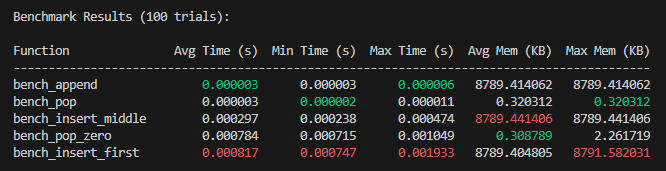
Example of benchmark results:
-
Single benchmark
Benchmark Results (5 trials): Function Avg Time (s) Min Time (s) Max Time (s) ---------------------------------------------- add_item 0.002393 0.000939 0.007362 -
Multiple benchmarks
Usage
Decorator-based Benchmarks (@bench decorator)
Basic usage
The @bench decorator provides the simplest way to benchmark a function:
from easybench import bench

# Add @bench with function parameters
@bench(item=123, big_list=list(range(1_000_000)))
def add_item(item, big_list):
    big_list.append(item)
Fresh data
In the example above, big_list is created once and the same list is used for all trials.
When you need fresh data for each trial, use a function or lambda to generate new data on demand:
from easybench import bench

# Create a new list for each trial
@bench(item=-1, big_list=lambda: list(range(1_000_000)))
def append(item, big_list):
    big_list.append(item)
Function parameters (@bench.fn_params)
Sometimes you may want to use functions as parameters.
In such cases, use the @bench.fn_params decorator:
def pop_first(some_list):
    """Remove the first element from the list"""
    some_list.pop(0)

@bench(big_list=list(range(1_000_000)))
@bench.fn_params(func=pop_first)
def apply_function(big_list, func):
    func(big_list)
Configuration (@bench.config)
To customize benchmark settings, use the @bench.config decorator:
@bench(big_list=list(range(10_000_000)))
@bench.config(trials=10, memory=True)
def pop_last(big_list):
    big_list.pop()
- Place the
@bench.configdecorator before (below) other bench decorators.
Main configuration options:
trials: Number of trials (default:5)memory: Also measure memory usage (default:False)- For other options, see "Configuration Options" below
Multiple parameter sets (BenchParams)
When you want to benchmark a function with multiple parameter sets,
you can pass a list of parameter sets created with BenchParams to the @bench decorator:
from easybench import bench, BenchParams

# Define parameter sets
small = BenchParams(
    name="Small",                                 # Parameter set name
    params={"lst": lambda: list(range(10_000))},  # Parameters for @bench
)
large = BenchParams(
    name="Large",
    params={"lst": lambda: list(range(1_000_000))}
)

# Benchmark with multiple parameter sets
@bench([small, large])
def pop_first(lst):
    return lst.pop(0)
On-demand benchmarking
If you want to run the benchmark only when needed, use the .bench() method:
@bench
def append_item(item, big_list):
    big_list.append(item)
    return len(big_list)

# Run as a normal function (without benchmarking)
result = append_item(3, list(range(1_000_000)))

# Run with benchmarking
result = append_item.bench(3, list(range(1_000_000)))
print(result)  # 10000001
- By default, the benchmark runs for
1trial. - To run multiple trials, specify the
bench_trialsparameter:result = append_item.bench(3, list(range(1_000_000)), bench_trials=10)
- When running multiple trials, the
.bench()method returns the value from the first trial.result = append_item.bench(3, [1,2,3], bench_trials=10) print(result) # 4
Class-based Benchmarks (EasyBench class)
For comparing multiple benchmarks or more complex setups, the class-based approach is useful:
from easybench import EasyBench, BenchConfig

class BenchListOperation(EasyBench):

    # Benchmark configuration
    bench_config = BenchConfig(
        trials=10,     # Number of trials
        memory=True,   # Measure memory usage
        sort_by="avg"  # Sort by average time
    )

    # Runs before each trial
    def setup_trial(self):
        self.big_list = list(range(10_000_000))

    # Benchmark methods (must start with bench_)
    def bench_append(self):
        self.big_list.append(-1)

    def bench_insert_start(self):
        self.big_list.insert(0, -1)

if __name__ == "__main__":
    BenchListOperation().bench()
How to use the class-based approach:
- Create a class that inherits from
EasyBench - Configure benchmark settings with the
bench_configclass variable - Prepare for each trial in the
setup_trialmethod - Methods starting with
bench_will be benchmarked - Call the
bench()method to execute the benchmarksbench()displays the results on screen and returns a dictionary of measured value
Lifecycle Methods
In class-based benchmarks, you can use the following lifecycle methods:
class BenchExample(EasyBench):
    def setup_class(self):
        # Run once before all benchmarks in the class
        pass

    def teardown_class(self):
        # Run once after all benchmarks in the class
        pass

    def setup_function(self):
        # Run before each benchmark function
        pass

    def teardown_function(self):
        # Run after each benchmark function
        pass

    def setup_trial(self):
        # Run before each trial
        pass

    def teardown_trial(self):
        # Run after each trial
        pass
Parameterized Benchmarks (parameterized decorator)
You can run the same benchmark method with different parameter sets using the parameterized decorator:
from easybench import BenchParams, EasyBench, parameterized

class BenchListOperations(EasyBench):
    # Define parameter sets with BenchParams
    small_params = BenchParams(
        name="Small List",
        params={"size": 10_000}
    )

    large_params = BenchParams(
        name="Large List",
        params={"size": 1_000_000}
    )

    # Apply parameterized decorator with a list of parameter sets
    @parameterized([small_params, large_params])
    def bench_create_list(self, size):
        return list(range(size))
This will run the benchmark with each parameter set and include the parameter set name in the results:
Benchmark Results (5 trials):

Function                         Avg Time (s) Min Time (s) Max Time (s)
--------------------------------------------------------------------
bench_create_list (Small List)   0.000442     0.000309     0.000855
bench_create_list (Large List)   0.092680     0.062617     0.129535
Fixtures (fixture decorator)
To provide common test data, you can use pytest-style fixtures:
from easybench import EasyBench, fixture

# Define a fixture
@fixture(scope="trial")
def big_list():
    return list(range(10_000_000))

class BenchListOperation(EasyBench):
    # Receive the fixture as an argument
    def bench_append(self, big_list):
        big_list.append(-1)

    def bench_insert_start(self, big_list):
        big_list.insert(0, -1)

if __name__ == "__main__":
    BenchListOperation().bench()
The scope parameter of the fixture decorator specifies the lifetime of the fixture:
"trial": Created for each trial (default)"function": Created once per benchmark function"class": Created once per benchmark class
Configuration Options
The following settings are available in the BenchConfig class:
from easybench import BenchConfig, EasyBench

class MyBenchmark(EasyBench):
    bench_config = BenchConfig(
        trials=5,            # Number of trials
        sort_by="avg",       # Sort criterion
        reverse=False,       # Sort order (False=ascending, True=descending)
        memory=True,         # Enable memory measurement
        color=True,          # Use color output in results
        show_output=False,   # Display function return values
        reporters=[]         # Custom reporters (see explanation below)
    )
Sorting options (sort_by):
"def": Definition order (default)"avg": Average execution time"min": Minimum execution time"max": Maximum execution time"avg_memory": Average memory usage (whenmemory=True)"peak_memory": Peak memory usage (whenmemory=True)
Memory Measurement Limitations
EasyBench uses Python's built-in tracemalloc module to measure memory usage.
This has some important limitations:
tracemalloconly tracks memory allocations made through Python's memory manager- Memory allocated by C extensions (like NumPy, Pandas, or other native libraries) often bypasses Python's memory manager and won't be accurately measured
- The reported memory usage reflects Python objects only, not the total process memory consumption
For applications heavily using C extensions, consider using external profilers like
memory_profileror system monitoring tools for more accurate measurements.
Command Line Interface (easybench command)
To run multiple benchmarks at once, use the easybench command:
easybench [options] [path]
- By default, it runs files named
bench_*.pyin thebenchmarksdirectory - You can specify either a directory containing benchmark files or a specific benchmark file
- Benchmark scripts must follow these rules:
- For class-based benchmarks, class names should start with
Bench - For function-based benchmarks, function names should start with
bench_
- For class-based benchmarks, class names should start with
Command Options
easybench [--trials N] [--memory] [--sort-by METRIC] [--reverse] [--no-color] [--show-output] [path]
--trials N: Number of trials (default: 5)--memory: Enable memory measurement--sort-by METRIC: Sort criterion (def/avg/min/max/avg_memory/peak_memory)--reverse: Sort results in descending order--no-color: Disable colored output--show-output: Display function return valuespath: Directory containing benchmark files or a specific benchmark file (default: "benchmarks")
Function-based Benchmark Example
Example of a function-based benchmark to be run from the command line:
# Filename: benchmarks/bench_list_operations.py
from easybench import fixture

@fixture(scope="trial")
def big_list():
    return list(range(10_000_000))

def bench_append(big_list):
    """Append an element to the end of the list"""
    big_list.append(-1)

def bench_insert_start(big_list):
    """Insert an element at the beginning of the list"""
    big_list.insert(0, -1)
Save this file in the benchmarks folder and run the easybench command to benchmark both functions and compare the results:
easybench --trials 10 --memory
Advanced Usage
Custom Output (Formatter and Reporter)
EasyBench uses a mechanism called Reporter to output benchmark results. By default, ConsoleReporter is used.
ConsoleReporter is a reporter that outputs data to the console screen, and by default formats the data in tabular form (TableFormatter). In EasyBench, you can change both the Formatter (output format) and the Reporter (output method) to enable various forms of output.
Using Reporters
To use reporters, set them as a list in the reporters parameter of your benchmark configuration (BenchConfig or @bench.config). Since reporters is a list, you can specify multiple output methods simultaneously.
-
Usage example
from easybench import BenchConfig
from easybench.reporters import ConsoleReporter, FileReporter

# Multiple output formats at once
config = BenchConfig(
    reporters=[
        ConsoleReporter(),             # Show in console as a table
        FileReporter("results.csv"),   # Save as CSV file
        FileReporter("results.json"),  # Save as JSON file
    ]
)
Creating Custom Reporters
For advanced use cases, you can create custom reporters:
from easybench.reporters import (
    Reporter, TableFormatter, JSONFormatter, CSVFormatter
)

# Custom reporter example - sends results to a web API
class WebAPIReporter(Reporter):
    def __init__(self, api_url, auth_token):
        super().__init__(JSONFormatter())  # Use JSON format
        self.api_url = api_url
        self.auth_token = auth_token

    def _send(self, formatted_output):
        # Send formatted results to an API endpoint
        import requests
        headers = {"Authorization": f"Bearer {self.auth_token}"}
        requests.post(self.api_url, headers=headers, json=formatted_output)

# Use with BenchConfig
bench_config = BenchConfig(
    reporters=[
        ConsoleReporter(),  # Still show in console
        WebAPIReporter("https://api.example.com/benchmarks", "my_token")
    ]
)
License
Project details
Verified details
These details have been verified by PyPIProject links
GitHub Statistics
Maintainers
Release history Release notifications | RSS feed


Download files
Download the file for your platform. If you're not sure which to choose, learn more about installing packages.
Source Distribution
Built Distribution
Filter files by name, interpreter, ABI, and platform.
If you're not sure about the file name format, learn more about wheel file names.
Copy a direct link to the current filters
File details
Details for the file easybench-0.1.11.tar.gz.
File metadata
- Download URL: easybench-0.1.11.tar.gz
- Upload date:
- Size: 155.3 kB
- Tags: Source
- Uploaded using Trusted Publishing? Yes
- Uploaded via: twine/6.1.0 CPython/3.10.17
File hashes
| Algorithm | Hash digest | |
|---|---|---|
| SHA256 |
4e3f3fdab34019363dceea1c9526e1d9cf138901ada004207b87983cca12b8d9
|
|
| MD5 |
19e14e4b17bf6ad1d225b7319f05c380
|
|
| BLAKE2b-256 |
1e3f11479b99176972ffbd0b8d41ae4c1f17dd038f1ec3a6df4d72cc871789ec
|
File details
Details for the file easybench-0.1.11-py3-none-any.whl.
File metadata
- Download URL: easybench-0.1.11-py3-none-any.whl
- Upload date:
- Size: 26.2 kB
- Tags: Python 3
- Uploaded using Trusted Publishing? Yes
- Uploaded via: twine/6.1.0 CPython/3.10.17
File hashes
| Algorithm | Hash digest | |
|---|---|---|
| SHA256 |
92abda277c67577b9723bda9d9948d8f0e2a8f2fe24b4ff8d50d4f25d5d1e91b
|
|
| MD5 |
4164a9fba24530bf50c48954bc40b5ab
|
|
| BLAKE2b-256 |
6f06a014a73c7be74d70275442dadd493768891319ab2406b8874164698c02a1
|






