
A previous release had provenance metadata, but this release does not. View details.
edt-bridge-mcp
English · Русский
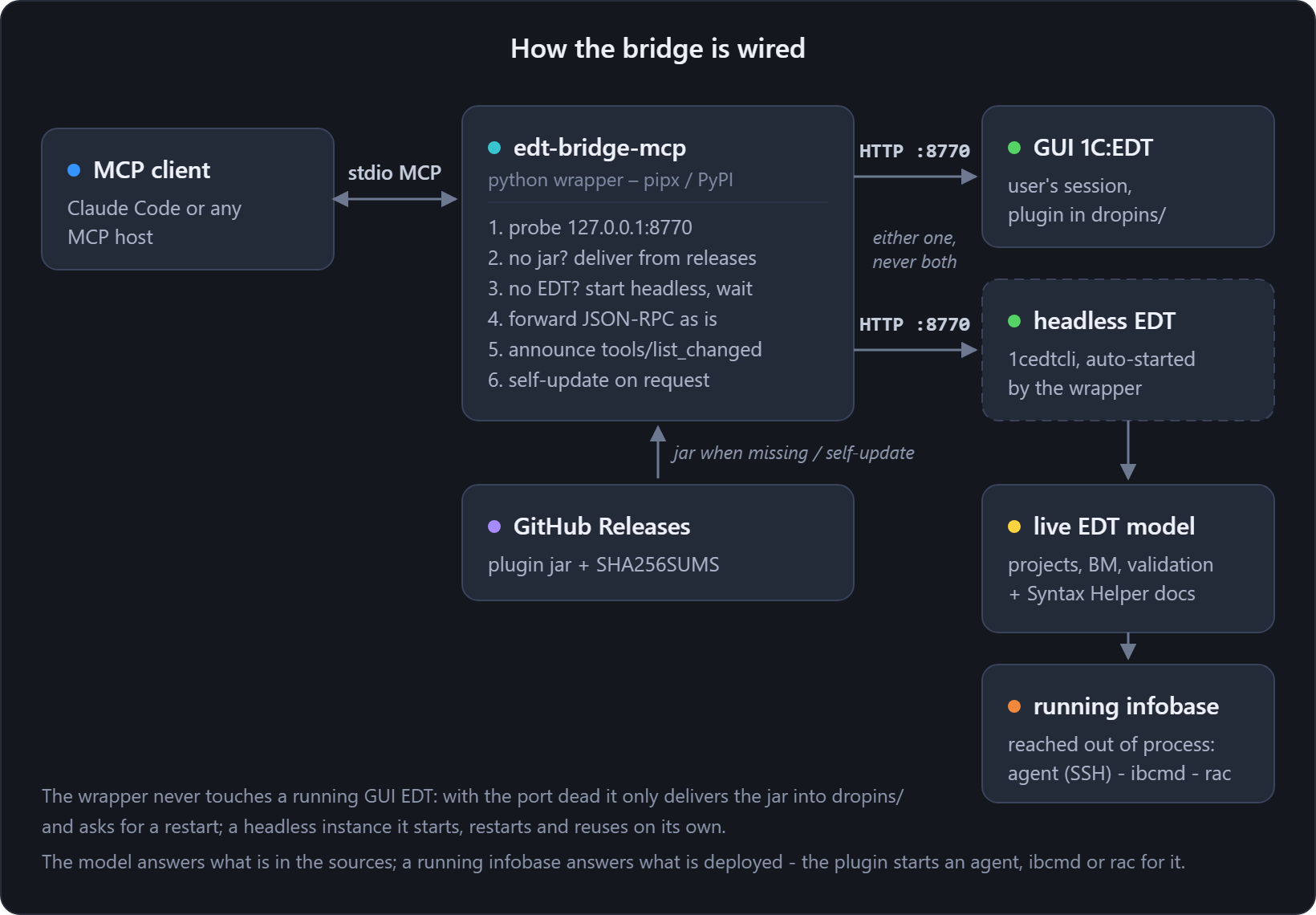
stdio MCP front-end for the edt-bridge 1C:EDT plugin.
The Java plugin serves MCP as JSON-RPC over HTTP on 127.0.0.1:8770. An MCP client configured
with that address cannot reach the server when EDT is stopped. The wrapper provides these behaviors:
- EDT open, GUI or headless, and every request is forwarded to the live bridge;
- EDT closed, and it starts a headless EDT –
1cedtcliwith a keepalive pipe, the same recipe asscripts/run-headless.ps1– then forwards once the model is ready; - plugin jar missing, and it delivers the jar itself from the latest GitHub release, checksum
verified, into EDT's
dropins/before starting. A barepipx install edt-bridge-mcpis enough to get a working bridge; - a client session never hangs on startup. While the bridge is starting,
tools/listreturns an empty list, and anotifications/tools/list_changedfollows when it is ready.
Install
pipx install edt-bridge-mcp # or: pipx install ./python from a checkout
Register in an MCP client
claude mcp add edt-bridge -- edt-bridge-mcp --workspace "D:\\path\\to\\edt-workspace"
From a shell
By default, the wrapper uses JSON-RPC over stdin and stdout to communicate with an MCP client. Use subcommands to access the bridge manually or from a script. They use the same port scan, token, and automatic headless start:
edt-bridge-mcp tools                    # what the running bridge serves
edt-bridge-mcp call edt_projects        # call a tool, print what it returned
edt-bridge-mcp call edt_metadata_details --json '{"projectName": "SM", "fqn": "CommonModule.Foo"}'
edt-bridge-mcp call edt_create_extension --json-file args.json   # arguments from a UTF-8 file
edt-bridge-mcp status                   # is a bridge up? (never starts one)
--raw prints the JSON result instead of the text a tool returned. Arguments come from --json,
--json-file or --stdin, and a file is the dependable route for non-ASCII arguments on Windows.
Exit codes: 0 is fine, 1 means the call could not be made at all (no bridge, bad usage, transport
error), and 2 means the bridge ran the tool and the tool reported an error. That lets a script tell
"it failed" from "it never ran".
Self-update
edt-bridge-mcp self-update             # refresh the plugin jar (GitHub Releases) + the wrapper (PyPI)
edt-bridge-mcp self-update --jar-only  # only the jar
edt-bridge-mcp self-update --pip-only  # only the wrapper
edt-bridge-mcp self-update --pip-only --from <repo>/python   # from a checkout
A running EDT, GUI or headless, keeps the old jar loaded until it restarts. The wrapper restarts its own headless instance the next time it starts one.
--from installs the wrapper from a local checkout instead of PyPI. Use it to try a build that is
not released yet, without a full pipx install --force, which rebuilds the venv and replaces the exe
the running client holds.
The exit code separates the bridge from its add-ons. 0 means every step asked for succeeded. 1
means the bridge itself did not update, neither the jar nor the wrapper, or that nothing did. 2
means the bridge is current and only a wrapper plugin is not: a plugin installs from its own source,
and that source being unreachable is not the bridge failing to update.
The wrapper updates itself by unpacking, not through an installer. It downloads the wheel from PyPI,
or copies the package out of the checkout given to --from, and replaces the package inside
site-packages using the standard library alone. No pip, no pipx, no build backend, and that matters:
pipx 1.15 builds its venvs through uv, and a uv-built venv contains no pip at all.
Plugins
External packages installed in the wrapper's environment can add MCP tools. They can contain
reference material under another license or tools for internal services. The wrapper discovers them
through the edt_bridge.tools entry-point group, lists their tools alongside its own, and executes
them. These tools are available without a running EDT.
pipx inject edt-bridge-mcp <package>   # install a plugin
edt-bridge-mcp plugins                 # what is plugged in, or why a plugin refused to load
EDT_BRIDGE_NO_PLUGINS=1 turns the discovery off. The declaration contract for plugin authors is on
the installation page.
The executables in Scripts are not replaced because a running client may hold them open on
Windows. The stub loads the updated code from site-packages on its next start. pipx_metadata.json is corrected, so pipx list does not go on reporting
the old version. An editable install is refused rather than overwritten.
Configuration
CLI flags override the environment.
| Env | Flag | Meaning |
|---|---|---|
EDT_BRIDGE_PORT |
--port |
bridge port (default 8770) |
EDT_BRIDGE_TOKEN |
– | write-tools token, forwarded as Authorization: Bearer and injected into the headless JVM |
EDT_BRIDGE_WORKSPACE |
--workspace |
EDT workspace path, required for the headless start |
EDT_BRIDGE_EDT_DIR |
--edt-dir |
EDT install dir (the folder with 1cedtcli and dropins); the newest install is found automatically when omitted |
EDT_BRIDGE_START_TIMEOUT |
--start-timeout |
seconds to wait for a starting bridge (default 360) |
EDT_BRIDGE_AUTOSTART |
--no-autostart |
set 0 or pass the flag to forward requests and start nothing |
The rarely touched ones (EDT_BRIDGE_PORT_SCAN, EDT_BRIDGE_WINDOW_WAIT, EDT_BRIDGE_LANG) and the
plugin's own variables are in
Environment variables.
Safety
- If a GUI EDT is running but the bridge port is dead, which means the plugin is missing there,
the wrapper refuses to start a headless instance, because the GUI holds the workspace lock. It
still delivers the jar into
dropins/when missing, so restarting that EDT activates the bridge. - If a headless
1cedtcliis already starting, the wrapper waits for it instead of spawning a second one.
1 maintainer

Metadata
1 maintainer
Release files for edt-bridge-mcp 0.38.0
For a detailed explanation of source distributions (sdists) and built distributions (wheels), please see the package formats documentation.
Loss of provenance
These files do not have provenance metadata, despite files in a prior release including this data.
We recommend further investigation before installing these files. View details.
Source distribution (sdist)
| File | Size | Uploaded | Provenance | Actions |
|---|---|---|---|---|
| edt_bridge_mcp-0.38.0.tar.gz | 175.0 kB | Without provenance | Details for edt_bridge_mcp-0.38.0.tar.gz |
Built distribution (wheel)
| File | Interpreter | ABI | Platform | Actions Reset |
|---|---|---|---|---|
| edt_bridge_mcp-0.38.0-py3-none-any.whl | Python 3 | none | any | Details for edt_bridge_mcp-0.38.0-py3-none-any.whl |
Total release size: 302.0 kB
Release files / edt_bridge_mcp-0.38.0.tar.gz
Loss of provenance
This file belongs to a release without provenance metadata, despite a prior release including this data.
We recommend further investigation before installing this file. View details.
| Download URL | edt_bridge_mcp-0.38.0.tar.gz |
|---|---|
| Size | 175.0 kB |
| Tags | Source |
|
SHA-256 checksum How to use checksums |
d15e3506ea243580b8c27aaffa13c6d177efd5d45fc69a6c448e9c3cf6913e28
|
|
BLAKE2b-256 checksum How to use checksums |
bae87e34bda15d610078e648134797c77ae90b14d4dc9ca2c7915fda1c33df71
|
| Upload date | |
|
Uploaded using Trusted Publishing? What is trusted publishing? |
Yes |
| Uploaded via |
twine/7.0.0 CPython/3.13.16
|
Release files / edt_bridge_mcp-0.38.0-py3-none-any.whl
Loss of provenance
This file belongs to a release without provenance metadata, despite a prior release including this data.
We recommend further investigation before installing this file. View details.
| Download URL | edt_bridge_mcp-0.38.0-py3-none-any.whl |
|---|---|
| Size | 127.1 kB |
| Tags | Python 3 |
|
SHA-256 checksum How to use checksums |
7941ad93d73008b5f0c6120d49584959579875a0c1c3f1c30c295defa5ec8a36
|
|
BLAKE2b-256 checksum How to use checksums |
2b857805775777aac79a55615be4c1ccd90ae850696d829cd9fec87240752634
|
| Upload date | |
|
Uploaded using Trusted Publishing? What is trusted publishing? |
Yes |
| Uploaded via |
twine/7.0.0 CPython/3.13.16
|
Security for edt-bridge-mcp 0.38.0
Provenance
Provenance describes where a file came from. On PyPI, provenance is shared via attestations, which provide a verifiable record of the build or publishing details. View details, limitations and caveats.
Loss of provenance
A previous release of these files had provenance metadata, but this release does not.
While this could reflect a routine change by the project maintainers, it may also indicate that the release files have been compromised.
Release comparison
- Removed 0.37.3 2 files With provenance
- Added 0.38.0 2 files Without provenance
A note on package security
PyPI is a repository for distributing packages, not a service for auditing them. While third-party security researchers and our staff do their best to detect and remove malicious packages, PyPI cannot guarantee the quality, security or suitability of any given package.
To learn more about protecting yourself from malicious actors, visit our package security documentation.














