
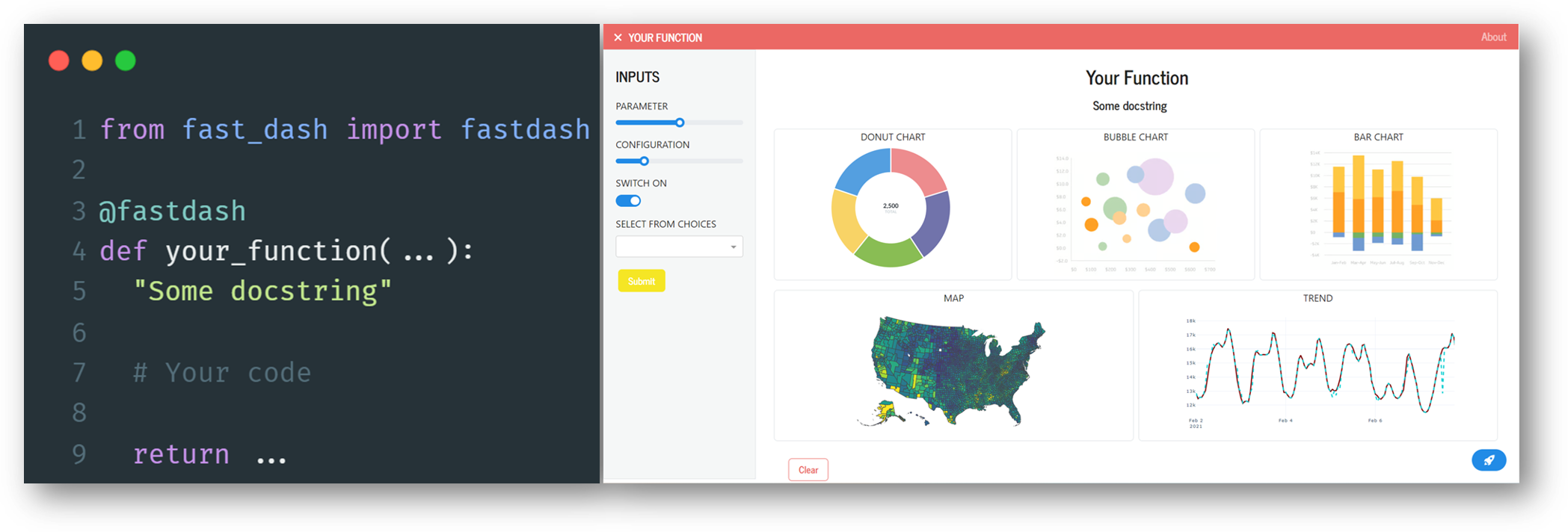
Turn your Python functions into interactive web applications. Fast Dash is an innovative way to build and deploy your Python code as interactive apps with minimal changes to your original code.

Project description

Turn any Python function into a web app with a single decorator ⚡






- Documentation: docs.fastdash.app
- Source: github.com/dkedar7/fast_dash
- Install:
pip install fast-dash
What is Fast Dash?
Fast Dash inspects your Python function's signature, picks UI components from the type hints and default values, and serves the result as a Plotly Dash app — usually in under five lines of code. No frontend, no callbacks, no boilerplate.
It exists for one job: collapse the gap between a working Python function and a shareable interactive web app.
30-second example
pip install fast-dash
from fast_dash import fastdash

@fastdash
def greet(name: str = "world") -> str:
    return f"Hello, {name}!"

# Serving on http://127.0.0.1:8080
That's the entire app. Open the URL, type a name, click Run, see the response.
How it works
The @fastdash decorator does three things at import time:
- Inspects the function signature — each parameter becomes an input component, the return becomes an output component.
- Picks components from type hints and defaults —
int→ number input,bool→ checkbox,pd.DataFrame→ table, etc. (full table below). - Builds a Dash app and starts the server — the function body is wired as the callback that runs when the user clicks Run.
You can override any of this by passing components explicitly via inputs= and outputs=, or by skipping the decorator and using the FastDash(...) class directly.
Type hint → component reference
Inputs (parameter type → UI component):
| Type hint | Component |
|---|---|
str |
Textarea |
str with default=[...] |
Single-select dropdown |
int, float |
Number input |
int/float with range(...) default |
Slider |
bool |
Checkbox |
list |
Multi-select dropdown |
dict (with default) |
Multi-select dropdown (keys) |
datetime.date |
Date picker |
PIL.Image.Image |
Image upload |
Literal["a", "b"] |
Single-select dropdown |
enum.Enum subclass |
Single-select dropdown |
Annotated[int, range(0, 100)] |
Slider |
Annotated[str, ["a", "b"]] |
Single-select dropdown |
Optional[T] |
As T, but nullable |
| Any Dash component instance | Used directly |
Any Fast Dash component (Text, Slider, ...) |
Used directly |
Outputs (return type → UI component):
| Return type | Component |
|---|---|
str, int, float, etc. |
Text (rendered as <h1>) |
pd.DataFrame |
Table |
PIL.Image.Image, matplotlib.figure.Figure |
Image |
| Tuple of types | Multiple outputs (one component each) |
Any Fast Dash component (Graph, Image, ...) |
Used directly |
For Plotly figures, annotate the return as Graph rather than plotly.graph_objects.Figure — the latter is not auto-detected:
from fast_dash import fastdash, Graph

@fastdash
def chart(rows: int = 100) -> Graph:
    import plotly.express as px
    return px.scatter(px.data.iris().head(rows), x="sepal_width", y="sepal_length")
Unknown hints fall back to text. Source-introspection failures (REPL, exec) fall back to generic OUTPUT_1, OUTPUT_2 labels — the app still works.
Common patterns
Multiple inputs and outputs
from fast_dash import fastdash

@fastdash
def describe(text: str, count: int = 3) -> str:
    """Repeat text `count` times."""
    return " · ".join([text] * count)
Mosaic layout for arranging multiple outputs:
from fast_dash import fastdash, Graph
import plotly.express as px
import pandas as pd

@fastdash(mosaic="AB\nAC")
def dashboard(rows: int = 100) -> (Graph, Graph, Graph):
    df = px.data.iris().head(rows)
    return (
        px.scatter(df, x="sepal_width", y="sepal_length", color="species"),
        px.histogram(df, x="petal_width"),
        px.box(df, y="petal_length", color="species"),
    )
The mosaic string is ASCII art (inspired by Matplotlib's subplot_mosaic). Each letter corresponds to one output, in order.
Wrapping arbitrary Dash components with Fastify:
from fast_dash import fastdash, Fastify
from dash import dcc

custom_slider = Fastify(dcc.Slider(min=0, max=100, value=50), "value")

@fastdash
def my_app(x: custom_slider) -> str:
    return f"You picked {x}"
Skip the decorator when you want more control over the lifecycle:
from fast_dash import FastDash

def my_fn(x: int) -> int: return x * 2

app = FastDash(callback_fn=my_fn, title="Doubler", port=8050)
app.run()
Multiple functions in a single tabbed app — pass a list of callbacks:
from fast_dash import FastDash

def greet(name: str) -> str:
    return f"Hello, {name}!"

def add(a: int, b: int) -> int:
    return a + b

app = FastDash([greet, add], tab_titles=["Greeter", "Adder"])
app.run()
Each function gets its own tab with independent inputs, outputs, and callbacks. tab_titles is optional — without it, tabs are named after the functions.
Decorator options
Most apps need none of these — defaults are sensible. Pass any of them as kwargs to @fastdash(...) or FastDash(...).
| Option | Default | Effect |
|---|---|---|
title |
function name | App title shown in the header |
inputs, outputs |
inferred | Override component selection |
mosaic |
None |
ASCII layout for multiple outputs |
theme |
"JOURNAL" |
Any Bootswatch theme name |
port |
8080 |
Port to serve on |
mode |
None |
Set to "jupyterlab", "inline", or "external" for notebook use |
update_live |
False |
Re-run on every input change instead of waiting for the Run button |
about |
True |
Show the docstring as an "About" modal; pass a string to override |
minimal |
False |
Hide chrome (header, footer, nav) for embedding |
branding |
False |
Show the Fast Dash rocket footer |
stream |
False |
Enable streaming outputs (see docs) |
The full list lives in the docs.
Limits and gotchas
- Output labels are inferred from the
returnline of your source. If the source can't be retrieved (REPL,exec, frozen environments), Fast Dash falls back to genericOUTPUT_1,OUTPUT_2labels rather than crashing. Passoutput_labels=[...]explicitly to control them. - Reusing component instances across inputs and outputs can mutate shared attributes. Construct fresh components per slot (or use
inputs=Textrather thaninputs=text_instance). - The
themearg expects a Bootswatch name, not a CSS URL. Theme drives both the Bootstrap stylesheet and the dark/light mode (Bootswatch's dark themes —CYBORG,DARKLY,SLATE, etc. — auto-enable dark mode).
Development
git clone https://github.com/dkedar7/fast_dash.git
cd fast_dash
uv pip install -e ".[test]"   # or: pip install -e ".[test]"
uv pip install "dash[testing]"
uv run --no-sync pytest tests/
Selenium tests need a chromedriver matching your installed Chrome version (brew install --cask chromedriver on macOS).
The tests/ directory is the canonical example collection — tests/examples.py and tests/test_typing_hints.py cover most patterns the library supports.
Project structure
fast_dash/
  fast_dash.py     # FastDash class + @fastdash decorator + callback wiring
  Components.py    # Layout (AppLayout) + type-hint inference + built-in components
  utils.py         # Source introspection, theme mapping, docstring parsing
  assets/          # Static CSS served by Dash
tests/             # pytest suite (also serves as runnable examples)
docs/              # MkDocs site source
License
MIT. Built on top of Plotly Dash.
Release history Release notifications | RSS feed


Download files
Download the file for your platform. If you're not sure which to choose, learn more about installing packages.
Source Distribution
Built Distribution
Filter files by name, interpreter, ABI, and platform.
If you're not sure about the file name format, learn more about wheel file names.
Copy a direct link to the current filters
File details
Details for the file fast_dash-0.2.15.tar.gz.
File metadata
- Download URL: fast_dash-0.2.15.tar.gz
- Upload date:
- Size: 64.2 kB
- Tags: Source
- Uploaded using Trusted Publishing? No
- Uploaded via: twine/6.1.0 CPython/3.13.12
File hashes
| Algorithm | Hash digest | |
|---|---|---|
| SHA256 |
36d6882b407ab64d2779abfe1067d4d4392b969fd9897a426f0c3460b53aefea
|
|
| MD5 |
315a065117293cb0732c49dbd2e89a0f
|
|
| BLAKE2b-256 |
90de7c6297e7ecadbecb1b40ee8206921dfc8c113aacbc2b94715c92d8bd95c5
|
File details
Details for the file fast_dash-0.2.15-py3-none-any.whl.
File metadata
- Download URL: fast_dash-0.2.15-py3-none-any.whl
- Upload date:
- Size: 61.4 kB
- Tags: Python 3
- Uploaded using Trusted Publishing? No
- Uploaded via: twine/6.1.0 CPython/3.13.12
File hashes
| Algorithm | Hash digest | |
|---|---|---|
| SHA256 |
5e05583662d015036cea31946a8b2127a7003b3028305c7ed6ad15e89563015a
|
|
| MD5 |
ed8e4950645a71631247169b9acd99ff
|
|
| BLAKE2b-256 |
7f3ba2227cbabb7c973cbc95dda64c5aeba007025f147a875828894b62be879e
|






