
fasthamer
Realtime HaMeR 3D hand mesh recovery on the Apple Neural Engine. Give it an image, get a 3D hand mesh, MANO parameters, 3D joints, camera parameters, and 2D joints per hand — a MediaPipe-Hands-style API, but with a full 3D hand mesh behind it.
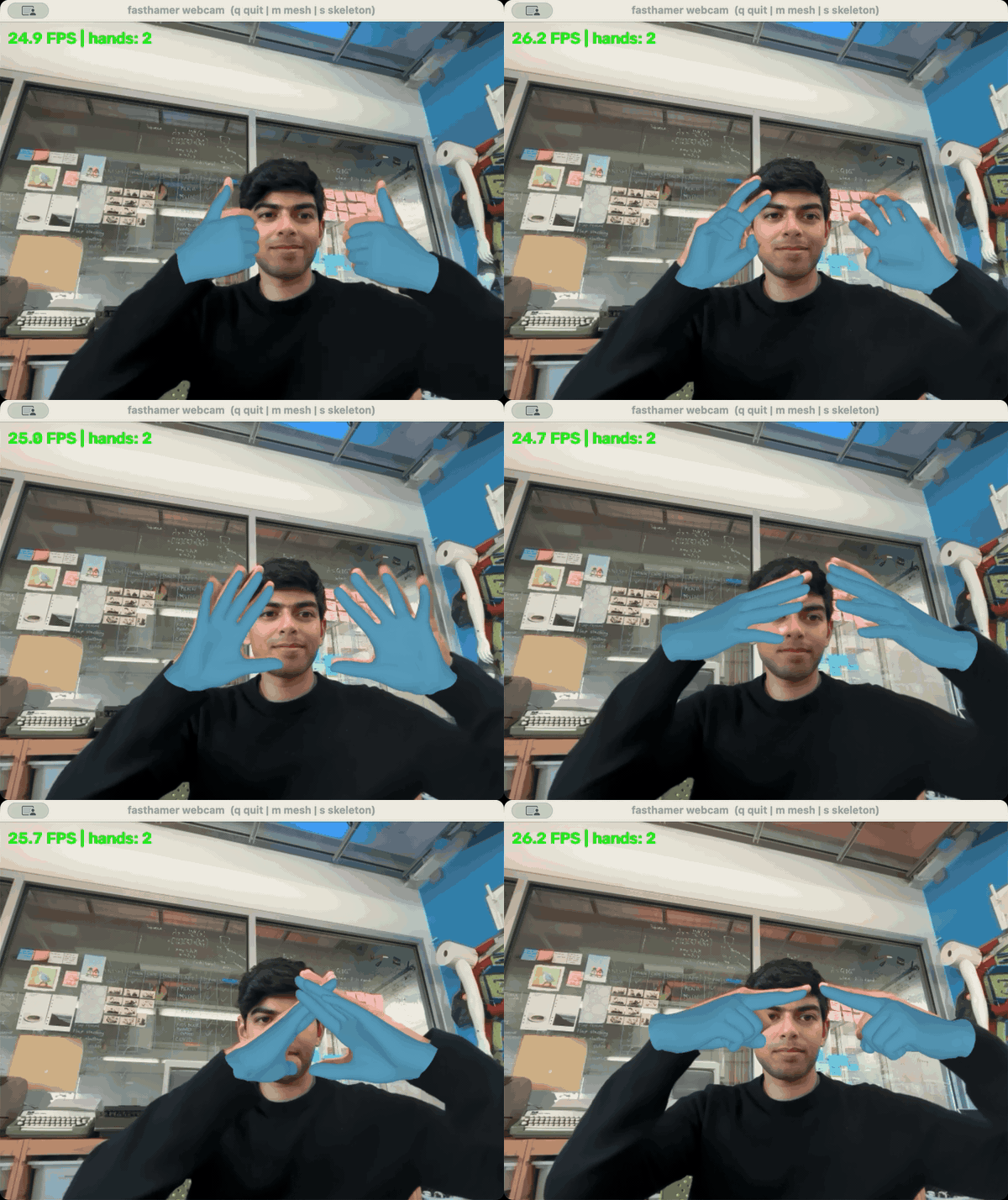
fasthamer-webcam: live 3D meshes on two hands at ~26 FPS
(MP4)
- Fast: the whole network (ViT-H backbone + MANO head) runs as one CoreML program on the ANE and the mesh stage takes ~0.6 ms per hand — ~30 FPS end-to-end with two hands at 640px on a fanless M4 MacBook Air, torch-free at runtime.
- Simple:
pip install fasthamer→fasthamer.load()→result = hands(rgb). No accounts, no license forms: the default hand mesh is NVIDIA's Apache-licensed SOMA-X hand, regressed from HaMeR's MANO parameters by mano2soma-x (~2 mm from the MANO mesh). If you have a MANO license you can get the MANO mesh instead (hand_model="mano"). - Complete outputs: MANO
global_orient/hand_pose/betas(rotation matrices and axis-angle), the hand mesh (2859-vertex SOMA-X or 778-vertex MANO), 21 3D joints, camera intrinsics + per-hand translation, projected 2D joints. - Batteries included: hand detection via fasthands (CoreML/ANE, ~1 ms) and a tiny C mesh rasterizer for overlays (~10x faster than pyrender, no GPU/OpenGL).
Requires macOS on Apple Silicon.
Install
pip install fasthamer
fasthamer-webcam --mirror                 # live demo: 3D mesh overlay from your webcam
That's it. The first fasthamer.load() (or fasthamer-setup, if you prefer
to pre-download) fetches the CoreML model bundle (~470 MB) and the SOMA-X hand
assets (~40 MB) into ~/.cache/fasthamer, then compiles the model for your
device (one-time, typically 10-30 s). Every load after that takes a couple of
seconds and works offline.
Optional: the MANO mesh
hand_model="mano" gives you the 778-vertex MANO
mesh instead of the SOMA-X hand. MANO is free for non-commercial research but
license-gated, so fasthamer does not ship it: create an account at
https://mano.is.tue.mpg.de, accept the license there, then
fasthamer-setup --mano                           # prompts for a path, or Enter to download with your account
fasthamer-setup --mano ~/Downloads/mano_v1_2.zip # or use the file you already have
fasthamer-webcam --mirror --hand-model mano
fasthamer either imports a MANO_RIGHT.pkl / mano_v1_2 folder / zip you
already have, or downloads mano_v1_2.zip with your MANO account email +
password (sent only to the MPI server, never stored), and converts it once to a
small .npz in ~/.cache/fasthamer/mano/. The same prompt runs on the first
load(hand_model="mano") if you skip setup. Non-interactive environments:
point FASTHAMER_MANO_PATH at your file, or set MANO_USERNAME and
MANO_PASSWORD; python -m fasthamer.mano_download downloads the zip on its own.
Quickstart
import cv2
import fasthamer

hands = fasthamer.load()                       # mode="image", hand_model="soma" by default
rgb = cv2.cvtColor(cv2.imread("photo.jpg"), cv2.COLOR_BGR2RGB)
result = hands(rgb)

for hand in result:
    hand.is_right          # bool (left hands: see note below)
    hand.keypoints_2d      # (21, 2)  pixels in the input image
    hand.keypoints_3d      # (21, 3)  meters, hand-centered
    hand.keypoints_camera  # (21, 3)  meters, camera frame (= keypoints_3d + cam_t)
    hand.vertices          # (2859, 3) SOMA-X hand mesh, hand-centered (778 with hand_model="mano")
    hand.soma_joints       # (25, 3)  SOMA-X skeleton joints (None with hand_model="mano")
    hand.cam_t             # (3,)     hand -> camera translation
    hand.global_orient     # (3, 3)   MANO global orientation (rotation matrix)
    hand.hand_pose         # (15, 3, 3) MANO pose  (also .hand_pose_aa / .global_orient_aa)
    hand.betas             # (10,)    MANO shape

result.focal, result.cx, result.cy   # pinhole camera: u = f*X/Z + cx
overlay = hands.render(rgb, result)               # mesh overlay (C rasterizer)
overlay = fasthamer.draw_landmarks(overlay, result)  # 2D skeleton
Video mode
mode="video" enables temporal hand tracking in the detector (faster and
smoother than per-frame detection) — feed frames sequentially:
hands = fasthamer.load(mode="video")
while True:
    ok, frame = cap.read()
    result = hands(cv2.cvtColor(frame, cv2.COLOR_BGR2RGB))
Webcam demo
fasthamer-webcam (installed with the package) opens your webcam and overlays
the reconstructed meshes in realtime:
fasthamer-webcam --mirror              # selfie view
fasthamer-webcam --hand-model mano     # MANO mesh instead of SOMA-X (needs fasthamer-setup --mano)
fasthamer-webcam --soma                # MANO vs SOMA-X comparison view (blend/flicker/wire, key 'o')
fasthamer-webcam --skeleton            # 2D joints instead of the mesh
fasthamer-webcam --camera 0            # pick a camera (auto-probed by default)
fasthamer-webcam --stabilize           # lock Right/Left per hand across frames
fasthamer-webcam --camera clip.mp4     # run on a video file instead of a camera
fasthamer-webcam --record out.mp4      # also save the annotated output
fasthamer-webcam --no-display --max-frames 120   # headless benchmark, prints FPS
Keys: q / ESC quit, m toggle mesh, s toggle skeleton. It uses the same
low-latency loop as the threaded example below (freshest-frame capture thread
- worker/display split), so the FPS shown is the real end-to-end rate — it is
capped by your camera's frame rate, and only drops below that when the model
is the bottleneck (hold your hands in view when benchmarking; with no hands
only the ~1 ms detector runs). See
fasthamer-webcam --helpfor the full option list (--max-hands,--alpha,--force-handedness,--fasthands-detector,--compute-units,--width/--height, ...).
Examples:
examples/image_demo.py— single image in, mesh + skeleton overlay out.examples/webcam_demo.py— minimal synchronous webcam loop (easiest to read).examples/webcam_threaded_demo.py— low-latency webcam demo: a background camera thread always serves the freshest frame, and a worker/display split keeps the window responsive while the mesh stays aligned to the frame it was computed on. Use this one if the simple demo feels laggy (cv2.VideoCaptureotherwise hands you buffered, stale frames). Supports--no-display --max-frames Nfor benchmarking.
Conventions
- Input images are RGB uint8 (
H×W×3). - 3D outputs use a camera-style frame: x right, y down, z forward, meters.
hand.vertices/hand.keypoints_3dare hand-centered; addhand.cam_t(or use the*_cameraproperties) for camera-frame coordinates. Projection uses the pinhole camera in the result (result.project(pts)). - Joint order is MANO/OpenPose-style: wrist, then 4 joints each for thumb,
index, middle, ring, pinky (
fasthamer.HAND_EDGEShas the skeleton). With the SOMA-X hand these are the SOMA skeleton's MCP/PIP/DIP/tip joints (and the MANO wrist position); they sit within a few mm of MANO's regressed joints, except the MCP row which is ~1 cm further down the palm.hand.soma_jointshas all 25 SOMA joints. - Left hands: HaMeR mirrors left-hand crops, so MANO parameters always
describe a right MANO hand.
vertices/keypoints_3dare already un-mirrored. To re-pose a left hand yourself, apply the params to a right-hand MANO model and negate x. hands.facesgives the triangle faces of the active hand model (SOMA-X 5692, MANO 1538); flip winding for left hands.
Options
fasthamer.load(
    mode="image",             # or "video"
    max_hands=2,
    hand_model="soma",        # "soma" (SOMA-X hand, no MANO needed) or "mano"
    detector="fasthands",     # detection stack: "fasthands" or "mediapipe"
    fasthands_detector=None,  # model inside fasthands: "whim" or "mediapipe"
    model_dir=None,           # local model bundle dir (skips the download)
    soma_dir=None,            # local SOMA-X asset dir (skips the download)
    mano_path=None,           # hand_model="mano": your MANO_RIGHT.pkl / mano_v1_2 folder / zip
                              #   (default: the copy cached by fasthamer-setup --mano)
    rescale_factor=2.0,       # hand-box padding before cropping
    swap_handedness=False,    # if handedness looks inverted (mirrored inputs)
    stabilize_handedness=False,  # video: lock R/L per hand across frames
    handedness_iou=0.3,       # IoU to treat a detection as the same hand
    handedness_ttl=10,        # drop a track after N unseen frames
    handedness_switch_frames=5,  # switch only after N consecutive disagreements
    force_handedness=None,    # "right" / "left" to pin it outright
    compute_units="CPU_AND_NE",
)
Choosing a hand detector
Two independent choices, and confusingly both offer something called "mediapipe" — they are not the same thing:
detectorpicks the detection stack:"fasthands"(default) runs MediaPipe Hands ported to CoreML on the Neural Engine, ~1 ms/frame;"mediapipe"runs Google's official MediaPipe Tasks API on TFLite/XNNPACK/GPU (needspip install "fasthamer[mediapipe]", and exposesdet_conf/track_conf).fasthands_detectorpicks the detector model inside fasthands (requiresfasthands >= 0.4.0):"whim"— the WHIM-fine-tuned full-hand-box detector, steadier than the palm detector;"mediapipe"— the original palm detector. Left asNone, fasthands' own default (whim) applies.
hands = fasthamer.load(mode="video", fasthands_detector="mediapipe")
The two detector models frame hands differently — on the bundled test image
the boxes are [408,507,583,921] (whim) vs [414,518,584,906] (palm) — and
that box drives the crop fed to HaMeR, so the choice affects the reconstructed
geometry, not just detection recall. Worth trying both on unusual footage
(egocentric/wrist cameras, heavy foreshortening).
Handedness stability (video)
Detectors decide Right/Left from a single frame, so on hard footage — foreshortened, self-occluding hands, e.g. a wrist/egocentric camera — the label can flicker frame to frame. This is not cosmetic: HaMeR is a right-hand model, so "left" hands are mirror-flipped before the network and un-mirrored after. A flickered label produces mirror-wrong geometry on that frame (we measure ~200 mm of vertex jump on an otherwise identical frame), which is why relabeling the output afterwards is not enough.
stabilize_handedness=True fixes it upstream of the crop: each hand gets a
persistent IoU-matched track, and a spatially continuous hand keeps the label it
first appeared with. Tracks expire after handedness_ttl unseen frames so a
genuinely new hand can re-acquire.
The lock is hysteretic, not permanent: a tracked hand only switches its label
once the detector disagrees for handedness_switch_frames consecutive
frames (default 5). A single agreeing frame resets the streak, so alternating
flicker never accumulates into a switch — but a sustained correction still
wins, so a genuinely misidentified hand recovers instead of staying wrong for
the life of the track. Set handedness_switch_frames=0 for a permanent lock.
hands = fasthamer.load(mode="video", stabilize_handedness=True)
...
hands.reset()      # clear tracks when the video sequence restarts
For rigs where handedness is known and fixed (single-hand egocentric mounts),
force_handedness="right" pins every detection outright — a stronger
constraint that takes precedence over the tracker. Both are orthogonal to
swap_handedness, which is a global flip applied by the detector.
Environment variables: FASTHAMER_MODEL_DIR / FASTHAMER_SOMA_DIR point at
a local model bundle / SOMA-X asset directory; FASTHAMER_ASSETS_URL /
FASTHAMER_SOMA_ASSETS_URL override where they are downloaded from;
FASTHAMER_MANO_PATH points at your MANO model (MANO_RIGHT.pkl,
mano_v1_2/, or mano_v1_2.zip); MANO_USERNAME / MANO_PASSWORD let setup
download it non-interactively.
How it works
MediaPipe-style palm detection (fasthands, ANE) finds hand boxes; each box is cropped HaMeR-style and run through a single CoreML mlprogram containing the ViT-H backbone (192×144 input, interpolated position embeddings) and the MANO transformer head — 6-bit palettized weights — which outputs the MANO parameters and camera.
The mesh stage then runs without torch:
- SOMA-X hand (default). The
mano2soma-x ResMLP maps the
MANO parameters to SOMA-X hand parameters (25 joint rotations, 20 identity
coefficients, 24 bone scales, root translation); it runs as a CoreML model
(fp32, ~0.4 ms). SOMA-X's hand model (identity PCA, closed-form skeleton
fit, forward kinematics, skinning) is re-implemented in C
(
fasthamer.soma_np/soma_stage.c, ~0.15 ms per hand) and matches the reference py-soma-x implementation to 0.05 mm. SOMA-X skins with plain LBS, so since the soma-v2 assets (fasthamer 0.8) the regressor also predicts learned vertex correctives on the SOMA topology (aposedirs/shapedirspair, added to the bind-pose rest shape before skinning) that remove the LBS pinch at bent joints: the regressed SOMA hand is within 0.15 mm (mean vertex distance, 1.3 mm worst vertex) of the MANO mesh HaMeR implies, versus ~2 mm / 8 mm before. - MANO hand (
hand_model="mano"). The MANO mesh (778 vertices) is computed in numpy from yourMANO_RIGHT.pkl(fasthamer.mano, ~0.5 ms per hand, no chumpy/scipy); it matches HaMeR's smplx MANO layer to 1e-7 m.
End-to-end outputs match the reference HaMeR torch pipeline to a few mm (fp16 + palettization noise). The overlay renderer is a small C rasterizer with supersampled anti-aliasing, compiled once on first use.
License
Code: MIT. The CoreML model bundle is converted from the MIT-licensed
HaMeR checkpoint and contains no MANO
data. The SOMA-X hand model data is NVIDIA's
SOMA-X (Apache-2.0). The mano2soma-x
regressor was trained on HaMeR's training annotations, which come from
research-only datasets and MANO fits, so treat it — like the HaMeR weights
themselves — as a research asset. The MANO model (hand_model="mano") is
licensed by the Max Planck Institute for non-commercial scientific research
and is obtained by you from your own account at https://mano.is.tue.mpg.de
under its license; fasthamer only
reads the copy you provide. Cite HaMeR,
SOMA and
MANO in academic work.
1 maintainer

Metadata
1 maintainer
Release files for fasthamer 0.8.1
For a detailed explanation of source distributions (sdists) and built distributions (wheels), please see the package formats documentation.
Source distribution (sdist)
| File | Size | Uploaded | Provenance | |
|---|---|---|---|---|
| fasthamer-0.8.1.tar.gz | 78.6 kB | Without provenance | Details |
Built distribution (wheel)
| File | Interpreter | ABI | Platform | Reset |
|---|---|---|---|---|
| fasthamer-0.8.1-py3-none-any.whl | Python 3 | none | any | Details |
Total release size: 150.1 kB
Release files / fasthamer-0.8.1.tar.gz
| Download URL | fasthamer-0.8.1.tar.gz |
|---|---|
| Size | 78.6 kB |
| Tags | Source |
|
SHA-256 checksum How to use checksums |
5600cf715d591dd48a7ed3df0c8b7617670fd479e362ca6fc2acd8df511a225b
|
|
BLAKE2b-256 checksum How to use checksums |
b2679699f4aa966460f585a8618c5a3fb55ff17b39527111401b9f30f923fdca
|
| Upload date | |
|
Uploaded using Trusted Publishing? What is trusted publishing? |
No |
| Uploaded via |
uv/0.9.13 {"installer":{"name":"uv","version":"0.9.13"},"python":null,"implementation":{"name":null,"version":null},"distro":{"name":"macOS","version":null,"id":null,"libc":null},"system":{"name":null,"release":null},"cpu":null,"openssl_version":null,"setuptools_version":null,"rustc_version":null,"ci":null}
|
Release files / fasthamer-0.8.1-py3-none-any.whl
| Download URL | fasthamer-0.8.1-py3-none-any.whl |
|---|---|
| Size | 71.5 kB |
| Tags | Python 3 |
|
SHA-256 checksum How to use checksums |
0db9b24dc8ce42ff173b6c443b05118177b863517becdad6d064dda9522b0ad8
|
|
BLAKE2b-256 checksum How to use checksums |
158cf04027332ff7ad7c19e9fe3c3a722175378d32e49102a5baf8a4a278446a
|
| Upload date | |
|
Uploaded using Trusted Publishing? What is trusted publishing? |
No |
| Uploaded via |
uv/0.9.13 {"installer":{"name":"uv","version":"0.9.13"},"python":null,"implementation":{"name":null,"version":null},"distro":{"name":"macOS","version":null,"id":null,"libc":null},"system":{"name":null,"release":null},"cpu":null,"openssl_version":null,"setuptools_version":null,"rustc_version":null,"ci":null}
|
Security for fasthamer 0.8.1
Provenance
Provenance describes where a file came from. On PyPI, provenance is shared via attestations, which provide a verifiable record of the build or publishing details. View details, limitations and caveats.
No provenance found
None of the files in this release were uploaded with provenance metadata.
A note on package security
PyPI is a repository for distributing packages, not a service for auditing them. While third-party security researchers and our staff do their best to detect and remove malicious packages, PyPI cannot guarantee the quality, security or suitability of any given package.
To learn more about protecting yourself from malicious actors, visit our package security documentation.














