






🔬 FineST (Fine-grained Spatial Transcriptomics) is a contrastive learning framework that integrates HE histology images with spatial transcriptomics data to uncover fine-grained molecular and cellular interactions in tissue.
📋 It facilitates precise nuclei segmentation, high-resolution RNA expression imputation, and fine-grained ligand-receptor (LR) interaction and cell-cell communication (CCC) pattern discovery on whole-slide image (WSI) or region of interest (ROI).
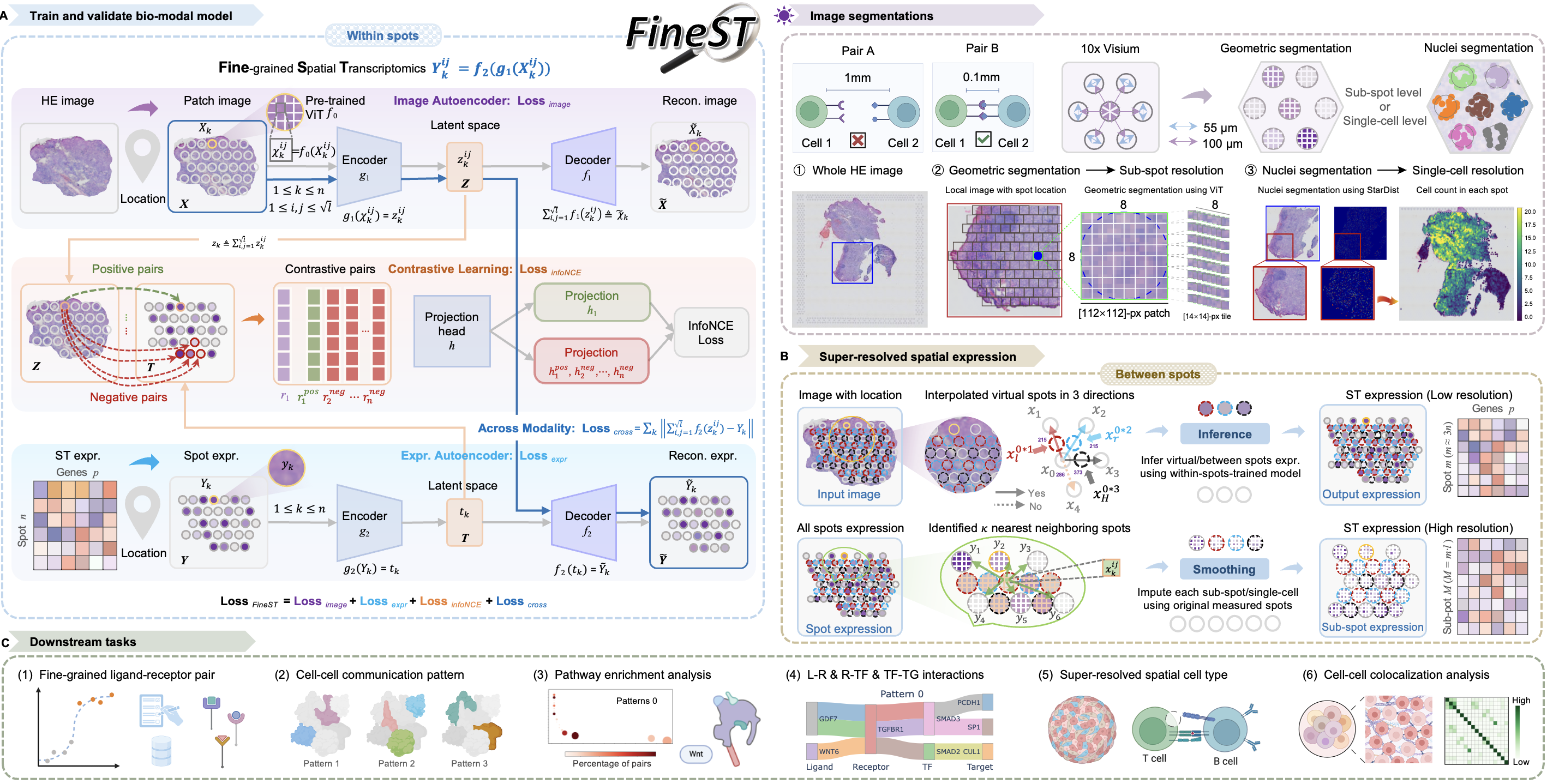
What is FineST?
Overview
📊 Core applications
📈 Imputation — recover weak or missing gene signals using HE image context
🔬 Resolution — refine Visium spots to sub-spot / single-cell, Visium HD 16-µm bin to 8-µm bin
🔗 Discovery — identify fine-grained LR pairs and CCC patterns at super resolution (7 or 8-µm)
🎯 Key capabilities
💰 Cost-efficient — leverage existing HE images; no extra sequencing required for imputation
🖼️ Morphology-aware — contrastive learning links HE cell morphology to gene expression
⚡ Multi-resolution — enhance spot/bin resolution to sub-spot, single-cell, or 8-µm bins
🌍 Broad applicability — supports Visium, Visium HD datasets for WSI- or ROI-based analysis
🧠 How it works
FineST follows a four-step pipeline:
🖼️ Step 0 — HE image feature extraction (HIPT / Virchow2)
🔄 Step 1 — Training FineST model on within-spot or 16-µm bin expression
📐 Step 2 — Super-resolution Imputation at sub-spot or single-cell level
💬 Step 3 — Fast Discovery of LR pairs and CCC patterns (SpatialDM + SparseAEH)
Supported ST platforms and image encoders
Capability |
Visium (sparse>80%) |
Visium HD (sparse>90%) |
|---|---|---|
Signal imputation |
Impute spot-level gene expression |
Impute 16-µm bin gene expression |
Resolution enhancement |
55-µm → 7/8-µm: sub-spot or single-cell, also support between-spot interpolation |
16-µm → 7/8-µm: sub-bin or single-cell |
Fine-grained discovery |
|
|
Histology foundation model |
Dim |
Visium |
Visium HD |
FineST-enhanced |
|---|---|---|---|---|
HIPT (Publicly available; Quick start) |
384 |
patch 64-pix (55-µm spot), need rescale to 0.5um/pixel |
patch 32-pix (16-µm bin) |
→ tile 16-pixel (8-µm sub-spot) |
Virchow2 (Require Token, Paper setting) |
1280 |
patch 112-pix (55-µm spot), need rescale to 0.5um/pixel |
patch 28-pix (16-µm bin) |
→ tile 14-pixel (7-µm sub-spot) |
Installation
🔧 Environment setup (Prerequisites)
🖥️ OS: Linux (Ubuntu recommended)
🐍 Python: 3.8+
🎮 GPU: NVIDIA GPU with CUDA strongly recommended (A100 used for FineST paper)
🔥 PyTorch: 1.7+ with CUDA (install separately; see PyTorch)
Conda (recommended)
git clone https://github.com/StatBiomed/FineST.git
conda create --name FineST python=3.8
conda activate FineST
cd FineST
pip install -r requirements.txt
Verify:
python -c "import torch; print(torch.__version__); print(torch.cuda.is_available())"PyPI
pip install -U FineST

## Alternatively, install from GitHub for latest version:
pip install -U git+https://github.com/StatBiomed/FineST
Note: To run the Jupyter notebook tutorials, register this environment as a kernel:
python -m pip install ipykernel
python -m ipykernel install --user --name=FineST
Quick start
🗂️ Project Structure (Repository layout)
FineST/
├── FineST/              # Python package (model, inference, CLI modules, ...)
├── docs/source/         # Jupyter notebooks — Visium, Visium HD, LR, CCC (recommended)
├── parameter/           # Model hyperparameter JSON files
├── finetune/            # Bundled pretrained checkpoints (e.g. CRC Visium HD HIPT)
├── run_NPC_tutorial_HIPT.sh      # NPC Visium demo (FineST_tutorial_data)
├── run_CRC_VisiumHD_HIPT.sh      # CRC Visium HD demo (FineST_tutorial_data_VisiumHD)
Download demo datasets
📥 Visium tutorial data (FineST_tutorial_data) is available on Google Drive.
pip install gdown
gdown --folder https://drive.google.com/drive/folders/1rZ235pexAMVvRzbVZt1ONOu7Dcuqz5BD?usp=drive_link
📥 Visium HD demo data (FineST_tutorial_data_VisiumHD) from 10x Genomics - Sample P2 CRC.
From the package root (FineST/), create the data folder, download, extract, and arrange files to match run_CRC_VisiumHD_HIPT.sh:
## 1) Create data root next to the package scripts
mkdir -p FineST_tutorial_data_VisiumHD
cd FineST_tutorial_data_VisiumHD

## 2) Download 10x Visium HD (P2 CRC) files
BASE=https://cf.10xgenomics.com/samples/spatial-exp/3.0.0/Visium_HD_Human_Colon_Cancer_P2
wget ${BASE}/Visium_HD_Human_Colon_Cancer_P2_tissue_image.btf
wget ${BASE}/Visium_HD_Human_Colon_Cancer_P2_spatial.tar.gz
wget ${BASE}/Visium_HD_Human_Colon_Cancer_P2_binned_outputs.tar.gz

## 3) Extract archives
tar -xzf Visium_HD_Human_Colon_Cancer_P2_binned_outputs.tar.gz
tar -xzf Visium_HD_Human_Colon_Cancer_P2_spatial.tar.gz

## 4) Arrange layout expected by FineST CLI / run_CRC_VisiumHD_HIPT.sh
mkdir -p square_016um
cp binned_outputs/square_016um/spatial/tissue_positions.parquet square_016um/
cp binned_outputs/square_016um/spatial/scalefactors_json.json square_016um/
mv Visium_HD_Human_Colon_Cancer_P2_tissue_image.btf \
   Visium_HD_Human_Colon_Cancer_tissue_image.btf

cd ..
Expected layout after step 4:
FineST_tutorial_data_VisiumHD/
├── Visium_HD_Human_Colon_Cancer_tissue_image.btf   # HE image (data root)
├── square_016um/
│   ├── tissue_positions.parquet
│   └── scalefactors_json.json
├── binned_outputs/          # from 10x extract (kept; optional after copy)
└── ...                      # optional: spatial/ from spatial.tar.gz
Experienced bioinformatics users
🚀 Command-line demos (from the package root)
For Visium (NPC, HIPT) — ~10 min
bash run_NPC_tutorial_HIPT.shReproduces NPC_Train_Impute_count_HIPT.ipynb (Sections 0–5)
DATA_ROOT default: FineST_tutorial_data (download above)
Outputs under {DATA_ROOT}/{Figures,OrderData,SaveData}/
Evaluation (infer/impute vs measured spots) on by default; RUN_EVAL=0 to skip
For Visium HD (CRC16, HIPT) — longer; needs data layout above
## First run: extract HE embeddings (~hours), then train/infer/eval
RUN_STEP0=1 bash run_CRC_VisiumHD_HIPT.sh

## Later runs: skip Step 0 if FineST_tutorial_data_VisiumHD/HIPT/ already exists
bash run_CRC_VisiumHD_HIPT.sh
DATA_ROOT default: FineST_tutorial_data_VisiumHD (replaces notebook FineST_local/Dataset/CRC16um/)
Expression: FineST.datasets.CRC16um() / CRC08um() (Figshare; auto on first run)
Weights: finetune/20260801162414255436/
Embeddings: RUN_STEP0=1 writes HIPT/HD_CRC_16um_pth_32_16/; or place precomputed and keep RUN_STEP0=0
Evaluation (vs 16 µm input + native 8 µm) on by default; RUN_EVAL=0 to skip
Bioinformatics beginners
⚡ Jupyter Notebook tutorials (recommended first run)
🧬 Visium end-to-end (~10 min)
🗺️ Visium HD end-to-end (~1–3 hours, large data)
💬 LR / CCC discovery (after imputation)
Visium: NPC_LRI_CCC_count.ipynb
Visium HD: CRC_LRI_CCC_count.ipynb
✂️ ROI-based analysis (~1 min)
ROI selection and cropping: Crop_ROI_Boundary_image.ipynb
Step-by-step tutorials
📚 Tutorials and scripts organized by task. For the complete online manual, see FineST tutorial.
Visium (NPC demo)
Imputation + 8µm enhancement (HIPT): NPC_Train_Impute_count_HIPT.ipynb
Imputation + 7µm enhancement (Virchow2): NPC_Train_Impute_count_Virchow2.ipynb
Between-spot interpolation: Between_spot_demo.ipynb
LR pair & CCC discovery: NPC_LRI_CCC_count.ipynb
Cell-type deconvolution: transDeconv_NPC_count.ipynb
Performance evaluation: NPC_Evaluate.ipynb
Visium (HCC P1T demo)
Imputation + 7µm enhancement (Virchow2): HCC_P1T_Train_Impute.ipynb
Visium HD (CRC 16µm demo)
Imputation + 8µm enhancement (HIPT): CRC16_Train_Impute_count_HIPT.ipynb
Imputation + 7µm enhancement (Virchow2): CRC16_Train_Impute_count_virchow2.ipynb
LR pair & CCC discovery: CRC_LRI_CCC_count.ipynb
Cell-type deconvolution: transDeconv_CRC_count.ipynb
Command-line workflow
🔄 End-to-end workflow:
Step 0  🖼️  HE image feature extraction     python -m FineST.image_feature_extraction
            (Additional: spot_interpolation / nuclei_segmentation)
Step 1  🧠  Train on within-spot / 16µm     python -m FineST.step1_FineST_train_infer
Step 2  📐  Super-resolution imputation     python -m FineST.step2_High_resolution_impute
Step 3  💬  LR pair & CCC discovery         docs/source/*_LRI_CCC_count.ipynb
Path presets (``–data_root``)
CLI modules share the same path layout as the notebook tutorials (docs/source/NPC_Train_Impute_count_*.ipynb, Section 1.2). Pass --data_root FineST_tutorial_data to auto-fill common paths; explicit arguments always override presets.
Python API
import FineST as fst

presets = fst.tutorial_path_presets('FineST_tutorial_data', hist_model='Virchow2')
# presets['embed_dir_within'], presets['save_adata_imput_all_spot'], ...
Preset layout (Visium NPC demo)
FineST_tutorial_data/
├── spatial/tissue_positions_list.csv
├── ImgEmbeddings/{HIPT|Virchow2}/pth_*_*/          # within-spot (Step 0)
├── ImgEmbeddings/{HIPT|Virchow2}/NEW_pth_*_*/      # between-spot (Step 2A)
├── ImgEmbeddings/{HIPT|Virchow2}/sc_pth_*_*/       # single-nuclei (Step 2B)
├── OrderData/position_order*.csv
├── Figures/
├── SaveData/adata_*.h5ad
└── NucleiSegments/{save_folder}/position_all_tissue_sc.csv
CLI flags
--data_root — Step 1, Step 2, nuclei segmentation
--hist_model HIPT|Virchow2 — Step 0, Step 1, Step 2, nuclei (default: HIPT; must match Step 0 embeddings)
⚙️ Step 0: HE image feature extraction
🖼️ Visium — within-spots
## HIPT (recommended)
python -m FineST.image_feature_extraction \
   --position_path FineST_tutorial_data/spatial/tissue_positions_list.csv \
   --rawimage_path FineST_tutorial_data/20210809-C-AH4199551.tif \
   --dataset_class Visium \
   --STfactor_path FineST_tutorial_data/spatial/scalefactors_json.json \
   --is_05umperpix True \
   --hist_model HIPT \
   --patch_size 64 \
   --data_save_dir FineST_tutorial_data

## Virchow2 (requires Hugging Face token)
python -m FineST.image_feature_extraction \
   --position_path FineST_tutorial_data/spatial/tissue_positions_list.csv \
   --rawimage_path FineST_tutorial_data/20210809-C-AH4199551.tif \
   --dataset_class Visium \
   --STfactor_path FineST_tutorial_data/spatial/scalefactors_json.json \
   --is_05umperpix True \
   --hist_model Virchow2 \
   --patch_size 112 \
   --data_save_dir FineST_tutorial_data
🗺️ Visium HD — 16-µm bins
CLI demo root: FineST_tutorial_data_VisiumHD/ (same as run_CRC_VisiumHD_HIPT.sh). Notebooks may use FineST_local/Dataset/CRC16um/ with the same relative layout under square_016um/.
## HIPT (recommended)
python -m FineST.image_feature_extraction \
   --position_path FineST_tutorial_data_VisiumHD/square_016um/tissue_positions.parquet \
   --rawimage_path FineST_tutorial_data_VisiumHD/Visium_HD_Human_Colon_Cancer_tissue_image.btf \
   --dataset_class VisiumHD \
   --STfactor_path FineST_tutorial_data_VisiumHD/square_016um/scalefactors_json.json \
   --is_05umperpix True \
   --hist_model HIPT \
   --patch_size 32 \
   --output_pth FineST_tutorial_data_VisiumHD/HIPT/HD_CRC_16um_pth_32_16 \
   --output_img FineST_tutorial_data_VisiumHD/HIPT/HD_CRC_16um_pth_32_16_image

## Virchow2 (requires Hugging Face token)
python -m FineST.image_feature_extraction \
   --position_path FineST_tutorial_data_VisiumHD/square_016um/tissue_positions.parquet \
   --rawimage_path FineST_tutorial_data_VisiumHD/Visium_HD_Human_Colon_Cancer_tissue_image.btf \
   --dataset_class VisiumHD \
   --STfactor_path FineST_tutorial_data_VisiumHD/square_016um/scalefactors_json.json \
   --is_05umperpix True \
   --hist_model Virchow2 \
   --patch_size 28 \
   --output_pth FineST_tutorial_data_VisiumHD/Virchow2/HD_CRC_16um_pth_28_14 \
   --output_img FineST_tutorial_data_VisiumHD/Virchow2/HD_CRC_16um_pth_28_14_image
FineST standardizes image resolution to 0.5 µm/pixel before patch extraction.
Recommended: pass --is_05umperpix True with --STfactor_path (path to scalefactors_json.json) and --dataset_class Visium or VisiumHD. FineST reads Space Ranger scale factors, sets scale_image=True, and computes --scale automatically.
Formula: --scale = microns_per_pixel / 0.5
Visium (NPC demo)
microns_per_pixel = 55 / spot_diameter_fullres from scalefactors_json.json
Example (FineST_tutorial_data/spatial/): spot_diameter_fullres = 139.45 → 55 / 139.45 ≈ 0.394 µm/px → --scale ≈ 0.789
Visium HD (CRC 16 µm)
Read microns_per_pixel directly from scalefactors_json.json
Example (FineST_tutorial_data_VisiumHD/square_016um/): 0.274 µm/px → --scale = 0.274 / 0.5 ≈ 0.548
Manual alternative: omit --is_05umperpix and set --scale_image True with an explicit --scale value.
🧠 Step 1: Training FineST model
🖼️ Visium — within-spots
Run from the package root (same as run_NPC_tutorial_HIPT.sh).
## HIPT with Visium16 (patch_size=64)
python -m FineST.step1_FineST_train_infer \
   --system_path './' \
   --data_root FineST_tutorial_data \
   --parame_path 'parameter/parameters_NPC_HIPT.json' \
   --dataset_class 'Visium16' \
   --hist_model 'HIPT' \
   --gene_selected 'CD70' \
   --visium_path 'FineST_tutorial_data/spatial/tissue_positions_list.csv' \
   --image_embed_path 'FineST_tutorial_data/ImgEmbeddings/HIPT/pth_64_16' \
   --patch_size 64 \
   --do_scale True \
   --weight_w 0.5

## Virchow2 with Visium64 (patch_size=112)
python -m FineST.step1_FineST_train_infer \
   --system_path './' \
   --data_root FineST_tutorial_data \
   --parame_path 'parameter/parameters_NPC_virchow2.json' \
   --dataset_class 'Visium64' \
   --hist_model 'Virchow2' \
   --gene_selected 'CD70' \
   --visium_path 'FineST_tutorial_data/spatial/tissue_positions_list.csv' \
   --image_embed_path 'FineST_tutorial_data/ImgEmbeddings/Virchow2/pth_112_14' \
   --patch_size 112 \
   --do_scale True \
   --weight_w 0.5
🗺️ Visium HD — 16-µm bins
Same layout as run_CRC_VisiumHD_HIPT.sh. Pretrained HIPT weights: finetune/20260801162414255436/.
## HIPT with VisiumHD (patch_size=32)
python -m FineST.step1_FineST_train_infer \
   --system_path './' \
   --data_root FineST_tutorial_data_VisiumHD \
   --parame_path 'parameter/parameters_CRC16_HIPT.json' \
   --dataset_class 'VisiumHD' \
   --hist_model 'HIPT' \
   --gene_selected 'SPP1' \
   --visium_path 'FineST_tutorial_data_VisiumHD/square_016um/tissue_positions.parquet' \
   --image_embed_path 'FineST_tutorial_data_VisiumHD/HIPT/HD_CRC_16um_pth_32_16' \
   --patch_size 32 \
   --do_scale True \
   --weight_w 0.5 \
   --weight_save_path 'finetune/20260801162414255436'

## Virchow2 with VisiumHD (patch_size=28)
python -m FineST.step1_FineST_train_infer \
   --system_path './' \
   --data_root FineST_tutorial_data_VisiumHD \
   --parame_path 'parameter/parameters_CRC16_virchow2.json' \
   --dataset_class 'VisiumHD' \
   --hist_model 'Virchow2' \
   --gene_selected 'SPP1' \
   --visium_path 'FineST_tutorial_data_VisiumHD/square_016um/tissue_positions.parquet' \
   --image_embed_path 'FineST_tutorial_data_VisiumHD/Virchow2/HD_CRC_16um_pth_28_14' \
   --patch_size 28 \
   --do_scale True \
   --weight_w 0.5
Key parameters
Must match Step 0
--dataset_class — sub-spot tiling: Visium16 (HIPT, 16 tiles), Visium64 (Virchow2, 64 tiles), VisiumHD (Visium HD)
--hist_model — image encoder: HIPT (384-dim) or Virchow2 (1280-dim); must match Step 0
Imputation blending (shown in commands above; adjust as needed)
--do_scale (CLI default False; demos / scripts use True) — z-score expression before combining image-inferred (adata_infer) and neighbor-smoothed (adata_smooth) signals
--weight_w (default 0.5) — blend weight: adata_imput = weight_w × adata_infer + (1 - weight_w) × adata_smooth
Auto-inferred (usually omit from command line)
With --data_root, fills OrderData/, Figures/, SaveData/ and related paths (same layout as notebook Section 1.2).
Without --data_root, output directories are derived from --image_embed_path.
LR genes default to the bundled human list: --LRgene_path 'LR_genes'
Users can specify the LR gene file explicitly, e.g.: --LRgene_path 'FineST/datasets/LR_gene/LRgene_CellChatDB_baseline_human.csv'
📐 Step 2: Super-resolution imputation
For Visium (~5k spots; 55-µm spot diameter; 100-µm center-to-center distance), enhance spatial resolution at sub-spot (geometric segmentation) or single-cell (nuclei segmentation with StarDist) level.
2.1 Visium: Sub-spot resolution
Interpolate additional spots between original spots first to increase spatial coverage (~3× spots), then extract between-spot image features and impute.
2.1.1 Interpolate between-spots
## Interpolate spots in horizontal and vertical directions
python -m FineST.spot_interpolation \
   --position_path FineST_tutorial_data/spatial/tissue_positions_list.csv
2.1.2 Extract image features for between-spots
## HIPT (recommended)
python -m FineST.image_feature_extraction \
   --position_path FineST_tutorial_data/spatial/tissue_positions_list_add.csv \
   --rawimage_path FineST_tutorial_data/20210809-C-AH4199551.tif \
   --dataset_class Visium \
   --STfactor_path FineST_tutorial_data/spatial/scalefactors_json.json \
   --is_05umperpix True \
   --hist_model HIPT \
   --patch_size 64 \
   --data_save_dir FineST_tutorial_data \
   --output_name NEW_pth_64_16

## Virchow2 (requires Hugging Face token)
python -m FineST.image_feature_extraction \
   --position_path FineST_tutorial_data/spatial/tissue_positions_list_add.csv \
   --rawimage_path FineST_tutorial_data/20210809-C-AH4199551.tif \
   --dataset_class Visium \
   --STfactor_path FineST_tutorial_data/spatial/scalefactors_json.json \
   --is_05umperpix True \
   --hist_model Virchow2 \
   --patch_size 112 \
   --data_save_dir FineST_tutorial_data \
   --output_name NEW_pth_112_14
2.1.3 Impute at sub-spot resolution
Requires the Step 1 weights folder (--weight_save_path). Replace weights[timestamp] with your actual folder name.
## HIPT with Visium16
python -m FineST.step2_High_resolution_impute \
   --system_path './' \
   --data_root FineST_tutorial_data \
   --hist_model HIPT \
   --parame_path 'parameter/parameters_NPC_HIPT.json' \
   --dataset_class 'Visium16' \
   --gene_selected 'CD70' \
   --visium_path 'FineST_tutorial_data/spatial/tissue_positions_list.csv' \
   --imag_within_path 'FineST_tutorial_data/ImgEmbeddings/HIPT/pth_64_16' \
   --imag_betwen_path 'FineST_tutorial_data/ImgEmbeddings/HIPT/NEW_pth_64_16' \
   --weight_save_path 'FineST_tutorial_data/Figures/weights[timestamp]'

## Virchow2 with Visium64
python -m FineST.step2_High_resolution_impute \
   --system_path './' \
   --data_root FineST_tutorial_data \
   --hist_model Virchow2 \
   --parame_path 'parameter/parameters_NPC_virchow2.json' \
   --dataset_class 'Visium64' \
   --gene_selected 'CD70' \
   --visium_path 'FineST_tutorial_data/spatial/tissue_positions_list.csv' \
   --imag_within_path 'FineST_tutorial_data/ImgEmbeddings/Virchow2/pth_112_14' \
   --imag_betwen_path 'FineST_tutorial_data/ImgEmbeddings/Virchow2/NEW_pth_112_14' \
   --weight_save_path 'FineST_tutorial_data/Figures/weights[timestamp]'
Key inputs
ImgEmbeddings/HIPT/pth_64_16/ or ImgEmbeddings/Virchow2/pth_112_14/ — within-spot image features (Step 0)
ImgEmbeddings/HIPT/NEW_pth_64_16/ or ImgEmbeddings/Virchow2/NEW_pth_112_14/ — between-spot image features
Figures/weights[timestamp]/ — trained model from Step 1 (e.g., weights20260204191708183236)
Key outputs
SaveData/adata_imput_all_subspot.h5ad — sub-spot level expression (~16× per spot for HIPT; ~64× for Virchow2)
SaveData/adata_imput_all_spot.h5ad — spot-level aggregated expression (~3× spatial density after interpolation)
2.2 Visium: Single-cell resolution
Nuclei segmentation with StarDist. Run after sub-spot imputation (needs adata_imput_all_spot.h5ad).
2.2.1 Nuclei segmentation
## Explicit paths
python -m FineST.nuclei_segmentation \
   --adata_path FineST_tutorial_data/SaveData/adata_imput_all_spot.h5ad \
   --image_path FineST_tutorial_data/20210809-C-AH4199551.tif \
   --prob_thresh 0.75 \
   --save_folder NPC_allspot_p075 \
   --out_dir FineST_tutorial_data/NucleiSegments

## Or with path presets (``--save_folder`` still required)
python -m FineST.nuclei_segmentation \
   --data_root FineST_tutorial_data \
   --save_folder NPC_allspot_p075 \
   --prob_thresh 0.75
Adjust --prob_thresh if segmentation is too sparse or dense (NPC demo: 0.75). Nuclei segmentation results are saved in FineST_tutorial_data/NucleiSegments/NPC_allspot_p075/. CLI aliases: --tissue (--save_folder), --img_path (--image_path).
2.2.2 Extract image features for single-nuclei
## HIPT
python -m FineST.image_feature_extraction \
   --position_path FineST_tutorial_data/NucleiSegments/NPC_allspot_p075/position_all_tissue_sc.csv \
   --rawimage_path FineST_tutorial_data/20210809-C-AH4199551.tif \
   --dataset_class Visium \
   --STfactor_path FineST_tutorial_data/spatial/scalefactors_json.json \
   --is_05umperpix True \
   --hist_model HIPT \
   --patch_size 16 \
   --data_save_dir FineST_tutorial_data \
   --output_name sc_pth_16_16
2.2.3 Impute at single-cell resolution
python -m FineST.step2_High_resolution_impute \
   --system_path './' \
   --data_root FineST_tutorial_data \
   --hist_model HIPT \
   --parame_path 'parameter/parameters_NPC_HIPT.json' \
   --dataset_class 'VisiumSC' \
   --gene_selected 'CD70' \
   --image_embed_path_sc 'FineST_tutorial_data/ImgEmbeddings/HIPT/sc_pth_16_16' \
   --weight_save_path 'FineST_tutorial_data/Figures/weights[timestamp]'
Key inputs
SaveData/adata_imput_all_spot.h5ad — spot-level expression from sub-spot imputation
NucleiSegments/{save_folder}/position_all_tissue_sc.csv — nuclei coordinates
ImgEmbeddings/HIPT/sc_pth_16_16/ — single-nuclei image features
Figures/weights[timestamp]/ — trained model from Step 1
Key outputs
SaveData/adata_imput_all_sc.h5ad — single-nuclei resolution expression
Key parameters (Step 2)
Match Step 0/1: dataset_class (Visium16 / Visium64 / VisiumSC), parameter JSON, Step 1 weights folder
Image features: within-spot + between-spot embeddings (sub-spot); ImgEmbeddings/HIPT/sc_pth_16_16/ or ImgEmbeddings/Virchow2/sc_pth_14_14/ (single-cell)
Auto-inferred: with --data_root (+ --hist_model), fills Figures/, OrderData/, SaveData/ output paths; otherwise inferred from embedding paths
LR genes: default LR_genes (bundled human list; same as Step 1)
Note: Sub-spot CLI chain (through Step 2B) is in run_NPC_tutorial_HIPT.sh. Single-cell / nuclei steps are in docs/source/NPC_Train_Impute_count_HIPT.ipynb / docs/source/NPC_Train_Impute_count_Virchow2.ipynb (Section 6).
2.3 Visium HD: (16 µm → 8 µm) enhancement
Visium HD uses continuous bin squares and does not require spot interpolation. See run_CRC_VisiumHD_HIPT.sh and the end-to-end notebooks: CRC16_Train_Impute_count_HIPT.ipynb or CRC16_Train_Impute_count_virchow2.ipynb.
💬 Step 3: Fine-grained ligand-receptor interaction
Identify ligand-receptor interactions and communication patterns based on SpatialDM and SparseAEH.
Visium: NPC_LRI_CCC_count.ipynb
Visium HD: CRC_LRI_CCC_count.ipynb
Perform cell-type deconvolution on super-resolved gene expression data with expDeconv() from TransImpute.
Visium: transDeconv_NPC_count.ipynb
Visium HD: transDeconv_CRC_count.ipynb
ROI selection with Napari
To analyze a specific region of interest (ROI) on the HE image, use napari:
from PIL import Image
Image.MAX_IMAGE_PIXELS = None
import matplotlib.pyplot as plt
import napari

image = plt.imread("FineST_tutorial_data/20210809-C-AH4199551.tif")
viewer = napari.view_image(image, channel_axis=2, ndisplay=2)
napari.run()
For detailed instructions and ROI extraction, please see | online tutorial, or | video guide.
Quick guide:
A shapes layer is automatically added when opening napari
Use the Add Polygons tool to draw ROI(s) on the HE image
Optionally rename the ROI layer for clarity
FineST also supports extracting cropped image and AnnData with fst.crop_img_adata() (see Crop_ROI_Boundary_image.ipynb).
Citation and Contact
If you use FineST in your research, please cite:
Li, L., Wang, T., Liang, Z., Yu, H., Ma, S., Yu, L., & Huang, Y. (2026). FineST: contrastive learning integrates histology and spatial transcriptomics for nuclei-resolved ligand-receptor analysis. Nature Communications, 17(1), 4645.
@article{li2026finest,
  title={FineST: contrastive learning integrates histology and spatial transcriptomics for nuclei-resolved ligand-receptor analysis},
  author={Li, Lingyu and Wang, Tianjie and Liang, Zhuo and Yu, Huajian and Ma, Stephanie and Yu, Lequan and Huang, Yuanhua},
  journal={Nature Communications},
  volume={17},
  number={1},
  pages={4645},
  year={2026},
  publisher={Nature Publishing Group UK London}
}
For any enquiries, please contact Dr. Lingyu Li (lingyuli@hku.hk) or Dr. Yuanhua Huang (yuanhua@hku.hk).
1 maintainer

Download files
Download the file for your platform. If you're not sure which to choose, learn more about installing packages.
Source Distribution
Built Distribution
Filter files by name, interpreter, ABI, and platform.
If you're not sure about the file name format, learn more about wheel file names.
Copy a direct link to the current filters
File details
Details for the file finest-0.1.4.tar.gz.
File metadata
- Download URL: finest-0.1.4.tar.gz
- Upload date:
- Size: 155.9 kB
- Tags: Source
- Uploaded using Trusted Publishing? No
- Uploaded via:
twine/6.1.0 CPython/3.8.18
File hashes
| Algorithm | Hash digest | |
|---|---|---|
| SHA256 |
cdabc887a3c2a0b76efc3b05e17a64f813424f4a9fd2f834e35cbc0400e41a57
|
|
| MD5 |
8cb55e534fb77f52ebcaaed8cfcd47a5
|
|
| BLAKE2b-256 |
7c7a6ecaaa7bed0942beb3308f77a4385546995d8668bd01e3aca28eb835c8f3
|
File details
Details for the file finest-0.1.4-py3-none-any.whl.
File metadata
- Download URL: finest-0.1.4-py3-none-any.whl
- Upload date:
- Size: 168.5 kB
- Tags: Python 3
- Uploaded using Trusted Publishing? No
- Uploaded via:
twine/6.1.0 CPython/3.8.18
File hashes
| Algorithm | Hash digest | |
|---|---|---|
| SHA256 |
97991a46b0ed8a6f2d63dbae80d945fd45f18145dbc1e2c535af6ef236f4b6df
|
|
| MD5 |
7768af5a782aa9b2fbe37f7593f87abb
|
|
| BLAKE2b-256 |
e203c69d8323945cb73dd1ca2f4b019e3b2022659b937162eea62b856c8fef88
|







