
Fracture Network Analysis

Project description







fractopo is a Python library/application that contains tools for validating and analysing lineament and fracture trace maps (fracture networks). It is targeted at structural geologists working on the characterization of bedrock fractures from outcrops and through remote sensing. fractopo is available as a Python library and through a command-line interface. As a Python library, the use of fractopo requires prior (Python) programming knowledge. However, if used through the command-line, using fractopo only requires general knowledge of command-line interfaces in your operating system of choice.
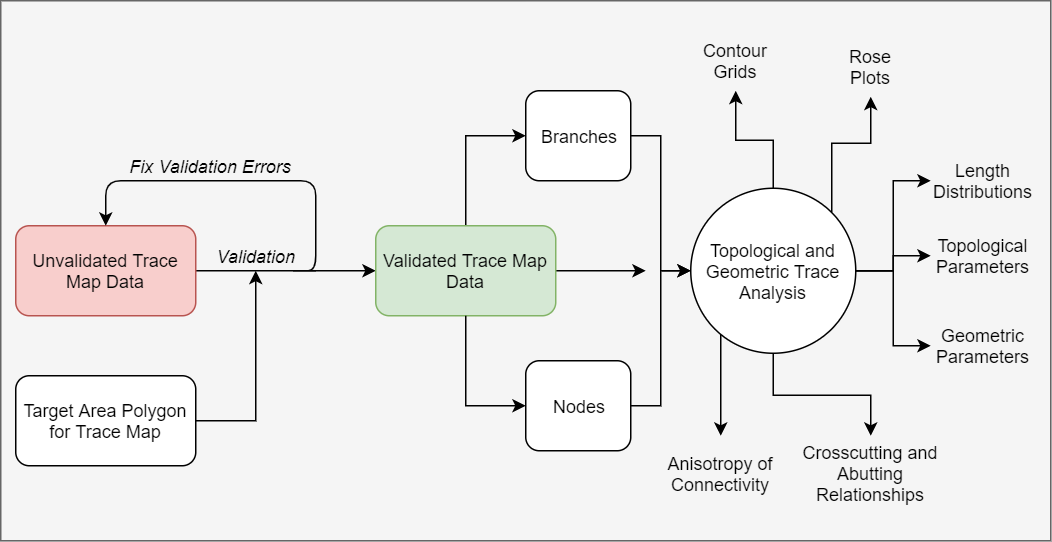
Overview of fractopo

Visualisation of fractopo data. fractopo analyses the trace data that can e.g. be digitized from drone orthophotographs (=fractures) or from digital elevation models (=lineaments). The displayed branches and nodes are extracted with fractopo.
Installation
pip and poetry installation only supported for linux -based operating systems. For Windows and MacOS install using (ana)conda. A container exists for exposing a simplified web interface, created with marimo.
conda
This is the only supported installation method for Windows and MacOS!
# Create new environment for fractopo (recommended but optional)
conda env create -n fractopo-env
conda activate fractopo-env
# Install to the newly created environment
# Available on conda-forge channel
conda install -c conda-forge fractopo
pip
The module is on PyPI.
pip install fractopopoetry
For usage:
poetry add fractopoFor development, use poetry to install the latest development version of fractopo:
git clone https://github.com/nialov/fractopo
cd fractopo
poetry install --all-extras
container (web interface)
A marimo + FastAPI app exists in ./marimos, api.py. This is included in the ghcr.io/nialov/fractopo-app:latest image. By default, when the image is run, the network analysis app is run accessible at root (/). To access validation functinality, use path /validation when accessing the container (e.g. localhost:2718/validation). Network analysis is also explicitly available at /network.
The app host and port can be chosen with HOST (default is 0.0.0.0) and PORT (default is 2718) environment variables. With docker you can, of course, expose in whichever port you choose.
Example docker invocations are below.
To run app:
docker run --rm --interactive --tty --publish 2718:2718 ghcr.io/nialov/fractopo-app:latestAfter running the above command, the network analysis functionality should be available at http://localhost:2718/network and validation functionality at http://localhost:2718/validation.
Usage
fractopo has two main use cases:
Validation of lineament & fracture trace data
Analysis of lineament & fracture trace data
Validation is done to make sure the data is valid for the analysis and is crucial as analysis cannot take into account different kinds of geometric and topological inconsistencies between the traces. Capabilities and associated guides are inexhaustibly listed in the table below.
Functionality |
Tutorial/Guide/Example |
|---|---|
Validation of trace data |
|
Visualize trace map data |
|
Topological branches and nodes |
|
Trace and branch length distributions |
|
Orientation rose plots |
|
Plot topological ternary node and branch proportions |
|
Cross-cutting and abutting relationships |
|
Geometric and topological fracture network parameters |
|
Contour grids of fracture network parameters |
|
Multi-scale length distributions |
For a short tutorial on use of fractopo, continue reading:
Input data
Reading and writing spatial filetypes is done in geopandas and you should see geopandas documentation for more advanced read-write use cases:
Simple example with trace and area data in GeoPackages:
import geopandas as gpd

# Trace data is in a file `traces.gpkg` in current working directory
# Area data is in a file `areas.gpkg` in current working directory
trace_data = gpd.read_file("traces.gpkg")
area_data = gpd.read_file("areas.gpkg")
Trace data should consists of polyline geometries, i.e., of LineString type. Trace data in MultiLineString format area not supported. Area data should consists of polygon geometries, i.e., of either Polygon or MultiPolygon type.
Trace validation
Trace data must be validated using fractopo validation functionality before analysis. The topological analysis of lineament & fracture traces implemented in fractopo will not tolerate uncertainty related to the topological abutting and snapping relationships between traces. See the documentation for further info on validation error types. Trace validation is recommended before all analysis using Network. Trace and target area data can be validated for further analysis with a Validation object:
from fractopo import Validation

validation = Validation(
    trace_data,
    area_data,
    name="mytraces",
    allow_fix=True,
)

# Validation is done explicitly with `run_validation` method
validated_trace_data = validation.run_validation()
Trace validation is also accessible through the fractopo command-line interface, fractopo tracevalidate which is more straightforward to use than through Python calls. Note that all subcommands of fractopo are available by appending them after fractopo.
tracevalidate always requires the target area that delineates trace data.
# Get full up-to-date command-line interface help
fractopo tracevalidate --help

# Basic usage example:
fractopo tracevalidate /path/to/trace_data.shp /path/to/target_area.shp\
   --output /path/to/validated_trace_data.shp

# Or with a printed summary and automatic saving to validated/ directory
fractopo tracevalidate /path/to/trace_data.shp /path/to/target_area.shp\
   --summary
Geometric and topological trace network analysis
fractopo can be used to extract lineament & fracture size, abundance and topological parameters from two-dimensional lineament and fracture trace, branch and node data.
Trace and target area data (GeoDataFrames) are passed into a Network object which has properties and functions for returning and visualizing different parameters and attributes of trace data.
from fractopo import Network

# Initialize Network object and determine the topological branches and nodes
network = Network(
    trace_data,
    area_data,
    # Give the Network a name!
    name="mynetwork",
    # Specify whether to determine topological branches and nodes
    # (Required for almost all analysis)
    determine_branches_nodes=True,
    # Specify the snapping distance threshold to define when traces are
    # snapped to each other. The unit is the same as the one in the
    # coordinate system the trace and area data are in.
    # In default values, fractopo assumes a metric unit and using metric units
    # is heavily recommended.
    snap_threshold=0.001,
    # If the target area used in digitization is a circle, the knowledge can
    # be used in some analysis
    circular_target_area=True,
    # Analysis on traces can be done for the full inputted dataset or the
    # traces can be cropped to the target area before analysis (cropping
    # recommended)
    truncate_traces=True,
)

# Properties are easily accessible
# e.g.,
network.branch_counts
network.node_counts

# Plotting is done by plot_ -prefixed methods
network.plot_trace_lengths()
Network analysis is also available through the fractopo command-line interface but using the Python interface (e.g. marimo, jupyter lab, ipython) is recommended when analysing Networks to have access to all available analysis and plotting methods. The command-line entrypoint is opinionated in what outputs it produces. Brief example of command-line entrypoint:
# Use --help to see all up-to-date arguments and help
fractopo network --help

fractopo network /path/to/trace_data.shp /path/to/area_data.shp\
   --name mynetwork
Data analysis workflow visualisation for fracture trace data (KB11). A. Target area for trace digitisation. B. Digitized traces and target area. C. Orthomosaic used as the base raster from which the traces are digitized from. D. Equal-area length-weighted rose plot of the fracture trace azimuths. E. Length distribution analysis of the trace lengths. F. Determined branches and nodes through topological analysis. G. Cross-cut and abutting relationships between chosen azimuth sets. H. Ternary plot of node (X, Y and I) proportions. I. Ternary plot of branch (C-C, C-I, I-I) proportions.
Documentation
Please visit the full documentation at: https://nialov.github.io/fractopo/index.html. I recommend starting with the tutorial notebook demonstrating network analysis functionality at https://nialov.github.io/fractopo/notebooks/fractopo_network_1.html. The documentation source is in docs_src and examples directories and is built with sphinx.
Citing
To cite this software:
Ovaskainen, N., (2023). fractopo: A Python package for fracture
network analysis. Journal of Open Source Software, 8(85), 5300,
https://doi.org/10.21105/joss.05300
To cite a specific version of fractopo you can use a zenodo provided DOI. E.g. https://doi.org/10.5281/zenodo.5957206 for version v0.2.6. See the zenodo page of fractopo for the DOI of each version: https://doi.org/10.5281/zenodo.5517485
Support
For issues of any kind: please create a GitHub issue here! Alternatively, you can contact the main developer by email at nikolasovaskainen@gmail.com.
References
For the scientific background, prior works, definition of traces, branches and nodes along with the explanation of the plots and the plotted parameters, you are referred to multiple sources:
-
Trace and branch size, abundance and topological parameter definitions.
-
Application of fractopo for subsampling analysis of fracture networks.
-
Application of fractopo for multi-scale lineament and fracture analysis
-
A similar package to fractopo with a QGIS GUI.
-
Discussion around rose plots and justification for using length-weighted equal-area rose plots.
-
Length distribution modelling using the Python 3 powerlaw package which fractopo uses
-
Length distribution modelling review.
My Master’s Thesis, Ovaskainen, 2020
Plots used in my Thesis were done with an older version of the same code used for this plugin.
Development
The package interfaces are nearing stability and breaking changes in code should for the most part be included in the CHANGELOG.md after 25.4.2023. However, this is not guaranteed until the version reaches v1.0.0. The interfaces of Network and Validation can be expected to be the most stable.
For general contributing guidelines, see CONTRIBUTING.rst
Release history Release notifications | RSS feed


Download files
Download the file for your platform. If you're not sure which to choose, learn more about installing packages.
Source Distribution
Built Distribution
Filter files by name, interpreter, ABI, and platform.
If you're not sure about the file name format, learn more about wheel file names.
Copy a direct link to the current filters
File details
Details for the file fractopo-0.9.2.tar.gz.
File metadata
- Download URL: fractopo-0.9.2.tar.gz
- Upload date:
- Size: 105.3 kB
- Tags: Source
- Uploaded using Trusted Publishing? No
- Uploaded via: poetry/2.2.1 CPython/3.13.12 Linux/6.17.0-1013-azure
File hashes
| Algorithm | Hash digest | |
|---|---|---|
| SHA256 |
d18f67c59047a7f940abd12030c1d0f77d6ef11519fabb70d4565969d9291029
|
|
| MD5 |
3788845d2cb43146b6f79e9ac75176c4
|
|
| BLAKE2b-256 |
e9018d4bce07f98a5783ff1848ee2d1d71990218b05724579b6c5c88b44503f6
|
File details
Details for the file fractopo-0.9.2-py3-none-any.whl.
File metadata
- Download URL: fractopo-0.9.2-py3-none-any.whl
- Upload date:
- Size: 111.9 kB
- Tags: Python 3
- Uploaded using Trusted Publishing? No
- Uploaded via: poetry/2.2.1 CPython/3.13.12 Linux/6.17.0-1013-azure
File hashes
| Algorithm | Hash digest | |
|---|---|---|
| SHA256 |
378190ed0353e97ee6d33c8abe970b3d1787c277b76716f77fec13a12a8a1ee1
|
|
| MD5 |
47851bdcabfca923ea8b0837d4d44ecf
|
|
| BLAKE2b-256 |
c03738fcb2fd2c1ae3844a4db30018782cad3571f5d9201dc9b55d09688c2b5a
|






