
fraudcrawler


Fraudcrawler is an intelligent market monitoring tool that searches the web for products, extracts product details, and classifies them using LLMs. It combines search APIs, web scraping, and AI to automate product discovery and relevance assessment.
Features
- Asynchronous pipeline - Products move through search, extraction, and classification stages independently
- Multiple search engines - Google Search, Google Shopping, and more...
- Search term enrichment - Automatically find related terms and expand your search
- Product extraction - Get structured product data via Zyte API
- LLM classification - Assess product relevance using OpenAI API with custom prompts
- Marketplace filtering - Focus searches on specific domains
- Deduplication - Avoid reprocessing previously collected URLs
- CSV export - Results saved with timestamps for easy tracking
Prerequisites
- Python 3.11 or higher
- API keys for:
- SerpAPI - Google search results
- Zyte API - Product data extraction
- OpenAI API - Product classification
- DataForSEO (optional) - Search term enrichment
Installation
python3.11 -m venv .venv
source .venv/bin/activate
pip install fraudcrawler
Using Poetry:
poetry install
Configuration
Create a .env file with your API credentials (see .env.example for template):
SERPAPI_KEY=your_serpapi_key
ZYTEAPI_KEY=your_zyte_key
OPENAIAPI_KEY=your_openai_key
DATAFORSEO_USER=your_user  # optional
DATAFORSEO_PWD=your_pwd    # optional
Usage
Basic Configuration
For a complete working example, see fraudcrawler/launch_demo_pipeline.py. After setting up the necessary parameters you can launch and analyse the results with:
# Run pipeline
await client.run(
    search_term=search_term,
    search_engines=search_engines,
    language=language,
    location=location,
    deepness=deepness,
    excluded_urls=excluded_urls,
)

# Load results
df = client.load_results()
print(df.head())
Advanced Configuration
Search term enrichment - Find and search related terms:
from fraudcrawler import Enrichment

deepness.enrichment = Enrichment(
    additional_terms=5,
    additional_urls_per_term=10
)
Marketplace filtering - Focus on specific domains:
from fraudcrawler import Host

marketplaces = [
    Host(name="International", domains="zavamed.com,apomeds.com"),
    Host(name="National", domains="netdoktor.ch,nobelpharma.ch"),
]

await client.run(..., marketplaces=marketplaces)
Exclude domains - Exclude specific domains from your results:
excluded_urls = [
    Host(name="Compendium", domains="compendium.ch"),
]

await client.run(..., excluded_urls=excluded_urls)
Skip previously collected URLs:
previously_collected_urls = [
    "https://example.com/product1",
    "https://example.com/product2",
]

await client.run(..., previously_collected_urls=previously_collected_urls)
Website source search - Ingest product listings from configured website templates:
from fraudcrawler import SearchEngineName
from fraudcrawler.scraping.utils import build_website_source_profile

source = build_website_source_profile(
    name="My Shop",
    base_url="https://shop.example/",
    searchable_urls=[
        {
            "filterUrl": "search?q={search_term}",
            "includeSubstrings": ["/p/"],
            "excludeSubstrings": [],
        }
    ],
    render_options={
        "javascript": True,
        "includeIframes": False,
        "actions": [],
        "networkCapture": [],
    },
)

await client.run(
    ...,
    search_engines=[SearchEngineName.WEBSITE_SOURCE],
    website_source_sources=[source],
)
Notes:
- Website-source jobs run for the initial search term only (enrichment terms are not used for website-source ingestion).
- URL results still pass the regular country-code filtering used by the scraping pipeline.
Redis cache – Set REDIS_USE_CACHE=true and run Redis to cache API and scrape calls (Searcher, Enricher, Zyte, Workflow).
View all results from a client instance:
client.print_available_results()
Output
Results are saved as CSV files in data/results/ with the naming pattern:
<search_term>_<language_code>_<location_code>_<timestamp>.csv
Example: sildenafil_de_ch_20250115143022.csv
The CSV includes product details, URLs, and classification scores from your workflows. Raw page HTML is intentionally excluded from CSV exports to keep result files smaller.
Development
For detailed contribution guidelines, see CONTRIBUTING.md.
License
This project is licensed under the MIT License - see the LICENSE file for details.
Architecture
Fraudcrawler uses an asynchronous pipeline where products can be at different processing stages simultaneously. Product A might be in classification while Product B is still being scraped. This is enabled by async workers for each stage (Search, Context Extraction, Processing) using httpx.AsyncClient.
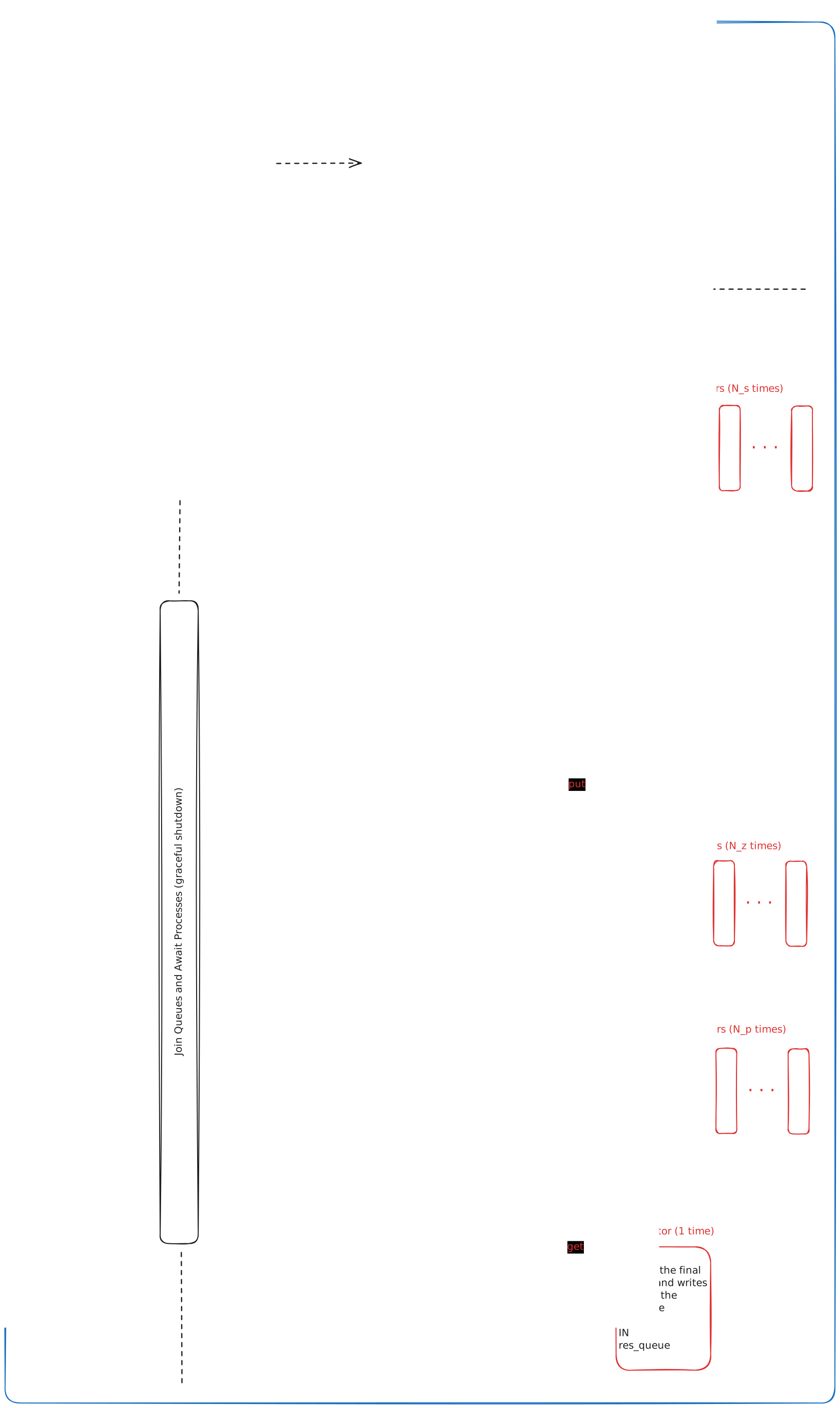
For more details on the async design, see the httpx documentation.


Release files for fraudcrawler 0.8.22
For a detailed explanation of source distributions (sdists) and built distributions (wheels), please see the package formats documentation.
Source distribution (sdist)
| File | Size | Uploaded | |
|---|---|---|---|
| fraudcrawler-0.8.22.tar.gz | 1.0 MB | Details |
Built distribution (wheel)
| File | Interpreter | ABI | Platform | Reset |
|---|---|---|---|---|
| fraudcrawler-0.8.22-py3-none-any.whl | Python 3 | none | any | Details |
Total release size: 2.1 MB
Release files / fraudcrawler-0.8.22.tar.gz
| Download URL | fraudcrawler-0.8.22.tar.gz |
|---|---|
| Size | 1.0 MB |
| Tags | Source |
|
SHA-256 checksum How to use checksums |
3eca18ef6ba6391c7cfe6de45001837051e0198c66568f83b5605e6618507c75
|
|
BLAKE2b-256 checksum How to use checksums |
1e2db13f587765d6271e0066e85a7413ba6e97162c1d8cafad5a20a2a5404986
|
| Upload date | |
|
Uploaded using Trusted Publishing? What is trusted publishing? |
No |
| Uploaded via |
poetry/2.2.1 CPython/3.13.13 Linux/6.18.31-1.qubes.fc37.x86_64
|
Release files / fraudcrawler-0.8.22-py3-none-any.whl
| Download URL | fraudcrawler-0.8.22-py3-none-any.whl |
|---|---|
| Size | 1.1 MB |
| Tags | Python 3 |
|
SHA-256 checksum How to use checksums |
e928c59fe729cb9963d4f75dd07250946a7f9c142d28f3ffac96614c61d82d06
|
|
BLAKE2b-256 checksum How to use checksums |
0ce6629aa95aaa166cea4aff73dd546011585b4bf666360670a96e56af83b6f0
|
| Upload date | |
|
Uploaded using Trusted Publishing? What is trusted publishing? |
No |
| Uploaded via |
poetry/2.2.1 CPython/3.13.13 Linux/6.18.31-1.qubes.fc37.x86_64
|














