
OpenAI-compatible speech recognition toolkit with WebSocket streaming, vLLM acceleration, and llama.cpp/GGUF edge runtime.

Project description

Industrial speech recognition toolkit for offline, streaming, and edge deployment.
ASR · VAD · punctuation · speaker pipelines · emotion and audio-event models · OpenAI-compatible serving





Quick Start · Colab · Benchmark · Model selection · Migration guide · Use cases · Community integrations · Deployment matrix · Troubleshooting · Models · Agent Integration · Docs · Contribute
Quick Start

No local setup? Open the Colab quickstart to transcribe a public sample or upload your own audio in a browser.
# CPU-only installs can use the default PyPI wheels.
pip install torch torchaudio
pip install funasr
For GPU quickstarts, install the PyTorch and torchaudio wheels that match your NVIDIA driver from pytorch.org before installing FunASR. After installation, confirm the GPU is visible:
python - <<'PY'
import torch
print(torch.cuda.is_available())
PY
Only use device="cuda" when this prints True; otherwise use device="cpu"
or reinstall PyTorch with the correct CUDA wheel.
Flagship model — Fun-ASR-Nano (LLM-ASR for Chinese, English, and Japanese, plus Chinese dialect groups and regional accents; needs a GPU):
from funasr import AutoModel

model = AutoModel(model="FunAudioLLM/Fun-ASR-Nano-2512", device="cuda")
result = model.generate(input="https://isv-data.oss-cn-hangzhou.aliyuncs.com/ics/MaaS/ASR/test_audio/asr_example_zh.wav")
print(result[0]["text"])
# 欢迎大家来体验达摩院推出的语音识别模型。
For the separate 31-language checkpoint, use Fun-ASR-MLT-Nano-2512. Language coverage is checkpoint-specific, so Nano and MLT-Nano should be treated as distinct model choices.
On CPU (or for five-language ASR plus emotion and audio-event tags), use SenseVoiceSmall. The pipeline below composes SenseVoiceSmall with FSMN-VAD and CAM++; diarization is provided by the separate CAM++ model, not by the SenseVoiceSmall checkpoint: See the SenseVoice paper, Hugging Face checkpoint, and GGUF edge checkpoint.
from funasr import AutoModel
from funasr.utils.postprocess_utils import rich_transcription_postprocess

model = AutoModel(model="iic/SenseVoiceSmall", vad_model="fsmn-vad", spk_model="cam++", device="cuda")  # use device="cpu" if you don't have a GPU
result = model.generate(
    input="https://isv-data.oss-cn-hangzhou.aliyuncs.com/ics/MaaS/ASR/test_audio/asr_example_zh.wav",
    batch_size_s=300,
)

# The AutoModel pipeline returns VAD segments with speaker ids and timestamps:
for seg in result[0]["sentence_info"]:
    print(f"[{seg['start']/1000:.1f}s] Speaker {seg['spk']}: {rich_transcription_postprocess(seg['sentence'])}")
Output — structured text with speaker labels, timestamps, and punctuation:
[0.6s] Speaker 0: 欢迎大家来体验达摩院推出的语音识别模型
One AutoModel pipeline call coordinates the configured ASR, VAD, and speaker
models and returns the combined result.
Scale & deploy the flagship
At scale, accelerate Fun-ASR-Nano with vLLM (batch processing):
from funasr.auto.auto_model_vllm import AutoModelVLLM

model = AutoModelVLLM(model="FunAudioLLM/Fun-ASR-Nano-2512", tensor_parallel_size=1)
results = model.generate(["audio1.wav", "audio2.wav"], language="auto")
Deploy as API server:
funasr-server --device cuda→ OpenAI-compatible endpoint at localhost:8000Use with AI agents: MCP Server for Claude/Cursor · OpenAI API for LangChain/Dify/AutoGen
Why FunASR?
Whisper is a single model; FunASR is a toolkit — you pick the right model per job: Fun-ASR-Nano (Chinese, English, Japanese, and Chinese dialects; GPU), Fun-ASR-MLT-Nano (31 languages), SenseVoiceSmall (five-language ASR plus emotion and audio events), and Paraformer (low-latency streaming). The table shows toolkit-level capabilities and names the model or pipeline that provides each one:
| FunASR (toolkit) | Whisper | Cloud APIs | |
|---|---|---|---|
| Top speed | 340x realtime (Fun-ASR-Nano + vLLM) | 13x realtime | ~1x realtime |
| Speaker ID | ✅ via VAD + CAM++ pipeline | ❌ Needs pyannote | ✅ Extra cost |
| Emotion | ✅ via SenseVoice | ❌ | ❌ |
| Languages | Checkpoint-specific (for example Qwen3-ASR 52, MLT-Nano 31, Nano zh/en/ja) | 57 | Varies |
| Streaming | ✅ WebSocket (Paraformer) | ❌ | ✅ |
| CPU viable | ✅ 17x realtime (SenseVoice) | ❌ Too slow | N/A |
| Self-hosted | ✅ Yes (toolkit: MIT; model licenses vary) | ✅ MIT license | ❌ Cloud only |
| Cost | Free | Free | $0.006/min+ |
Trying FunASR for the first time? Use the Colab quickstart before setting up a local environment. Choosing a first model? Start with the model selection guide. Planning a switch from Whisper or a cloud ASR provider? Use the migration guide and benchmark example to test representative audio, map features, and roll out safely.
Installation
pip install funasr
From source / Requirements
git clone https://github.com/modelscope/FunASR.git && cd FunASR
pip install -e ./
Requirements: Python ≥ 3.8. Install PyTorch + torchaudio first (pytorch.org), then pip install funasr.
Model Zoo
| Model | Task | Languages | Params | Links |
|---|---|---|---|---|
| Fun-ASR-Nano | ASR | zh/en/ja + Chinese dialects and accents | 800M | ⭐ 🤗 GGUF |
| Fun-ASR-MLT-Nano | ASR | 31 languages | 800M | ⭐ 🤗 |
| SenseVoiceSmall | ASR + emotion + events | zh/en/ja/ko/yue | 234M | ⭐ 🤗 GGUF paper |
| Paraformer-zh | ASR + timestamps | zh/en | 220M | ⭐ 🤗 |
| Paraformer-zh-streaming | Streaming ASR | zh/en | 220M | ⭐ 🤗 |
| Qwen3-ASR | ASR, 52 languages | multilingual | 1.7B | usage |
| GLM-ASR-Nano | ASR, 17 languages | multilingual | 1.5B | usage |
| Whisper-large-v3 | ASR + translation | multilingual | 1550M | usage |
| Whisper-large-v3-turbo | ASR + translation | multilingual | 809M | usage |
| ct-punc | Punctuation | zh/en | 290M | ⭐ 🤗 |
| fsmn-vad | VAD | zh/en | 0.4M | ⭐ 🤗 |
| cam++ | Speaker diarization | — | 7.2M | ⭐ 🤗 |
| emotion2vec+large | Emotion recognition | — | 300M | ⭐ 🤗 |
Usage
Full examples with parameter docs: Tutorial →
from funasr import AutoModel

# Chinese production (VAD + ASR + punctuation + speaker)
model = AutoModel(model="paraformer-zh", vad_model="fsmn-vad", punc_model="ct-punc", spk_model="cam++", device="cuda")
result = model.generate(input="https://isv-data.oss-cn-hangzhou.aliyuncs.com/ics/MaaS/ASR/test_audio/asr_example_zh.wav", hotword="关键词 20")


# Streaming real-time (feed audio chunk by chunk)
import soundfile as sf
model = AutoModel(model="paraformer-zh-streaming", device="cuda")
audio, sr = sf.read("speech.wav", dtype="float32")   # 16 kHz mono
chunk_size = [0, 10, 5]                               # 600 ms chunks
chunk_stride = chunk_size[1] * 960
cache = {}
n_chunks = (len(audio) - 1) // chunk_stride + 1
for i in range(n_chunks):
    chunk = audio[i * chunk_stride : (i + 1) * chunk_stride]
    res = model.generate(input=chunk, cache=cache, is_final=(i == n_chunks - 1),
                         chunk_size=chunk_size, encoder_chunk_look_back=4, decoder_chunk_look_back=1)
    if res[0]["text"]:
        print(res[0]["text"], end="", flush=True)

# Emotion recognition
model = AutoModel(model="emotion2vec_plus_large", device="cuda")
result = model.generate(input="audio.wav", granularity="utterance")
CLI (Agent-Friendly)
# Transcribe audio (simplest)
funasr audio.wav

# JSON output (for AI agents)
funasr audio.wav --output-format json

# SRT subtitles
funasr audio.wav --output-format srt --output-dir ./subs

# Speaker diarization + timestamps
funasr audio.wav --spk --timestamps -f json

# Choose model and language
funasr audio.wav --model paraformer --language zh

# Batch transcribe
funasr *.wav --output-format srt --output-dir ./output
Available models: sensevoice (default), paraformer, paraformer-en, fun-asr-nano
Deploy
# OpenAI-compatible API (recommended)
pip install torch torchaudio
pip install funasr vllm fastapi uvicorn python-multipart
funasr-server --device cuda
# → POST /v1/audio/transcriptions at localhost:8000
Verify it with a public sample:
curl -L https://isv-data.oss-cn-hangzhou.aliyuncs.com/ics/MaaS/ASR/test_audio/BAC009S0764W0121.wav -o sample.wav
curl http://localhost:8000/v1/audio/transcriptions \
  -F file=@sample.wav \
  -F model=sensevoice \
  -F response_format=verbose_json
# Docker streaming service
docker pull registry.cn-hangzhou.aliyuncs.com/funasr_repo/funasr:funasr-runtime-sdk-online-cpu-0.1.12
CPU / Edge — llama.cpp / GGUF (no GPU, no Python)
Run SenseVoice / Paraformer / Fun-ASR-Nano as a single self-contained binary on CPU and edge devices — this is to FunASR what whisper.cpp is to Whisper, but with ~3× lower CER than whisper.cpp on Chinese. Built-in FSMN-VAD, no Python at runtime.
# Linux / macOS: run from the extracted release directory
bash download-funasr-model.sh sensevoice ./gguf        # or: paraformer | nano
./llama-funasr-sensevoice -m ./gguf/sensevoice-small-q8.gguf --vad ./gguf/fsmn-vad.gguf -a audio.wav
# → 欢迎大家来体验达摩院推出的语音识别模型
# Windows PowerShell: run from the extracted archive root (with the `hf` CLI installed)
hf download FunAudioLLM/SenseVoiceSmall-GGUF sensevoice-small-q8.gguf --local-dir .\gguf
hf download FunAudioLLM/fsmn-vad-GGUF fsmn-vad.gguf --local-dir .\gguf
.\llama-funasr-sensevoice.exe -m .\gguf\sensevoice-small-q8.gguf --vad .\gguf\fsmn-vad.gguf -a audio.wav
# Use the windows-x64-vulkan package with a current AMD, Intel, or NVIDIA Vulkan driver:
.\llama-funasr-sensevoice.exe -m .\gguf\sensevoice-small-q8.gguf --vad .\gguf\fsmn-vad.gguf -a audio.wav --backend vulkan
# Use the windows-x64-cuda package on RTX 30-class GPUs:
.\llama-funasr-sensevoice.exe -m .\gguf\sensevoice-small-q8.gguf --vad .\gguf\fsmn-vad.gguf -a audio.wav --backend cuda
Use funasr-llamacpp-linux-x64-vulkan.tar.gz on Linux GPU systems with a
working Vulkan driver/ICD:
./llama-funasr-sensevoice -m ./gguf/sensevoice-small-q8.gguf --vad ./gguf/fsmn-vad.gguf -a audio.wav --backend vulkan
The Windows Vulkan ZIP uses the system Vulkan loader supplied by the GPU driver; installing the Vulkan SDK is only necessary when building from source. Both Vulkan packages currently accelerate SenseVoiceSmall.
The current Windows CUDA package targets CUDA architecture 86. RTX 50 / Blackwell
GPUs report compute capability 12.0 (sm_120) and should use the CPU package or
build from source with -DCMAKE_CUDA_ARCHITECTURES=120 until a dedicated CUDA
asset is published.
Prebuilt binaries: Releases · v0.1.9 · Linux Vulkan tarball · Windows Vulkan zip · Windows CUDA zip · Download & quickstart: funasr.com/llama-cpp · GGUF models: Hugging Face · Docs & benchmarks: runtime/llama.cpp/
OpenAI API example → · Gradio demo → · Client recipes → · JavaScript/TypeScript recipes → · Kubernetes template → · Workflow recipes → · Postman collection → · OpenAPI spec → · Security guide → · Deployment matrix → · Deployment docs → · Agent integration →
Benchmark
184 long-form audio files (192 min). Full report → · RTFx and reproducibility notes →
| Model | Chinese CER ↓ | GPU Speed | CPU Speed | vs Whisper-large-v3 |
|---|---|---|---|---|
| Fun-ASR-Nano (vLLM) | 8.20% | 340x realtime | — | 🚀 26x faster |
| SenseVoice-Small | 7.81% | 170x realtime | 17x realtime | 🚀 13x faster |
| Paraformer-Large | 10.18% | 120x realtime | 15x realtime | 🚀 9x faster |
| Whisper-large-v3-turbo | 21.71% | 46x realtime | ❌ | 3.4x faster |
| Whisper-large-v3 | 20.02% | 13x realtime | ❌ | baseline |
Key takeaway: FunASR models run on CPU faster than Whisper runs on GPU.
What's new
- 2026/07/24: v1.3.27 on PyPI — the OpenAI-compatible server now reports detected SenseVoice language metadata in
verbose_jsonand reuses the cached Fun-ASR-NanoAutoModelafter vLLM fallback. When vLLM/VAD setup and its fallback both fail, half-initialized engine state is cleared so a later request can retry. Install withpython -m pip install -U "funasr==1.3.27". Release -> - 2026/07/23: llama.cpp runtime v0.1.9 — adds
funasr-llamacpp-windows-x64-vulkan.zipfor standalone SenseVoiceSmall Vulkan inference on Windows with AMD, Intel, or NVIDIA drivers. Linux Vulkan, Windows CUDA, CPU/AVX2, Linux arm64, and macOS arm64 assets remain available. Release -> - 2026/07/23: v1.3.26 on PyPI —
funasr-server --model fun-asr-nano --hub msnow honors the requested ModelScope hub for the default Fun-ASR-Nano model in both the vLLM path and the AutoModel fallback, avoiding unintended Hugging Face downloads when users choose ModelScope. Install withpython -m pip install -U "funasr==1.3.26". Release -> - 2026/07/23: v1.3.25 on PyPI — realtime WebSocket users can now use deterministic final-text hotword corrections with
POSTPROCESS_HOTWORDS:wrong=>rightor--postprocess-hotword-file, keeping fixed-name cleanup separate from model-levelHOTWORDS:decoding bias. The source-tree realtime entrypoint also works without preinstalling the package. Install withpython -m pip install -U "funasr==1.3.25". Release -> - 2026/07/23: v1.3.24 on PyPI — OpenAI-compatible server deployments now support custom model paths and hub selection, the llama.cpp/GGUF runtime docs include the HTTP transcription wrapper and Linux Vulkan package, and public docs links were refreshed for cleaner onboarding. Install with
python -m pip install -U "funasr==1.3.24". Release -> - 2026/07/22: v1.3.23 on PyPI — packaging and onboarding refresh for this week's community integrations: the PyPI long description now highlights the current OpenAI-compatible server path, llama.cpp/GGUF runtime notes, Windows CUDA architecture guidance, and browser quickstart links shipped in the repository docs. Runtime code is unchanged from v1.3.22. Install with
python -m pip install -U "funasr==1.3.23". Release -> - 2026/07/22: llama.cpp runtime v0.1.8 — adds
funasr-llamacpp-linux-x64-vulkan.tar.gzfor SenseVoiceSmall on Linux Vulkan GPUs. Runllama-funasr-sensevoice ... --backend vulkan; CPU, AVX2, macOS arm64, Windows CPU/AVX2, and Windows CUDA packages remain available. Release -> - 2026/07/19: v1.3.22 on PyPI —
funasr-servernow fills OpenAI-compatibleverbose_json.segmentsfor text-only SenseVoice/Paraformer fallback responses, so subtitle clients no longer see an emptysegmentsarray whentextis populated. Install withpython -m pip install -U "funasr==1.3.22". Release -> - 2026/07/19: v1.3.21 on PyPI — fixes first-import onboarding in fresh environments where users install
funasrbefore choosing a platform-specific PyTorch build.import funasrandfunasr.__version__now work without torch; accessingAutoModelstill requires PyTorch and raises a clear install hint. Install withpython -m pip install -U "funasr==1.3.21". Release -> - 2026/07/19: v1.3.20 on PyPI — PyPI metadata and install guidance now point at the current FunASR docs, community integrations, and quoted
python -m pip install -U "funasr>=1.3.19"commands for Fun-ASR-Nano deployment paths. This is a documentation/packaging sync; runtime code remains unchanged from v1.3.19. Install withpython -m pip install -U "funasr==1.3.20". Release -> - 2026/07/19: v1.3.19 on PyPI — realtime WebSocket long-session troubleshooting docs are now shipped with the package. Run the server with
--enable-spk --log-session-stats-interval 30and attach the emittedSession stats:lines when reporting disconnects or memory growth. Install withpython -m pip install -U "funasr==1.3.19". Long-session guide -> · Release -> - 2026/07/19: v1.3.18 on PyPI — CLI SRT/TSV subtitle output now requests sentence timestamps and loads punctuation when needed, so
funasr audio.wav --output-format srt --output-dir ./subswrites segmented subtitle cues instead of one full-text block. Install withpython -m pip install -U "funasr==1.3.18". Release -> - 2026/07/18: v1.3.16 on PyPI — client-driven realtime endpoints for Fun-ASR-Nano. Start one WebSocket session, stream PCM, and send
COMMITfor each utterance without loading server-side VAD; short utterances finalize and timestamps remain monotonic across commits. Install withpip install --upgrade funasr, then runfunasr-realtime-server --endpoint-mode client. Guide → - 2026/07/18: llama.cpp runtime v0.1.7 — prebuilt Windows CUDA package for SenseVoiceSmall (
funasr-llamacpp-windows-x64-cuda.zip) plus Linux / macOS / Windows CPU packages. Download the GGUF model, then runllama-funasr-sensevoice ... --backend cudaon supported NVIDIA GPUs. Release → - 2026/06/20: llama.cpp / GGUF runtime — run SenseVoice / Paraformer / Fun-ASR-Nano on CPU & edge as a single self-contained binary (a whisper.cpp-style alternative), built-in FSMN-VAD, no Python at runtime. Prebuilt binaries for Linux / macOS / Windows + q8 quantized models (~half the size, same accuracy). runtime/llama.cpp/ · Releases
- 2026/06/21: v1.3.12 on PyPI — rolling fixes (qwen3-asr language codes, glm_asr, vLLM repetition_penalty).
pip install --upgrade funasr - 2026/05/24: vLLM Inference Engine — 2-3x faster LLM decoding for Fun-ASR-Nano. Streaming WebSocket service with VAD + Speaker Diarization. Guide → · Realtime WS tuning → · API stability checklist →
- 2026/05/24: Dynamic VAD — adaptive silence threshold (default on). Short sentences stay intact, long segments get auto-split. Details →
- 2026/05/24: v1.3.3 —
funasr-serverCLI, OpenAI-compatible API, MCP Server for AI agents.pip install --upgrade funasr - 2026/05/20: Added Qwen3-ASR (0.6B/1.7B) — 52 languages, auto detection. usage
- 2026/05/20: Added GLM-ASR-Nano (1.5B) — 17 languages, dialect support. usage
- 2026/05/19: Fun-ASR-Nano and SenseVoice can be combined with VAD and CAM++ for speaker diarization.
- 2025/12/15: Fun-ASR-Nano-2512 — Chinese, English, Japanese, and Chinese dialect support; trained on tens of millions of hours.
Older
- 2024/10/10: Whisper-large-v3-turbo support added.
- 2024/07/04: SenseVoice — ASR + emotion + audio events.
- 2024/01/30: FunASR 1.0 released.
Community
| 📖 Documentation | 🐛 Issues |
| 💬 Discussions | 🤗 HuggingFace |
| 🤝 Contributing | 🌐 funasr.com |
| 🗺️ Repository roles & roadmap | 📈 Growth plan |
| 🧩 Community projects | 💡 Use-case showcase |
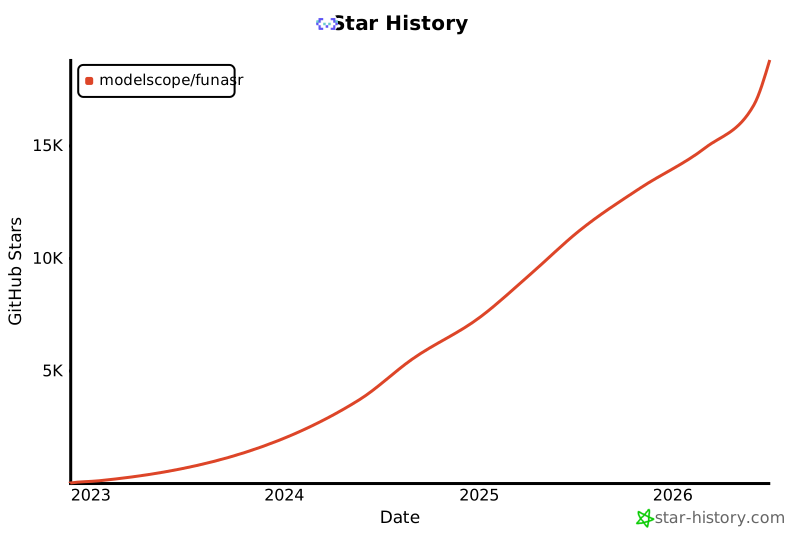
Star History
License
- FunASR toolkit source code in this repository: MIT License.
- Pretrained model weights are licensed separately. Check the license shown on each model card; when a model card links to the FunASR Model Open Source License Agreement, those terms apply.
Citations
@inproceedings{gao2023funasr,
  author={Zhifu Gao and others},
  title={FunASR: A Fundamental End-to-End Speech Recognition Toolkit},
  booktitle={INTERSPEECH},
  year={2023}
}
Release history Release notifications | RSS feed


Download files
Download the file for your platform. If you're not sure which to choose, learn more about installing packages.
Source Distribution
Built Distribution
Filter files by name, interpreter, ABI, and platform.
If you're not sure about the file name format, learn more about wheel file names.
Copy a direct link to the current filters
File details
Details for the file funasr-1.3.27.tar.gz.
File metadata
- Download URL: funasr-1.3.27.tar.gz
- Upload date:
- Size: 826.1 kB
- Tags: Source
- Uploaded using Trusted Publishing? No
- Uploaded via: twine/6.2.0 CPython/3.12.3
File hashes
| Algorithm | Hash digest | |
|---|---|---|
| SHA256 |
721601f1eebb74c087b5b85db9ec9d40cf6cfc1c08a3b8a78fe8a01e6715d246
|
|
| MD5 |
99dcfedf3e4a09159fd11ffea3317f34
|
|
| BLAKE2b-256 |
4e718a548ed1c4e1dbd79821f7cd06447b40bbf18d1428415f0e8c7e88218a35
|
File details
Details for the file funasr-1.3.27-py3-none-any.whl.
File metadata
- Download URL: funasr-1.3.27-py3-none-any.whl
- Upload date:
- Size: 951.8 kB
- Tags: Python 3
- Uploaded using Trusted Publishing? No
- Uploaded via: twine/6.2.0 CPython/3.12.3
File hashes
| Algorithm | Hash digest | |
|---|---|---|
| SHA256 |
02ef1e932881b6cbb5530739c7e118f173657c5e9ac2ccb8d2c30b895864ae12
|
|
| MD5 |
861f569617d1ad7243d5e6de71a892b2
|
|
| BLAKE2b-256 |
57a08b77fcc5cff126b09d2874ac50c9b66ef2692c4c7875a4328a7dabed8328
|






