
grape
Find images matching keywords using CLIP (Radford et al., 2021). Like grep, but for images.
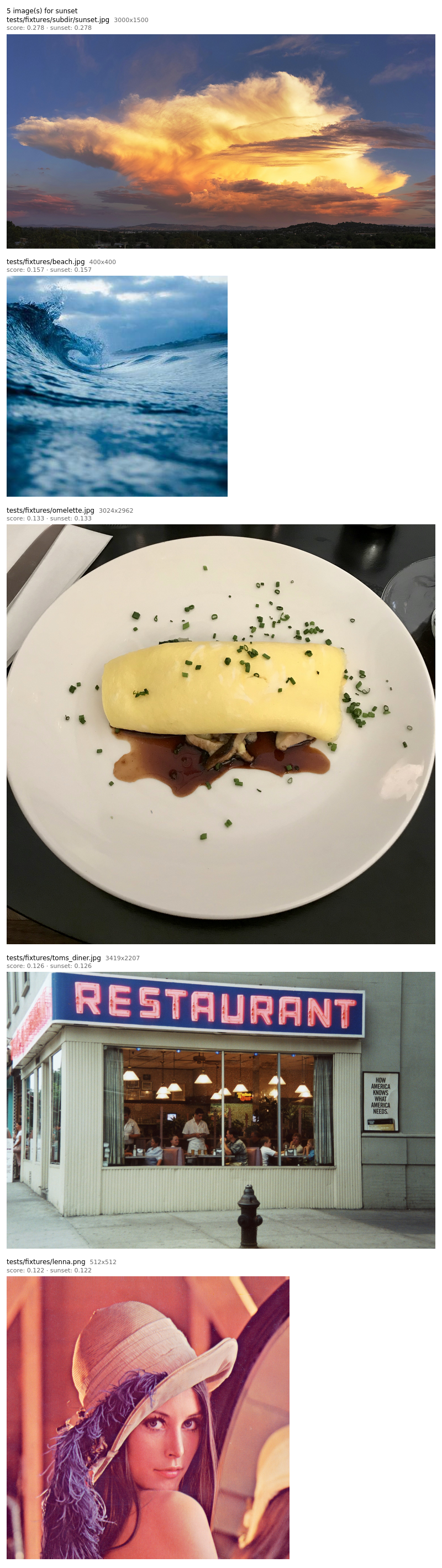
$ grape -R -s -n 5 --keywords sunset tests/fixtures
0.283  tests/fixtures/subdir/sunset.jpg
0.163  tests/fixtures/beach.jpg
0.145  tests/fixtures/omelette.jpg
0.144  tests/fixtures/lenna.png
0.128  tests/fixtures/toms_diner.jpg
The same search with --view:
Install
pip install grape-image-search
Python 3.10+. Model weights (~3.5 GB for the default) download on first run.
GPU
grape uses a GPU when PyTorch has one: NVIDIA, AMD or Intel. Even a
laptop's integrated GPU indexes ~20x faster than the CPU with the default
model. -v logs the device it picked; GRAPE_DEVICE=cpu forces the CPU.
-
NVIDIA: the plain
pip installabove already gets PyTorch's CUDA build. -
Intel (XPU): install the GPU driver and PyTorch's XPU build first (PyTorch's Intel GPU guide).
scripts/install_xpu.shsets up a venv this way.pip install torch torchvision --index-url https://download.pytorch.org/whl/xpu pip install grape-image-search -
AMD (ROCm, untested): install PyTorch's ROCm build first (pytorch.org).
Usage
Paths can be files, directories (with -R), or - to read from stdin.
At least one of -k or --like is required.
# describe what's in the picture (it matches what the photo shows, not
# words written in it)
grape -R --keywords sunset ~/Pictures

# find images similar to a reference
grape -R --like ref.jpg ~/Pictures

# combine text + reference, and penalize something
grape -R --keywords dog --exclude cat --like my_dog.jpg ~/Pictures

# top 5, with scores
grape -R -s -n 5 --keywords sunset ~/Pictures

# browse results in a GUI window
grape -R -n 200 --keywords sunset --view ~/Pictures

# pick images in the window (click to select); their paths print on close
grape -R -print0 --keywords blurry --view ~/Pictures | xargs -0 rm --

# read paths from stdin
find ~/Pictures -mtime -7 -type f | grape --keywords selfie -

# copy the top 10 cat photos to a folder
grape -R -print0 -n 10 --keywords cat ~/Pictures | xargs -0 cp -t ~/cats/
Run grape --help for the full flag list.
Worked examples
Per-keyword breakdown (-v) shows how each keyword and --like
reference contributes. The score on the header line is the mean.
$ grape -R -v -n 3 --keywords 'playful puppy,golden retriever' ~/Pictures
0.342  /home/me/Pictures/family/biscuit_park.jpg
  playful puppy: 0.301  golden retriever: 0.383
0.298  /home/me/Pictures/family/biscuit_couch.jpg
  playful puppy: 0.267  golden retriever: 0.329
0.274  /home/me/Pictures/family/old_biscuit.jpg
  playful puppy: 0.198  golden retriever: 0.350
-v also dumps every thread's stack on Ctrl-C, which shows where a run
is stuck.
Aesthetic ranking uses --exclude to subtract the mean score of a
contrast prompt. Scores are smaller here because both sides are competing.
$ grape -R -s -n 5 --ensemble-prompts '{}' \
    --keywords 'beautiful photo' --exclude 'ugly photo' ~/travel/
0.163  /home/me/travel/kyoto_arashiyama.jpg
0.139  /home/me/travel/iceland_sunset.jpg
0.127  /home/me/travel/nepal_trek.jpg
0.109  /home/me/travel/paris_evening.jpg
0.091  /home/me/travel/tokyo_skyline.jpg
Scoring
Grape ranks images by cosine similarity between CLIP embeddings. Each image's score is:
mean(similarity to --keywords and --like) - mean(similarity to --exclude)
Cosine similarities are not probabilities. Meaningful matches typically sit in the 0.15-0.35 range; even strong matches rarely exceed 0.35. Scores are not comparable across models -- switch models and the numbers shift.
--like matches semantics, not pixels. Two different photos of dogs
playing fetch score high; a photo and its crop do too. For actual duplicate
detection, use a perceptual-hashing tool like
czkawka.
Caching
On by default at ~/.cache/grape/embeddings.db
($XDG_CACHE_HOME/grape/embeddings.db). Cached:
- Image embeddings (the expensive part)
- Text embeddings, keyed by prompt
- Model identity, so repeat runs skip the torch/open_clip import entirely
- Image-vs-non-image detection results, so videos and docs are skipped on rescan
A warm query scores thousands of images in under a second via a single matrix multiply. Entries are keyed by absolute path, file stat (size, mtime, inode), and model ID, so they auto-invalidate when files change.
Use --no-cache to disable or --cache PATH to relocate.
Models
The default is
SigLIP 2's ViT-L-16-SigLIP2-256
(Tschannen et al., 2025) pretrained as webli -- the strongest text-to-image
retrieval available at this encoding cost. Pick any
OpenCLIP checkpoint with
--model model_name/pretrained_tag:
grape --model ViT-B-16-SigLIP2-256/webli -R --keywords sunset ~/Pictures    # 3.5x faster
grape --model ViT-SO400M-14-SigLIP2/webli -R --keywords sunset ~/Pictures   # strongest
ViT-B-16-SigLIP2-256 indexes photos about 3.5x faster and is a 1.5 GB
download instead of 3.5 GB. Its matches are slightly worse: on the standard
ImageNet test it names about 3 in 100 more photos wrong than the default.
Embeddings are scoped per model; switching re-encodes everything.
Keywords are matched with
prompt ensembling (Radford et al., 2021,
Section 3.1.4 and Appendix A): each keyword expands into several templates
("itap of a {}.", "a bad photo of the {}.", ...) plus the bare keyword, each
is embedded, then the embeddings are averaged and renormalized. The default
set is open_clip's seven simple ImageNet templates plus "{}", which
Volkov et al. (2025) found best for
SigLIP 2. Override with --ensemble-prompts.
Known issues
--viewcan't display HEIC photos: the window's web engine doesn't decode them. Paths, scores and selection still work.
1 maintainer

Metadata
1 maintainer
Release files for grape-image-search 0.5.0
For a detailed explanation of source distributions (sdists) and built distributions (wheels), please see the package formats documentation.
Source distribution (sdist)
| File | Size | Uploaded | Provenance | Actions |
|---|---|---|---|---|
| grape_image_search-0.5.0.tar.gz | 84.3 kB | With provenance | Details for grape_image_search-0.5.0.tar.gz |
Built distribution (wheel)
| File | Interpreter | ABI | Platform | Actions Reset |
|---|---|---|---|---|
| grape_image_search-0.5.0-py3-none-any.whl | Python 3 | none | any | Details for grape_image_search-0.5.0-py3-none-any.whl |
Total release size: 130.6 kB
Release files / grape_image_search-0.5.0.tar.gz
| Download URL | grape_image_search-0.5.0.tar.gz |
|---|---|
| Size | 84.3 kB |
| Tags | Source |
|
SHA-256 checksum How to use checksums |
0bd56a9ba37a6ddd57c00a32b7e995a9e94adca1b897ac6e3a242e33d24d2a5b
|
|
BLAKE2b-256 checksum How to use checksums |
d0d3c4c4b08a438e0fbfdcb2d1dd601c21f7f00317dfa8db908a214755001bbb
|
| Upload date | |
|
Uploaded using Trusted Publishing? What is trusted publishing? |
Yes |
| Uploaded via |
twine/7.0.0 CPython/3.13.16
|
Provenance
Provenance describes where a file came from. On PyPI, provenance is shared via attestations, which provide a verifiable record of the build or publishing details. View details, limitations and caveats.


PyPI Publish Attestation
PyPI verified that this artifact, at this checksum, originated from the publisher listed below.
Signed by GitHub Actions, verified by PyPI on Nov 19, 2026.
Transparency logRelease files / grape_image_search-0.5.0-py3-none-any.whl
| Download URL | grape_image_search-0.5.0-py3-none-any.whl |
|---|---|
| Size | 46.4 kB |
| Tags | Python 3 |
|
SHA-256 checksum How to use checksums |
589e7ae8ce3cf3df197dde549173f2ed6d29e0a397ea4c0d661a33946750e6a8
|
|
BLAKE2b-256 checksum How to use checksums |
fbc84fa6b2c8483c67170599d30ab3043535058f050d6d876b0d91d2f0c1f82e
|
| Upload date | |
|
Uploaded using Trusted Publishing? What is trusted publishing? |
Yes |
| Uploaded via |
twine/7.0.0 CPython/3.13.16
|
Provenance
Provenance describes where a file came from. On PyPI, provenance is shared via attestations, which provide a verifiable record of the build or publishing details. View details, limitations and caveats.
PyPI Publish Attestation
PyPI verified that this artifact, at this checksum, originated from the publisher listed below.
Signed by GitHub Actions, verified by PyPI on Nov 19, 2026.
Transparency logSecurity for grape-image-search 0.5.0
Provenance
Provenance describes where a file came from. On PyPI, provenance is shared via attestations, which provide a verifiable record of the build or publishing details. View details, limitations and caveats.
Full provenance
Both files in this release have been uploaded with provenance metadata.
Attestation for grape_image_search-0.5.0.tar.gz
PyPI Publish Attestation
PyPI verified that this artifact, at this checksum, originated from the publisher listed below.
Signed by GitHub Actions, verified by PyPI on Nov 19, 2026.
Transparency logA note on package security
PyPI is a repository for distributing packages, not a service for auditing them. While third-party security researchers and our staff do their best to detect and remove malicious packages, PyPI cannot guarantee the quality, security or suitability of any given package.
To learn more about protecting yourself from malicious actors, visit our package security documentation.














