
grape
Search your photos by describing what's in them. Like grep, but for images.
$ grape -R -s -n 5 --keywords sunset tests/fixtures
0.283  tests/fixtures/subdir/sunset.jpg
0.163  tests/fixtures/beach.jpg
0.146  tests/fixtures/omelette.jpg
0.144  tests/fixtures/lenna.png
0.128  tests/fixtures/cat.jpg
The same search with --view:
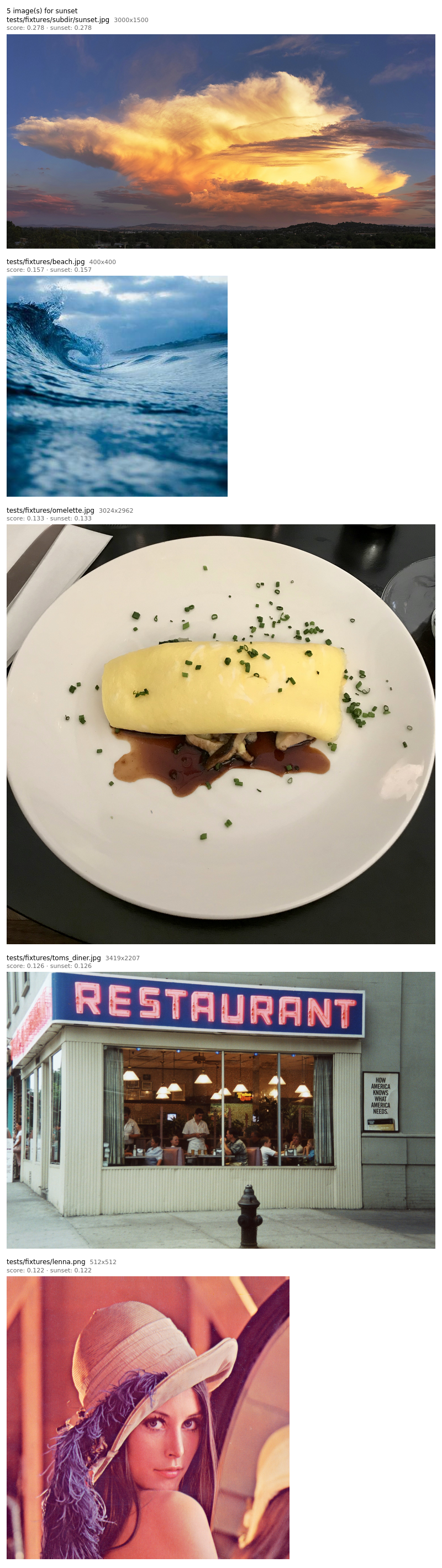
grape uses CLIP-style models, which understand what a picture shows. "sunset" finds photos of sunsets, not photos with the word "sunset" written in them.
Install
pip install grape-image-search
Needs Python 3.10+. The first run downloads the model (~3.5 GB).
GPU
grape uses a GPU if PyTorch can see one. Even a laptop's built-in GPU
reads photos ~20x faster than the CPU. -v shows which device it picked;
GRAPE_DEVICE=cpu forces the CPU.
-
NVIDIA: the plain
pip installabove is all you need. -
Intel: install the GPU driver and PyTorch's Intel build first (PyTorch's Intel GPU guide), or let
scripts/install_xpu.shset up a venv for you.pip install torch torchvision --index-url https://download.pytorch.org/whl/xpu pip install grape-image-search -
AMD (untested): install PyTorch's ROCm build first (pytorch.org).
Searching
Give grape files or folders (-R to search folders), and say what you want:
# photos of something
grape -R --keywords sunset ~/Pictures

# several things at once (comma-separated; a photo's score is the average)
grape -R --keywords 'dog,beach' ~/Pictures

# photos that look like one you already have
grape -R --like my_dog.jpg ~/Pictures

# dogs, but not cats
grape -R --keywords dog --exclude cat ~/Pictures
The first search reads every photo, which takes a while. After that grape remembers them, and searches take well under a second.
Looking at the results
Results are listed best match first.
-
-n 10shows only the top 10. -
-sshows each photo's score. -
-valso shows how each keyword scored:$ grape -R -v -n 3 --keywords sunset,beach tests/fixtures 0.205 tests/fixtures/beach.jpg sunset: 0.163 beach: 0.247 0.192 tests/fixtures/subdir/sunset.jpg sunset: 0.283 beach: 0.102 0.144 tests/fixtures/lenna.png sunset: 0.144 beach: 0.143 -
--viewopens the results in a window. Click photos to select them; when you close the window, grape prints the selected paths, ready to pass to another command:grape -R -n 200 --keywords blurry --view ~/Pictures | xargs rm --
Using grape with other commands
Like grep, grape prints one path per line. -print0 separates them with
NUL instead, which is safe for any filename:
# copy the 10 best cat photos to a folder
grape -R -print0 -n 10 --keywords cat ~/Pictures | xargs -0 cp -t ~/cats/

# search only this week's photos (- reads paths from stdin)
find ~/Pictures -mtime -7 -type f | grape --keywords selfie -
Run grape --help for every option.
Scores
A score says how well a photo matches, on the model's own scale. Good matches usually score 0.15-0.35; anything above 0.35 is rare. Scores only compare photos within one search: a different model, or different keywords, gives different numbers.
With --exclude, the score is the keyword score minus the exclude score.
That makes it useful for ranking photos by quality:
grape -R -n 20 --ensemble-prompts '{}' \
    --keywords 'beautiful photo' --exclude 'ugly photo' ~/Pictures
--like matches what a photo shows, not its exact pixels: two different
photos of a dog fetching a ball both score high. To find exact or
near-exact duplicates, use a tool built for that, like
czkawka.
Models
The default model is
SigLIP 2's ViT-L-16-SigLIP2-256.
--model picks any OpenCLIP
model:
# smaller and faster
grape --model ViT-B-16-SigLIP2-256/webli -R --keywords sunset ~/Pictures

# bigger and slower, best matches
grape --model ViT-SO400M-14-SigLIP2/webli -R --keywords sunset ~/Pictures
ViT-B-16-SigLIP2-256 reads photos about 3.5x faster and is a 1.5 GB
download instead of 3.5 GB. Its matches are slightly worse: on the standard
ImageNet test it names about 3 in 100 more photos wrong than the default.
Each model has its own index, so switching models reads all photos again.
grape turns each keyword into a few short sentences ("itap of a sunset.",
"a bad photo of the sunset.", ...) and averages them, which matches photos
better than the bare word
(Radford et al. 2021, section 3.1.4).
--ensemble-prompts '{}' uses your keywords exactly as written, which is
better when they're already full sentences.
Cache
grape stores what it learns about each photo in
~/.cache/grape/embeddings.db, so it only reads a photo again after the
file changes. It also remembers files that aren't images (videos,
documents), so later searches skip them. --cache PATH uses a different
file; --no-cache turns caching off.
Known issues
--viewcan't display HEIC photos: the window's web engine doesn't decode them. Paths, scores and selection still work.
1 maintainer

Metadata
1 maintainer
Release files for grape-image-search 0.6.0
For a detailed explanation of source distributions (sdists) and built distributions (wheels), please see the package formats documentation.
Source distribution (sdist)
| File | Size | Uploaded | Provenance | Actions |
|---|---|---|---|---|
| grape_image_search-0.6.0.tar.gz | 85.2 kB | With provenance | Details for grape_image_search-0.6.0.tar.gz |
Built distribution (wheel)
| File | Interpreter | ABI | Platform | Actions Reset |
|---|---|---|---|---|
| grape_image_search-0.6.0-py3-none-any.whl | Python 3 | none | any | Details for grape_image_search-0.6.0-py3-none-any.whl |
Total release size: 132.0 kB
Release files / grape_image_search-0.6.0.tar.gz
| Download URL | grape_image_search-0.6.0.tar.gz |
|---|---|
| Size | 85.2 kB |
| Tags | Source |
|
SHA-256 checksum How to use checksums |
6d760fa4fb70e53017d34c30c903bca95a8efcea17ffc40514f92241e0ccaf67
|
|
BLAKE2b-256 checksum How to use checksums |
95187609a6f6e90a8ab66facb57c17f0e3c511bf64ea89582ea7d174515c0b2e
|
| Upload date | |
|
Uploaded using Trusted Publishing? What is trusted publishing? |
Yes |
| Uploaded via |
twine/7.0.0 CPython/3.13.16
|
Provenance
Provenance describes where a file came from. On PyPI, provenance is shared via attestations, which provide a verifiable record of the build or publishing details. View details, limitations and caveats.


PyPI Publish Attestation
PyPI verified that this artifact, at this checksum, originated from the publisher listed below.
Signed by GitHub Actions, verified by PyPI on Nov 20, 2026.
Transparency logRelease files / grape_image_search-0.6.0-py3-none-any.whl
| Download URL | grape_image_search-0.6.0-py3-none-any.whl |
|---|---|
| Size | 46.8 kB |
| Tags | Python 3 |
|
SHA-256 checksum How to use checksums |
7c42258738462e5acd226f4f92bbe138027cc5cb04bba689f7f5e3e08d68edad
|
|
BLAKE2b-256 checksum How to use checksums |
fbd9631ddacc9cb938605dbc09701cb0f7b095e9ed73af477d3cb54689c0aee7
|
| Upload date | |
|
Uploaded using Trusted Publishing? What is trusted publishing? |
Yes |
| Uploaded via |
twine/7.0.0 CPython/3.13.16
|
Provenance
Provenance describes where a file came from. On PyPI, provenance is shared via attestations, which provide a verifiable record of the build or publishing details. View details, limitations and caveats.
PyPI Publish Attestation
PyPI verified that this artifact, at this checksum, originated from the publisher listed below.
Signed by GitHub Actions, verified by PyPI on Nov 20, 2026.
Transparency logSecurity for grape-image-search 0.6.0
Provenance
Provenance describes where a file came from. On PyPI, provenance is shared via attestations, which provide a verifiable record of the build or publishing details. View details, limitations and caveats.
Full provenance
Both files in this release have been uploaded with provenance metadata.
Attestation for grape_image_search-0.6.0.tar.gz
PyPI Publish Attestation
PyPI verified that this artifact, at this checksum, originated from the publisher listed below.
Signed by GitHub Actions, verified by PyPI on Nov 20, 2026.
Transparency logA note on package security
PyPI is a repository for distributing packages, not a service for auditing them. While third-party security researchers and our staff do their best to detect and remove malicious packages, PyPI cannot guarantee the quality, security or suitability of any given package.
To learn more about protecting yourself from malicious actors, visit our package security documentation.














