






Graphizy
Graphizy is a powerful, fast, and flexible Python library for building and analyzing graphs from 2D spatial data. Designed for computational geometry and network visualization, it supports multiple graph types, real-time analysis, memory-enhanced temporal graphs, and comprehensive weight computation systems — all powered by OpenCV and igraph with a modern, unified API.
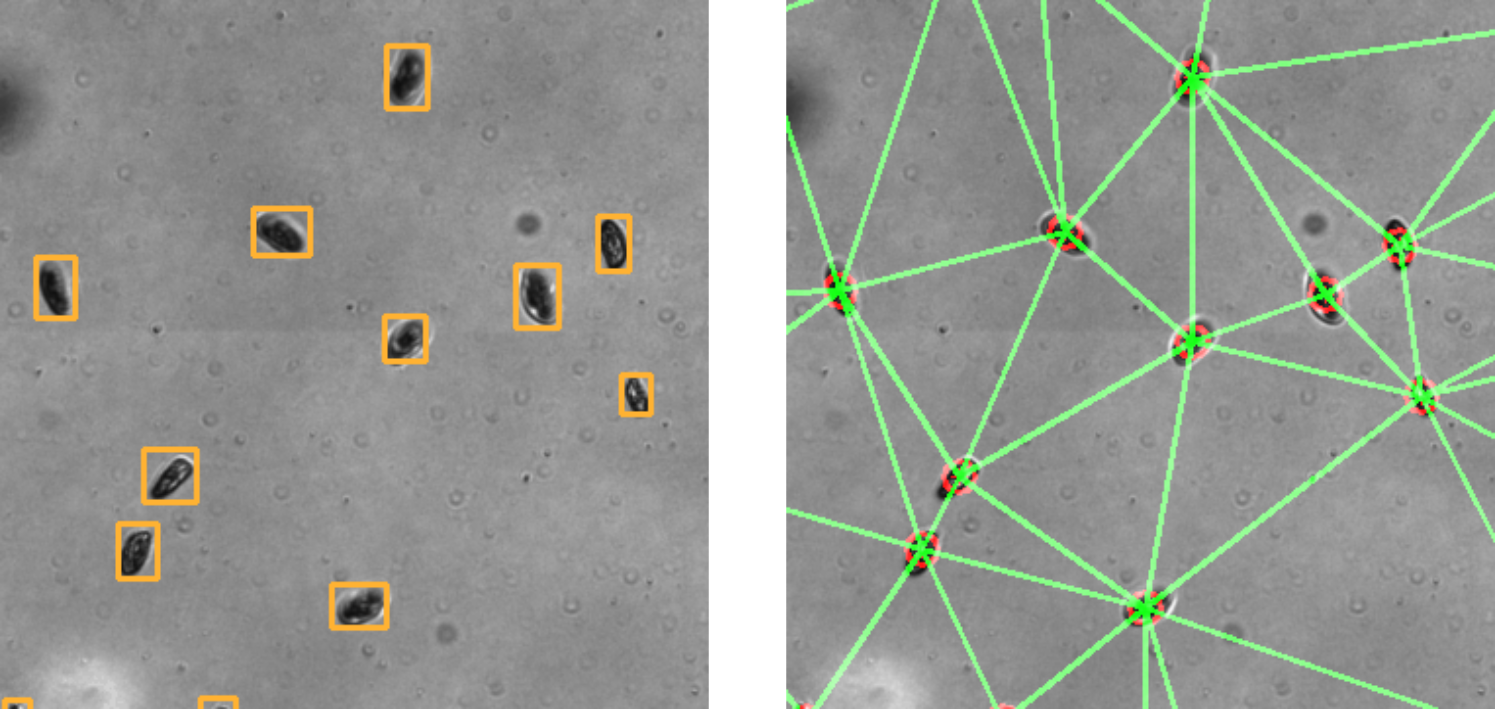
Convert spatial coordinates to analyzed graphs in milliseconds. Real-time graph analytics accessible through comprehensive igraph integration with enhanced memory and weight systems.
Documentation
✨ Key Features
-
One API for All Graphs Create Delaunay, k-NN, MST, Gabriel, Proximity, and even custom graphs with a single make_graph() call. Plugin-friendly, smart defaults, and fully type-safe.
-
Temporal Memory System Track how connections evolve over time. Use built-in memory features for persistence-aware analysis, temporal filtering, and age-based visualization.
-
Rich Graph Types, Easily Extended From spatial graphs to domain-specific topologies: support includes Delaunay triangulations, proximity graphs, k-nearest neighbors, MSTs, and custom plugins.
-
Instant Network Analysis Access over 200 igraph algorithms with real-time stats: clustering, centrality, components, and more. All robust to disconnections. NetworkX compatible.
-
Custom Weights, Real-Time Ready Define weights using distance, inverse, Gaussian, or custom formulas. Memory-aware weight updates and vectorized for performance.
-
Advanced Tools for Spatial & Temporal Insights Includes percolation thresholds, service accessibility, social dynamics, and time-aware community tracking — all tailored for dynamic networks.
-
Visualization & Streaming Visualize network memory with age-based coloring and transparency. Stream updates in real time, or export static snapshots. Comes with CLI tools and interactive demos.
🔄 Unified Graph Creation Interface
- Modern API: Single
make_graph()method for all graph types - Plugin System: Easily add custom graph algorithms
- Smart Defaults: Intelligent parameter handling with memory and weight integration
- Type Safety: Runtime configuration validation with detailed error messages
📊 Comprehensive Graph Types
- Delaunay Triangulation: Optimal triangular meshes from point sets
- Proximity Graphs: Connect nearby points based on distance thresholds
- K-Nearest Neighbors: Connect each point to its k closest neighbors
- Minimum Spanning Tree: Minimal connected graph with shortest total edge length
- Gabriel Graph: Geometric proximity graph (subset of Delaunay triangulation)
- Custom Graphs: Extensible plugin system for domain-specific algorithms
🧠 Advanced Memory Systems
- Temporal Analysis: Track connections across time steps for dynamic systems
- Smart Integration: Automatic memory updates with configurable retention policies
- Age-Based Visualization: Visual feedback showing connection persistence over time
- Performance Optimized: Vectorized operations for real-time applications
⚖️ Sophisticated Weight Computation
- Multiple Methods: Distance, inverse distance, Gaussian, and custom formulas
- Real-Time Computation: Optimized fast computers for high-performance applications
- Edge Attributes: Compute any edge attribute using mathematical expressions
- Memory Integration: Weight computation on memory-enhanced graph structures
📈 Comprehensive Graph Analysis
- igraph Integration: Full access to 200+ graph analysis algorithms
- Resilient Methods: Robust analysis that handles disconnected graphs gracefully
- Real-Time Statistics: Vertex count, edge count, connectivity, clustering, centrality
- Component Analysis: Detailed connectivity and community structure analysis
🎨 Advanced Visualization & Real-Time Processing
- Memory Visualization: Age-based coloring and transparency effects
- Real-Time Streaming: High-performance streaming with async support
- Flexible Configuration: Runtime-configurable parameters using type-safe dataclasses
- Interactive Demos: Built-in demonstrations and CLI tools
🚀 Installation
pip install graphizy
For development:
git clone https://github.com/cfosseprez/graphizy.git
cd graphizy
pip install -e .
⚡ Quick Start
Modern Unified Interface
from graphizy import Graphing, GraphizyConfig, generate_and_format_positions

# Generate sample data
data = generate_and_format_positions(size_x=800, size_y=600, num_particles=100)

# Configure and create grapher
config = GraphizyConfig(dimension=(800, 600))
grapher = Graphing(config=config)

# Create different graph types using unified interface
delaunay_graph = grapher.make_graph("delaunay", data)
proximity_graph = grapher.make_graph("proximity", data, proximity_thresh=50.0)
knn_graph = grapher.make_graph("knn", data, k=4)
mst_graph = grapher.make_graph("mst", data)
gabriel_graph = grapher.make_graph("gabriel", data)

# Visualize results
image = grapher.draw_graph(delaunay_graph)
grapher.show_graph(image, "Delaunay Graph")
grapher.save_graph(image, "delaunay.jpg")
Advanced Analysis with Modern API
# Comprehensive graph analysis
results = grapher.get_graph_info(delaunay_graph) # This call is instantaneous

# Print a clean, pre-formatted summary
print(results.summary())

# Access specific metrics as properties (computed on first access)
print(f"Density: {results.density:.3f}")
print(f"Diameter: {results.diameter}")

# Use helper methods for deeper analysis
top_hubs = results.get_top_n_by('degree', n=3)
print(f"Top 3 hubs (by degree): {top_hubs}")

betweenness_stats = results.get_metric_stats('betweenness')
print(f"Betweenness Centrality Stats: {betweenness_stats}")
🧠 Memory-Enhanced Temporal Graphs
Track connections over time for dynamic system analysis:
import numpy as np

# Initialize memory system
grapher.init_memory_manager(max_memory_size=200, track_edge_ages=True)

# Simulate evolution over time with automatic memory integration
for iteration in range(100):
    # Update positions (e.g., particle movement)
    data[:, 1:3] += np.random.normal(0, 2, (len(data), 2))

    # Create memory-enhanced graph (automatic with smart defaults)
    memory_graph = grapher.make_graph("proximity", data, proximity_thresh=60.0)
    # Automatically: use_memory=True, update_memory=True, compute_weights=True

    # Visualize with age-based coloring every 10 iterations
    if iteration % 10 == 0:
        memory_image = grapher.draw_memory_graph(
            memory_graph,
            use_age_colors=True,
            alpha_range=(0.3, 1.0)  # Older connections fade
        )
        grapher.save_graph(memory_image, f"memory_frame_{iteration:03d}.jpg")

# Analyze memory evolution
memory_stats = grapher.get_memory_analysis()
print(f"Total historical connections: {memory_stats['total_connections']}")
print(f"Average edge age: {memory_stats['edge_age_stats']['avg_age']:.1f}")
⚖️ Advanced Weight Computation
Compute sophisticated edge weights with multiple methods:
# Initialize weight computation system
grapher.init_weight_computer(method="gaussian", target_attribute="similarity")

# Create graphs with automatic weight computation
weighted_graph = grapher.make_graph("proximity", data,
                                   proximity_thresh=70.0,
                                   compute_weights=True)

# Analyze edge weights
if 'similarity' in weighted_graph.es.attributes():
    weights = weighted_graph.es['similarity']
    print(f"Weight statistics: mean={np.mean(weights):.3f}, std={np.std(weights):.3f}")

# Custom weight formulas
grapher.compute_edge_attribute(weighted_graph, "custom_weight",
                              method="formula",
                              formula="1.0 / (1.0 + distance * 0.01)")

# Real-time optimized weight computation
grapher.setup_fast_attributes(
    distance={"method": "distance", "target": "dist"},
    strength={"method": "inverse_distance", "target": "strength"}
)
fast_graph = grapher.make_graph("delaunay", data, compute_weights=False)
grapher.compute_all_attributes_fast(fast_graph)  # High-performance computation
🔄 Automated Multi-Graph Processing
Process multiple graph types automatically with memory and weights:
# Configure automatic processing
grapher.set_graph_type(['delaunay', 'proximity', 'knn', 'mst'])
grapher.update_graph_params('proximity', proximity_thresh=60.0, metric='euclidean')
grapher.update_graph_params('knn', k=5)

# Initialize integrated systems
grapher.init_memory_manager(max_memory_size=150, track_edge_ages=True)
grapher.init_weight_computer(method="distance", target_attribute="weight")

# Process all graph types with full pipeline: graph → memory → weights
all_graphs = grapher.update_graphs(data)  # Smart defaults: use_memory=True, update_memory=True, compute_weights=True

# Analyze results
for graph_type, graph in all_graphs.items():
    if graph:
        info = grapher.get_graph_info(graph)
        print(f"{graph_type}: {info['edge_count']} edges, density={info['density']:.3f}")

        # Check for computed weights
        if 'weight' in graph.es.attributes():
            weights = graph.es['weight']
            print(f"  Weights: avg={np.mean(weights):.3f}")
🎯 Graph Types Comparison
| Graph Type | Connectivity | Typical Edges | Use Case | Memory Compatible | Weight Compatible |
|---|---|---|---|---|---|
| Delaunay | Always | ~3n | Mesh generation, spatial analysis | ✅ | ✅ |
| Proximity | Variable | ~distance² | Local neighborhoods, clustering | ✅ | ✅ |
| K-NN | Variable | k×n | Machine learning, recommendation | ✅ | ✅ |
| MST | Always | n-1 | Minimal connectivity, optimization | ✅ | ✅ |
| Gabriel | Variable | ⊆ Delaunay | Wireless networks, geometric constraints | ✅ | ✅ |
| Memory | Variable | Historical | Temporal analysis, evolution tracking | N/A | ✅ |
🏃♂️ Real-Time Streaming
High-performance real-time graph processing:
# Create stream manager for real-time processing
stream_manager = grapher.create_stream_manager(
    buffer_size=1000,
    update_interval=0.05,  # 20 FPS
    auto_memory=True
)

# Add real-time visualization callback
def visualize_callback(graphs):
    if 'proximity' in graphs and graphs['proximity']:
        image = grapher.draw_memory_graph(graphs['proximity'], use_age_colors=True)
        grapher.show_graph(image, "Real-time Graph", block=False)

stream_manager.add_callback(visualize_callback)
stream_manager.start_streaming()

# Feed real-time data
for frame in data_stream:
    stream_manager.push_data(frame)

# Async streaming for high-performance applications
async_manager = grapher.create_async_stream_manager(buffer_size=2000)
# ... async processing
🔧 Plugin System
Easily extend Graphizy with custom graph types:
from graphizy import graph_type_plugin
import igraph as ig

@graph_type_plugin(
    name="custom_algorithm",
    description="Your custom graph algorithm",
    category="custom",
    parameters={
        "threshold": {"type": "float", "default": 0.5, "description": "Algorithm threshold"}
    }
)
def create_custom_graph(data_points, dimension, **kwargs):
    # Your algorithm implementation
    # ... create igraph Graph
    return graph

# Use immediately with unified interface
custom_graph = grapher.make_graph("custom_algorithm", data, threshold=0.7)
📊 Performance & Scalability
- Real-time Processing: Handle 1000+ points at 60+ FPS
- Memory Efficiency: Optimized data structures with configurable memory limits
- Vectorized Operations: NumPy and OpenCV optimizations throughout
- Async Support: High-performance asynchronous streaming capabilities
- Smart Caching: Intelligent caching of expensive computations
🛠️ Advanced Configuration
Type-safe, runtime-configurable parameters:
# Comprehensive configuration
config = GraphizyConfig(
    dimension=(1200, 800),
    drawing={
        "line_color": (255, 0, 0),
        "point_color": (0, 255, 255),
        "line_thickness": 2,
        "point_radius": 8
    },
    graph={
        "proximity_threshold": 75.0,
        "distance_metric": "euclidean"
    },
    memory={
        "max_memory_size": 200,
        "auto_update_from_proximity": True
    },
    weight={
        "auto_compute_weights": True,
        "weight_method": "gaussian"
    }
)

grapher = Graphing(config=config)

# Runtime updates
grapher.update_config(
    drawing={"line_thickness": 3},
    memory={"max_memory_size": 300}
)
📚 Examples & Documentation
Comprehensive examples demonstrating all features:
1_basic_usage.py- Modern unified interface and all graph types2_graph_metrics.py- Advanced analysis with resilient methods3_advanced_memory.py- Memory systems and temporal analysis4_weight_computation.py- Weight systems and custom formulas5_add_new_graph_type.py- Plugin system and custom algorithms6_stream_example.py- Real-time streaming and async processing
# Run examples
python examples/1_basic_usage.py
python examples/2_graph_metrics.py
python examples/3_advanced_memory.py

# Interactive demo
python examples/0_interactive_demo.py
🔬 Advanced Use Cases
Scientific Computing
# Particle physics simulations with temporal tracking
grapher.init_memory_manager(max_memory_size=1000, track_edge_ages=True)
for timestep in simulation:
    particle_graph = grapher.make_graph("delaunay", particle_positions[timestep])
    analyze_particle_interactions(particle_graph)
Network Analysis
# Social network evolution with weight analysis
grapher.init_weight_computer(method="inverse_distance", target_attribute="friendship_strength")
social_graph = grapher.make_graph("proximity", user_positions,
                                 proximity_thresh=influence_radius,
                                 compute_weights=True)
Computer Vision
# Feature point tracking in video streams
async for frame_features in video_stream:
    feature_graph = grapher.make_graph("knn", frame_features, k=8)
    track_feature_evolution(feature_graph)
📋 Requirements
- Python >= 3.8
- NumPy >= 1.20.0
- OpenCV >= 4.5.0
- python-igraph >= 0.9.0
- SciPy >= 1.7.0 (for KNN and MST)
- networkx >= 3.0 (for NetworkX bridge)
🧪 Development & Testing
# Install development dependencies
pip install -e ".[dev]"

# Run tests with coverage
pytest tests/ --cov=graphizy --cov-report=html

# Code quality
black src/
flake8 src/
mypy src/graphizy/

# Performance testing
python examples/benchmark_comparison.py
📈 Changelog
v0.1.17 (Current)
- ✅ Unified make_graph() Interface: Single method for all graph types
- ✅ Enhanced Memory Systems: Smart defaults and vectorized operations
- ✅ Advanced Weight Computation: Multiple methods with real-time optimization
- ✅ Resilient Analysis Methods: Robust handling of disconnected graphs
- ✅ Plugin System Enhancements: Advanced parameter validation and documentation
- ✅ Real-Time Streaming: Async support and performance optimizations
- ✅ Comprehensive Documentation: Updated examples and API reference
Previous Versions
- v0.1.16: Added MST and Gabriel graph types, enhanced memory visualization
- v0.1.15: Initial memory system and weight computation
- v0.1.14: Plugin system and custom graph types
- v0.1.13: Core graph types and visualization
🤝 Contributing
We welcome contributions! Please see our Contributing Guide for details.
- Fork the repository
- Create a feature branch (
git checkout -b feature/amazing-feature) - Add comprehensive tests for new functionality
- Ensure all tests pass (
pytest tests/) - Update documentation and examples
- Commit changes (
git commit -m 'Add amazing feature') - Push to branch (
git push origin feature/amazing-feature) - Open a Pull Request
📄 License
GPL-2.0-or-later License - see LICENSE file for details.
👨💻 Author
Charles Fosseprez
📧 Email: charles.fosseprez.pro@gmail.com
🐙 GitHub: @cfosseprez
📖 Documentation: graphizy.readthedocs.io
🙏 Acknowledgments
Built with powerful open-source libraries:
- OpenCV for high-performance computer vision operations
- igraph for comprehensive graph analysis algorithms
- NumPy for efficient numerical computations
- SciPy for scientific computing functions
Built with ❤️ for computational geometry, network analysis, and real-time graph processing
1 maintainer

Metadata
1 maintainer
Release files for graphizy 0.1.20
For a detailed explanation of source distributions (sdists) and built distributions (wheels), please see the package formats documentation.
Source distribution (sdist)
| File | Size | Uploaded | |
|---|---|---|---|
| graphizy-0.1.20.tar.gz | 149.2 kB | Details |
Built distribution (wheel)
| File | Interpreter | ABI | Platform | Reset |
|---|---|---|---|---|
| graphizy-0.1.20-py3-none-any.whl | Python 3 | none | any | Details |
Total release size: 263.6 kB
Release files / graphizy-0.1.20.tar.gz
| Download URL | graphizy-0.1.20.tar.gz |
|---|---|
| Size | 149.2 kB |
| Tags | Source |
|
SHA-256 checksum How to use checksums |
5bed6d7a5979b0e4ac2e011407ba2db7785a3f394b39e810513ae6da79dab6a1
|
|
BLAKE2b-256 checksum How to use checksums |
a29797871bbc5b08ca312f6f7d4081b8c095d8c74e18d967822d30f5b8d3e47d
|
| Upload date | |
|
Uploaded using Trusted Publishing? What is trusted publishing? |
No |
| Uploaded via |
poetry/2.1.3 CPython/3.9.13 Windows/10
|
Release files / graphizy-0.1.20-py3-none-any.whl
| Download URL | graphizy-0.1.20-py3-none-any.whl |
|---|---|
| Size | 114.4 kB |
| Tags | Python 3 |
|
SHA-256 checksum How to use checksums |
4362df93bd85a61a26ae3a06ec49a9ac525d494ba9157a0548287dd21e9173ad
|
|
BLAKE2b-256 checksum How to use checksums |
a785a8f506b625b68cd0116798558529d1f3e585d144e12bd2c6d3b0dbe790f4
|
| Upload date | |
|
Uploaded using Trusted Publishing? What is trusted publishing? |
No |
| Uploaded via |
poetry/2.1.3 CPython/3.9.13 Windows/10
|














