
gridcalc



A programmable spreadsheet for developers and technical users, with Excel-ish formulas, Python escape hatches, XLSX interop, goal seek, and LP/MIP solving. It ships two frontends over one engine: a curses terminal app, and a desktop window that renders the same workbook in a webview.
Inspired by Serge Zaitsev's kalk.
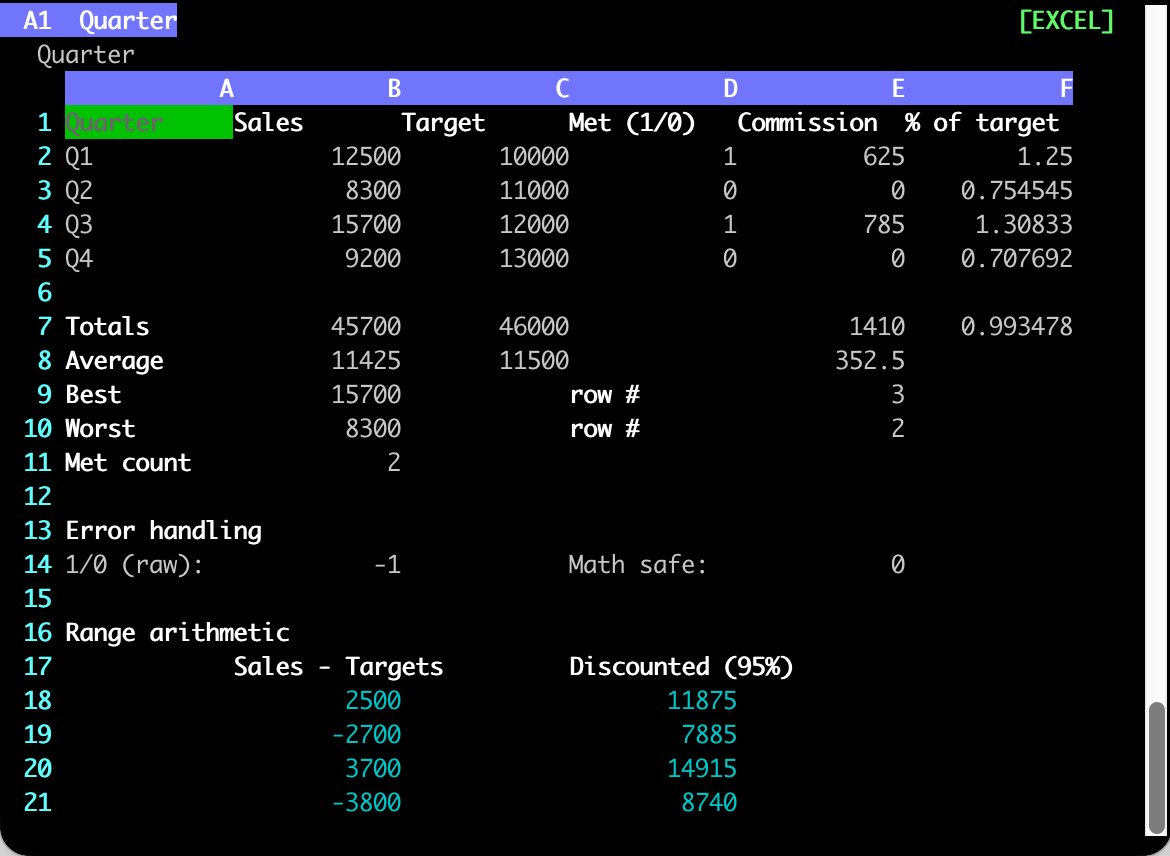
The terminal app over example_excel.json.
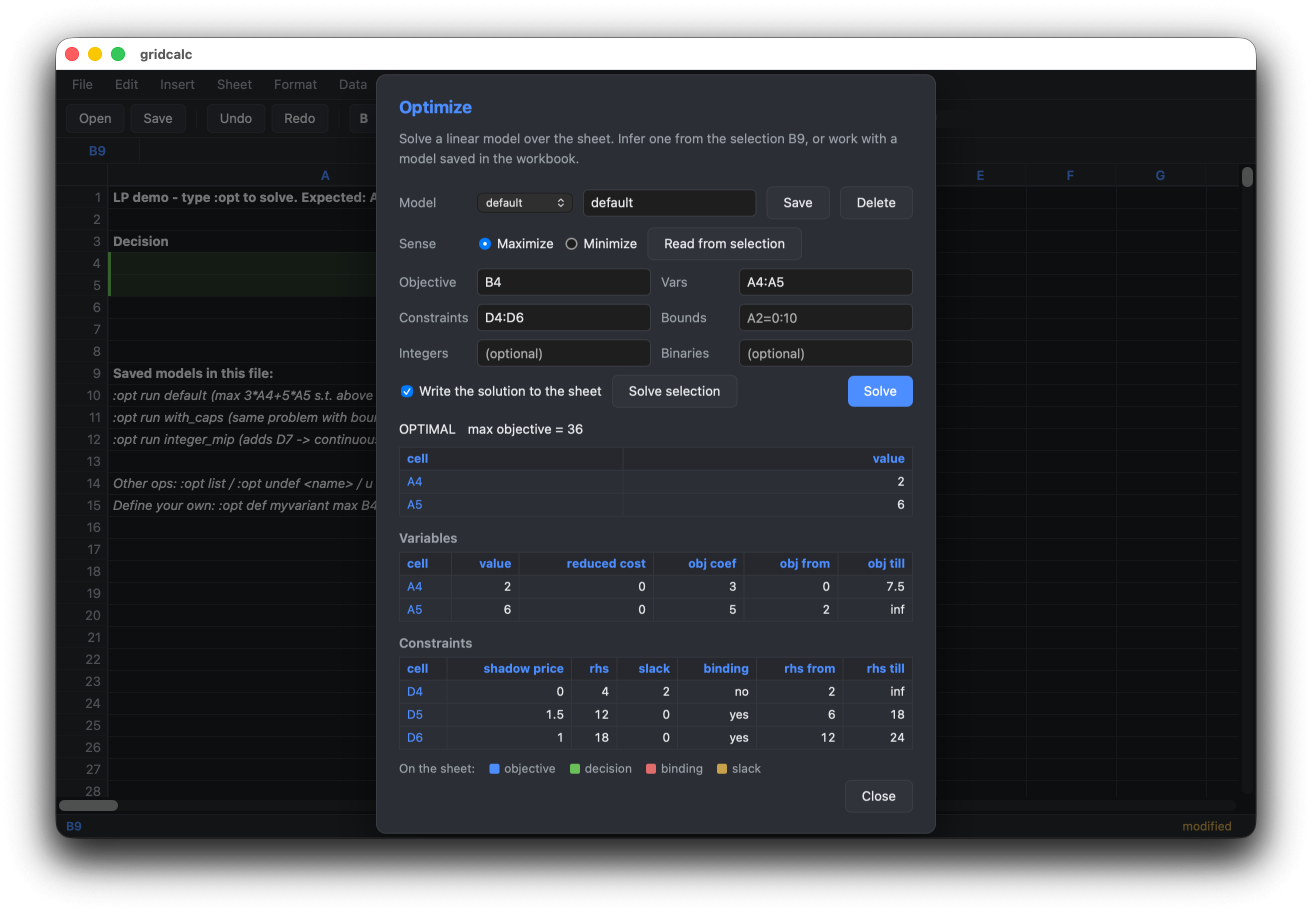
The desktop app solving example_lp.json -- the solution is written to the sheet behind the dialog.
pip install gridcalc
gridcalc budget.json        # terminal
gridcalc-web budget.json    # desktop window  (needs the [web] extra)
Documentation: https://shakfu.github.io/gridcalc/ -- install, tour, formula reference, optimization guide, file format, Python API, and the design notes.
What it gives you
-
Excel-compatible formulas (
=IF(A1>=B1, A1*0.05, 0)) and arrays (=SUM(A1:A10 * B1:B10)) without leaving the terminal. -
Multi-sheet workbooks with cross-sheet refs (
=Sheet2!A1) and a proper dep graph. -
Three formula modes per file: strict Excel, Excel-plus-
py.*, or full Pythonevalwith numpy/pandas. -
xlsx interop via OpenXLSX C++ -- read every sheet's formulas + values; export with cached values.
-
Linear, mixed-integer & quadratic programming built in via HiGHS --
:opt max B4 vars A4:A5 st D4:D6solves from cells in the sheet, with shadow prices, infeasibility diagnosis, and RHS sweeps. Models persist in the workbook. -
Goal-seek --
:goal B10 = 100 by A1adjusts a variable so a formula hits a target value. -
Vim-style command line (
:w,:e,:q,/search,y/p, visual selection, undo), with system-clipboard copy/paste -- yank pushes values as TSV, paste pulls TSV in from other apps. -
A desktop app as well as a terminal one -- the same engine behind a mouse-driven grid with menus, a Ctrl-K command palette, and solver results painted onto the sheet. Most
:commands are a shared registry both frontends dispatch, so they behave identically in each.
Install
pip install gridcalc            # core: zero third-party runtime deps
pip install 'gridcalc[extras]'  # adds numpy, pandas, pygments
pip install 'gridcalc[web]'     # adds the desktop window (gridcalc-web)
Or with uv: uv tool install 'gridcalc[extras]'.
The core install has zero third-party runtime dependencies on Linux and macOS -- the full 300+ Excel function library (statistical distributions, financial functions, LINEST/TREND regression, ...) works on stdlib alone. Details in the install guide.
A taste
Cells hold a number, a label (any non-=-prefixed string), or a formula (prefixed with =):
        A          B          C
1  Revenue   Cost       Margin
2  1000      600        =(A2-B2)/A2*100      <- formula
3  1200      700        =(A3-B3)/A3*100
4  Total     =SUM(B2:B3) =AVG(C2:C3)
Press : for the command line -- :w saves, :o opens, :q quits, v selects, u undoes, / searches. The quick tour covers the rest, and the command reference lists every command.
Try the shipped examples:
gridcalc example_excel.json          # sales report, named ranges, IF/MATCH
gridcalc example_excel.xlsx          # the same workbook saved as xlsx
gridcalc example_hybrid.json         # progressive tax via py.* + aggregations
gridcalc example.json                # PYTHON: numpy/pandas, list-comprehensions
gridcalc example_multisheet.json     # 3-sheet budget, cross-sheet formulas
gridcalc example_lp.json             # LP/MIP demo -- type :opt to solve
gridcalc example_goal.json           # goal-seek demo -- :goal B1 = 11 by A1
Scripting it
Any operation flag turns the same command line into a batch run that never opens a window -- so the solver is reachable from cron, a Makefile, or CI:
gridcalc plan.json --solve                       # run the workbook's saved model
gridcalc plan.json --solve --sens                # ... with shadow prices
gridcalc plan.json --sweep 'D5 6:24 9'           # parametric right-hand side
gridcalc book.json --goal 'B10 = 100 by A1'      # goal seek
gridcalc book.json --eval '=SUM(A1:A10)'         # evaluate a formula
gridcalc book.xlsx --convert book.json           # format conversion
Results go to stdout as JSON with a documented schema, and the exit code separates "the answer is no" (2 -- infeasible, unbounded, did not converge) from "the job is broken" (1). Nothing is written back unless you pass --apply. Full reference: https://shakfu.github.io/gridcalc/reference/cli/
Documentation
| Topic | |
|---|---|
| Install, extras, source builds | https://shakfu.github.io/gridcalc/install/ |
| Quick tour | https://shakfu.github.io/gridcalc/tour/ |
| Desktop app (web frontend) | https://shakfu.github.io/gridcalc/desktop/ |
| Formulas, functions, named ranges | https://shakfu.github.io/gridcalc/guide/formulas/ |
| Optimization (LP/MIP/QP, sensitivity, sweeps) | https://shakfu.github.io/gridcalc/guide/optimization/ |
| Headless CLI (solve/goal/sweep/eval/convert) | https://shakfu.github.io/gridcalc/reference/cli/ |
| File format | https://shakfu.github.io/gridcalc/reference/file-format/ |
| Python API | https://shakfu.github.io/gridcalc/reference/api/ |
| Design notes (recalc, security, web frontend) | https://shakfu.github.io/gridcalc/topological/ |
The pages are built from docs/ with MkDocs; make docs-serve previews them locally.
Development
make build      # rebuild the C++ extensions (_core, _opt)
make test       # unit tests
make qa         # lint + typecheck + test + format (Python and TypeScript)
make web-build  # compile the desktop app's React client
make docs       # build the documentation site
make wheel      # cpXX-cpXX wheel for current Python
The full target list is in the development guide, and make help prints it.
Prior Art
-
sc-im: A ncurses spreadsheet program for terminal
-
sheets: A terminal based spreadsheet tool
-
rustxl: A fast, keyboard-driven spreadsheet with vim-style navigation and Excel-compatible formulas.
License
MIT
1 maintainer

Metadata
1 maintainer
Release files for gridcalc 0.7.0
For a detailed explanation of source distributions (sdists) and built distributions (wheels), please see the package formats documentation.
Built distributions (wheels)
| File | Reset | |||
|---|---|---|---|---|
| gridcalc-0.7.0-cp312-abi3-win_amd64.whl | CPython 3.12 | abi3 | Windows x86-64 | Details |
| gridcalc-0.7.0-cp312-abi3-manylinux_2_27_x86_64.manylinux_2_28_x86_64.whl | CPython 3.12 | abi3 | Linux glibc 2.28+ x86-64, Linux glibc 2.27+ x86-64 | Details |
| gridcalc-0.7.0-cp312-abi3-manylinux_2_26_aarch64.manylinux_2_28_aarch64.whl | CPython 3.12 | abi3 | Linux glibc 2.26+ ARM64, Linux glibc 2.28+ ARM64 | Details |
| gridcalc-0.7.0-cp312-abi3-macosx_11_0_arm64.whl | CPython 3.12 | abi3 | macOS 11.0+ ARM64 | Details |
| gridcalc-0.7.0-cp312-abi3-macosx_10_15_x86_64.whl | CPython 3.12 | abi3 | macOS 10.15+ x86-64 | Details |
Total release size: 15.6 MB
Release files / gridcalc-0.7.0-cp312-abi3-win_amd64.whl
| Download URL | gridcalc-0.7.0-cp312-abi3-win_amd64.whl |
|---|---|
| Size | 2.9 MB |
| Tags | CPython 3.12 Windows x86-64 abi3 |
|
SHA-256 checksum How to use checksums |
0de870676fb324e9a3e7ec8d953102f4b43e9b68355fbf529ddc499c03eeb6fb
|
|
BLAKE2b-256 checksum How to use checksums |
28451b3c980c676d054368854d303700c2d0fe8147927795ec7722e40aa4917a
|
| Upload date | |
|
Uploaded using Trusted Publishing? What is trusted publishing? |
No |
| Uploaded via |
twine/6.2.0 CPython/3.14.7
|
Release files / gridcalc-0.7.0-cp312-abi3-manylinux_2_27_x86_64.manylinux_2_28_x86_64.whl
| Download URL | gridcalc-0.7.0-cp312-abi3-manylinux_2_27_x86_64.manylinux_2_28_x86_64.whl |
|---|---|
| Size | 3.7 MB |
| Tags | CPython 3.12 Linux glibc 2.27+ x86-64 Linux glibc 2.28+ x86-64 abi3 |
|
SHA-256 checksum How to use checksums |
4f345cede58b85f93caa691da51f00f39a93d01e013676e02aeb41514f2bc8ee
|
|
BLAKE2b-256 checksum How to use checksums |
6610b7479bfb83b583ea8a79b1cdfd063153c677e7cbe350bde5778dc451d844
|
| Upload date | |
|
Uploaded using Trusted Publishing? What is trusted publishing? |
No |
| Uploaded via |
twine/6.2.0 CPython/3.14.7
|
Release files / gridcalc-0.7.0-cp312-abi3-manylinux_2_26_aarch64.manylinux_2_28_aarch64.whl
| Download URL | gridcalc-0.7.0-cp312-abi3-manylinux_2_26_aarch64.manylinux_2_28_aarch64.whl |
|---|---|
| Size | 3.4 MB |
| Tags | CPython 3.12 Linux glibc 2.26+ ARM64 Linux glibc 2.28+ ARM64 abi3 |
|
SHA-256 checksum How to use checksums |
bece20abef1e23e6c7ad59f13a0ebf82923b2a5b54babaafe52d6e60300d4155
|
|
BLAKE2b-256 checksum How to use checksums |
397442bf3c8b747e8901a2e1f5811b298161ede6c1436c6c656d9903ffc74577
|
| Upload date | |
|
Uploaded using Trusted Publishing? What is trusted publishing? |
No |
| Uploaded via |
twine/6.2.0 CPython/3.14.7
|
Release files / gridcalc-0.7.0-cp312-abi3-macosx_11_0_arm64.whl
| Download URL | gridcalc-0.7.0-cp312-abi3-macosx_11_0_arm64.whl |
|---|---|
| Size | 2.7 MB |
| Tags | CPython 3.12 abi3 macOS 11.0+ ARM64 |
|
SHA-256 checksum How to use checksums |
97df1f1f3bdff35e47a72d66f205af78b916420165a63ee9b2c9d99d887d8955
|
|
BLAKE2b-256 checksum How to use checksums |
aca79be1b24413b6559dff18f499d12638eb6335ba9d599ddbc25c7a17a6e0cc
|
| Upload date | |
|
Uploaded using Trusted Publishing? What is trusted publishing? |
No |
| Uploaded via |
twine/6.2.0 CPython/3.14.7
|
Release files / gridcalc-0.7.0-cp312-abi3-macosx_10_15_x86_64.whl
| Download URL | gridcalc-0.7.0-cp312-abi3-macosx_10_15_x86_64.whl |
|---|---|
| Size | 2.9 MB |
| Tags | CPython 3.12 abi3 macOS 10.15+ x86-64 |
|
SHA-256 checksum How to use checksums |
4251752f7eafd80182719ede6321ee178e792570e64f028677522eb6646e0052
|
|
BLAKE2b-256 checksum How to use checksums |
b61fa96ab1c02de1368034ee99ca32fc7faef48a9db6bf024e20778f436b1a96
|
| Upload date | |
|
Uploaded using Trusted Publishing? What is trusted publishing? |
No |
| Uploaded via |
twine/6.2.0 CPython/3.14.7
|














