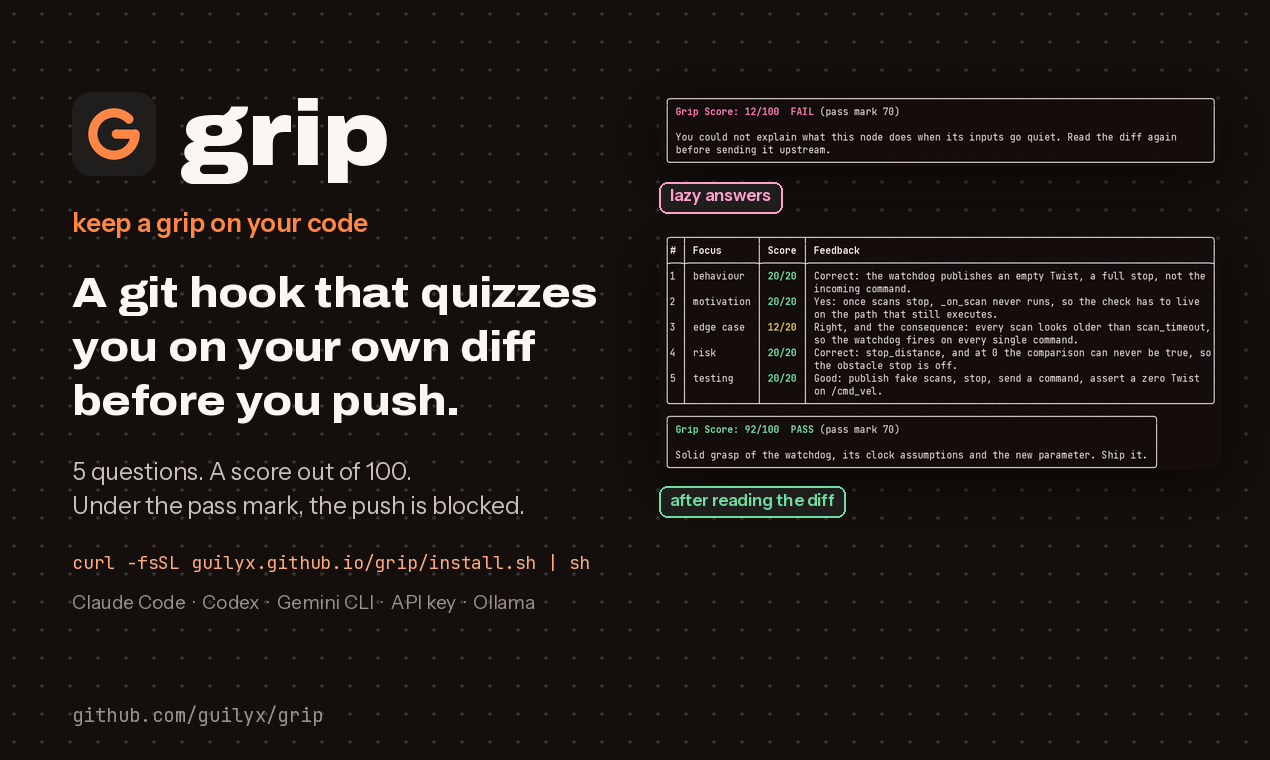
Pass the whiteboard defense before you push. grip is a git hook that pulls you aside at the moment you ship and asks what a senior engineer would: what does this do, why this way and not another, where does it fail, what could go wrong. Five questions written from your own diff, a Grip Score out of 100, and a pass mark your team sets. Below the mark, nothing goes upstream.




5 questionswritten from your diff, graded against a hidden rubric, 100 points |
12 → 92the same diff blocked with lazy answers, through with real ones (demo) |
0 new tools to learna git hook, or/grip inside Claude Code, Codex, Gemini CLI, Cursor and friends |
| Without grip | With grip |
|---|---|
$ git push
Enumerating objects: 14, done.
...
To github.com:acme/robot.git
   3f2a1c9..8e7d4b2  main -> main
Four hundred lines the assistant wrote, nobody on the team can explain, now upstream. |
$ git push
grip  5 questions about your push (pre-push). Pass mark: 70/100.

Q1/5 (behaviour) What happens to a cmd_vel message
     whose linear.x exceeds the new limit?
> it is clamped to the limit, not dropped, so the
> robot keeps moving at the max speed

...

Grip Score: 92/100  PASS
Same push, one minute later. You can explain it in the review because you just did. |
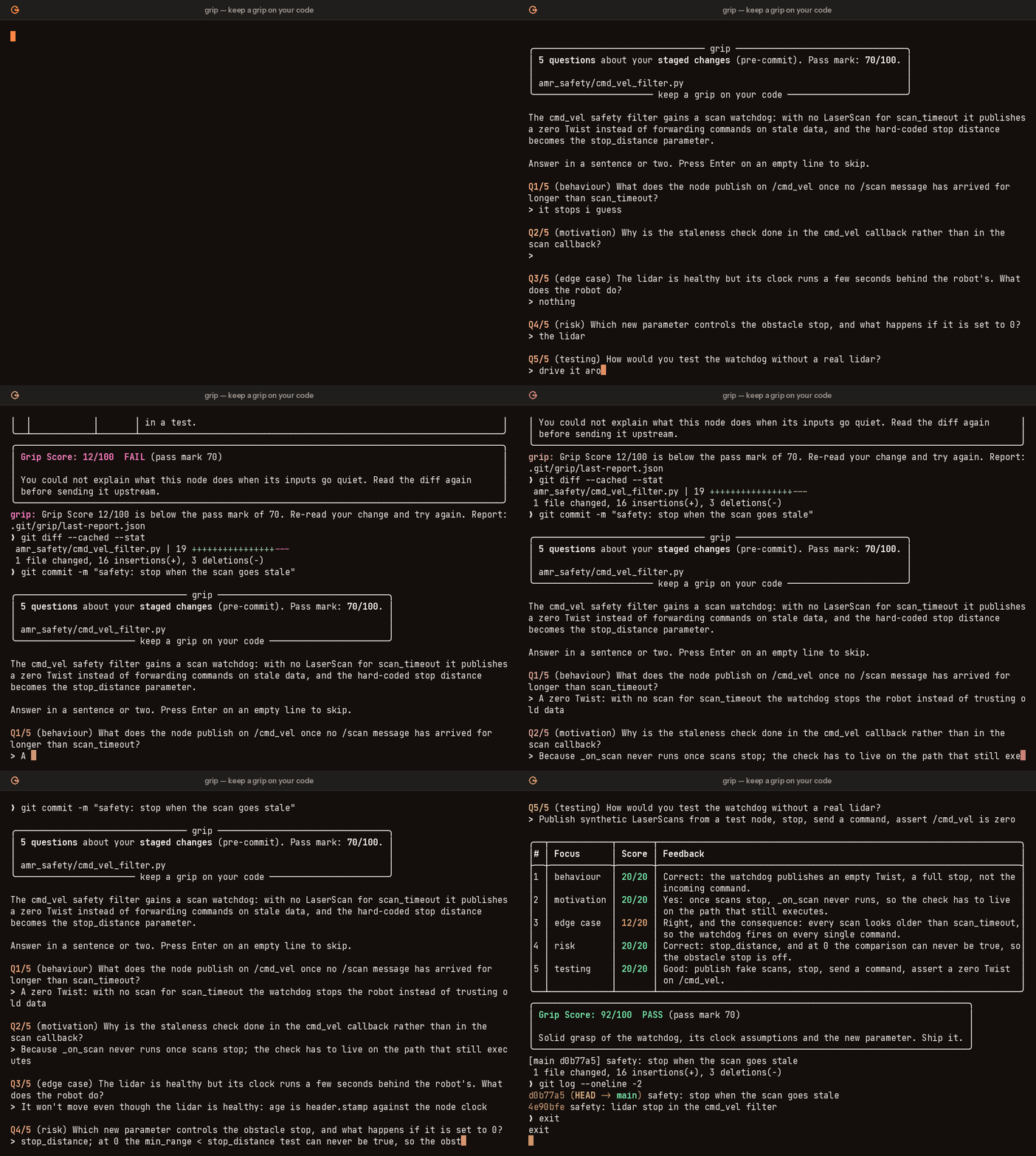
A commit blocked at 12/100, then accepted at 92/100. Video version. Recorded with the offline scripted provider, so questions are canned; a real model writes them from your diff.
The whiteboard defense
I should be able to pull you aside at any moment and ask you to explain any customer-facing system you've shipped. [...] I don't expect line-level familiarity with the code. [...] But if I ask "why did you do X instead of Y?", "what happens if this actor behaves maliciously?", "what data structure did you use here and why?", or "where does this fail?" you should be able to answer confidently.
Mitchell Hashimoto
We found this post after we built grip, and it is the clearest statement of what grip is for. (Mitchell is not involved with grip.) The bar is not line-level recall. It is being able to explain and defend a system you put in front of customers, however much of it a model wrote.
grip runs that conversation at the last moment it is cheap: before the push.
| At the whiteboard | What grip asks |
|---|---|
| How does it work? | behaviour: what the change does, in your words |
| Why X instead of Y? | motivation: why it is built this way |
| Where does this fail? | edge case: the input or state that breaks it |
| What could go wrong? | risk: side effects, and what else it touches |
| How do you know? | testing: how you would show it works |
The questions never ask for line numbers, exact strings or function names. A model writes them from the diff with a hidden rubric, then grades your answers against it.
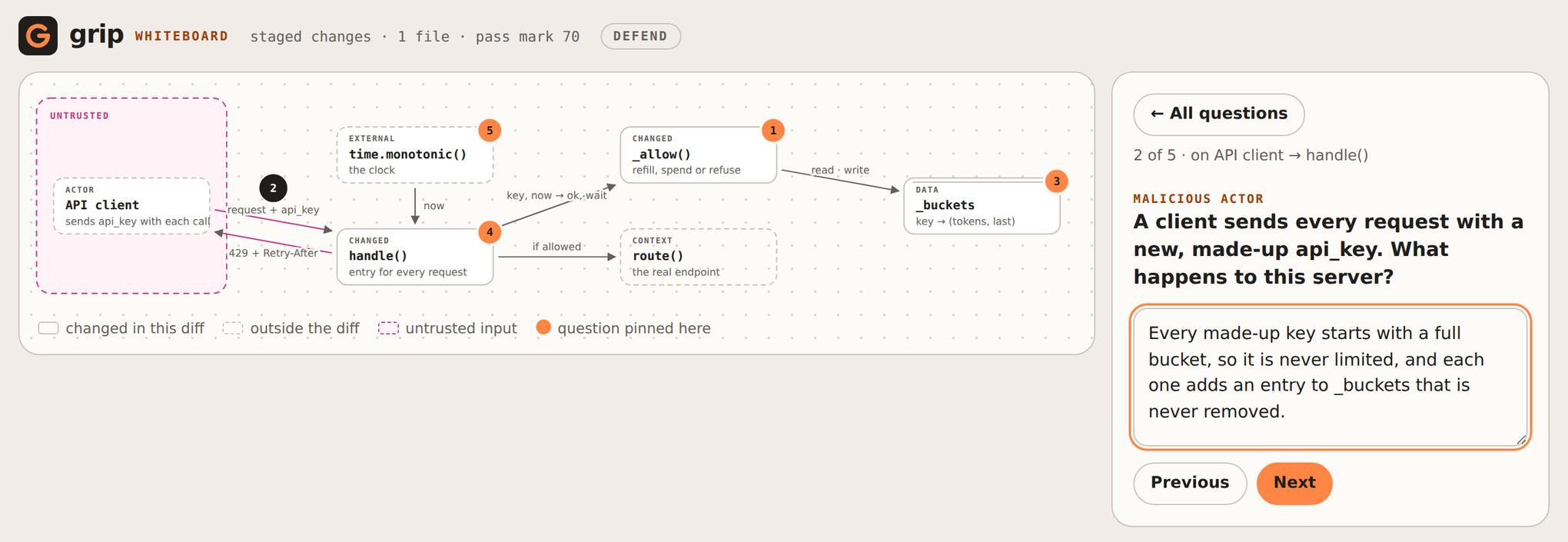
grip whiteboard: the whole defense
grip whiteboard draws your change the way you would on a whiteboard: its parts, how they
connect, which inputs are untrusted. It pins five questions to the drawing, including the
two the quiz does not ask directly, what a malicious actor could do and why this data
structure, and opens it in your browser. Click a part, answer, hand in. Same score, same
pass mark, and a pass counts for the push hook.
grip whiteboard                    # defend your staged change in the browser
grip whiteboard --interview        # for the person asking: rubrics visible, tick what you hear
grip whiteboard --export board.html  # a shareable copy, no rubrics
Prototype freely, defend what ships. For a spike, a demo or an experiment, generate
all of it: grip skip lets one push through, grip skip --hours 2 pauses grip for a
session, or leave the hook out of that repository. Keep the hook where customers are.
Why now
Generated code, big refactors, late-night pastes: it is easy to ship a change you could not explain in a code review. grip makes you explain it before it leaves your machine. It is a lightweight forcing function, not a gate for correctness.
The gap grip aims at is measured, not imagined. In METR's 2025 randomised trial, experienced open-source developers using AI tools were 19% slower while believing they were 20% faster. GitClear's analysis of 153 million changed lines found code churn on track to double since AI assistants arrived. The 2024 DORA report linked higher AI adoption to lower delivery stability, and the 2025 Stack Overflow survey put developer trust in AI output at a low. Every one of these tools checks the code. grip is the only one that checks the human.
Install
grip is on PyPI as grip-hook. Install it as a
command-line tool with pipx or uv (Python 3.11+):
pipx install grip-hook # or: uv tool install grip-hook
Plain pip install grip-hook works too, inside a virtualenv. You get grip and a
git grip alias, on Linux, macOS and Windows. Upgrade with pipx upgrade grip-hook (or
uv tool upgrade grip-hook).
Neither pipx nor uv? curl -fsSL https://raw.githubusercontent.com/guilyx/grip/main/install.sh | sh
uses whichever one it finds and tells you how to get uv when there is neither.
Then, in your repository:
grip init
That writes a commented .grip.toml, installs the pre-push hook and tells the coding
agents on your machine to run the quiz before they push. Commit the files and the team
shares the setup. Prefer to do it by hand? Two ways to wire it into git:
Option A: native git hook
cd your-repo
grip install                  # pre-push (recommended)
grip install --stage pre-commit --stage pre-push   # both
Option B: pre-commit framework
# .pre-commit-config.yaml
repos:
  - repo: https://github.com/guilyx/grip
    rev: v0.2.1
    hooks:
      - id: grip          # runs at pre-push
      # - id: grip-commit # runs at pre-commit
pre-commit install --hook-type pre-push
Inside a coding agent
grip is an Agent Skill. One command installs it into Claude Code, Codex, Gemini CLI, Cursor, Windsurf, Cline, Copilot and friends:
npx skills add guilyx/grip -g
Then type /grip before you push. The agent relays the five questions, you answer, grip
grades; the skill forbids the agent from answering for you. /grip-review main..feat
quizzes a reviewer on someone else's branch, /grip-explain turns your answers into the
commit message, and /grip-whiteboard opens the whiteboard in your browser so you answer
there. Claude Code users can take the
plugin instead, which also blocks git push until the diff has passed:
/plugin marketplace add guilyx/grip
/plugin install grip@grip
grip agents writes the rule file each agent on your machine reads (AGENTS.md,
CLAUDE.md, GEMINI.md, Cursor, Windsurf, Cline, Copilot) so it runs grip check before
every push. See the docs for the raw
grip ask / grip grade flow any agent can drive.
Provider
Already using Claude Code, Codex or Gemini CLI? grip can reuse it, so there is no API key and no extra bill:
# .grip.toml
provider = "claude-code"      # or "codex", or "gemini"
Otherwise grip talks to Anthropic by default: export ANTHROPIC_API_KEY (or run
ant auth login). For a local, free setup use Ollama:
# .grip.toml
provider = "ollama"
model = "qwen3:14b"
Any OpenAI-compatible API works with provider = "openai" plus base_url and
OPENAI_API_KEY.
Use
Nothing to do: commit or push as usual. When grip runs, answer five questions in the terminal. Pass the mark and the commit or push continues; fail it and it is blocked with per-question feedback so you know what to go read.
grip quiz                     # quiz your staged changes right now, no hook needed
grip quiz --unpushed          # quiz everything not yet on a remote
grip quiz --provider fake     # try the flow offline with a dummy grader
grip whiteboard               # draw the change and defend it in the browser
grip status                   # hooks, last score, what has passed, configuration
grip skip && git push         # bypass once (GRIP_SKIP=1 and --no-verify work too)
grip skip --hours 1           # pause the hooks for a demo; grip resume cancels
A diff that passed is remembered for 24 hours, so a pre-push right after a pre-commit does not ask again.
Practice on Keep A Grip
Keep A Grip is a catalogue of ROS 2, robotics and AI problems built for this loop: solve one with any assistant, then let grip quiz you on the diff. Scores land on your dashboard; anyone can add a problem.
grip login kag_…                   # token from your dashboard
grip solve cmd-vel-safety-filter   # a repo with PROBLEM.md, pass mark preset
grip submit                        # tests, five questions, score reported
Only the score leaves your machine. See the docs.
Configure
.grip.toml at the repository root, or [tool.grip] in pyproject.toml. Environment
variables (GRIP_PASSING_SCORE=80) and flags (--passing-score 80) override files.
passing_score = 70            # 0-100, the Grip Score you need
difficulty = "normal"         # easy | normal | hard
provider = "anthropic"        # anthropic | claude-code | codex | gemini | openai | ollama | fake
model = ""                    # empty = provider default (claude-opus-5 for anthropic)
effort = "medium"             # low | medium | high | xhigh | max | none
exclude = ["*.lock", "*.snap"]
max_diff_bytes = 200000
remember_passes_hours = 24
require_tty = false           # fail instead of skipping in non-interactive runs
fail_open = false             # let commits through when the provider is down
Full reference: guilyx.github.io/grip.
How the score works
- The model reads the diff and writes exactly five questions, each with a hidden rubric.
- You answer each in a sentence or two.
- The model grades all five against the rubrics: 0 to 20 points each, summed to a Grip Score out of 100.
- Score at or above
passing_scorelets the commit or push through.
Only the diff (after exclude) and your answers are sent to the provider. Reports are
saved to .git/grip/last-report.json.
When grip gets in the way
A one-line typo fix does not deserve five questions, and grip cannot tell a rename from a
rewrite. That is what the escape hatches are for: grip skip for one push,
grip skip --hours 1 for a pairing session, exclude for generated files,
remember_passes_hours so a passed diff is not asked twice. Questions and grading come
from a language model, so they are sometimes unfair; the per-question feedback shows you
why, and grip quiz gives a fresh set. What has and has not been measured about the
quiz, and where it is known to be annoying, is on the
honest numbers page; the
evals harness behind it runs offline. Treat the Grip Score as a prompt to
re-read, not a verdict.
Cite
If grip is part of a study or a course, please cite it (CITATION.cff):
@software{lejeune2026grip,
  author = {L., Erwin},
  title  = {grip: keep a grip on your code},
  year   = {2026},
  url    = {https://github.com/guilyx/grip}
}
Contributing
Issues and pull requests are welcome. See CONTRIBUTING.md for the development setup, and SECURITY.md for what data grip touches.
Media
A launch video, the
Product Hunt image and the icon live
under docs/assets/launch/, all generated from the demo recording by
scripts/launch/make_launch.py. Use them freely. More on the
media page.
License
BSD-3-Clause. Copyright (c) 2026, Erwin L.
1 maintainer

Metadata
1 maintainer
Release files for grip-hook 0.2.1
For a detailed explanation of source distributions (sdists) and built distributions (wheels), please see the package formats documentation.
Source distribution (sdist)
| File | Size | Uploaded | Provenance | |
|---|---|---|---|---|
| grip_hook-0.2.1.tar.gz | 117.0 kB | With provenance | Details |
Built distribution (wheel)
| File | Interpreter | ABI | Platform | Reset |
|---|---|---|---|---|
| grip_hook-0.2.1-py3-none-any.whl | Python 3 | none | any | Details |
Total release size: 206.6 kB
Release files / grip_hook-0.2.1.tar.gz
| Download URL | grip_hook-0.2.1.tar.gz |
|---|---|
| Size | 117.0 kB |
| Tags | Source |
|
SHA-256 checksum How to use checksums |
e1fb40f7f2aaacdcba456adb1d8213ba7e1c35f3553481b8ab15de9188921f4f
|
|
BLAKE2b-256 checksum How to use checksums |
07ad68f398a5c0c1f760d046db8e612037b34f6bac077ebe9ae9ecc59a15247b
|
| Upload date | |
|
Uploaded using Trusted Publishing? What is trusted publishing? |
Yes |
| Uploaded via |
twine/7.0.0 CPython/3.13.14
|
Provenance
Provenance describes where a file came from. On PyPI, provenance is shared via attestations, which provide a verifiable record of the build or publishing details. View details, limitations and caveats.


PyPI Publish Attestation
PyPI verified that this artifact, at this checksum, originated from the publisher listed below.
Signed by GitHub Actions, verified by PyPI on Oct 19, 2026.
Transparency logRelease files / grip_hook-0.2.1-py3-none-any.whl
| Download URL | grip_hook-0.2.1-py3-none-any.whl |
|---|---|
| Size | 89.6 kB |
| Tags | Python 3 |
|
SHA-256 checksum How to use checksums |
230db47218ff532e842b29bed40b5b3e8930820d34de34a33953575ea82a2e9a
|
|
BLAKE2b-256 checksum How to use checksums |
c86dd9da915cae8096a6a0e0b5932b6e7b0d4112670db6f649c8230b8718d0f7
|
| Upload date | |
|
Uploaded using Trusted Publishing? What is trusted publishing? |
Yes |
| Uploaded via |
twine/7.0.0 CPython/3.13.14
|
Provenance
Provenance describes where a file came from. On PyPI, provenance is shared via attestations, which provide a verifiable record of the build or publishing details. View details, limitations and caveats.
PyPI Publish Attestation
PyPI verified that this artifact, at this checksum, originated from the publisher listed below.
Signed by GitHub Actions, verified by PyPI on Oct 19, 2026.
Transparency logSecurity for grip-hook 0.2.1
Provenance
Provenance describes where a file came from. On PyPI, provenance is shared via attestations, which provide a verifiable record of the build or publishing details. View details, limitations and caveats.
Full provenance
All 2 files in this release have been uploaded with provenance metadata.
Attestation for grip_hook-0.2.1.tar.gz
PyPI Publish Attestation
PyPI verified that this artifact, at this checksum, originated from the publisher listed below.
Signed by GitHub Actions, verified by PyPI on Oct 19, 2026.
Transparency logA note on package security
PyPI is a repository for distributing packages, not a service for auditing them. While third-party security researchers and our staff do their best to detect and remove malicious packages, PyPI cannot guarantee the quality, security or suitability of any given package.