
A Python Textual app for monitoring hardware in the terminal

Project description
🚀 Ground Control - The Ultimate Terminal System Monitor
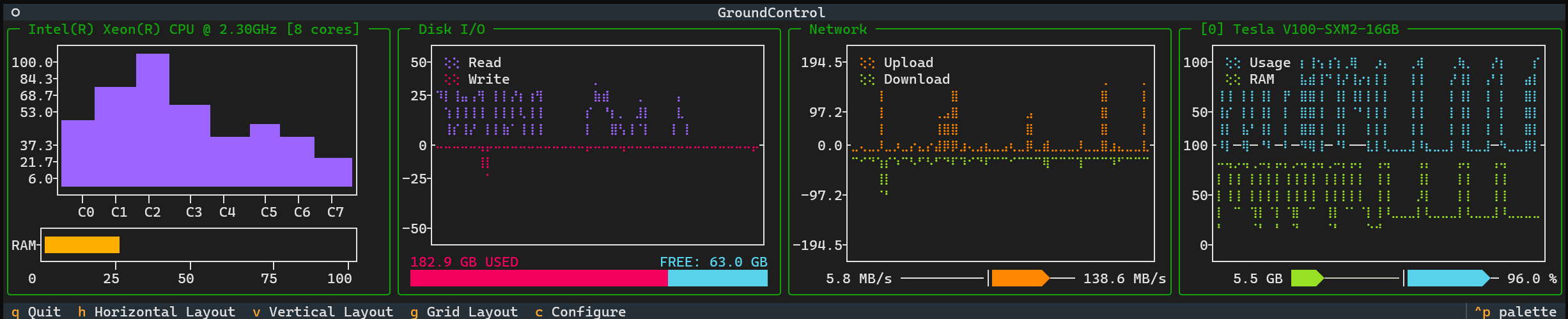



Ground Control is a sleek, real-time terminal-based system monitor built with Textual, Plotext and the nvitop API. It provides a powerful, aesthetic, customizable interface for tracking CPU, memory, disk, network, GPU usage, and system temperatures — all in a visually appealing and responsive TUI.
Ground Control works optimally with TMUX, install it here!
We tested Ground Control with the Windows Terminal app, Tabby and the VSCode integrated terminal. Monospaced fonts are preferred.
🌟 Features
📊 Real-Time System Monitoring
- CPU Usage: Per-core load tracking with frequency stats and detailed performance metrics.
- Memory Utilization: RAM usage with dynamic visualization and memory statistics.
- Temperature Monitoring: Real-time system temperature tracking with thermal status indicators.
- Disk I/O: Monitor read/write speeds and disk usage with comprehensive storage metrics.
- Network Traffic: Live upload/download speeds with bandwidth utilization graphs.
- GPU Metrics: Real-time NVIDIA GPU monitoring with utilization and memory tracking (if available).
🖥️ Responsive Layout
- Automatic resizing to fit your terminal window.
- Multiple layouts: Grid, Horizontal, and Vertical.
- Customizable widgets: Show only the metrics you need with granular control.
🎛️ Interactive Controls
- Keyboard shortcuts for quick navigation.
- Toggle between different layouts instantly.
- Customize displayed metrics via a built-in selection panel with individual widget control.
🛠️ Installation
🔹 Install via PyPI
pip install ground-control-tui
🔹 Install from Source
git clone https://github.com/alberto-rota/ground-control
cd ground-control
pip install -e .
🚀 Getting Started
🔹 Run Ground Control
Once installed, simply launch Ground Control with:
groundcontrol
or
gc
🔹 Available Layouts
Grid Layout
A structured layout displaying all widgets neatly in a grid. When you first launch Ground Control, it will show this layout.
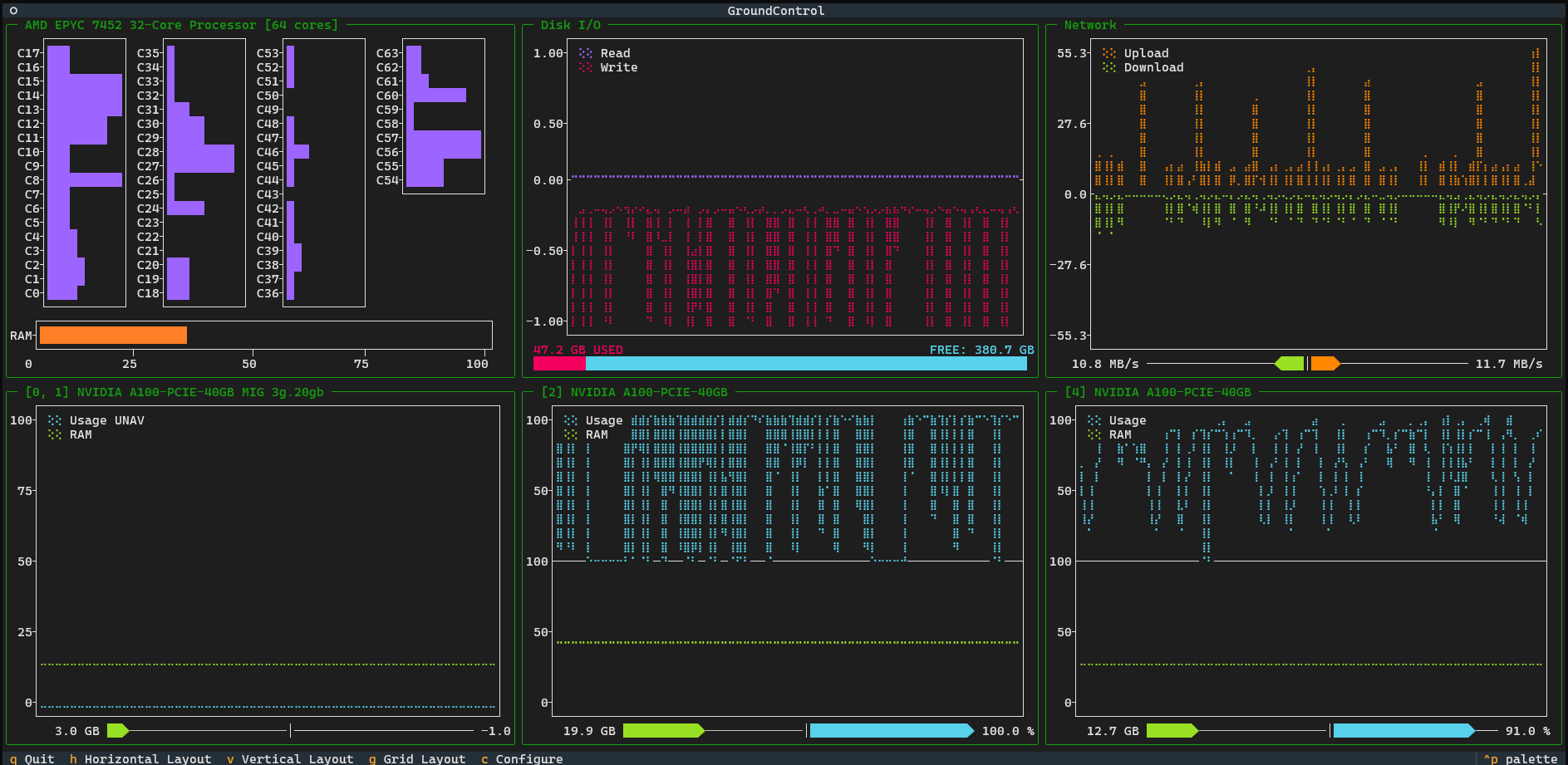
Horizontal Layout
All widgets aligned in a single row. If you like working with wide shell spaces, split a TMUX session horizontally and use this layout!
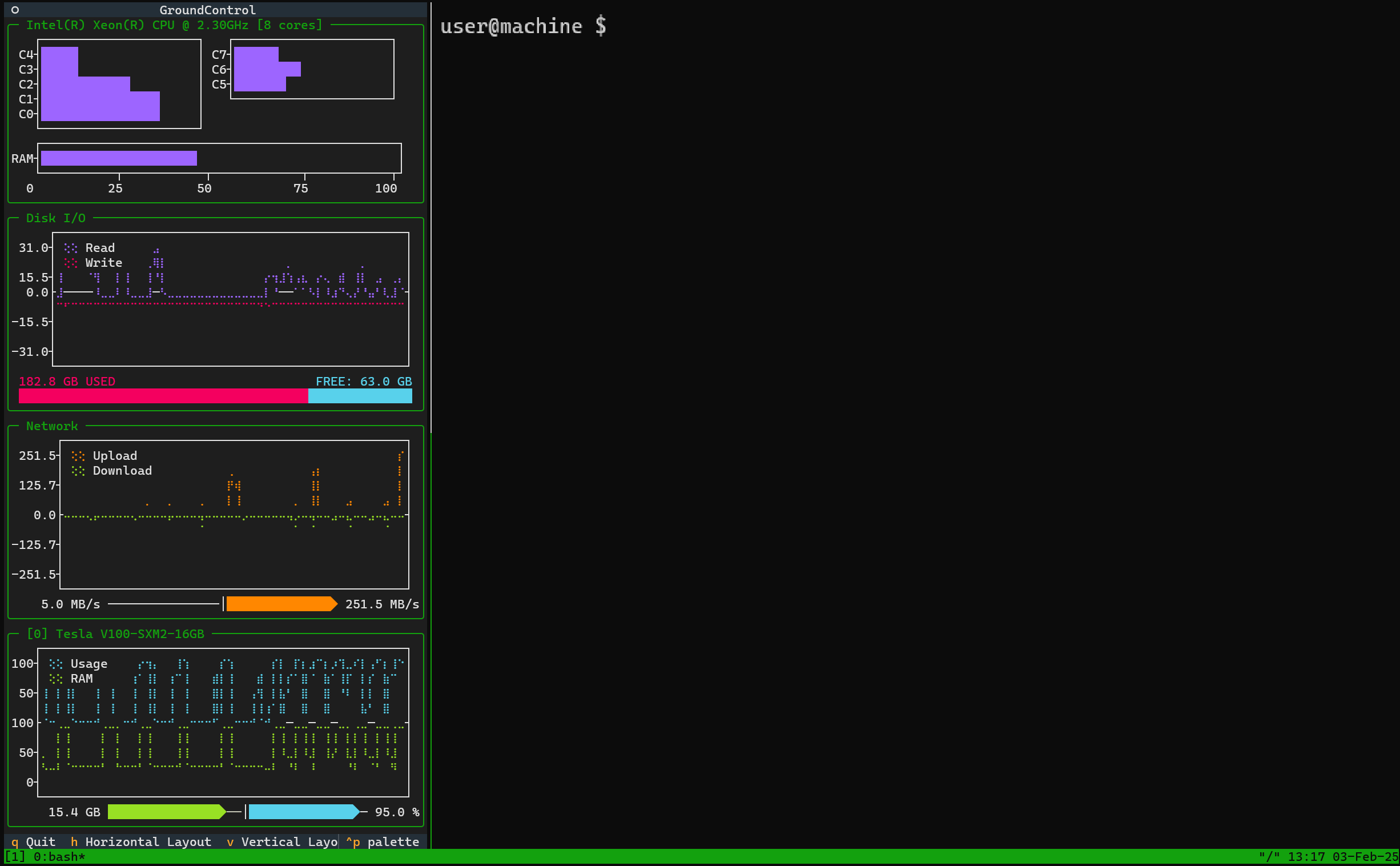
Vertical Layout
A column-based layout, ideal for narrow shell spaces. If you like working with tall shell spaces, split a TMUX session verticall and use this layout!
🖥️ Widget Breakdown
Each panel in Ground Control represents a different system metric:
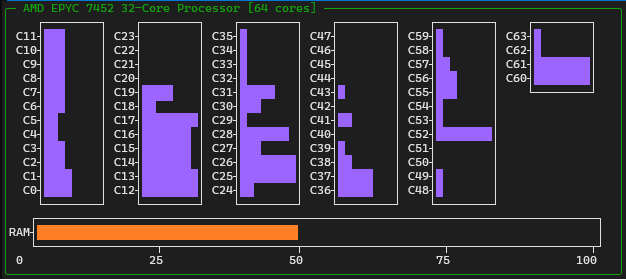
🔹 CPU Usage
- Shows per-core CPU usage as horizontal bars (0-100%)
- Displays each core's utilization in a compact bar chart format
- Updates in real-time with color-coded bars showing load intensity
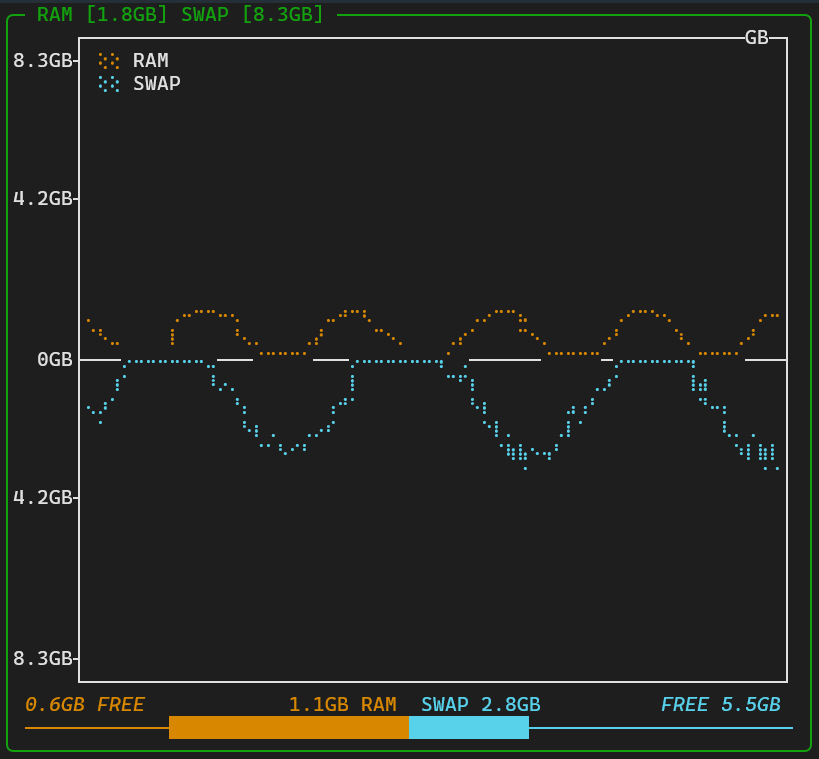
🔹 Memory Utilization
- Dual plot showing RAM (positive axis) and SWAP (negative axis) usage in GB
- Center bar with color-coded sections showing used/free RAM and SWAP
- Title displays total RAM and SWAP capacity in GB
🔹 Temperature Monitoring
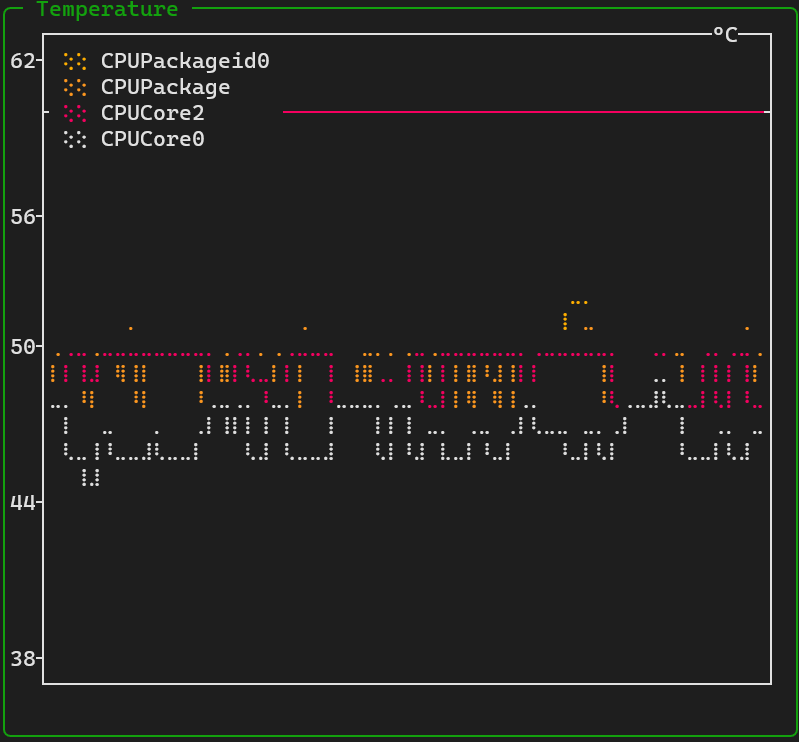
- Multi-line plot tracking temperature over time in °C for up to 4 key sensors
- Color-coded warning thresholds at 60°C (orange) and 80°C (red)
- Right panel shows current temperatures with dynamic color bars based on heat levels
- Prioritizes CPU, GPU, and motherboard sensors
🔹 Disk I/O
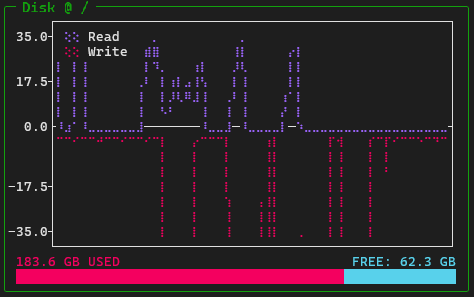
- Dual plot showing read (positive axis) and write (negative axis) speeds for each mounted disk/partition
- Shows disk usage with color-coded bar for used/free space in GB
- Updates in real-time with throughput history
- Each mounted disk/partition gets its own widget (except boot/EFI partitions)
- Automatically detects and displays all mounted disks and partitions
🔹 Network Traffic
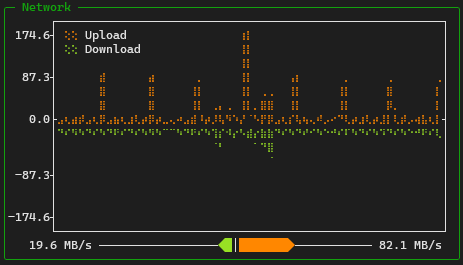
- Dual plot showing upload (positive axis) and download (negative axis) speeds
- Shows current transfer rates with color-coded indicators
- Tracks cumulative data transfer amounts
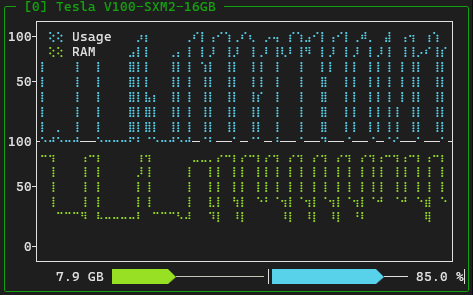
🔹 GPU Metrics (NVIDIA Only)
- Dual plot showing GPU usage % (positive axis) and memory usage GB (negative axis)
- Center bar displays current GPU memory usage (GB) and utilization (%)
- Shows "Usage UNAV" when GPU utilization cannot be detected
🛠️ Configuring Ground Control
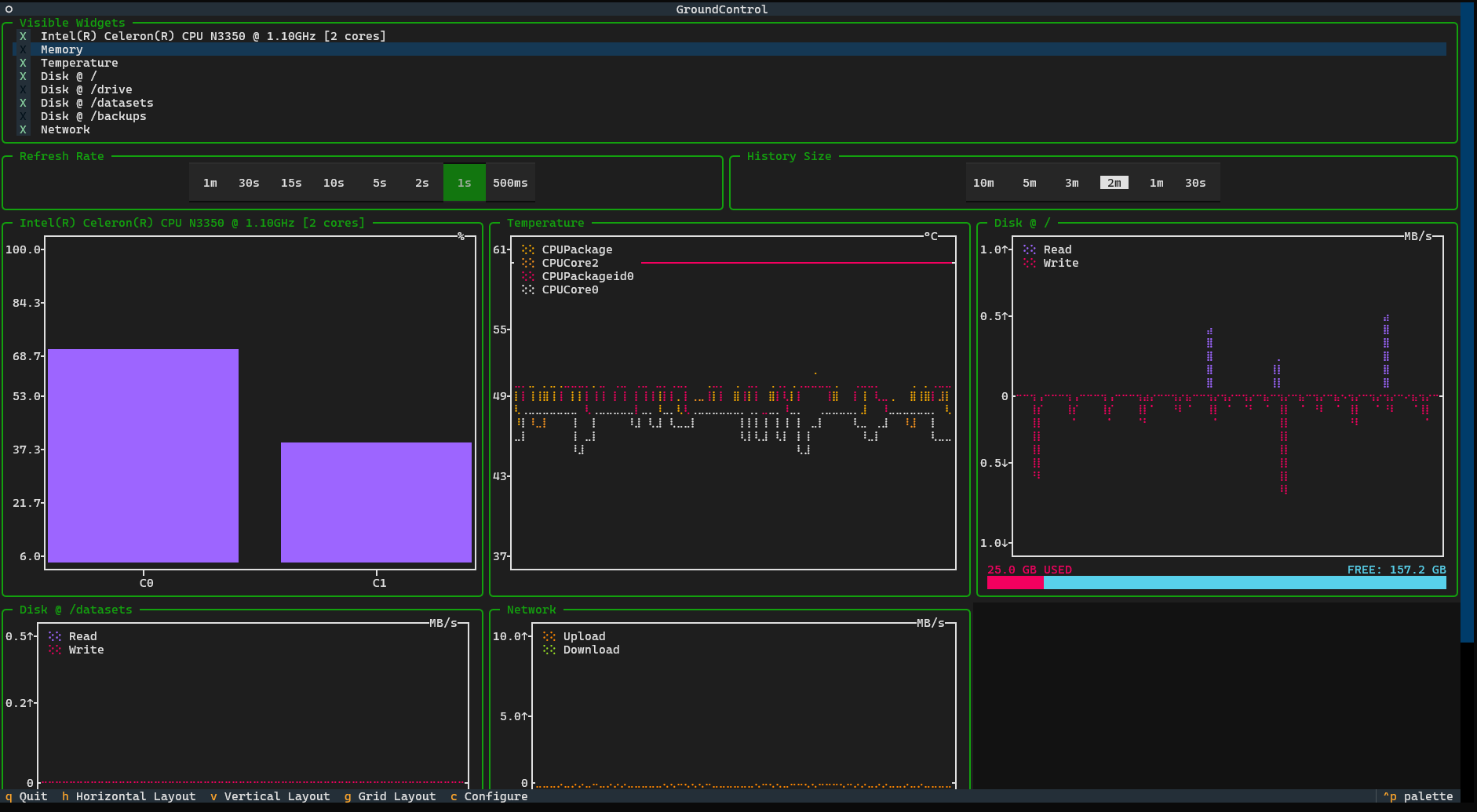
Ground Control offers extensive customization options to tailor your monitoring experience. You might not want to see all the widgets all at once, or you may want to focus on specific system metrics.
🔹 Widget Selection Panel
The configuration panel can be accessed by pressing c or clicking the Configure button. This opens a panel that allows you to:
- Toggle widgets: Enable/disable individual widgets (CPU, Memory, Temperature, Disk, Network, GPU) by clicking their checkboxes
- Refresh rate: Choose update intervals from 500ms to 1 minute using the refresh rate buttons
- History size: Set the data history length from 30 seconds to 10 minutes using the history buttons
- Save preferences: All settings are automatically saved to
~/.config/ground-control/config.json
The config file stores:
- Widget visibility settings for each widget
- Current layout (grid/horizontal/vertical)
- Refresh rate in seconds
- History size in seconds
🔹 Layout Management
You can switch between different layouts instantly:
- Press
gor clickGrid Layoutfor the structured grid view - Press
hor clickHorizontal Layoutfor single-row alignment - Press
vor clickVertical Layoutfor column-based display
🔹 Persistent Configuration
All your customizations are automatically saved when you quit Ground Control. When you launch it again, you'll see the same layout and widget configuration you previously selected, ensuring a consistent monitoring experience.
🔹 Keyboard Shortcuts
All available keyboard shortcuts are listed here:
| Key | Action |
|---|---|
h |
Switch to Horizontal Layout |
v |
Switch to Vertical Layout |
g |
Switch to Grid Layout |
c |
Show/Hide the configuration panel |
q |
Quit Ground Control |
Ground Control saves user preferences in a configuration file located at:
~/.config/ground-control/config.json.
Modify this file in your default text editor with
groundcontrol config
or
gc config
⛔ Current Known Limitations/Bugs
- In heavy-duty HPC systems, with multiple disks, cores and GPUs to be monitored, metric collection and plotting might get bottlenecked and groundcontrol might run slow. Consider directly editing the config file with a text editor to avoid
- GPU usage is monitored only for CUDA-enabled hardware. Ground Control detects MiG devices but in some cases it cannot detect their utilization. You'll see Usage UNAV in the GPU Widget if this is the case
- Temperature monitoring availability depends on system sensors and may not be available on all platforms
👨💻 Contributing
Pull requests and contributions are welcome! To contribute:
- Fork the repo.
- Create a feature branch.
- Submit a PR with your changes.
Visit the Issue Section to start!
📜 License
This project is licensed under the GNU General Public License v3.0. See the LICENSE file for details.
📧 Author
Alberto Rota
📩 Email: alberto_rota@outlook.com
🐙 GitHub: @alberto-rota
Release history Release notifications | RSS feed


Download files
Download the file for your platform. If you're not sure which to choose, learn more about installing packages.
Source Distribution
Built Distribution
Filter files by name, interpreter, ABI, and platform.
If you're not sure about the file name format, learn more about wheel file names.
Copy a direct link to the current filters
File details
Details for the file ground_control_tui-1.3.0.tar.gz.
File metadata
- Download URL: ground_control_tui-1.3.0.tar.gz
- Upload date:
- Size: 67.5 kB
- Tags: Source
- Uploaded using Trusted Publishing? No
- Uploaded via: uv/0.9.22 {"installer":{"name":"uv","version":"0.9.22","subcommand":["publish"]},"python":null,"implementation":{"name":null,"version":null},"distro":{"name":"Ubuntu","version":"24.04","id":"noble","libc":null},"system":{"name":null,"release":null},"cpu":null,"openssl_version":null,"setuptools_version":null,"rustc_version":null,"ci":null}
File hashes
| Algorithm | Hash digest | |
|---|---|---|
| SHA256 |
e16bb4ee7ff603e3b5c76c24d335813c091faca0710f8bb086bf0a2d46e27d03
|
|
| MD5 |
86044001fa9798ef906723517fd0f4cb
|
|
| BLAKE2b-256 |
3b2f921bdfb01966888d007879c1e7af72a5ab63bb00b596ac97de6a7a66a17a
|
File details
Details for the file ground_control_tui-1.3.0-py3-none-any.whl.
File metadata
- Download URL: ground_control_tui-1.3.0-py3-none-any.whl
- Upload date:
- Size: 72.0 kB
- Tags: Python 3
- Uploaded using Trusted Publishing? No
- Uploaded via: uv/0.9.22 {"installer":{"name":"uv","version":"0.9.22","subcommand":["publish"]},"python":null,"implementation":{"name":null,"version":null},"distro":{"name":"Ubuntu","version":"24.04","id":"noble","libc":null},"system":{"name":null,"release":null},"cpu":null,"openssl_version":null,"setuptools_version":null,"rustc_version":null,"ci":null}
File hashes
| Algorithm | Hash digest | |
|---|---|---|
| SHA256 |
438470f92f1479810b48ad5f56808d779a6272d2faf645e8440c702c045041ab
|
|
| MD5 |
ca1c5dbaef12bcc34a11e0934e173a77
|
|
| BLAKE2b-256 |
81cbb3b195baadf61151a31cda05d128bb9b74a4149adfde25fea126a532e0ac
|






