
This release is a pre-release and may not be stable for production use.
Breaking change (v7.3.0):
ha_config_set_yamlhas been moved to beta.
The Unofficial and Awesome Home Assistant MCP Server









A comprehensive Model Context Protocol (MCP) server that enables AI assistants to interact with Home Assistant.
Using natural language, control smart home devices, query states, execute services and manage your automations.

🚀 Get Started
The recommended way to run ha-mcp is the HA-MCP Custom Component. It installs into Home Assistant through HACS, runs the full server in-process, and works on every Home Assistant installation type — Home Assistant OS, Supervised, Container, and Core — with full feature parity. It is the easiest setup in every case, with no access token to manage.
Add it to Home Assistant via HACS (the preferred install):

Quick start:
- Install the HA-MCP Custom Component from HACS — click the badge above, or in HACS open Integrations → ⋮ → Custom repositories, add
https://github.com/homeassistant-ai/ha-mcp-integration(category: Integration), then Download. - Restart Home Assistant.
- Go to Settings → Devices & Services → Add Integration, search for HA-MCP Custom Component, choose HA-MCP Server, and click Submit. Creating the entry starts the server.
- Copy the connect URL from the entry's Configure screen (Settings → Devices & Services → HA-MCP Custom Component → HA-MCP Server → Configure) — it is also printed in the Home Assistant log. A notification confirms the server started and points you there.
- Paste that URL into your AI client — done.
Connect URL. The Configure screen gives you a Home Assistant webhook URL for remote clients — https://<your-ha-domain>/api/webhook/<webhook-id> through Nabu Casa or any reverse proxy already pointed at Home Assistant (locally, http://<ha-host>:8123/api/webhook/<webhook-id>). For clients on the same network, the server is also reachable directly at http://<ha-ip>:9584/private_<random>.
- Replaces other install methods: the in-process server is a complete, standalone ha-mcp install — it takes the place of the app (add-on), Docker, and uvx/PyPI (stdio) methods. Run only one; do not run the in-process server alongside another install.
- Local only? Turn off Remote access via webhook in the entry options — no webhook is registered at all, while the direct port and sidebar panel keep working.
- Settings panel: while the server runs, an admin-only HA-MCP panel appears in the Home Assistant sidebar for managing tools, feature flags, backups, and themes.
- Optional authentication: set Webhook authentication to
ha_authto require a Home Assistant account sign-in instead of using the secret URL as the credential. - Manual install (no HACS): copy
custom_components/ha_mcp_tools/from this repository into your Home Assistantconfig/custom_components/directory, then restart and add the integration as above.
The component's second entry type, the File & YAML services entry (HA-MCP File & YAML Tools), is only needed if you enable ha-mcp's opt-in file and YAML editing tools (feature flags, off by default) — skip it otherwise; you can add it later at any time. It works with any server type (in-process, app, Docker, or stdio).
Full in-process server documentation → · Setup Wizard for client-specific config →
🏠 Home Assistant app (add-on)
Prefer to run ha-mcp as a Home Assistant app (add-on)? On Home Assistant OS and Supervised installs it is a close second — no access token to manage, and it works with Claude Desktop, Claude.ai, ChatGPT, and any other MCP client on your local network or configured for remote access.
-
Add the repository to your Home Assistant instance:
If that opens the App store without an add-repository dialog (a known Home Assistant issue), add it manually: Settings → Apps → Install app → ⋮ → Repositories, then paste
https://github.com/homeassistant-ai/ha-mcp. -
Install "Home Assistant MCP Server" from Settings → Apps → Install app and click Start. (Home Assistant 2026.2 renamed "Add-ons" to "Apps"; on older versions this is the Add-on store.)
-
Open the Logs tab to find your unique MCP URL.
-
Connect your AI client to that URL — no token or credential setup needed.

⚠️ Configure exactly one install method per client. The custom component, the app, Docker/PyPI, and local stdio are independent ways to run the same server — pick one and point your AI client at that single URL. Keeping two entries for the same server in one client (for example a local
uvx ha-mcp@latestentry withHOMEASSISTANT_URL/HOMEASSISTANT_TOKENalongside an app or component URL) is a known cause of connection hangs.
Other install methods
These run the server outside Home Assistant — useful for Container / Core installs (which can't run apps) or a separate host. The Setup Wizard generates the exact client-specific config for each.
-
Docker (HTTP server): run
ghcr.io/homeassistant-ai/ha-mcpin HTTP mode, pointed at your Home Assistant URL and a long-lived token (an administrator's is recommended; non-admin tokens work with limitations), and connect your client to its secret URL. See the Setup Wizard for the full command and per-client config. -
PyPI / uvx (HTTP server): run the published
ha-mcppackage withuvx ha-mcp@latest(or pip) as a streamable-HTTP server the same way. Details in the Setup Wizard. -
Local stdio (not recommended): runs ha-mcp on your own machine over stdio. The one-command installers in the Demo server section below use this path; the Setup Wizard covers connecting it to your own Home Assistant.
-
OIDC authentication: gate remote access behind an external identity provider (Authentik, Keycloak, Auth0, etc.) instead of a secret URL — all authenticated users share the server's Home Assistant credentials. See OIDC Mode.
⚠️ stdio has known transport issues. The stdio transport has connection problems that streamable HTTP does not (#1713). It is recommended only for demo/testing tinkering — for a real setup, use the custom component or an HTTP method above.
🌐 Remote access (Nabu Casa / Webhook Proxy app / OpenAI Tunnel)
Using the HA-MCP custom component? You do not need the Webhook Proxy — the component has its own built-in webhook for remote access (see the Get Started quick start at the top). The proxy is for the app (it can also front another external server via its
mcp_server_urloption). The OpenAI Tunnel below is different: it applies to any install method when Home Assistant isn't publicly reachable at all (no Nabu Casa or reverse proxy).
Already have Nabu Casa or another reverse proxy pointing at your Home Assistant? The Webhook Proxy app routes MCP traffic through your existing setup — no separate tunnel or port forwarding needed.
- Install the MCP Server app (see above) and the Webhook Proxy app from the same store
- Start the webhook proxy and restart Home Assistant when prompted
- Copy the webhook URL from the app logs:
MCP Server URL (remote): https://xxxxx.ui.nabu.casa/api/webhook/mcp_xxxxxxxx - Configure your AI client with that URL
For other remote access methods (Cloudflare Tunnel, custom reverse proxy), see the Setup Wizard.
ChatGPT / Codex behind a firewall (OpenAI Tunnel). ChatGPT connectors normally require a publicly reachable URL. If you can't (or don't want to) expose one, the community OpenAI Tunnel for HA-MCP integration by @norpol runs OpenAI's tunnel-client inside Home Assistant and connects your local MCP server URL to an OpenAI-hosted tunnel over an outbound-only connection — no port forwarding, reverse proxy, or public URL. Point it at your ha-mcp URL, then attach the ChatGPT connector to the same tunnel ID. See the FAQ entry and #1811.
🧪 Demo server (Windows / macOS / Linux)
Want to try ha-mcp before connecting your own Home Assistant? No paid subscription required. These one-command scripts set up a local stdio connection to a hosted demo environment so you can see it working in a few minutes. Each script's Connect your own Home Assistant link then shows how to point it at your instance.
🍎 macOS
- Go to claude.ai and sign in (or create a free account)
- Open Terminal and run:
curl -LsSf https://raw.githubusercontent.com/homeassistant-ai/ha-mcp/master/scripts/install-macos.sh | sh
- Download Claude Desktop (or restart: Claude menu → Quit)
- Ask Claude: "Can you see my Home Assistant?"
You're now connected to the demo environment! Connect your own Home Assistant →
🐧 Linux
Anthropic doesn't ship Claude Desktop for Linux, so pick one path:
Claude Desktop — free, via the community build:
- Install the community Claude Desktop for Linux build and sign in with a free claude.ai account
- Open Terminal and run:
curl -LsSf https://raw.githubusercontent.com/homeassistant-ai/ha-mcp/master/scripts/install-linux.sh | sh
- Restart Claude Desktop, then ask: "Can you see my Home Assistant?"
Claude Code — official CLI, requires a paid Claude plan:
- Install Claude Code:
curl -fsSL https://claude.ai/install.sh | bash - Configure ha-mcp, then run
claude:curl -LsSf https://raw.githubusercontent.com/homeassistant-ai/ha-mcp/master/scripts/install.sh | sh -s -- --claude-code
- Start
claude, run/mcpto confirm, then ask: "Can you see my Home Assistant?"
🪟 Windows
- Go to claude.ai and sign in (or create a free account)
- Open Windows PowerShell (from Start menu) and run:
irm https://raw.githubusercontent.com/homeassistant-ai/ha-mcp/master/scripts/install-windows.ps1 | iex
- Download Claude Desktop (or restart: File → Exit)
- Ask Claude: "Can you see my Home Assistant?"
You're now connected to the demo environment! Connect your own Home Assistant →
🧙 Setup Wizard for 15+ clients
Claude Code, Gemini CLI, ChatGPT, Open WebUI, VSCode, Cursor, and more.

Having issues? Check the FAQ & Troubleshooting
💬 What Can You Do With It?
Just talk to Claude naturally. Here are some real examples:
| You Say | What Happens |
|---|---|
| "Create an automation that turns on the porch light at sunset" | Creates the automation with proper triggers and actions |
| "Add a weather card to my dashboard" | Updates your Lovelace dashboard with the new card |
| "The motion sensor automation isn't working, debug it" | Analyzes execution traces, identifies the issue, suggests fixes |
| "Make my morning routine automation also turn on the coffee maker" | Reads the existing automation, adds the new action, updates it |
| "Create a script that sets movie mode: dim lights, close blinds, turn on TV" | Creates a reusable script with the sequence of actions |
Spend less time configuring, more time enjoying your smart home.
✨ Features
| Category | Capabilities |
|---|---|
| 🔍 Search | Fuzzy entity search, deep config search, system overview |
| 🏠 Control | Any service, bulk device control, real-time states |
| 🔧 Manage | Automations, scripts, helpers, dashboards, areas, zones, groups, calendars, blueprints |
| 📊 Monitor | History, statistics, camera snapshots, automation traces, ZHA devices |
| 💾 System | Backup/restore, updates, apps, device registry |
| 🔒 Safety | Read Only Mode toggle, per-tool enable/disable, tool security policies (user approval), automatic edit backups |
Template helper edit backups capture persisted options through the HA-MCP custom component, using either its Server entry or File & YAML Tools entry. Helper edits, generic integration options edits, and deletion capture the stable config-entry identity and entity ID/name mapping. Capture refuses degraded secret scrubbing. Restoring an existing helper requires a fresh safety backup, removes optional settings absent from the snapshot, and verifies persisted options.
For Template backup listing and bulk deletion, filter by the config-entry ID returned as entity_id by capture. Capture accepts an entity alias; the history filters use the stable config-entry ID. Recreation reports its replacement config-entry ID and saved entity mapping separately.
If the original entry has been deleted, restore recreates the helper and reports its new config-entry ID. The saved entity ID and custom name are restored when available; an occupied entity ID is refused before creation. Older snapshots without entity metadata cannot preserve renamed entity IDs. If a collision or verification failure occurs after creation, the new helper and source backup are retained and the result reports the new entry for inspection. Other entity/device registry settings are not restored. Helper and integration edits through the same server wait until restore finishes; other Home Assistant clients are outside this coordination. Failed or uncertain restores report their outcome and safe refusal reasons; inspect the current helper before retrying.
Complete Tool List (87 tools)
| Category | Tools |
|---|---|
| Apps (add-ons) | ha_get_app, ha_manage_app |
| Areas & Floors | ha_list_floors_areas, ha_remove_area_or_floor, ha_set_area_or_floor |
| Assist | ha_manage_pipeline |
| Automations | ha_config_get_automation, ha_config_remove_automation, ha_config_set_automation |
| Blueprints | ha_manage_blueprints |
| Calendar | ha_config_get_calendar_events, ha_config_remove_calendar_event, ha_config_set_calendar_event |
| Camera | ha_get_camera_image |
| Dashboard | ha_get_dashboard_screenshot (beta) |
| Dashboards | ha_config_delete_dashboard_resource, ha_config_delete_dashboard, ha_config_get_dashboard, ha_config_list_dashboard_resources, ha_config_set_dashboard_resource, ha_config_set_dashboard |
| Developer | ha_dev_manage_server, ha_dev_manage_settings |
| Device Registry | ha_get_device, ha_remove_device, ha_set_device |
| Energy | ha_manage_energy_prefs |
| Entity Registry | ha_get_entity_exposure, ha_get_entity, ha_remove_entity, ha_set_entity |
| Files | ha_delete_file (beta), ha_list_files (beta), ha_read_file (beta), ha_write_file (beta) |
| Groups | ha_config_list_groups, ha_config_remove_group, ha_config_set_group |
| HACS | ha_get_hacs_info, ha_manage_hacs |
| Helper Entities | ha_config_list_helpers, ha_config_set_helper, ha_remove_helpers_integrations |
| History & Statistics | ha_get_automation_traces, ha_get_history, ha_get_logs |
| Integrations | ha_get_integration, ha_get_system_health, ha_set_integration |
| Labels & Categories | ha_config_get_category, ha_config_get_label, ha_config_remove_category, ha_config_remove_label, ha_config_set_category, ha_config_set_label |
| Matter | ha_manage_radio |
| Scenes | ha_config_get_scene, ha_config_remove_scene, ha_config_set_scene |
| Scripts | ha_config_get_script, ha_config_remove_script, ha_config_set_script |
| Search & Discovery | ha_get_overview, ha_get_state, ha_search |
| Service & Device Control | ha_bulk_control, ha_call_event, ha_call_service, ha_get_operation_status, ha_list_services |
| System | ha_config_get_yaml (beta), ha_config_set_yaml (beta), ha_manage_backup, ha_manage_custom_tool (beta), ha_manage_security_policy, ha_manage_theme, ha_manage_updates, ha_reload_core, ha_restart |
| Todo Lists | ha_get_todo, ha_remove_todo_item, ha_set_todo_item |
| Utilities | ha_eval_template, ha_report_issue |
| Zones | ha_get_zone, ha_remove_zone, ha_set_zone |
🆚 ha-mcp vs. Home Assistant's built-in MCP Server
Home Assistant ships its own MCP Server integration. It is built on the Assist pipeline, so a connected MCP client can read and control the entities you have exposed to Assist and run the intents Assist understands — handy for voice-style control of already-exposed devices.
ha-mcp is a standalone server built for configuring, building, and debugging your smart home, not just controlling it. On top of device control, it adds capabilities the built-in integration does not have:
| Capability | Built-in MCP Server | ha-mcp |
|---|---|---|
| Control exposed devices, query states | Yes | Yes |
| Entity scope | Only entities exposed to Assist | Everything in Home Assistant |
| Create / edit automations, scripts, scenes | No | Yes |
| Build & edit dashboards | No | Yes |
| Debug automations from traces, read history & logs | No | Yes |
| Manage helpers, areas, zones, labels, groups | No | Yes |
| Backups, apps, HACS, device & entity registry | No | Yes |
Rule of thumb: Use the built-in integration for voice-style control of devices you have already exposed; use ha-mcp when you want an AI assistant that can also build and maintain your Home Assistant setup.
🔌 Custom Component (ha_mcp_tools) — File & YAML Services
The HA-MCP Custom Component also powers a set of privileged tools that standard Home Assistant APIs can't provide: file system access and YAML config editing. (The same component runs the full server in-process — that's the recommended install in the Get Started section at the top.) Its File & YAML services entry (HA-MCP File & YAML Tools) enables the tools below.
Tools that require the component:
| Tool | Description |
|---|---|
ha_config_set_yaml (beta) |
Safely add, replace, or remove top-level YAML keys in configuration.yaml and package files (automatic backup, validation, and config check) |
ha_list_files (beta) |
List files in allowed directories |
ha_read_file (beta) |
Read files from allowed paths (config YAML, logs, and allowed directories) |
ha_write_file (beta) |
Write files to allowed directories |
ha_delete_file (beta) |
Delete files from allowed directories |
Template helper edit backups and restores also require the component, using either its Server entry or File & YAML Tools entry. These five tools return an error with installation instructions if the component is missing.
These tools also require beta feature flags. See Beta Features for how to enable them — including the ENABLE_BETA_FEATURES master flag, which must be on before the filesystem/YAML sub-flags take effect.
Install
Install the HA-MCP File & YAML Tools entry from the same HA-MCP Custom Component:
To add manually: open HACS > Integrations > three-dot menu > Custom repositories > add https://github.com/homeassistant-ai/ha-mcp-integration (category: Integration) > Download. Or copy custom_components/ha_mcp_tools/ from this repository into your HA config/custom_components/ directory.
After installing, restart Home Assistant, then open Settings > Devices & Services > Add Integration, search for HA-MCP Custom Component, and add the HA-MCP File & YAML Tools entry.
To run the full ha-mcp server in-process through this same component, see the Get Started section at the top and the full in-process server documentation →.
🧠 Better Results with Agent Skills
This server gives your AI agent tools to control Home Assistant. For better configurations, pair it with Home Assistant Agent Skills — domain knowledge that teaches the agent Home Assistant best practices.
An MCP server can create automations, helpers, and dashboards, but it has no opinion on how to structure them. Without domain knowledge, agents tend to over-rely on templates, pick the wrong helper type, or produce automations that are hard to maintain. The skills fill that gap: native constructs over Jinja2 workarounds, correct helper selection, safe refactoring workflows, and proper use of automation modes.
Bundled Skills (built-in)
Skills from homeassistant-ai/skills are bundled and served as MCP resources via skill:// URIs. Any MCP client that supports resources can discover them automatically — no manual installation needed. For tool-only clients (claude.ai, etc.), the best-practices skill is reachable through the ha_get_skill_guide tool: call it with no arguments to read SKILL.md, or with file set to a path SKILL.md links to read that reference file. Resources are not auto-injected into context — clients must explicitly request them, so idle context cost is just the metadata listing.
ha_get_skill_guide is a mandatory tool: the catalog always exposes it (it can't be disabled) so tool-only clients never see a silently missing skill surface.
Skills can still be installed manually for clients that prefer local skill files — see the skills repo for instructions.
🔍 Tool Discovery for AI Agents
By default, the full tool catalog (~87 tools) is listed to the client through the standard MCP tools/list response. Clients with deferred / on-demand tool loading (claude.ai, Claude Desktop, Claude Code) handle that fine — tools are pulled into context only when needed, so idle context cost is near-zero.
For setups without deferred tool support — models like Claude Haiku, Gemini, OpenAI-compatible local models and smaller open-weights models, or clients that inline all tool schemas regardless of model (e.g. GitHub Copilot CLI) — listing the full tool catalog up front adds a lot of idle context and can overwhelm smaller models. To address that, the server ships with a search-based discovery mode built on top of FastMCP's BM25 search transform.
Smaller or local LLMs (Ollama, etc.)
If your model can't see the tools or your Home Assistant, it may be getting handed the whole tool catalog at once and struggling with it. It's recommended to try the following to see if it helps:
- Enable tool search (
ENABLE_TOOL_SEARCH=true, or the app option below). Instead of listing every tool up front, the server defers the catalog behind a search interface so the model pulls in only the tools it needs, when it needs them. - Raise the model's context window above the default. Local runtimes ship with small defaults (Ollama's
num_ctxis one example) that can't hold a large tool set plus the conversation — increase it well beyond the default.
Enable search-based discovery
Set ENABLE_TOOL_SEARCH=true (or toggle the option in the HA app). The full catalog is replaced in the tool list with four entry points plus a small set of always-visible "pinned" tools (ha_search, ha_get_overview, ha_report_issue, etc.). All tools remain callable directly by name once discovered:
| Tool | Purpose |
|---|---|
ha_search_tools |
BM25 English-keyword search across all tools, pinned ones included. Hidden tools return name, description, parameters, and annotations (readOnlyHint / destructiveHint) so the agent can pick the right one; a pinned tool returns a name-only stub (pinned: true) pointing back at the tool list, and does not use up a result slot. |
ha_call_read_tool |
Execute a readOnlyHint tool by name. Safe — clients can auto-approve. |
ha_call_write_tool |
Execute a write tool that creates or updates data. |
ha_call_delete_tool |
Execute a tool that removes / deletes data. |
The proxy split lets MCP clients apply different permission policies per category (e.g. auto-approve reads, prompt for writes, confirm deletes) without parsing tool docstrings.
A ha_manage_* tool combines several operations, so it is reachable from more than one proxy: ha_call_write_tool and ha_call_delete_tool run the whole tool, while ha_call_read_tool runs only the read actions Read Only Mode approves (the same per-call verdict), so a manage tool with no approved read actions is not reachable there. Search results list each proxy the tool can be reached through. In Read Only Mode only ha_call_read_tool is listed; the other two still answer a client that holds them in a cached tool list, and any write they carry gets the Read Only Mode error rather than Unknown tool.
| Setting | Default | Description |
|---|---|---|
ENABLE_TOOL_SEARCH |
false |
Replace full tool catalog with search-based discovery (tools deferred behind on-demand search). |
TOOL_SEARCH_MAX_RESULTS |
5 |
Max hidden tools returned per ha_search_tools call (range 2–10); a pinned tool that ranks inside that top count is added as a name-only stub on top of it. |
PINNED_TOOLS |
empty | Comma-separated tool names to keep always visible. The web settings UI is the primary way to manage this. |
When to enable
- Claude Haiku, OpenAI-compatible local models, Gemini, or any model without native deferred tool support — large idle-context savings. The same applies to clients that inline all tool schemas regardless of model (e.g. GitHub Copilot CLI, even when running Claude Sonnet/Opus).
- MCP clients that cap total tool count (some cap at 100) — surfaces a minimal set (~10 tools) instead of 87.
- Cost-sensitive deployments — fewer idle tokens per turn.
Leave it off in clients with deferred tool loading (claude.ai, Claude Desktop, Claude Code); the full catalog has no idle cost there, direct calls skip the search step, and the client's built-in tool search is the better choice — there is no benefit to running ha-mcp's on top of it. Whether tools are deferred depends on the client and model combination: the same model can behave differently per client — GitHub Copilot CLI running Claude Sonnet/Opus inlines the full catalog and still benefits from tool search here. Some Codex models and ChatGPT include deferred tools too — check your client/model directly to confirm its features so you don't leave this enabled unnecessarily.
🔄 Refresh your client's tool list after changing this (or any) setting. Toggling
ENABLE_TOOL_SEARCH(or changing pinned/disabled tools, Read Only Mode, etc.) changes the tools the server exposes, but your AI client keeps serving its cached tool list until it re-fetches. Restarting the app or Home Assistant does not refresh the client — reconnect or refresh the MCP server in your client (e.g. re-add/refresh the connector in ChatGPT, or close and reopen Claude Desktop). If you skip this, newly enabled tools won't appear in the client at all, and tools the server no longer exposes still show as available but fail when called (Unknown tool, or the Read Only Mode error for a write tool that mode hides). ChatGPT sometimes keeps serving the stale list even after the connector is removed and re-added under the same name — if tools are still missing after re-adding, delete the connector and create a new one with a different name.
For the HA app, the same option is documented in homeassistant-addon/DOCS.md along with the in-app settings UI for fine-grained tool enable/disable/pin.
Read-only HTTP connections
Append /readonly to the server's HTTP MCP endpoint to restrict that connection
to the existing Read Only Mode while other clients keep normal access:
Normal:     https://example.com/private_your_secret
Read-only:  https://example.com/private_your_secret/readonly
OAuth and OIDC connections use the same login/provider: for example,
https://example.com/mcp/readonly. No additional secret or server is required.
Read-only connections hide write tools and block write calls, including calls
through cached tools or search proxies. The global Read Only Mode setting still
restricts both endpoints when enabled. Reconnect the client after changing its URL
so it refreshes its tool list.
This is a connection mode for automated agents, not a separate permission on the
credential: the same credentials still work at the normal endpoint. Home Assistant
webhook URLs also accept the suffix:
https://your-ha.example/api/webhook/<webhook-id>/readonly. This requires the
updated embedded integration or Webhook Proxy dev app (add-on), together with
the updated MCP server.
🧪 Dev Channel
Want early access to new features and fixes? Dev releases (.devN) are published on every push to master.
Dev Channel Documentation — Instructions for pip/uvx, Docker, and Home Assistant app.
🤝 Contributing
For development setup, testing instructions, and contribution guidelines, see CONTRIBUTING.md.
For comprehensive testing documentation, see tests/README.md.
🔒 Privacy
Ha-mcp runs locally on your machine. Your smart home data stays on your network.
- No telemetry today — anonymous usage stats are a planned future feature (as of June 2026); when it lands it will follow your Home Assistant analytics/telemetry setting (which you can override), announced prominently in the release notes and the web Settings UI at least one month beforehand
- No personal data collection — we never collect entity names, configs, or device data
- User-controlled bug reports — only sent with your explicit approval
For full details, see our Privacy Policy.
📄 License
This project is licensed under the MIT License - see the LICENSE file for details.
🙏 Acknowledgments
- Home Assistant: Amazing smart home platform (!)
- FastMCP: Excellent MCP server framework
- Model Context Protocol: Standardized AI-application communication
- Claude Code: AI-powered coding assistant
- PolicyLayer: Argument-path predicate DSL shape (
args.domain in [...]witheq/in/regex/contains/exists/...) inspired the per-tool approval rule schema (#966).
👥 Contributors
Maintainers
- @julienld — Project creator.
- @sergeykad — Core maintainer.
- @kingpanther13 — Core maintainer.
- @Patch76 — Core maintainer.
Contributors
- @bigeric08 — Explicit
mcpdependency for protocol version 2025-11-25 support. - @airlabno — Support for
datafield in schedule time blocks. - @ryphez — Codex Desktop UI MCP quick setup guide.
- @Danm72 — Entity registry tools (
ha_set_entity,ha_get_entity) for managing entity properties. - @Raygooo — SOCKS proxy support.
- @cj-elevate — Integration & entity management tools (enable/disable/delete); person/zone/tag config store routing.
- @maxperron — Beta testing.
- @kingbear2 — Windows UV setup guide.
- @konradwalsh — Financial support via GitHub Sponsors. Thank you! ☕
- @knowald — Area resolution via device registry in
ha_get_system_overviewfor entities assigned through their parent device. Financial support via GitHub Sponsors. Thank you! ☕ - @zorrobyte — Per-client WebSocket credentials in OAuth mode, fixing WebSocket tool failures.
- @deanbenson — Fixed
ha_deep_searchtimeout on large Home Assistant instances with many automations. - @saphid — Config entry options flow tools (initial design, #590).
- @adraguidev — Fix menu-based config entry flows for group helpers (#647).
- @transportrefer — Integration options inspection (
ha_get_integrationschema support, #689). - @teh-hippo — Fix blueprint import missing save step.
- @smenzer — Documentation fix.
- @The-Greg-O — REST API for config entry deletion.
- @restriction — Responsible disclosure: python_transform sandbox missing call target validation.
- @lcrostarosa — Diagnostic and health monitoring tools concept (#675), inspiring system/error logs, repairs, and ZHA radio metrics integration.
- @roysha1 — Copilot CLI support in the installation wizard; replaced placeholder logo SVGs with real brand icons on the documentation site.
- @teancom — Fix add-on stats endpoint (
/addons/{slug}/stats). - @TomasDJo — Category support for automations, scripts, and scenes.
- @bzelch —
python_transformsupport for automations and scripts. - @gcormier — Windows installer improvements: removed unused variable and fixed terminal closing after install.
- @ekobres — Feature flags for
HAMCP_ENABLE_FILESYSTEM_TOOLSand the (since removed)HAMCP_ENABLE_CUSTOM_COMPONENT_INTEGRATIONin the app config, with beta tagging in source and docs. - @w3z315 — Financial support via GitHub Sponsors. Thank you! ☕
- @griffinmartin — Added OpenCode (by Anomaly) as a selectable AI client in the setup wizard, with both stdio and streamable HTTP support.
- @hhopke — Fixed app (add-on) API calls to route through HA Core ingress proxy instead of direct container connections, fixing
ha_manage_addon(nowha_manage_app) proxy mode on app installs. - @tomwilkie — JMESPath middleware exploration (#1147) whose review-time token-measurement data informed the design of #1199 and #1225.
- @SealKan —
fields=/attribute_keys=projection on six read-heavy tools (#1225),ha_call_eventtool (#1239), dashboards-list helper refactor (#1207),for:-field duration-math detector in the best-practice checker (#1264), persistent DCR OAuth client registrations across restarts (#1265), and issue-triage prompt token-budgeting (#1522). - @KarelTestSpecial — Cached YAML instance to prevent CPU spikes during bulk edits (#1371).
- @corgan2222 — HA brand assets for custom integration (#1317).
- @drseanwing — Progress emission via FastMCP
Contextin long-running tools (#1124); tool-discovery / categorized-search docs (#1123). - @fnordpig — Config subentry support (#1393) and Assist pipeline management tool (#1392).
- @paul43210 —
array_patchmode inha_manage_appfor atomic GET-modify-POST (#1063). - @L1AD — Filed #966 proposing tool security policies; pointed to PolicyLayer's MCP-security work as prior art that inspired the predicate DSL shape.
- @nightcityblade — Updated stale Home Assistant Advanced Mode references after HA 2026.6 made formerly advanced options available by default (#1533).
- @emmelutzer — Financial support via GitHub Sponsors. Thank you! ☕
- @pkkr —
ha_knx_get_projecttool exposing KNX group addresses from an uploaded ETS project file. - @cbowns — Fixed inconsistent hyphen in setup.astro Codex CLI docs.
- @Shaan-alpha — Extended
ha_restartknown-good error patterns to cover 502/503 responses from reverse proxies. - @rebelancap — Fixed UTC-to-local timezone conversion in
add_timezone_metadata. - @saevras — Fixed blueprint import E2E test to use local URL instead of host-to-container networking.
- @jasonjhofmann — Recurring calendar events via
rrulesupport inha_config_set_calendar_event. - @vpciii — Coerce JSON-encoded strings on dict/list tool params.
- @pburtchaell — Financial support via GitHub Sponsors. Thank you! ☕
- @norpol — Built the OpenAI Tunnel for HA-MCP companion integration, connecting ChatGPT to a firewalled Home Assistant MCP server (#1811).
💬 Community
- GitHub Discussions — Ask questions, share ideas
- Issue Tracker — Report bugs, request features, or suggest tool behavior improvements. Bug reports need the report the
ha_report_issuetool generates, or a reason why there is none; without either they are closed after 24 hours.
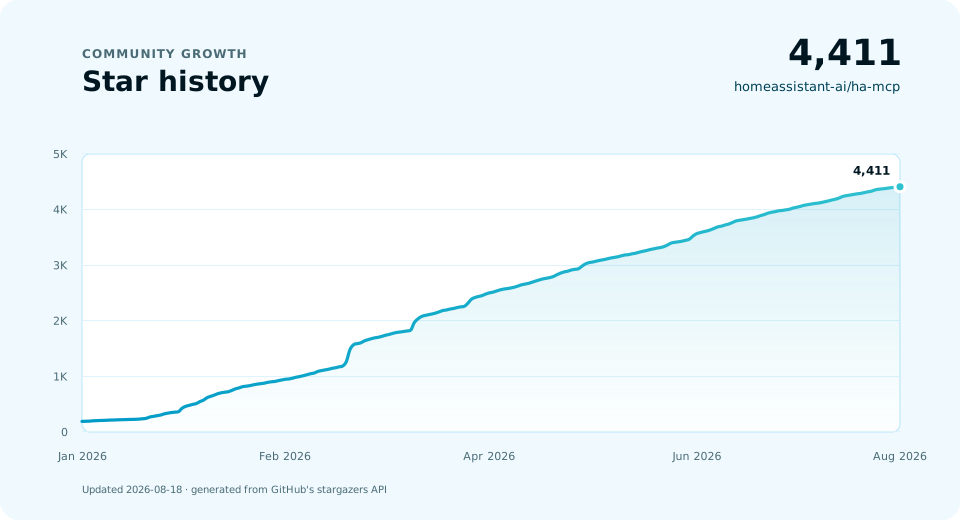
Star History
1 maintainer

Metadata
1 maintainer
Release files for ha-mcp-dev 8.6.0.dev2873
For a detailed explanation of source distributions (sdists) and built distributions (wheels), please see the package formats documentation.
Source distribution (sdist)
| File | Size | Uploaded | |
|---|---|---|---|
| ha_mcp_dev-8.6.0.dev2873.tar.gz | 3.3 MB | Details |
Built distribution (wheel)
| File | Interpreter | ABI | Platform | Reset |
|---|---|---|---|---|
| ha_mcp_dev-8.6.0.dev2873-py3-none-any.whl | Python 3 | none | any | Details |
Total release size: 7.1 MB
Release files / ha_mcp_dev-8.6.0.dev2873.tar.gz
| Download URL | ha_mcp_dev-8.6.0.dev2873.tar.gz |
|---|---|
| Size | 3.3 MB |
| Tags | Source |
|
SHA-256 checksum How to use checksums |
40cc3d50f3abd20e46b93811bbdf42ad4fad8762600cc42baba137ec66742f92
|
|
BLAKE2b-256 checksum How to use checksums |
32dbde782b446ae8850d0f87c42e108f1f2675ae6ec4556576cf37a6cc41be30
|
| Upload date | |
|
Uploaded using Trusted Publishing? What is trusted publishing? |
Yes |
| Uploaded via |
twine/7.0.0 CPython/3.13.14
|
Provenance
Provenance describes where a file came from. On PyPI, provenance is shared via attestations, which provide a verifiable record of the build or publishing details. View details, limitations and caveats.


PyPI Publish Attestation
PyPI verified that this artifact, at this checksum, originated from the publisher listed below.
Signed by GitHub Actions, verified by PyPI on Oct 3, 2026.
Transparency logRelease files / ha_mcp_dev-8.6.0.dev2873-py3-none-any.whl
| Download URL | ha_mcp_dev-8.6.0.dev2873-py3-none-any.whl |
|---|---|
| Size | 3.8 MB |
| Tags | Python 3 |
|
SHA-256 checksum How to use checksums |
74303120feabcd1b2e03a6f15c88205dcc70f98e7dbac0d1e9ddd99a84fdb19e
|
|
BLAKE2b-256 checksum How to use checksums |
bac16c4ab765c49b0aca74bb6147ee2ca56066ffd19686ab6a676dd03fc265c5
|
| Upload date | |
|
Uploaded using Trusted Publishing? What is trusted publishing? |
Yes |
| Uploaded via |
twine/7.0.0 CPython/3.13.14
|
Provenance
Provenance describes where a file came from. On PyPI, provenance is shared via attestations, which provide a verifiable record of the build or publishing details. View details, limitations and caveats.
PyPI Publish Attestation
PyPI verified that this artifact, at this checksum, originated from the publisher listed below.
Signed by GitHub Actions, verified by PyPI on Oct 3, 2026.
Transparency log













