
This release is a pre-release and may not be stable for production use.
⚠️ Breaking change in OAuth mode (v7.0.0) — Set
HOMEASSISTANT_URLserver-side. The consent form now accepts only the token. Migration guide →

The Unofficial and Awesome Home Assistant MCP Server








A comprehensive Model Context Protocol (MCP) server that enables AI assistants to interact with Home Assistant.
Using natural language, control smart home devices, query states, execute services and manage your automations.

🚀 Get Started
Full guide to get you started with Claude Desktop (~10 min)
No paid subscription required. Click on your operating system:


Quick install (~5 min)
🍎 macOS
- Go to claude.ai and sign in (or create a free account)
- Open Terminal and run:
curl -LsSf https://raw.githubusercontent.com/homeassistant-ai/ha-mcp/master/scripts/install-macos.sh | sh
- Download Claude Desktop (or restart: Claude menu → Quit)
- Ask Claude: "Can you see my Home Assistant?"
You're now connected to the demo environment! Connect your own Home Assistant →
🪟 Windows
- Go to claude.ai and sign in (or create a free account)
- Open Windows PowerShell (from Start menu) and run:
irm https://raw.githubusercontent.com/homeassistant-ai/ha-mcp/master/scripts/install-windows.ps1 | iex
- Download Claude Desktop (or restart: File → Exit)
- Ask Claude: "Can you see my Home Assistant?"
You're now connected to the demo environment! Connect your own Home Assistant →
🏠 Home Assistant OS (Add-on)
-
Add the repository to your Home Assistant instance:
-
Install "Home Assistant MCP Server" from the Add-on Store and wait for it to complete
-
Click Start, then open the Logs tab to find your unique MCP URL
-
Configure your AI client with that URL

No token or credential setup needed — the add-on connects to Home Assistant automatically.
🧙 Setup Wizard for 15+ clients
Claude Code, Gemini CLI, ChatGPT, Open WebUI, VSCode, Cursor, and more.

Having issues? Check the FAQ & Troubleshooting
💬 What Can You Do With It?
Just talk to Claude naturally. Here are some real examples:
| You Say | What Happens |
|---|---|
| "Create an automation that turns on the porch light at sunset" | Creates the automation with proper triggers and actions |
| "Add a weather card to my dashboard" | Updates your Lovelace dashboard with the new card |
| "The motion sensor automation isn't working, debug it" | Analyzes execution traces, identifies the issue, suggests fixes |
| "Make my morning routine automation also turn on the coffee maker" | Reads the existing automation, adds the new action, updates it |
| "Create a script that sets movie mode: dim lights, close blinds, turn on TV" | Creates a reusable script with the sequence of actions |
Spend less time configuring, more time enjoying your smart home.
✨ Features
| Category | Capabilities |
|---|---|
| 🔍 Search | Fuzzy entity search, deep config search, system overview |
| 🏠 Control | Any service, bulk device control, real-time states |
| 🔧 Manage | Automations, scripts, helpers, dashboards, areas, zones, groups, calendars, blueprints |
| 📊 Monitor | History, statistics, camera snapshots, automation traces, ZHA devices |
| 💾 System | Backup/restore, updates, add-ons, device registry |
Complete Tool List (93 tools)
| Category | Tools |
|---|---|
| Add-ons | ha_call_addon_api, ha_get_addon |
| Areas & Floors | ha_config_list_areas, ha_config_list_floors, ha_config_remove_area, ha_config_remove_floor, ha_config_set_area, ha_config_set_floor |
| Automations | ha_config_get_automation, ha_config_remove_automation, ha_config_set_automation |
| Blueprints | ha_get_blueprint, ha_import_blueprint |
| Calendar | ha_config_get_calendar_events, ha_config_remove_calendar_event, ha_config_set_calendar_event |
| Camera | ha_get_camera_image |
| Dashboards | ha_config_delete_dashboard_resource, ha_config_delete_dashboard, ha_config_get_dashboard, ha_config_list_dashboard_resources, ha_config_set_dashboard_resource, ha_config_set_dashboard, ha_dashboard_find_card |
| Device Registry | ha_get_device, ha_remove_device, ha_rename_entity, ha_update_device |
| Entity Registry | ha_get_entity_exposure, ha_get_entity, ha_remove_entity, ha_set_entity |
| Files | ha_delete_file, ha_list_files, ha_read_file, ha_write_file |
| Groups | ha_config_list_groups, ha_config_remove_group, ha_config_set_group |
| HACS | ha_hacs_add_repository, ha_hacs_download, ha_hacs_info, ha_hacs_list_installed, ha_hacs_repository_info, ha_hacs_search |
| Helper Entities | ha_config_list_helpers, ha_config_remove_helper, ha_config_set_helper, ha_get_helper_schema, ha_set_config_entry_helper |
| History & Statistics | ha_get_automation_traces, ha_get_history, ha_get_logs, ha_get_statistics |
| Integrations | ha_delete_config_entry, ha_get_integration, ha_set_integration_enabled |
| Labels & Categories | ha_config_get_category, ha_config_get_label, ha_config_remove_category, ha_config_remove_label, ha_config_set_category, ha_config_set_label |
| Scripts | ha_config_get_script, ha_config_remove_script, ha_config_set_script |
| Search & Discovery | ha_deep_search, ha_get_overview, ha_get_state, ha_get_states, ha_search_entities |
| Service & Device Control | ha_bulk_control, ha_call_service, ha_get_operation_status, ha_list_services |
| System | ha_backup_create, ha_backup_restore, ha_check_config, ha_config_set_yaml, ha_get_system_health, ha_get_updates, ha_reload_core, ha_restart |
| Todo Lists | ha_add_todo_item, ha_get_todo, ha_remove_todo_item, ha_update_todo_item |
| Utilities | ha_eval_template, ha_install_mcp_tools, ha_report_issue |
| Zones | ha_get_zone, ha_remove_zone, ha_set_zone |
🔌 Custom Component (ha_mcp_tools)
Some tools require a companion custom component installed in Home Assistant. Standard HA APIs do not expose file system access or YAML config editing. This component provides both.
Tools that require the component:
| Tool | Description |
|---|---|
ha_config_set_yaml |
Safely add, replace, or remove top-level YAML keys in configuration.yaml and package files (automatic backup, validation, and config check) |
ha_list_files |
List files in allowed directories (www/, themes/, custom_templates/) |
ha_read_file |
Read files from allowed paths (config YAML, logs, www/, themes/, custom_templates/, custom_components/) |
ha_write_file |
Write files to allowed directories |
ha_delete_file |
Delete files from allowed directories |
All other tools work without the component. These five return an error with installation instructions if the component is missing.
These tools also require feature flags: HAMCP_ENABLE_FILESYSTEM_TOOLS=true (file tools) and ENABLE_YAML_CONFIG_EDITING=true (YAML editing). To enable the ha_install_mcp_tools installer tool, set HAMCP_ENABLE_CUSTOM_COMPONENT_INTEGRATION=true.
Install using HACS (recommended)

To add manually: open HACS > Integrations > three-dot menu > Custom repositories > add https://github.com/homeassistant-ai/ha-mcp (category: Integration) > Download.
After installing, restart Home Assistant. Then open Settings > Devices & Services > Add Integration and search for HA MCP Tools.
Install manually
Copy custom_components/ha_mcp_tools/ from this repository into your HA config/custom_components/ directory. Restart Home Assistant, then add the integration as described above.
🧠 Better Results with Agent Skills
This server gives your AI agent tools to control Home Assistant. For better configurations, pair it with Home Assistant Agent Skills — domain knowledge that teaches the agent Home Assistant best practices.
An MCP server can create automations, helpers, and dashboards, but it has no opinion on how to structure them. Without domain knowledge, agents tend to over-rely on templates, pick the wrong helper type, or produce automations that are hard to maintain. The skills fill that gap: native constructs over Jinja2 workarounds, correct helper selection, safe refactoring workflows, and proper use of automation modes.
Bundled Skills (built-in)
Skills from homeassistant-ai/skills are bundled and served as MCP resources via skill:// URIs. Any MCP client that supports resources can discover them automatically — no manual installation needed.
| Setting | Default | Description |
|---|---|---|
ENABLE_SKILLS |
true |
Serve skills as MCP resources. Resources are not auto-injected into context — clients must explicitly request them. |
ENABLE_SKILLS_AS_TOOLS |
true |
Expose skills and doc resources via list_resources/read_resource tools. Resource-capable clients can set to false to reduce tool count. |
Skills can still be installed manually for clients that prefer local skill files — see the skills repo for instructions.
🧪 Dev Channel
Want early access to new features and fixes? Dev releases (.devN) are published on every push to master.
Dev Channel Documentation — Instructions for pip/uvx, Docker, and Home Assistant add-on.
🤝 Contributing
For development setup, testing instructions, and contribution guidelines, see CONTRIBUTING.md.
For comprehensive testing documentation, see tests/README.md.
🔒 Privacy
Ha-mcp runs locally on your machine. Your smart home data stays on your network.
- Configurable telemetry — optional anonymous usage stats
- No personal data collection — we never collect entity names, configs, or device data
- User-controlled bug reports — only sent with your explicit approval
For full details, see our Privacy Policy.
📄 License
This project is licensed under the MIT License - see the LICENSE file for details.
🙏 Acknowledgments
- Home Assistant: Amazing smart home platform (!)
- FastMCP: Excellent MCP server framework
- Model Context Protocol: Standardized AI-application communication
- Claude Code: AI-powered coding assistant
👥 Contributors
Maintainers
- @julienld — Project creator & core maintainer.
- @sergeykad — Core maintainer.
- @kingpanther13 — Core maintainer.
Contributors
- @bigeric08 — Explicit
mcpdependency for protocol version 2025-11-25 support. - @airlabno — Support for
datafield in schedule time blocks. - @ryphez — Codex Desktop UI MCP quick setup guide.
- @Danm72 — Entity registry tools (
ha_set_entity,ha_get_entity) for managing entity properties. - @Raygooo — SOCKS proxy support.
- @cj-elevate — Integration & entity management tools (enable/disable/delete); person/zone/tag config store routing.
- @maxperron — Beta testing.
- @kingbear2 — Windows UV setup guide.
- @konradwalsh — Financial support via GitHub Sponsors. Thank you! ☕
- @knowald — Area resolution via device registry in
ha_get_system_overviewfor entities assigned through their parent device. - @zorrobyte — Per-client WebSocket credentials in OAuth mode, fixing WebSocket tool failures.
- @deanbenson — Fixed
ha_deep_searchtimeout on large Home Assistant instances with many automations. - @saphid — Config entry options flow tools (initial design, #590).
- @adraguidev — Fix menu-based config entry flows for group helpers (#647).
- @transportrefer — Integration options inspection (
ha_get_integrationschema support, #689). - @teh-hippo — Fix blueprint import missing save step.
- @smenzer — Documentation fix.
- @The-Greg-O — REST API for config entry deletion.
- @restriction — Responsible disclosure: python_transform sandbox missing call target validation.
- @lcrostarosa — Diagnostic and health monitoring tools concept (#675), inspiring system/error logs, repairs, and ZHA radio metrics integration.
💬 Community
- GitHub Discussions — Ask questions, share ideas
- Issue Tracker — Report bugs, request features, or suggest tool behavior improvements
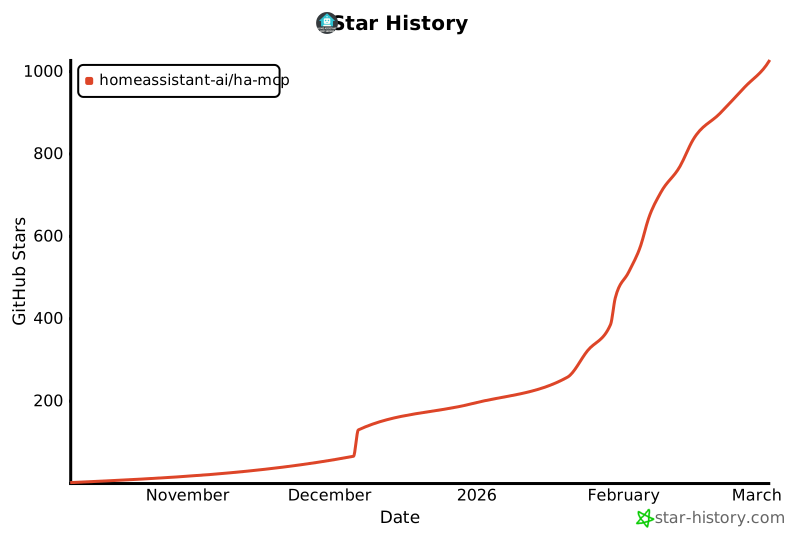
⭐ Star History
1 maintainer

Metadata
1 maintainer
Release files for ha-mcp-dev 7.2.0.dev327
For a detailed explanation of source distributions (sdists) and built distributions (wheels), please see the package formats documentation.
Source distribution (sdist)
| File | Size | Uploaded | Provenance | |
|---|---|---|---|---|
| ha_mcp_dev-7.2.0.dev327.tar.gz | 313.4 kB | With provenance | Details |
Built distribution (wheel)
| File | Interpreter | ABI | Platform | Reset |
|---|---|---|---|---|
| ha_mcp_dev-7.2.0.dev327-py3-none-any.whl | Python 3 | none | any | Details |
Total release size: 669.4 kB
Release files / ha_mcp_dev-7.2.0.dev327.tar.gz
| Download URL | ha_mcp_dev-7.2.0.dev327.tar.gz |
|---|---|
| Size | 313.4 kB |
| Tags | Source |
|
SHA-256 checksum How to use checksums |
a6954189127f8017d7f61e5b18fdb313958431b5806b9b16e969970eee916b14
|
|
BLAKE2b-256 checksum How to use checksums |
21e344641d4701e3d1fcd16b678dce680e31c1c9c1bb3c431be67a50c0d964ef
|
| Upload date | |
|
Uploaded using Trusted Publishing? What is trusted publishing? |
Yes |
| Uploaded via |
twine/6.1.0 CPython/3.13.7
|
Provenance
Provenance describes where a file came from. On PyPI, provenance is shared via attestations, which provide a verifiable record of the build or publishing details. View details, limitations and caveats.


PyPI Publish Attestation
PyPI verified that this artifact, at this checksum, originated from the publisher listed below.
Signed by GitHub Actions, verified by PyPI on Apr 6, 2026.
Transparency logRelease files / ha_mcp_dev-7.2.0.dev327-py3-none-any.whl
| Download URL | ha_mcp_dev-7.2.0.dev327-py3-none-any.whl |
|---|---|
| Size | 356.0 kB |
| Tags | Python 3 |
|
SHA-256 checksum How to use checksums |
b0fd8a88904bfaed9d9f56075354a77ab797d740055168096bf602ab9d5caecb
|
|
BLAKE2b-256 checksum How to use checksums |
bcc8bb86bd33bc05791c4e5cf89a3176abb4bf873ea9102bc944cc1e40b8d933
|
| Upload date | |
|
Uploaded using Trusted Publishing? What is trusted publishing? |
Yes |
| Uploaded via |
twine/6.1.0 CPython/3.13.7
|
Provenance
Provenance describes where a file came from. On PyPI, provenance is shared via attestations, which provide a verifiable record of the build or publishing details. View details, limitations and caveats.
PyPI Publish Attestation
PyPI verified that this artifact, at this checksum, originated from the publisher listed below.
Signed by GitHub Actions, verified by PyPI on Apr 6, 2026.
Transparency logSecurity for ha-mcp-dev 7.2.0.dev327
Provenance
Provenance describes where a file came from. On PyPI, provenance is shared via attestations, which provide a verifiable record of the build or publishing details. View details, limitations and caveats.
Full provenance
All 2 files in this release have been uploaded with provenance metadata.
Attestation for ha_mcp_dev-7.2.0.dev327.tar.gz
PyPI Publish Attestation
PyPI verified that this artifact, at this checksum, originated from the publisher listed below.
Signed by GitHub Actions, verified by PyPI on Apr 6, 2026.
Transparency logA note on package security
PyPI is a repository for distributing packages, not a service for auditing them. While third-party security researchers and our staff do their best to detect and remove malicious packages, PyPI cannot guarantee the quality, security or suitability of any given package.
To learn more about protecting yourself from malicious actors, visit our package security documentation.














