
This release is a pre-release and may not be stable for production use.

The Unofficial and Awesome Home Assistant MCP Server








A comprehensive Model Context Protocol (MCP) server that enables AI assistants to interact with Home Assistant.
Using natural language, control smart home devices, query states, execute services and manage your automations.

🚀 Get Started
Full guide to get you started with Claude Desktop (~10 min)
No paid subscription required. Click on your operating system:


Quick install (~5 min)
🍎 macOS
- Go to claude.ai and sign in (or create a free account)
- Open Terminal and run:
curl -LsSf https://raw.githubusercontent.com/homeassistant-ai/ha-mcp/master/scripts/install-macos.sh | sh
- Download Claude Desktop (or restart: Claude menu → Quit)
- Ask Claude: "Can you see my Home Assistant?"
You're now connected to the demo environment! Connect your own Home Assistant →
🪟 Windows
- Go to claude.ai and sign in (or create a free account)
- Open Windows PowerShell (from Start menu) and run:
irm https://raw.githubusercontent.com/homeassistant-ai/ha-mcp/master/scripts/install-windows.ps1 | iex
- Download Claude Desktop (or restart: File → Exit)
- Ask Claude: "Can you see my Home Assistant?"
You're now connected to the demo environment! Connect your own Home Assistant →
🧙 Setup Wizard for 15+ clients
Claude Code, Gemini CLI, ChatGPT, Open WebUI, VSCode, Cursor, and more.

Having issues? Check the FAQ & Troubleshooting
💬 What Can You Do With It?
Just talk to Claude naturally. Here are some real examples:
| You Say | What Happens |
|---|---|
| "Create an automation that turns on the porch light at sunset" | Creates the automation with proper triggers and actions |
| "Add a weather card to my dashboard" | Updates your Lovelace dashboard with the new card |
| "The motion sensor automation isn't working, debug it" | Analyzes execution traces, identifies the issue, suggests fixes |
| "Make my morning routine automation also turn on the coffee maker" | Reads the existing automation, adds the new action, updates it |
| "Create a script that sets movie mode: dim lights, close blinds, turn on TV" | Creates a reusable script with the sequence of actions |
Spend less time configuring, more time enjoying your smart home.
✨ Features
| Category | Capabilities |
|---|---|
| 🔍 Search | Fuzzy entity search, deep config search, system overview |
| 🏠 Control | Any service, bulk device control, real-time states |
| 🔧 Manage | Automations, scripts, helpers, dashboards, areas, zones, groups, calendars, blueprints |
| 📊 Monitor | History, statistics, camera snapshots, automation traces, ZHA devices |
| 💾 System | Backup/restore, updates, add-ons, device registry |
🛠️ Complete Tool List (97 tools)
| Category | Tools |
|---|---|
| Search & Discovery | ha_search_entities, ha_deep_search, ha_get_overview, ha_get_state |
| Service & Device Control | ha_call_service, ha_bulk_control, ha_get_operation_status, ha_get_bulk_status, ha_list_services |
| Automations | ha_config_get_automation, ha_config_set_automation, ha_config_remove_automation |
| Scripts | ha_config_get_script, ha_config_set_script, ha_config_remove_script |
| Helper Entities | ha_config_list_helpers, ha_config_set_helper, ha_config_remove_helper |
| Dashboards | ha_config_get_dashboard, ha_config_set_dashboard, ha_config_update_dashboard_metadata, ha_config_delete_dashboard, ha_get_dashboard_guide, ha_get_card_types, ha_get_card_documentation |
| Areas & Floors | ha_config_list_areas, ha_config_set_area, ha_config_remove_area, ha_config_list_floors, ha_config_set_floor, ha_config_remove_floor |
| Labels | ha_config_get_label, ha_config_set_label, ha_config_remove_label, ha_manage_entity_labels |
| Zones | ha_get_zone, ha_create_zone, ha_update_zone, ha_delete_zone |
| Groups | ha_config_list_groups, ha_config_set_group, ha_config_remove_group |
| Todo Lists | ha_get_todo, ha_add_todo_item, ha_update_todo_item, ha_remove_todo_item |
| Calendar | ha_config_get_calendar_events, ha_config_set_calendar_event, ha_config_remove_calendar_event |
| Blueprints | ha_list_blueprints, ha_get_blueprint, ha_import_blueprint |
| Device Registry | ha_get_device, ha_update_device, ha_remove_device, ha_rename_entity |
| ZHA & Integrations | ha_get_zha_devices, ha_get_entity_integration_source |
| Add-ons | ha_get_addon |
| Camera | ha_get_camera_image |
| History & Statistics | ha_get_history, ha_get_statistics |
| Automation Traces | ha_get_automation_traces |
| System & Updates | ha_check_config, ha_restart, ha_reload_core, ha_get_system_info, ha_get_system_health, ha_get_updates |
| Backup & Restore | ha_backup_create, ha_backup_restore |
| Utility | ha_get_logbook, ha_eval_template, ha_get_domain_docs, ha_get_integration |
🧪 Dev Channel
Want early access to new features and fixes? Dev releases (.devN) are published on every push to master.
Dev Channel Documentation — Instructions for pip/uvx, Docker, and Home Assistant add-on.
🤝 Contributing
For development setup, testing instructions, and contribution guidelines, see CONTRIBUTING.md.
For comprehensive testing documentation, see tests/README.md.
🔒 Privacy
Ha-mcp runs locally on your machine. Your smart home data stays on your network.
- Configurable telemetry — optional anonymous usage stats
- No personal data collection — we never collect entity names, configs, or device data
- User-controlled bug reports — only sent with your explicit approval
For full details, see our Privacy Policy.
📄 License
This project is licensed under the MIT License - see the LICENSE file for details.
🙏 Acknowledgments
- Home Assistant: Amazing smart home platform (!)
- FastMCP: Excellent MCP server framework
- Model Context Protocol: Standardized AI-application communication
- Claude Code: AI-powered coding assistant
👥 Contributors
- @julienld — Project maintainer & core contributor.
- @kingbear2 — Windows UV setup guide.
- @sergeykad — Dashboard card-level CRUD operations, better changelogs and removed the dependency to textdistance/numpy.
- @konradwalsh — Financial support via GitHub Sponsors. Thank you! ☕
- @cj-elevate — Integration & entity management tools (enable/disable/delete).
- @kingpanther13 — Dev channel documentation, bulk control validation, OAuth 2.1 docs, tool consolidation, error handling improvements, and native solutions guidance.
- @Danm72 — Entity registry tools (
ha_set_entity,ha_get_entity) for managing entity properties. - @Raygooo — SOCKS proxy support.
💬 Community
- GitHub Discussions — Ask questions, share ideas
- Issue Tracker — Report bugs, request features, or suggest tool behavior improvements
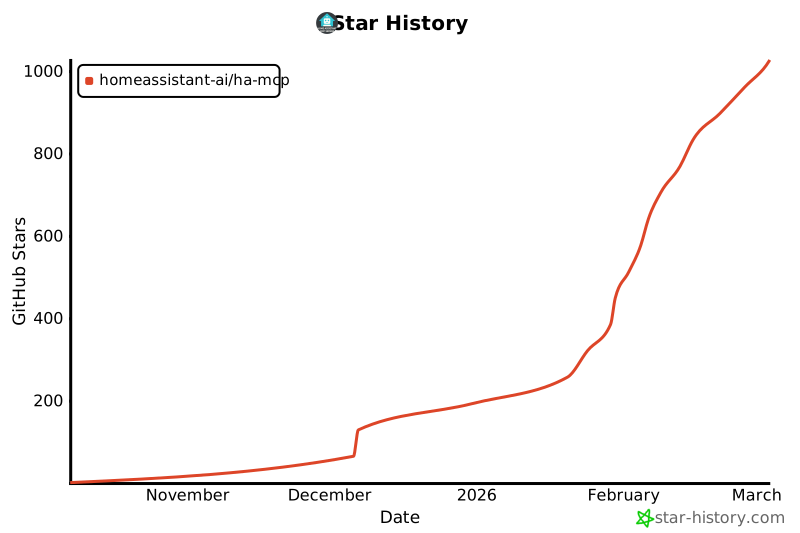
⭐ Star History
1 maintainer

Metadata
1 maintainer
Release files for ha-mcp-dev 6.4.0.dev164
For a detailed explanation of source distributions (sdists) and built distributions (wheels), please see the package formats documentation.
Source distribution (sdist)
| File | Size | Uploaded | |
|---|---|---|---|
| ha_mcp_dev-6.4.0.dev164.tar.gz | 221.3 kB | Details |
Built distribution (wheel)
| File | Interpreter | ABI | Platform | Reset |
|---|---|---|---|---|
| ha_mcp_dev-6.4.0.dev164-py3-none-any.whl | Python 3 | none | any | Details |
Total release size: 473.1 kB
Release files / ha_mcp_dev-6.4.0.dev164.tar.gz
| Download URL | ha_mcp_dev-6.4.0.dev164.tar.gz |
|---|---|
| Size | 221.3 kB |
| Tags | Source |
|
SHA-256 checksum How to use checksums |
a60ca53c7824a15519934e4a56a053d222bf761c59c8410ad72b70bc11d23da6
|
|
BLAKE2b-256 checksum How to use checksums |
7e643665dedaee8eced6dae0930e8936bcac53f3332ab2380a9f9fc5389ed3dc
|
| Upload date | |
|
Uploaded using Trusted Publishing? What is trusted publishing? |
Yes |
| Uploaded via |
twine/6.1.0 CPython/3.13.7
|
Provenance
Provenance describes where a file came from. On PyPI, provenance is shared via attestations, which provide a verifiable record of the build or publishing details. View details, limitations and caveats.


PyPI Publish Attestation
PyPI verified that this artifact, at this checksum, originated from the publisher listed below.
Signed by GitHub Actions, verified by PyPI on Jan 31, 2026.
Transparency logRelease files / ha_mcp_dev-6.4.0.dev164-py3-none-any.whl
| Download URL | ha_mcp_dev-6.4.0.dev164-py3-none-any.whl |
|---|---|
| Size | 251.9 kB |
| Tags | Python 3 |
|
SHA-256 checksum How to use checksums |
fcb07db37bb6392b0ed9921dc7390da49b575918164f0bd4d577eeac3f1a8091
|
|
BLAKE2b-256 checksum How to use checksums |
de423665e330aecd5ed2f4d8773227556f3736b6a5a7ab549699444d48bb94d1
|
| Upload date | |
|
Uploaded using Trusted Publishing? What is trusted publishing? |
Yes |
| Uploaded via |
twine/6.1.0 CPython/3.13.7
|
Provenance
Provenance describes where a file came from. On PyPI, provenance is shared via attestations, which provide a verifiable record of the build or publishing details. View details, limitations and caveats.
PyPI Publish Attestation
PyPI verified that this artifact, at this checksum, originated from the publisher listed below.
Signed by GitHub Actions, verified by PyPI on Jan 31, 2026.
Transparency log













