

Hearthwork
Hearthwork runs a local AI model on your own computer and connects your coding agent to it, from one menu. The model runs on your GPU and RAM, and the agent is Claude Code, Codex, OpenCode, Aider or Qwen Code (hearthwork agents). It sets itself up for your hardware, tells you honestly whether your PC is good enough, and handles the small incompatibilities that otherwise break agents on local models.
Works on Windows, macOS and Linux. Needs Python 3.9+ and the agent(s) you want to use; no extra Python packages.
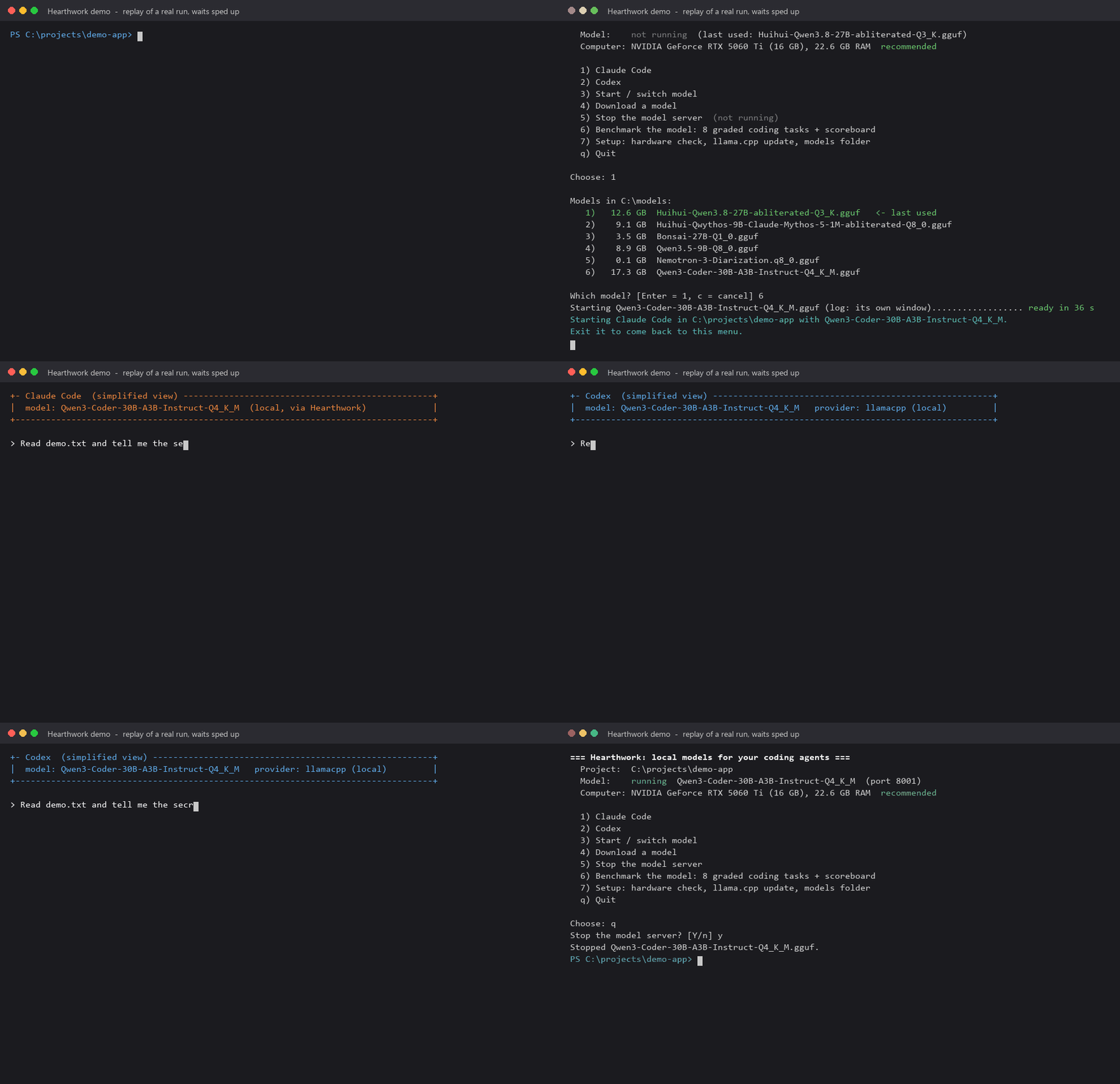
A replay of a real run on an RTX 5060 Ti 16 GB. Waits are sped up, the agent screens are simplified, and paths are shortened.
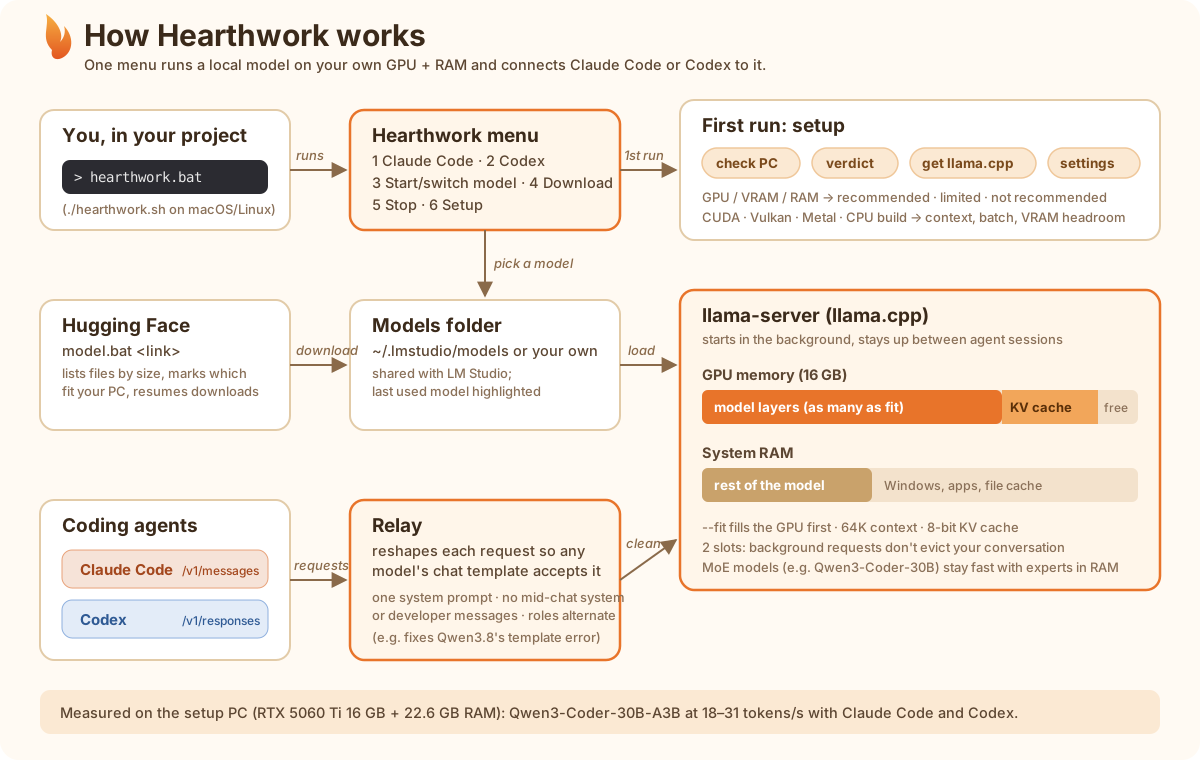
How it works
Install
uv tool install hearthwork
or pipx install hearthwork. The latest code from GitHub: uv tool install git+https://github.com/BillyMRX1/hearthwork.
This gives you one command, hearthwork. It needs Python 3.9+ and no other Python packages.
- Update:
hearthwork update(oruv tool upgrade hearthwork). - Version and data folder:
hearthwork --version.
Upgrading from the clone version
Earlier versions were run from a cloned folder with .bat/.sh scripts. Those scripts are gone; everything is now the hearthwork command.
- On first run, Hearthwork offers to import an old setup it finds (a folder with
config.jsonandbin/, for example the old clone if you run from it). - Or import it yourself:
hearthwork setup --import <old folder>. - It copies your settings, llama.cpp, prompt caches and benchmark results. The old folder is left as it is.
Where your data lives
Settings, llama.cpp, caches and results are stored per user, outside the install:
| OS | Folder |
|---|---|
| Windows | %LOCALAPPDATA%\hearthwork |
| macOS | ~/Library/Application Support/hearthwork |
| Linux | $XDG_DATA_HOME/hearthwork (default ~/.local/share/hearthwork) |
Set the environment variable HEARTHWORK_HOME to use another folder. Inside it:
config.json: your settings.bin/: llama.cpp.cache/slots/: saved prompt caches.bench/: benchmark results (results.jsonl) and each run's folder (runs/).templates/: chat-template overrides.server.jsonandserver.log: the running model server, and its log on macOS/Linux.
Quick start
From the project you want the agent to work on, run:
hearthwork
The first run sets things up (see below). After that you get one menu:
=== Hearthwork: local models for your coding agents ===
  Project:  C:\projects\my-app
  Model:    running  Qwen3-Coder-30B-A3B-Instruct-Q4_K_M  (port 8001)
  Computer: NVIDIA GeForce RTX 5060 Ti (16 GB), 22.6 GB RAM  recommended

  1) Claude Code
  2) Codex
  3) Start / switch model
  4) Download a model
  5) Stop the model server
  6) Benchmark the model: 8 graded coding tasks + scoreboard
  7) Setup: hardware check, llama.cpp update, models folder
  q) Quit
- Picking an agent starts the model if none is running: you pick it (the last used is highlighted, Enter keeps it), it loads in the background, and then the agent opens in this terminal, in your project folder. Exit the agent to come back to the menu.
- The model server keeps running between agent sessions, so switching between Claude Code and Codex is instant. Both can use it at the same time. On Windows it runs in its own window, which shows its log; on macOS/Linux the log is
server.login the data folder. - On quit it asks whether to stop the server.
- Skip the menu:
hearthwork claude/hearthwork codex.
| Command | What it does |
|---|---|
hearthwork |
The menu above. |
hearthwork claude [args] |
Claude Code with the local model; starts a model first if none is running. Extra arguments go to claude. |
hearthwork opencode|aider|qwen [args] |
OpenCode, Aider or Qwen Code with the local model (see Agents). Extra arguments go to the agent, e.g. hearthwork opencode run "...", hearthwork aider --message "...". |
hearthwork <agent> --dry-run |
Prints the exact command, the environment variables Hearthwork sets (keys and tokens masked) and the files it generates, without starting the model, the relay or the agent. Must be the first argument. |
hearthwork agents |
Lists the supported agents: installed (and version), the API each uses, how Hearthwork connects it, and the install command of the missing ones. |
hearthwork codex [args] |
Codex with the local model; starts a model first if none is running. Extra arguments go to codex, e.g. hearthwork codex exec "...". |
hearthwork start [--model X] |
Starts the model server in the background. |
hearthwork stop |
Stops the background model server. |
hearthwork serve [--model X] |
Runs the model server in this terminal; Ctrl+C stops it. |
hearthwork context [model] [N|auto] |
Shows the context range for each model on this computer; with N (e.g. 96K) saves it for that model, auto clears it. |
hearthwork status |
Shows what is running, with the context the server really runs with. |
hearthwork share [--port 8484] [--allow-public] [--tailscale] |
Shares the running model on your home network (starts one if needed); Ctrl+C stops. --tailscale also makes it usable from anywhere through Tailscale. A PIN shows here when another computer asks to connect. |
hearthwork devices [remove <name>] |
Lists the computers allowed to use your model; remove revokes one at once. |
hearthwork connect [host[:port]] |
Uses the model of a computer that is sharing: finds it on the local network and among your Tailscale computers (or give its address), pairs with the PIN. |
hearthwork disconnect |
Goes back to local models. |
hearthwork model <link> |
Downloads a model from Hugging Face. |
hearthwork bench [--agent claude|codex|opencode|aider|qwen] [--all] [--warmup] [--show] |
Benchmarks the running model through an agent. --all is the release check (every installed agent, see Benchmark). --show prints the scoreboard and the latest summary. |
hearthwork check [--json] |
Checks whether this PC suits Hearthwork and which models fit (see below). |
hearthwork runtime [install <name> | use <name> | update | rollback] |
Lists the llama.cpp engines (CUDA 13/12, ROCm, Vulkan, SYCL, Metal, CPU) installed side by side, the one recommended for this PC and why. install downloads another next to the others, use switches (applies at the next model start), update gets the newest build, rollback goes back to the previous one. |
hearthwork setup [--update-llama] [--reset] [--import FOLDER] |
Runs setup again. --update-llama gets the newest llama.cpp, --reset starts setup from scratch, --import brings in an old clone-based setup. |
hearthwork update |
Updates Hearthwork itself. |
hearthwork --version |
Prints the version and data folder. |
- Faster first messages: each agent's processed system prompt is saved to
cache/slots/in the data folder when a session ends or the server stops, and restored when the server starts. Measured: the first message after a restart went from 28 s to 13 s (Claude Code) and from 25 s to 17 s (Codex).
Use the model from another computer
Run the model on one computer (say, a PC with a GPU) and use any supported agent from another one on the same home network. Both need Hearthwork; the second one needs no model, llama.cpp or setup.
hearthwork share           # on the computer with the model; leave it running
hearthwork connect         # on the other computer: finds it, then asks for the PIN shown on the first
hearthwork claude          # now uses the other computer's model (same for every agent, the menu, bench)
hearthwork disconnect      # back to local models
- Pairing:
connectasks to pair and the host shows a 6-digit PIN, which you type on the other computer. The PIN works for 2 minutes, 3 wrong tries end the request, and too many wrong PINs lock pairing for 10 minutes. The host then gives the computer a long random key (it keeps only a hash) and later connections need no PIN. - Trusted devices:
hearthwork deviceslists them,hearthwork devices remove <name>revokes one immediately. - Requests are cleaned up on the host, so the other computer needs no model-specific setup. It uses whatever model the host runs and cannot start, stop or switch it.
- Windows host: the firewall may ask to allow Python; allow it on private networks. Sharing is refused while a network is marked Public (mark it Private, or pass
--allow-public). - Discovery uses UDP port 8485; if it does not find the host, run
hearthwork connect <ip>[:8484].
Limits: on a home network the traffic is plain HTTP (not encrypted), so use it on networks you trust only. To use the model away from home, use Tailscale (below).
From anywhere with Tailscale
Tailscale is a WireGuard-based private network between your own devices. Install it and sign in on both computers, then:
hearthwork share --tailscale   # on the model computer (also fine on a cafe's Wi-Fi)
hearthwork connect             # on the other one: lists LAN hosts and Tailscale peers "(tailscale)"
- Host:
shareprints the Tailscale address and MagicDNS name (e.g.my-pc.tailnet.ts.net). With--tailscalethe host accepts only Tailscale and local (loopback) computers, plus your local network when no network is Public; the Public-network guard ignores Tailscale's own adapter. Plainsharejust mentions the Tailscale address when Tailscale is up. On Windows, allow the firewall prompt for the Tailscale interface too. - Client:
connectalso asks every online Tailscale peer on port 8484, so no address is needed. Pairing stores every address of the host (LAN IP, Tailscale IP, MagicDNS name). Each run tries the LAN first (fast), then Tailscale, so the same key works at home and away without pairing again;hearthwork statusshows the route (via LAN 192.168.0.7orvia Tailscale 100.x.y.z). Older pairings with a single address keep working. - Security: Tailscale traffic is encrypted end to end by WireGuard and only devices of your tailnet can reach the host. The PIN and device keys still apply (a tailnet can be shared with other people).
- Tailscale is optional: without it nothing changes.
Use the model from any tool: hearthwork api
One local endpoint that speaks both the OpenAI and the Anthropic API, for tools Hearthwork has no launcher for (the official SDKs, Aider, OpenCode, Continue, your own scripts). It uses the same request cleanup as the agent launchers, so strict chat templates (Qwen3.5 and similar) work.
hearthwork api                      # leave it running; Ctrl+C stops it
hearthwork api --show               # copy-paste setup for each tool
- OpenAI: base URL
http://127.0.0.1:8080/v1(chat/completions,responses,completions,models, andembeddingsif the model supports it). Anthropic: base URLhttp://127.0.0.1:8080(v1/messages,v1/messages/count_tokens). Streaming works. - This computer only. It listens on 127.0.0.1. For other devices use
hearthwork share. --port N(default 8080).--api-key KEYrequires the key (Authorization: Bearerorx-api-key); without it any program on this computer can use the model.- Model: if none is running,
hearthwork apistarts the last-used one when it starts (it never restarts a running or busy server)./v1/modelslists the running model first, then every local model (name = file name without.gguf), so tools can show a dropdown. Any model name in a request uses the running model. --allow-switch: a request whose"model"is part of another local model file name restarts the server with that model (30-60 s) and then answers. This interrupts everything else using the model (a connected laptop, agent sessions), so it is off by default.- Replies sent to
/v1/responseswithoutmax_output_tokensare capped at 8192 tokens (a stuck generation ends); on the other endpoints your own values are used unchanged. hearthwork api --showprints setup for the OpenAI and Anthropic Python SDKs, curl, environment variables, Aider, OpenCode, Continue and Cursor (Cursor may not work with localhost: some of its features run from its own servers).
Use Hearthwork as a subagent from any agent
Any agent harness (cloud Claude Code, Codex, Cursor, OpenCode, ...) can hand a coding task to "our Claude", "our Codex" (or OpenCode, Aider, Qwen Code) running on the local model (or on the computer you hearthwork connect to) and get the result back. Two ways:
1. The task command, from the other agent's shell tool (no terminal needed):
hearthwork task [--agent claude|codex|opencode|aider|qwen] [--allow "pytest *"]... [--cwd DIR] [--timeout 900] [--json] [--dry-run] "TASK"
echo "TASK" | hearthwork task -        # "-" reads the task from stdin: no shell quoting problems
It starts the model if none is running (the last used one; if none can be chosen without asking, it stops with a message), runs the agent non-interactively, and prints a report on stdout: agent, model, host, duration, status, files created/modified/deleted (compared before and after, .git, node_modules, .venv and __pycache__ skipped) and the agent's final message. Progress goes to stderr. Exit code 0 means success; 124 a timeout (the agent and its child processes are killed), 1 an agent error. The agent starts without the parent session's CLAUDECODE / CLAUDE_CODE_* / CODEX_* variables, so it does not think it is nested.
- Claude Code may read, search and edit files, and run only commands matching an
--allowpattern (--allow "python *"becomesBash(python *)); everything else is denied. - Codex runs in its
workspace-writesandbox: it may edit inside the folder and run commands there, and the sandbox decides the rest.--allowhas no effect on it. - OpenCode and Qwen Code follow the same rule as Claude Code: file edits plus the
--allowcommands (OpenCode throughOPENCODE_PERMISSION, Qwen Code through--approval-mode auto-edit --allowed-tools). - Aider only edits files: it cannot limit the commands it would run, so they are switched off.
--dry-runprints the command, environment and generated files the task would use and starts nothing.
2. The MCP server, so the other agent gets tools instead of a shell command:
hearthwork mcp install claude   # claude mcp add --scope user hearthwork -- <path to hearthwork> mcp
hearthwork mcp install codex    # codex mcp add hearthwork -- <path to hearthwork> mcp
hearthwork mcp install print    # JSON for Cursor, OpenCode, Claude Desktop: {"mcpServers": {"hearthwork": {"command": ..., "args": ["mcp"]}}}
The path to hearthwork is absolute, so GUI clients with another PATH work too. Tools: local_task_start (returns an id) and local_task_result (waits up to 55 s per call; status running, done or failed, plus the report), local_task (blocking), and local_model_status. Prefer start + result: some clients, Codex among them, cancel an MCP tool call after about 60 s. For the blocking local_task in Codex raise the limit in ~/.codex/config.toml: under [mcp_servers.hearthwork] set tool_timeout_sec = 900.
Tips: give small, precise tasks (file names, interfaces, the test command), and review the result afterwards, as the local model is weaker than the agent calling it. Run up to as many tasks in parallel as the server has slots (2 by default; give parallel tasks different files). hearthwork claude / hearthwork codex without a terminal and without a prompt exit with a hint pointing here; hearthwork claude -p "..." works as before.
Benchmark
hearthwork bench (or menu option 6) drives the running model through a coding agent (--agent, Claude Code by default) in a fresh folder, with 8 prompts in one conversation. It grades each step by checking the files and running the code, not by trusting the agent's reply:
| # | Task | Graded by |
|---|---|---|
| 1 | chat | a reply came back |
| 2 | list files | both files named |
| 3 | read a file | the secret phrase is in the reply |
| 4 | write + run fizzbuzz.py |
running it gives the exact FizzBuzz output |
| 5 | add is_prime + run |
function and docstring exist, FizzBuzz still right, the primes below 30 are printed |
| 6 | fix 3 planted bugs | buggy.py prints 20.0, [9, 5], 0 |
| 7 | write unit tests | test_buggy.py passes. Half points if it copies the functions instead of importing buggy.py |
| 8 | summary | names all 3 files |
- Results are added to
bench/results.jsonlin the data folder. The scoreboard ranks every model and agent you have tried, by score and then time. - Each run's folder stays in
bench/runs/<date-time>/<agent>/in the data folder, so you can inspect what the agent wrote. - Isolated agent history: each run gives the agent an empty config folder (
CODEX_HOMEfor Codex,CLAUDE_CONFIG_DIRfor Claude Code) next to its work folder, so benchmark sessions never fill your real~/.codexor~/.claude. The other agents keep their history per project folder, and every run has its own folder. The benchmark refuses to start if that folder would be your real one. Codex gets a copy of only the[windows]table of yourconfig.toml(its sandbox setting); without it Codex on Windows blocks every command. No login is needed: the local provider is passed as-coverrides, and Claude Code runs with the dummy token Hearthwork already sets.
Release check: hearthwork bench --all
Runs every installed agent one after another (never in parallel, which would starve the GPU), then prints and saves a table for release notes (summary.md in the run's folder; bench --show prints the latest one):
- Warmup: a ~30K-token prompt goes through the Anthropic (
/v1/messages) and OpenAI (/v1/responses) endpoints first, so the first agent does not pay for cold caches. Not timed.--warmupdoes the same before a single-agent run. - Retry: if the agent itself fails (crashes, does not start, reaches another provider), the run is repeated once in a fresh folder. Both attempts are written to
results.jsonl; a failed attempt has anerrorand no score, so it never reaches the scoreboard. A wrong answer is a score, not a failure, and is not retried. - Summary:
| Model | Agent | Score | Time |
|---|---|---|---|
| Qwen3.5-35B-A3B-Q4_K_M | Claude Code | 8.0/8 | 3.0 min |
| Qwen3.5-35B-A3B-Q4_K_M | Codex | 8.0/8 | 3.3 min |
Agents
hearthwork agents shows which are installed (with version), the API each speaks, how Hearthwork connects it, and the install command of the missing ones. Every agent works the same way in hearthwork <agent> [args], the menu, hearthwork task --agent <agent>, the MCP tools, remote mode (share / connect) and bench. The context window and output limit each agent is told come from the running server (or the shared one).
| Agent | Install | API (relay path) | How Hearthwork connects it | Known quirks |
|---|---|---|---|---|
Claude Code (claude) |
https://code.claude.com | Anthropic Messages (/v1/messages) |
ANTHROPIC_* env vars and a --settings file in the data folder |
Told the real context size, so it compacts in time. |
Codex (codex) |
npm i -g @openai/codex |
OpenAI Responses (/v1/responses) |
-c overrides as a one-off model provider, plus a model catalogue (codex-models.json) |
~/.codex/config.toml is not changed. |
OpenCode (opencode) |
npm i -g opencode-ai |
OpenAI Chat Completions (/v1/chat/completions) |
OPENCODE_CONFIG_CONTENT env var: provider @ai-sdk/openai-compatible with the model's limit.context / limit.output; -m hearthwork/<model>; the key is passed as HEARTHWORK_KEY |
Nothing is written to disk. Auto-update and sharing are turned off for the session. Headless: opencode run. |
Aider (aider) |
uv tool install --python 3.12 aider-chat |
OpenAI Chat Completions | OPENAI_API_BASE / OPENAI_API_KEY env vars, --model openai/<model>, a generated --model-metadata-file (context) and --model-settings-file (max_tokens); --no-show-model-warnings --no-check-update --no-analytics |
Not an agent loop: it edits files from a reply format and cannot read or run anything on its own, so hearthwork task switches its shell commands off and hearthwork bench scores it low (1.7/8 on Qwen3.5-35B-A3B). It keeps its own git behaviour (creates a repo, commits, adds .aider* to .gitignore). Install with Python 3.12: uv tool install aider-chat fails to build scipy on 3.13+ on Windows. Hearthwork sets PYTHONUTF8=1 so its console does not crash on Windows code pages. |
Qwen Code (qwen) |
npm i -g @qwen-code/qwen-code |
OpenAI Chat Completions | OPENAI_BASE_URL / OPENAI_API_KEY / OPENAI_MODEL env vars and a generated settings file (contextWindowSize, max_tokens) given through QWEN_CODE_SYSTEM_SETTINGS_PATH; ~/.qwen/settings.json is not changed |
Headless: qwen "prompt"; hearthwork task uses --approval-mode auto-edit plus --allowed-tools for the --allow commands. It also runs a background memory extraction that makes extra requests. |
- Every agent goes through a small relay inside Hearthwork (
src/hearthwork/harnesses.py). It reshapes requests so any model's chat template accepts them, for all three APIs. - Why the relay is needed: strict templates (e.g. Qwen3.5/3.8) reject a second system/developer message, unknown roles, or two user messages in a row, and these agents send them. Without the relay, Claude Code and Codex requests failed on Qwen3.8 with "System message must be at the beginning".
- Your own config is never edited. Each agent gets environment variables, command-line flags, or a generated file in the data folder. They write their own state (history, caches) where they always do.
--dry-runshows all of it without starting anything:
hearthwork opencode --dry-run      # the command, the environment (keys masked), the generated config
hearthwork task --agent qwen --dry-run "fix the failing test"
It prints the placeholder http://127.0.0.1:<relay-port> for the relay, which gets a free port at launch. Put --dry-run first: everything after it goes to the agent as usual (Aider has a --dry-run of its own, which still works after another argument).
- Adding another agent means adding one entry to
HARNESSESinsrc/hearthwork/harnesses.py: names, version command, install hint, which API it speaks, a function that builds its command and environment, and how to run it headless and read its final message. Menu,agents,task, MCP andbenchpick it up from there. - Not yet supported: Goose (environment variables look possible:
GOOSE_PROVIDER,OPENAI_HOST,GOOSE_MODEL, but not verified), Crush, Kilo Code CLI, OpenHands (needs Docker or its own runtime) and Hermes. A clean, non-invasive way to point each at a custom endpoint was not verified, so they are left out rather than guessed. Until then,hearthwork api --showgives setup snippets for tools without a launcher.
Claude Code settings Hearthwork adds
hearthwork claude writes claude-settings-<model>.json in the data folder (one per model) and starts Claude Code with --settings pointing at it. These settings sit on top of your own; ~/.claude/settings.json is not changed, and plain claude stays your normal cloud Claude.
permissions.defaultMode: "default": Claude Code's ask-before-risky-actions mode ("manual" in its UI). Newer Claude Code versions start in auto mode, where the local model checks every command first; see the measurement below. Shift+Tab still switches modes.- A status line such as
local · Qwen3.5-35B-A3B-Q4_K_M · 64K, so a local session is never mistaken for cloud Claude. It runs the hidden commandhearthwork statusline <model> <context>with the same Python that runs Hearthwork. - Your overrides: if
~/.claude/settings-hearthwork.jsonexists it is merged on top (nested objects are merged, other values replace). Use it for your own permissions, hooks, status line, or even"defaultMode": "auto"(Hearthwork then reminds you about the slow checks). A file with invalid JSON is ignored with a warning.HEARTHWORK_CLAUDE_OVERRIDESpoints to a different file. - The connection (relay address, model names, token limits) stays in environment variables of the Claude Code process, not in the file: the relay port is new each session.
Short commands: hearthwork alias
hearthwork alias add ccl claude     # `ccl` now runs `hearthwork claude`
hearthwork alias add cxl codex
hearthwork alias list
hearthwork alias remove ccl
A launcher (ccl.cmd on Windows, a shell script on macOS/Linux) is created next to the hearthwork command, so it is already on PATH. Arguments are passed on (ccl -p "..."). Hearthwork refuses a name that is already a command (e.g. claude) and only lists or removes launchers it created.
First run: setup (onboarding)
hearthwork (or hearthwork start) runs setup automatically when nothing is configured yet. It:
- Checks the computer: OS, CPU, RAM, and GPU (NVIDIA / AMD / Intel / Apple) with its memory.
- For AMD/Intel GPUs it reads the GPU's own memory, so integrated graphics aren't mistaken for a real GPU.
- Judges whether a local model is worth it here, and says why:
- RECOMMENDED (continues): a GPU with ≥12 GB and ~26 GB+ of GPU memory + RAM usable for models, or a Mac with ≥32 GB.
- LIMITED (asks; default yes): a 6–12 GB GPU or tight memory. Expect roughly 5–15 tokens/s, or a smaller, weaker version of the model.
- NOT RECOMMENDED (asks; default no, nothing is downloaded): no GPU, an integrated-only GPU, or under ~18 GB usable. Recommends cloud Claude Code instead.
- The reference point is measured: RTX 5060 Ti 16 GB + 22.6 GB RAM ran Qwen3-Coder-30B at 18–31 tokens/s. The thresholds for other hardware are estimates from that.
- Gets llama.cpp. It uses one already in
bin/(in the data folder) or on PATH. Otherwise it downloads the newest official build that matches the hardware:- CUDA for NVIDIA. The CUDA 13 or 12 build is chosen from the driver.
- ROCm for AMD cards of the RDNA2 generation or newer (RX 6000 and up), otherwise Vulkan; Vulkan for Intel (SYCL for Arc).
- Metal on macOS.
- CPU if there is no GPU.
Every build lives in its own folder (
bin/<runtime>-b<build>/), so several can sit side by side; seehearthwork runtime. A new build is smoke-tested (it starts and accepts every option Hearthwork passes) before it is used, and the previous build is kept forhearthwork runtime rollback. The menu andhearthwork statusmention a newer llama.cpp build at most once a day.
- Asks for the models folder. It finds LM Studio's folder and offers it, so both tools share the same files.
- Picks settings for this hardware: context
auto(see below), prompt batch size, VRAM headroom, and an 8-bit KV cache. - Saves everything to
config.jsonin the data folder. If there are no models yet, it suggests one, with the command to download it.
To set up from scratch, for example on another computer, run hearthwork setup --reset (or delete config.json and bin/ in the data folder).
Options
hearthwork start --model <part of a file name>skips the model menu (also forserve).hearthwork start --context N(98304or96K) overrides the context for that run. Agents andhearthwork shareread the context from the running server, so they follow it.hearthwork claude --max-output Ncaps the length of each Claude Code reply (default 4096 tokens). Codex has no such setting.- Agent settings stay local:
hearthwork claudeandhearthwork codexonly change settings for that agent process, never your terminal or the agent's own config files.
Downloading models
hearthwork model https://huggingface.co/unsloth/Qwen3-Coder-30B-A3B-Instruct-GGUF     (a repo: lists files, you pick one)
hearthwork model unsloth/Qwen3-Coder-30B-A3B-Instruct-GGUF                            (same, short form)
hearthwork model https://huggingface.co/<org>/<repo>/blob/main/<file>.gguf            (one file)
- The repo list shows each file's size, smallest first, and whether it fits this computer:
- fits in GPU memory (fastest),
- GPU + RAM (slower; fine for MoE models),
- too big.
- Files are saved to
<models folder>/<org>/<repo>/, LM Studio's layout. - Multi-part models download all their parts.
- Interrupted downloads resume when you run the same command again.
- Gated or private repos: set
HF_TOKEN.
How resources are used
- GPU first. llama.cpp's
--fitputs as much of the model on the GPU as fits, keepingfitTargetMiBfree for the desktop, and runs the rest from RAM. It does this on every start, so it adapts to each model and machine. - Context:
auto, per model and per computer. Hearthwork reads the model file (trained context, layers, KV heads, attention layout) to work out how much memory each token of context needs: Qwen3.5-35B-A3B ~11 KB (attention in 1 of 4 layers), Qwen3-Coder-30B ~52 KB, at an 8-bit KV cache. From that and your GPU memory and RAM it gives a range, e.g.context: 128K (auto; range 64K-256K, model max 256K):- minimum 64K: Claude Code's own prompt is ~20K tokens, so less compacts constantly;
- recommended (what
autostarts with): the largest that keeps the model's share of the GPU (a model that does not fit in VRAM keeps ~2 GB or 12% of VRAM for context), at most 128K because longer prompts take minutes to read on a consumer GPU; - maximum: what fits GPU memory + RAM, capped at the model's own limit (more context than recommended pushes model layers into RAM and slows it down).
The model menu shows the recommended context per model. A model with an unreadable header gets 64K (32K with under 24 GB). Precedence:
start --context> saved for the model (hearthwork context <model> N,contextsinconfig.json) > a number inserver.context>auto. Older setups with 32768 or 65536 inserver.contextare switched toautoonce.
- Other settings:
- Prompt batch 4096 on 12 GB+ GPUs: a 20K-token prompt took 84 s at 512 and 26 s at 4096.
- 2 slots, so Claude Code's background requests don't evict the conversation's cache.
- The model's RAM part is loaded into RAM rather than memory-mapped from a possibly slow disk.
- Stable prompt prefix: llama.cpp reuses only the part of the prompt before the first difference. Claude Code starts its system prompt with an
x-anthropic-billing-headerline whose hash changes with every new session, and adds a<total_tokens>counter after each turn; the relay removes both. Measured on a 17K-token prompt, a new session's first message went from 4.1K to 2.2K freshly processed tokens (6.8 s to 3.5 s). Within a session the cache was already stable.HEARTHWORK_RELAY_DUMP=<folder>writes every request the relay sees, before and after cleanup, for debugging. - Where to change them: the
serversection ofconfig.jsonin the data folder.hearthwork setuprecalculates them. - Not used: speculative decoding. Measured with Qwen3-Coder-30B (MoE, experts partly in RAM): n-gram speculation guessed 92% of the tokens when editing a file, but ran only 2–3% faster (within noise); the simple variant ran 14–19% slower. Verifying several guessed tokens at once routes them through many different experts, and part of those sit in RAM, so verifying costs about as much as generating. It may help when a model fits entirely in VRAM.
Models
- Requirements: any GGUF model works if it supports tool calling (Claude Code reads, edits and runs things through tools) and fits.
- Mixture-of-experts (MoE) models, like Qwen3-30B-A3B, stay fast even partly in RAM.
- Dense models slow down a lot once they spill out of GPU memory.
- Any model's chat template is handled. The relay moves the
systemmessage Claude Code places mid-conversation into the neighbouring user message, because strict templates reject it ("System message must be at the beginning").- Escape hatch for a template broken in some other way: put a fixed copy at
templates/<model file name without .gguf>.jinjain the data folder.
- Escape hatch for a template broken in some other way: put a fixed copy at
Measured on the setup PC (RTX 5060 Ti 16 GB over PCIe 4.0 x4, 22.6 GB RAM, 2026-10-06/07)
Benchmark scoreboard (hearthwork bench: 8 graded coding tasks in one agent conversation; Claude Code in dontAsk permission mode):
| Model (Q4_K_M, all MoE) | Size | Codex | Claude Code |
|---|---|---|---|
| Qwen3.5-35B-A3B | 20.5 GB | 8/8 in 2.6 min | 8/8 in 3.6 min |
| Qwen3-Coder-30B-A3B | 17.3 GB | 8/8 in 4.2 min | 8/8 in 3.9 min |
| GLM-4.7-Flash | 17.1 GB | 8/8 in 4.5 min | 7.7/8 in 3.9 min (one bug left unfixed) |
- Generation speed:
- Qwen3-Coder-30B: 18–38 tokens/s, depending on context length.
- A dense model partly in RAM (Huihui-Qwen3.8-27B Q3_K) managed only ~6 tokens/s.
- Claude Code's auto mode slows local models down. In auto mode, Claude Code asks the model to check every command first. With a local model those checks are slow and can time out and block the command. One GLM-4.7-Flash run took 48.7 min in auto mode and 3.9 min without it. Hearthwork therefore starts Claude Code in the normal ask mode (see above).
For comparison, a disk-streaming engine built on AirLLM ran the same Qwen3-Coder model about 10x slower on this PC.
Check your PC first
See whether Hearthwork is worth it on a computer, and which model to use, without installing anything:
uvx hearthwork check
It shows the hardware, the verdict, installed agents, and the best version of each suggested coding model that fits (sizes live from Hugging Face). Once Hearthwork is installed: hearthwork check (add --json for machine-readable output).
1 maintainer

Metadata
1 maintainer
Release files for hearthwork 0.6.1
For a detailed explanation of source distributions (sdists) and built distributions (wheels), please see the package formats documentation.
Source distribution (sdist)
| File | Size | Uploaded | Provenance | |
|---|---|---|---|---|
| hearthwork-0.6.1.tar.gz | 142.9 kB | Without provenance | Details |
Built distribution (wheel)
| File | Interpreter | ABI | Platform | Reset |
|---|---|---|---|---|
| hearthwork-0.6.1-py3-none-any.whl | Python 3 | none | any | Details |
Total release size: 253.7 kB
Release files / hearthwork-0.6.1.tar.gz
| Download URL | hearthwork-0.6.1.tar.gz |
|---|---|
| Size | 142.9 kB |
| Tags | Source |
|
SHA-256 checksum How to use checksums |
b9a1a3f46431b9fa35d3f01d97ddcab68b6a9b1774882e2b521926c595cd140b
|
|
BLAKE2b-256 checksum How to use checksums |
45712933442df41f8d4211bd2c097277c2d3dbc189ae80c17c1103fc29dd30c2
|
| Upload date | |
|
Uploaded using Trusted Publishing? What is trusted publishing? |
No |
| Uploaded via |
uv/0.12.11 {"installer":{"name":"uv","version":"0.12.11","subcommand":["publish"]},"python":null,"implementation":{"name":null,"version":null},"distro":null,"system":{"name":null,"release":null},"cpu":null,"openssl_version":null,"setuptools_version":null,"rustc_version":null,"ci":null}
|
Release files / hearthwork-0.6.1-py3-none-any.whl
| Download URL | hearthwork-0.6.1-py3-none-any.whl |
|---|---|
| Size | 110.8 kB |
| Tags | Python 3 |
|
SHA-256 checksum How to use checksums |
dbffdb8565ce2dcdf9bb2df2f51c0fcefc3288203b74197dbcc67b1cb107bf02
|
|
BLAKE2b-256 checksum How to use checksums |
7c9086a0cefdcd8473b0d9a50fa93f6344429975bd218bf0622636a53701c71b
|
| Upload date | |
|
Uploaded using Trusted Publishing? What is trusted publishing? |
No |
| Uploaded via |
uv/0.12.11 {"installer":{"name":"uv","version":"0.12.11","subcommand":["publish"]},"python":null,"implementation":{"name":null,"version":null},"distro":null,"system":{"name":null,"release":null},"cpu":null,"openssl_version":null,"setuptools_version":null,"rustc_version":null,"ci":null}
|
Security for hearthwork 0.6.1
Provenance
Provenance describes where a file came from. On PyPI, provenance is shared via attestations, which provide a verifiable record of the build or publishing details. View details, limitations and caveats.
No provenance found
None of the files in this release were uploaded with provenance metadata.
A note on package security
PyPI is a repository for distributing packages, not a service for auditing them. While third-party security researchers and our staff do their best to detect and remove malicious packages, PyPI cannot guarantee the quality, security or suitability of any given package.














