

hexiel
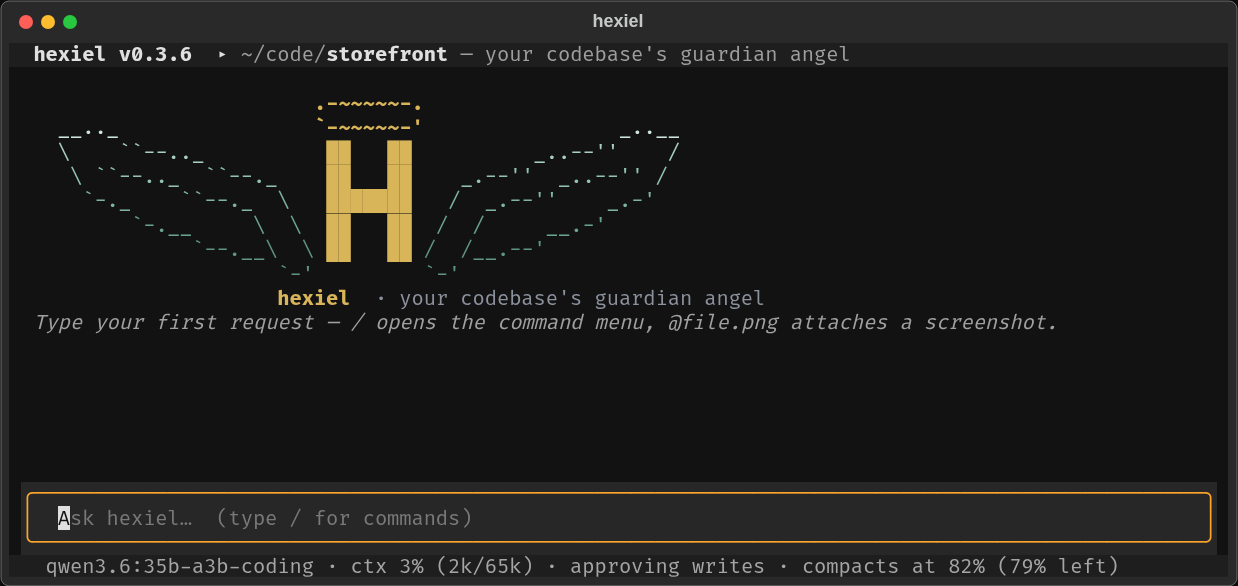
An open-source AI coding agent for your terminal and browser — a guardian angel for your codebase.
Runs on local models (Ollama, even on a mini-PC iGPU) or any big cloud model.
A free, self-hostable alternative to Claude Code and opencode.
🌐 Website: hexiel.tech · designed by JKagiDesigns LLC
Why hexiel
- Built for modest hardware. Everything that doesn't need a model (searching,
mapping the project, waiting on tests, distilling web pages, batching work in a
pythonscript) runs locally in Python. The prompt is kept lean: on an Intel iGPU mini-PC runningqwen3.6:35b-a3b-coding, each request's prompt processing dropped from 46.5 s to 23.7 s in v0.2.6. - Any model, local or cloud. Ollama (local or Cloud), Anthropic, OpenAI, Gemini, xAI, OpenRouter, DeepSeek, or any OpenAI-compatible server (vLLM, LM Studio, TGI). Switch per session or permanently, from the UI.
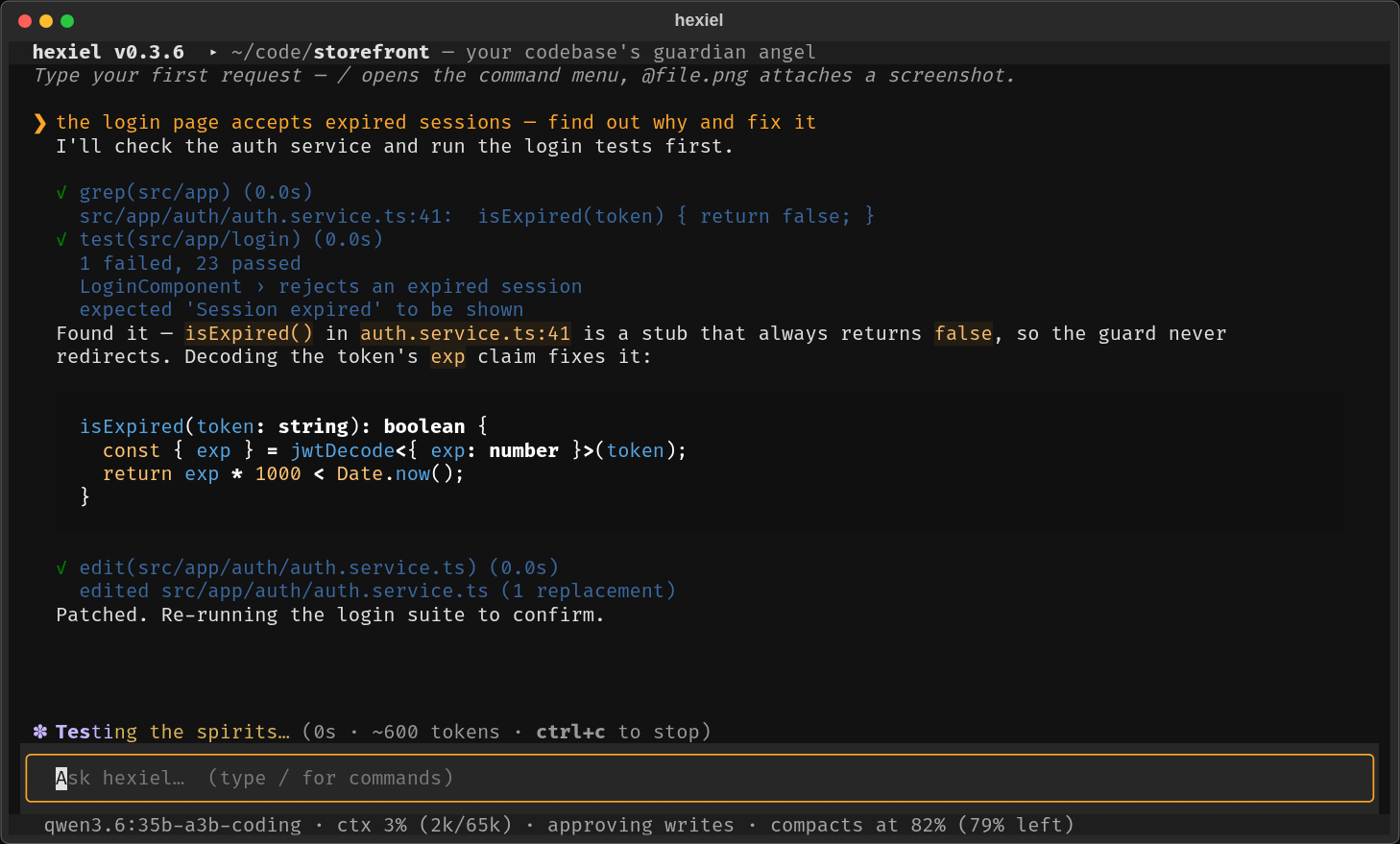
- Terminal and browser. A full-screen TUI, a browser UI, one-shot headless runs, and an OpenAI-compatible API — one agent core behind all of them.
- Brings your ecosystem. Your existing Claude Code skills (
~/.claude/skills) and OpenWebUI tool/pipe/filter plugins work as-is. - Remembers and keeps track. File-based memory (
MEMORY.md), atodo.mdthat survives crashes, auto-compaction at a Claude-Code-sized context window. - Knows the versions you use. A free, local knowledge library (RAG): point it at the docs for Java 21, Tomcat 10.1, Angular 18… — downloaded for you or dropped in by hand — and every model answers from those docs, with citations, instead of from memory. Details.
- Fixes itself. Crashes become incident files;
/healreproduces, fixes, tests and proposes a merge request — you approve it. - Free to use, can't be resold. GPLv3 + Commons Clause.
Quickstart
One line, no Python needed:
curl -fsSL https://hexiel.tech/install.sh | sh        # macOS, Linux
irm https://hexiel.tech/install.ps1 | iex             # Windows (PowerShell)
The installer refuses to run as root, brings uv (a pinned release, downloaded
with its .sha256 and verified) when there is no Python 3.11+, installs hexiel with it, puts hexiel on your
PATH, and runs hexiel --setup. Setup looks in the usual places on your machine for what is already there —
API keys exported in your shell or .env, and the keys, MCP servers, skills and rules of Claude Code, Codex,
Gemini CLI, OpenCode, Goose, Aider, Continue and Cursor, plus your local Ollama — shows each finding with
where it came from (secrets masked), asks y/n per item, stores the keys in ~/.config/hexiel/auth.toml
(mode 0600; the shell's own value always wins), and picks the first model that actually answers: a model
loaded on your Ollama, one pulled there, Ollama Cloud if you are signed in, else the cheapest profile with a
working key — proven with one request. Only API keys are taken: a subscription login (claude.ai, ChatGPT,
Google) is named and refused, with the API-key or Ollama alternative. What is still missing gets one line
each with the sign-up link and the exact command. Run it again any time: hexiel --setup, or /import
inside a session. Paste a key without editing files: hexiel auth set anthropic (or a variable name);
hexiel auth list shows what is stored, masked.
Prefer your own tooling? From PyPI:
pipx install 'hexiel[serve]'          # or, inside a virtualenv: pip install 'hexiel[serve]'
hexiel --setup                        # find keys and agents already here, pick a model that answers
hexiel --doctor                       # health report with fixes (grouped, :checkhealth style)
cd ~/code/your-project && hexiel
No pipx, or pip says externally-managed-environment (Arch, Debian/Ubuntu, Fedora, Homebrew)? Your OS
protects its system Python on purpose. Install pipx (sudo pacman -S python-pipx, sudo apt install pipx,
sudo dnf install pipx, brew install pipx) and run pipx ensurepath, or use a plain virtualenv:
python -m venv ~/.hexiel-venv && ~/.hexiel-venv/bin/pip install 'hexiel[serve]'.
Or from source (to hack on it):
git clone https://gitlab.com/jkagidesigns1/public/applications/hexiel.git
cd hexiel
python -m venv .venv
.venv/bin/pip install -e '.[serve]'     # Windows: .venv\Scripts\pip install -e ".[serve]"
.venv/bin/hexiel --doctor               # preflight checks with copy-paste fixes
.venv/bin/hexiel                        # start the TUI
Then put it on your PATH so it runs from any project:
ln -s "$PWD/.venv/bin/hexiel" ~/.local/bin/hexiel
cd ~/code/your-project && hexiel
hexiel always treats the directory you launch it from as the project: it
detects that tree's toolchain, reads its skills and keeps its state
(.hexiel/ — todo, memory, incidents, web cache) right there. The header shows
the hexiel version and the project you're in; hexiel -c resumes the last
conversation of this project.
Windows: works out of the box — the agent shells through PowerShell (pwsh,
winget install Microsoft.PowerShell), and bash falls back to it when no
WSL/git-bash is on PATH.
Ways to run it
hexiel                    # full-screen terminal UI
hexiel --serve            # browser UI at http://127.0.0.1:8777
hexiel -p "explain this repo in one paragraph"   # one-shot, headless
hexiel -c                 # resume this project's last conversation
hexiel -m sonnet          # pick a model profile for this run
hexiel --setup            # (again) find keys and agents on this machine, pick a model that answers
hexiel --doctor           # health report: Runtime · Models · Tools · Integrations · Project, with fixes
hexiel auth set anthropic # store a key (hidden input) in ~/.config/hexiel/auth.toml, 0600
hexiel --acp              # be the agent inside Zed / JetBrains (Agent Client Protocol on stdio)
hexiel marketplace search # browse the skills & plugins catalogues you added
In your editor (ACP). Zed — add to settings.json, then pick hexiel in the agent panel:
"agent_servers": { "hexiel": { "command": "hexiel", "args": ["--acp"] } }
JetBrains IDEs (AI Assistant → Agents → add a custom agent, or ~/.jetbrains/acp.json): command hexiel, arguments
--acp. Add -m PROFILE to pin a model. The editor gets streamed answers, tool cards (with diffs for edits),
approval prompts, hexiel's todo list as the plan, Ask/Auto modes, its own MCP servers, and past sessions to reopen.
VS Code, Neovim and Vim have thin plugins in editors/ that run the same hexiel --acp: a VS Code chat panel
(selection → ask, edit approvals, View diff), a Neovim Lua plugin (:Hexiel, :'<,'>HexielSend, :HexielDiff, approvals through
vim.ui.select) and a Vim 9 script with the same commands. Each folder has its own README.
Using it
 |
 |
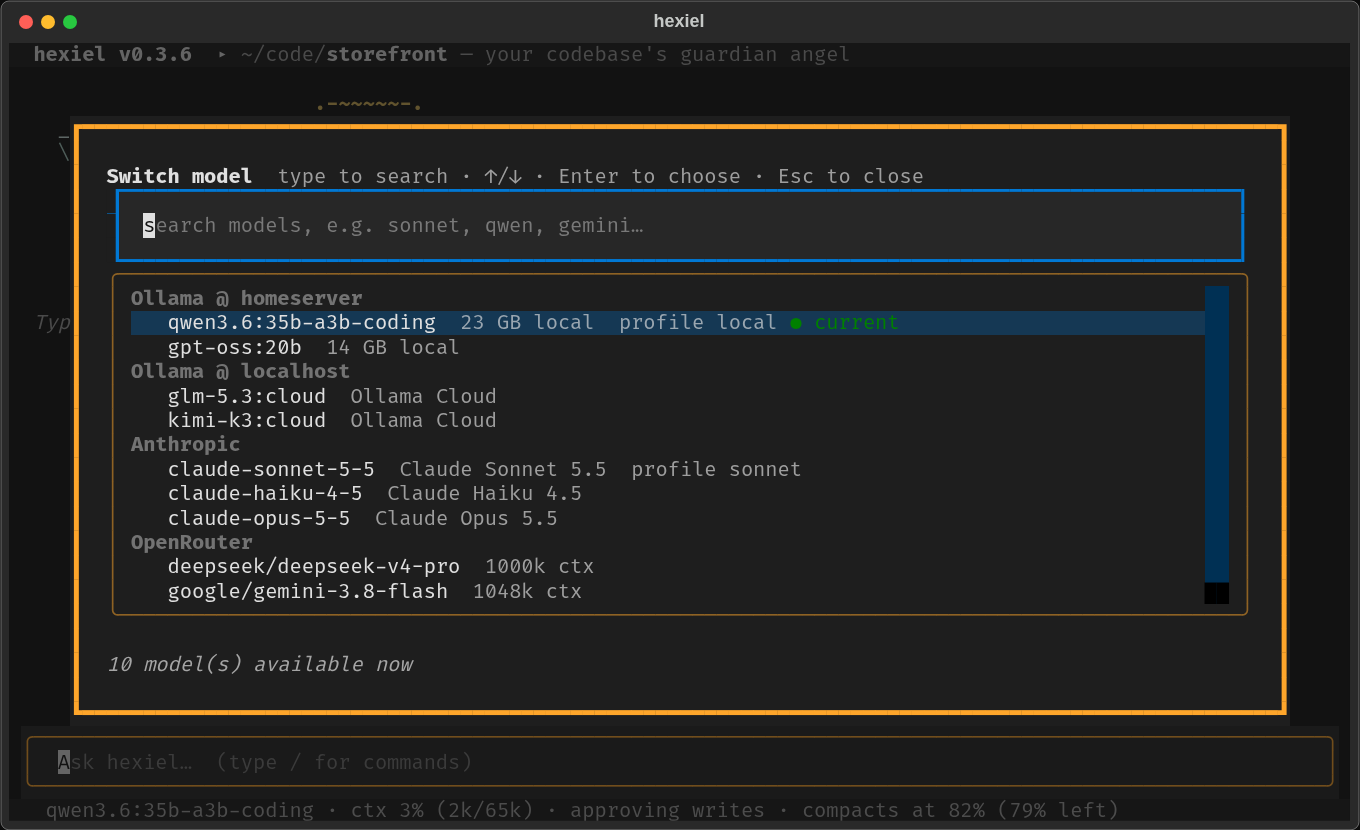
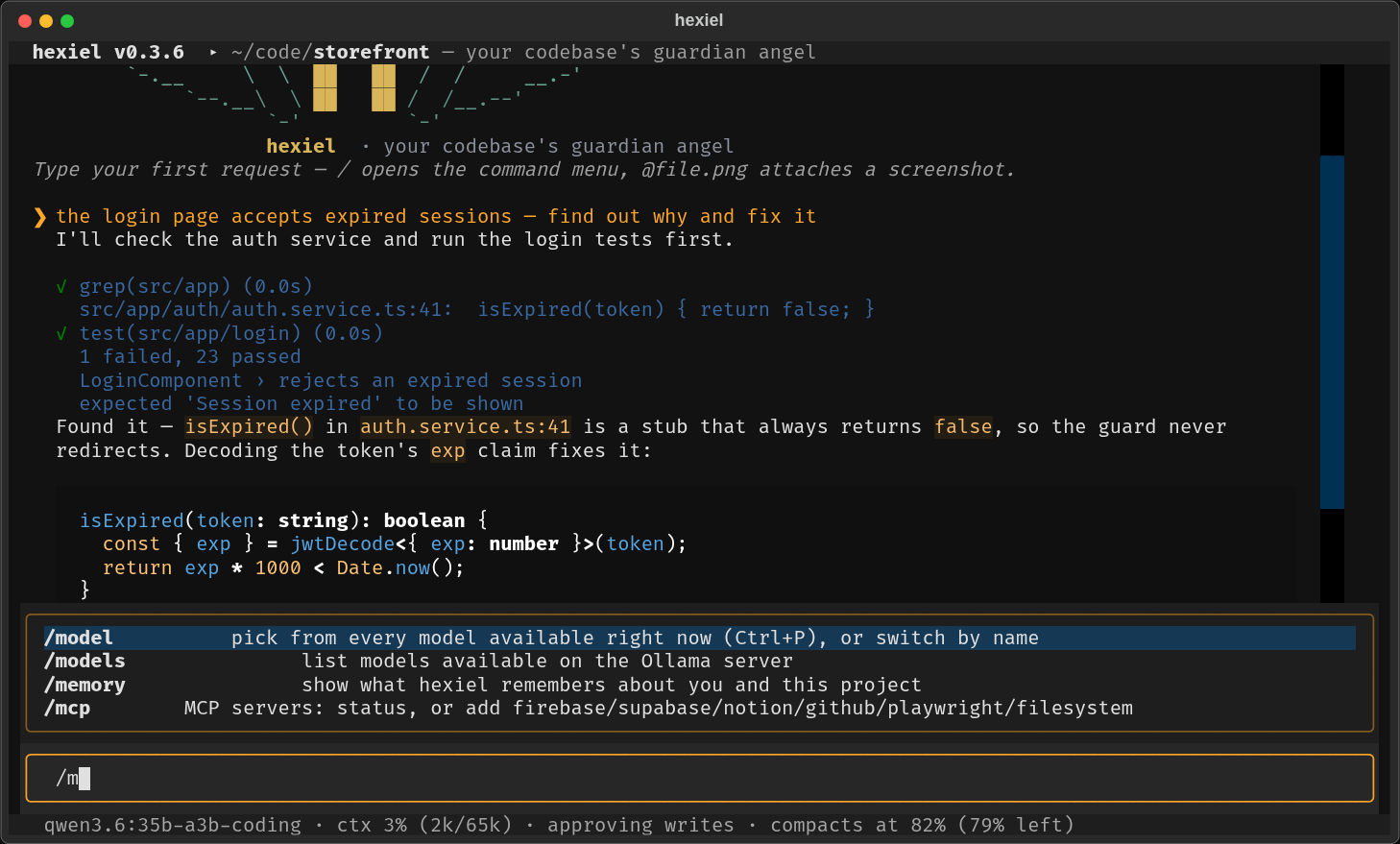
Ctrl+P / /model lists every model you can use right now — local Ollama, Ollama Cloud, Claude, OpenRouter… — queried live each time, never stale. |
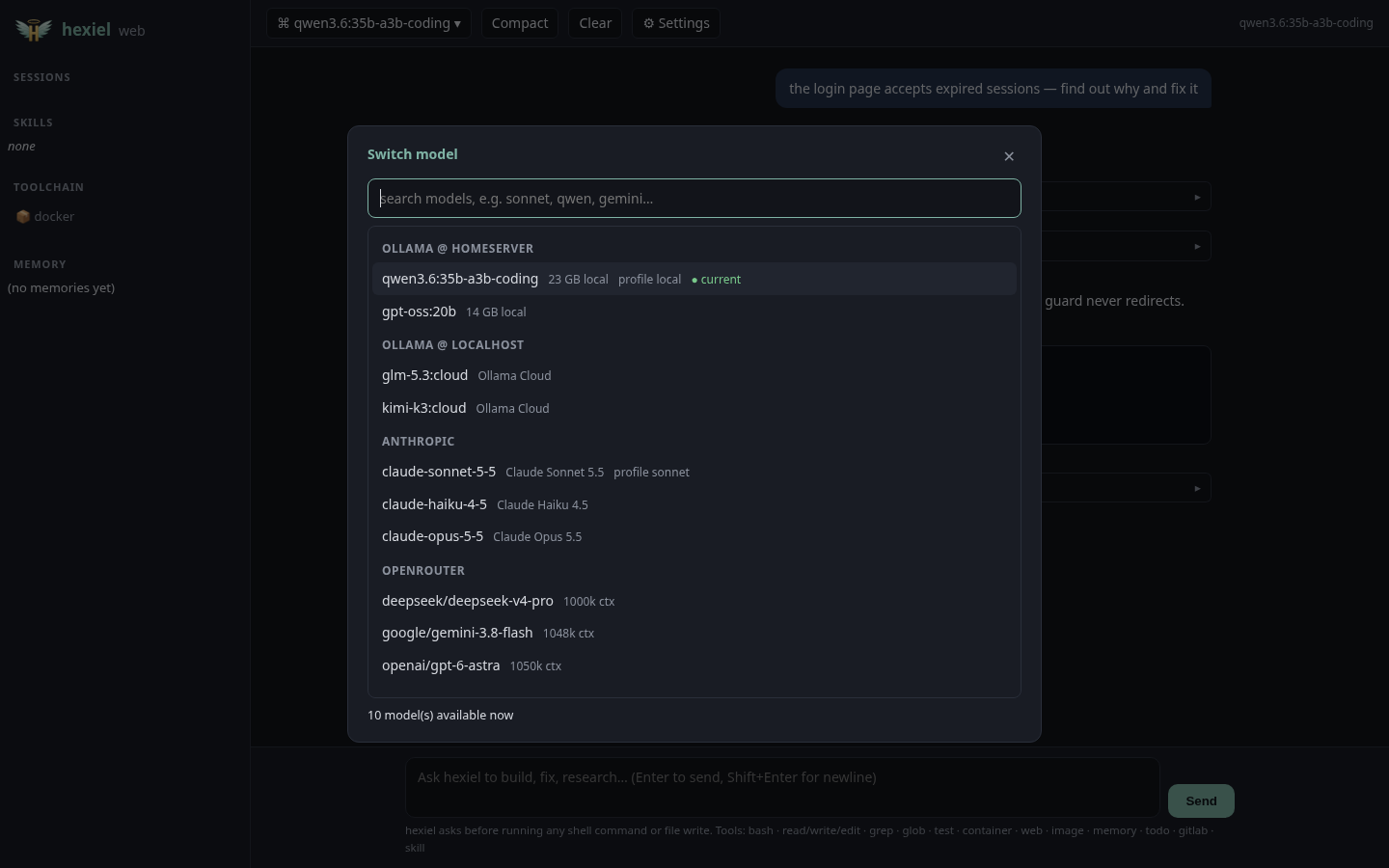
The same live picker in the browser UI. |
 |
 |
Type / for the command menu — every command and skill with what it does; ↑/↓, Tab to complete, Enter to run. /model lists your profiles. |
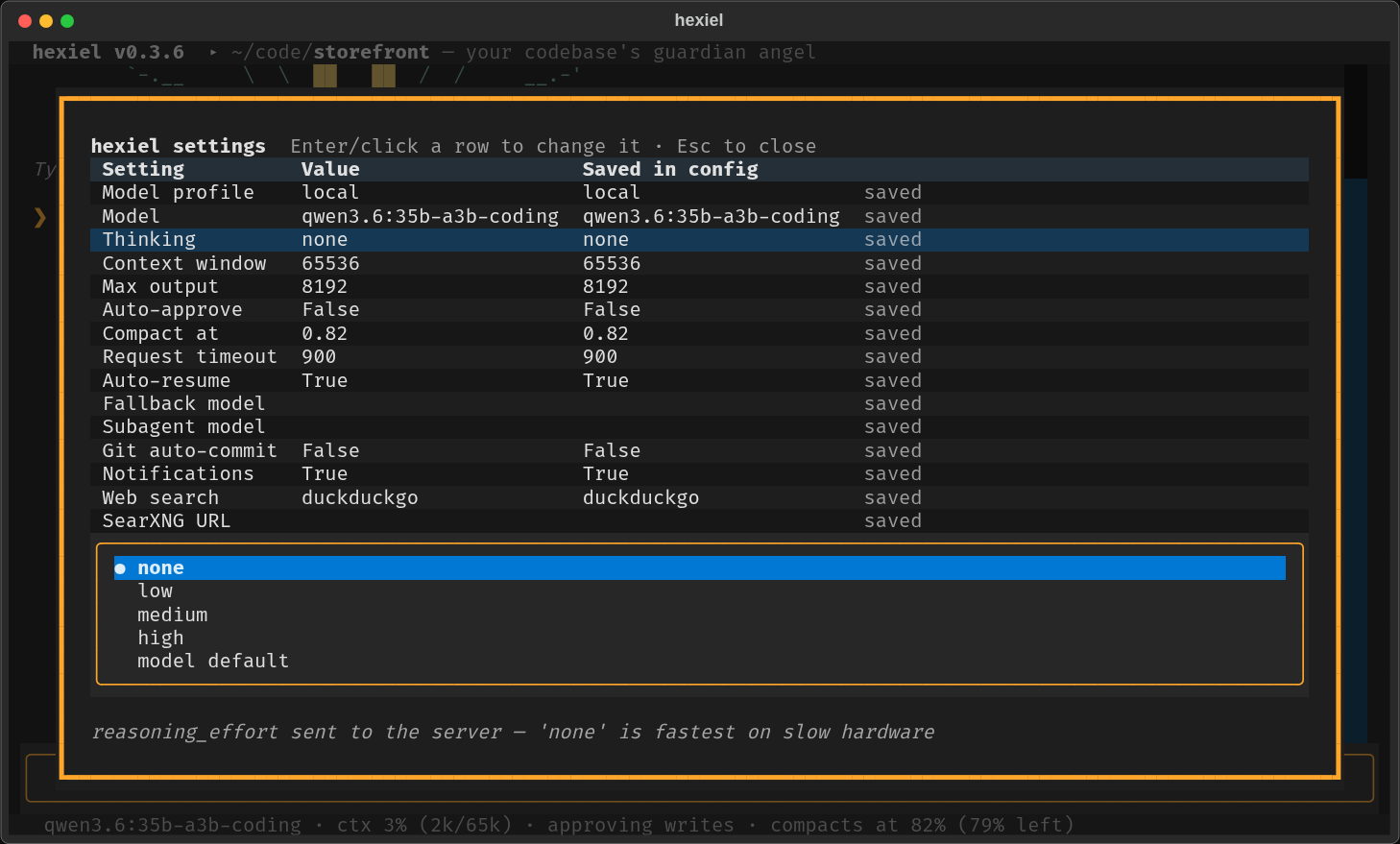
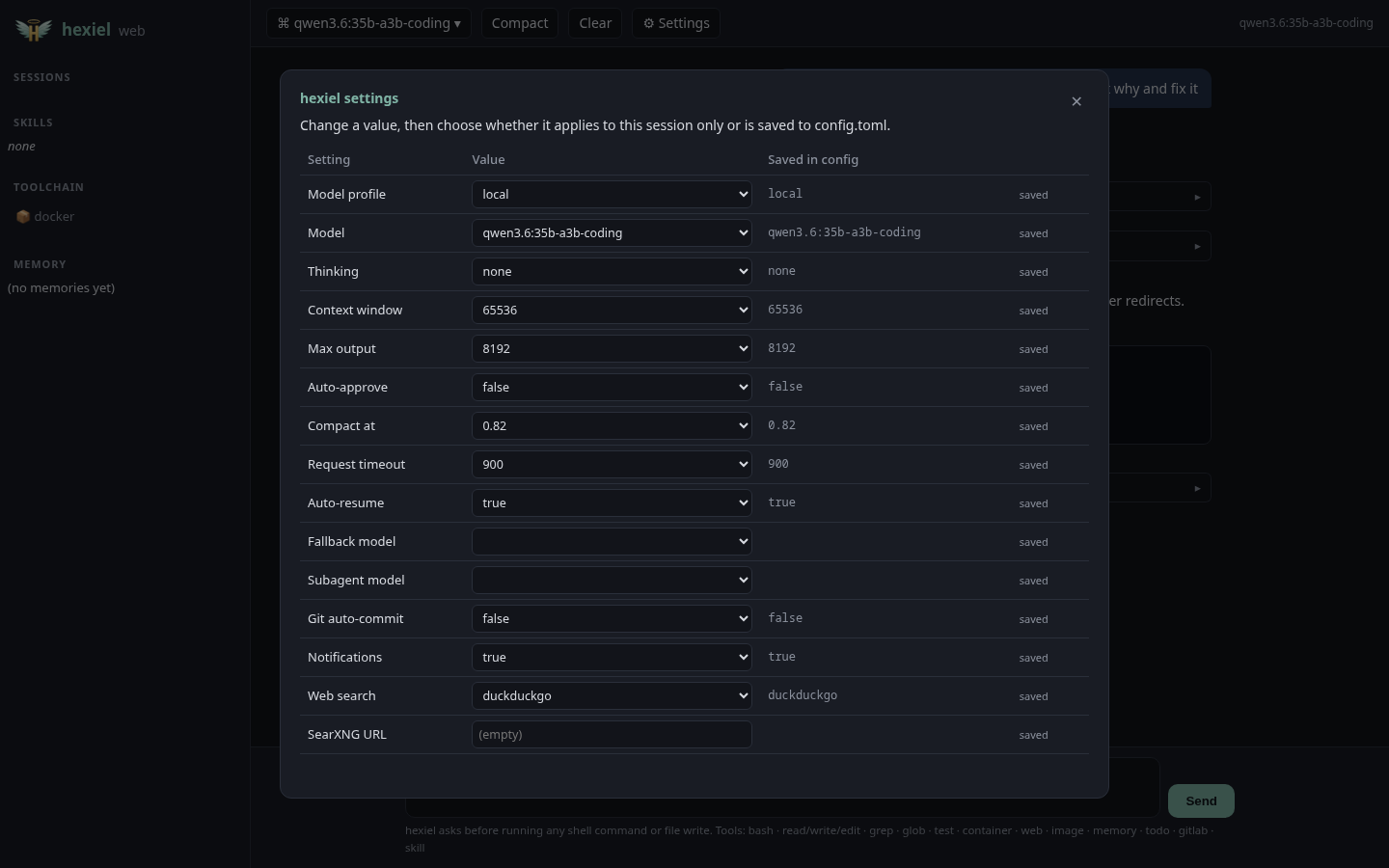
/config shows every setting in a table. Pick a row, pick a value, then choose this session or save permanently (one line of config.toml changes; comments are kept). |
- Screenshots: type an image path in your message (
why does @shot.png look broken?,~/Pictures/error.jpg) and it's attached for vision models. - Recall (
↑/↓): step back through the last 25 things you sent this session — attachments and all, since they're named in the text;↓past the newest returns to what you were typing. - Reading history: scroll up while hexiel works and it never yanks you back down; a floating ↓ scroll to bottom tag returns you to the newest messages (scrolling back down by hand does the same).
- Budget: the sidebar's SPEND block tracks each paid bill against your plan. For
Ollama Cloud it follows
/api/balanceon the same periodic refresh as the spend figure: the plan's own billing period (not a guessed day of the month), the monthly allowance, and what is left of it plus any credits you bought on top — so an upgrade (Pro → Max) or a credit top-up shows up as a bigger budget and a new "$ left" figure without editingconfig.toml. Under the bar: what is left and when the plan renews, what today cost, this week's pace, and the day the money runs out at that pace. (Ollama's paid plans have no daily cap — only monthly credits.) Pin your own cap and cycle day withdetect_limits = falsein that account's[spend.NAME]table;/usageprints the same for every account. - Activity line: while hexiel works, the bottom-left shows what it's doing —
thinking, writing, running your tests — with elapsed time and tokens.
Ctrl+Cstops a turn — double-tappingEscalso stops the current task (handy whenCtrl+Creads as "close"). - Approvals: edits and commands ask first (
y/always /n);/autogoes hands-free. - System prompt, yours:
/promptshows the prompt the model is working from and lets you edit it, in the terminal and the browser. Save it for this session, this directory (<project>/.hexiel/system-prompt.md, shared with the repo) or globally (~/.config/hexiel/system-prompt.md);Resetrebuilds the default. - Updates: hexiel checks for new releases in the background.
/update(or the web UI's update button) installs it and restarts, resuming your conversation. It refuses to update a checkout with uncommitted changes.
Control, safety and flow
Model picker (Ctrl+P / /model) |
Every model reachable right now — local Ollama, Ollama Cloud, Anthropic, OpenAI, OpenRouter… queried live each time, searchable |
| Auto-resume | Hit a rate or usage limit? hexiel counts down to the reset and continues the same turn; with fallback_profile it switches to e.g. your local model instead |
| Sight for text-only models | An image sent to a model that cannot see is described by a small local vision model (Florence-2 on the CPU, hexiel[see], downloaded once with hexiel --get-vision): what the picture shows, the objects and where they are, and the text read with position — so the model can still answer about it. Nothing leaves your machine |
| Video and audio, no script | The video tool runs ffmpeg for you — trim, join, convert, compress to a size, speed, captions, GIFs, slideshows, extract audio, poster frames — with a bundled ffmpeg on every OS, and the result plays right in the chat (web player, poster card in the terminal) |
| Dead cloud accounts skipped | A cloud account that can't answer — rejected key, no credits, monthly limit, budget stop — is checked once when a session starts and skipped by every model chain (main, router, overflow, planner, image descriptions, tool models) for cloud_cooldown_minutes (default 60), in every hexiel window: the session starts on the next usable model (often your local one), says until when, and switches back by itself. /accounts shows what is skipped, /accounts recheck tries again now |
| Permission rules | Claude Code syntax — Bash(git status:*), Read(./.env), Edit(src/**), WebFetch(domain:…); deny > ask > allow; reads .claude/settings.json. "Always" answers are scoped to that kind of call |
Plan mode (/plan) |
Investigate and propose a plan; nothing is changed until you turn it off |
Undo (/undo) |
Reverts the files hexiel changed in its last turn, turn by turn |
| Hooks | Claude Code compatible (PreToolUse, PostToolUse, UserPromptSubmit, Stop, SessionStart); exit 2 blocks |
| Custom commands | Markdown prompts in .hexiel/commands/ or .claude/commands/ become /name (with $ARGUMENTS) |
Subagents (task tool) |
Searches and research run in a helper's own context; only the answer comes back — optionally on a cheaper/local subagent_profile. mode="write" does the same for implementation jobs: its own git worktree, the full toolkit, approvals auto-yes inside the box, committed for you to merge; fan out several task calls in one reply and they run in parallel |
| Instant checks | Every write/edit is syntax-checked locally (Python, JSON, TOML, shell, JS) in the same step |
Context metering (/context) |
See what actually occupies the model's window — system prompt, tool definitions, per-role history, images — and prune old tool results without losing the thread |
| Cache-stable by design | The system prompt never embeds anything volatile (date, git state ride the current user turn instead), so the prefix keeps reading from the provider or Ollama cache at a fraction of the input price; local Ollama models also stay resident (keep_alive) with a pinned context and a start-up pre-warm, so no 30–120s reload after you idle |
| Also | /usage (tokens in/cached/out), desktop notifications when you're needed, opt-in git auto_commit, Claude prompt caching, a guard that stops runaway model output |
For analysts, researchers and small businesses
No code needed — just ask:
| Ask | What hexiel does (locally, cheaply) |
|---|---|
| "Which region beat its target? sales.csv vs targets.xlsx" | Reads a compact schema card of each file (not the file), answers with SQL (DuckDB) across CSV / Excel / Parquet / JSON — only the aggregated result reaches the model |
| "Keep a list of my customers and invoices" | Creates and updates a local SQLite database (.hexiel/data.db) — no setup |
| "Add an 'actual' column to Q3 in budget.xlsx" | Edits Excel cells, ranges and sheets, keeping your formatting |
| "Chart revenue by month" | An interactive HTML chart you can open in any browser |
| "Every Monday at 8am, summarise last week's sales and flag anything odd" | A scheduled job that runs even when hexiel is closed (systemd/cron, launchd, Windows Task Scheduler); results land in /inbox with a desktop notification |
| "What do these papers say about irrigation? Cite pages." | Indexes your PDFs / Word / Markdown once, then answers from the best passages with [file p.N] citations — keyword + (optional, local) semantic search, never whole documents in the prompt |
| "Research the state of IndexNow adoption" | Deep research: plans sub-questions, then searches and reads many pages in parallel in Python and hands the model one cited evidence pack |
| "Connect my Firebase project" | /mcp add firebase — also supabase, notion, github, playwright (browser automation), filesystem |
| "Fix the cell that loads the dataset in my notebook" | Reads and edits Jupyter notebooks cell by cell (notebook tool) — list cells, replace/insert/delete, clear outputs |
| "What's on my screen?" | Grabs a screenshot, reads the text in it (OCR), or reads/writes the clipboard — the desktop toolset, loaded automatically whenever hexiel runs on a desktop |
Data and scheduling tools load only when needed (automatically when a project contains data files, or on request), so coding sessions don't pay for them in every prompt.
Knowledge library — your docs, your versions (RAG)
Models guess at the version of Java, Angular or Tomcat you actually run. Give hexiel the documentation once and it looks things up instead. Free, local, in the open-source core.
hexiel knowledge find "Apache Tomcat 10.1 documentation"   # free web search for the official docs
hexiel knowledge add https://tomcat.apache.org/tomcat-10.1-doc/ -t tomcat-10.1
# …or just copy files into the folder yourself:  $(hexiel knowledge path)/java-21/*.md|html|pdf|docx
hexiel knowledge sync                # one command: index what's new, changed or deleted
hexiel knowledge sync --refresh      # also re-download your web sources first
hexiel knowledge status              # topics, passages, whether semantic search is on
One subfolder per topic (java-21/, docker-compose/, angular-18/). hexiel then calls
knowledge_search on its own for version-specific questions and cites the file; if you
ask about something not in the library it can find the official docs and offer to
download them (knowledge_add, with your approval). Search is hybrid — SQLite keyword
(BM25) plus Ollama embeddings (nomic-embed-text, pulled automatically on first sync),
so "how do I encrypt connections?" finds the TLS page. No Ollama? Keyword search still
works. hexiel works out which topics a project uses from its files (a pom.xml naming
Java 21 and cucumber → java-21, cucumber-7) and attaches the passages that match each
message to it automatically — keyword-only, a few hundred tokens, a hard 150 ms budget — so
the model reads your docs before it answers. Pin a project explicitly with
.hexiel/knowledge.toml (topics = ["java-21"]); knowledge_auto = "off" turns the
attachment off.
The crawler stays on the docs site, honours robots.txt and rate-limits itself. In the
TUI/browser: /knowledge and /knowledge sync. Full guide: docs/KNOWLEDGE.md.
Browser UI
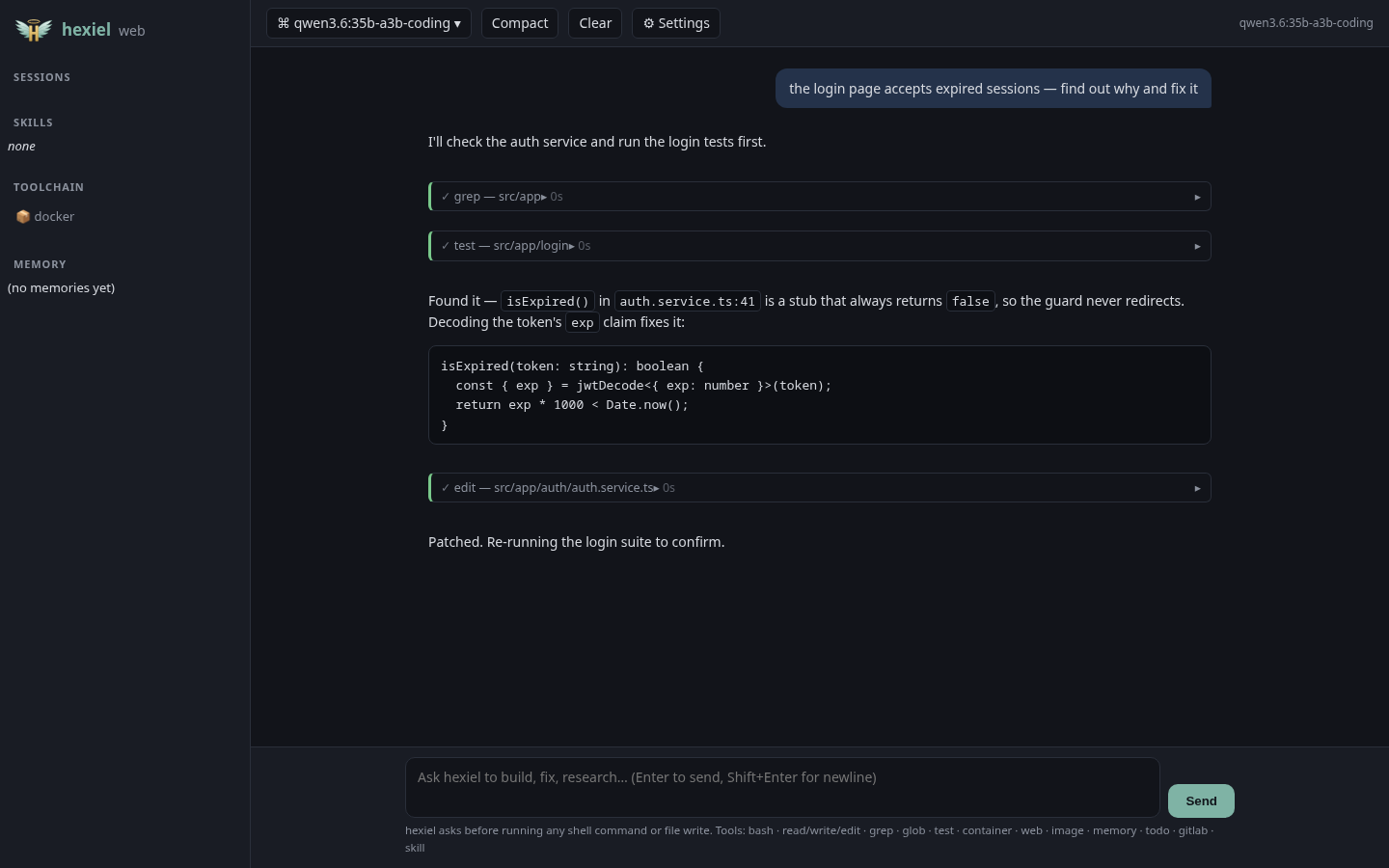
hexiel --serve runs the same agent in a browser (with the same / command menu and live model picker): streamed markdown, tool-call
cards, approval dialogs, model picker, ⚙ settings, context gauge, todo, memory
and sessions. Local-only by default; --host 0.0.0.0 prints a loud warning
(anyone who can reach the port can run commands on your machine).
 |
 |
Pasting text and images
The prompt is multi-line (Enter sends; Shift+Enter, Ctrl+J or Alt+Enter add a newline) and pasted text is
sanitized (control characters, escape sequences and invisible/bidi characters are dropped). Pastes over
~1,500 characters or 15 lines collapse to a [Pasted text #1 +240 lines] tag in the prompt and expand when you send.
Copy an image and press Ctrl+V (or Alt+V) in the terminal UI, or just paste in the browser, to attach it.
Terminal clipboard images need wl-clipboard or xclip (Linux) or pngpaste (macOS); the browser works everywhere.
Pasted images are saved under .hexiel/pastes/ in the project (add it to .gitignore).
Agent instruction files, made small
On first start in a project, hexiel offers (once) to find CLAUDE.md, AGENTS.md, .cursorrules, Copilot/Gemini/Windsurf
files and Claude Code's project memories, and split them verbatim into small topic files under .hexiel/instructions/.
The system prompt then carries only a short INDEX.md; topics that match your request are attached for that turn, sized to
the model's context window. You choose whether to keep it all out of git/svn (ignore) or commit it (commit: AGENTS.md
becomes the index and other agents' files become pointers; originals are backed up in .hexiel/imported/).
Claude memories are copied both ways, with a note in each tool about the other.
hexiel instructions scan | import [--yes [--commit]] | sync | restore
A small model for the small jobs (per-tool models)
Reading a big file or a long web page doesn't need your strongest model. Map tools to cheaper profiles in config.toml:
[tool_models]
read = "small-local"       # a quick model condenses big files before the main model sees them
grep = "small-local"
web_fetch = "small-local"
search = "strong-local"    # alias for web_search
When a mapped tool returns more than digest_min_chars (default 3000, set in [settings]), that model condenses the
output for your current request, and the main model gets the summary with a note; it can ask for the raw text by
calling the tool again with full: true. Small outputs, errors and images pass through. A helper that takes longer than
digest_timeout (default 90 s) is given up on and you get the raw output, as you do if it errors. The same output for the
same request is only summarised once. Tools that author changes (write, edit, bash) always use the main model,
since it has to write its own work; for planning, set planner_profile (see /delegate).
A slow helper (say a Raspberry Pi) should only see small inputs. A value can be a list, tried in order with the first model that isn't busy preferred (and, if one fails or times out, the next is tried; a helper that just failed is skipped for two minutes), or a table with limits for that tool:
[tool_models]
read = { models = ["pi", "gmktec"], min_chars = 1500, max_input = 6000, timeout = 45 }
grep = "pi"
search = ["gmktec"]
min_chars / max_input / timeout override the global values for that tool: smaller outputs aren't touched, bigger ones
than max_input aren't sent (you get the raw text), and timeout caps the wait. /toolmodels shows each tool's models,
whether they are ready or busy, and the limits; /toolmodels test times a one-word request on each; /usage adds
how many outputs were condensed and roughly how many tokens that kept out of the main model's context.
Busy notice. With several hexiel windows (or background runs) sharing one local model, requests queue silently. hexiel now says so — "⏳ gmktec is busy with 1 other request from another hexiel window … this one may wait its turn" — for models served from this machine or your network (cloud models serve everyone at once and aren't tracked).
Seeing images and PDFs
Paste (Ctrl+V / Alt+V in the terminal, plain paste in the browser), drop a file onto the web UI, or mention a path
(@shot.png, ~/Downloads/spec.pdf) and you can see what you attached. In the web UI images appear as thumbnails
in your message and when the model looks at one (view_image); click for full size. PDFs get a card that opens a
reader (with an "open in a new tab" link). In the terminal, an attached file shows as a clickable line that opens
it in your system viewer; install the view extra (pipx install 'hexiel[view]', or pipx inject hexiel textual-image) and images (and, with poppler's pdftoppm, a PDF's
first page) also draw inline in terminals that support it, with a block-character fallback elsewhere. The model gets
images directly; for PDFs it reads the text. Only files that came up in the conversation are ever served to the
browser.
Text-only models see images too. When the active model can't take images (qwen3-coder, gpt-oss, deepseek, glm…),
each attached image is described once by a vision model and the description goes in its place — nothing is silently
dropped. The describer comes from [tool_models] describe_image (a small local vision model first is the cheap
choice); with none usable, tesseract reads the text in the image. A profile's vision = "yes" or "no" overrides
the guess from the model name. The model can also ask itself: describe_image path=… question=….
[models.laptop-vision]
provider = "openai"
model = "gemma4:12b"
base_url = "http://127.0.0.1:11434/v1"

[tool_models]
describe_image = { models = ["laptop-vision", "anthropic-sonnet"] }
Without any vision model, an image still turns into a card: size, brightness, main colours, which regions hold
content, the text (with positions, when tesseract is installed) and any QR codes or barcodes (pyzbar or zbarimg).
Scanned PDFs — pages with no text layer — are rendered (poppler's pdftoppm) and read the same way. The render
tool opens an HTML file, Markdown file or URL in headless Chromium/Firefox and looks at the result (or describes it
for text-only models), so "does the page look right?" has an answer.
Teams of agents
task hands a job to a helper that works alone. A team is 2-6 named helpers working at the same time that talk
to each other: an implementer and a reviewer who asks it questions, a researcher feeding a writer, frontend and
backend agreeing on an API. Ask for one in plain words ("have a backend agent and a reviewer work on this
together"). Each member sends with team_msg (to a name, or all, optionally waiting for a reply); the message
reaches the other member before its next step. Write-mode members each get their own git worktree. You see the
traffic live, /team shows the board, and the answer brings back every member's result and the message log.
Skills & plugins marketplace
/marketplace add https://example.com/hexiel-marketplace.json   # or a folder, or a git repo
/marketplace search pdf          # ○ available  ● installed  ↑ update
/marketplace install pdf-tables
/marketplace update              # newer versions only; a changed file with the same version is flagged, not taken
/marketplace remove pdf-tables
(hexiel marketplace … does the same from a shell.) A catalogue lists skills (a SKILL.md or a zip of a skill
folder), plugins (Python), MCP servers and bundles. Claude Code marketplace.json catalogues work too: each
plugin's skills/, commands/ and .mcp.json are installed. Items with a sha256 are refused when the download
does not match; plugins and MCP servers run code, so the install says so — review the source first.
{"name": "team-picks", "items": [
  {"name": "pdf-tables", "kind": "skill", "version": "1.0.0", "url": "pdf-tables.md", "sha256": "…",
   "description": "Pull tables out of PDFs into CSV"},
  {"name": "sqlite", "kind": "mcp", "version": "1.0", "mcp": {"command": "uvx", "args": ["mcp-server-sqlite"]}}]}
Hexiel Remote (optional, paid)
Drive the hexiel on your own machine from any browser or phone, and run cloud-triggered automations (schedules and webhooks) on it. $8/month after a 14-day trial — see https://remote.hexiel.tech. The agent itself stays free; this client is open source and the subscription is enforced by the relay.
hexiel remote login          # email + password -> revocable device token (stored 0600); offers to keep the machine connected
hexiel remote status         # is the background service running, and does the relay see this machine?
hexiel remote install        # (re)install the background service: systemd user unit, launchd agent or Windows scheduled task
hexiel --serve --remote      # connect in the foreground instead (one connection per machine)
Signing in only registers the machine; it shows online while something holds the connection open. The background
service (hexiel remote install, offered at login) does that whenever the computer is on and you're logged in, so
automations run without a terminal open. It works in its own folder (~/.local/share/hexiel/remote-workspace), not your
home directory; point it at a project with hexiel remote install --dir ~/code/project. Linux: run
loginctl enable-linger $USER to keep it running while nobody is logged in. Logs: ~/.local/share/hexiel/remote.log.
Take over a chat you already have open. In the terminal UI or the local web UI, type /remote-control: that same
live chat (its history, tool output and approvals) becomes drivable from remote.hexiel.tech, and whatever you type
there lands in the chat on your computer. Not signed in yet? It asks for your login (or sends you to sign up) first.
While it's on, the background service is paused (one connection per machine) and restarts when you type
/remote-control off or exit. /remote-control status shows where it stands. An approval can be answered in the
terminal or the browser, whichever is first.
Only the web UI's own pages and API cross the tunnel (never /v1). The relay can see tunneled traffic (TLS, not end-to-end encrypted).
Bug reports and error tracking
/bug <what happened>and/feature <idea>send a report (your hexiel version and OS attached);/bugslists yours and whether they are resolved. Everything is tracked at https://hexiel.tech/support: a public queue anyone can read, and, signed in with your Hexiel Remote login, your own reports and the errors your hexiel sent.- When hexiel hits an error it already saves it locally for
/heal. Witherror_reports = "account"(the default) a scrubbed copy is also sent for tracking if you are signed in to Hexiel Remote: home paths, API keys, tokens, e-mail addresses and LAN IPs are removed, and your prompts and tool arguments are never included (only their sizes)."all"also sends from installs without an account (they appear by title only in the public queue);"off"— orHEXIEL_NO_REPORTS=1— sends nothing. Reports that can't be delivered are retried later.
Models
Fastest start: /model add <preset> in the terminal UI — presets for Claude
(sonnet, opus, haiku), OpenAI (gpt), Gemini (gemini), xAI (grok),
DeepSeek, Kimi, GLM, Mistral, Groq, Together, Fireworks, OpenRouter, Azure,
Bedrock, and local Ollama / LM Studio / vLLM / llama.cpp. hexiel --presets
lists them; docs/MODELS.md has copy-paste config for each,
including provider quirks hexiel handles for you.
Profiles live in ~/.config/hexiel/config.toml (written on first run). Switch
with /model NAME, hexiel -m NAME, or the settings table.
default = "local"

[models.local]                      # Ollama on this machine or a home server
provider = "openai"
base_url = "http://localhost:11434/v1"
model = "qwen3.6:35b-a3b-coding"    # coding + screenshots + tool calling in one model
context_window = 65536              # match the server's OLLAMA_CONTEXT_LENGTH
extra_body = { reasoning_effort = "none" }   # skip slow "thinking" on modest hardware

[models.sonnet]
provider = "anthropic"
model = "claude-sonnet-5-5"
api_key_env = "ANTHROPIC_API_KEY"
Picking a local model: on low-end hardware, prefer mixture-of-experts
models with ~3B active parameters (they run several times faster than dense
models of the same size) that have vision + tool-calling. qwen3.6:35b-a3b-coding
passed all of hexiel's checks (tool calls, screenshots, a compiled Java task) on
an Intel iGPU at ~12 tokens/s. Hybrid "thinking" models should run with
reasoning_effort = "none"; otherwise one step can take minutes.
What hexiel does
Tools
bash · python (batch many steps into one local script) · read (also symbol= for one definition,
around= for a few lines) · write ·
edit · glob · grep · list · map (cached project tree) · file_info ·
powershell · test (your detected runner) · container (docker/podman +
compose) · view_image / image_edit · web_search / web_fetch (no API key
needed) · memory · todo · gitlab_mr · skill · knowledge_search / knowledge_find_docs / knowledge_add
· notebook (Jupyter .ipynb cell edits) · render (look at an HTML/Markdown page or URL) · team / team_msg · desktop toolset: screenshot · clipboard · ocr (auto-loaded when a display is present;
screenshots attach to the conversation and OCR uses tesseract) — plus any MCP server's tools and any OpenWebUI plugin in plugins/.
Code navigation from a local symbol index (Python via ast, regex outlines for JS/TS, Go, Rust, Java/Kotlin/C#, C/C++,
Ruby, PHP, shell, Lua — or exact tree-sitter ranges for 30+ languages with the code extra,
pipx install 'hexiel[code]'; persisted between sessions): find (typo-tolerant names plus a ranked search over
docstrings and comments, and by meaning when an embedding model such as nomic-embed-text answers — one call
instead of a grep chain) · where_is · callers · outline · symbols. And exact answers
with no model in the loop: util (date math, units, regex test, JSON paths, CSV column stats, hashes, base64,
semver, arithmetic) · have (is a program or Python package installed, and the install command for this OS when not).
Context discipline
- Auto-compaction, Claude-Code style: at 82% of the context window, older history is summarized (task, recent work, decisions, errors, next steps) and the conversation continues. Real provider usage numbers drive it.
- Local-first token economy: tool output is budgeted and distilled in Python before the model sees it.
| Work | Where it runs |
|---|---|
| Toolchain discovery, project map, file indexing | local (Python) |
| Multi-step reads/searches/parsing | one python script instead of many model round-trips |
| Long command output | repeated lines collapsed with a count, every error/warning line kept, head + tail |
git status, pip list, ls -l |
a compact digest when the output is long |
| Waiting for tests / containers / builds | local; only the verdict + failures reach the model |
| Duplicate tool calls | answered from cache until the file (or, for searches, the tree) changes |
| Re-reading a file after edits | just the diff against the earlier read, while that read is still in context |
| The first message of a session | a project brief rides along: type, entry points, test command, recent commits, open todos |
| "Convert this video", "OCR this" | the matching slice of what's installed (ffmpeg, tesseract, …) or how to get it |
| Tools for programs that aren't installed | their definitions aren't sent at all |
| Web pages | distilled to text; full text parked on disk for follow-up reads |
| Old tool output and images in long sessions | dropped locally before any summarization call |
| Skills | one-line index; full instructions load only when used |
| Reasoning, planning, writing code | the model — spend tokens there, nowhere else |
Project instructions, todo and memory — maintained automatically
- Project instructions:
AGENTS.md/CLAUDE.md/HEXIEL.md(any letter case) at the project root are loaded into every session; a roottodo.mdis pointed out so the model reads it when you say "continue". - todo.md: multi-step work is tracked in
<project>/.hexiel/todo.md(- [ ]queued, one- [~]in progress,- [x]done). When a request takes three or more tool calls and the model hasn't planned it itself, hexiel logs it as a task, refreshes the where we left off line after every step and ticks it off when the turn completes — in Python, at zero token cost. If hexiel or your laptop dies mid-task,hexiel -cresumes from an accurate checkpoint. - Memory:
~/.local/share/hexiel/memory/(global) and<project>/.hexiel/memory/(project), markdown notes indexed byMEMORY.md. The model saves what it learns; and every auto-compaction also extracts durable facts (build/test commands, conventions, your preferences) intoauto-facts.md— deduplicated, no extra model call. - Skills are
SKILL.mdfolders from~/.local/share/hexiel/skills/, the project, and~/.claude/skills/— Claude Code skills work unchanged.
Self-healing — fix hexiel, then share the fix with everyone
Crashes and provider errors are recorded to .hexiel/incidents/. Run /heal
(or /heal <what went wrong> for a bug you noticed) and hexiel:
- makes an isolated copy of its own source at the version you're running
(a git worktree — or, for
pipinstalls, a clone of the release tag) under~/.local/share/hexiel/heal/. Your project and your install are untouched; - reproduces the bug, fixes the root cause and adds a test, running the suite there;
- opens a lazygit-style review: changed files on the left with checkboxes,
a colour diff on the right (
spaceinclude/exclude,aall/none); - you choose:
- Send to hexiel (and keep) — commits only the files you ticked and opens a
merge request to the official repo (via a fork if you're not a maintainer), so
every hexiel user gets the fix once it's reviewed. Needs a free GitLab account
(
/setup-gitlab <token>). - Keep just for me — applies the ticked files to your hexiel.
- Discard, or decide later with
/heal review.
- Send to hexiel (and keep) — commits only the files you ticked and opens a
merge request to the official repo (via a fork if you're not a maintainer), so
every hexiel user gets the fix once it's reviewed. Needs a free GitLab account
(
MCP servers
hexiel runs Model Context Protocol servers —
local (stdio) and remote (streamable HTTP). It reads Claude Code's .mcp.json
from your project (and ~/.config/hexiel/mcp.json), so existing setups just work:
{ "mcpServers": {
    "files":  { "command": "npx", "args": ["-y", "@modelcontextprotocol/server-filesystem", "."] },
    "remote": { "type": "http", "url": "https://example.com/mcp",
                "headers": { "Authorization": "Bearer ${MY_TOKEN}" } } } }
or in config.toml, with an optional allowlist to keep prompts small on modest hardware:
[mcp.servers.files]
command = "npx"
args = ["-y", "@modelcontextprotocol/server-filesystem", "."]
tools = ["read_file", "list_directory"]     # expose only these
Tools appear as mcp__<server>__<tool>; read-only tools skip the approval prompt.
/mcp shows each server's status, tool count and schema-token cost.
GitLab merge requests for your own projects (/ship, gitlab_mr)
- Owner flow: turn uncommitted work into a merge request (branch → commit → push → MR), approving each step.
- Contributor flow: hexiel forks the repo, pushes to your fork and opens an MR upstream — attributed to you.
- Auth via
HEXIEL_GITLAB_TOKEN/GITLAB_TOKENor/setup-gitlab <token>. gitlab.com and self-hosted.
OpenWebUI compatibility
- Use hexiel from OpenWebUI (or any OpenAI client): point a connection at
http://127.0.0.1:8777/v1/chat/completions. Read-only tools stay available; write tools are disabled over the API. - Use OpenWebUI plugins in hexiel: drop
Tools/Pipe/Filterplugin files intoplugins/— methods become tools,Valvesare honored. Put plugins you chose in~/.local/share/hexiel/plugins/(always loaded). A project's ownplugins/folder loads only afterhexiel --trust-projectin that project, so code in a freshly cloned repo never runs by surprise. Plugin tools always ask for approval. Plugins load at startup. Guide: https://hexiel.tech/plugins/
Contributing
Fork → branch → merge request; the maintainer reviews and approves. hexiel can
do the whole flow for you (/ship). See CONTRIBUTING.md.
.venv/bin/pytest                    # 117 tests: tools, providers, compaction, TUI, MCP,
                                    # self-heal, settings, updater, web UI, plugins
.venv/bin/python scripts/screenshots.py   # regenerate these screenshots
License
GPLv3 with the Commons Clause: free to use, study, fork and contribute — not free to sell as a product or service.
1 maintainer

Metadata
1 maintainer
Release files for hexiel 0.9.10
For a detailed explanation of source distributions (sdists) and built distributions (wheels), please see the package formats documentation.
Source distribution (sdist)
| File | Size | Uploaded | Provenance | Actions |
|---|---|---|---|---|
| hexiel-0.9.10.tar.gz | 755.8 kB | Without provenance | Details for hexiel-0.9.10.tar.gz |
Built distribution (wheel)
| File | Interpreter | ABI | Platform | Actions Reset |
|---|---|---|---|---|
| hexiel-0.9.10-py3-none-any.whl | Python 3 | none | any | Details for hexiel-0.9.10-py3-none-any.whl |
Total release size: 1.3 MB
Release files / hexiel-0.9.10.tar.gz
| Download URL | hexiel-0.9.10.tar.gz |
|---|---|
| Size | 755.8 kB |
| Tags | Source |
|
SHA-256 checksum How to use checksums |
6fecbd4f1fd52ac65a7624562e9f83fe7423c3b402cc35b5ec483673afc0e8c3
|
|
BLAKE2b-256 checksum How to use checksums |
14e174d5024912b9f8112554f3088a72a3fd8ae506f35b382160379ce9956394
|
| Upload date | |
|
Uploaded using Trusted Publishing? What is trusted publishing? |
Yes |
| Uploaded via |
twine/7.0.0 CPython/3.12.16
|
Release files / hexiel-0.9.10-py3-none-any.whl
| Download URL | hexiel-0.9.10-py3-none-any.whl |
|---|---|
| Size | 572.4 kB |
| Tags | Python 3 |
|
SHA-256 checksum How to use checksums |
1170b263423c8e80582afc7d5ac71f3cf6fe4ef19f2b8a1bfe0d4150be253a89
|
|
BLAKE2b-256 checksum How to use checksums |
e0401c87cd9c040658745d19cd5d214a2c19184df984018718bc17303f1f9900
|
| Upload date | |
|
Uploaded using Trusted Publishing? What is trusted publishing? |
Yes |
| Uploaded via |
twine/7.0.0 CPython/3.12.16
|
Security for hexiel 0.9.10
Provenance
Provenance describes where a file came from. On PyPI, provenance is shared via attestations, which provide a verifiable record of the build or publishing details. View details, limitations and caveats.
No provenance found
None of the files in this release were uploaded with provenance metadata.
A note on package security
PyPI is a repository for distributing packages, not a service for auditing them. While third-party security researchers and our staff do their best to detect and remove malicious packages, PyPI cannot guarantee the quality, security or suitability of any given package.
To learn more about protecting yourself from malicious actors, visit our package security documentation.














