

hf-mem is a CLI to estimate inference memory requirements for Hugging Face models, written in Python. hf-mem is lightweight, only depends on httpx2, as it pulls the Safetensors and / or GGUF metadata via HTTP Range requests. It's recommended to run with uv for a better experience.
hf-mem lets you estimate the inference requirements to run any model from the Hugging Face Hub, including Transformers, Diffusers and Sentence Transformers models, or really any model as long as it contains any of Safetensors or GGUF weights. Repositories without a standard layout (e.g. consolidated-*.safetensors or ComfyUI single-file checkpoints) are estimated per *.safetensors file.
Read more information about hf-mem in this short-form post, but note it's not up-to-date as it was written in January 2026.
Usage
CLI (Recommended)
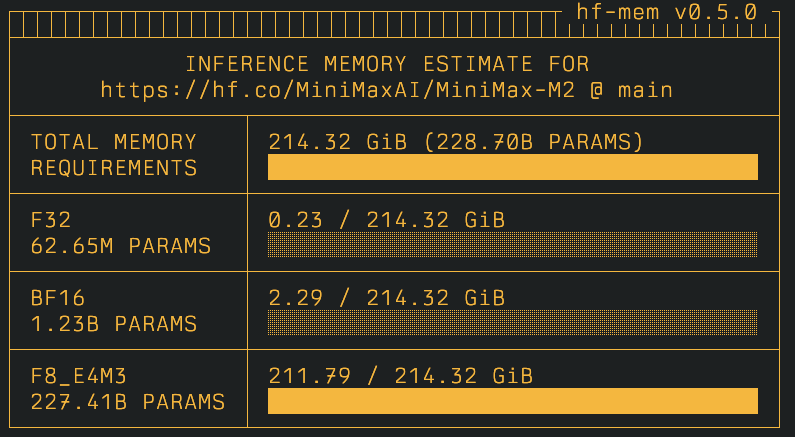
Transformers
uvx hf-mem --model-id zai-org/GLM-5.3-Flash
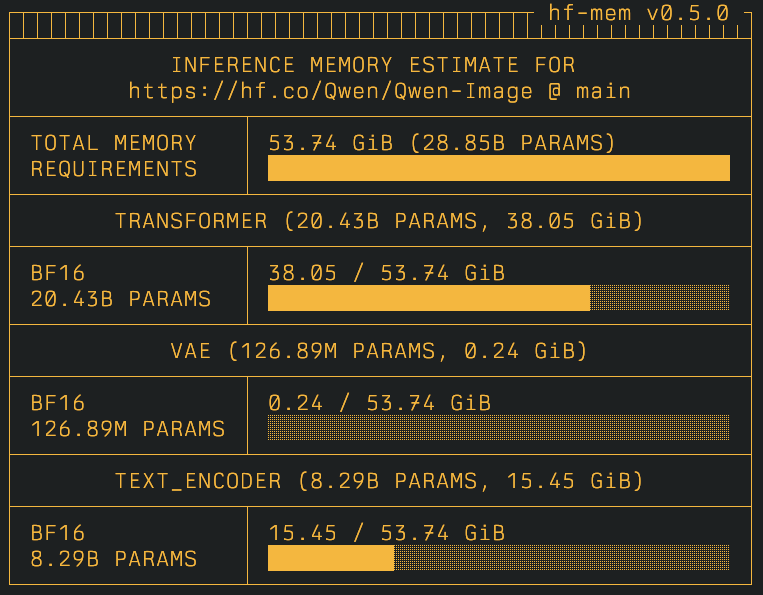
Diffusers
uvx hf-mem --model-id Qwen/Qwen-Image-2.1
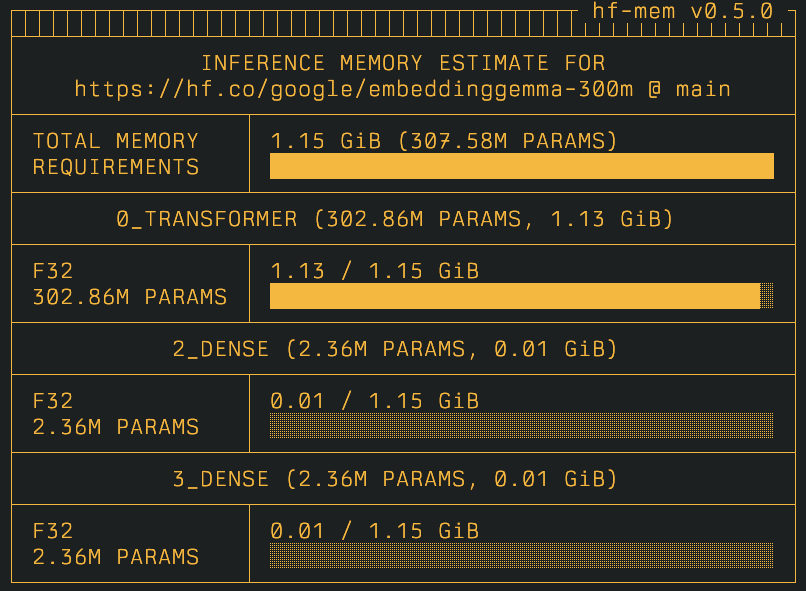
Sentence Transformers
uvx hf-mem --model-id google/embeddinggemma-2
Python
You can also run it programmatically with Python as:
from hf_mem import run

result = run(model_id="zai-org/GLM-5.3-Flash", experimental=True)
print(result)
# Result(model_id='zai-org/GLM-5.3-Flash', revision='main', filename=None, memory=328326771576, kv_cache=14763950080, total_memory=343090721656, details=False)
If you're already inside an async application, use arun(...) instead:
from hf_mem import arun

result = await arun(model_id="zai-org/GLM-5.3-Flash", experimental=True)
print(result)
# Result(model_id='zai-org/GLM-5.3-Flash', revision='main', filename=None, memory=328326771576, kv_cache=14763950080, total_memory=343090721656, details=False)
Experimental
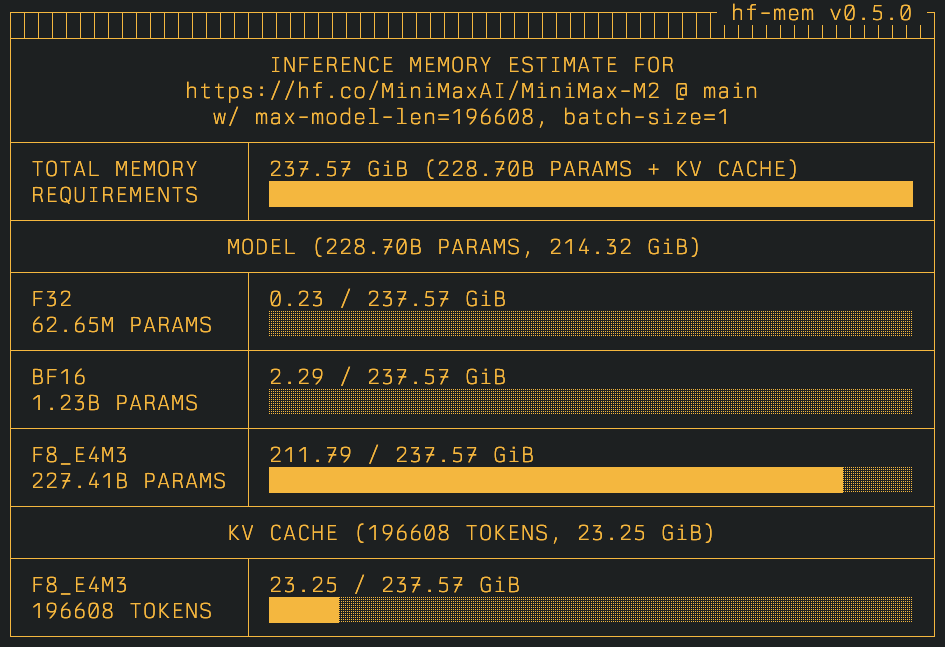
By enabling the --experimental flag, you can enable the KV Cache memory estimation for generative models (LLMs, VLMs, omni and speech models), even including a custom --max-model-len (defaults to the config.json default), --batch-size (defaults to 1), and the --kv-cache-dtype (defaults to auto which, same as vLLM, uses the model data type set in config.json under torch_dtype or dtype, unless the quantization_config declares a quantized KV cache).
The KV cache estimation accounts for the attention layout of the model: Multi-head Latent Attention (MLA) caches the compressed latent, hybrid models only cache the full and sliding attention layers (linear attention, convolution or Mamba layers don't grow with the context length), and the text decoder is resolved from nested configurations such as text_config or llm_config.
Additionally, for Mixture of Experts (MoEs), the --experimental flag also adds a weights-only breakdown of the base model and all the experts combined.
uvx hf-mem --model-id zai-org/GLM-5.3-Flash --experimental
GGUF
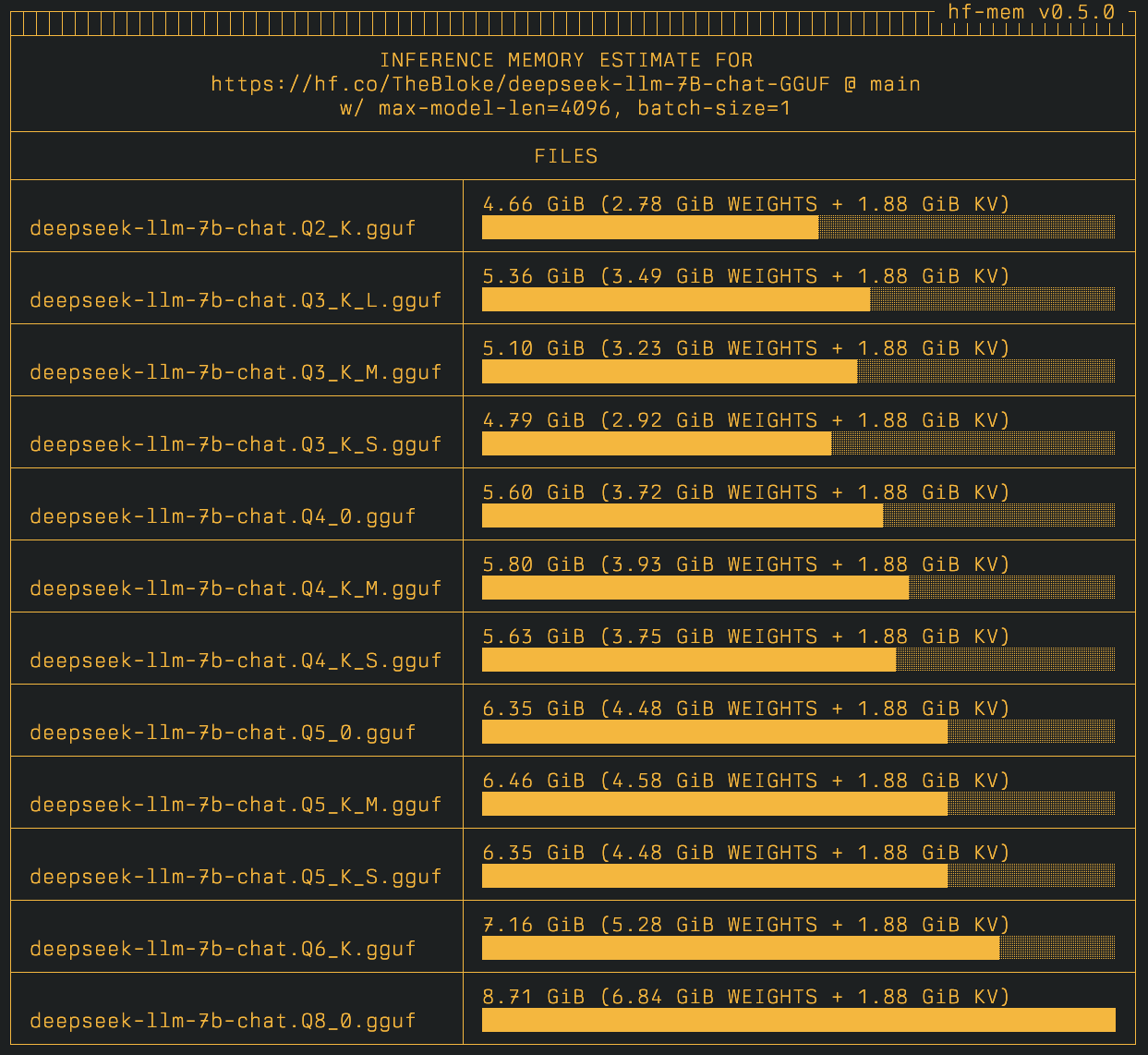
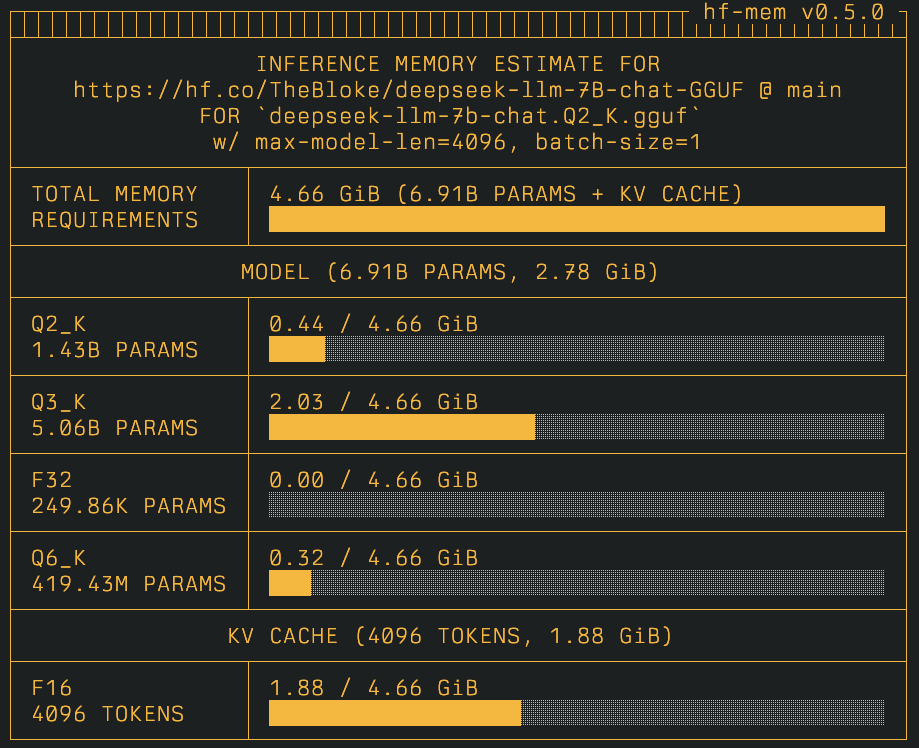
If the repository contains GGUF model weights, those will be listed by default (only if there are no Safetensors weights, otherwise the GGUFs will be ignored) and the memory will be estimated for each one of those, skipping mmproj and imatrix files; whereas if a specific file (or a directory containing a sharded file) is provided via --gguf-file, then the memory estimation will be targeted for that given file instead.
uvx hf-mem --model-id LiquidAI/LFM3-1.7B-GGUF --experimental
Or if you want to only get the estimation on a given file:
uvx hf-mem --model-id unsloth/Qwen3.8-27B-GGUF --gguf-file Qwen3.8-27B-UD-Q4_K_M.gguf --experimental
Skills
Optionally, you can add hf-mem as an agent skill, which allows the underlying coding agent to discover and use it when provided as a SKILL.md, e.g., .claude/skills/hf-mem/SKILL.md.
More information can be found at Anthropic Agent Skills and how to use them.
Extensions
Optionally, you can also add hf-mem as an extension to the Hugging Face Hub CLI under hf as hf mem .... First you need to install hf as explained in Hugging Face CLI - "Getting started". To add hf-mem as an extension, all you need to do is run:
hf extensions add alvarobartt/hf-mem
More information can be found at Hugging Face Hub CLI - "How Python extensions are installed".
Once installed, you can use hf-mem via hf as hf mem ... along with the rest of Hugging Face extensions you have installed (which you can list via hf extensions list).
References
1 maintainer

Metadata
1 maintainer
Release files for hf-mem 0.6.0
For a detailed explanation of source distributions (sdists) and built distributions (wheels), please see the package formats documentation.
Source distribution (sdist)
| File | Size | Uploaded | Provenance | Actions |
|---|---|---|---|---|
| hf_mem-0.6.0.tar.gz | 26.7 kB | Without provenance | Details for hf_mem-0.6.0.tar.gz |
Built distribution (wheel)
| File | Interpreter | ABI | Platform | Actions Reset |
|---|---|---|---|---|
| hf_mem-0.6.0-py3-none-any.whl | Python 3 | none | any | Details for hf_mem-0.6.0-py3-none-any.whl |
Total release size: 59.4 kB
Release files / hf_mem-0.6.0.tar.gz
| Download URL | hf_mem-0.6.0.tar.gz |
|---|---|
| Size | 26.7 kB |
| Tags | Source |
|
SHA-256 checksum How to use checksums |
982ed96ed3dc3511604f169d6c1fc45c106e52be5222c7ca2f760dcc7701a052
|
|
BLAKE2b-256 checksum How to use checksums |
dbbd46ecaff4fb9fda332cdaa3f1855dad7b0c5a3eda3130a12df772657effed
|
| Upload date | |
|
Uploaded using Trusted Publishing? What is trusted publishing? |
Yes |
| Uploaded via |
uv/0.13.7 {"installer":{"name":"uv","version":"0.13.7","subcommand":["publish"]},"python":null,"implementation":{"name":null,"version":null},"distro":{"name":"Ubuntu","version":"24.04","id":"noble","libc":null},"system":{"name":null,"release":null},"cpu":null,"openssl_version":null,"setuptools_version":null,"rustc_version":null,"ci":true}
|
Release files / hf_mem-0.6.0-py3-none-any.whl
| Download URL | hf_mem-0.6.0-py3-none-any.whl |
|---|---|
| Size | 32.6 kB |
| Tags | Python 3 |
|
SHA-256 checksum How to use checksums |
2bee081a251e9dbd495d00c31e95c5b37dd68bf2678b64a3624d8c2662163bfd
|
|
BLAKE2b-256 checksum How to use checksums |
951d92974347c67796a44d32684d45aff01daa960c63685af17d44d93e7903ea
|
| Upload date | |
|
Uploaded using Trusted Publishing? What is trusted publishing? |
Yes |
| Uploaded via |
uv/0.13.7 {"installer":{"name":"uv","version":"0.13.7","subcommand":["publish"]},"python":null,"implementation":{"name":null,"version":null},"distro":{"name":"Ubuntu","version":"24.04","id":"noble","libc":null},"system":{"name":null,"release":null},"cpu":null,"openssl_version":null,"setuptools_version":null,"rustc_version":null,"ci":true}
|
Security for hf-mem 0.6.0
Provenance
Provenance describes where a file came from. On PyPI, provenance is shared via attestations, which provide a verifiable record of the build or publishing details. View details, limitations and caveats.
No provenance found
None of the files in this release were uploaded with provenance metadata.
A note on package security
PyPI is a repository for distributing packages, not a service for auditing them. While third-party security researchers and our staff do their best to detect and remove malicious packages, PyPI cannot guarantee the quality, security or suitability of any given package.
To learn more about protecting yourself from malicious actors, visit our package security documentation.














