
Offline turn-taking analysis and regression evidence for dual-channel voice-agent recordings, MIT.

Project description

 hotato
The open-source flight recorder for production voice agents.
Find where your voice agent talks over callers, and pin the failure to a portable contract with audio, timing, traces, trust checks, human labels, and CI gates. Recapture the call against your changed agent, and the same contract shows whether the fresh recapture passes it without regressing the paired hold guard. MIT.







Start here (no account, no keys, no network)
uvx hotato start --demo
That sweeps two bundled recorded calls a provider's default agent failed, writes the dashboard, and turns one missed-interruption candidate into a demo failure contract it immediately verifies:
[start] demo: swept 2 bundled calls, 5 candidate moments;
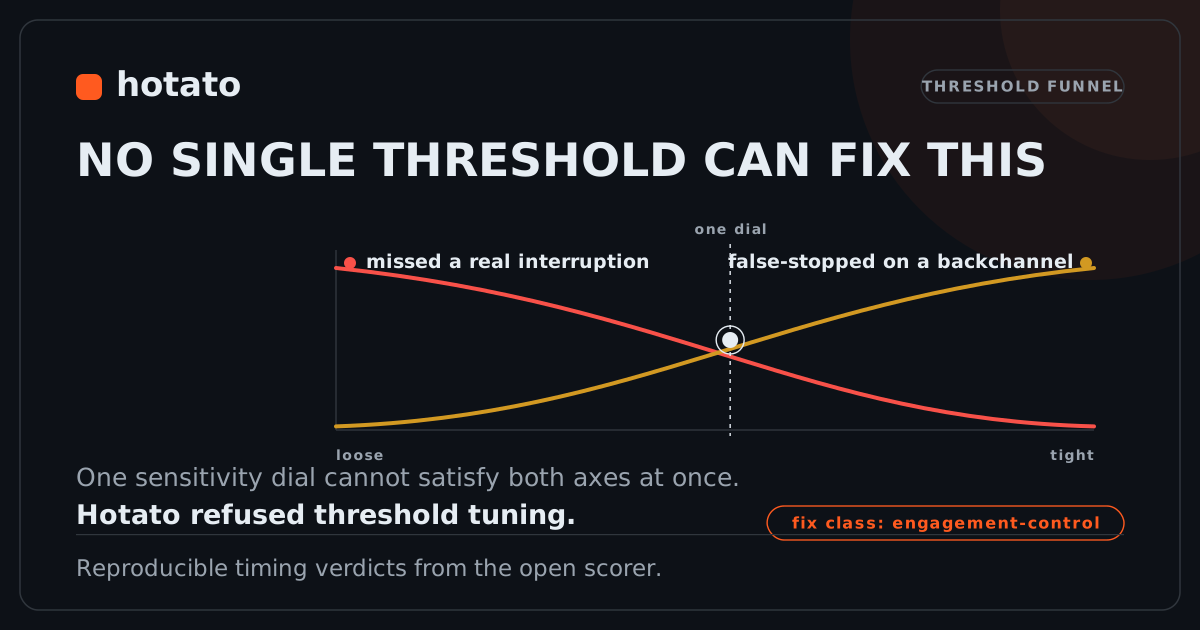
        wrote hotato-sweep.json, hotato-sweep.html, hotato-no-single-threshold.svg
        wrote contracts/demo-missed-interruption.hotato; verified contract: FAIL as expected
Open hotato-sweep.html for the ranked candidate moments with a hear-the-bug playhead. One of them is the failure below: the agent missed a real interruption in one call and false-stopped on a backchannel in another, so no single sensitivity dial fixes both. That is the card start --demo renders for you:
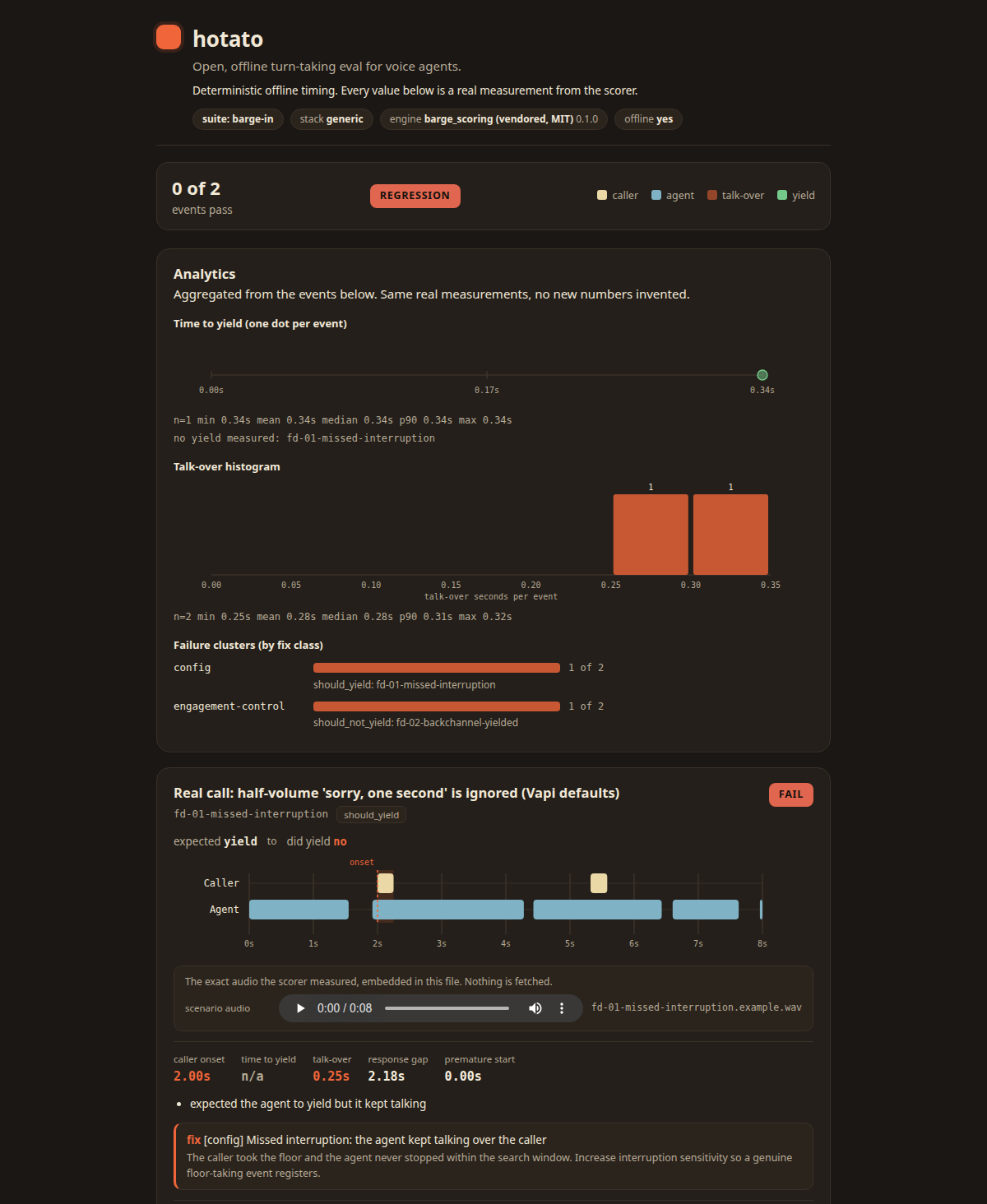
One self-contained HTML file: the scored timeline, each verdict, the trust preflight, and the audio it measured.
A failure became a candidate, became a portable .hotato contract, and contract verify catches it. Hotato prints the exact next commands to promote it into a permanent fixture, run it in CI, and re-verify.
Point it at your own recording to walk the same loop end to end:
hotato start --stereo my-call.wav # trust -> scan -> review -> label -> contract
Choose your path
| You want to | Run this |
|---|---|
| Try the full loop, no credentials | uvx hotato start --demo |
| Sweep the bundled demo calls | uvx hotato sweep --demo |
| Sweep recent calls from a real stack | hotato connect vapi then hotato sweep --stack vapi --since 7d |
| Add Hotato to an existing repo, CI gate included | hotato init starter --stack vapi --out . (docs/STARTER.md) |
| Turn a confirmed failure into a portable contract | hotato contract create --from-candidate hotato-sweep.json#1 --expect yield --id refund-cutoff-001 --out contracts (docs/CONTRACTS.md) |
| Verify contracts in CI | hotato contract verify contracts/ --junit contracts-junit.xml |
| Attach observability traces to a contract | hotato trace attach contracts/refund-cutoff-001.hotato --trace voice_trace.jsonl (docs/TRACE.md) |
| Test a candidate fix, before/after, fail-closed | hotato fix trial patch.json --name staging-x --before before/ --after after/ (docs/FIX-TRIAL.md) |
| Share a finding in a PR or slide | hotato card hotato-sweep.json#1 --out finding.svg |
| Drive it from a coding agent | uvx --from "hotato[mcp]" hotato-mcp (the voice_eval_run scorer + eight fleet tools; configs in docs/MCP.md) |
Every command above takes a two-channel recording (caller on one channel, agent on the other). A mono file or a bad export is marked NOT SCORABLE, never turned into a confident but meaningless verdict.
contract verify and a promoted fixture in CI are two different guarantees, depending on which recording goes in:
| On the frozen recording (every push) | On a fresh recapture (by hand, see docs/RECAPTURE.md) |
|
|---|---|---|
| Proves | The evidence, policy, and scorer are intact | The CURRENT agent's behavior still matches the label |
| Does not prove | That the deployed agent hasn't changed | -- |
A contract bundle contains call audio. Do not commit a raw customer contract to a public repository; use sanitized fixtures for anything public. See docs/CONTRACTS.md.
The loop
Catch it, confirm it, gate it, then prove it holds:
- Sweep surfaces candidate talk-over and false-stop moments across your recent calls, ranked by how far the timing missed.
- You label one (
yield= stop for the caller,hold= keep talking through a backchannel) andfixture promotesaves it as a permanent regression test. - CI runs that fixture on every change and exits non-zero if the recorded evidence stops matching your policy -- a change to the evidence, thresholds, or scorer is caught on every push. Catching the AGENT itself regressing needs a fresh recapture through the same fixture: see
docs/RECAPTURE.md.
Hotato measures whether the agent stopped talking when the caller started, how many seconds that took, and how many seconds both were talking at once. It reports what it measured, never a guess at intent.
Connect a production stack
The demo needs nothing. To point Hotato at real calls, connect once, then sweep on a schedule:
hotato connect vapi                                             # credentials stored 0600, local only
hotato sweep --stack vapi --since 7d --out hotato-sweep.html    # cron, CI, wherever
Run sweep on a timer and it becomes a scheduled batch scanner. Your audio stays on your machine unless you explicitly pull it from your stack. Full guide: docs/SET-AND-FORGET.md · runnable examples/set-and-forget/.
Fleet (private, self-hosted)
hotato fleet runs the loop across every agent from one local workspace: ingest
calls, surface candidates, label them, and run a before/after experiment that
recomputes both sides from audio under a pinned manifest. It recommends a change;
it never deploys one. Local mode is stdlib-only (SQLite plus a content-addressed
store) with no account and no hosted dependency, and no product limit on how many
agents you register.
hotato fleet init -w acme
hotato fleet agent add -w acme --name support-bot --stack vapi --assistant-id asst_123
hotato fleet ingest  -w acme --agent support-bot call.wav
hotato fleet discover -w acme --agent support-bot call.wav
hotato fleet review  -w acme
A before/after experiment refuses a proof built from an edited verdict, a
re-encoded old call, a dropped fixture, or unrelated audio: the number comes from
re-scoring the recordings, under one pinned policy, every time. Full guide:
docs/GUARDIAN-FLEET.md.
Five levels of evidence
Hotato never calls the weakest level a verdict. Every card, report, and CLI result names its level; the public tier is the weakest one its inputs support, never a blended score.
| Level | Name | What it means |
|---|---|---|
| 1 | Candidate | A timing moment worth human review. Not a bug yet. |
| 2 | Human-labeled failure | A reviewer confirmed this recording broke an explicit yield-or-hold expectation. |
| 3 | Stored-evidence check | The historical audio still produces the expected result under the pinned policy and scorer. |
| 4 | Fresh-recapture comparison | A newly captured call passed the same contract, and no submitted paired guard regressed. |
| 5 | External proof | An independent team confirmed a caught regression or a fresh recapture. Not yet published. |
A before/after experiment (hotato fix trial, and the fleet loop) re-derives every verdict from the on-disk audio under one pinned trial manifest. It refuses a proof built from an edited verdict, a re-encoded old call, a dropped fixture, or unrelated audio. The number comes from re-scoring the recordings every time, never from a stored field.
What Hotato is not
- Not a full QA platform. It does not grade the whole conversation, task
success, or content -- it isolates turn-taking timing and pins it to
reproducible evidence. See
docs/COMPARE.mdfor how it fits alongside broader voice-agent testing tools. - Not transcript scoring. It measures audio timing, not what was said.
- Not speaker ID. Channels are anonymous; nothing identifies who a person is.
- Not semantic intent detection. It produces candidate timing evidence. Humans label intent. CI enforces confirmed contracts.
- Not a hand on production config. It never sits in the live audio path and never changes a running agent.
Install
uvx hotato runs any command with zero install. To add it to a project:
pip install hotato                 # core: stdlib-only, zero dependencies
pip install 'hotato[neural]'       # optional Silero VAD cross-check
pip install 'hotato[livekit]'      # LiveKit live capture
pip install 'hotato[pipecat]'      # Pipecat live capture
Depth
- Set-and-forget monitoring (connect once, sweep on a schedule, promote confirmed bugs into fixtures):
docs/SET-AND-FORGET.md· runnableexamples/set-and-forget/ - Bad call to CI regression test, step by step:
docs/BAD-CALL-TO-CI.md· runnableexamples/bad-call-to-ci/ - What it measures (the three timing signals, re-derivable by hand):
METHODOLOGY.md· Python APIdocs/API.md - The fix ladder (each failure names a likely fix class; when the evidence maps cleanly to stack config, Hotato names the setting family and direction):
docs/FIX-PLANS.md - Rule out the non-turn-taking bugs first (STT, buffering, verbosity, refusals, wrong-language):
docs/WHY.md - Pull a call from your stack (Vapi, Twilio, Retell, LiveKit, Pipecat):
adapters/README.md· statusdocs/ADAPTER-STATUS.md - CI gates: GitHub Action
docs/CI.md· pytest plugindocs/PYTEST.md - Recorded-call battery: 12 scripted calls against a live voice agent on its provider's default settings, where a missed interruption and a false stop on a backchannel fail in the same run, so
diagnoserefuses to name one threshold:corpus/vapi-defaults/README.md - Failure contracts and traces: turn a labelled candidate into a portable, CI-verified bundle and attach observability evidence:
docs/CONTRACTS.md·docs/TRACE.md·docs/OTEL.md - Proving the CURRENT agent, not just the frozen recording: the recapture walkthrough:
docs/RECAPTURE.md - Egress: a per-command network table derived from the code -- what's local, what reaches your vendor, what optional extras add a hosted call:
docs/EGRESS.md - Root-cause evidence and a before/after fix trial:
hotato explainturns a failing result into root-cause-by-layer evidence, andhotato fix trialtests a candidate change before/after, fail-closed:docs/EXPLAIN.md·docs/FIX-TRIAL.md·docs/APPLY.md·docs/FIX-LOOP.md - Evidence: what Hotato validates, the input-condition trust matrix, every card and CLI block reproducible, and where Hotato fits alongside broader voice-agent testing tools:
docs/VALIDATION.md·docs/TRUST-MATRIX.md·docs/GALLERY.md·docs/EVIDENCE-PACK.md·docs/COMPARE.md - For coding agents:
AGENTS.md·llms.txt·llms-full.txt· MCP serverdocs/MCP.md· SecuritySECURITY.md - Contributing: the highest-value PR is a labelled call fixture:
docs/SUBMITTING.md
Why "hotato": good turn-taking is a game of hot potato. Speak, then pass the turn the moment the caller wants it. MIT licensed (LICENSE); the open core stays open.
mcp-name: io.github.attenlabs/hotato
Release history Release notifications | RSS feed


Download files
Download the file for your platform. If you're not sure which to choose, learn more about installing packages.
Source Distribution
Built Distribution
Filter files by name, interpreter, ABI, and platform.
If you're not sure about the file name format, learn more about wheel file names.
Copy a direct link to the current filters
File details
Details for the file hotato-1.0.0.tar.gz.
File metadata
- Download URL: hotato-1.0.0.tar.gz
- Upload date:
- Size: 7.7 MB
- Tags: Source
- Uploaded using Trusted Publishing? No
- Uploaded via: twine/6.2.0 CPython/3.12.3
File hashes
| Algorithm | Hash digest | |
|---|---|---|
| SHA256 |
98c4e5409eed788fa0099758c4701a5248e94b9dcbd4cbdc4696fd5665e7d0df
|
|
| MD5 |
a504558d24ef0a6ff6bdf50ffde760dd
|
|
| BLAKE2b-256 |
31d75f90bac7094cc371220affd6294604899fbf8ce3b6fd82b7f3f5b7ecf714
|
File details
Details for the file hotato-1.0.0-py3-none-any.whl.
File metadata
- Download URL: hotato-1.0.0-py3-none-any.whl
- Upload date:
- Size: 3.1 MB
- Tags: Python 3
- Uploaded using Trusted Publishing? No
- Uploaded via: twine/6.2.0 CPython/3.12.3
File hashes
| Algorithm | Hash digest | |
|---|---|---|
| SHA256 |
3b641babf4059a7f4597aaae5e54802c0dd214ce855dda58697a7f404a2d1e98
|
|
| MD5 |
dc24dec782e44706cc223ef875480246
|
|
| BLAKE2b-256 |
566e9698a1598f5a749e6bd2dacbe0e33a2fdd0f7a9b9076c1924dd452e8f898
|






