

One brain for your internal agents.
Provide context once. Reuse it across workflows, chat, and the AI tools your team already uses.
Watch the video · Quick start · Documentation · Ready-to-use hubs · Website · Discussions



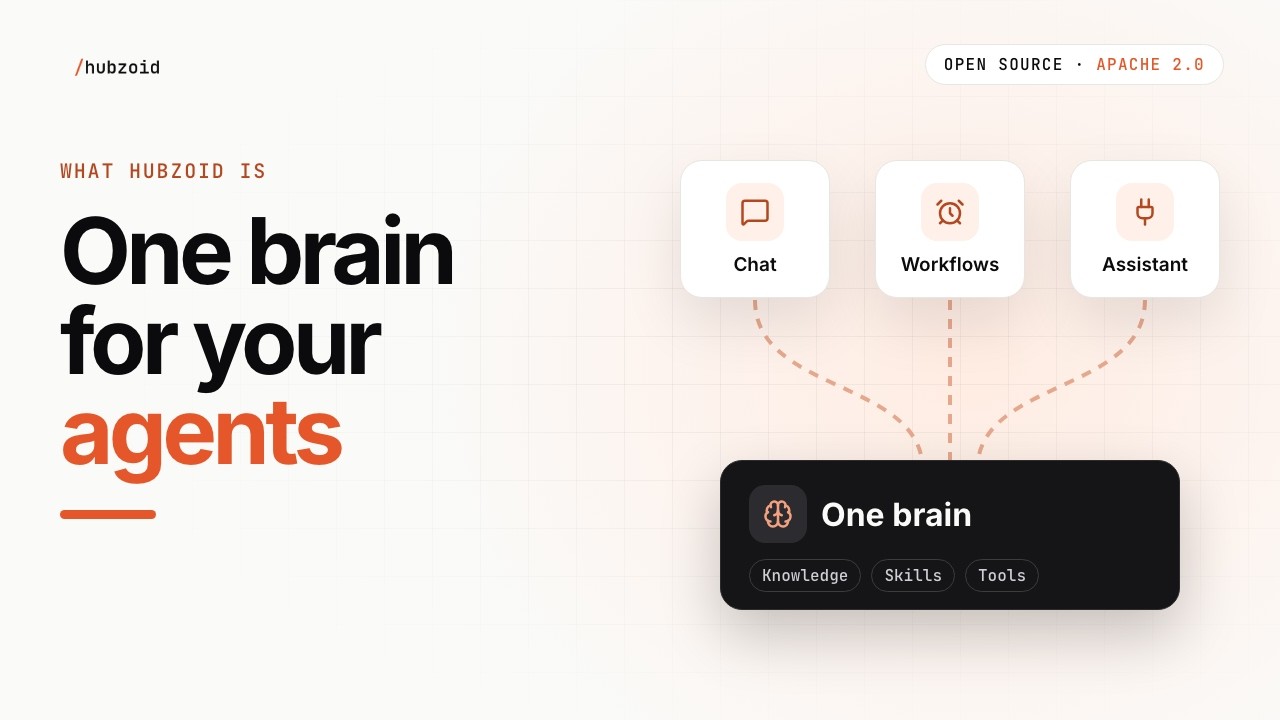
Hubzoid turns a folder of your knowledge, rules and tools into an agent you can use yourself and share with your team. Ask it questions in chat, run repeatable workflows, or connect the AI assistant you already use. The rules live in files you can read, edit and version.
Why Hubzoid
- Your rules live in files you own. Knowledge, skills and agent instructions are Markdown in a folder. Read them, edit them, version them in Git. Authoring a hub
- One hub, three ways to use it. Ask in chat, run repeatable workflows on demand or on a schedule, or bring the same knowledge and tools into Claude Code, ChatGPT or Codex over MCP. Connect your assistant
- Runs on the login you already have. Claude Code or Codex signed in on your machine is enough. A model API key works too. Choose a runtime
- Built for a team. Sign-in, access per person and per agent, approvals before consequential actions, and a record of every run. Team setup
- Open source and yours to host. Apache-2.0, including team controls. Run it on your laptop, then on a server you control. Deploying
Quick start
You need Python 3.11 or 3.12, and Claude Code or Codex signed in on this machine. No API key.
Paste this into Claude Code or Codex:
Set up Hubzoid for me using the quickstart:
https://github.com/hubzoid/hubzoid/blob/main/docs/quickstart.md
Run the starter, show me one answer, then help me make it mine.
The quickstart tells your assistant to use a virtual environment, keep secrets out of chat, and show you each file change before making it.
Or by hand:
python3.12 -m venv .venv
source .venv/bin/activate
pip install hubzoid
hubzoid init my-hub
hubzoid run my-hub
The web app opens at http://127.0.0.1:3080. Ask:
A customer wants a refund 40 days after delivery. What can we offer?
The assistant answers from knowledge/house-rules.md and names the file. That is the whole loop: a rule in a file, an answer that follows it, and a source you can check.
my-hub is a small starter for Kestrel & Oak, a fictional shop. init uses the Claude Code or Codex you are signed in to. Without one, it offers to save a model API key in the hub's private .env. Windows, uv or from source
Make it yours
The starter is a folder. Every folder Hubzoid reads is there, with sample content only where it teaches the loop.
my-hub/
├── AGENTS.md          the assistant's job: who it is, what it answers from
├── knowledge/         what it knows: rules, policies, notes, one Markdown file each
│   └── house-rules.md
├── skills/            step-by-step procedures it follows when a task matches
├── agents/            specialist agents it can hand work to
├── tools_local/       your own Python tools
├── connectors/        MCP connections to other systems
├── workflows/         repeatable work in Python
├── schedule/          tasks that run on a schedule, one Markdown file each
├── evals/             checks that answers stay right
│   └── refund-window.md
└── raw_data/          files the assistant can search and read
Change one rule and watch the answer follow it:
- Open
my-hub/knowledge/house-rules.mdand change the refund window from 30 days to 45. Or ask Claude Code or Codex to make the change and show you the diff. - Stop
hubzoid runand start it again. - Ask the same question. The answer now follows your rule.
hubzoid eval run my-hubchecks it stays that way.
Then replace the sample with your own material: your rules and notes in knowledge/, the assistant's job in AGENTS.md, your checks in evals/. Only what is in the files is shared. A correction in chat is not saved on its own, and your coding assistant's conversation with you is not saved into the hub. Authoring a hub
Ready-to-use hubs
Complete agents built on Hubzoid, each in its own repository. Each one starts with a labelled sample you can run before connecting anything of your own, and its README says what it needs.
| Hub | What it does |
|---|---|
| Software Factory | Turns engineering requests into reviewed draft pull requests. People approve the plan and merge. |
| Order & Invoice Desk | Reads orders and invoices from your inbox into sourced records and reports. No ERP required. |
| Customer Desk | Drafts customer replies from your knowledge and systems. A person approves each one. |
| Engineering Desk | Reviews pull requests against your team's rules and answers questions about your code. Nothing is posted until you say so. |
Use it three ways
| You want to | Use |
|---|---|
| Ask about your work and get an answer with its source | Chat, in the web app, in Slack or inside your own app, with the hub's knowledge and permitted tools. Slack · Other channels · Embedding the chat |
| Repeat a report or a check, with saved inputs and results | Workflows, on demand or on a schedule. Workflows · Reports and sharing |
| Bring the same capabilities into your own assistant | MCP, with your own access. Connect your assistant |
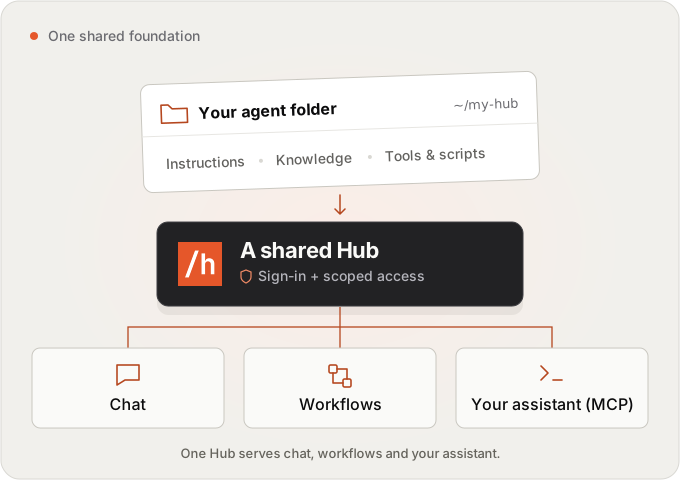
For Claude Code, paste the connection command hubzoid run prints, open /mcp in Claude Code and approve the connection.
Host it for your team
Local mode is private to your machine. To share a hub, turn on sign-in and set its public address in the hub's .env:
HUBZOID_AUTH=true
HUBZOID_PUBLIC_URL=https://hub.example.com
Create the first administrator, then start the hub:
hubzoid admin create you@example.com my-hub --owner
hubzoid run my-hub
Open the one-time sign-in link it prints, set a password, and add teammates in Settings → People & access. Each person gets the agents and capabilities they need. Shared knowledge does not mean shared credentials or access to another person's private results.
Every way of hosting works the same way: one image built from the hub's Git repository, one durable folder at /data, sign-in on, one public address, and weekly verified backups.
| Where | How | Status |
|---|---|---|
| Docker or Compose on your own server | The released image and docker/docker-compose.yml. Deploying |
Supported |
| A VM with systemd | A virtual environment behind a reverse proxy. Deploying | Supported |
| Railway | hubzoid deploy init railway, then Railway builds the hub's Dockerfile with a volume at /data. |
Written, not yet verified on Railway |
| Maritime | hubzoid deploy init maritime, then maritime create --repo with its /data disk. |
Written, not yet verified on Maritime |
hubzoid deploy verify https://your-address checks a deployment from outside. Deployment overview · Backup and restore · Upgrading
Go further
| Next step | Guide |
|---|---|
| Add knowledge, skills, tools or specialist agents | Authoring a hub |
| Connect business systems | MCP connectors |
| Write repeatable work | Python workflows, Markdown tasks |
| Ask a person before an action runs | Approvals and hub changes, Work items |
| Check answer quality and inspect runs | Evals, Observability |
| Control access and spending | Access management, Budgets |
| Keep answering when a Claude login hits its limit | Claude failover |
All guides · Website documentation · Release notes
The chat and its Settings come with pip install hubzoid: no separate UI or Node install. Hubzoid 2 no longer includes Open WebUI. Deployments that need it stay on 1.x (pip install "hubzoid<2"). Python 3.12 workflows need SQLite 3.42 or later, or PostgreSQL. hubzoid doctor my-hub checks this.
Help, contributing and license
Questions and ideas go to GitHub Discussions. Bugs go to issues. To contribute, start with the contributing guide.
Hubzoid is Apache-2.0, including team controls. Dependencies and brand assets keep their own terms. Licensing
Need help with your company's agents? Build with us uses the same open-source product.
1 maintainer

Metadata
1 maintainer
Release files for hubzoid 2.0.7
For a detailed explanation of source distributions (sdists) and built distributions (wheels), please see the package formats documentation.
Source distribution (sdist)
| File | Size | Uploaded | Provenance | Actions |
|---|---|---|---|---|
| hubzoid-2.0.7.tar.gz | 5.4 MB | With provenance | Details for hubzoid-2.0.7.tar.gz |
Built distribution (wheel)
| File | Interpreter | ABI | Platform | Actions Reset |
|---|---|---|---|---|
| hubzoid-2.0.7-py3-none-any.whl | Python 3 | none | any | Details for hubzoid-2.0.7-py3-none-any.whl |
Total release size: 10.4 MB
Release files / hubzoid-2.0.7.tar.gz
| Download URL | hubzoid-2.0.7.tar.gz |
|---|---|
| Size | 5.4 MB |
| Tags | Source |
|
SHA-256 checksum How to use checksums |
ec64d5062d4d3b023bb1230b2b46a0e25035dbbd32a30f02f203d147adf331f5
|
|
BLAKE2b-256 checksum How to use checksums |
97e0f0bc385879f9f0b4dd22e9b46e68eb80764abf39f9c2358645841768974b
|
| Upload date | |
|
Uploaded using Trusted Publishing? What is trusted publishing? |
Yes |
| Uploaded via |
twine/7.0.0 CPython/3.13.16
|
Provenance
Provenance describes where a file came from. On PyPI, provenance is shared via attestations, which provide a verifiable record of the build or publishing details. View details, limitations and caveats.


PyPI Publish Attestation
PyPI verified that this artifact, at this checksum, originated from the publisher listed below.
Signed by GitHub Actions, verified by PyPI on Nov 3, 2026.
Transparency logRelease files / hubzoid-2.0.7-py3-none-any.whl
| Download URL | hubzoid-2.0.7-py3-none-any.whl |
|---|---|
| Size | 5.0 MB |
| Tags | Python 3 |
|
SHA-256 checksum How to use checksums |
60544a2b4b30187d2c4a9d364003963c1b3c1e5678027bfd25bb62868b0dbb31
|
|
BLAKE2b-256 checksum How to use checksums |
48e9f84d6176598421c8b003e7d4e551022e5cc9b652f312714db38e118c0f70
|
| Upload date | |
|
Uploaded using Trusted Publishing? What is trusted publishing? |
Yes |
| Uploaded via |
twine/7.0.0 CPython/3.13.16
|
Provenance
Provenance describes where a file came from. On PyPI, provenance is shared via attestations, which provide a verifiable record of the build or publishing details. View details, limitations and caveats.
PyPI Publish Attestation
PyPI verified that this artifact, at this checksum, originated from the publisher listed below.
Signed by GitHub Actions, verified by PyPI on Nov 3, 2026.
Transparency logSecurity for hubzoid 2.0.7
Provenance
Provenance describes where a file came from. On PyPI, provenance is shared via attestations, which provide a verifiable record of the build or publishing details. View details, limitations and caveats.
Full provenance
All 2 files in this release have been uploaded with provenance metadata.
Attestation for hubzoid-2.0.7.tar.gz
PyPI Publish Attestation
PyPI verified that this artifact, at this checksum, originated from the publisher listed below.
Signed by GitHub Actions, verified by PyPI on Nov 3, 2026.
Transparency logA note on package security
PyPI is a repository for distributing packages, not a service for auditing them. While third-party security researchers and our staff do their best to detect and remove malicious packages, PyPI cannot guarantee the quality, security or suitability of any given package.
To learn more about protecting yourself from malicious actors, visit our package security documentation.














