
Dear ImGui Bundle: easily create ImGui applications in Python and C++. Batteries included!

Project description

Dear ImGui Bundle: easily create ImGui applications in Python and C++. Batteries included!


Introduction
About Dear ImGui Bundle
Dear ImGui Bundle is a bundle for Dear ImGui, including various powerful libraries from its ecosystem. It enables to easily create ImGui applications in C++ and Python, under Windows, macOS, and Linux. It is aimed at application developers, researchers, and beginner developers who want to quickly get started.
Interactive manual & demo in one click!
Click on the animated demonstration below to launch the fully interactive demonstration.
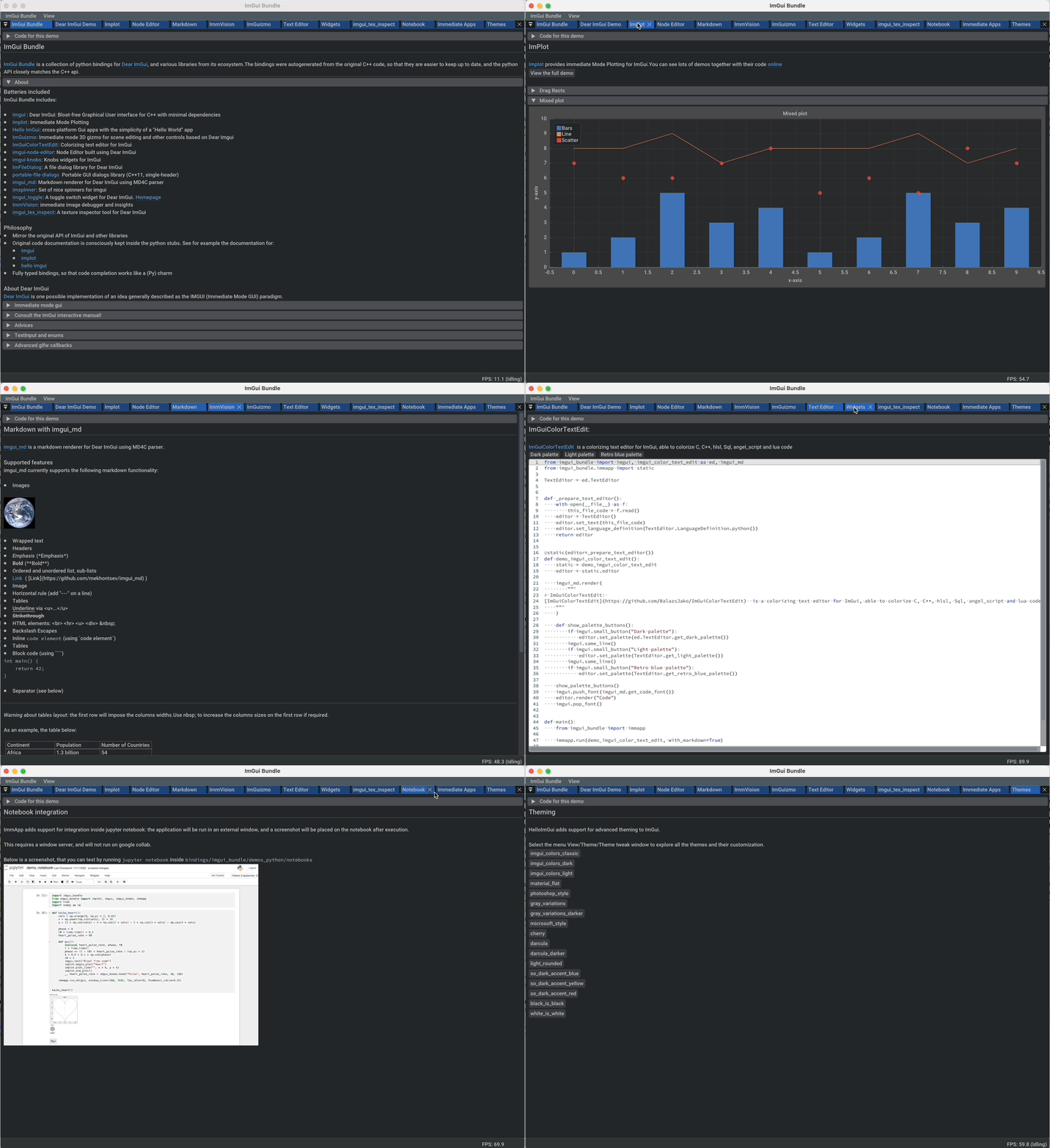
This demonstration is also an interactive manual, similar to the online ImGui Manual
Batteries included
Dear ImGui Bundle includes the following libraries:
-
imgui : Dear ImGui, bloat-free Graphical User interface for C++ with minimal dependencies
-
implot: Immediate Mode Plotting
-
Hello ImGui: cross-platform Gui apps with the simplicity of a "Hello World" app
-
ImGuizmo: Immediate mode 3D gizmo for scene editing and other controls based on Dear ImGui
-
ImGuiColorTextEdit: Colorizing text editor for ImGui
-
imgui-node-editor: Node Editor built using Dear ImGui
-
imgui-knobs: Knobs widgets for ImGui
-
ImFileDialog: A file dialog library for Dear ImGui
-
portable-file-dialogs Portable GUI dialogs library (C++11, single-header)
-
imgui_md: Markdown renderer for Dear ImGui using MD4C parser
-
imspinner: Set of nice spinners for imgui
-
imgui_toggle: A toggle switch widget for Dear ImGui.
-
ImmVision: Immediate image debugger and insights
-
imgui_tex_inspect: A texture inspector tool for Dear ImGui
-
imgui-command-palette: A Sublime Text or VSCode style command palette in ImGui
A big thank you to their authors for their awesome work!
Easily port your code between python and C++
The python bindings are autogenerated via an advanced generator (so that keeping them up to date is easy), and closely mirror the original C++ API, with fully typed bindings.
The original code documentation is meticulously kept inside the python stubs. See for example the documentation for imgui , implot, and hello imgui
Thanks to this, code completion in your favorite python IDE works like a charm, and porting code between Python and C++ becomes easy.
Build and install instructions
Install for Python
Install from pypi
pip install imgui-bundle
pip install opencv-contrib-python
- in order to run the immvision module, install opencv-python or opencv-contrib-python
Note: under windows, you might need to install msvc redist.
Install from source:
git clone https://github.com/pthom/imgui_bundle.git
cd imgui_bundle
git submodule update --init --recursive
pip install -v .
pip install opencv-contrib-python
-
Since there are lots of submodules, this might take a few minutes
-
The build process might take up to 5 minutes
Run the python demo
Simply run demo_imgui_bundle.
The source for the demos can be found inside bindings/imgui_bundle/demos_python.
Consider demo_imgui_bundle as an always available manual for Dear
ImGui Bundle with lots of examples and related code source.
Install for C++
Integrate Dear ImGui Bundle in your own project in 5 minutes
The easiest way to use Dear ImGui Bundle in an external project is to use the example provided in example_integration. This folder includes everything you need to set up your own project.
Build from source
If you choose to clone this repo, follow these instructions:
git clone https://github.com/pthom/imgui_bundle.git
cd imgui_bundle
git submodule update --init --recursive
mkdir build
cd build
cmake .. -DIMMVISION_FETCH_OPENCV=ON
make -j
-
Since there are lots of submodules, this might take a few minutes
-
The flag
-DIMMVISION_FETCH_OPENCV=ONis optional. If set, a minimal version of OpenCV will be downloaded a compiled at this stage (this might require a few minutes)
The immvision module will only be built if OpenCV can be found.
Otherwise, it will be ignored, and no error will be emitted.
If you have an existing OpenCV install, set its path via:
cmake .. -DOpenCV_DIR=/.../path/to/OpenCVConfig.cmake
Run the C++ demo
If you built ImGuiBundle from source, Simply run
build/bin/demo_imgui_bundle.
The source for the demos can be found inside bindings/imgui_bundle/demos_cpp.
Consider demo_imgui_bundle as a manual with lots of examples and
related code source. It is always available
online
Usage instructions
Dear ImGui - Immediate GUI
Dear ImGui is an implementation of the Immediate Gui paradigm.
Consult the ImGui Manual
Dear ImGui comes with a complete demo. It demonstrates all the widgets, together with an example code on how to use them.
ImGui Manual is an easy way to consult this demo, and to see the corresponding code. The demo code is in C++, but read on for "Code advices" on how to translate from C++ to python.
Example
An example is often worth a thousand words, the following code:
C++
// Display a text
ImGui::Text("Counter = %i", app_state.counter);
ImGui::SameLine(); // by default ImGui starts a new line at each widget

// The following line displays a button
if (ImGui::Button("increment counter"))
    // And returns true if it was clicked: you can *immediately* handle the click
    app_state.counter += 1;

// Input a text: in C++, InputText returns a bool and modifies the text directly
bool changed = ImGui::InputText("Your name?", &app_state.name);
ImGui::Text("Hello %s!", app_state.name.c_str());
Python
# Display a text
imgui.text(f"Counter = {app_state.counter}")
imgui.same_line()  # by default ImGui starts a new line at each widget

# The following line displays a button
if imgui.button("increment counter"):
    # And returns true if it was clicked: you can *immediately* handle the click
    app_state.counter += 1

# Input a text: in python, input_text returns a tuple(modified, new_value)
changed, app_state.name = imgui.input_text("Your name?", app_state.name)
imgui.text(f"Hello {app_state.name}!")
Displays this:

Hello ImGui - Starter pack
Dear ImGui Bundle includes Hello ImGui, which is itself based on ImGui. "Hello ImGui" can be compared to a starter pack that enables to easily write cross-platform Gui apps for Windows, macOS, Linux, iOS, and emscripten.
API
See the "Hello ImGui" API doc. Also consult the doc on how to build DPI aware applications.
Features
-
Full multiplatform support: Windows, Linux, OSX, iOS, Emscripten, Android (poorly supported). See demo video
-
Advanced layout handling
-
Power Save mode: reduce FPS when application is idle (see RunnerParams.fpsIdle)
-
DPI aware applications (widget placement, window size, font loading and scaling)
-
Theme tweaking (see demo video, and API )
-
Window geometry utilities: autosize, restore window position, full screen, etc. (see WindowGeometry)
-
Multiplatform assets embedding
-
Switch between Glfw or Sdl backend (see RunnerParams.backendType)
The usage of Hello ImGui is optional. You can also build an imgui
application from scratch, in C++ or in python (see python
example)
HelloImGui is fully configurable by POD (plain old data) structures. See their description
Advanced layout and theming with Hello ImGui:
See the demo named "demo_docking", which demonstrates:
-
How to handle complex layouts: you can define several layouts and switch between them: each layout which will remember the user modifications and the list of opened windows
-
How to use theming
-
How to store you own user settings in the app ini file
-
How to add a status bar and a log window
-
How to reduce the FPS when idling (to reduce CPU usage)
Links:
-
see demo_docking.py
-
see demo_docking.cpp
-
see a short video explanation about layouts on YouTube
ImmApp - Immediate App
ImGui Bundle includes a library named ImmApp (which stands for Immediate App). ImmApp is a thin extension of HelloImGui that enables to easily initialize the ImGuiBundle addons that require additional setup at startup
API
How to start an application with addons
Some libraries included by ImGui Bundle require an initialization at startup. ImmApp makes this easy via AddOnParams.
The example program below demonstrates how to run an application which will use implot (which requires a context to be created at startup), and imgui_md (which requires additional fonts to be loaded at startup).
C++
#include "immapp/immapp.h"
#include "imgui_md_wrapper/imgui_md_wrapper.h"
#include "implot/implot.h"
#include "demo_utils/api_demos.h"
#include <vector>
#include <cmath>


int main(int, char**)
{
    // This call is specific to the ImGui Bundle interactive manual. In a standard application, you could write:
    //         HelloImGui::SetAssetsFolder("my_assets"); // (By default, HelloImGui will search inside "assets")
    ChdirBesideAssetsFolder();

    constexpr double pi = 3.1415926535897932384626433;
    std::vector<double> x, y1, y2;
    for (double _x = 0; _x < 4 * pi; _x += 0.01)
    {
        x.push_back(_x);
        y1.push_back(std::cos(_x));
        y2.push_back(std::sin(_x));
    }

    auto gui = [x,y1,y2]()
    {
        ImGuiMd::Render("# This is the plot of _cosinus_ and *sinus*");  // Markdown
        if (ImPlot::BeginPlot("Plot"))
        {
            ImPlot::PlotLine("y1", x.data(), y1.data(), x.size());
            ImPlot::PlotLine("y2", x.data(), y2.data(), x.size());
            ImPlot::EndPlot();
        }
    };

    HelloImGui::SimpleRunnerParams runnerParams { .guiFunction = gui, .windowSize = {600, 400} };
    ImmApp::AddOnsParams addons { .withImplot = true, .withMarkdown = true };
    ImmApp::Run(runnerParams, addons);

    return 0;
}
Python:
import numpy as np
from imgui_bundle import implot, imgui_md, immapp
from imgui_bundle.demos_python import demo_utils


def main():
    # This call is specific to the ImGui Bundle interactive manual. In a standard application, you could write:
    #         hello_imgui.set_assets_folder("my_assets"); # (By default, HelloImGui will search inside "assets")
    demo_utils.set_hello_imgui_demo_assets_folder()

    x = np.arange(0, np.pi * 4, 0.01)
    y1 = np.cos(x)
    y2 = np.sin(x)

    def gui():
        imgui_md.render("# This is the plot of _cosinus_ and *sinus*")  # Markdown
        if implot.begin_plot("Plot"):
            implot.plot_line("y1", x, y1)
            implot.plot_line("y2", x, y2)
            implot.end_plot()

    immapp.run(gui, with_implot=True, with_markdown=True, window_size=(600, 400))


if __name__ == "__main__":
    main()
Using Dear ImGui Bundle with jupyter notebook
ImmApp adds support for integration inside jupyter notebook: the application will be run in an external window, and a screenshot will be placed on the notebook after execution.
This requires a window server, and will not run on google collab.
Below is a screenshot, that you can test by running jupyter notebook
inside bindings/imgui_bundle/demos_python/notebooks

40 seconds demo video on Youtube
API:
C++ / Python porting advices
General advices
ImGui is a C++ library that was ported to Python. In order to work with it, you will often refer to its manual, which shows example code in C++.
In order to translate from C++ to Python:
-
Change the function names and parameters' names from
CamelCasetosnake_case -
Change the way the output are handled.
-
in C++
ImGui::RadioButtonmodifies its second parameter (which is passed by address) and returns true if the user clicked the radio button. -
In python, the (possibly modified) value is transmitted via the return:
imgui.radio_buttonreturns aTuple[bool, str]which contains(user_clicked, new_value).
-
-
if porting some code that uses static variables, use the
@immapp.staticdecorator. In this case, this decorator simply adds a variablevalueat the function scope. It is preserved between calls. Normally, this variable should be accessed viademo_radio_button.value, however the first line of the function adds a synonym named static for more clarity. Do not overuse them! Static variable suffer from almost the same shortcomings as global variables, so you should prefer to modify an application state.
Example:
C++
void DemoRadioButton()
{
    static int value = 0;
    ImGui::RadioButton("radio a", &value, 0); ImGui::SameLine();
    ImGui::RadioButton("radio b", &value, 1); ImGui::SameLine();
    ImGui::RadioButton("radio c", &value, 2);
}
Python
@immapp.static(value=0)
def demo_radio_button():
    static = demo_radio_button
    clicked, static.value = imgui.radio_button("radio a", static.value, 0)
    imgui.same_line()
    clicked, static.value = imgui.radio_button("radio b", static.value, 1)
    imgui.same_line()
    clicked, static.value = imgui.radio_button("radio c", static.value, 2)
Enums and TextInput
In the example below, two differences are important:
InputText functions:
imgui.input_text (Python) is equivalent to ImGui::InputText (C++)
-
In C++, it uses two parameters for the text: the text pointer, and its length.
-
In Python, you can simply pass a string, and get back its modified value in the returned tuple.
Enums handling:
-
ImGuiInputTextFlags_(C++) corresponds toimgui.InputTextFlags_(python) and it is an enum (note the trailing underscore). -
ImGuiInputTextFlags(C++) corresponds toimgui.InputTextFlags(python) and it is an int (note: no trailing underscore)
You will find many similar enums.
The dichotomy between int and enums, enables you to write flags that are a combinations of values from the enum (see example below).
Example
C++
void DemoInputTextUpperCase()
{
    static char text[64] = "";
    ImGuiInputTextFlags flags = (
        ImGuiInputTextFlags_CharsUppercase
        | ImGuiInputTextFlags_CharsNoBlank
    );
    /*bool changed = */ ImGui::InputText("Upper case, no spaces", text, 64, flags);
}
Python
@immapp.static(text="")
def demo_input_text_decimal() -> None:
    static = demo_input_text_decimal
    flags:imgui.InputTextFlags = (
            imgui.InputTextFlags_.chars_uppercase.value
          | imgui.InputTextFlags_.chars_no_blank.value
        )
    changed, static.text = imgui.input_text("Upper case, no spaces", static.text, flags)
Note: in C++, by using imgui_stdlib.h, it is also possible to write:
#include "imgui/misc/cpp/imgui_stdlib.h"

void DemoInputTextUpperCase_StdString()
{
    static std::string text;
    ImGuiInputTextFlags flags = (
        ImGuiInputTextFlags_CharsUppercase
        | ImGuiInputTextFlags_CharsNoBlank
    );
    /*bool changed = */ ImGui::InputText("Upper case, no spaces", &text, flags);
}
Advanced glfw callbacks
When using the glfw backend, you can set advanced callbacks on all glfw events.
Below is an example that triggers a callback whenever the window size is changed:
import imgui_bundle
import glfw   # always import glfw *after* imgui_bundle!!!


# define a callback
def my_window_size_callback(window: glfw._GLFWwindow, w: int, h: int):
    print(f"Window size changed to {w}x{h}")


# Get the glfw window used by hello imgui
window = imgui_bundle.glfw_utils.glfw_window_hello_imgui()
glfw.set_window_size_callback(window, my_window_size_callback)
It is important to import glfw after imgui_bundle, since - upon import - imgui_bundle informs glfw that it shall use its own version of the glfw dynamic library.
Debug native C++ in python scripts
ImGui Bundle provides tooling to help you debug the C++ side, when you encounter a bug that is difficult to diagnose from Python.
It can be used in two steps:
-
Edit the file
pybind_native_debug/pybind_native_debug.py. Change its content so that it runs the python code you would like to debug. Make sure it works when you run it as a python script. -
Now, debug the C++ project
pybind_native_debug_bundlewhich is defined in the directorypybind_native_debug/. This will run your python code from C++, and you can debug the C++ side (place breakpoints, watch variables, etc).
Example: this issue on macOS was solved thanks to this.
Closing words
Who is this project for
As mentioned in the intro,
Dear ImGui Bundle is a bundle for Dear ImGui, including various powerful libraries from its ecosystem. It enables to easily create ImGui applications in C++ and Python, under Windows, macOS, and Linux. It is aimed at application developers, researchers, and beginner developers who want to quickly get started.
Dear ImGui Bundle aims to make applications prototyping fast and easy, in a multiplatform / multi-tooling context. The intent is to reduce the time between an idea and a first GUI prototype down to almost zero.
It is well adapted for
-
developers and researchers who want to switch easily between and research and development environment by facilitating the port of research artifacts
-
beginners and developers who want to quickly develop an application without learning a GUI framework
Who is this project not for
You should prefer a more complete framework (such as Qt for example) if your intent is to build a fully fledged application, with support for internationalization, advanced styling, etc.
Also, the library makes no guarantee of ABI stability, and its API is opened to slight adaptations and breaking changes if they are found to make the overall usage better and/or safer.
Acknowledgments
Dear ImGui Bundle would not be possible without the work of the authors of "Dear ImGui", and especially Omar Cornut.
It also includes a lot of other projects, and I’d like to thank their authors for their awesome work!
A particular mention for Evan Pezent (author of ImPlot), Cédric Guillemet (author of ImGuizmo), Balázs Jákó (author of ImGuiColorTextEdit), and Michał Cichoń (author of imgui-node-editor), and Dmitry Mekhontsev (author of imgui-md), Andy Borrel (author of imgui-tex-inspect, another image debugging tool, which I discovered long after having developed immvision).
This doc was built using Asciidoc.
Immvision was inspired by The Image Debugger, by Bill Baxter.
License
The MIT License (MIT)
Copyright (c) 2021-2023 Pascal Thomet
Permission is hereby granted, free of charge, to any person obtaining a copy of this software and associated documentation files (the "Software"), to deal in the Software without restriction, including without limitation the rights to use, copy, modify, merge, publish, distribute, sublicense, and/or sell copies of the Software, and to permit persons to whom the Software is furnished to do so, subject to the following conditions:
The above copyright notice and this permission notice shall be included in all copies or substantial portions of the Software.
THE SOFTWARE IS PROVIDED "AS IS", WITHOUT WARRANTY OF ANY KIND, EXPRESS OR IMPLIED, INCLUDING BUT NOT LIMITED TO THE WARRANTIES OF MERCHANTABILITY, FITNESS FOR A PARTICULAR PURPOSE AND NONINFRINGEMENT. IN NO EVENT SHALL THE AUTHORS OR COPYRIGHT HOLDERS BE LIABLE FOR ANY CLAIM, DAMAGES OR OTHER LIABILITY, WHETHER IN AN ACTION OF CONTRACT, TORT OR OTHERWISE, ARISING FROM, OUT OF OR IN CONNECTION WITH THE SOFTWARE OR THE USE OR OTHER DEALINGS IN THE SOFTWARE.
Alternatives
pyimgui provides battle-tested comprehensive python bindings for ImGui. I worked with this project a lot, and contributed a bit to it. In the end, I had to develop a separate project, in order to be able to add auto-generated and auto-documented python modules.
Dear PyGui (repository) provides python bindings for ImGui with a lot of addons, and a more pythonesque API, which makes it perhaps more suited for Python only projects.
About the author
Dear ImGui Bundle is developed by Pascal Thomet. I am reachable on my Github page. I sometimes blog. There is a playlist related to ImGui Bundle on YouTube.
I have a past in computer vision, and a lot of experience in the trenches between development and research teams; and I found ImGui to be a nice way to reduce the delay between a research prototype and its use in production code.
I also have an inclination for self documenting code, and the doc you are reading was a way to explore new ways to document projects.
How is Dear ImGui Bundle developed
The development of the initial version of Dear ImGui Bundle took about one year at full time.
The bindings are auto-generated thanks to an advanced parser, so that they are easy to keep up to date. I’ll give more information about the bindings generator a bit later in 2023.
Please be tolerant if you find issues! Dear ImGui Bundle is developed for free, under a very permissive license, by one main author (and most of its API comes from external libraries).
If you need consulting about this library or about the bindings generator in the context of a commercial project, please contact me by email.
Contributions are welcome!
History
Three of my past projects gave me the idea to develop this library.
-
ImGui Manual, an interactive manual for Dear ImGui, which I developed in June 2020
-
implot demo which I developed in 2020.
-
imgui_datascience, a python package I developed in 2018 for image analysis and debugging. Its successor is immvision.
Developments for Dear ImGui Bundle and its related automatic binding generator began in january 2022.
FAQ
See FAQ
Release history Release notifications | RSS feed


Download files
Download the file for your platform. If you're not sure which to choose, learn more about installing packages.
Source Distribution
Built Distributions
Filter files by name, interpreter, ABI, and platform.
If you're not sure about the file name format, learn more about wheel file names.
Copy a direct link to the current filters
File details
Details for the file imgui-bundle-0.9.0.tar.gz.
File metadata
- Download URL: imgui-bundle-0.9.0.tar.gz
- Upload date:
- Size: 55.3 MB
- Tags: Source
- Uploaded using Trusted Publishing? No
- Uploaded via: twine/4.0.2 CPython/3.11.5
File hashes
| Algorithm | Hash digest | |
|---|---|---|
| SHA256 |
76007aadc9bdce480df799e7aa8a0238a2603c673b7e61d5fd93771d38f227fb
|
|
| MD5 |
9ac4b74306c67004b6f509a8b3393a00
|
|
| BLAKE2b-256 |
00b9bc604b8dc60679fd31cac4d41786fa247e1ae35dbdea768cfe7088a4ba41
|
File details
Details for the file imgui_bundle-0.9.0-cp312-cp312-win_amd64.whl.
File metadata
- Download URL: imgui_bundle-0.9.0-cp312-cp312-win_amd64.whl
- Upload date:
- Size: 70.2 MB
- Tags: CPython 3.12, Windows x86-64
- Uploaded using Trusted Publishing? No
- Uploaded via: twine/4.0.2 CPython/3.11.5
File hashes
| Algorithm | Hash digest | |
|---|---|---|
| SHA256 |
5087f6760d4324cee5a078acee59da71b797c8a253ae76a76011d58e8cd3c3c6
|
|
| MD5 |
673f6168b7755e460451426e0f19e10f
|
|
| BLAKE2b-256 |
2c4b70121029545439af715cae1dbf91e45f732468c3878ef5a2c795fefa27f7
|
File details
Details for the file imgui_bundle-0.9.0-cp312-cp312-musllinux_1_1_x86_64.whl.
File metadata
- Download URL: imgui_bundle-0.9.0-cp312-cp312-musllinux_1_1_x86_64.whl
- Upload date:
- Size: 65.6 MB
- Tags: CPython 3.12, musllinux: musl 1.1+ x86-64
- Uploaded using Trusted Publishing? No
- Uploaded via: twine/4.0.2 CPython/3.11.5
File hashes
| Algorithm | Hash digest | |
|---|---|---|
| SHA256 |
a4500bcff26319694a178fe487b5fe1d47037fafc342dff953b8850014953ee3
|
|
| MD5 |
e71b5349edc10de3d8fa062d95406c7e
|
|
| BLAKE2b-256 |
be8b3340e9ec6cd6c4b5930aa0240aadb59e1bac45da7b6e89a0fb2f9c5ae03b
|
File details
Details for the file imgui_bundle-0.9.0-cp312-cp312-manylinux_2_17_x86_64.manylinux2014_x86_64.whl.
File metadata
- Download URL: imgui_bundle-0.9.0-cp312-cp312-manylinux_2_17_x86_64.manylinux2014_x86_64.whl
- Upload date:
- Size: 65.0 MB
- Tags: CPython 3.12, manylinux: glibc 2.17+ x86-64
- Uploaded using Trusted Publishing? No
- Uploaded via: twine/4.0.2 CPython/3.11.5
File hashes
| Algorithm | Hash digest | |
|---|---|---|
| SHA256 |
bd68688571008468f655f354b3a43f6885bffa9ab02ac4fbd9e1afebdf22b4e2
|
|
| MD5 |
2d94647ad5d50c343c5888fc384d3a61
|
|
| BLAKE2b-256 |
663cafa935bf403574f5e951b931cc59041ce60ca37fc3f90aed73ea3d4a1e1e
|
File details
Details for the file imgui_bundle-0.9.0-cp312-cp312-macosx_13_0_arm64.whl.
File metadata
- Download URL: imgui_bundle-0.9.0-cp312-cp312-macosx_13_0_arm64.whl
- Upload date:
- Size: 29.9 MB
- Tags: CPython 3.12, macOS 13.0+ ARM64
- Uploaded using Trusted Publishing? No
- Uploaded via: twine/4.0.2 CPython/3.11.3
File hashes
| Algorithm | Hash digest | |
|---|---|---|
| SHA256 |
481df83c15bc6aeef8417954fc6db56759c9dd8848905f840a2c800191dad589
|
|
| MD5 |
ccc0567cbd08ca4665d37da34517ef39
|
|
| BLAKE2b-256 |
447b239b2b478fe4ac621746211ff28361697dcdb1b48ee3408ec6a891334806
|
File details
Details for the file imgui_bundle-0.9.0-cp312-cp312-macosx_11_0_x86_64.whl.
File metadata
- Download URL: imgui_bundle-0.9.0-cp312-cp312-macosx_11_0_x86_64.whl
- Upload date:
- Size: 62.3 MB
- Tags: CPython 3.12, macOS 11.0+ x86-64
- Uploaded using Trusted Publishing? No
- Uploaded via: twine/4.0.2 CPython/3.11.5
File hashes
| Algorithm | Hash digest | |
|---|---|---|
| SHA256 |
94984ee378a6804f857d39fcf6d322a7f906bc0902bf5f32b7ef645f0d5eee7d
|
|
| MD5 |
f0664475be6b799834e6d2b97995a768
|
|
| BLAKE2b-256 |
74e8e2f18ad1e05d8485ef8ff2e5e2da5b709826530cfee652746664cb2af09e
|
File details
Details for the file imgui_bundle-0.9.0-cp311-cp311-win_amd64.whl.
File metadata
- Download URL: imgui_bundle-0.9.0-cp311-cp311-win_amd64.whl
- Upload date:
- Size: 67.4 MB
- Tags: CPython 3.11, Windows x86-64
- Uploaded using Trusted Publishing? No
- Uploaded via: twine/4.0.2 CPython/3.11.5
File hashes
| Algorithm | Hash digest | |
|---|---|---|
| SHA256 |
129153119b668ed0febd1c03e243d916162e4f7dd5eaeff8a52dee2d668dd90d
|
|
| MD5 |
d494947b324bdb16ab84cea19fa5c438
|
|
| BLAKE2b-256 |
566a5869ea4fa111d7c39fa5934f6c26d4b20c5bf62eefdb4d25d401f99b7182
|
File details
Details for the file imgui_bundle-0.9.0-cp311-cp311-musllinux_1_1_x86_64.whl.
File metadata
- Download URL: imgui_bundle-0.9.0-cp311-cp311-musllinux_1_1_x86_64.whl
- Upload date:
- Size: 51.6 MB
- Tags: CPython 3.11, musllinux: musl 1.1+ x86-64
- Uploaded using Trusted Publishing? No
- Uploaded via: twine/4.0.2 CPython/3.11.5
File hashes
| Algorithm | Hash digest | |
|---|---|---|
| SHA256 |
5ba8934bf0c30d3d7bf2d68db61688fbf7c6c0d4dca778953d96296b65fe2373
|
|
| MD5 |
779be40cb0a103eca68ad2255ba6e4cb
|
|
| BLAKE2b-256 |
999544fc381e8d9bd7582548ca838d69ffd5370110e1502e96f290df6e890c67
|
File details
Details for the file imgui_bundle-0.9.0-cp311-cp311-manylinux_2_17_x86_64.manylinux2014_x86_64.whl.
File metadata
- Download URL: imgui_bundle-0.9.0-cp311-cp311-manylinux_2_17_x86_64.manylinux2014_x86_64.whl
- Upload date:
- Size: 50.7 MB
- Tags: CPython 3.11, manylinux: glibc 2.17+ x86-64
- Uploaded using Trusted Publishing? No
- Uploaded via: twine/4.0.2 CPython/3.11.5
File hashes
| Algorithm | Hash digest | |
|---|---|---|
| SHA256 |
8d2d89f81bdddbcade68a90d98f0fcf57537ca57e38620497241009a3f4f3a6d
|
|
| MD5 |
2e6f4670223a2ce560da9209d0152847
|
|
| BLAKE2b-256 |
9417e1af022f926d88f7bf09e4de6dbd1b64756c89b619425248882868a61373
|
File details
Details for the file imgui_bundle-0.9.0-cp311-cp311-macosx_13_0_arm64.whl.
File metadata
- Download URL: imgui_bundle-0.9.0-cp311-cp311-macosx_13_0_arm64.whl
- Upload date:
- Size: 29.9 MB
- Tags: CPython 3.11, macOS 13.0+ ARM64
- Uploaded using Trusted Publishing? No
- Uploaded via: twine/4.0.2 CPython/3.11.3
File hashes
| Algorithm | Hash digest | |
|---|---|---|
| SHA256 |
3bdc72b2ab26271e960140d3a9637ec3164732f6648f70ef960974a618b640cb
|
|
| MD5 |
9a76b237a740699916297e8c43e6792b
|
|
| BLAKE2b-256 |
8b9d9c2d6f92bf0f2daf3d48f35eddcd86769abef138e335c9bc82fcef165544
|
File details
Details for the file imgui_bundle-0.9.0-cp311-cp311-macosx_11_0_x86_64.whl.
File metadata
- Download URL: imgui_bundle-0.9.0-cp311-cp311-macosx_11_0_x86_64.whl
- Upload date:
- Size: 48.2 MB
- Tags: CPython 3.11, macOS 11.0+ x86-64
- Uploaded using Trusted Publishing? No
- Uploaded via: twine/4.0.2 CPython/3.11.5
File hashes
| Algorithm | Hash digest | |
|---|---|---|
| SHA256 |
759408cb429c2e6ec96cfba6fe437d78d8260b7007e020ecc9c6743319401da2
|
|
| MD5 |
8a9359f2d130c04618d972ae952df119
|
|
| BLAKE2b-256 |
ff88f69b0b032741bd13bc8cd20a2a9aeebe10d5ae2c45acd603a554ba557427
|
File details
Details for the file imgui_bundle-0.9.0-cp310-cp310-win_amd64.whl.
File metadata
- Download URL: imgui_bundle-0.9.0-cp310-cp310-win_amd64.whl
- Upload date:
- Size: 64.5 MB
- Tags: CPython 3.10, Windows x86-64
- Uploaded using Trusted Publishing? No
- Uploaded via: twine/4.0.2 CPython/3.11.5
File hashes
| Algorithm | Hash digest | |
|---|---|---|
| SHA256 |
f05cfc6d088510700f4a966076faa6280470ab8ac6ad96f5509aadad88079052
|
|
| MD5 |
cde61a61a8bb10efa8adddd012c48697
|
|
| BLAKE2b-256 |
21c2144c17561ffa33880205c15c69dd57f112cf2b564312cf21f5093761da10
|
File details
Details for the file imgui_bundle-0.9.0-cp310-cp310-musllinux_1_1_x86_64.whl.
File metadata
- Download URL: imgui_bundle-0.9.0-cp310-cp310-musllinux_1_1_x86_64.whl
- Upload date:
- Size: 37.5 MB
- Tags: CPython 3.10, musllinux: musl 1.1+ x86-64
- Uploaded using Trusted Publishing? No
- Uploaded via: twine/4.0.2 CPython/3.11.5
File hashes
| Algorithm | Hash digest | |
|---|---|---|
| SHA256 |
b2c088b689afec8b3acd28e14098aa52527f7fcac8b7c008a002203109c213e0
|
|
| MD5 |
6005018c3780adcbaf40e54443e59473
|
|
| BLAKE2b-256 |
db4a5d631016cd4459d3d5462c23bb38234678ffd2e8525b4fccab94e16f4666
|
File details
Details for the file imgui_bundle-0.9.0-cp310-cp310-manylinux_2_17_x86_64.manylinux2014_x86_64.whl.
File metadata
- Download URL: imgui_bundle-0.9.0-cp310-cp310-manylinux_2_17_x86_64.manylinux2014_x86_64.whl
- Upload date:
- Size: 36.3 MB
- Tags: CPython 3.10, manylinux: glibc 2.17+ x86-64
- Uploaded using Trusted Publishing? No
- Uploaded via: twine/4.0.2 CPython/3.11.5
File hashes
| Algorithm | Hash digest | |
|---|---|---|
| SHA256 |
e48fd8eecadb1fd255d1e71bcbc03078b2ba0c33a2f1d8025ec4ef46a5df05a4
|
|
| MD5 |
bf358b19acd8d22fbddb3f53cded14f0
|
|
| BLAKE2b-256 |
af43d7d47be2843dcec65b8cd2db9ef78df139435948b841c4d9328f20c70073
|
File details
Details for the file imgui_bundle-0.9.0-cp310-cp310-macosx_13_0_arm64.whl.
File metadata
- Download URL: imgui_bundle-0.9.0-cp310-cp310-macosx_13_0_arm64.whl
- Upload date:
- Size: 36.5 MB
- Tags: CPython 3.10, macOS 13.0+ ARM64
- Uploaded using Trusted Publishing? No
- Uploaded via: twine/4.0.2 CPython/3.11.3
File hashes
| Algorithm | Hash digest | |
|---|---|---|
| SHA256 |
e263ef708dec2aa0dc9f9500a7fbebd1ef114e0fea0b4c96034796e8b8cad158
|
|
| MD5 |
6d5fe1e812a8a4a2ceb5d4c5ef25a40e
|
|
| BLAKE2b-256 |
f039582f7e3fa5ebc263c9fa56748223c2d845d138f27836d510f03f6d5ff92f
|
File details
Details for the file imgui_bundle-0.9.0-cp310-cp310-macosx_11_0_x86_64.whl.
File metadata
- Download URL: imgui_bundle-0.9.0-cp310-cp310-macosx_11_0_x86_64.whl
- Upload date:
- Size: 34.2 MB
- Tags: CPython 3.10, macOS 11.0+ x86-64
- Uploaded using Trusted Publishing? No
- Uploaded via: twine/4.0.2 CPython/3.11.5
File hashes
| Algorithm | Hash digest | |
|---|---|---|
| SHA256 |
84aace02caff3115cdeba2ad19db5129306040e867f21c27ab6784b3d6c0118f
|
|
| MD5 |
e2b58583ab87b1f3776c1c15615e724f
|
|
| BLAKE2b-256 |
5890239a073081a597f33fdcfcff6e85313e5d6e05d8cfcc1268fc529e3d0163
|
File details
Details for the file imgui_bundle-0.9.0-cp39-cp39-win_amd64.whl.
File metadata
- Download URL: imgui_bundle-0.9.0-cp39-cp39-win_amd64.whl
- Upload date:
- Size: 61.7 MB
- Tags: CPython 3.9, Windows x86-64
- Uploaded using Trusted Publishing? No
- Uploaded via: twine/4.0.2 CPython/3.11.5
File hashes
| Algorithm | Hash digest | |
|---|---|---|
| SHA256 |
5408911cf3551fb54c7618627a1f78ceb649bbdc685344fc73fdaa4a9206bb4d
|
|
| MD5 |
c9462c6dab59cb7c406456a7c7e0c842
|
|
| BLAKE2b-256 |
b8cb1164df0b2e124188f278866f339b9e660828a90279245040ca8e7b41b0b1
|
File details
Details for the file imgui_bundle-0.9.0-cp39-cp39-musllinux_1_1_x86_64.whl.
File metadata
- Download URL: imgui_bundle-0.9.0-cp39-cp39-musllinux_1_1_x86_64.whl
- Upload date:
- Size: 23.5 MB
- Tags: CPython 3.9, musllinux: musl 1.1+ x86-64
- Uploaded using Trusted Publishing? No
- Uploaded via: twine/4.0.2 CPython/3.11.5
File hashes
| Algorithm | Hash digest | |
|---|---|---|
| SHA256 |
23bf0edfbdc7be5b2526f16de9f05646db591d863bcd95f10ae168dfc6d12986
|
|
| MD5 |
8c3ad197fe7ec920164787a3c949a3dc
|
|
| BLAKE2b-256 |
b8ca5a7b21c5472846797f73979102662b2a9e5923223ab5238b87c536c4afd5
|
File details
Details for the file imgui_bundle-0.9.0-cp39-cp39-manylinux_2_17_x86_64.manylinux2014_x86_64.whl.
File metadata
- Download URL: imgui_bundle-0.9.0-cp39-cp39-manylinux_2_17_x86_64.manylinux2014_x86_64.whl
- Upload date:
- Size: 22.0 MB
- Tags: CPython 3.9, manylinux: glibc 2.17+ x86-64
- Uploaded using Trusted Publishing? No
- Uploaded via: twine/4.0.2 CPython/3.11.5
File hashes
| Algorithm | Hash digest | |
|---|---|---|
| SHA256 |
6df1f93221a1f68f9906704cc9977c41b6427ba89b9586867e46e2e59a428798
|
|
| MD5 |
b7f354b48758d6499c8a95c76446b866
|
|
| BLAKE2b-256 |
5ef357eeeb10ab6cc5aea8b4ea07a237f85c25abe92e43cbcf04f24df5a09aa9
|
File details
Details for the file imgui_bundle-0.9.0-cp39-cp39-macosx_13_0_arm64.whl.
File metadata
- Download URL: imgui_bundle-0.9.0-cp39-cp39-macosx_13_0_arm64.whl
- Upload date:
- Size: 36.6 MB
- Tags: CPython 3.9, macOS 13.0+ ARM64
- Uploaded using Trusted Publishing? No
- Uploaded via: twine/4.0.2 CPython/3.11.3
File hashes
| Algorithm | Hash digest | |
|---|---|---|
| SHA256 |
ecf69bfd2bc9bbc584fc305d29ada196aca2a925076a1b9166aef7472abf001a
|
|
| MD5 |
6516d56f96243841d9731b3dc937068e
|
|
| BLAKE2b-256 |
cc711ac316f7ef1b05849ef08e2ac8b0064e3c038375860809f8275b2d673567
|
File details
Details for the file imgui_bundle-0.9.0-cp39-cp39-macosx_11_0_x86_64.whl.
File metadata
- Download URL: imgui_bundle-0.9.0-cp39-cp39-macosx_11_0_x86_64.whl
- Upload date:
- Size: 20.3 MB
- Tags: CPython 3.9, macOS 11.0+ x86-64
- Uploaded using Trusted Publishing? No
- Uploaded via: twine/4.0.2 CPython/3.11.5
File hashes
| Algorithm | Hash digest | |
|---|---|---|
| SHA256 |
df9cebd94de518a3e0d947b948d1ae536c55d5963d9ce5d74c4dfc4e1dc37bc3
|
|
| MD5 |
a6e5aba54927ec9f1e497a4bbb15ecfd
|
|
| BLAKE2b-256 |
491e8c5a0467413007040e139470a9bcd072daf2a2d27722baeca6dfdcc60b3c
|






