
InkSim
InkSim is a standalone embroidery simulator and preview renderer. It opens embroidery files, shows the stitch sequence, and lets you inspect or replay a design before production.
It is a standalone Python desktop application installed from PyPI, with its own optional Inkscape extension for previewing designs.

The viewer includes an OpenGL textured renderer that draws stitches as
realistic ribbon quads with normal-mapped thread and Blinn-Phong lighting. Press
Z in the viewer to toggle between the CPU and GPU renderers. The GPU renderer
requires OpenGL 3.3; older systems fall back to the
CPU raster renderer automatically.
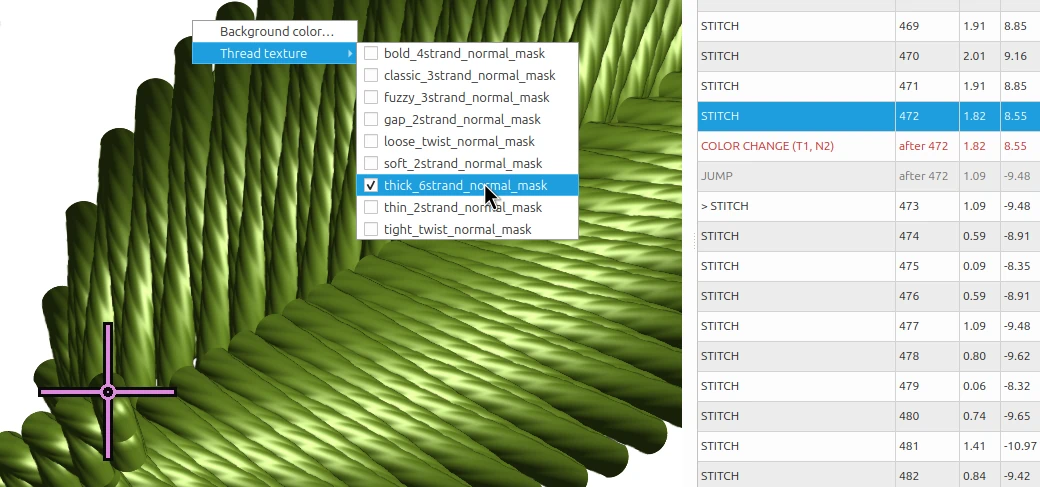
Detail of the normal-mapped thread texture used by the OpenGL renderer.
Install
uv tool install inksim
Requires Python 3.11+. See the installation guide for
uv setup and alternative installers.
Run
inksim
inksim design.pes
inksim design.pes --play
On Windows, inksim-gui design.pes starts without a console window.
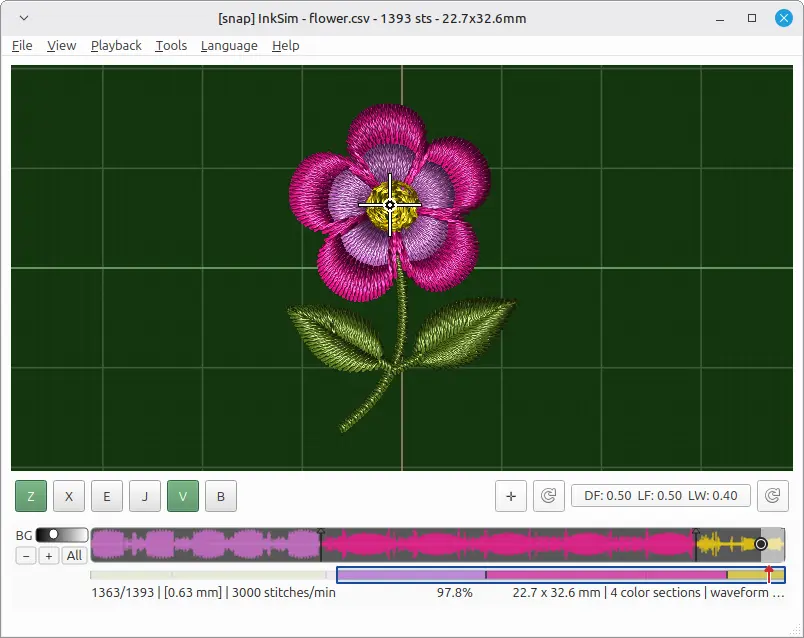
Open and preview
InkSim's file browser lets you browse embroidery designs, inspect detected Inkscape and Ink/Stitch paths, and preview stitches before opening a file.
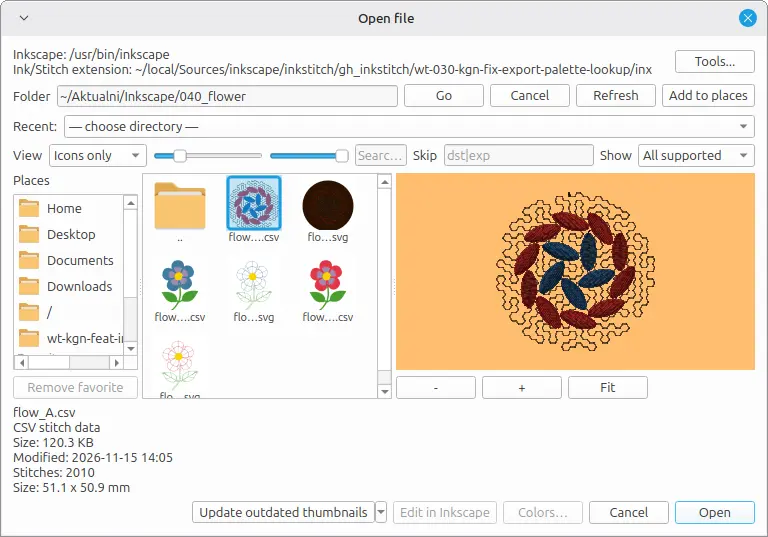
Inkscape integration
Install InkSim's extension from Tools → Inkscape Setup... in InkSim, then choose Extensions → Inksim → Preview in Inkscape. InkSim starts the preview application if needed. See the Inkscape workflow for details.
Documentation
- Documentation index
- Installation and running
- User guide
- Rendering modes and overlays
- Inkscape / Ink/Stitch workflow
- Application interconnect
- Developer guide
- Contributing
Background
The idea behind this tool dates back to 2013 with an experimental C++/Qt project called Orca, which originally explored graph algorithms for Inkscape on Linux before turning into a digitizer and stitch viewer. Here is an old recording of that early prototype in action:
InkSim is a fresh, standalone rewrite of that viewer concept -- built from scratch using Python, PySide6, and Numba. The main goal is to provide a fast, lightweight way to preview embroidery files without heavy overhead.
It was built to fill a small workflow gap, and it's shared with the hope that others in the Inkscape and Ink/Stitch community might find it helpful as well.
Special thanks to the Ink/Stitch team and community for keeping open-source embroidery alive and inspiring.
License
InkSim is released under the GNU General Public License v3 or later.
1 maintainer

Metadata
1 maintainer
Release files for inksim 0.6.0
For a detailed explanation of source distributions (sdists) and built distributions (wheels), please see the package formats documentation.
Source distribution (sdist)
| File | Size | Uploaded | Provenance | Actions |
|---|---|---|---|---|
| inksim-0.6.0.tar.gz | 1.3 MB | Without provenance | Details for inksim-0.6.0.tar.gz |
Built distribution (wheel)
| File | Interpreter | ABI | Platform | Actions Reset |
|---|---|---|---|---|
| inksim-0.6.0-py3-none-any.whl | Python 3 | none | any | Details for inksim-0.6.0-py3-none-any.whl |
Total release size: 2.6 MB
Release files / inksim-0.6.0.tar.gz
| Download URL | inksim-0.6.0.tar.gz |
|---|---|
| Size | 1.3 MB |
| Tags | Source |
|
SHA-256 checksum How to use checksums |
b66582531676869b4d2fb97325e11344dd29fa3e0f78a74f0f0cbc5ed367542a
|
|
BLAKE2b-256 checksum How to use checksums |
2eba145beab5df59500603834c3c700005e245f4c2d332f06b645a4fab46e360
|
| Upload date | |
|
Uploaded using Trusted Publishing? What is trusted publishing? |
No |
| Uploaded via |
twine/7.0.0 CPython/3.14.5
|
Release files / inksim-0.6.0-py3-none-any.whl
| Download URL | inksim-0.6.0-py3-none-any.whl |
|---|---|
| Size | 1.3 MB |
| Tags | Python 3 |
|
SHA-256 checksum How to use checksums |
4102ad65079cf788bf3f05b9f7b1484e653c7a720e878937cf94a0b4e3a9c94e
|
|
BLAKE2b-256 checksum How to use checksums |
49404354ed2590be5e63de9891daf70ebf89f9f166e29f3f4dfa43ad07baf6f7
|
| Upload date | |
|
Uploaded using Trusted Publishing? What is trusted publishing? |
No |
| Uploaded via |
twine/7.0.0 CPython/3.14.5
|
Security for inksim 0.6.0
Provenance
Provenance describes where a file came from. On PyPI, provenance is shared via attestations, which provide a verifiable record of the build or publishing details. View details, limitations and caveats.
No provenance found
None of the files in this release were uploaded with provenance metadata.
A note on package security
PyPI is a repository for distributing packages, not a service for auditing them. While third-party security researchers and our staff do their best to detect and remove malicious packages, PyPI cannot guarantee the quality, security or suitability of any given package.
To learn more about protecting yourself from malicious actors, visit our package security documentation.














