
InkSim
InkSim is a standalone interactive embroidery simulator and preview renderer. It opens embroidery files, displays their stitch sequence, and lets the user inspect or replay the design before production.

The viewer now includes an OpenGL textured renderer that draws stitches as
realistic ribbon quads with normal-mapped thread and Blinn-Phong lighting. Press
Z in the viewer to toggle between the CPU and GPU renderers. The GPU renderer
requires OpenGL 3.3; older systems and virtual machines fall back to the
CPU raster renderer automatically.
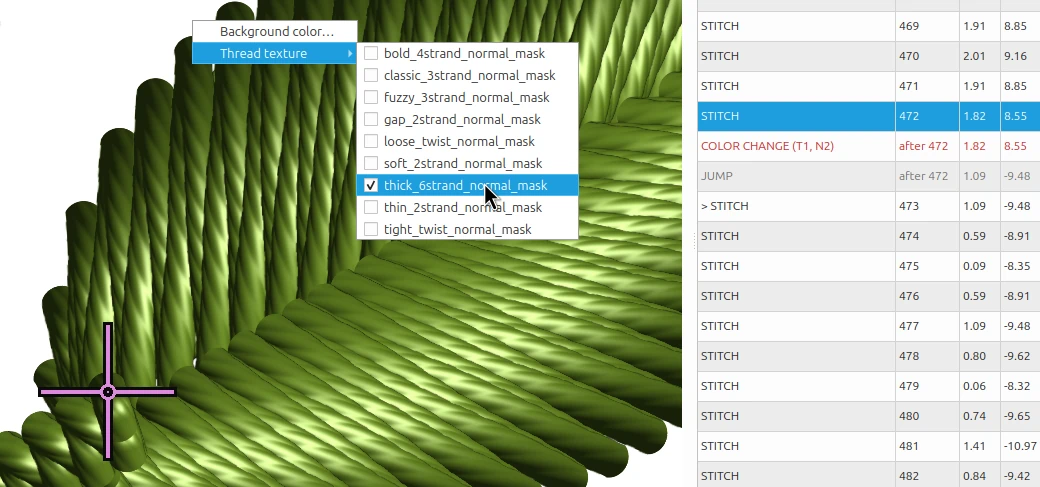
Detail of the normal-mapped thread texture used by the OpenGL renderer.
InkSim is experimental software provided for development and testing.
Running
Run InkSim from your terminal or command prompt:
inksim design.pes
On Windows you can also use inksim-gui design.pes to launch without a console
window. Both command names work the same on Windows, macOS, and Linux.
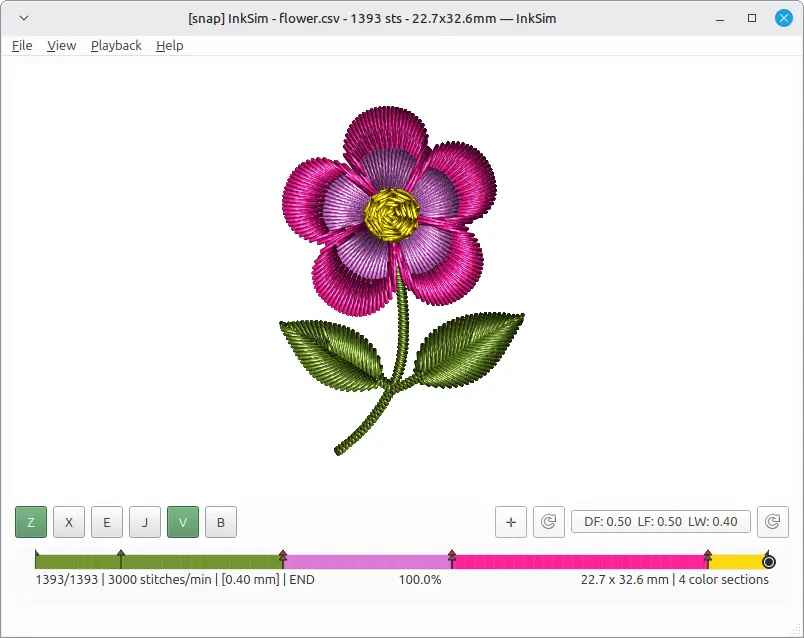
The InkSim window after opening a design.
Installation
InkSim requires Python 3.11 or newer. Install it with your preferred Python
package manager (uv, pip, pipx, or another). See the
installation guide for step-by-step instructions for
the most common tools, including how to add InkSim to your PATH and how to
install a development copy from source.
Quick start
inksim
inksim design.pes
inksim design.pes --play
Documentation
- Installation and running
- User guide
- Rendering modes and overlays
- Inkscape / Ink/Stitch workflow
- Application interconnect
- Contributing
Background
The idea behind this tool dates back to 2013 with an experimental C++/Qt project called Orca, which originally explored graph algorithms for Inkscape on Linux before turning into a digitizer and stitch viewer. Here is an old recording of that early prototype in action:
InkSim is a fresh, standalone rewrite of that viewer concept -- built from scratch using Python, PySide6, and Numba. The main goal is to provide a fast, lightweight way to preview embroidery files without heavy overhead.
It was built to fill a small workflow gap, and it's shared with the hope that others in the Inkscape and Ink/Stitch community might find it helpful as well.
Special thanks to the Ink/Stitch team and community for keeping open-source embroidery alive and inspiring.
License
InkSim is released under the GNU General Public License v3 or later.
1 maintainer

Metadata
1 maintainer
Release files for inksim 0.3.6
For a detailed explanation of source distributions (sdists) and built distributions (wheels), please see the package formats documentation.
Source distribution (sdist)
| File | Size | Uploaded | |
|---|---|---|---|
| inksim-0.3.6.tar.gz | 477.3 kB | Details |
Built distribution (wheel)
| File | Interpreter | ABI | Platform | Reset |
|---|---|---|---|---|
| inksim-0.3.6-py3-none-any.whl | Python 3 | none | any | Details |
Total release size: 974.0 kB
Release files / inksim-0.3.6.tar.gz
| Download URL | inksim-0.3.6.tar.gz |
|---|---|
| Size | 477.3 kB |
| Tags | Source |
|
SHA-256 checksum How to use checksums |
7c8a6fe9a36339e96876062c61e1192cc3dacf91ce440c24656f66f0ca08af89
|
|
BLAKE2b-256 checksum How to use checksums |
76943f38311160eb797d8d724ca176de8a82dadebd721839163783b6b36eca1e
|
| Upload date | |
|
Uploaded using Trusted Publishing? What is trusted publishing? |
No |
| Uploaded via |
twine/7.0.0 CPython/3.14.5
|
Release files / inksim-0.3.6-py3-none-any.whl
| Download URL | inksim-0.3.6-py3-none-any.whl |
|---|---|
| Size | 496.7 kB |
| Tags | Python 3 |
|
SHA-256 checksum How to use checksums |
34b4f67a6245a204fe3edfc60b833f42ba0b0b6d9714fc26d3553d12c81e6adf
|
|
BLAKE2b-256 checksum How to use checksums |
dce4b162f099579c9d78ae38ce46650876b65ae614c8510bd3f53e285320f957
|
| Upload date | |
|
Uploaded using Trusted Publishing? What is trusted publishing? |
No |
| Uploaded via |
twine/7.0.0 CPython/3.14.5
|














