
Browse, compare, and price EC2 instances - TUI and CLI

Project description
Instancepedia - EC2 Instance Type Browser
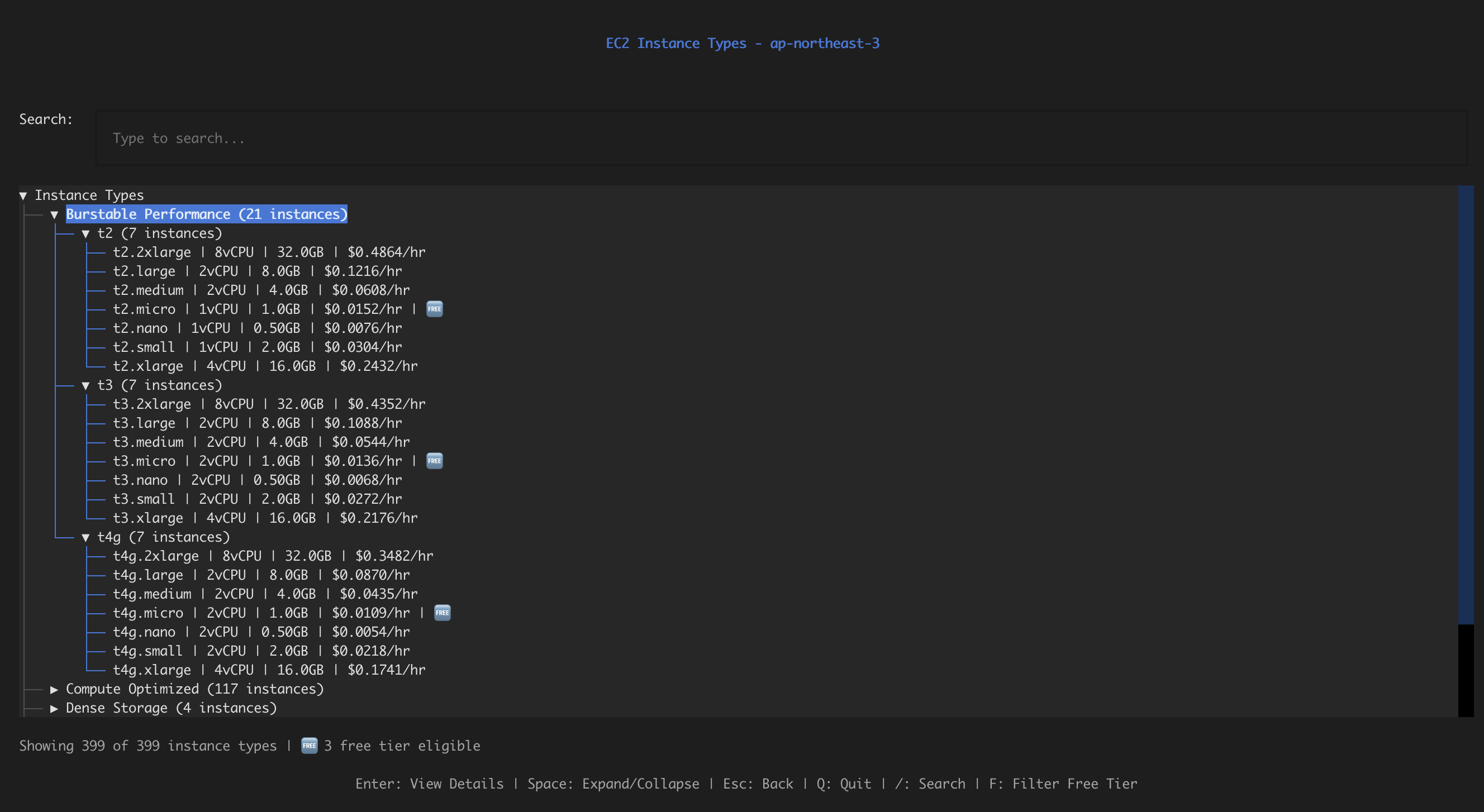
Browse AWS EC2 instance types with pricing in your terminal. Interactive TUI for exploration. Scriptable CLI for automation.
Quick Start
# Install
pip install instancepedia

# Configure AWS (if not already done)
aws configure

# Launch interactive browser
instancepedia

# Or use CLI mode
instancepedia list --region us-east-1
instancepedia pricing t3.micro
That's it! You're now browsing EC2 instances with real-time pricing.
Why Instancepedia?
- 🚀 Fast: Smart caching, batch API calls, instant results
- 💰 Complete Pricing: On-demand, spot, savings plans, reserved instances
- 🎯 Practical: Filter presets, cost optimization, multi-region comparison
- ⚡ Dual Mode: Interactive TUI for exploration, CLI for scripting
- 🆓 Free: Uses only free AWS APIs, never costs you money
Common Tasks
Browse All Instances Interactively
instancepedia
Press ? for keyboard shortcuts. Press F to filter, / to search, Enter to see details.
Find the Cheapest Instance for Your Workload
TUI: Open filter modal (F), set your requirements, press S to sort by price.
CLI:
# Web server: 4+ vCPU, 8+ GB RAM, current gen
instancepedia list --min-vcpu 4 --min-memory 8 --current-generation --sort price

# Database: Memory-optimized, 32+ GB
instancepedia list --family r6i,r7g --min-memory 32 --sort price

# Budget dev box: up to 2 vCPU, 4 GB, cheapest
instancepedia list --max-vcpu 2 --max-memory 4 --sort price | head -20
Compare Instance Types
TUI: Navigate to an instance, press C to mark it, repeat for second instance, press V to compare.
CLI:
# Side-by-side comparison
instancepedia compare t3.medium t3a.medium

# Compare all instances in a family
instancepedia compare-family t3
Get Pricing Information
# Single instance, all pricing types
instancepedia pricing t3.micro --region us-east-1

# Spot price history (30 days)
instancepedia spot-history t3.micro --region us-east-1

# Cost optimization recommendations
instancepedia optimize t3.micro --region us-east-1

# Multi-region comparison
instancepedia compare-regions t3.micro --regions us-east-1,us-west-2,eu-west-1
Use Filter Presets
# List built-in presets
instancepedia presets list

# Apply a preset
instancepedia presets apply web-server

# Create custom preset
instancepedia presets save my-preset --min-vcpu 4 --architecture arm64

# Delete custom preset
instancepedia presets delete my-preset
Export Data for Analysis
TUI: Press E to export current view to JSON and CSV.
CLI:
# Export filtered list to JSON
instancepedia list --family t3 --format json > t3-instances.json

# Export to CSV for spreadsheet
instancepedia list --current-generation --format csv > instances.csv
Key Features
Interactive TUI
- Hierarchical tree view with categories → families → instances
- Real-time pricing loading with 4-hour cache (instant on subsequent runs)
- Advanced filtering by vCPU, memory, GPU, architecture, price, and more
- Smart search with instant results as you type
- Cost optimization with intelligent recommendations (spot, right-sizing, savings plans)
- Spot price history with 30-day trends and volatility analysis
- Multi-region comparison to find the cheapest region
- Export to JSON/CSV for further analysis
Scriptable CLI
- Multiple output formats: Table, JSON, CSV
- Powerful filters: All TUI filters available in CLI
- Batch operations: Process multiple instances or regions
- Filter presets: Built-in and custom presets
- Quiet mode: Clean output for scripting (
--quiet)
Installation
From PyPI (Recommended)
pip install instancepedia
From Source
git clone https://github.com/pfrederiksen/instancepedia.git
cd instancepedia
pip install -e .
AWS Credentials
Choose one method:
# AWS CLI configuration
aws configure

# Environment variables
export AWS_ACCESS_KEY_ID=your-key
export AWS_SECRET_ACCESS_KEY=your-secret

# Named profile
export AWS_PROFILE=your-profile
Note: Instancepedia uses only free AWS APIs (EC2 DescribeInstanceTypes, EC2 DescribeSpotPriceHistory, Pricing GetProducts). You will never be charged for using this tool.
Documentation
- Quick Start Guide - Get productive in 5 minutes
- Complete Feature List - All capabilities explained
- CLI Reference - Every command and option
- Keyboard Shortcuts - TUI navigation
- Configuration Guide - Customize behavior
- Examples - Real-world usage scenarios
Example Workflows
Scenario: Choosing an Instance for a Web Application
# 1. Browse interactively to understand options
instancepedia

# 2. Filter to reasonable specs (4 vCPU, 8-16 GB, current gen)
# Press F, set filters, apply

# 3. Sort by price (press S repeatedly until "Price (Low-High)")

# 4. Compare top candidates (mark with C, view with V)

# 5. Check cost optimization (press O on selected instance)

# 6. View spot price history for fault-tolerant workloads (press P)

# 7. Compare pricing across regions (press R)

# 8. Export shortlist for team review (press E)
Scenario: Cost Optimization Analysis
# Get recommendations for existing instance
instancepedia optimize m5.xlarge --region us-east-1 --usage-pattern standard

# Compare spot pricing across regions
instancepedia compare-regions m5.xlarge --regions us-east-1,us-west-2,eu-west-1

# Analyze spot price history
instancepedia spot-history m5.xlarge --region us-east-1 --days 30

# Find cheaper alternatives in the same family
instancepedia compare-family m5 --sort price
Scenario: Infrastructure Planning Script
#!/bin/bash
# Find the cheapest ARM instance with 4 vCPU and 16 GB RAM

INSTANCE=$(instancepedia list \
  --architecture arm64 \
  --min-vcpu 4 \
  --max-vcpu 4 \
  --min-memory 16 \
  --max-memory 16 \
  --current-generation \
  --sort price \
  --format json \
  --quiet | jq -r '.[0].instance_type')

echo "Recommended instance: $INSTANCE"

# Get detailed pricing
instancepedia pricing "$INSTANCE" --format json
Configuration
Instancepedia can be configured via ~/.instancepedia/config.toml:
# Default AWS region
default_region = "us-east-1"

# Default AWS profile (optional)
# aws_profile = "my-profile"

# Enable Vim-style navigation (hjkl)
vim_keys = false

# TUI pricing concurrency (5-50)
tui_pricing_concurrency = 20

# CLI pricing concurrency (5-100)
cli_pricing_concurrency = 50

# Pricing cache TTL in seconds (default: 4 hours)
pricing_cache_ttl = 14400
Keyboard Shortcuts (TUI)
Essential shortcuts (press ? for complete list):
| Key | Action |
|---|---|
/ |
Search instances |
F |
Open filter modal |
S |
Cycle sort order |
Enter |
View instance details |
C |
Mark instance for comparison |
V |
View comparison (2 marked instances) |
P |
Spot price history |
O |
Cost optimization recommendations |
R |
Multi-region pricing comparison |
E |
Export to JSON/CSV |
Q or Esc |
Quit / Go back |
? |
Show all shortcuts |
CLI Commands
# Instance browsing
instancepedia list [filters]
instancepedia show <instance-type>
instancepedia search <query>

# Pricing and cost analysis
instancepedia pricing <instance-type>
instancepedia spot-history <instance-type>
instancepedia optimize <instance-type>
instancepedia cost-estimate <instance-type>

# Comparison
instancepedia compare <type1> <type2>
instancepedia compare-family <family>
instancepedia compare-regions <instance-type> --regions r1,r2,r3

# Presets
instancepedia presets list
instancepedia presets apply <preset-name>
instancepedia presets save <name> [filters]
instancepedia presets delete <name>

# Utilities
instancepedia regions
instancepedia cache stats
instancepedia cache clear
Troubleshooting
Slow first launch? Pricing data is being fetched. Subsequent runs use the cache (4-hour TTL) and are instant.
AWS credentials error?
Run aws configure or see Configuration Guide.
Permission errors?
Ensure your AWS credentials have ec2:DescribeInstanceTypes, ec2:DescribeSpotPriceHistory, and pricing:GetProducts permissions.
Prices not showing?
Some regions may have rate limits. Press R in TUI to retry failed requests.
Want debug info?
Run with --debug flag: instancepedia --debug
Contributing
Contributions welcome! See CONTRIBUTING.md for guidelines.
License
MIT License - see LICENSE file for details.
Related Projects
- ec2instances.info - Web-based EC2 instance browser
- AWS CLI - Official AWS command-line tool
- Textual - TUI framework (powers Instancepedia)
Acknowledgments
Built with Textual by Textualize.io. Pricing data from AWS Price List API.
Made with ❤️ for the AWS community
Release history Release notifications | RSS feed


Download files
Download the file for your platform. If you're not sure which to choose, learn more about installing packages.
Source Distribution
Built Distribution
Filter files by name, interpreter, ABI, and platform.
If you're not sure about the file name format, learn more about wheel file names.
Copy a direct link to the current filters
File details
Details for the file instancepedia-0.10.9.tar.gz.
File metadata
- Download URL: instancepedia-0.10.9.tar.gz
- Upload date:
- Size: 590.9 kB
- Tags: Source
- Uploaded using Trusted Publishing? No
- Uploaded via: twine/6.2.0 CPython/3.11.14
File hashes
| Algorithm | Hash digest | |
|---|---|---|
| SHA256 |
7db6a04d97d241804d0a3457c056b3e729ca51a4296e70aeb6e4cff188a2dfa8
|
|
| MD5 |
36acd9cc5fbaac0706f86d71be378ed7
|
|
| BLAKE2b-256 |
9ef9bd079e1c42a55768d4cae3790953e8f18a83d5bc5b061551b13866df0e99
|
File details
Details for the file instancepedia-0.10.9-py3-none-any.whl.
File metadata
- Download URL: instancepedia-0.10.9-py3-none-any.whl
- Upload date:
- Size: 129.0 kB
- Tags: Python 3
- Uploaded using Trusted Publishing? No
- Uploaded via: twine/6.2.0 CPython/3.11.14
File hashes
| Algorithm | Hash digest | |
|---|---|---|
| SHA256 |
f878f10daafbe32e2c51da2586631a74d79525c99f05a40eea2f53e0026763bc
|
|
| MD5 |
dfc7b44d0045421b4c95b7d348a722ce
|
|
| BLAKE2b-256 |
bcdab6dd618342a726686cdd03c74690cd3e3637f94c0aab5401138bfc8ec4ec
|






