
EC2 Instance Type Browser - TUI and CLI

Project description
Instancepedia - EC2 Instance Type Browser
A Terminal User Interface (TUI) and Command-Line Interface (CLI) application for browsing AWS EC2 instance types with detailed information and free tier eligibility. Use the interactive TUI for exploration or the CLI for scripting and automation.
Features
TUI Mode (Interactive)
- 🗺️ Region Selection: Browse instance types for any AWS region you have access to
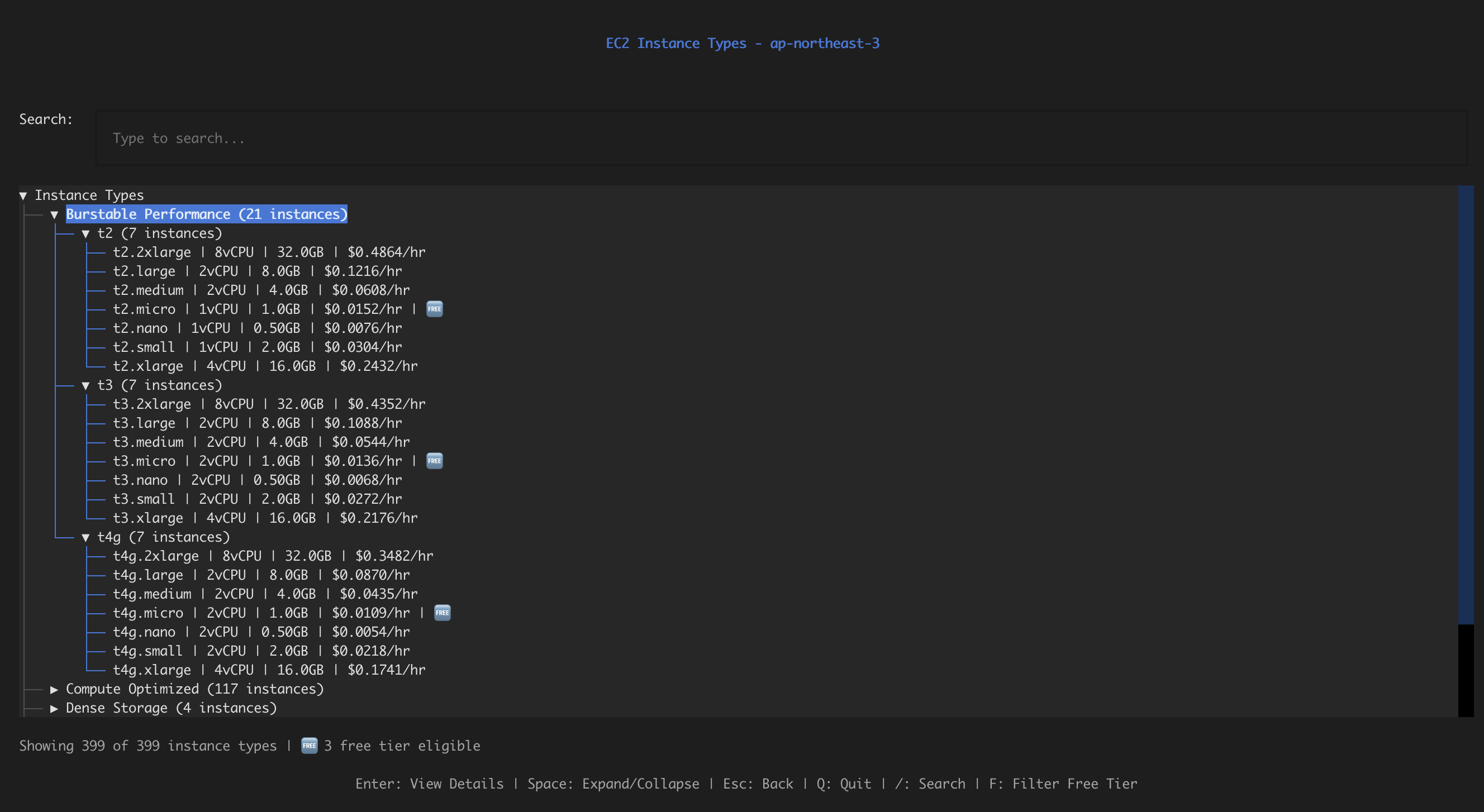
- 📋 Categorized Instance List: View all available EC2 instance types organized by family and category
- Hierarchical tree structure: Categories → Families → Instances
- Categories include: General Purpose, Compute Optimized, Memory Optimized, Burstable Performance, GPU Instances, Storage Optimized, etc.
- Instances grouped by family (e.g., m5, m6i, t2, t3) within categories
- Root node and families expand automatically when parent categories are expanded
- Expand/collapse categories and families to reduce clutter
- Expanded state is preserved during pricing updates
- 💰 Pricing Information: See on-demand and spot prices for each instance type
- Prices load in the background for all instance types
- Real-time pricing updates in the tree view (throttled to preserve expanded state)
- Batch fetching for optimal performance
- Automatic retry with exponential backoff on rate limits
- Pricing displayed directly in the instance list: instance type, vCPU, memory, and price per hour
- Smart caching with 4-hour TTL to reduce API calls and improve performance
- Cache hit statistics displayed in the header during and after pricing loads
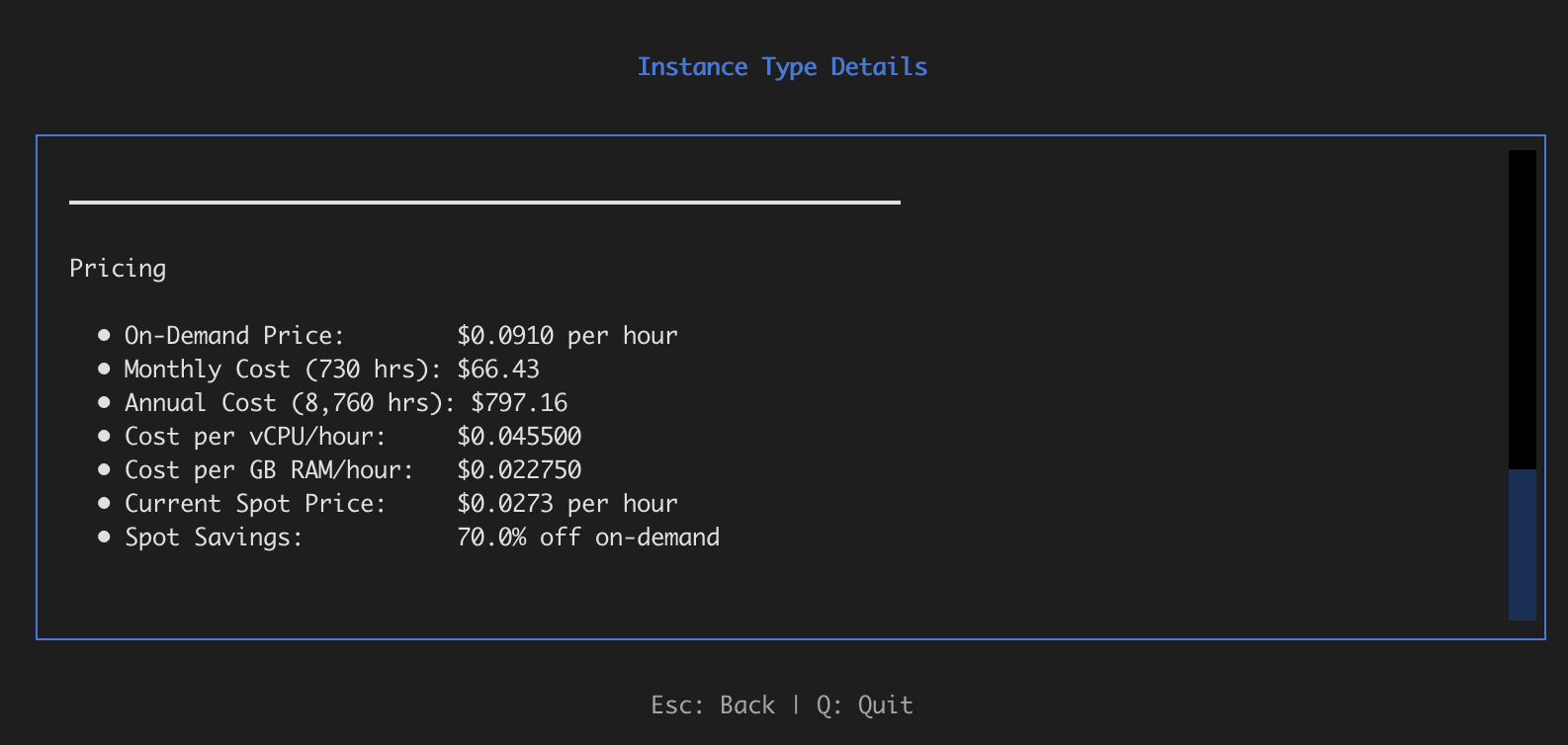
- 💵 Cost Calculator: Automatic calculation of monthly and annual costs, plus cost per vCPU and GB RAM
- 🔍 Search & Filter: Search by instance type name, filter by free tier eligibility
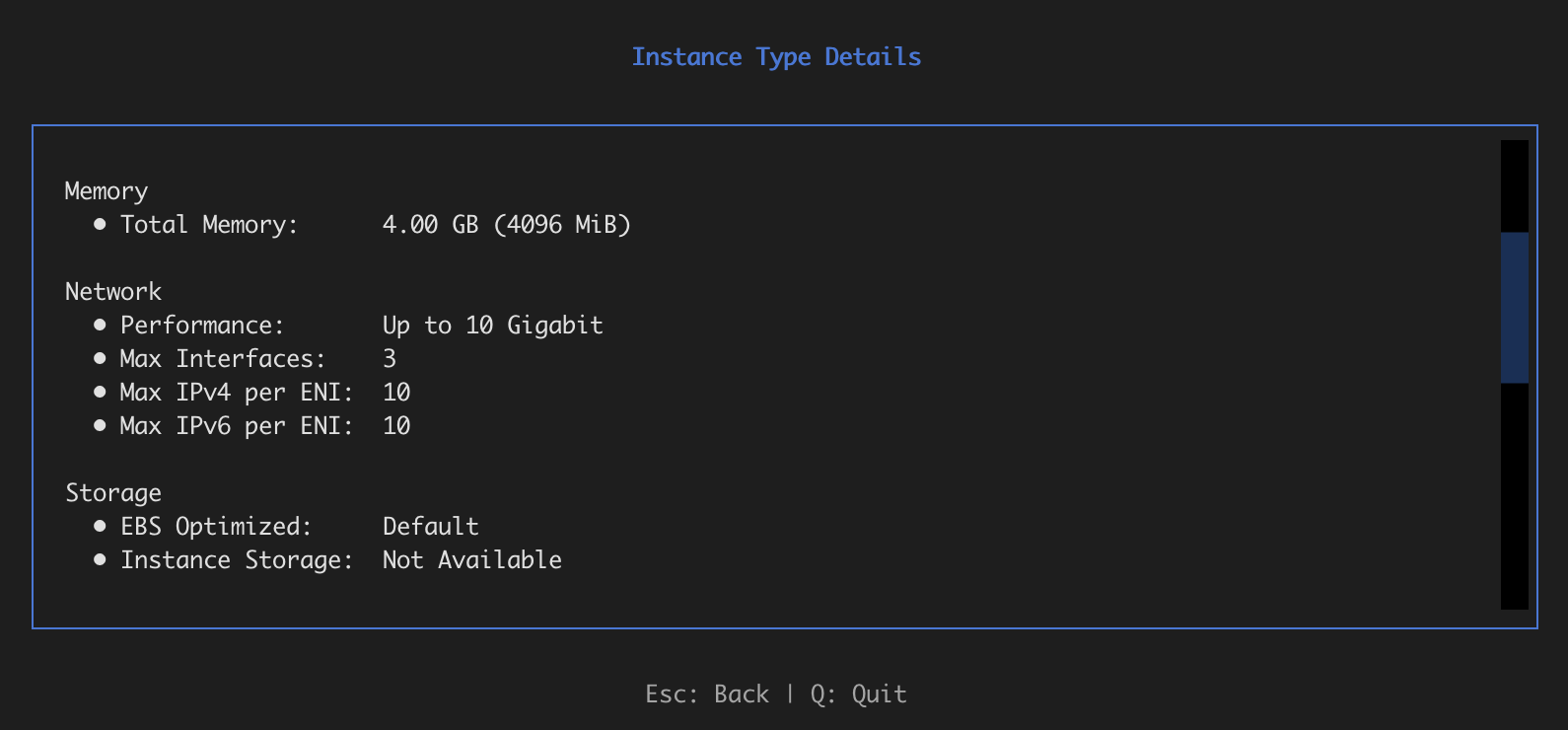
- 📊 Detailed Information: Comprehensive details for each instance type including:
- Compute specifications (vCPU, cores, threads)
- Memory information
- Network performance
- Storage options (EBS, instance store)
- Architecture support
- Pricing and cost analysis with spot price savings
- 🆓 Free Tier Indicators: Clearly marked free tier eligible instances
- ⚡ Fast Navigation: Smooth screen transitions with loading indicators
- 🐛 Debug Mode: Scrolling debug log for troubleshooting (use
--debugflag)
CLI Mode (Headless)
- 🔧 Scriptable: Perfect for automation, CI/CD pipelines, and scripting
- 📊 Multiple Output Formats: Table (human-readable), JSON (machine-readable), CSV (spreadsheet-friendly)
- 🔍 Powerful Filtering: Search, filter by family, free tier only, and more
- 💰 Pricing Queries: Get pricing information for specific instances (on-demand and spot prices)
- 📈 Comparison: Compare two instance types side-by-side with detailed metrics
- 📁 File Output: Save results to files for further processing
- ⚡ Fast: No UI overhead, optimized for batch operations
- 🔇 Quiet Mode: Suppress progress messages for clean script output
- 💾 Cache Management: View cache statistics and clear cached pricing data
Installation
From PyPI (Recommended)
pip install instancepedia
From Source
- Clone the repository:
git clone https://github.com/pfrederiksen/instancepedia.git
cd instancepedia
- Install dependencies:
pip install -r requirements.txt
Or install in development mode:
pip install -e .
Configure AWS Credentials
After installation, configure AWS credentials (one of the following):
- Run
aws configure - Set environment variables:
AWS_ACCESS_KEY_ID,AWS_SECRET_ACCESS_KEY - Use an AWS profile:
export AWS_PROFILE=your-profile
Usage
TUI Mode (Interactive)
After installation from PyPI, simply run:
instancepedia
Or explicitly launch TUI mode:
instancepedia --tui
Or with debug mode enabled (shows scrolling debug log):
instancepedia --tui --debug
If you installed from source (development mode), you can also run:
python3 -m src.main
Note: Pricing information loads in the background after instance types are displayed. The app uses smart caching with a 4-hour TTL, so subsequent runs are much faster:
- First run: Pricing fetches from AWS API (shows "⏳ Loading..." in tree)
- Subsequent runs: Pricing loads instantly from cache (shows cache hit statistics in header)
- Progress indicator shows how many prices have been loaded and cache hit rate
- Real-time updates as prices load (tree updates are throttled to preserve your expanded sections)
- Parallel requests and batch processing for optimal performance
- Your expanded categories and families remain open during pricing updates
CLI Mode (Headless)
The CLI mode provides command-line access to all functionality, perfect for scripting and automation.
List Instance Types
# List all instance types in a region
instancepedia list --region us-east-1

# List as JSON (for scripting)
instancepedia list --region us-east-1 --format json

# List as CSV (for spreadsheets)
instancepedia list --region us-east-1 --format csv --output instances.csv

# Filter by search term
instancepedia list --region us-east-1 --search t3

# Show only free tier instances
instancepedia list --region us-east-1 --free-tier-only

# Filter by instance family
instancepedia list --region us-east-1 --family m5

# Include pricing information (cached for fast subsequent runs)
instancepedia list --region us-east-1 --include-pricing
Show Instance Details
# Show detailed information for a specific instance
instancepedia show t3.micro --region us-east-1

# Show with pricing
instancepedia show t3.micro --region us-east-1 --include-pricing

# Output to file
instancepedia show t3.micro --region us-east-1 --format json --output t3-micro.json
Search Instance Types
# Search for instances matching a term
instancepedia search m5 --region us-east-1

# Search with filters
instancepedia search t3 --region us-east-1 --free-tier-only
Get Pricing Information
# Get pricing for a specific instance
instancepedia pricing t3.micro --region us-east-1

# Get pricing as JSON
instancepedia pricing t3.micro --region us-east-1 --format json
Example Output (table format):
Pricing for t3.micro in us-east-1:

On-Demand: $0.0104/hr
Monthly (730 hrs): $7.59
Annual: $91.10
Spot: $0.0036/hr
Spot Savings: 65.4%
List Available Regions
# List all available regions
instancepedia regions

# List as JSON
instancepedia regions --format json
Compare Instance Types
# Compare two instance types
instancepedia compare t3.micro t3.small --region us-east-1

# Compare with pricing
instancepedia compare t3.micro t3.small --region us-east-1 --include-pricing
Example Output (table format):
+--------------------+-----------------+-----------------+
| Property           | t3.micro        | t3.small        |
+====================+=================+=================+
| Instance Type      | t3.micro        | t3.small        |
+--------------------+-----------------+-----------------+
| vCPU               | 2               | 2               |
+--------------------+-----------------+-----------------+
| Memory (GB)        | 1.0             | 2.0             |
+--------------------+-----------------+-----------------+
| Network            | Up to 5 Gigabit | Up to 5 Gigabit |
+--------------------+-----------------+-----------------+
| On-Demand Price/hr | $0.0104         | $0.0208         |
+--------------------+-----------------+-----------------+
| Free Tier Eligible | Yes 🆓           | No              |
+--------------------+-----------------+-----------------+
Manage Pricing Cache
Instancepedia automatically caches pricing data to reduce API calls and improve performance. Cache entries are stored in ~/.instancepedia/cache/ with a default TTL of 4 hours.
# View cache statistics
instancepedia cache stats

# View cache statistics as JSON
instancepedia cache stats --format json

# Clear all cached pricing data
instancepedia cache clear

# Clear cache for a specific region
instancepedia cache clear --region us-east-1

# Clear cache for a specific instance type
instancepedia cache clear --instance-type t3.micro

# Clear cache without confirmation prompt
instancepedia cache clear --force
Example Output (stats):
Cache Statistics:
  Location: /Users/username/.instancepedia/cache
  Total entries: 487
  Valid entries: 487
  Expired entries: 0
  Cache size: 89,234 bytes
  Oldest entry: 2026-01-06T10:30:15
  Newest entry: 2026-01-06T12:45:22
Benefits of Caching:
- Significantly faster pricing loads on subsequent runs
- Reduces AWS API calls and potential rate limiting
- Automatic cache expiry ensures pricing data stays reasonably current
- Cache is thread-safe and can be used from both TUI and CLI modes
- Failed pricing lookups are also cached to avoid repeated failures
Common Options
All CLI commands support these common options:
--region <region>- AWS region (default: from config or us-east-1)--profile <profile>- AWS profile name (overrides environment variable)--format <format>- Output format:table(default),json, orcsv--output <file>- Write output to file instead of stdout--quiet- Suppress progress messages (useful for scripting)--debug- Enable debug output with tracebacks
Note:
- When using
--format json, output is valid JSON that can be piped tojqor parsed by other tools - CSV format is suitable for importing into spreadsheets
- CLI commands return exit code 0 on success, 1 on error (useful for scripting)
- Progress messages are sent to stderr, so output can be redirected cleanly:
instancepedia list --region us-east-1 --format json > output.json
Examples
# Export all free tier instances to CSV
instancepedia list --region us-east-1 --free-tier-only --format csv --output free-tier.csv

# Get pricing for multiple instances (using shell loop)
for instance in t3.micro t3.small t3.medium; do
  instancepedia pricing $instance --region us-east-1 --format json
done

# Find all m5 instances with pricing
instancepedia list --region us-east-1 --family m5 --include-pricing --format json

# Compare instances across different regions
instancepedia compare t3.micro t3.small --region us-east-1 --include-pricing

# Search and filter with quiet mode (for scripts)
instancepedia search t3 --region us-east-1 --free-tier-only --format json --quiet

# Get instance details as JSON for processing
instancepedia show t3.micro --region us-east-1 --include-pricing --format json | jq '.instance.pricing'
Keyboard Shortcuts
Region Selector
↑↓- Navigate regionsEnter- Select regionEsc/Q- Quit
Instance List
↑↓- Navigate tree (move between categories, families, and instances)Enter- View details (on instance) or expand/collapse (on category/family)Space- Expand/collapse category or family/- Focus search inputF- Toggle free tier filter (show only free tier eligible instances)Esc- Back to region selectorQ- Quit
Tree Navigation Tips:
- The root "Instance Types" node is expanded by default
- Categories are collapsed by default to reduce initial clutter
- When you expand a category, all family nodes within it are automatically expanded
- Instance nodes show: instance type | vCPU count | memory | price | free tier indicator
- Search and filters work across all categories and families
Instance Detail
Esc- Back to listQ- Quit
Configuration
You can configure the application using environment variables:
INSTANCEPEDIA_AWS_REGION- Default AWS region (default: us-east-1)INSTANCEPEDIA_AWS_PROFILE- AWS profile to use
IAM Permissions
Instancepedia requires minimal AWS permissions to function. The application needs read-only access to EC2 instance type information and pricing data.
Required IAM Policy
Create an IAM policy with the following JSON:
{
    "Version": "2012-10-17",
    "Statement": [
        {
            "Effect": "Allow",
            "Action": [
                "ec2:DescribeRegions",
                "ec2:DescribeInstanceTypes",
                "ec2:DescribeSpotPriceHistory"
            ],
            "Resource": "*"
        },
        {
            "Effect": "Allow",
            "Action": [
                "pricing:GetProducts"
            ],
            "Resource": "*"
        }
    ]
}
Note: The pricing:GetProducts permission is required to display on-demand pricing. The ec2:DescribeSpotPriceHistory permission is required to display current spot prices. If you don't need pricing information, you can omit these permissions and the application will still function (pricing will show as "N/A").
The application handles AWS API rate limiting automatically with exponential backoff retry logic, so you don't need to worry about rate limit errors.
Setting Up IAM Permissions
-
Create the policy (using AWS CLI):
aws iam create-policy \
  --policy-name InstancepediaReadOnly \
  --policy-document file://instancepedia-policy.json
-
Attach the policy to a user:
aws iam attach-user-policy \
  --user-name YOUR_USERNAME \
  --policy-arn arn:aws:iam::ACCOUNT_ID:policy/InstancepediaReadOnly
-
Or attach to a role (for EC2 instances, Lambda, etc.):
aws iam attach-role-policy \
  --role-name YOUR_ROLE_NAME \
  --policy-arn arn:aws:iam::ACCOUNT_ID:policy/InstancepediaReadOnly
Note: Replace YOUR_USERNAME, YOUR_ROLE_NAME, and ACCOUNT_ID with your actual values.
Alternatively, you can use the AWS Console:
- Go to IAM → Policies → Create policy
- Select JSON tab and paste the policy above
- Name it
InstancepediaReadOnlyand create it - Attach it to your user or role as needed
Performance
Instancepedia is optimized for performance in both TUI and CLI modes:
TUI Mode
- Smart Caching: Pricing data is cached locally with a 4-hour TTL, dramatically reducing load times on subsequent runs
- Cache Statistics: Real-time display of cache hit rates in the pricing header
- Parallel Pricing Fetching: Uses thread pools to fetch pricing data concurrently (10 parallel workers)
- Batch Spot Price Queries: Fetches spot prices in batches of up to 50 instance types per API call
- Automatic Retry: Handles rate limiting with exponential backoff (1s, 2s, 4s, etc.)
- Background Loading: Pricing loads in the background so you can browse instance types immediately
- Throttled UI Updates: Tree updates are throttled (every 10 pricing updates) to prevent UI flicker and preserve expanded state
- State Preservation: Expanded categories and families are preserved during tree rebuilds
CLI Mode
- Smart Caching: Pricing data is cached locally (same cache as TUI mode) for faster repeated queries
- Efficient Filtering: Filters are applied in-memory after fetching, minimizing API calls
- Optional Pricing: Pricing is only fetched when
--include-pricingis specified - Parallel Processing: When fetching pricing for multiple instances, uses parallel requests (5 workers)
- Streaming Output: Results are printed as they're processed (for table format)
- Fast JSON/CSV Export: Direct serialization without UI overhead
- Cache Management: CLI commands to view cache statistics and clear cached data
Requirements
- Python 3.9+
- AWS credentials configured
- Dependencies (installed automatically with pip):
boto3>=1.28.0- AWS SDK for sync operationsaioboto3>=12.0.0- Async AWS SDK for TUItextual>=0.40.0- TUI frameworkpydantic>=2.0.0- Data validationpydantic-settings>=2.0.0- Settings managementtabulate>=0.9.0- Table formatting for CLI
Development
Setting Up Development Environment
- Clone the repository:
git clone https://github.com/pfrederiksen/instancepedia.git
cd instancepedia
- Install in development mode with dev dependencies:
pip install -e ".[dev]"
This installs the package in editable mode along with development tools (build, twine, pytest).
Creating Releases
Releases are automated using the release script. The script handles version bumping, git tagging, and triggering GitHub releases.
Prerequisites:
- Be on the
mainbranch - Have a clean working directory (no uncommitted changes)
- Be up to date with the remote repository
Usage:
# Bump patch version (0.1.1 -> 0.1.2)
./scripts/release.sh patch

# Bump minor version (0.1.1 -> 0.2.0)
./scripts/release.sh minor

# Bump major version (0.1.1 -> 1.0.0)
./scripts/release.sh major

# Use a specific version
./scripts/release.sh 0.2.0
The script will:
- Update the version in
pyproject.toml - Create a commit with the version bump
- Create an annotated git tag (e.g.,
v0.1.2) - Push the commit to
main - Push the tag (which automatically triggers the GitHub Actions workflow to create a GitHub release)
Note: After creating a release, you can publish to PyPI using the publish script (see below).
Building and Publishing
To build the package for PyPI:
- Install build tools (use a virtual environment):
python3 -m venv .venv
source .venv/bin/activate
pip install --upgrade build twine
- Build the package:
python3 -m build
- Check the package:
python3 -m twine check dist/*
- Publish to TestPyPI (recommended first):
python3 -m twine upload --repository testpypi dist/*
- Publish to PyPI:
python3 -m twine upload dist/*
Or use the helper script:
./scripts/publish.sh testpypi  # Test first
./scripts/publish.sh pypi      # Production
Running Tests
The test suite includes comprehensive tests for all components:
# Run all tests (124 tests covering CLI, TUI, and services)
pytest

# Run with coverage report
pytest --cov=src --cov-report=html

# Run specific test modules
pytest tests/test_cli_*.py        # CLI tests
pytest tests/test_tui_*.py        # TUI tests

# Run with verbose output
pytest -v

# Run tests without coverage (faster)
pytest --no-cov
Test Coverage:
- ✅ CLI: Output formatters (Table, JSON, CSV), command handlers, argument parser
- ✅ TUI: All screens (region selector, instance list, instance detail), navigation, filtering
- ✅ Services: AWS client integration, pricing services, caching
- ✅ All tests use mocking to avoid requiring AWS credentials
The test suite validates functionality including error handling, output formatting, UI interactions, and caching.
Project Structure
instancepedia/
├── src/                          # Source code
│   ├── __init__.py
│   ├── app.py                    # Main TUI application
│   ├── main.py                   # Entry point (supports both TUI and CLI)
│   ├── cache.py                  # Pricing cache with TTL support
│   ├── debug.py                  # Debug utilities
│   ├── exceptions.py             # Custom exception types
│   ├── logging_config.py         # Logging configuration
│   ├── cli/                      # CLI module (headless mode)
│   │   ├── __init__.py
│   │   ├── commands.py           # CLI command handlers (including cache management)
│   │   ├── output.py             # Output formatters (table, JSON, CSV)
│   │   └── parser.py             # Argument parser
│   ├── config/                   # Configuration
│   │   ├── __init__.py
│   │   └── settings.py           # Configuration settings
│   ├── models/                   # Data models
│   │   ├── __init__.py
│   │   ├── free_tier.py
│   │   ├── instance_type.py
│   │   └── region.py
│   ├── services/                 # AWS service wrappers
│   │   ├── __init__.py
│   │   ├── async_aws_client.py   # Async AWS client (aioboto3)
│   │   ├── async_pricing_service.py  # Async pricing service with caching
│   │   ├── aws_client.py         # Sync AWS client
│   │   ├── free_tier_service.py
│   │   ├── instance_service.py
│   │   └── pricing_service.py    # Sync pricing service with caching
│   └── ui/                       # TUI screens
│       ├── __init__.py
│       ├── instance_detail.py
│       ├── instance_list.py      # Shows cache statistics
│       └── region_selector.py
├── tests/                        # Test suite (124 tests)
│   ├── __init__.py
│   ├── conftest.py               # Pytest fixtures
│   ├── test_cli_commands.py      # CLI command tests
│   ├── test_cli_output.py        # Output formatter tests
│   ├── test_cli_parser.py        # Argument parser tests
│   ├── test_tui_*.py             # TUI component tests
│   └── ...
├── scripts/                      # Utility scripts
│   ├── publish.sh                # PyPI publishing helper
│   └── release.sh                # Release automation script
├── screenshots/                  # Application screenshots
├── .gitignore                   # Git ignore rules
├── LICENSE                      # MIT License
├── MANIFEST.in                  # Package manifest for PyPI
├── pyproject.toml               # Project configuration and metadata
├── requirements.txt             # Python dependencies
└── README.md                    # This file
License
MIT
Release history Release notifications | RSS feed


Download files
Download the file for your platform. If you're not sure which to choose, learn more about installing packages.
Source Distribution
Built Distribution
Filter files by name, interpreter, ABI, and platform.
If you're not sure about the file name format, learn more about wheel file names.
Copy a direct link to the current filters
File details
Details for the file instancepedia-0.3.1.tar.gz.
File metadata
- Download URL: instancepedia-0.3.1.tar.gz
- Upload date:
- Size: 459.2 kB
- Tags: Source
- Uploaded using Trusted Publishing? No
- Uploaded via: twine/6.2.0 CPython/3.11.14
File hashes
| Algorithm | Hash digest | |
|---|---|---|
| SHA256 |
0afd102099660ac8216dd4cc693c5873b3163d87d2644ac28bfc9248d17114b6
|
|
| MD5 |
ed27a2368f029a1d91d202f1eb976169
|
|
| BLAKE2b-256 |
b673ec16a67648312e2b42844b022acb8643577fc8028ca5b15a38d3e3802b4c
|
File details
Details for the file instancepedia-0.3.1-py3-none-any.whl.
File metadata
- Download URL: instancepedia-0.3.1-py3-none-any.whl
- Upload date:
- Size: 61.7 kB
- Tags: Python 3
- Uploaded using Trusted Publishing? No
- Uploaded via: twine/6.2.0 CPython/3.11.14
File hashes
| Algorithm | Hash digest | |
|---|---|---|
| SHA256 |
a3a25e2e89acbbba7d952451150403ab8f5b6e4fb78b0094ab7bca1750e49781
|
|
| MD5 |
37680a80e5ec5301e2e40c9f38bfcb08
|
|
| BLAKE2b-256 |
d08e3152139536724dcdbb0800906309fff84a7ef7d362b13affcd1c01f5ae23
|






