
jevbrief
Clean, traceable state briefings for TypeSafe's Jev, from any source.
Other tools show what Jev decided. jevbrief shows what Jev was told, what it wasn't told, and why.


Documentation · Quick start · Adapters · Benchmarks · Contributing
Why jevbrief
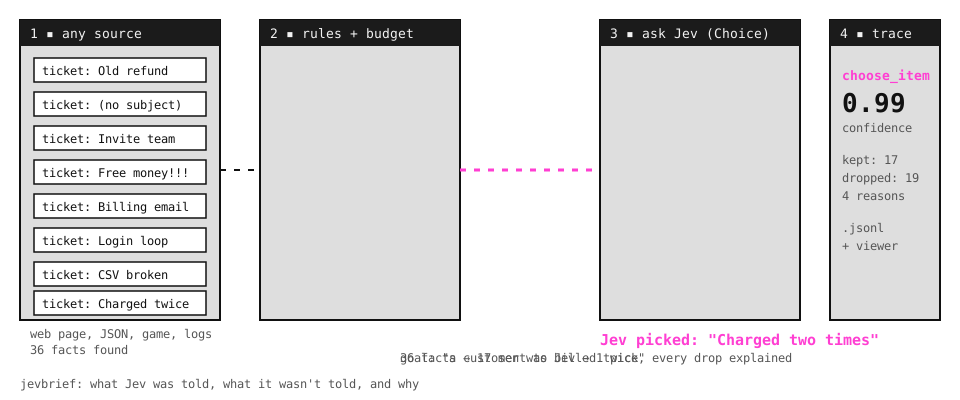
Jev turns state into typed decisions. It does its best work on small, relevant state, and it is weak at raw numbers, dates, and long lists of irrelevant detail. Real sources are the opposite: a web page has hundreds of elements, an agent can call a hundred tools, and a failed build prints thousands of log lines.
jevbrief sits between your source and Jev. It keeps what matters, drops the rest with a reason for every drop, asks Jev one clear question, and records the whole decision so you can replay it.
Quick start
pip install jevbrief # tools, ci, otel, and json; add [web] or [nes], or [all] for everything
Set TYPESAFE_API_KEY (get one at console.typesafe.ai) in your environment or a .env file. inspect needs no key and costs nothing. ask calls Jev and --view replays the decision:
gh run view <run id> --log-failed > run.log
jevbrief inspect run.log --adapter ci --goal "CI is red on main"
jevbrief ask     run.log --adapter ci --goal "CI is red on main" --view
27 log lines -> 7 failures -> 3 sent to Jev
likely cause: Run pytest -q: E KeyError: 'currency_code'   (confidence 0.84)
looks flaky: no (0.07)
Building an agent? One call narrows any mix of tools to the ones that fit the current step, and returns your own objects. The tools can be your functions, MCP servers, LangChain, CrewAI, OpenAI, or Anthropic tools. Another call tells you when the agent is going in circles.
from jevbrief import select_tools, pick_tool, check_progress

llm.bind_tools(select_tools(tools, goal))     # ranking only: local, free, no API key
pick = pick_tool(tools, goal)                 # Jev picks one: pick.tool, pick.confidence
check_progress(history, goal).stuck          # is the agent going in circles?
Adapters
| Adapter | Reads | Jev answers | Install |
|---|---|---|---|
| tools | Your functions, MCP servers, LangChain, CrewAI, OpenAI, and Anthropic tools | Which tool the agent should call next | jevbrief |
| steps | An agent's step history, from any framework or a jevbrief trace | Is the agent stuck, making progress, or done | jevbrief |
| ci | GitHub Actions logs and JUnit XML | Which error broke the build, and whether it looks flaky | jevbrief |
| otel | OpenTelemetry logs (OTLP JSON) | Which log group explains an incident | jevbrief |
| json | Any JSON or JSON Lines, with a config file | Which item fits, or which action to take | jevbrief |
| web | Web pages, through Playwright | Which element to click next | jevbrief[web] |
| nes | An NES game's memory | Which move to make next | jevbrief[nes] |
Each adapter's page covers its quick start, input, reason codes, options, and limits. Want another source? Suggest it or build it.
Benchmarks
Both arms use the same Jev and the same question, with three runs per task and median input tokens. The raw arm sends what a naive integration would send.
| Adapter | Data | Accuracy, raw → jevbrief | Input tokens, raw → jevbrief |
|---|---|---|---|
| tools | 105 real MCP tools, 40 hand-written goals | 82% → 88% (94% with hybrid ranking) | 13,450 → 3,685 |
| steps | 28 synthetic agent histories | 89% → 93% | 2,506 → 1,266 |
| ci | 16 real failed GitHub Actions runs | 88% → 100% | 30,502 → 988 |
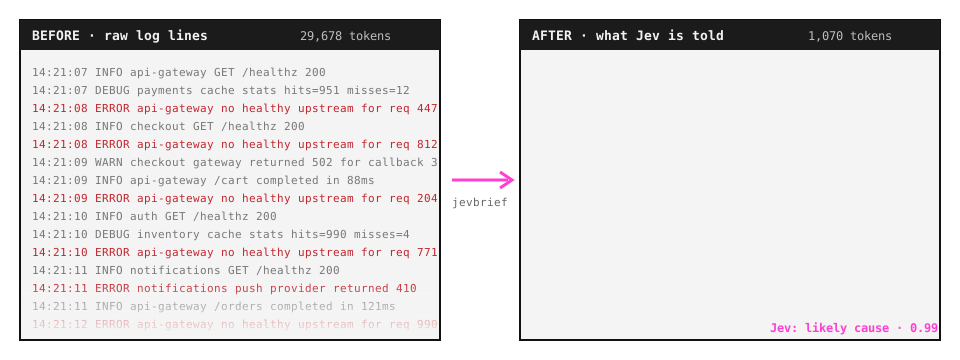
| otel | 6 synthetic incidents | 83% → 100% | 29,678 → 1,070 |
| json | 9 synthetic queries | 89% → 100% | 3,848 → 2,002 |
| web | 10 synthetic pages | 100% → 100% | 5,400 → 2,344 |
| nes | 100 moves on a real level | block 8.6 → block 56.4 | 2,829 → 713 |
Not every result favors jevbrief:
- On ci's second question, whether the failure is flaky, jevbrief scored 67% against 93%.
- The synthetic sets were built alongside the adapters.
See how the benchmarks work for the method and caveats.
Contributing
- Suggest a source: open an adapter request.
- Build an adapter: follow the guide.
- Report a wrong decision: open a bug report, and attach the trace.
git clone https://github.com/parthkomalwad/jevbrief && cd jevbrief
python -m venv .venv && . .venv/bin/activate    # Windows: .venv\Scripts\activate
pip install -e ".[dev]" && pytest -q
License
MIT. Community project, not affiliated with TypeSafe AI.
1 maintainer

Release files for jevbrief 0.5.0
For a detailed explanation of source distributions (sdists) and built distributions (wheels), please see the package formats documentation.
Source distribution (sdist)
| File | Size | Uploaded | |
|---|---|---|---|
| jevbrief-0.5.0.tar.gz | 94.1 kB | Details |
Built distribution (wheel)
| File | Interpreter | ABI | Platform | Reset |
|---|---|---|---|---|
| jevbrief-0.5.0-py3-none-any.whl | Python 3 | none | any | Details |
Total release size: 174.7 kB
Release files / jevbrief-0.5.0.tar.gz
| Download URL | jevbrief-0.5.0.tar.gz |
|---|---|
| Size | 94.1 kB |
| Tags | Source |
|
SHA-256 checksum How to use checksums |
6b5b722d58887f64320f5568345e3922bca10d0e6278ac503c73fe042fc30710
|
|
BLAKE2b-256 checksum How to use checksums |
a23a5a1065609e2d4dd3a8cc537fcb0bcb7f00056f50eabffd6896ff4d7ee90b
|
| Upload date | |
|
Uploaded using Trusted Publishing? What is trusted publishing? |
No |
| Uploaded via |
twine/7.0.0 CPython/3.14.7
|
Release files / jevbrief-0.5.0-py3-none-any.whl
| Download URL | jevbrief-0.5.0-py3-none-any.whl |
|---|---|
| Size | 80.6 kB |
| Tags | Python 3 |
|
SHA-256 checksum How to use checksums |
43d750f510ea542ec69787880d62b448447b0011eca2bd115e324531c126e29e
|
|
BLAKE2b-256 checksum How to use checksums |
f88b98307aceabf40a748b36cda50b04fccf20e6ee98bb9918f999ab392c7e61
|
| Upload date | |
|
Uploaded using Trusted Publishing? What is trusted publishing? |
No |
| Uploaded via |
twine/7.0.0 CPython/3.14.7
|














