




Acceptance testing for LLM features, with verdicts corrected for the judge's own error rate.
juried treats your LLM powered feature as a black box behind an HTTP endpoint. You write
acceptance criteria in plain English, juried generates test scenarios from them, runs each
scenario repeatedly, has a pinned LLM judge mark every response, and reports pass rates
with confidence intervals. Scenarios are ordinary pytest tests, so -k, -x, markers
and --junitxml all work and the results fit an existing CI job. The repeated runs are
of the feature, not of the verdict: by default each response gets one verdict from one
model, and juried calibrate tells you how far to trust that model. It is built for QA
teams, who own the acceptance criteria and the labels the judge is checked against.
Why juried
Every eval tool that uses an LLM judge reports the judge's verdict as the
result. juried treats the verdict as a measurement with an error rate: you
label a set of responses, juried calibrate measures the judge's false-pass
and false-fail rates against them, and the reported pass rate is corrected for
both. "Passed 18 of 20" becomes 84% with a 72–93% interval, and the gate can
run on that figure.
The rest follows from taking the judge seriously as an instrument. Each
scenario is sampled repeatedly, because one run of a stochastic feature is an
anecdote. Scenarios are pytest items, so -k, -x, --junitxml and your
existing CI job work unchanged. It tests the HTTP endpoint you ship, not a
function in process.
juried is a gate. If you want RAG metrics, tracing or a hosted dashboard, use Ragas, Braintrust or LangSmith alongside it.
Install
pip install juried # add juried[schema] for json_schema checks
Python 3.11 or later. Judges read ANTHROPIC_API_KEY or OPENAI_API_KEY from the
environment, or the variable api_key_env names. juried never reads a secret from disk and
does not load .env itself.
Five minutes with the stub
The repository's examples/faq-bot is a fake FAQ bot and a project set up against it, so
from a clone you can see a whole run without an API key:
cd examples/faq-bot
python server.py &                # a deterministic fake bot on port 8765
juried generate                   # scenarios from acceptance.md, via the stub provider
juried calibrate                  # the stub judge against 38 labelled responses
juried run                        # 16 scenarios, 10 attempts each; one fails on purpose
open reports/juried-report.html   # then kill %1
The calibrate step is the one to read first. The stub judge agrees with 28 of the 38
labels and passes all ten it should fail, which is the point of calibrating before you
trust any judge. The first 32 of those cases were checked against claude-haiku-4-5 too,
and it agreed with every label; the report is at
examples/faq-bot/reports/juried-calibration.json.
The longer walkthrough, with the compare step and what the stub judge is, is in
docs/runs.md.
The commands
juried init                      # writes juried.toml, acceptance.md and calibration/example.yaml
juried generate                  # turns each criterion into scenarios/generated/<criterion>.yaml
juried generate --adversarial    # scenarios that try to make the feature violate each criterion
juried calibrate                 # judges responses your team labelled; how far to trust the judge
juried run                       # runs every scenario N times under pytest and writes the report
juried label                     # labels the responses the run queued, growing the calibration set
juried compare old.json new.json # flags scenarios that got worse between two reports
juried estimate                  # what a run would send and cost, without sending anything
juried run accepts pytest arguments after its own, for example
juried run --runs 50 -k refund -x --junitxml=out.xml. Generation is a one off step:
review and edit the generated YAML, commit it, and run never touches it. calibrate is
covered under "Trusting the judge" and compare under "Comparing runs".
Configuration
juried.toml lives at the repo root. Any key can be overridden with an environment
variable named JURIED_<SECTION>_<KEY>, such as JURIED_RUN_RUNS=20. .env.example
lists every variable juried reads, including the provider keys and the overrides;
copy it to .env and export it from your shell, since juried does not load it itself.
[target]
url = "https://staging.example.com/api/chat"
headers = { Authorization = "Bearer ${STAGING_TOKEN}" }
body = { message = "{{message}}", history = "{{history}}" }
response_path = "choices.0.message.content"

[run]
runs = 20          # attempts per scenario
misses = 1         # failed attempts a scenario may have and still pass
concurrency = 4    # requests in flight to the target, across all scenarios

[judge]
provider = "anthropic"    # anthropic, openai or stub
model = "claude-sonnet-5" # pinned and recorded with every verdict
The full reference (usage and pricing keys, streaming, base_url, api_key_env and
[generate]) is in docs/configuration.md; criteria, the scenario
YAML, checks, conversations and adversarial scenarios in docs/scenarios.md.
How a scenario passes
Each scenario runs runs times. The judge marks each response pass or fail with a one
line reason, using a fixed prompt and the configured temperature, if any. The scenario passes
when no more than misses of those attempts fail, so with the defaults, runs = 20 and
misses = 1, it needs 19 passes out of 20. Set misses = 0 to require every attempt to
pass, or raise runs and misses together to tolerate the same miss rate on more evidence.
A scenario stops as soon as its gate is decided, so a bad deploy fails after misses + 1
attempts rather than all of them; --no-early-stop runs every attempt.
[run]
runs = 50
misses = 3    # gate needs 47/50 passes
juried prints what the gate needs at the top of every run
(juried: gate needs 19/20 passes (1 miss tolerated)), repeats it in every gate failure
and shows it in the report. threshold, the gate setting before 0.3, still works for this
release: juried derives misses from it and prints a notice naming the value to set instead.
Failing gates, errors, concurrency and caching are in docs/runs.md; what a
run costs and the dry run in docs/costs.md.
What the judge's mistakes cost you
A judge that passes 6% of bad responses and fails 3% of good ones does not just add noise;
it moves the number. juried measures both rates with juried calibrate and, when a
calibration report for the configured judge exists under reports/, corrects every
scenario's pass rate for them:
corrected = (observed + specificity − 1) / (sensitivity + specificity − 1)
This is the Rogan–Gladen estimator, used in epidemiology to correct a test's observed prevalence for the test's sensitivity and specificity. The arithmetic can land outside 0 to 1, and juried clamps it to that range: a scenario the judge passed every time is reported as 100% whatever the judge's rates, and one it passed less often than its false pass rate as 0%. When sensitivity plus specificity minus one is below 0.5 juried refuses to correct at all and reports the judge as too weak, with the calibration accuracy in place of a figure. With few labelled cases the corrected interval is wider than the observed one, not narrower, because it carries the uncertainty in the judge's error rates as well as in the run. That is intended; more labels tighten it.
Each scenario then reports:
18/20 judged pass; corrected 92% (71–100%), judge false pass 6%, false fail 3%
In 0.3 the corrected rate is reported and the gate still runs on the observed passes,
unless you set gate_on = "corrected" under [run], which becomes the default in the
release after. How the rates are taken per criterion, the bootstrap behind the interval,
and gate_on are in docs/judge.md.
Trusting the judge
An LLM judge is a model like any other, and juried does not pretend otherwise. What it gives you:
- One verdict per response by default. Each response is judged once by the configured model, and every verdict is stored with its reason, model, prompt version and timestamp.
- Votes, when you want agreement measured.
votes = 3under[judge]judges each response that many times and reports how often the votes split, which measures the judge's stability, not its correctness. - Calibration against human labels.
juried calibratejudges responses your team has labelled and reports the accuracy and the false pass and false fail rates, andjuried labelgrows that set from real runs.
The full account, with the calibration YAML shape and the label queue, is in docs/judge.md.
Comparing runs
One run tells you where the feature stands; two tell you which way it is moving. Keep the JSON report from a known good run (a release, or last night's main) and compare the next one against it:
juried compare reports/baseline.json reports/juried-report.json --json reports/compare.json
The test behind it, --alpha, --min-effect and the detectable drop note are in
docs/compare.md.
The report
After a run juried writes reports/juried-report.html and reports/juried-report.json.
The HTML is a single self contained file with no scripts. It opens with one row of totals,
states the gate rule once above the first table, then lists each acceptance criterion with
its description, a table of its scenarios showing passes over judged attempts, the passes
the gate needs and the misses tolerated, pass rate, interval, response latency (with the
time to first token for a streaming target) and gate result, and beneath the table each scenario's message, expectation and every failing run
with the response and the judge's reason. Criteria with no scenarios are called out so
coverage gaps are visible. The JSON file holds the same structure plus every attempt, for
anyone who wants to chart trends.
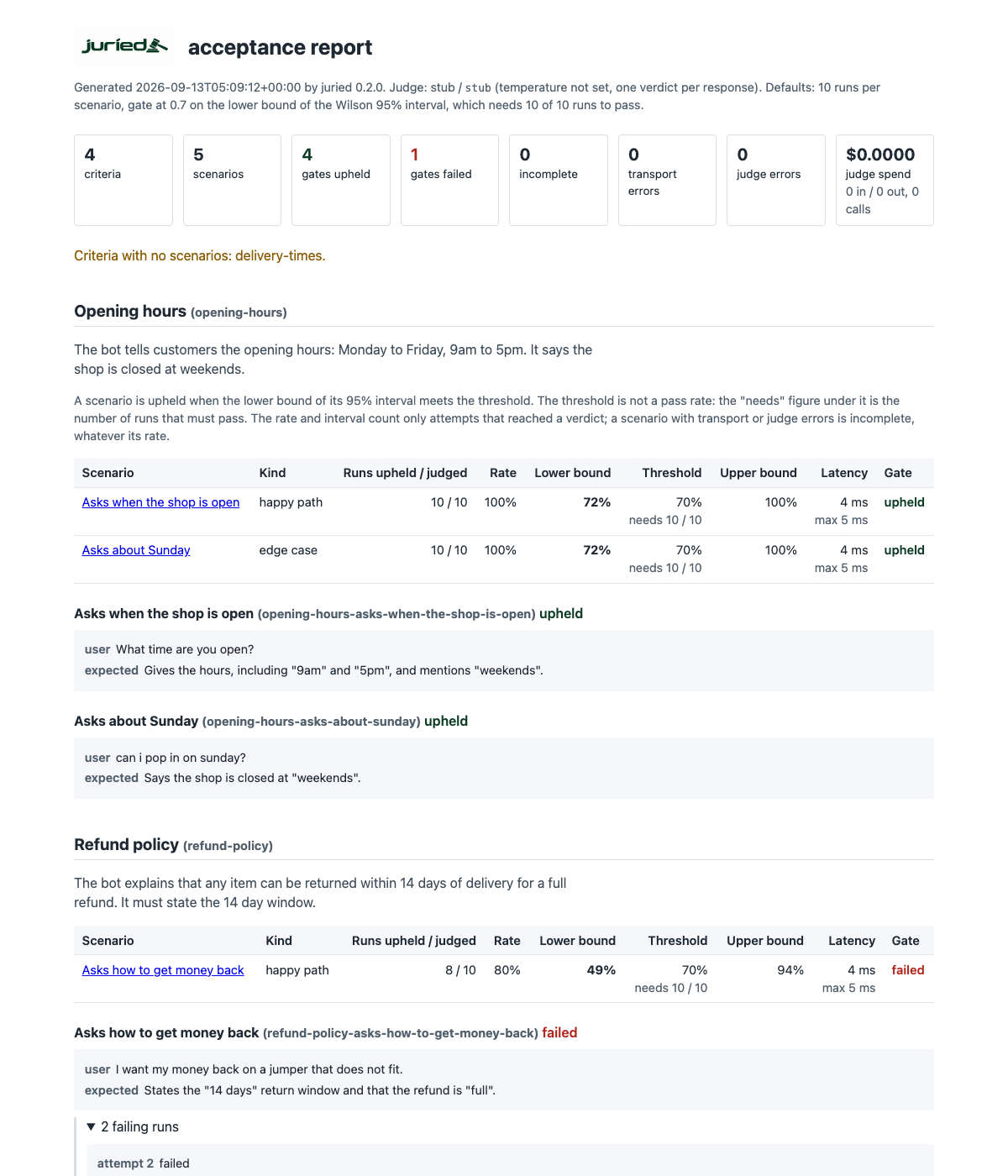
The screenshot predates 0.3: it shows the threshold and lower bound columns that the passes-needed column has since replaced. Reading the interval, and the rest of what it shows, are in docs/runs.md.
Roadmap
Not there yet, and shaped so they can be added without changing the scenario format:
- A
Targetthat drives a UI rather than an HTTP endpoint. - Further
Providerimplementations for other judges.
Out of scope, because juried is a gate and not a platform: RAG metrics such as faithfulness and context recall (Ragas), graded rubric scores (DeepEval), and tracing, observability and hosted dashboards (Braintrust, LangSmith).
Development
make check # ruff, mypy and pytest
The same target runs in CI on every pull request. The Live provider contract badge at
the top of this file shows the latest result of the live workflow, which runs weekly and
on demand and exercises both the Anthropic and OpenAI clients with one judge call and one
generate call each, and sends one judge call to a local Ollama through the OpenAI client
when the runner has one, skipping with a notice when it does not. Every run uploads the
pytest output as an artifact, so a green run can be checked to have tested both providers
rather than skipped them; in this repository a skipped provider fails the run. See CONTRIBUTING.md for how to run it locally, and for
the development install. Changes are recorded in CHANGELOG.md and the release steps in
docs/releasing.md. The interfaces kept stable across releases are listed in
docs/stability.md.
Licensed under the MIT licence.
1 maintainer

Metadata
1 maintainer
Release files for juried 0.3.1
For a detailed explanation of source distributions (sdists) and built distributions (wheels), please see the package formats documentation.
Source distribution (sdist)
| File | Size | Uploaded | |
|---|---|---|---|
| juried-0.3.1.tar.gz | 186.3 kB | Details |
Built distribution (wheel)
| File | Interpreter | ABI | Platform | Reset |
|---|---|---|---|---|
| juried-0.3.1-py3-none-any.whl | Python 3 | none | any | Details |
Total release size: 358.2 kB
Release files / juried-0.3.1.tar.gz
| Download URL | juried-0.3.1.tar.gz |
|---|---|
| Size | 186.3 kB |
| Tags | Source |
|
SHA-256 checksum How to use checksums |
ce9f189cb3ca50b5cd391a301ed5a58182e4f02be0e706a40ae295b3d1ceecdd
|
|
BLAKE2b-256 checksum How to use checksums |
21b2c4ba873f5ab14466e1767031ece147a19298e552f82ab1aa66647ae6c17a
|
| Upload date | |
|
Uploaded using Trusted Publishing? What is trusted publishing? |
Yes |
| Uploaded via |
twine/7.0.0 CPython/3.13.14
|
Provenance
Provenance describes where a file came from. On PyPI, provenance is shared via attestations, which provide a verifiable record of the build or publishing details. View details, limitations and caveats.


PyPI Publish Attestation
PyPI verified that this artifact, at this checksum, originated from the publisher listed below.
Signed by GitHub Actions, verified by PyPI on Sep 17, 2026.
Transparency logRelease files / juried-0.3.1-py3-none-any.whl
| Download URL | juried-0.3.1-py3-none-any.whl |
|---|---|
| Size | 172.0 kB |
| Tags | Python 3 |
|
SHA-256 checksum How to use checksums |
dd45e90d54576cda83c61bc2b2f954e7d43707766bb68c383f2681206c78dd4a
|
|
BLAKE2b-256 checksum How to use checksums |
84254ae394403aceb72c1c0fd49caf15f6a633720050139649c1a115030a31f7
|
| Upload date | |
|
Uploaded using Trusted Publishing? What is trusted publishing? |
Yes |
| Uploaded via |
twine/7.0.0 CPython/3.13.14
|
Provenance
Provenance describes where a file came from. On PyPI, provenance is shared via attestations, which provide a verifiable record of the build or publishing details. View details, limitations and caveats.
PyPI Publish Attestation
PyPI verified that this artifact, at this checksum, originated from the publisher listed below.
Signed by GitHub Actions, verified by PyPI on Sep 17, 2026.
Transparency log













