

Memory SDK — Python client for Kagura Memory Cloud








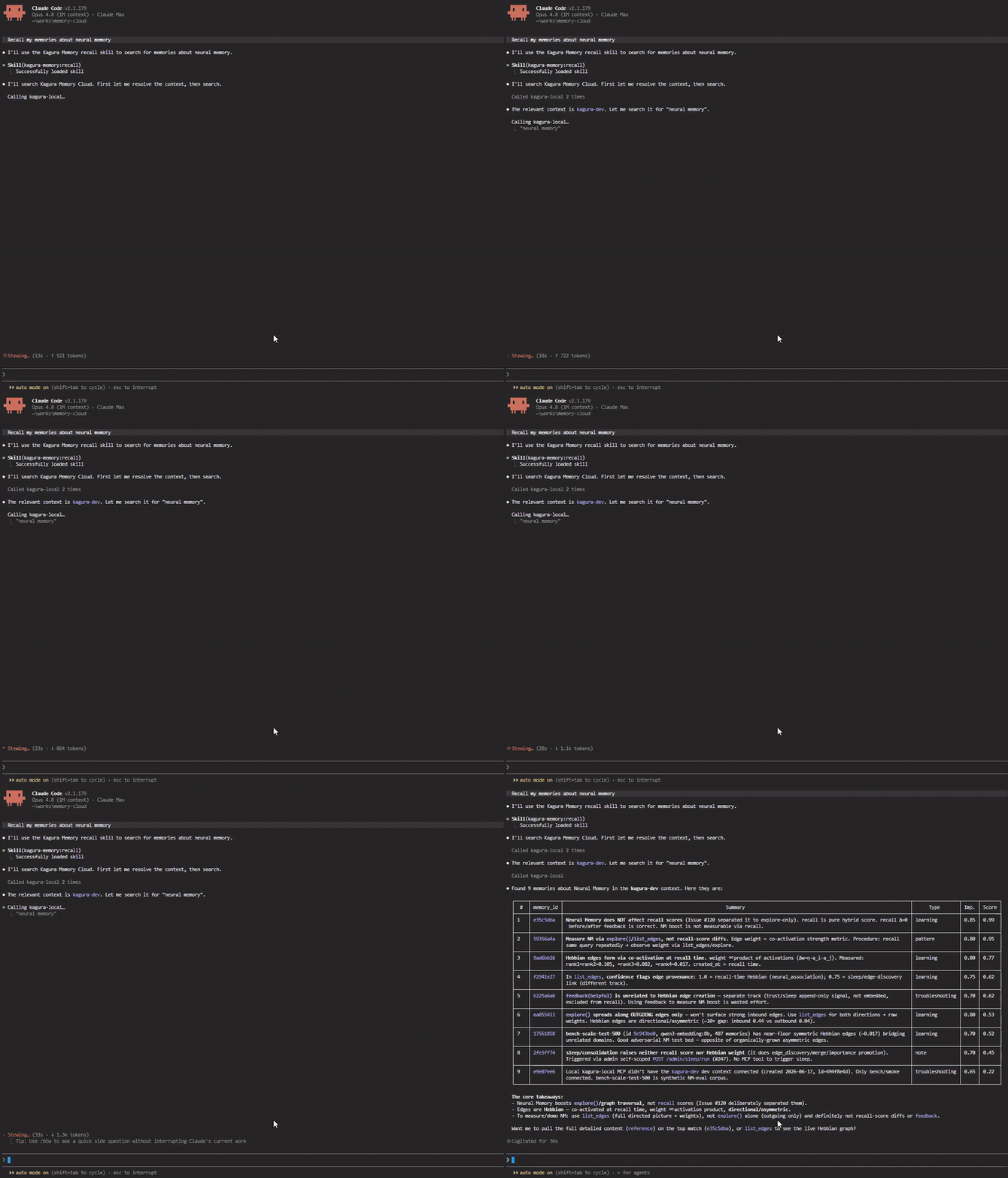
Recall past memories straight from Claude Code — Kagura Memory over MCP.
What is this?
This SDK connects your Python code to Kagura Memory Cloud, giving AI assistants the ability to remember, search, and learn from past interactions — and to ingest documents (PDFs, URLs) directly into a searchable memory graph. It provides seven clients (plus a document ingestor) for different use cases:
| Client | Protocol | Use Case |
|---|---|---|
KaguraClient |
MCP (JSON-RPC) | Direct memory ops — remember, recall, explore, reference, forget |
ResourceClient |
REST API | External data ingestion — push data from Slack, CI/CD, CRM into Kagura |
FilesClient |
REST + presigned PUT | File uploads with sha256 integrity binding (R2); optional per-file context binding for ACL |
SecretClient |
REST + age crypto | Zero-knowledge secrets — age recipient encryption, local decryption (the server only ever stores armored ciphertext) |
WorkspaceClient |
REST API | Workspace member / invitation management + owner-provisioned member keys (owner API key only) |
AgentsClient |
REST API | Agent bootstrap — one-call session-start rehydration for API-key-only callers (server v0.49.0+) |
MemoryClient |
REST API | Tool guardrails for API-key-only hooks and setup scripts — load_guardrails + the AGENTS.md digest (server v0.74.0+) |
FileIngestor |
CLI + SDK | Document ingestion — PDF/Office/HTML/EPUB, audio & YouTube transcripts → memory graph + R2 archive |
60-second demo
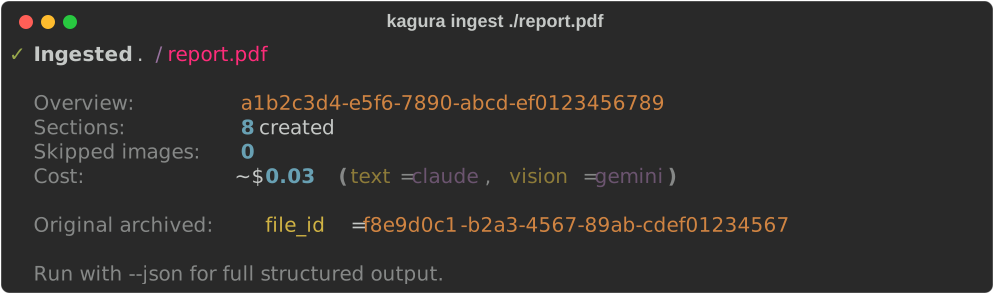
Turn a PDF into a structured graph of memories — one overview memory plus per-section summaries, linked via declared_link edges. The original file is archived to your workspace's storage so you can always pull the bytes back.
pip install 'kagura-memory[ingest-pdf]'
kagura auth login
kagura ingest ./report.pdf
kagura recall "report findings" -k 5        # search across sections
kagura files download-url <file_id> -c <context-id>   # short-lived GET on the original
Ingestion extracts text — from PDFs, Office/HTML/EPUB documents, audio/video transcripts, and YouTube captions. Images embedded in a document are detected and counted (IngestResult.skipped_images) but not yet OCR'd: a vision provider (Gemini 2.5 Flash by default) is configured and validated, but the orchestrator does not currently invoke Provider.describe_image() — image-to-text memories are a planned follow-up. Pass --no-vision to skip provider configuration entirely, or --dry-run to see token / cost estimates without calling an LLM.
Installation
pip install kagura-memory                   # core SDK
pip install 'kagura-memory[ingest-pdf]'     # adds PDF ingestion support
pip install 'kagura-memory[ingest-all]'     # all document formats (see below)
# or
uv add kagura-memory
Supported document formats
kagura ingest (and FileIngestor) dispatch to a structural extractor based
on the file's MIME type / extension. Heavy parser dependencies are opt-in
extras — install only what you need, or ingest-all for everything:
| Format | Extensions | Extra | Parser |
|---|---|---|---|
| Plain text / Markdown | .txt, .md |
(none — base [ingest]) |
stdlib |
| HTML | .html, .htm |
[ingest-html] |
beautifulsoup4 |
.pdf |
[ingest-pdf] |
PyMuPDF | |
| Word | .docx |
[ingest-docx] |
python-docx |
| Excel | .xlsx |
[ingest-xlsx] |
openpyxl |
| PowerPoint | .pptx |
[ingest-pptx] |
python-pptx |
| EPUB | .epub |
[ingest-epub] |
PyMuPDF (reused) |
Each extractor is pure-parse — no network, no LLM. It maps the document
into structural sections (Markdown/HTML headings, Word heading styles, one
section per sheet/slide, PDF/EPUB outline) that the chunker and summarizer
then turn into memories. Office and EPUB files are ZIP containers, so each
extractor enforces decompression-bomb caps (max sheets/rows/slides/pages and
total decoded text). A missing extra surfaces as a clear
KaguraIngestError naming the package to install.
Quick Start
Configuration
Copy the example and fill in your credentials:
cp .kagura.json.example .kagura.json
# Edit .kagura.json — set api_key and mcp_url
Used by the CLI (kagura commands) and load_config() in Python code:
{
  "api_key": "kagura_your_api_key",
  "mcp_url": "http://localhost:8080/mcp/w/{workspace_id}",
  "context_id": "auto"
}
Or use environment variables: KAGURA_API_KEY, KAGURA_MCP_URL, KAGURA_CONTEXT_ID
Get your API key from the Kagura Memory Cloud Web UI: Integrations > API Keys
Looking for
KaguraAgent? The LLM-powered session-analysis actor was removed in v0.37.0 — its role moved to dedicated ecosystem packages: kagura-agent (memory-backed autonomous agent) with kagura-brain as its LLM head, while conversation→memory compilation is handled server-side (Memory Analysis) and by the connector workers. This SDK stays a pure substrate client, and base installs no longer pull thelitellmdependency tree (it now ships with the[ingest]extra).
Ollama for ingestion
kagura ingest reads OLLAMA_API_KEY and OLLAMA_API_BASE from the environment (litellm picks them up directly for the ollama_chat/ route), for both local Ollama and Ollama Cloud (ollama signin sets the key automatically):
export OLLAMA_API_KEY="..."          # Ollama Cloud only; local needs no key
export OLLAMA_API_BASE="https://ollama.com"
kagura ingest report.pdf --text-provider ollama
The ingest provider uses litellm's ollama_chat/ route (system messages preserved), so cloud and local share the same code path.
KaguraClient — Direct Memory Operations
For programmatic control without LLM:
from kagura_memory import KaguraClient

async with KaguraClient(api_key="kagura_...", mcp_url="https://...") as client:
    await client.remember(context_id="dev", summary="OAuth2 pattern", content="Use Authlib...")
    results = await client.recall(context_id="dev", query="OAuth2", k=5)
    await client.explore(context_id="dev", memory_id="uuid", depth=3)

    # Filtered recall — ALL listed tags, optional date range
    results = await client.recall(
        context_id="dev", query="budget",
        filters={"tags": ["予算", "2026"], "tags_match": "all",
                 "created_after": "2026-03-01T00:00:00Z"},
    )

    # Cross-context recall — search several contexts at once
    results = await client.recall(query="auth", context_ids=["ctx-1", "ctx-2"], k=10)

    # Optional response keys (degraded, tag_suggestions, ...) are absent when they do not apply — use .get().
    # degraded=True: the semantic half was down, so results are keyword-only (v0.66.0+);
    # an empty result then means "search impaired", not "nothing stored".
    # tags_normalize also matches "Dev_Environment" for "dev-environment" (v0.65.0+).
    results = await client.recall(context_id="dev", query="setup",
                                  filters={"tags": ["dev-environment"], "tags_normalize": True})
    if results.get("degraded"):
        print("keyword-only:", results.get("degraded_reason"))

    # Reranking is tri-state (memory-cloud v0.69.0+). Omit use_rerank to follow the
    # context's search config (update_search_config); True requests it, applied only
    # when the context enables it; False skips it for this call, e.g. to save latency.
    # With context_ids, the first listed context's config decides.
    # Servers before v0.69.0 rerank only on True.
    fast = await client.recall(context_id="dev", query="OAuth2", use_rerank=False)

    # Find a context by name. On memory-cloud v0.73.0+ rows are slim
    # (id/name/is_private/is_locked/last_used_at); summaries are opt-in.
    found = await client.list_contexts(name_contains="auth", include_summary=True)

    # Trust-tier filter (provenance) — exclude untrusted / connector-ingested
    # memories from behaviour-influencing reads (OWASP LLM01/LLM03)
    safe = await client.recall(context_id="dev", query="policy",
                               filters={"trust_tier": "trusted"})
AI agent memory substrate
Primitives for autonomous agents — a deterministic load path, a retrieval-feedback signal, and a TTL-bounded run-state lane kept separate from knowledge:
async with KaguraClient(api_key="kagura_...", mcp_url="https://...") as client:
    # Deterministic delivery — pin on write, load the full pinned set every turn
    # (Goal / critical-policy memories, distinct from probabilistic recall).
    # For a rule tied to a tool call, use a tool guardrail (next section).
    await client.remember(context_id="dev", summary="Goal: ship the v2 importer by June",
                          content="...", delivery_mode="always")
    pinned = await client.load_pinned(context_id="dev")

    # Time Memories — deterministic "what's upcoming" query (no semantic search).
    # Items carry `trigger` on server v0.73.0+; include_details=True returns `details`.
    upcoming = await client.recall_upcoming(context_id="dev", from_="now")

    # WHERE axis — deterministic "what's near here" query, nearest first
    # (SDK v0.38.0, server v0.53.0+). radius_m/k are keyword-only.
    # lat/lon must be JSON numbers; the server 422s string-typed coordinates.
    await client.remember(context_id="dev", summary="Coffee with Sato", content="...",
                          details={"location": {"lat": 35.68, "lon": 139.76, "label": "Tokyo HQ"}})
    nearby = await client.recall_nearby(context_id="dev", lat=35.68, lon=139.76, radius_m=500)
    # update_memory(details=...) REPLACES details wholesale — no deep-merge. Read the
    # current value with reference() and re-send location, or this drops off the map.
    # Map viewport over the REST list (SDK v0.40.0, server v0.54.0+): keyword-only,
    # one-sided bounds OK, any bound keeps only located memories (item.location).
    page = await client.list_memories(context_id="dev", lat_min=35.5, lat_max=35.9,
                                      lon_min=139.5, lon_max=140.0)

    # HOW-MUCH axis — an append-only numeric series (SDK v0.40.0, server v0.54.0+).
    # Separate from memories: never embedded, never returned by recall(), never
    # merged or rewritten by Sleep consolidation. No delete — an operator-set
    # retention window is the only thing that removes rows (see Compatibility).
    # Raw numbers here; prose ("hit goal weight") via remember().
    await client.record_measurement(context_id="dev", metric="weight_kg", value=71.5,
                                    unit="kg")  # measured_at: ISO str or datetime (naive = UTC)
    weekly = await client.recall_series(context_id="dev", metric="weight_kg",
                                        period="week", agg="avg")  # default: last 30 days
    for b in weekly.series:  # empty buckets omitted; max window 365 days
        print(b.bucket, b.value, b.count)

    # Supersede — store a newer version WITHOUT destroying history (server v0.45.0+).
    # The old memory is shadowed, not deleted: it leaves default recall but stays
    # reachable, and deleting the edge restores it. Prefer this over forget() +
    # remember(), which throws away the history the supersede edge exists to keep.
    await client.remember(context_id="dev", summary="Deploy target: ap-northeast-1",
                          content="...", supersedes="old-memory-uuid")
    # Read the history back. NOTE: a top-level argument, NOT a filters key.
    history = await client.recall(context_id="dev", query="deploy target",
                                  include_superseded=True)  # results carry superseded_by
    # Reject a wrong supersede_candidate suggestion (server v0.65.0+; memory_id only).
    res = await client.update_memory(context_id="dev", memory_id="uuid",
                                     dismiss_supersede_candidate=True)
    # Only res.get("supersede_candidate_dismissed") confirms it: older servers drop the flag.

    # Retrieval feedback — teach the substrate which recall results were useful
    await client.feedback(context_id="dev", memory_id="uuid", helpful=True, query="OAuth2")

    # Agent session-state lane — TTL-bounded, structurally excluded from recall()
    await client.set_state(context_id="dev", key="step", value={"n": 3}, ttl_seconds=3600)
    state = await client.get_state(context_id="dev", key="step")  # omit key → all live entries
Tool guardrails (v0.39.0, server v0.74.0+)
A memory whose details.tool_trigger names a tool (and optionally a pattern in its
input) is a tool guardrail: a client-side hook injects its summary when a matching
call happens (action="inform"), or denies the call with the summary as the reason
(action="block"). The server validates the patterns on write and never runs them;
matching happens in the hook, which loads the set deterministically with
load_guardrails:
from kagura_memory import KaguraClient, MemoryClient, ToolTrigger

CTX = "ctx-uuid"

async with KaguraClient() as client:
    # Needs context editor+ and a user credential (agent-bound keys can read, not author).
    await client.remember(
        context_id=CTX,
        summary="Never force-push to main; open a PR instead",
        content="...",
        tool_trigger=ToolTrigger(tool="Bash", match=r"git\s+push\s+--force", action="block"),
    )

    # Two independently capped lanes (pinned + tool_triggered), never silently cut.
    rails = await client.load_guardrails(CTX)
    if rails.tool_triggered_truncated:
        rails = await client.load_guardrails(CTX, cap=1000)

    # Hookless clients get the tool-triggered set in the get_context_info() block.
    info = await client.get_context_info(CTX)
    block = info.guardrails  # None when the MCP URL carries ?guardrails=off

async with MemoryClient.from_mcp_url() as memory:  # REST twin for API-key hooks / scripts
    rails = await memory.load_guardrails(CTX)
    digest = await memory.get_guardrail_digest(CTX)  # the AGENTS.md export block
    print(digest.tool_triggered_version)             # changes when the set changes
update_memory(details=...)replacesdetailswholesale: re-sendtool_triggerwith any other details you change, or the memory stops being a guardrail. Passing bothtool_trigger=anddetails["tool_trigger"]raisesValueError.forgetsilently skips a guardrail the caller may not delete (below context editor, or an agent-bound key), sodeleted_countcan be0with no error.- A hook that caches the set treats a
GuardrailSet.formatgreater thanGUARDRAIL_FORMATas absent (fail-open):formatbumps only when a field changes meaning. - With an OAuth profile,
MemoryClient.load_guardrails(aPOST) needsmemory:write; a--read-onlylogin loads the set throughKaguraClient.load_guardrails(MCP) instead. kagura guardrails digest <ctx> --out AGENTS.mdkeeps an always-loaded file in sync (see CLI). The block is workspace memory, not repository content: point--outat an untracked file, or rungit update-index --skip-worktree AGENTS.mdon a tracked one, so the guardrail summaries never land in a commit (or, in a public repository, get published).
Agent bootstrap — one-call session-start rehydration (v0.37.0, server v0.49.0+)
get_agent_bootstrap composes the primitives above (context guide + pinned +
trusted-only recall + upcoming time memories + agent state) into one envelope, so an
agent starts a session with a single round-trip. Components are fail-soft: a failing
component reports status="error" while the rest still return (top-level degraded
flag). Also available over REST (AgentsClient) for API-key-only callers such as
agent-bound member keys:
from kagura_memory import AgentsClient, KaguraClient

async with KaguraClient() as client:  # MCP surface
    # One-time provisioning (owner/admin): register the agent, bind its context
    agent = await client.register_agent("ci-agent", framework="claude-code")
    await client.bind_agent_context(agent.id, "ctx-uuid", is_default=True)

    bootstrap = await client.get_agent_bootstrap(
        "agent-uuid",                     # context_id omitted → default binding
        session_id="run-42",              # echoed in the correlation block
        query="current task",             # enables the trusted-only recall component
        include=["pinned", "recall", "state"],
    )
    pinned = bootstrap.components["pinned"]  # {"status": "ok", "memories": [...], ...}

async with AgentsClient.from_mcp_url() as agents:  # REST companion
    bootstrap = await agents.bootstrap("agent-uuid", include=["pinned"])
⚠️ Error handling changed in v0.29.0 (breaking). Every
KaguraClientMCP tool method now raises on a server domain error instead of returning an error dict: a missing context/memory raisesKaguraNotFoundError, any other domain error raisesKaguraError. Replaceresult["status"] == "error"checks withtry/except:from kagura_memory import KaguraNotFoundError, KaguraError try: results = await client.recall(context_id="dev", query="auth") except KaguraNotFoundError: ... # context or memory not found except KaguraError: ... # other server-side error
A success response the SDK cannot parse — usually a server newer than this SDK — raises
KaguraResponseError from the KaguraClient MCP tool methods and the REST clients (a
KaguraError subclass; .operation names the MCP tool or <Client>.<method>) instead of a
raw pydantic ValidationError or KeyError. Upgrading kagura-memory is the likely fix.
list_memories does the same (.operation is KaguraClient.list_memories). The other
KaguraClient methods that call REST endpoints — get_server_info, check_server_version,
get_embedding_status, get_memory_stats, find_duplicates, list_embedding_models — still
raise KaguraConnectionError on drift, so catch KaguraError to cover both.
Plan and quota refusals raise typed errors, from the KaguraClient MCP tool methods and the
REST clients alike. All three are KaguraError subclasses:
KaguraQuotaError— a quota or cap was reached:rememberpast the daily memory quota, a tool call past the daily MCP call cap,create_contextat the context cap, the resource-token or member-seat cap, or the daily REST quota. The REST clients other thanSecretClientalso raise it for any other 429, such as the per-minute rate limit.quota_type,limit,current,used_todayandresets_atcarry the server's numbers when it sends them.create_contextchecks the cap throughlist_contextsbefore it calls the server, so that refusal hasquota_type,currentandlimitbut norequired_plan.detailsholds every field the server sent, including those without an attribute, such as the embedding-spend cap'scap_usd.retry_afteris the number of seconds until the quota resets, taken fromRetry-Afteror derived fromresets_at. It isNonefor a count cap, because waiting does not free one. OnKaguraClient, an HTTP-level 429 still raisesKaguraRateLimitError. That includes the daily MCP quota when the server's rate-limit middleware refuses the request before the tool runs.KaguraFeatureNotAvailableError— the workspace cannot use the feature.gatesays why:"plan"means an upgrade lifts it (required_plan/required_plan_display), while"allowlist"and"deployment"have no upgrade path.KaguraPartialRollbackError—rollback_sleep_runreversed only part of the run..summaryis theRollbackSummaryof what was reversed, with the failed steps inerrors. It isNonewhen the server's summary could not be read.
Against memory-cloud 0.75.0+ the SDK types a refusal by its gate descriptor
(#1644). Against older servers it
falls back to the error code and the legacy fields. A quota_exceeded refusal that names no
quota, such as the 1 MB memory-size guard, stays a plain KaguraError, because no plan lifts it
and waiting does not help. kagura commands print the reset time and the required plan under
the error message.
from kagura_memory import KaguraFeatureNotAvailableError, KaguraQuotaError
try:
    await client.remember(context_id="dev", summary="...", content="...")
except KaguraQuotaError as e:
    print(e.quota_type, e.resets_at, e.retry_after)
except KaguraFeatureNotAvailableError as e:
    print(e.feature, e.required_plan_display)
More operations — tag-vocabulary discovery (list_tags), merge_contexts, context lifecycle (create_context/update_context/delete_context), workspace get_usage, get_memory_stats, find_duplicates, get_embedding_status — are runnable in examples/client_advanced.py; the API Coverage table lists the full surface.
ResourceClient — External Data Ingestion
Push data from external systems into Kagura so AI can search it:
from kagura_memory import ResourceClient, ResourceEventRequest

async with ResourceClient.from_mcp_url(api_key="kagura_...", mcp_url="http://localhost:8080/mcp/w/...") as client:
    # One-call setup: create public context + set resource_id + create token
    token = await client.setup_resource(resource_id="products", summary="Product catalog")
    print(f"Save this token: {token.token}")  # Shown only once!

    event = ResourceEventRequest(
        op="upsert", doc_id="SKU-001", version=1,
        payload={"name": "Wireless Headphones", "price": 79.99},
    )
    await client.ingest_event("products", token.token, event)

    # Check ingestion stats
    stats = await client.get_resource_impact("products")
    print(f"Memories: {stats.memory_count}, Tokens: {stats.token_count}")
Creating a resource, a resource token or a public context is plan-gated (plan_required).
Since memory-cloud 0.68.0 (#1551) the
gate is the plan's resources / public_contexts feature (XL only by default); earlier servers
gated it on the plan's shared contexts and token cap. Resources, tokens and public contexts that
already exist keep serving.
See examples/ for complete working examples.
FilesClient — File Uploads with Checksum Binding
Upload files to the workspace's object store via short-lived presigned PUT URLs. The SDK binds the body's sha256 into the PUT signature so the server (memory-cloud v0.15.1+, R2_CHECKSUM_BINDING_ENABLED=true) can reject tampered uploads with 400 BadDigest:
from pathlib import Path
from kagura_memory import FilesClient

async with FilesClient.from_mcp_url(api_key="kagura_...", mcp_url="https://memory.kagura-ai.com/mcp") as client:
    # Upload from a Path (read fully into memory; server caps file size at 100 MiB)
    f = await client.upload(context_id="ctx-uuid", source=Path("./report.pdf"))
    print(f"Uploaded {f.id}, sha256={f.sha256}, size={f.size_bytes}")

    # Upload from bytes — filename is required (server enforces non-empty)
    f2 = await client.upload(context_id="ctx-uuid", source=b"...", filename="payload.bin")

    # Optionally bind a file to an owning context for access control (server
    # v0.41.0+). binding_context_id is the wire `context_id` — distinct from the
    # `context_id` arg, which is the workspace. Omit it for a workspace-scoped
    # (NULL-context) file. FileObject.context_id reflects the binding (or None).
    f3 = await client.upload(
        context_id="ctx-uuid",
        source=Path("./plan.pdf"),
        binding_context_id="owning-ctx-uuid",
    )
    print(f3.context_id)  # -> "owning-ctx-uuid"

    # Short-lived presigned GET URL. download_url / delete require the owning
    # context_id (workspace) — server v0.41.0 scopes file-id lookups to it.
    url = await client.download_url(f.id, context_id="ctx-uuid")

    # List & delete
    page = await client.list(context_id="ctx-uuid", limit=50)
    await client.delete(f.id, context_id="ctx-uuid")
Re-uploading bytes whose sha256 already exists in the workspace returns the existing FileObject (idempotent dedup happy-path) — no exception.
A file bound via binding_context_id routes read/write/list/delete through that context's ACL (server v0.41.0+): you need write (EDITOR+) access to the context, and it must belong to the upload's workspace (else 403 / 422). A denied download surfaces as a 404 (existence-hiding), not a 403. Unbound uploads stay workspace-scoped and fully listable.
Runnable: examples/files_upload.py.
SecretClient — Zero-Knowledge Secrets
Client side of the secret store (memory-cloud v0.39.0+, requires the [secret] extra: pip install 'kagura-memory[secret]'). Secrets are encrypted to recipients' age/X25519 public keys and decrypted locally — memory-cloud only ever stores armored ciphertext, never plaintext. All crypto is delegated to the audited pyrage binding; the age private key is held in your OS keychain (keyring) and never transmitted.
from kagura_memory.secrets.client import SecretClient

async with SecretClient.from_mcp_url(api_key="kagura_...", mcp_url="https://memory.kagura-ai.com/mcp") as client:
    # Register your public key (lands in `pending` until an owner approves it).
    me = await client.register_pubkey("age1...", label="laptop")

    # Encrypt-and-store in one call. recipients_snapshot / grant_pubkey_ids are
    # derived 1:1 from the recipient set, so the server's grant-consistency
    # invariant holds by construction.
    actives = [p for p in await client.list_pubkeys() if p.status == "active"]
    await client.put_secret_for_recipients("db-prod", b"hunter2", actives)

    # Fetch ciphertext (decrypt locally with your own key — not shown here).
    sv = await client.fetch_secret("db-prod")
Most workflows use the CLI instead — see kagura secret below, which handles keychain custody and the get/put/grant/rotate flows with built-in misuse guards.
WorkspaceClient — Workspace Member Management
Owner-key operational tooling for workspace members and invitations (memory-cloud v0.42.0+). Every endpoint requires the workspace owner's static API key when called programmatically — OAuth tokens are rejected by the server with an actionable 403, and the assignable roles are member / admin / viewer (owner changes go through the ownership transfer flow):
from kagura_memory import WorkspaceClient

async with WorkspaceClient.from_mcp_url(api_key="kagura_...") as client:
    members = await client.list_members("workspace-uuid")
    for m in members:
        print(m.user_id, m.role, m.user_email)

    # Invite a new user by email. member/viewer invitations REQUIRE a
    # context grant (allowed_context_ids, min 1); expires_in_days accepts
    # only the server presets 7/30/90/365 (None = never expires).
    inv = await client.create_invitation(
        "workspace-uuid",
        "new@example.com",
        role="member",
        allowed_context_ids=["context-uuid"],
        expires_in_days=30,
    )
    print(inv.invitation_url)  # shown once — a join credential

    # Role changes / removal
    await client.update_member_role("workspace-uuid", "google_123", role="admin")
    await client.remove_member("workspace-uuid", "google_123")
Notes: add_member does not validate the user id server-side (a typo creates a dangling row — prefer create_invitation for onboarding); invitation ids are integers with no status field (derive pending from is_accepted/is_expired); listing invitations programmatically returns token/invitation_url as None (server-side token hygiene).
The same client also provisions member API keys (memory-cloud #1165): mint_member_key(ws, user_id, name, expires_days) (member/viewer targets only, never yourself — leaked-owner-key self-replication is blocked server-side; plaintext_key is returned exactly once), list_member_keys (metadata only), and revoke_member_key (soft revoke). CLI: kagura auth create-key|list-keys|revoke-key.
SDK ↔ memory-cloud Compatibility
| SDK | Min memory-cloud | Notes |
|---|---|---|
| 0.40.0+ | 0.17.1 (0.54.0 for the measurement lane + list bbox; 0.70.0 for auth login --invite, 0.76.0 for its one-link hand-off; 0.74.0 for the guardrail lanes of setup codex|hermes|openclaw, incl. --agents-md) |
HOW-MUCH axis + WHERE-axis list filter; invite-only sign-up; Codex / Hermes Agent / OpenClaw setup. record_measurement() / recall_series() and kagura measure record|series need memory-cloud 0.54.0+ (#1333) — an older server returns "tool not found". The lane has no delete, but on server 0.55.0+ an operator-set retention window (SLEEP_MEASUREMENT_RETENTION_DAYS > 0, or a per-context config row; off by default, #1355) makes Sleep hard-delete observations older than the window, and kagura sleep rollback cannot restore them. list_memories(lat_min=…, lat_max=…, lon_min=…, lon_max=…) and MemoryListItem.location need 0.54.0+ too (#1334) — an older server silently ignores the bbox and returns an unfiltered page, and location stays None. An out-of-range or non-numeric bound raises ValueError locally, as recall_nearby does. The new parameters are keyword-only and omitted from the wire when unset, so existing calls are unchanged. A response any of these three calls cannot parse raises KaguraResponseError naming the operation. For list_memories that is new: before 0.40.0 its drift raised KaguraConnectionError, which the other REST-backed KaguraClient methods still do, so catch KaguraError for both. kagura auth login --invite <link|token> needs features.beta_invites (memory-cloud 0.70.0+; on an older server, or with invites off, it says the invite has no effect and signs in normally). The single link that signs you up and lands on /device with the code filled in needs 0.76.0+ (#1655); older servers get the two-step prompt. A device-authorization 429 (memory-cloud 0.76.0+ per-address limit) now says how many seconds to wait. kagura setup codex|hermes|openclaw (#260) points each harness at the kagura-mcp stdio proxy, which works on any supported server: memory-cloud's OAuth dynamic client registration still accepts only Claude, ChatGPT and Cursor clients (through 0.76.0; #1657 is open), so none of the three can sign in on its own. Its guardrail lanes need memory-cloud 0.74.0+ (#1621): the digest Codex receives in the MCP instructions through --guardrails <uuid> (--context-id by default), a query an older server ignores, as it does ?guardrails=off; the get_context_info guardrails block Hermes and OpenClaw read; and the --agents-md export, which against an older server fails with a 404 after the entry is written and changes no file. MIN_SERVER_VERSION stays 0.17.1. |
| 0.39.0+ | 0.17.1 — checked against memory-cloud up to 0.76.0. Per-surface: 0.65.0 supersede dismissal; 0.69.0 ServerInfo.search_defaults; 0.73.0 list_contexts / recall_upcoming options and setup claude --tool-profile; 0.74.0 tool guardrails and setup claude --guardrails; 0.75.0 gate-typed plan/quota errors and the list_contexts hint |
Checked against memory-cloud up to 0.76.0 (the production release). Per-surface floors are in the second column; every other surface keeps its floor from the rows below. Tool guardrails. KaguraClient.load_guardrails() (MCP), MemoryClient.load_guardrails() / get_guardrail_digest() (REST POST /api/v1/memory/guardrails, GET /api/v1/memory/guardrails/digest), remember/update_memory(tool_trigger=…), the ContextInfo.guardrails block and kagura guardrails load|digest need memory-cloud 0.74.0+ (#1619 / #1621). Against an older server the MCP tool returns "tool not found", MemoryClient.load_guardrails raises KaguraConnectionError (HTTP 405) and get_guardrail_digest raises KaguraNotFoundError (a 404 indistinguishable from an unknown or denied context), ContextInfo.guardrails stays None, and details.tool_trigger is stored unvalidated as an ordinary details key. list_contexts / recall_upcoming options and supersede dismissal. update_memory(dismiss_supersede_candidate=True) / kagura update-memory --dismiss-supersede-candidate needs memory-cloud 0.65.0+ (#1504). It rejects the memory's supersede_candidate suggestion and needs memory_id: combined with external_id it raises ValueError before any network call. Before 0.65.0 the server silently drops the flag, so a dismissal-only call succeeds as an empty update that dismisses nothing and refreshes updated_at; supersede_candidate_dismissed in the response is the only confirmation that a dismissal happened. list_contexts(name_contains=…, include_summary=…, include_details=…) / kagura context list --name-contains/--summary/--details and recall_upcoming(include_details=True) need 0.73.0+ (#1600, #1599); include_stats / --stats works on any server. From memory-cloud 0.73.0, list_contexts rows are slim by default (id/name/is_private/is_locked/last_used_at; summary and embedding_model are opt-in), and the envelope adds total (rows returned) beside count (quota usage, unaffected by name_contains). 0.75.0 adds an optional hint when the caller can see no context (#1658). recall_upcoming items carry trigger in place of details unless include_details=True. Every new argument is omitted from the wire when unset, and older servers ignore it (before 0.73.0 there is also no total: use len(result["contexts"])). Plan/quota refusals and kagura setup claude. Typed plan and quota errors (#256) read the gate descriptor memory-cloud 0.75.0+ attaches (#1644) and fall back to the error code on older servers. kagura setup claude --tool-profile puts the 0.73.0+ ?profile= on the MCP URL (#1601), and --guardrails the 0.74.0+ ?guardrails= (#1621) (#258). Docs and models realigned with the server (#257). get_server_info().features types every flag 0.76.0 sends (neural_memory, research_tools, plan_page, byok, cost_display, managed_connectors, managed_llm, referrals, beta_invites, reranking) as bool = False, where False also means "not reported", and keeps newer flags in features.model_extra instead of dropping them. ServerInfo.search_defaults carries the reranker defaults new contexts start with (0.69.0+). Behaviour the docstrings now describe: load_pinned returns the pinned set under memories; the old docstring example read results and raised KeyError. Forgotten memories stay recoverable for a per-deployment window (CLEANUP_DELETED_MEMORIES_RETENTION_DAYS, default 30 days) since 0.66.0, and forget(query=…) is refused while recall is degraded. recall may carry degraded / degraded_reason (0.66.0+), plus tag_suggestions and the filters.tags_normalize input (0.65.0+); from 0.73.0 result items omit an empty context_summary / superseded_by / contradicts / supersede_candidate instead of sending null / []. remember / update_memory may return persistence and lint (0.65.0+), and update_memory(context_summary="") / details={} clear the field. From 0.65.0, merge_contexts counts rows, reports the not-yet-embedded ones as pending_embedding, and refuses delete_source on the default context before copying anything (older servers refused it only after copying, leaving a half-completed merge). get_embedding_status counts only contexts the caller can see (0.65.0+). list_embedding_models lists the deployment's allowlist, and an operator can migrate a context's embedding model (0.66.0+). Creating a public context, a resource or a resource token is plan-gated (plan_required); since 0.68.0 (#1551) the gate is the plan's public_contexts / resources feature (XL only by default), where earlier servers gated it on the plan's shared contexts and token cap. The keyless self_hosted reranker (0.42.0+) needs no reranker_model (0.69.0+). recall's related_tags no longer carry sample_summary, and bootstrap upcoming rows carry trigger instead of details (0.73.0+). MIN_SERVER_VERSION stays 0.17.1. |
| 0.38.1+ | 0.17.1 (the fix matters against 0.43.0+ for Sleep, 0.68.0+ for the indexer) | Forward-tolerant Sleep and indexer responses. memory-cloud 0.43.0+ grades a Sleep run degraded when some judge-LLM calls fail (#1183) — and since 0.46.0 also when a phase fails (#1229) — and 0.68.0+ records skipped_reason="memories_per_day_exceeded" when the resource indexer defers a batch to the daily quota reset (#1549). SDKs up to 0.38.0 rejected both values: one degraded run broke get_sleep_history and kagura sleep history|report|rollback, and one deferred run broke get_indexer_status and kagura resource indexer-status. SleepReport.status, RollbackResult.status, IndexerState.job_status and IndexerStateMetrics.skipped_reason are now str, so values a newer server adds pass through (the SleepRunStatus / IndexerJobStatus / IndexerSkippedReason Literals list the known values). SleepReport gains llm_call_failures and SleepReportDetail gains merge_retention_result. A response the KaguraClient MCP tool methods or the REST clients still cannot parse (a model mismatch or a missing/null list or object in the envelope) raises KaguraResponseError naming the operation, not a raw pydantic ValidationError, KeyError or TypeError; the REST clients' envelope-shape errors move from KaguraConnectionError to it too. KaguraClient's REST-backed methods (get_server_info, get_memory_stats, list_memories, …) still raise KaguraConnectionError — catch KaguraError for both. MIN_SERVER_VERSION stays 0.17.1. |
| 0.38.0+ | 0.17.1 (per-surface: see notes) | Client-surface parity — four server capabilities the SDK could not reach. recall_nearby() + details.location (the WHERE axis) need memory-cloud 0.53.0+ (#1331); remember(supersedes=…) and its read-back counterpart recall(include_superseded=True) need 0.45.0+ (#1208); list_tags(with_tags=…) faceted drill-down needs 0.17.2+ (#830); update_memory(details=…) works on any server that already accepted details on the MCP tool, and replaces details wholesale — the server does not deep-merge, so re-send location when revising or the memory drops off recall_nearby. CLI gains kagura remember --details/--location. All four are additive and omitted from the wire when unset, so existing calls are unchanged. MIN_SERVER_VERSION stays 0.17.1. |
| 0.37.0+ | 0.17.1 (0.49.0 for the agent control plane) | Agent control plane (RFC-0002 P0-1/2/3). KaguraClient.get_agent_bootstrap() (MCP) and AgentsClient.bootstrap() (REST, POST /api/v1/agents/{agent_id}/bootstrap) need memory-cloud 0.49.0+ (#1276); the same release covers the registry + binding wrappers (register_agent/get_agent/list_agents/update_agent/delete_agent on both surfaces; bindings as bind_agent_context/list_agent_bindings/update_agent_binding/unbind_agent_context on KaguraClient, mirrored as bind_context/list_bindings/update_binding/unbind_context on AgentsClient — owner/admin-gated server-side, #1274/#1275), so an SDK-only consumer can provision the agent + binding that bootstrap requires. Against an older server the MCP tools return "tool not found" and the REST routes 404. MIN_SERVER_VERSION stays 0.17.1. |
| 0.37.0+ | 0.17.1 | KaguraAgent removed (breaking, #233). The LLM-powered session-analysis actor, its models (Session/Message/ProcessResult/…), and kagura process are gone — the actor role lives in kagura-agent (with kagura-brain as its LLM head), and conversation→memory compilation is server-side Memory Analysis / connector workers. litellm moved from core dependencies to the [ingest] extra, so pure-client installs are much lighter; ingestion (including plain text) now requires pip install 'kagura-memory[ingest]'. |
| 0.36.0+ | 0.17.1 (0.42.0 for kagura workspace / kagura auth create-key) |
Workspace member management + owner-provisioned member keys (owner-key only). WorkspaceClient / kagura workspace member|invite and mint_member_key/list_member_keys/revoke_member_key / kagura auth create-key|list-keys|revoke-key need memory-cloud 0.42.0+ (owner-key programmatic access, #1164 / #1165). Requires the workspace owner's static API key — OAuth tokens are rejected on this surface, and a deployment can disable it via enable_owner_key_member_management=false. Key minting is privilege-downgrade only: member/viewer targets, never self, expires_days required. MIN_SERVER_VERSION stays 0.17.1. |
| 0.35.0+ | 0.17.1 (0.41.0 for file uploads/downloads) | FilesClient v0.41.0 compatibility (breaking). memory-cloud 0.41.0 requires workspace_id on the query of the file-id endpoints (confirm/download-url/delete) and presigns R2 PUT without the checksum header — so pre-0.35.0 SDKs get 403/422 on every upload/download/delete against it. This SDK sends workspace_id on those endpoints (harmlessly ignored by older servers) and only binds the checksum when the presign signed it. Breaking: FilesClient.download_url(file_id, *, context_id) and delete(file_id, *, context_id) now require context_id; kagura files download-url/delete require -c/--context-id (or a profile/.kagura.json workspace). MIN_SERVER_VERSION stays 0.17.1. |
| 0.34.0+ | 0.17.1 (0.41.0 for secret delete + file context binding) | Owner-only secret delete + file context binding. SecretClient.delete_secret / kagura secret delete (DELETE /api/v1/config/secrets/{name}) and FilesClient.upload(binding_context_id=…) / FileObject.context_id (context-scoped file ACL) need memory-cloud 0.41.0+. MIN_SERVER_VERSION stays 0.17.1 — only these surfaces require 0.41.0. |
| 0.33.0+ | 0.17.1 (0.39.0 for kagura secret) |
Zero-knowledge secret store. SecretClient / kagura secret need memory-cloud 0.39.0+ (the /api/v1/config/secrets endpoints). MIN_SERVER_VERSION is not bumped — the rest of the SDK still works on 0.17.1+; only the secret surface requires 0.39.0. Requires the [secret] extra. |
| 0.27.0 – 0.31.x | 0.17.1 | Agent memory substrate. load_pinned + delivery_mode pin-on-write, recall_upcoming, feedback, set_state/get_state, and the trust_tier recall filter each need a memory-cloud carrying the matching #885 agent-substrate APIs (≈ v0.23.0+); against an older server those specific tools return an MCP "tool not found". MIN_SERVER_VERSION stays 0.17.1 — the rest of the SDK still works on 0.17.1+. v0.29.0 also changed error handling (breaking): MCP tool methods now raise KaguraNotFoundError/KaguraError instead of returning {"status":"error"} dicts (see the KaguraClient error-handling note above). |
| 0.15.0 – 0.20.x | 0.15.1 | FilesClient + R2 checksum binding. list_tags() additionally needs 0.15.4 — MIN_SERVER_VERSION is intentionally not bumped, only that one method requires the newer server. |
| 0.14.x | 0.15.1 | FilesClient + R2 checksum binding (x-amz-checksum-sha256 on PUT) |
| 0.13.x | 0.13.0 | Pre-FilesClient |
MIN_SERVER_VERSION in src/kagura_memory/client.py is the SDK's tested floor, and it is advisory: the SDK does not pre-check the server version and block a call. check_server_version() only logs a warning, and kagura doctor is the one place a too-old server fails outright. Version mismatches therefore surface at call time, in two different ways: a tool the server doesn't have raises KaguraError ("tool not found"), while a newer parameter on a tool it does have is typically ignored server-side — silently. That silent case is why the per-surface floors above matter. When pointing the SDK at a backend with R2_CHECKSUM_BINDING_ENABLED=true, the SDK must be v0.14.0+; older versions don't send the signed checksum header and uploads fail with HTTP 403 SignatureDoesNotMatch.
CLI
Authentication (OAuth2 device flow)
Log in once with kagura auth login — the SDK stores credentials at
~/.kagura/credentials.json (mode 0600) and KaguraClient() plus all
kagura CLI commands pick them up automatically:
kagura auth login                                    # default: memory:read + memory:write
kagura auth login --read-only                        # read-only scope
kagura auth login --scope "memory:read profile:read" # custom scope set
kagura auth login --no-browser                       # SSH / headless
kagura auth login --profile work                     # named profile for a second workspace
kagura auth login --invite https://<host>/join/<token> # invite-only sign-up (link or bare token)

kagura auth status                                   # show profile, server, expiry, scope
kagura auth list                                     # list all stored profiles (default marked *)
kagura auth list --json                              # machine-readable profile list
kagura auth refresh                                  # manual token rotation
kagura auth refresh --scope "memory:write"           # incremental consent (re-runs device flow)
kagura auth token                                    # raw access_token to stdout (CI use)
kagura auth logout                                   # revoke + delete profile
kagura auth logout --all --yes                       # remove every profile
Invite-only servers. When a deployment admits new accounts only by
invite link (/join/<token>), pass that link — or its bare token — to
kagura auth login --invite. The token is checked locally against the
server's pattern before any network call, is never sent to the API, and is
never written to credentials.json or included in an error message. The CLI
builds the /join link on the web app's host (taken from the device flow's
verification_uri, not from --server, since the API can live on another
origin) and refuses a full link for a different server. It then reads the
public /api/v1/system/info: when features.beta_invites is not true
(invites turned off, or a server older than v0.70.0) it says invites have no
effect and shows the normal prompt. On memory-cloud v0.76.0 and later it
prints one link, /join/<token>?return_to=…, that signs you up and lands on
the approval page with the code filled in, followed by the plain approval URL
in case you end up on the dashboard. On an older server, or when that probe
fails, it prints two steps in order — open the invite link and sign up, then
open the approval URL. Either way the browser opens only the invite link
(--no-browser just prints).
Sign-in rate limit. memory-cloud v0.76.0 and later limit device sign-in
requests per client address. When the server refuses one with HTTP 429,
kagura auth login says so and how many seconds to wait (from the
Retry-After header, 60 when it is missing).
Two integration paths:
| You want… | Use |
|---|---|
CLI / KaguraClient (terminal use, scripts) |
kagura auth login — refresh happens automatically |
Claude Code MCP (Claude Code reads .mcp.json) |
kagura setup claude --profile <name> — OAuth via the refresh-aware kagura-mcp proxy (recommended) |
| Codex, Hermes Agent, OpenClaw | kagura setup codex|hermes|openclaw --profile <name> — the same proxy (below) |
| CI / service accounts | kagura setup claude with a long-lived API key from the web UI |
Claude Code's MCP client reads its config once at startup and never
refreshes tokens, so a short-lived OAuth access_token baked into
.mcp.json would 401 silently after it expires. kagura setup claude --profile <name> instead points .mcp.json at the kagura-mcp
stdio proxy, which owns ~/.kagura/credentials.json, forwards every
MCP request to the server, and injects an always-fresh bearer token —
so the same kagura auth login credentials power both the CLI and
Claude Code. If the server rejects an expired MCP session (the MCP
Streamable HTTP 404), the proxy — like a long-lived KaguraClient —
re-runs the initialize handshake and retries the request once, so
Claude Code keeps working without a restart. Use the long-lived API-key
path only for CI / service accounts, where a static token is preferable.
Credential resolution order when KaguraClient() is called with no
arguments: KAGURA_API_KEY env (CI / service accounts always win) →
KAGURA_PROFILE env or explicit profile= arg → default_profile
from ~/.kagura/credentials.json → legacy .kagura.json.
Diagnostics (kagura doctor)
Run kagura doctor when a local setup is not behaving as expected:
kagura doctor                  # human-readable pass/warn/fail report
kagura doctor --profile work   # inspect a named OAuth profile
kagura doctor --json           # machine-readable output for CI/scripts
The report covers effective auth source, OAuth/static API-key health,
the Claude Code kagura-memory MCP entry in effect (from local, project
.mcp.json or user scope, plus any entry it shadows), kagura-mcp PATH wiring, MCP URL HTTPS,
server reachability/version, optional ingestion extras, LiteLLM supply-chain
status, and local LLM provider key/model diagnostics. Provider diagnostics are
local-only: GEMINI_API_KEY, ANTHROPIC_API_KEY, OPENAI_API_KEY, and
OLLAMA_API_KEY are reported with redacted previews, and model/key mismatches
are warnings only. doctor exits non-zero only on fail checks; warnings do
not fail CI.
Other commands
# Direct memory operations
kagura remember -s "FastAPI DI" --content "Use Depends()..." -c dev
kagura remember -s "Coffee with Sato" --content "..." --location "35.68,139.76,Tokyo HQ"
kagura recall "dependency injection" -k 10
kagura recall "dependency injection" --no-rerank   # skip reranking; no flag follows the context config (v0.69.0+)
kagura recall "project context" --trusted-only     # exclude connector-ingested memories (filters.trust_tier, v0.24.0+)
kagura explore -m "memory-uuid" --depth 3
kagura forget -m "memory-uuid"
kagura update-memory -m "memory-uuid" --dismiss-supersede-candidate   # server v0.65.0+
kagura contexts
kagura context list --name-contains auth --summary   # server v0.73.0+; --details, --stats

# Resource tokens
kagura resource tokens create -r products -d "Product sync"
kagura resource ingest -r products -k TOKEN --doc-id SKU-001 -V 1 -p '{"name":"Widget"}'
kagura resource ingest-batch -r products -k TOKEN -f events.json
kagura resource stats -r products
kagura resource schema -r products

# Sleep Maintenance — observability + rollback
kagura sleep history <context-id> --limit 5
kagura sleep report <context-id> <report-id>
kagura sleep rollback <context-id> <report-id> -y    # destructive: prompts unless --yes / -y is set

# Tool guardrails (server v0.74.0+); context-id defaults to .kagura.json
kagura guardrails load <context-id> --cap 200         # pinned + tool-triggered lanes as JSON
kagura guardrails digest <context-id>                 # print the AGENTS.md export block
kagura guardrails digest <context-id> --out AGENTS.md # splice it in; unchanged set → no write, empty set → block removed
                                                      # (keep it out of commits: untracked file or --skip-worktree)
kagura guardrails digest <context-id> --target instructions --profile core  # preview the MCP instructions for ?profile=core

# Measurement lane — numeric series kept apart from memories (server v0.54.0+)
kagura measure record <context-id> weight_kg 71.5 --unit kg --at 2026-09-01T07:30:00Z   # --at defaults to now
kagura measure series <context-id> weight_kg --period week --agg avg   # default: day/avg over the last 30 days

# File uploads (R2 checksum binding)
kagura files upload ./report.pdf -c <context-id>
kagura files upload ./plan.pdf -c <context-id> --binding-context-id <ctx>   # bind to an owning context for ACL (v0.41.0+)
kagura files list -c <context-id> --limit 50
kagura files download-url <file-id> -c <context-id>   # -c required (server v0.41.0)
kagura files delete <file-id> -c <context-id>         # -c required (server v0.41.0)

# Workspace member management — owner API key ONLY (server v0.42.0+; OAuth tokens are rejected)
kagura workspace member list [--json]
kagura workspace member add <user-id> --role member|admin|viewer   # user must already exist — prefer invite
kagura workspace member set-role <user-id> --role member|admin|viewer
kagura workspace member remove <user-id> --yes
kagura workspace invite create <email> --role member -c <context-id> --expires-days 30
kagura workspace invite list [--include-accepted]
kagura workspace invite revoke <invitation-id>

# Owner-provisioned member API keys — owner API key ONLY (server v0.42.0+)
kagura auth create-key --user <member-id> --name ci-bot --expires-days 90   # key printed ONCE; member/viewer targets only, never yourself
kagura auth list-keys --user <member-id>            # metadata only — plaintext is never re-shown
kagura auth revoke-key <key-id> --user <member-id>  # soft revoke (row kept for audit)

# Config
kagura config show
Zero-knowledge secrets (kagura secret)
Requires the [secret] extra (pip install 'kagura-memory[secret]') and memory-cloud 0.39.0+. Your age private key lives in the OS keychain; memory-cloud only ever stores armored ciphertext.
kagura secret keygen --label laptop          # generate keypair → keychain, register public key (pending)
kagura secret approve <pubkey-id>            # owner: approve a pending key (verify its fingerprint out-of-band)
kagura secret put db-prod < secret.txt       # value from stdin/--from-file — never from argv
kagura secret get db-prod | psql             # refuses to print to a TTY; pipe it, or use -o FILE (0600) / --reveal
kagura secret exec --as DATABASE_URL=db-prod -- ./server   # inject into a child env, no disk/scrollback
kagura secret grant db-prod --to <pubkey-id> # re-encrypt to the expanded recipient set
kagura secret revoke db-prod --to <pubkey-id># revoke a grant (then `rotate` — revoke ≠ invalidation)
kagura secret rotate db-prod                 # encrypt a NEW value to the remaining recipients
kagura secret list                           # secret metadata (never the values)
kagura secret delete db-prod                 # owner-only hard delete (cleanup, not invalidation — rotate first)
kagura secret audit-verify                   # verify the tamper-evident audit chain
deleteis cleanup, not a security control. It removes the stored ciphertext (all versions + grants) but does not un-share a value a recipient already fetched, nor rotate the live upstream credential. To contain a leak, rotate the upstream credential first, then delete. Owner-only; needs memory-cloud 0.41.0+.
Document ingestion (kagura ingest)
See the 60-second demo above for the happy path. The full option surface:
# Local file or URL → one overview + N sections + R2 archive
kagura ingest ./report.pdf
kagura ingest https://example.com/report.pdf --tags "Q1,research"

# Preview cost / sections without calling any LLM
kagura ingest ./report.pdf --dry-run

# Skip vision-provider configuration entirely (images are not OCR'd yet, so
# this just avoids validating a vision provider you don't need)
kagura ingest ./report.pdf --no-vision

# Storage: skip the R2 archive (no file_id stamped on the overview memory)
kagura ingest ./report.pdf --no-archive

# Machine-readable output for scripts
kagura ingest ./report.pdf --json
Exit codes: 0 when the overview memory is created (per-section errors are still 0, they show up in result.errors); 1 when the overview itself fails (corrupted PDF, network error, etc.); 0 for any --dry-run invocation.
For the SDK-level FileIngestor API, see examples/ingest_pdf.py.
Provider configuration (env vars, picked up automatically via litellm):
ANTHROPIC_API_KEY— text summarization (default modelclaude-sonnet-4-6via theclaudepreset)GEMINI_API_KEY— audio/video transcription (default modelgemini/gemini-2.5-flashvia thegeminipreset); also the default vision provider for image OCR, which is configured but not yet invoked (see above)- Override per invocation:
--text-provider {claude|gemini|ollama},--vision-provider {claude|gemini|ollama}
Claude Code Integration
Wire Kagura Memory into Claude Code as an MCP server. Recommended: OAuth via
the refresh-aware kagura-mcp proxy — log in once, then setup claude writes
the stdio .mcp.json form and tokens refresh automatically:
kagura auth login --profile default        # one-time OAuth device flow
kagura setup claude --profile default      # writes .mcp.json → kagura-mcp stdio proxy
This writes a .mcp.json that launches kagura-mcp as the MCP server (no secret
in the file), plus .claude/ hooks and /kagura-recall · /kagura-remember
skills. Check the active mode any time with kagura auth status (it reports
refresh-aware vs legacy static API-key token for the entry Claude Code uses
in the current directory, and which scope it comes from).
CI / service accounts — use a long-lived API key instead (static token, no refresh needed):
kagura setup claude --api-key kagura_xxx --mcp-url https://memory.kagura-ai.com/mcp
One entry for every project — the stdio entry holds nothing project-specific (a local command and a profile name), so when one profile serves all your projects, put it at Claude Code's user scope:
kagura setup claude --profile default --scope user # via `claude mcp add-json --scope user`
With an API key instead of --profile, the user-scope entry does not hold the
key: it sends Authorization: Bearer ${KAGURA_MCP_API_KEY}, which Claude Code
fills in from its own environment when it connects. The key is never on the
claude mcp add-json command line, where any local user could read it in the
process list, and never in ~/.claude.json. Set the variable in the environment
that starts Claude Code, e.g. export KAGURA_MCP_API_KEY=kagura_xxx in your shell
profile. Setup says whether the current shell has it, and kagura doctor warns
when it is unset. It is a separate variable from KAGURA_API_KEY, which the SDK
ranks above .kagura.json and OAuth profiles for every kagura command. (The
--profile entry needs no key at all. --scope project still writes the key into
.mcp.json, so keep that file out of version control.)
--scope project (the default) writes <project>/.mcp.json: that is the scope
Claude Code shares through version control, and it asks you to approve a new
project server before first use. --scope user writes through the claude
CLI, since Claude Code owns ~/.claude.json; without claude on PATH, setup
prints the command and stops. A different user-scope kagura-memory entry is
replaced: an interactive run asks first, -y replaces it (and says so). Each run
still writes the project's .kagura.json and hooks. Claude Code uses the
kagura-memory entry from the strongest scope — local > project > user — and
ignores the rest (local scope belongs to the git repository root, whichever
subdirectory you start in; project scope is the closest .mcp.json defining it,
in that directory or any parent), so setup checks every scope first: it warns (and
with -y exits 1 without writing) when a stronger entry would hide the new one,
and notes any weaker entry the new one hides. kagura doctor reports the same.
Upstream URL query — --guardrails off|<context-uuid> (server v0.74.0+) and
--tool-profile <name> (server v0.73.0+) put memory-cloud's ?guardrails= /
?profile= on the upstream MCP URL: as kagura-mcp --guardrails … --tool-profile …
arguments for --profile (the proxy adds them to the profile's URL at run time,
replacing any earlier value), or in the url's query for an API key. Nothing is
copied into --server or ~/.kagura/credentials.json, and changing them never
forces a re-login. The entry is rebuilt from the flags on every run, so pass them
again when you re-run setup (it notes any it dropped). --guardrails off also
removes the guardrails block from get_context_info: use it only when hooks
deliver guardrails (see below). --tool-profile core limits tools/list to the
memory loop; the server knows full and core (case-sensitive), fails
tools/list for any other name, and ignores the profile when the URL already has
a ?tools= allowlist. Older servers ignore both parameters.
Hooks and commands — the SessionStart hook recalls project context with
kagura recall --trusted-only (server v0.24.0+), so connector-ingested memories
never reach the session unreviewed. --no-session-hook, --no-sync-hook (the
.claude/memory sync) and --no-commands (/kagura-recall · /kagura-remember)
skip them; re-running with one removes only what setup itself wrote. When the
memory-cloud kagura-memory plugin is installed (claude plugin list), an
interactive run offers to skip /kagura-recall and /kagura-remember, which
duplicate its /kagura-memory:recall and :remember (default: skip), and asks
separately about the SessionStart hook (default: keep — the plugin recalls
nothing automatically: its SessionStart hook only announces active guardrails, and
/kagura-memory:session-start is a command you run). -y keeps both and names
--no-commands. Setup never sets --guardrails off for you: once the plugin's
guardrail hooks are configured (/kagura-memory:setup), re-run with
--guardrails off. Setup prints the plugin's server_url and context_id
values (never an API key); the plugin's context_id is one guardrail context for
every project, and its hooks need a user API key even when setup uses --profile.
Or use the CLI directly:
kagura remember -s "FastAPIのDIパターン" --content "DIはDepends()を使う" -c dev
Also running the memory-cloud kagura-memory Claude Code plugin (its guardrail hooks and
/kagura-memory:setup)? Both expect the MCP entry named kagura-memory, and the plugin's
hooks need their own API key — see the coexistence note in
skills/setup/SKILL.md.
Claude Code plugin (CLI-as-skills)
This repo also ships a thin Claude Code plugin under
.claude-plugin/ + skills/ that wraps
the high-value CLI commands as skills (doctor, auth, setup, ingest,
resource, files, secret) — each shells out to the installed kagura CLI and returns
clear guidance when it is not installed/authenticated. The plugin is named
kagura-cli (distinct from the kagura-memory SDK package and the existing
kagura-memory MCP plugin). Registration in the kagura-plugins marketplace (so
it installs via /plugin install kagura-cli@kagura-plugins) is tracked as a
follow-up.
Codex, Hermes Agent and OpenClaw
OpenAI Codex, Hermes Agent and OpenClaw cannot sign in to memory-cloud with OAuth
on their own yet: its dynamic client registration does not accept their clients
(memory-cloud#1657). All
three can spawn a stdio MCP server, so kagura setup points them at the same
refresh-aware kagura-mcp proxy Claude Code uses — log in once, and no API key
goes anywhere:
kagura auth login --profile default
kagura setup codex --profile default      # or: hermes, openclaw
kagura setup codex --profile default --dry-run   # show what it would do, change nothing
Each harness passes a filtered environment to the servers it starts, so the
entry names kagura-mcp by its absolute path (resolved when setup runs) and
always passes --profile; it never depends on PATH, KAGURA_PROFILE or the
default profile. Re-run setup after moving the SDK to another environment.
Setup changes a harness's config only through that harness's own CLI. Without
the CLI on PATH (or, for Hermes, without a terminal or with -y), it prints
the block and the file to add it to and edits nothing. An entry of the same name
stops setup unless you pass --force; setup says what kind of entry it is
(stdio, URL with a bearer from an environment variable, URL with OAuth) and
never prints its values. Setup asks questions only with a terminal and without
-y; run from an agent's shell or CI, it behaves as with -y and never stops
at a prompt.
The connection check, the context lookup and the AGENTS.md export use the
--profile login alone, even when KAGURA_API_KEY is set, because that is the
only credential the entry's kagura-mcp uses (kagura setup claude does the
same).
| Codex | Hermes Agent | OpenClaw | |
|---|---|---|---|
| Config | ~/.codex/config.toml ($CODEX_HOME) |
~/.hermes/config.yaml ($HERMES_HOME, or the active Hermes profile's) |
~/.openclaw/openclaw.json (OPENCLAW_CONFIG_PATH) |
| Written with | codex mcp add (--force: codex mcp remove first) |
hermes mcp add, attached to your terminal: it probes the server and asks which tools to enable |
openclaw mcp add, which probes first (--force: openclaw mcp set) |
| Check it | codex mcp get kagura-memory |
hermes mcp test kagura-memory |
openclaw mcp doctor kagura-memory --probe |
| Guardrails | MCP instructions: --context-id (or --guardrails <uuid>) adds --guardrails to the proxy |
get_context_info (on by default), plus the opt-in AGENTS.md export |
same as Hermes |
Guardrails. Codex reads the server's MCP instructions, so with
--context-id <uuid> the entry runs kagura-mcp --guardrails <uuid> and Codex
receives that context's tool guardrail digest at every connect (server
v0.74.0+). Use a context whose editor list you control: every editor's guardrail
summaries reach the model. The server falls back to its base text, silently,
when the entry's credential cannot read the context, the context has no
guardrails, or the deployment turns the digest off; setup prints the
kagura guardrails digest <uuid> --target instructions command that previews
what Codex receives. Hermes and OpenClaw do not read instructions: they
see guardrails in the guardrails block of get_context_info, which
?guardrails=off would remove, so --guardrails off is refused for them (exit 2)
and a context id is never written into their entry.
AGENTS.md export (opt-in; server v0.74.0+). --agents-md [PATH] writes a
snapshot of the context's tool guardrails — the same block as
kagura guardrails digest --out — into a file the harness loads every session:
for Hermes the first of .hermes.md, HERMES.md, AGENTS.override.md,
AGENTS.md, CLAUDE.md in the current directory (else AGENTS.md); for OpenClaw
~/.openclaw/workspace/AGENTS.md; for Codex $CODEX_HOME/AGENTS.md (~/.codex),
or AGENTS.override.md there when it exists, since Codex reads it instead —
rarely needed, as the digest already arrives in instructions. An interactive
Hermes or OpenClaw run offers it (default no) and lists the profile's contexts;
without a terminal or with -y, pass --context-id. Only the text between the
kagura-memory:guardrails markers changes; a context with no guardrails writes
nothing. Setup prints the command that refreshes the block.
Codex and the kagura-memory plugin's hooks. memory-cloud's Codex plugin
reads the credential for its guardrail hooks only from a URL entry
(bearer_token_env_var, env_http_headers or http_headers), so a stdio entry
turns them into no-ops. When the hooks are turned on for the entry being
written (their config.json's mcp_server, kagura-memory by default, equals
--name), setup says so and suggests --url-form; an interactive run asks
before writing the stdio entry.
URL form. With a long-lived API key, and no wish to run the proxy on the
harness host, --url-form --mcp-url https://memory.kagura-ai.com/mcp/w/<workspace-id>
writes a URL entry instead. The key never passes through setup: the entry
references an environment variable, and you put the key there yourself.
--profile is optional here: it only lists contexts and fetches the AGENTS.md
export, so it must be a login on the --mcp-url server (exit 2 otherwise).
Without it, the export uses the usual kagura credential chain, which must
point at that server too (KAGURA_MCP_URL for KAGURA_API_KEY).
| The entry sends | Where the key goes | |
|---|---|---|
| Codex | bearer_token_env_var = "KAGURA_API_KEY" (--api-key-env to rename; ?guardrails=off while the plugin's hooks are on) |
export KAGURA_API_KEY=… in the shell profile that starts Codex (the kagura CLI also ranks this variable above OAuth profiles) |
| Hermes | Authorization: Bearer ${MCP_KAGURA_MEMORY_API_KEY} (the name Hermes derives from the server name) |
hermes mcp add --auth header asks for it and stores it in Hermes's .env; when setup prints the block, add it there yourself |
| OpenClaw | Authorization: Bearer ${KAGURA_API_KEY}, always with transport: "streamable-http" (a URL entry defaults to SSE) |
~/.openclaw/.env; the entry is added with --no-probe, so run openclaw mcp doctor kagura-memory --probe once the key is there |
API Coverage
| Operation | SDK Client | Protocol | Auth |
|---|---|---|---|
| Memory (remember/recall/forget/explore/reference/update_memory) | KaguraClient |
MCP | API Key |
| Provenance / trust_tier recall filter | KaguraClient |
MCP | API Key |
| Deterministic delivery (load_pinned + delivery_mode pin-on-write) | KaguraClient |
MCP | API Key |
| Time Memory (recall_upcoming) | KaguraClient |
MCP | API Key |
WHERE axis (recall_nearby + details.location) |
KaguraClient |
MCP | API Key |
WHERE-axis list filter (list_memories lat_min/lat_max/lon_min/lon_max bbox + item location) |
KaguraClient |
REST | API Key |
| HOW-MUCH axis — measurement lane (record_measurement / recall_series) | KaguraClient |
MCP | API Key |
Tag vocabulary + faceted drill-down (list_tags, with_tags) |
KaguraClient |
MCP | API Key |
Supersede / memory history (remember supersedes=, recall include_superseded=, update_memory dismiss_supersede_candidate=) |
KaguraClient |
MCP | API Key |
| Retrieval feedback (feedback) | KaguraClient |
MCP | API Key |
| Agent session-state lane (set_state/get_state, TTL) | KaguraClient |
MCP | API Key |
| Agent bootstrap (get_agent_bootstrap — one-call session-start rehydration) | KaguraClient / AgentsClient |
MCP + REST | API Key |
| Agent registry + context bindings (register/list/update/delete, bind/unbind — owner/admin) | KaguraClient / AgentsClient |
MCP + REST | API Key |
Tool guardrails (load_guardrails, remember/update_memory tool_trigger=, get_context_info guardrails) |
KaguraClient / MemoryClient |
MCP + REST | API Key |
Guardrail digest (AGENTS.md export block / server-instructions preview) |
MemoryClient |
REST | API Key |
| Context (create/update/list/delete/get_context_info) | KaguraClient |
MCP | API Key |
| Workspace (get_usage) | KaguraClient |
MCP | API Key |
| Search config (update_search_config) | KaguraClient |
MCP | API Key |
Server info (get_server_info — version, deployment feature flags, search_defaults) |
KaguraClient |
REST | None (public endpoint) |
| Embedding status (get_embedding_status) | KaguraClient |
REST | API Key |
| Memory stats (get_memory_stats) | KaguraClient |
REST | API Key |
| Duplicate detection (find_duplicates) | KaguraClient |
REST | API Key |
| Sleep Maintenance (history / report / rollback) | KaguraClient |
MCP | API Key |
| Resource Token (create/list/update/revoke) | ResourceClient |
REST API | API Key |
| Resource Event ingestion | ResourceClient |
REST API | Resource Token |
| Resource Impact (stats) | ResourceClient |
REST API | API Key |
| Resource Schema | ResourceClient |
REST API | API Key |
| File upload (optional context binding) / download-url / delete / list | FilesClient |
REST + presigned PUT | API Key |
| Secret pubkey registry (register/list/me/approve/revoke) | SecretClient |
REST API | API Key / OAuth |
| Secret put / fetch / list / revoke-grant / delete / audit-verify | SecretClient |
REST API (age, local decrypt) | API Key / OAuth |
| Account erasure (GDPR Art.17 / APPI) | — | Web UI only | Session |
Context deletion is a soft delete available via KaguraClient.delete_context() and kagura context delete (the CLI prompts for confirmation). Account erasure (GDPR Art.17 / APPI) is intentionally Web UI only — it is irreversible and requires session authentication and confirmation. kagura sleep rollback runs over the MCP API Key but is itself destructive (reverses edge creation, merges, importance updates, promotions, and archives) and the CLI requires --yes to skip the interactive confirmation. The server commits per-action without a Saga, so a 5xx response after partial success means SOME actions may have been reversed before the error surfaced — re-run kagura sleep report to inspect the post-failure state.
Development
git clone https://github.com/kagura-ai/kagura-memory-python-sdk.git
cd kagura-memory-python-sdk
uv sync --dev
uv run ruff check src/ tests/   # Lint
uv run ruff format src/ tests/  # Format
uv run pyright src/              # Type check
uv run pytest tests/ -v          # Test
Development with Claude Code
This project is developed with Claude Code:
/quality                # Run lint, format, type check, tests
/simplify               # Review for reuse, quality, efficiency
/self-review            # Pre-PR self-review
/self-maint             # Audit .claude/ config against codebase
/test                   # Run the test suite
/release <level>        # Bump version, tag, push, create GitHub Release
/kagura-memory:guide    # SDK usage reference (kagura-memory plugin)
Typical flow: Issue → Branch → Implement → /quality → /simplify → /self-review → PR → Merge → /release
Links
- Kagura Memory Cloud — the server this SDK connects to
- Releases — changelogs
- Issues — bug reports & feature requests
License
MIT License — see LICENSE for details.
1 maintainer

Release files for kagura-memory 0.40.0
For a detailed explanation of source distributions (sdists) and built distributions (wheels), please see the package formats documentation.
Source distribution (sdist)
| File | Size | Uploaded | |
|---|---|---|---|
| kagura_memory-0.40.0.tar.gz | 1.6 MB | Details |
Built distribution (wheel)
| File | Interpreter | ABI | Platform | Reset |
|---|---|---|---|---|
| kagura_memory-0.40.0-py3-none-any.whl | Python 3 | none | any | Details |
Total release size: 2.0 MB
Release files / kagura_memory-0.40.0.tar.gz
| Download URL | kagura_memory-0.40.0.tar.gz |
|---|---|
| Size | 1.6 MB |
| Tags | Source |
|
SHA-256 checksum How to use checksums |
87b284d07c8a822b3468dad5c26dd0fbf5391d992bbb3d429b8bade57441be2e
|
|
BLAKE2b-256 checksum How to use checksums |
afd5bc1bfe0b800b4b2e4832c4c063fd04215c3bb16b5d5eaeca8ae4d7a82932
|
| Upload date | |
|
Uploaded using Trusted Publishing? What is trusted publishing? |
Yes |
| Uploaded via |
twine/7.0.0 CPython/3.13.14
|
Provenance
Provenance describes where a file came from. On PyPI, provenance is shared via attestations, which provide a verifiable record of the build or publishing details. View details, limitations and caveats.


PyPI Publish Attestation
PyPI verified that this artifact, at this checksum, originated from the publisher listed below.
Signed by GitHub Actions, verified by PyPI on Sep 23, 2026.
Transparency logRelease files / kagura_memory-0.40.0-py3-none-any.whl
| Download URL | kagura_memory-0.40.0-py3-none-any.whl |
|---|---|
| Size | 353.2 kB |
| Tags | Python 3 |
|
SHA-256 checksum How to use checksums |
bbd206361f3a12039cefe78b6aa397e54e52a3a8e870cf721d97c1ad9fc0cb83
|
|
BLAKE2b-256 checksum How to use checksums |
235bfc9a054621ff4ab796cb2794f0ef49595a5e09404611129c5c31863051fc
|
| Upload date | |
|
Uploaded using Trusted Publishing? What is trusted publishing? |
Yes |
| Uploaded via |
twine/7.0.0 CPython/3.13.14
|
Provenance
Provenance describes where a file came from. On PyPI, provenance is shared via attestations, which provide a verifiable record of the build or publishing details. View details, limitations and caveats.
PyPI Publish Attestation
PyPI verified that this artifact, at this checksum, originated from the publisher listed below.
Signed by GitHub Actions, verified by PyPI on Sep 23, 2026.
Transparency log













