
keep-mcp
MCP server for Google Keep
See CONTRIBUTING.md for contribution guidelines and required visual evidence.
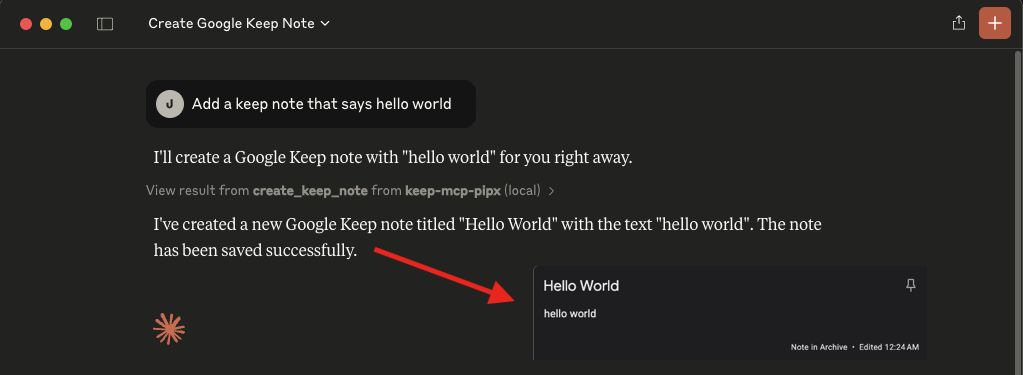
How to use
- Add the MCP server to your MCP servers:
  "mcpServers": {
    "keep-mcp-pipx": {
      "command": "pipx",
      "args": [
        "run",
        "keep-mcp"
      ],
      "env": {
        "GOOGLE_EMAIL": "Your Google Email",
        "GOOGLE_MASTER_TOKEN": "Your Google Master Token - see README.md"
      }
    }
  }
Or with uvx:
  "mcpServers": {
    "keep-mcp": {
      "command": "uvx",
      "args": [
        "keep-mcp"
      ],
      "env": {
        "GOOGLE_EMAIL": "Your Google Email",
        "GOOGLE_MASTER_TOKEN": "Your Google Master Token - see README.md"
      }
    }
  }
- Add your credentials:
GOOGLE_EMAIL: Your Google account email addressGOOGLE_MASTER_TOKEN: Your Google account master token
Obtain a Google master token
keep-mcp uses gkeepapi, which connects to Google Keep through an unofficial private API. A Google master token has full access to your account. Treat it like a password and never commit or share it.
Use the browser-assisted token exchange documented by gpsoauth. Choose how you want to run the exchange:
- Local Python: Follow
gpsoauth's alternative flow. - Docker: Follow gkeepapi's "Obtaining a Master Token" instructions. This runs the same exchange without requiring a local Python installation.
Both options require the browser oauth_token described in the gpsoauth documentation.
Older instructions may ask for your Google password or an app password and call perform_master_login(). That flow is unreliable and can return BadAuthentication. Use the browser-assisted flow above instead.
Features
Query and read tools
find: Search notes (case-insensitive by default) with optional filters for labels, colors, pinned, archived, trashed, creation/update date ranges (ISO 8601, UTC), and a result limitget_note: Get a single note by ID
Creation and update tools
create_note: Create a new note with title and text (automatically adds keep-mcp label)create_list: Create a checklist noteupdate_note: Update a note's title and textadd_list_item: Add an item to a checklist noteupdate_list_item: Update checklist item text and checked statedelete_list_item: Delete a checklist item
Note state tools
set_note_color: Set a note color (valid values: DEFAULT, RED, ORANGE, YELLOW, GREEN, TEAL, BLUE, CERULEAN, PURPLE, PINK, BROWN, GRAY)pin_note: Pin or unpin a notearchive_note: Archive or unarchive a notetrash_note: Move a note to trashrestore_note: Restore a trashed/deleted notedelete_note: Mark a note for deletion
Labels, collaborators, and media tools
list_labels: List labelscreate_label: Create a labeldelete_label: Delete a labeladd_label_to_note: Add a label to a noteremove_label_from_note: Remove a label from a notelist_note_collaborators: List collaborator emails for a noteadd_note_collaborator: Add a collaborator email to a noteremove_note_collaborator: Remove a collaborator email from a notelist_note_media: List media blobs for a note (with media links)
By default, all destructive and modification operations are restricted to notes that have were created by the MCP server (i.e. have the keep-mcp label). Set UNSAFE_MODE to true to bypass this restriction.
"env": {
  ...
  "UNSAFE_MODE": "true"
}
Local development (uv + make)
If you prefer a JS-style workflow (npm i, npm start), use the included Makefile:
make install   # like npm i
make start     # like npm start
make test
make lint
Run the real-account smoke test with credentials:
GOOGLE_EMAIL="you@example.com" \
GOOGLE_MASTER_TOKEN="..." \
make smoke
Equivalent direct uv commands (without make):
UV_CACHE_DIR=/tmp/uv-cache uv venv --python 3.11 .venv
UV_CACHE_DIR=/tmp/uv-cache uv pip install --python .venv/bin/python -e .
UV_CACHE_DIR=/tmp/uv-cache uv run --no-sync --python .venv/bin/python -m server
Testing
Unit tests (default)
The project includes a lightweight unit test suite under tests/.
It validates:
- note serialization shape for note and list objects (including labels, collaborators, media, and list items)
- modification safety behavior (
keep-mcplabel requirement andUNSAFE_MODE=trueoverride) - MCP tool behavior in
src/server/cli.pyusing mocked Keep client objects (tool happy paths and key error paths)
Run locally:
make test
Smoke test against a real Keep account
For additional confidence, run a basic lifecycle smoke test against a dedicated test account:
GOOGLE_EMAIL="you@example.com" \
GOOGLE_MASTER_TOKEN="..." \
make smoke
What it does:
- create note
- update note
- pin/unpin
- archive/unarchive
- trash/restore
- delete
This script is intended for manual verification and is not run in CI.
CI checks
GitHub Actions runs on every pull request and executes:
- lint (
ruff check .) - unit tests with coverage (
pytest -q --cov=src/server --cov-report=term-missing --cov-fail-under=70) - bytecode sanity (
python -m compileall src)
Publishing
Automatic publish on merge to main (GitHub Actions)
This repo includes a release workflow at .github/workflows/release.yml that runs on every push to main (including merged PRs).
It will:
- inspect commits since the last release tag (
vX.Y.Z) - compute the next semantic version from Conventional Commit types
- skip publishing when there are no releasable commit types
- run lint and unit tests
- build
dist/* - publish to PyPI
- create a GitHub release/tag
v<computed-version>with generated notes
Version bump rules:
- major: commit subject with
!(example:feat!:orfix(api)!:) or commit body containingBREAKING CHANGE - minor:
feat: - patch:
fix:,perf:,revert: - no release:
docs:,chore:,ci:,test:,refactor:(unless the commit is marked as breaking)
Required repository secret:
PYPI_API_TOKEN: a PyPI API token (recommended scope: this project only)
Manual publish
To publish manually to PyPI:
- Update the version in
pyproject.toml - Build the package:
pipx run build
- Upload to PyPI:
pipx run twine upload --repository pypi dist/*
Run locally with MCP clients
This is useful when you want a client to run this server from your local checkout instead of PyPI.
- Create a local virtualenv and install in editable mode:
cd /ABSOLUTE/PATH/TO/keep-mcp
make install
- Add the server to your MCP client config.
config.toml clients (Codex, Goose, etc.)
[mcp_servers.keep_mcp]
command = "make"
args = ["-C", "/ABSOLUTE/PATH/TO/keep-mcp", "start"]

[mcp_servers.keep_mcp.env]
GOOGLE_EMAIL = "you@example.com"
GOOGLE_MASTER_TOKEN = "your-master-token"
UNSAFE_MODE = "false"
JSON mcpServers clients (Claude Desktop, Cursor, Cline, etc.)
{
  "mcpServers": {
    "keep-mcp-local": {
      "command": "make",
      "args": ["-C", "/ABSOLUTE/PATH/TO/keep-mcp", "start"],
      "env": {
        "GOOGLE_EMAIL": "you@example.com",
        "GOOGLE_MASTER_TOKEN": "your-master-token",
        "UNSAFE_MODE": "false"
      }
    }
  }
}
Alternative (without make):
[mcp_servers.keep_mcp]
command = "uv"
args = [
  "--directory", "/ABSOLUTE/PATH/TO/keep-mcp",
  "run", "--no-sync", "--python", ".venv/bin/python",
  "-m", "server"
]
Notes:
- Run
make installonce before starting from an MCP client. - Only the repo root path is required (no absolute
/.venv/bin/pythonpath). - Ensure
makeanduvare in yourPATH. - Restart your MCP client after updating config files.
UNSAFE_MODEis optional; keep it"false"unless you explicitly want to modify non-keep-mcpnotes.
Troubleshooting
- If you get "DeviceManagementRequiredOrSyncDisabled" check https://admin.google.com/ac/devices/settings/general and turn "Turn off mobile management (Unmanaged)"
1 maintainer

Metadata
1 maintainer
Release files for keep-mcp 2.0.1
For a detailed explanation of source distributions (sdists) and built distributions (wheels), please see the package formats documentation.
Source distribution (sdist)
| File | Size | Uploaded | |
|---|---|---|---|
| keep_mcp-2.0.1.tar.gz | 24.4 kB | Details |
Built distribution (wheel)
| File | Interpreter | ABI | Platform | Reset |
|---|---|---|---|---|
| keep_mcp-2.0.1-py3-none-any.whl | Python 3 | none | any | Details |
Total release size: 36.0 kB
Release files / keep_mcp-2.0.1.tar.gz
| Download URL | keep_mcp-2.0.1.tar.gz |
|---|---|
| Size | 24.4 kB |
| Tags | Source |
|
SHA-256 checksum How to use checksums |
783c143a7d0ff0fa5eb3686ba3c5925b52b04065a4b4b4f119c47ca89520c91d
|
|
BLAKE2b-256 checksum How to use checksums |
8fb24ae8591f73003107140f429c64fa472906a2ae8ae23442469c1b27e6554b
|
| Upload date | |
|
Uploaded using Trusted Publishing? What is trusted publishing? |
No |
| Uploaded via |
twine/7.0.0 CPython/3.13.14
|
Release files / keep_mcp-2.0.1-py3-none-any.whl
| Download URL | keep_mcp-2.0.1-py3-none-any.whl |
|---|---|
| Size | 11.6 kB |
| Tags | Python 3 |
|
SHA-256 checksum How to use checksums |
70719cb52d9c8530fd5b34bf1706b820b5b41fec85ddf2a3ee886f47a1a8de8e
|
|
BLAKE2b-256 checksum How to use checksums |
d43ff1955a6f20ce49d2d8998470f4fd1aa5f02e4294acef71234ecac1cde907
|
| Upload date | |
|
Uploaded using Trusted Publishing? What is trusted publishing? |
No |
| Uploaded via |
twine/7.0.0 CPython/3.13.14
|














