

Interactive security triage in the terminal.



Kekkai
Stop parsing JSON.
Kekkai is a small open-source CLI that wraps existing security scanners (Trivy, Semgrep, Gitleaks) and focuses on the part that tends to be slow and frustrating: reviewing and triaging results.
Running scanners is easy. Interpreting noisy output, dealing with false positives, and making CI usable is not. Kekkai exists to make that part tolerable.
See it run: kekkai doctor plus a single kekkai scan driving Semgrep, Gitleaks, and Trivy (Docker-backed), then a quick look at the unified kekkai-report.json on disk.

What it does
- Runs Trivy (dependencies), Semgrep (code), and Gitleaks (secrets)
- Normalizes their outputs into a single report format
- Provides an interactive terminal UI for reviewing findings
- Lets you mark findings as false positives and persist decisions locally
- Supports CI mode with severity-based failure thresholds
Kekkai does not replace scanners or introduce proprietary detection logic. It sits on top of existing tools and focuses on workflow and UX.
Quick Start
Requires Docker and Python 3.12
1. Install
pipx install kekkai-cli
2. Scan
kekkai scan
# Runs Trivy (CVEs), Semgrep (code), Gitleaks (secrets)
# Outputs unified kekkai-report.json
3. Triage
kekkai triage
# Interactive TUI to review findings with keyboard navigation
⚡️ Auto-Install (Pre-commit)
Add this to your .pre-commit-config.yaml to scan on every commit:
  - repo: [https://github.com/kademoslabs/kekkai](https://github.com/kademoslabs/kekkai)
    rev: v2.0.1
    hooks:
      - id: kekkai-scan
No signup, no cloud service required.
Why Kekkai?
| Problem | Kekkai Solution |
|---|---|
| Juggling 3+ tools | One CLI for Trivy, Semgrep, Gitleaks |
| Reading JSON logs | Interactive terminal UI |
| Installing scanners | Auto-pulls Docker containers |
| Parsing different formats | Unified kekkai-report.json |
| False positives | Mark and ignore with .kekkaiignore |
| CI/CD integration | kekkai scan --ci --fail-on high |
Features
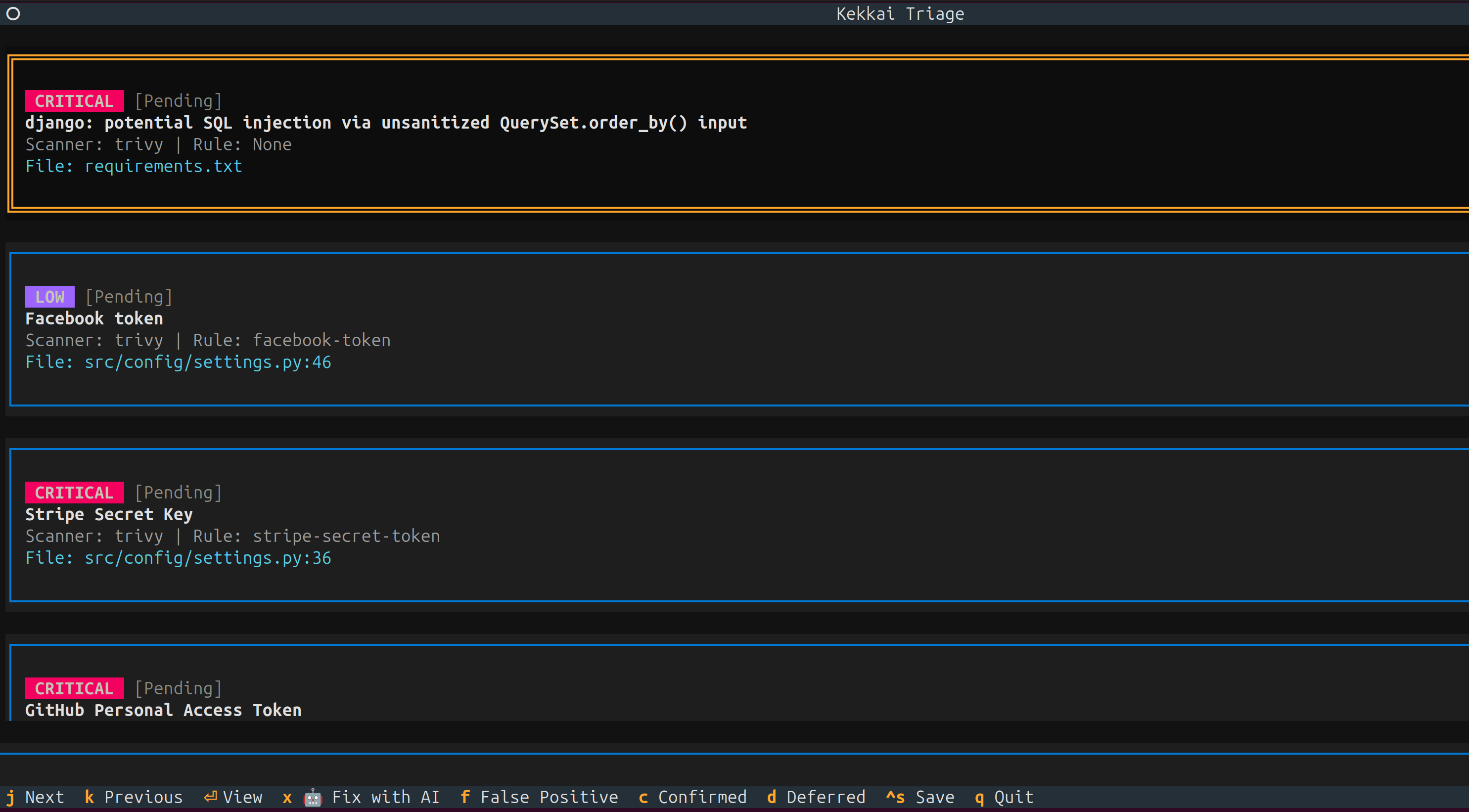
Interactive Triage TUI
Stop reading JSON. Use keyboard navigation to review findings, mark false positives, and generate ignore files.
kekkai triage
Controls:
j/kor↑/↓: Navigate findingsf: Mark as false positivec: Confirm findingd: Defer/ignoreCtrl+S: Save decisionsq: Quit
🚦 CI/CD in 1 Second
Don't write YAML. Run this in your repo:
kekkai init --ci
GitHub PR Comments
Get security feedback directly in pull requests.
export GITHUB_TOKEN="ghp_..."
kekkai scan --pr-comment
Unified Scanning
Run industry-standard scanners without installing them individually. Each scanner runs in an isolated Docker container.
kekkai scan                          # Scan current directory
kekkai scan --repo /path/to/project  # Scan specific path
kekkai scan --output results.json    # Custom output path
Scanners Included:
| Scanner | Finds | Image |
|---|---|---|
| Trivy | CVEs in dependencies | ghcr.io/aquasecurity/trivy:0.69.3 |
| Semgrep | Code vulnerabilities | semgrep/semgrep:latest |
| Gitleaks | Hardcoded secrets | zricethezav/gitleaks:latest |
DAST with OWASP ZAP (optional)
Point Kekkai at a running HTTP service for a baseline ZAP scan. On Linux, 127.0.0.1 / localhost targets are rewritten so the ZAP container can reach your host (via host.docker.internal + host-gateway).
kekkai scan --scanners zap \
  --target-url 'http://127.0.0.1:5000' \
  --allow-private-ips

Container Security:
- Read-only filesystem
- No network access
- Memory limited (2GB)
- No privilege escalation
Design choices
- Local-first: no SaaS required, runs entirely on your machine or CI
- No network access for scanner containers
- Read-only filesystems, memory-limited containers
- Uses existing tools instead of reimplementing scanners
- Terminal-first UX instead of dashboards
Optional features
These are opt-in and not required for basic use:
Local-First AI Threat Modeling
Generate STRIDE threat models with AI that runs on your machine. No API keys. No cloud.
# Ollama (recommended - easy setup, privacy-preserving)
ollama pull mistral
kekkai threatflow --repo . --model-mode ollama --model-name mistral

# Output: THREATS.md with attack surface analysis and Mermaid.js diagrams
Supports:
- Ollama (recommended)
- Local GGUF models (llama.cpp)
- OpenAI/Anthropic/Gemini (if you trust them with your code)
Full Local-First AI Threat Modeling Documentation →

DefectDojo Integration
Spin up a vulnerability management dashboard locally if you need it.
kekkai dojo up --wait    # Start DefectDojo
kekkai upload            # Import scan results
What You Get:
- DefectDojo web UI at
http://localhost:8085(default HTTP port; override withkekkai dojo up --port …) - Automatic credential generation
- Pre-configured for Kekkai imports
AI-Powered Fix Engine
Generate code patches for findings (experimental).
kekkai fix --input scan-results.json --apply
Compliance Reporting
Turn a unified kekkai-report.json into HTML (or PDF, compliance matrix, etc.) with executive summary and framework mapping (PCI-DSS, OWASP, HIPAA, SOC 2).
kekkai report --input kekkai-report.json --format html --output ./reports --project my-service
The demo below runs a fast Semgrep-only pass to refresh the JSON, then renders HTML and lists the output directory.

# Other formats
kekkai report --input kekkai-report.json --format pdf --frameworks PCI-DSS,OWASP
What this is not
- Not a replacement for commercial AppSec platforms
- Not a new scanner or detection engine
- Not optimized for large enterprises (yet)
- Not a hosted service
Right now, Kekkai is aimed at individual developers and small teams who already run scanners but want better triage and less noise.
Security
Kekkai is designed with security as a core principle:
- Container Isolation: Scanners run in hardened Docker containers
- No Network Access: Containers cannot reach external networks
- Local-First AI: run entirely on your machine
- SLSA Level 3: Release artifacts include provenance attestations
- Signed Images: Docker images are Cosign-signed
For vulnerability reports, see SECURITY.md.
Documentation
| Guide | Description |
|---|---|
| Installation | All installation methods |
| ThreatFlow | AI threat modeling setup |
| Triage TUI | Interactive finding review |
| CI Mode | Pipeline integration |
| DefectDojo | Optional vulnerability management |
| Security | SLSA provenance verification |
Roadmap (short-term)
- Persistent triage state across runs (baselines)
- “New findings only” diffs
- Better PR-level workflows
- Cleaner reporting for small teams
Contributing
We welcome contributions! See CONTRIBUTING.md for guidelines.
License
Apache-2.0 — See LICENSE for details.
Built by Kademos Labs
1 maintainer

Metadata
1 maintainer
Release files for kekkai-cli 2.3.0
For a detailed explanation of source distributions (sdists) and built distributions (wheels), please see the package formats documentation.
Source distribution (sdist)
| File | Size | Uploaded | |
|---|---|---|---|
| kekkai_cli-2.3.0.tar.gz | 230.8 kB | Details |
Built distribution (wheel)
| File | Interpreter | ABI | Platform | Reset |
|---|---|---|---|---|
| kekkai_cli-2.3.0-py3-none-any.whl | Python 3 | none | any | Details |
Total release size: 438.8 kB
Release files / kekkai_cli-2.3.0.tar.gz
| Download URL | kekkai_cli-2.3.0.tar.gz |
|---|---|
| Size | 230.8 kB |
| Tags | Source |
|
SHA-256 checksum How to use checksums |
dca38d1defa1f8bf1eeaea8f29c07a33399de19cc465cda2be77f7a276dff2ce
|
|
BLAKE2b-256 checksum How to use checksums |
d42e9358f1daf9f8a18fdaf0e95899ef059efccceb43c52e2540bad51148b20d
|
| Upload date | |
|
Uploaded using Trusted Publishing? What is trusted publishing? |
No |
| Uploaded via |
twine/6.2.0 CPython/3.12.13
|
Release files / kekkai_cli-2.3.0-py3-none-any.whl
| Download URL | kekkai_cli-2.3.0-py3-none-any.whl |
|---|---|
| Size | 208.0 kB |
| Tags | Python 3 |
|
SHA-256 checksum How to use checksums |
57a8bef3ba5d592e1e360c481dfd5bf2d038de4d7933d749bb10647ec2562970
|
|
BLAKE2b-256 checksum How to use checksums |
af27de16762819cf546a218a8d53ee9e9c62786d67f635556a0f64a8ff09a96a
|
| Upload date | |
|
Uploaded using Trusted Publishing? What is trusted publishing? |
No |
| Uploaded via |
twine/6.2.0 CPython/3.12.13
|














