

Your AI coding tools, under one roof.
See and share the MCP servers, plugins and skills
that Claude Code, Codex and Cursor load.



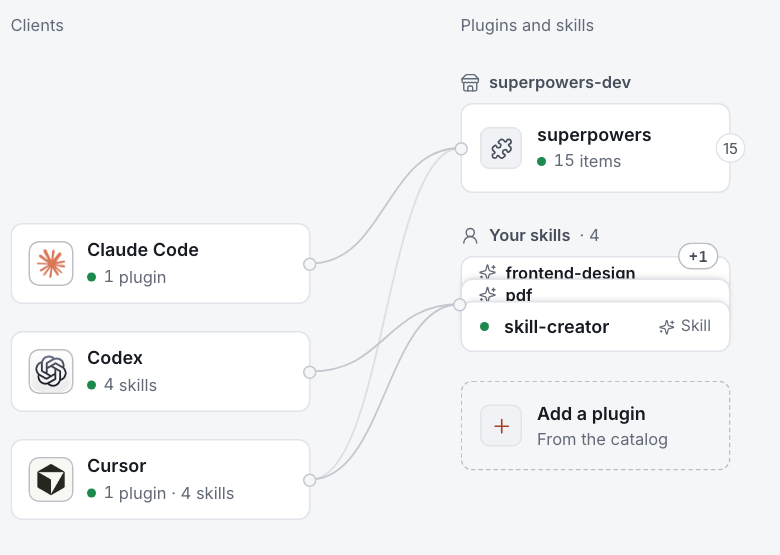
See what each agent loads
The plugins, skills and MCP servers of Claude Code, Codex and Cursor on one map. What one agent has and another lacks shows at a glance.
Share servers across all agents
Move a server into the Kitden gateway and every agent you use gets it. Set it up once, not once per agent.
Turn tools off
Every tool of a server has a switch, for all projects or one. A tool that is off is refused, not just hidden.
And more
| Feature | What it does |
|---|---|
| Find and add | Search the official MCP Registry, skills.sh, the Claude plugins marketplace and any public GitHub repository. Drag a result onto a client or the gateway. |
| Fill the gaps | A plugin or skill one agent has goes to the others in one step. |
| Tokens and sign-in, once | Checked before Apply, kept in the macOS Keychain or the Linux keyring, refreshed by the gateway. |
| Per project | Turn a server or a tool on or off for one project only. |
| See what runs | How often each tool is called, and which tools only read. |
| Instructions in view | Which CLAUDE.md, AGENTS.md, rules, hooks, commands and agents each client loads, and where they come from. |
| Ask your agent | "Show my setup" works from any agent, through Kitden's own read-only MCP server. |
Safe to use
- Nothing is written until you press Apply. Every change shows a preview first, with the exact edit under Show changes.
- Apply keeps a backup, and Undo puts it back. If a file changed since, Kitden stops instead of overwriting it.
- Everything stays on your computer. The page runs at 127.0.0.1 behind a private link. No account, no telemetry. Kitden goes online only for the catalogs you open and the remote servers you add.
- Secrets live in the macOS Keychain or your Linux keyring only. The page shows no more than their first and last characters.
- Kitden's agent tools only read. Asking an agent to show your setup changes nothing.
Add only servers and plugins you trust: they run with your permissions.
Get started
Needs macOS or Linux, uv and at
least one of Claude Code, Codex or Cursor. On Linux, install libsecret-tools (Debian,
Ubuntu) or libsecret (Fedora, Arch) so Kitden can keep server secrets in your keyring.
Try it on a sample first. Your own settings are not read or changed:
uvx --python 3.13 kitden demo
Install it and open it for your own setup:
uv tool install --python 3.13 kitden && kitden
Or with Homebrew: brew install konstantinstarovoytov/tap/kitden, then kitden.
Update later with uv tool upgrade kitden or brew upgrade kitden.
Guide · Roadmap · Releases · Issues · Contributing · Apache-2.0
1 maintainer

Metadata
1 maintainer
Release files for kitden 0.6.0
For a detailed explanation of source distributions (sdists) and built distributions (wheels), please see the package formats documentation.
Source distribution (sdist)
| File | Size | Uploaded | Provenance | Actions |
|---|---|---|---|---|
| kitden-0.6.0.tar.gz | 799.7 kB | Without provenance | Details for kitden-0.6.0.tar.gz |
Built distribution (wheel)
| File | Interpreter | ABI | Platform | Actions Reset |
|---|---|---|---|---|
| kitden-0.6.0-py3-none-any.whl | Python 3 | none | any | Details for kitden-0.6.0-py3-none-any.whl |
Total release size: 1.7 MB
Release files / kitden-0.6.0.tar.gz
| Download URL | kitden-0.6.0.tar.gz |
|---|---|
| Size | 799.7 kB |
| Tags | Source |
|
SHA-256 checksum How to use checksums |
435d212e4214f08fced5938a0da20295a140ac7e2ea7a19ec54a7279d8f85874
|
|
BLAKE2b-256 checksum How to use checksums |
9f03ea9d421b92fb638a285a3924e30a2bcb94c438ef48299e7386276445fc85
|
| Upload date | |
|
Uploaded using Trusted Publishing? What is trusted publishing? |
Yes |
| Uploaded via |
uv/0.10.10 {"installer":{"name":"uv","version":"0.10.10","subcommand":["publish"]},"python":null,"implementation":{"name":null,"version":null},"distro":{"name":"Ubuntu","version":"24.04","id":"noble","libc":null},"system":{"name":null,"release":null},"cpu":null,"openssl_version":null,"setuptools_version":null,"rustc_version":null,"ci":true}
|
Release files / kitden-0.6.0-py3-none-any.whl
| Download URL | kitden-0.6.0-py3-none-any.whl |
|---|---|
| Size | 874.0 kB |
| Tags | Python 3 |
|
SHA-256 checksum How to use checksums |
a08eca4dd977b173bb46ea21755cf9bd7656966fdec6a55d107fdee8cb7165cd
|
|
BLAKE2b-256 checksum How to use checksums |
091cdedba3c973f32341e00db03a0a869dbf01f785e25d25e368707a169c1d3f
|
| Upload date | |
|
Uploaded using Trusted Publishing? What is trusted publishing? |
Yes |
| Uploaded via |
uv/0.10.10 {"installer":{"name":"uv","version":"0.10.10","subcommand":["publish"]},"python":null,"implementation":{"name":null,"version":null},"distro":{"name":"Ubuntu","version":"24.04","id":"noble","libc":null},"system":{"name":null,"release":null},"cpu":null,"openssl_version":null,"setuptools_version":null,"rustc_version":null,"ci":true}
|
Security for kitden 0.6.0
Provenance
Provenance describes where a file came from. On PyPI, provenance is shared via attestations, which provide a verifiable record of the build or publishing details. View details, limitations and caveats.
No provenance found
None of the files in this release were uploaded with provenance metadata.
A note on package security
PyPI is a repository for distributing packages, not a service for auditing them. While third-party security researchers and our staff do their best to detect and remove malicious packages, PyPI cannot guarantee the quality, security or suitability of any given package.
To learn more about protecting yourself from malicious actors, visit our package security documentation.














