
The shape-shifting MCP hub — shapeshift() into any MCP server at runtime. 7 registries. No restart.
Verified details
These details have been verified by PyPIProject links
GitHub Statistics
Maintainers

Project description

🦊 Kitsune MCP
One entry in your config. Any MCP server on demand.
5 tools at rest. Thousands available on request. No restarts.








What's new in v0.20
- GATEWAY —
status()detects other MCP servers active in your client configs and shows their context cost.setup()harvests their API keys and absorbs the servers forshapeshift(). - 6-tool lean profile —
status,search,auth,shapeshift,call,auto.auto()is now first-class in the lean surface, not forge-only. auto()withserver_hint— one-shot task execution:auto("current time in Tokyo", server_hint="mcp-server-time")infers args and returns the result directly. Arg extraction infers "Tokyo" → "Asia/Tokyo" automatically.setup()wizard —setup(action="harvest")extracts API keys from other servers' configs into~/.kitsune/.env.setup(action="absorb")registers those servers forshapeshift().setup(project=True)writes a lean.claude/mcp.jsonfor this project only.
See CHANGELOG.md for the full list.
The problem: static tool loading
Every MCP server you add to your config loads all its tools at startup and keeps them there, every turn, whether used or not.
Five servers means 3,000–20,000+ tokens of overhead on every request. Research on LLM tool use consistently shows accuracy degrades as the number of visible tools increases — the model has to reason about dozens of options before it can act on any of them.
20 tools in context → baseline performance
50 tools in context → measurable degradation in tool selection accuracy
100+ tools in context → significant drop; wrong tools called, arguments hallucinated
The fix isn't a better model — it's a smaller menu.
GATEWAY — see what you're paying for
Once Kitsune is running, call status() to see what other MCP servers your clients are loading:
GATEWAY
  ⚠  2 other server(s) active in claude-desktop (~16 extra tools in context)
     Run setup() to harvest their credentials and reduce bloat
  ⚠  1 other server(s) active in claude-code (~8 extra tools in context)
Kitsune can absorb those servers so you get a single lean config with everything still accessible on demand:
setup()                    # preview what can be harvested
setup(action="harvest")    # extract API keys → ~/.kitsune/.env  (non-destructive)
setup(action="absorb")     # register servers for shapeshift()   (non-destructive)
setup(project=True)        # write .claude/mcp.json with only Kitsune (this project only)
Kitsune: RAG for your MCP ecosystem
Think of Kitsune the same way you think of RAG for documents: instead of loading all your knowledge into context upfront, you retrieve only what's relevant to the current query.
Kitsune does the same thing for MCP servers:
| RAG for documents | Kitsune for MCP |
|---|---|
| Index: all your docs | Registry: 10,000+ MCP servers across 7 sources |
| Query → retrieve relevant chunks | search("web scraping") → find matching servers |
| Inject only relevant content | shapeshift("firecrawl", tools=["scrape"]) → mount only needed tools |
| Clear context when done | shapeshift() → unmount, context returns to baseline |
5 tools at rest (~400 tokens). Any server on demand. Load exactly the tools the current task needs — 2 out of 20 if that's all you need.
shapeshift("brave-search", tools=["web_search"])  # retrieve: 1 tool, ~300 tokens
# ... task done ...
shapeshift()                                       # release: context back to ~400 tokens
shapeshift("supabase")                             # next task: different server, no restart
shapeshift()
shapeshift("@modelcontextprotocol/server-github")  # and again
Why Kitsune?
In Japanese folklore, the Kitsune (狐) is a fox spirit of extraordinary intelligence and magical power. What makes it remarkable is how it grows: with age and wisdom, a Kitsune gains additional tails — each one representing a new ability it has mastered. It can shapeshift, take on any form it chooses, borrow the powers of others, and just as freely cast them off when the purpose is fulfilled. One fox. Many forms. Total fluidity.
This tool works the same way.
shapeshift("brave-search") — the fox takes on a new form, its tools appear natively.
shapeshift() — it returns to its true shape, ready to become something else.
Each server it shapeshifts into is a new tail. Each capability borrowed and released cleanly. One entry in your config. Every server in the MCP ecosystem, on demand.
I am not Japanese, and I use this name with the highest respect for the mythology and culture it comes from. The parallel felt too precise to ignore — a spirit that shapeshifts between forms, gains new powers, and releases them at will. That is exactly what this tool does.
vs. always-on connectors (Claude.ai, ChatGPT, Cursor)
Most clients now offer a "connector marketplace" — Notion, Gmail, Drive, Slack, Linear, etc. — one click to enable. The catch: every enabled connector loads its full tool surface into the system prompt of every message, for the lifetime of the conversation. You pay for it whether you use it or not.
Kitsune is lazy and parallel: one entry, every server reachable on demand, only the tools you actively call sit in context.
Notion, head to head (numbers measured live)
| Setup | Resting context (every turn) | One Notion search | After cleanup |
|---|---|---|---|
| Always-on Notion connector | 13,733 tokens | 13,733 + reply | 13,733 forever |
| Kitsune — full Notion mounted | 400 tokens | ~14,133 + reply | 400 |
Kitsune — shapeshift("notion-hosted", tools=["notion-search"]) |
400 tokens | ~1,940 + reply | 400 (after shapeshift()) |
Over a 50-turn conversation:
- Always-on connector: 50 × 13,733 = 686,650 tokens of repeated Notion overhead
- Kitsune lean: 50 × 400 + 5 turns × 1,540 = 27,700 tokens
97% reduction for the same workflow. And Notion is just one connector.
The "but it's just one" trap
Real-world always-on token costs (typical hosted MCPs):
- Notion ~13.7K · Gmail ~8K · Drive ~10K · Slack ~7K · Calendar ~5K
Five connectors enabled = ~43K tokens per turn, every turn, whether you mention them or not. Same five via Kitsune lean: ~420 tokens resting, with a brief spike only on the turn where you actually use one.
For a 100-turn dev session: 4.3M tokens of waste vs ~40K. You can have a 100× longer conversation before hitting context limits.
The killer demo
> compare("notion")

   tokens  tools  src         status              id
   13,733     14  official    live (oauth)        notion-hosted
   18,349     22  npm         live                @notionhq/notion-mcp-server
   ...

💡 Cheapest ready-to-use: notion-hosted

> shapeshift("notion-hosted", tools=["notion-search"])
   ✓ Mounted notion-search (~1,540 tokens)

> call("notion-search", {"query": "roadmap"})
   [results]

> shapeshift()
   ✓ Released. Context returned to baseline (~400 tokens).
One tool. On demand. Off again. Same OAuth, same Notion endpoint (mcp.notion.com/mcp) — but tokens stay in ~/.kitsune/oauth/, not on a third-party's servers.
Connectors charge rent. Kitsune charges per use.
The 6-tool surface
kitsune-mcp exposes exactly six tools at rest — enough to handle any task autonomously, find, mount, authenticate, call, and monitor any server in the ecosystem:
| Tool | What it does |
|---|---|
auto(task) |
Intent router: describe any task → Kitsune finds the right server, mounts it, and calls the right tool in one step. The front door for new users. |
search(query) |
Find servers across 7 registries. Returns ranked matches with token estimates. |
auth(target, value) |
Store an API key (auth("BRAVE_API_KEY", "sk-...")) or trigger OAuth 2.1 (auth("https://mcp.notion.com/mcp")). Writes to ~/.kitsune/.env, active immediately. |
shapeshift(server_id, tools, source) |
Mount: server's tools become first-class native tools. Unmount: shapeshift() with no args releases current form. tools=[...] for lean load. |
call(tool_name, arguments) |
Call any tool — mounted or not. When shapeshifted, server_id is inferred. |
status() |
Current form, active connections (PID + RAM), token overhead, registry health. |
Overhead at rest: ~420 tokens. Each mount adds only what you load — tools=["web_search"] is ~300 tokens, not 1,500.
Need evaluation tools (inspect, test, bench, craft, compare)? Use kitsune-forge:
{ "command": "kitsune-forge" }
Specialized agent profiles
Because tool context is opt-in, you can wire agents to carry only the surface they ever need:
Research agent — search + fetch, ~700 tokens
{ "command": "kitsune-mcp", "env": { "KITSUNE_TOOLS": "search,shapeshift,call,auth,status" } }
shapeshift("brave-search", tools=["web_search"])
shapeshift("firecrawl-mcp", tools=["scrape"])
# Total in-context: ~700 tokens at peak. A GPT-4o request at 700 tokens costs ~$0.0021.
Code agent — github + filesystem + git
shapeshift("@modelcontextprotocol/server-github", tools=["create_issue", "search_repositories"])
shapeshift("@modelcontextprotocol/server-filesystem", tools=["read_file", "write_file"])
shapeshift("@modelcontextprotocol/server-git", tools=["git_log", "git_diff"])
# Each loaded separately when needed — never all 60+ tools at once
Notes agent — notion + memory, lean
shapeshift("notion-hosted", tools=["notion-search", "notion-append-block-children"])
shapeshift("mem0", tools=["add_memory", "search_memory"])
# ~3,000 tokens peak vs ~22,000 for both always-on
How It Fits Together
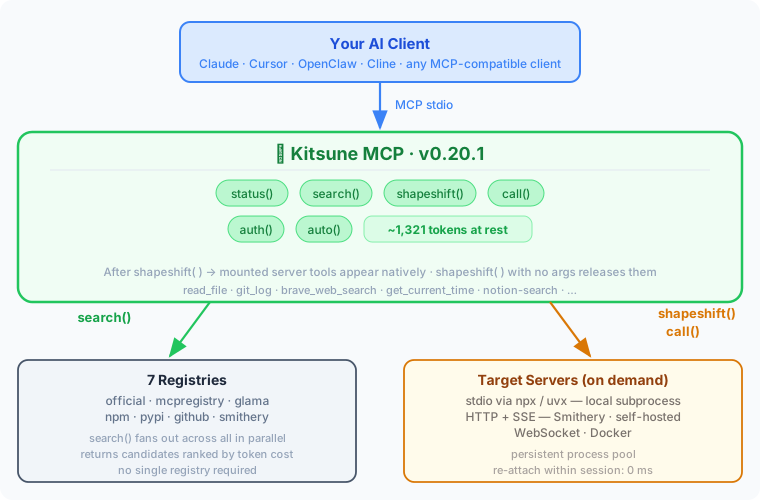
shapeshift() injects tools directly at runtime via FastMCP's live API. Token overhead stays flat regardless of how many servers you explore.
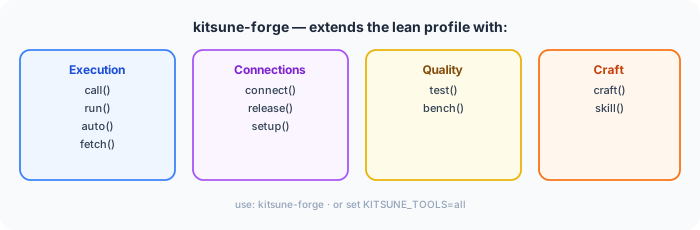
Need the full evaluation suite? kitsune-forge adds inspect, test, bench, craft, compare, and more:
Quick Start
pip install kitsune-mcp
Add to your MCP client config — once, globally:
{
  "mcpServers": {
    "kitsune": {
      "command": "kitsune-mcp"
    }
  }
}
Works with Claude Desktop, Claude Code, Cursor, Cline, OpenClaw, Continue.dev, Zed, and any MCP-compatible client. No API keys needed.
| Client | Global config file |
|---|---|
| Claude Desktop (macOS) | ~/Library/Application Support/Claude/claude_desktop_config.json |
| Claude Desktop (Windows) | %APPDATA%\Claude\claude_desktop_config.json |
| Claude Code | ~/.claude/mcp.json |
| Cursor / Windsurf | ~/.cursor/mcp.json |
| Cline / Continue.dev | VS Code settings / ~/.continue/config.json |
| OpenClaw | MCP config in OpenClaw settings |
# One-shot: describe task + pin the server
auto("current time in Tokyo", server_hint="mcp-server-time")
auto("search: anthropic news May 2026", server_hint="exa")

# Multi-step: inspect / lean-mount / hold mount for several calls
shapeshift("mcp-server-time")
call("get_current_time", {"timezone": "Asia/Tokyo"})
shapeshift()
Use auto() with server_hint for single-call flows. Use shapeshift + call when you want to inspect first, mount specific tools, or run multiple calls on the same server.
Using Kitsune alongside existing servers
You can add Kitsune to a config that already has other servers — it works without touching anything else.
Kitsune never deletes or modifies your existing configs without explicit confirmation. Config changes are always backed up and reversible.
Run Kitsune and standard MCP side-by-side (Claude Code)
Claude Code supports per-project MCP configs that override the global one. This means you can run a Kitsune session and a standard multi-server session simultaneously, with no config changes:
# Terminal A — Kitsune-only project (6 tools, clean context)
mkdir ~/projects/kitsune-session
echo '{"mcpServers":{"kitsune":{"command":"kitsune-mcp"}}}' > ~/projects/kitsune-session/.claude/mcp.json
cd ~/projects/kitsune-session && claude

# Terminal B — standard workflow (all your configured servers)
cd ~/projects/any-other-project && claude  # uses global ~/.claude/mcp.json
Both sessions run in parallel. Terminal A sees 5 tools; Terminal B sees everything in your global config. No restarts, no toggling, no risk to either session. Easy to compare workflows or run specialised agent tasks in one terminal while using familiar tools in another.
Server Sources
Kitsune MCP searches across 7 registries in parallel — tens of thousands of servers, no single one required.
| Registry | Auth | registry= value |
|---|---|---|
| modelcontextprotocol/servers | None | official |
| registry.modelcontextprotocol.io | None | mcpregistry |
| Glama | None | glama |
| npm | None | npm |
| PyPI | None | pypi |
| GitHub repos | None | github:owner/repo |
| Smithery | Free API key | smithery |
Default search() fans out across all no-auth registries automatically. Add a SMITHERY_API_KEY to extend discovery with Smithery's hosted server catalog (HTTP servers, no local install required).
How It Works
The proxy model
Kitsune MCP is a dynamic MCP proxy. It sits between your AI client and any number of other MCP servers, connecting to them on demand:
Your AI client
    │
    ▼
Kitsune MCP          ← the one entry in your config
    │
    ├── (on shapeshift) ──► filesystem server   (spawned subprocess)
    ├── (on shapeshift) ──► brave-search server (spawned subprocess)
    └── (on shapeshift) ──► remote HTTP server  (HTTP+SSE connection)
Nothing is copied. When you call a mounted tool, Kitsune MCP forwards the call to the original server via JSON-RPC and returns the result. The server's logic always runs on the server — Kitsune MCP only relays the schema and the call.
What shapeshift() does, step by step
- Connects to the target server via the right transport (stdio subprocess, HTTP, WebSocket)
- Handshakes — sends MCP
initialize/notifications/initialized - Fetches
tools/list,resources/list,prompts/listfrom the server - Registers each tool as a native FastMCP tool — a proxy closure with the exact signature from the schema
- Notifies the AI client (
notifications/tools/list_changed) so the new tools appear immediately
The AI sees read_file, write_file, list_directory as if they were always there. There's no wrapper or call_tool("filesystem", ...) indirection — the tools are first-class.
shapeshift() with no args reverses all of it: deregisters the proxy closures, clears resources and prompts, notifies the client.
Resources and prompts
shapeshift() proxies all three MCP primitives, not just tools:
| Primitive | What gets proxied |
|---|---|
| Tools | Every tool from tools/list, registered with its exact parameter schema |
| Resources | Static resources from resources/list — readable via the MCP resources API |
| Prompts | Every prompt from prompts/list, with its argument signature |
Template URIs (e.g. file:///{path}) are skipped — they require parameter binding that adds complexity with little practical gain. Everything else is proxied.
Transport is automatic
| Server source | How it runs |
|---|---|
| npm package | npx <package> — spawned locally |
| pip package | uvx <package> — spawned locally |
| GitHub repo | npx github:user/repo or uvx --from git+https://... |
| Docker image | docker run --rm -i --memory 512m <image> |
| Smithery hosted | HTTP+SSE (requires SMITHERY_API_KEY) |
| WebSocket server | ws:// / wss:// |
Cold start latency (typical ranges)
| Transport | First call | Subsequent calls |
|---|---|---|
| Smithery HTTP / WebSocket | ~100–300 ms | ~50–150 ms |
npm (npx) — cached |
~1–3 s | reused from pool |
npm (npx) — cold download |
~5–15 s | cached after first |
pip (uvx) — cached |
~1–2 s | reused from pool |
| Docker | ~3–8 s | reused from pool |
Kitsune keeps a persistent process pool — once a server is started, subsequent shapeshift() calls reattach in milliseconds. shapeshift("brave-search") the second time is fast.
Why use inspect() before shapeshift()
inspect() (available in kitsune-forge) connects to the server and fetches its schemas — but does not register anything. Zero tools added to context, zero tokens consumed by the AI.
Use it to:
- See exact parameter names and types before committing
- Check credential requirements upfront (avoid a cryptic error mid-task)
- Get the measured token cost of the mount so you can budget
- Verify the server actually starts and responds before a live session
inspect("mcp-server-brave-search")
# → CREDENTIALS
# →   ✗ missing  BRAVE_API_KEY — Brave Search API key
# →   Add: auth("BRAVE_API_KEY", "your-value")
# → Token cost: ~99 tokens (measured)

# Add the key — picked up immediately, no restart needed
auth("BRAVE_API_KEY", "your-value")
shapeshift("mcp-server-brave-search")
call("brave_web_search", arguments={"query": "MCP protocol 2025"})
Security
Trust tiers
Every shapeshift() and call() result shows where the server comes from:
| Tier | Sources | Indicator |
|---|---|---|
| High | official (modelcontextprotocol/servers) |
✓ Source: official |
| Medium | mcpregistry, glama, smithery |
✓ Source: smithery |
| Community | npm, pypi, github |
⚠️ Source: npm (community — not verified) |
Community servers and source="local" installs require confirm=True — you're explicitly acknowledging you've reviewed the server before running arbitrary code. To bypass this for servers you already trust, set KITSUNE_TRUST=community (via auth("KITSUNE_TRUST", "community") or your .env). This persists across sessions so power users and agents never see the gate again.
Install command validation
Before spawning any subprocess, Kitsune MCP validates the executable name:
- Blocks shell metacharacters (
&,;,|,`,$) — prevents injection via a crafted server ID - Blocks path traversal (
../) — prevents escaping to arbitrary binaries
Arguments are passed directly to asyncio.create_subprocess_exec (never a shell), so they are not subject to shell interpretation.
OAuth 2.1 for hosted MCP servers
Many hosted MCP servers (Notion, Linear, Cloudflare) authenticate via OAuth 2.1 with Dynamic Client Registration rather than a static API key. Kitsune supports this automatically:
auth("https://mcp.notion.com/mcp")
# First use: browser opens, you approve, tokens are cached.
# Subsequent runs: cached token loaded silently, refreshed when expired.

shapeshift("https://mcp.notion.com/mcp")
call("notion-search", {"query": "..."})
Kitsune probes /.well-known/oauth-authorization-server on the server origin; if present, it registers a client (RFC 7591) and runs the authorization code flow with PKCE S256. Tokens and client registrations are stored at ~/.kitsune/oauth/<origin>/ with mode 0600 — never in .env.
Headless or no-browser environments: set KITSUNE_NO_BROWSER=1 to have Kitsune print the authorize URL for you to paste manually (a loopback listener still captures the callback).
Credential warnings
shapeshift() probes tool descriptions for unreferenced environment variable patterns. If a tool mentions BRAVE_API_KEY and that variable isn't set, you get a warning immediately — before you call anything:
⚠️  Credentials may be required — add to .env:
  BRAVE_API_KEY=your-value
  Or: auth("BRAVE_API_KEY", "your-value")
Process isolation and sandboxing
- stdio servers run as separate OS processes — no shared memory with Kitsune MCP
- Docker servers run with
--rm -i --memory 512m --label kitsune-mcp=1 fetch()blocks private IPs, loopback, and non-HTTPS URLs (SSRF protection)- The process pool has a hard cap of 10 concurrent processes and evicts idle ones after 1 hour
What You Can Access
One kitsune-mcp entry unlocks any of these on demand — no config changes, no restart:
| Category | Servers | Key needed | Lean tokens |
|---|---|---|---|
| Web search | Brave Search, Exa, Linkup, Parallel | Free API keys | ~150–993 |
| Web scraping | Firecrawl, ScrapeGraph AI | Free tiers | ~400 (lean) |
| Code & repos | GitHub (official, 26 tools) | Free GitHub token | ~500 (lean) |
| Productivity | Notion, Linear, Slack | Free workspace keys | ~400 (lean) |
| Maps, Calendar, Gmail, Drive | Free GCP key / OAuth | varies | |
| Memory | Mem0, knowledge graphs | Free tiers | ~300 |
| No key required | Filesystem, Git, weather, Yahoo Finance | — | ~300–1,000 |
The same pattern works for all of them:
shapeshift("brave")                                    # web search in 2 tools
call("brave_web_search", arguments={"query": "…"})
shapeshift()

shapeshift("firecrawl-mcp", tools=["scrape","search"]) # scraping, lean (2 of 9 tools)
call("scrape", arguments={"url": "https://…"})
shapeshift()

shapeshift("@modelcontextprotocol/server-github", tools=["create_issue","search_repositories"])
call("create_issue", arguments={"owner": "…", "repo": "…", "title": "…"})
shapeshift()
Token cost scales with what you load, not what exists. A 26-tool GitHub server costs ~500 tokens if you only mount 3 tools. See .env.example for the full key catalog with lean mount hints.
Why Not Just X?
"Can't I just add more servers to mcp.json?" — Every configured server starts at launch and exposes all tools constantly. You can't add or remove mid-session without a restart. With 5+ servers you're burning thousands of tokens on every request for tools rarely needed. Kitsune MCP keeps the tool list minimal — shapeshift into what you need, release when done.
"What about MCP Inspector?" — MCP Inspector is a standalone web UI that connects to one server and lets you inspect schemas and call tools manually. It's useful for basic debugging but isolated from real AI workflows. Kitsune MCP tests servers inside actual Claude or Cursor sessions — how an AI really uses them. It adds test() scoring, bench() latency numbers, side-by-side server comparison, and craft() for live endpoint prototyping. It also discovers and installs servers on demand; Inspector requires you to already have one running.
"What about mcp-dynamic-proxy?" — It hides tools behind call_tool("brave", "web_search", {...}) — always a wrapper. After shapeshift("mcp-server-brave-search"), Kitsune MCP gives you a real native brave_web_search with the actual schema. It also can't discover or install packages at runtime.
"Can FastMCP do this natively?"
| FastMCP native | Kitsune MCP | |
|---|---|---|
| Proxy a known HTTP/SSE server | ✅ | ✅ |
| Load tools at runtime | ✅ (write code) | ✅ shapeshift() |
| Search registries to discover servers | ❌ | ✅ npm · official · Glama · Smithery |
| Install npm / PyPI / GitHub packages on demand | ❌ | ✅ |
| Atomic release — retract all shapeshifted tools at once | ❌ | ✅ shapeshift() |
| Persistent stdio process pool | ❌ | ✅ |
Zero boilerplate — works after pip install |
❌ | ✅ |
Configuration
Minimal (no API keys)
{
  "mcpServers": {
    "kitsune": { "command": "kitsune-mcp" }
  }
}
Optional integrations
{
  "mcpServers": {
    "kitsune": {
      "command": "kitsune-mcp",
      "env": { "SMITHERY_API_KEY": "your-key" }
    }
  }
}
Get a free key at smithery.ai/account/api-keys. Without it, Kitsune MCP is fully functional via npm, PyPI, official registries, and GitHub.
Frictionless credentials — Kitsune MCP re-reads .env on every shapeshift() and call(). Add a key mid-session and it takes effect immediately — no restart:
# .env (CWD, ~/.env, or ~/.kitsune/.env — all checked, ~/.kitsune/.env wins)
BRAVE_API_KEY=your-key
GITHUB_TOKEN=ghp_...
Or use auth() to write to .env and activate in one step:
auth("BRAVE_API_KEY", "your-key") # writes to ~/.kitsune/.env, active immediately
Custom tool surface
{ "command": "kitsune-mcp",
  "env": { "KITSUNE_TOOLS": "shapeshift,call,auth" } }   ← three tools only
All Tools
kitsune-mcp — lean profile (6 tools, ~420 token overhead)
| Tool | Description |
|---|---|
auto(task, tool, args) |
Intent router: describe any task → finds server → calls tool in one step. Category-aware routing. |
shapeshift(server_id, tools, source, confirm) |
Load a server's tools live. shapeshift() with no args unmounts. tools=[...] for lean load. source="local" forces npx/uvx install; source="smithery" forces HTTP. |
search(query, registry) |
Search MCP servers across registries. |
auth(target, value) |
Store an API key (auth("VAR", "val")) or trigger OAuth 2.1 (auth("https://...")). Writes to ~/.kitsune/.env, active immediately. |
call(tool_name, server_id, args) |
Call a tool. server_id optional when shapeshifted — current form used. |
status() |
Show current form, active connections (PID + RAM), token stats. |
kitsune-forge — full suite (~1,700 token overhead)
Everything above, plus:
| Tool | Description |
|---|---|
shiftback(kill, uninstall) |
Explicit unmount. kill=True terminates the process. uninstall=True also removes a locally installed package. |
inspect(server_id) |
Show tools, schemas, and live credential status (✓/✗ per key). Measures token cost. |
run(package, tool, args) |
Run from npm/pip directly. uvx:pkg-name for Python. |
fetch(url, intent) |
Fetch a URL, return compressed text (~17x smaller than raw HTML). |
craft(name, description, params, url) |
Register a custom tool backed by your HTTP endpoint. shapeshift() removes it. |
connect(command, name) |
Start a persistent server. Accepts server_id or shell command. |
release(name) |
Kill a persistent connection by name. |
setup(name) |
Step-by-step setup wizard for a connected server. |
compare(query) |
Compare servers matching a query — token cost, tool count, trust tier, credential status. |
test(server_id, level) |
Quality-score a server 0–100. |
bench(server_id, tool, args) |
Benchmark tool latency — p50, p95, min, max. |
skill(qualified_name) |
Load a skill into context. Persisted across sessions. |
Usage Examples
Adaptive agent — multi-server session, zero config
# Task 1: read some files
shapeshift("@modelcontextprotocol/server-filesystem", tools=["read_file"])
read_file(path="/tmp/data.csv")
shapeshift()   # unmount

# Task 2: search the web
shapeshift("mcp-server-brave-search")
brave_web_search(query="latest MCP servers 2025")
shapeshift()

# Task 3: run a git query
shapeshift("@modelcontextprotocol/server-git", tools=["git_log"])
git_log(repo_path=".", max_count=5)
shapeshift()
# Three different servers. One session. Zero config edits.
MCP developer workflow — test your server
# Evaluate your server before publishing (kitsune-forge)
inspect("my-server")               # review schemas and credentials
test("my-server")                  # quality score 0–100
bench("my-server", "my_tool", {})  # p50, p95 latency

# Prototype a tool backed by your local endpoint
craft(
    name="my_tool",
    description="Calls my ranking service",
    params={"query": {"type": "string"}},
    url="http://localhost:8080/rank"
)
my_tool(query="test")   # call it natively inside Claude
shapeshift()
Auth then mount in the same session
auth("BRAVE_API_KEY", "your-key")   # written to ~/.kitsune/.env immediately
shapeshift("mcp-server-brave-search")
call("brave_web_search", arguments={"query": "MCP protocol 2025"})
shapeshift()
OAuth-authenticated hosted server
auth("https://mcp.notion.com/mcp")   # browser opens, you approve
shapeshift("https://mcp.notion.com/mcp", tools=["notion-search"])
call("notion-search", arguments={"query": "roadmap"})
shapeshift()
Persistent server with setup guidance
connect("uvx voice-mode", name="voice")
setup("voice")                      # shows missing env vars
auth("DEEPGRAM_API_KEY", "your-key")
setup("voice")                      # confirms ready
shapeshift("voice-mode")
speak(text="Hello from Kitsune MCP!")
shapeshift()
Installation
uvx kitsune-mcp                # recommended — uv manages the env automatically
# or
pip install kitsune-mcp        # classic pip
# or
npx kitsune-mcp                # if you prefer npm (delegates to uvx internally)
Requirements: Python 3.12+ · node/npx (for npm servers) · uvx from uv (for pip servers)
Tip:
uvx kitsune-mcpis the easiest way — uv installs into an isolated env automatically. No venv setup needed.
Built for two audiences
Adaptive agents
An agent that loads everything upfront burns tokens on tools it never calls — and makes worse decisions because it sees too many options at once. An agent that mounts on demand is leaner, faster, and more focused:
- Shapeshift into only what the current task needs — release when done
shapeshift(server_id, tools=[...])to cherry-pick — load 2 tools from a server that has 20- Chain across multiple servers in one session without touching config or restarting
- Token overhead stays flat: ~400 base + only what you load
Kitsune MCP is designed around the real economics of an agent loop.
MCP developers
Beyond MCP Inspector's basic schema viewer, Kitsune MCP gives you a full development workflow inside your actual AI client:
| Need | Tool |
|---|---|
| Explore a server's tools and schemas | inspect(server_id) |
| Quality-score your server end-to-end | test(server_id) → score 0–100 |
| Benchmark tool latency | bench(server_id, tool, args) → p50, p95, min, max |
| Prototype endpoint-backed tools live | craft(name, description, params, url) |
| Test inside real Claude/Cursor workflows | shapeshift() → call tools natively → shapeshift() |
| Compare two servers side by side | compare("notion") — token cost, tool count, trust, cred status |
No separate web UI. No isolated test environment. Test how your server actually behaves when an AI uses it.
Contributing
make dev     # install with dev dependencies
make test    # pytest
make lint    # ruff
Issues and PRs: github.com/kaiser-data/kitsune-mcp
MIT License · Python 3.12+ · Built on FastMCP
Project details
Verified details
These details have been verified by PyPIProject links
GitHub Statistics
Maintainers
Release history Release notifications | RSS feed


Download files
Download the file for your platform. If you're not sure which to choose, learn more about installing packages.
Source Distribution
Built Distribution
Filter files by name, interpreter, ABI, and platform.
If you're not sure about the file name format, learn more about wheel file names.
Copy a direct link to the current filters
File details
Details for the file kitsune_mcp-0.20.1.tar.gz.
File metadata
- Download URL: kitsune_mcp-0.20.1.tar.gz
- Upload date:
- Size: 226.7 kB
- Tags: Source
- Uploaded using Trusted Publishing? Yes
- Uploaded via: twine/6.1.0 CPython/3.13.12
File hashes
| Algorithm | Hash digest | |
|---|---|---|
| SHA256 |
e3d9cd137132cd4ba09a8577e2a934588a3376c517ee16480805fe7d96f41150
|
|
| MD5 |
c79c5a5e8eed2df8c7786434efb3399a
|
|
| BLAKE2b-256 |
13896a891ce6b9dd4511c9c90ce9bb213964a62fe76279bbdb4ebb393c812628
|
Provenance
The following attestation bundles were made for kitsune_mcp-0.20.1.tar.gz:
Publisher:
publish.yml on kaiser-data/kitsune-mcp
-
Statement:
-
Statement type:
https://in-toto.io/Statement/v1 -
Predicate type:
https://docs.pypi.org/attestations/publish/v1 -
Subject name:
kitsune_mcp-0.20.1.tar.gz -
Subject digest:
e3d9cd137132cd4ba09a8577e2a934588a3376c517ee16480805fe7d96f41150 - Sigstore transparency entry: 1548872846
- Sigstore integration time:
-
Permalink:
kaiser-data/kitsune-mcp@e74c6a79452e960082256d85c3beacce4c8b513a -
Branch / Tag:
refs/tags/v0.20.1 - Owner: https://github.com/kaiser-data
-
Access:
public
-
Token Issuer:
https://token.actions.githubusercontent.com -
Runner Environment:
github-hosted -
Publication workflow:
publish.yml@e74c6a79452e960082256d85c3beacce4c8b513a -
Trigger Event:
push
-
Statement type:
File details
Details for the file kitsune_mcp-0.20.1-py3-none-any.whl.
File metadata
- Download URL: kitsune_mcp-0.20.1-py3-none-any.whl
- Upload date:
- Size: 289.8 kB
- Tags: Python 3
- Uploaded using Trusted Publishing? Yes
- Uploaded via: twine/6.1.0 CPython/3.13.12
File hashes
| Algorithm | Hash digest | |
|---|---|---|
| SHA256 |
efc19d65c3987c15d92f35ec913c56355521cc793482a21bc6e1b67cbc570d0f
|
|
| MD5 |
47eb76f1cc1af9743054056e26cc1199
|
|
| BLAKE2b-256 |
d2b181f8577e0e7903f43a8c04f2e15dc773b21d51e8d3ffd42b2cf0ddff8351
|
Provenance
The following attestation bundles were made for kitsune_mcp-0.20.1-py3-none-any.whl:
Publisher:
publish.yml on kaiser-data/kitsune-mcp
-
Statement:
-
Statement type:
https://in-toto.io/Statement/v1 -
Predicate type:
https://docs.pypi.org/attestations/publish/v1 -
Subject name:
kitsune_mcp-0.20.1-py3-none-any.whl -
Subject digest:
efc19d65c3987c15d92f35ec913c56355521cc793482a21bc6e1b67cbc570d0f - Sigstore transparency entry: 1548873098
- Sigstore integration time:
-
Permalink:
kaiser-data/kitsune-mcp@e74c6a79452e960082256d85c3beacce4c8b513a -
Branch / Tag:
refs/tags/v0.20.1 - Owner: https://github.com/kaiser-data
-
Access:
public
-
Token Issuer:
https://token.actions.githubusercontent.com -
Runner Environment:
github-hosted -
Publication workflow:
publish.yml@e74c6a79452e960082256d85c3beacce4c8b513a -
Trigger Event:
push
-
Statement type:






