
The shape-shifting MCP hub — shapeshift() into any MCP server at runtime. 7 registries. No restart.
Verified details
These details have been verified by PyPIProject links
GitHub Statistics
Maintainers

Project description

🦊 Kitsune MCP
One config entry. 130,000+ servers on demand. Up to 95% less MCP token overhead.










Kitsune is a gateway MCP server that discovers, installs, and dynamically loads any of 130,000+ MCP servers at runtime (134,945 indexed on Glama alone as of May 2026). Instead of keeping every server's tools in context permanently, Kitsune mounts tools on demand via shapeshift() and releases them when done. Five tools at rest. Thousands available on request. No restarts.
Why not just shell out to a CLI?
Shelling out to aws, gcloud, kubectl, or gh from a Bash tool also costs ~0 tokens at rest. So why MCP at all?
Because long-tail CLI commands fail. LLMs have great recall on the top ~20 commands of a CLI they've seen in training (git status, gh pr list, aws s3 cp) and steeply degraded recall on everything else. For an API surface the size of aws (~9,000 subcommands), first-call success drops to 30–50% on long-tail operations — wrong flag names, singular-vs-plural verbs, case-sensitive enums, and silently-deprecated options. Each miss costs a retry turn, and the worst failures aren't errors but plausible-looking wrong calls that succeed.
MCP gives you structured tool schemas the model can read and validate against:
| Approach | Long-tail accuracy | Failure mode | Token cost at rest |
|---|---|---|---|
| CLI fallback | ~30–50% on rare subcommands | Hallucinated flags, silent wrong calls | ~0 |
| Always-on MCP | ~95% across the whole surface | Schema bloat in every turn | ~10–15K per server |
| Kitsune (mount on demand) | ~95% — only when you need it | None — schemas drop after shiftback() |
~1,321 tokens |
That's the structural argument for the hub model: CLI-cheap at rest, MCP-accurate when it matters. For one-off ops on a CLI the model knows cold, gh is fine. For unfamiliar APIs, internal tooling, or any operation where a wrong call has real cost (production AWS changes, billing operations, security flows), Kitsune gives you schema-validated execution without the always-on tax. See examples/scenarios/ for seven worked use cases.
Token savings vs always-on
The savings grow with every server you add — because Kitsune's resting cost stays flat at ~1,321 tokens (measured: 6 lean-profile tools) no matter how many servers live behind it:
Saving formula: 1 − (Kitsune base 965 + surgical mount) / always-on total
| Always-on servers | Always-on/turn | Kitsune per active call | Saved |
|---|---|---|---|
| GitHub (26 tools) | 4,229 | ~1,265 (965 + ~300) | 70% |
| GitHub + filesystem + git | 8,678 | ~1,265–1,655 | 81–85% |
| Notion + GitHub + filesystem + git + memory | 25,000 | ~1,265–2,915 | 88–95% |
Savings grow because Kitsune's ~965-token baseline is shared across all registered servers — you only pay it once regardless of how many are behind it.
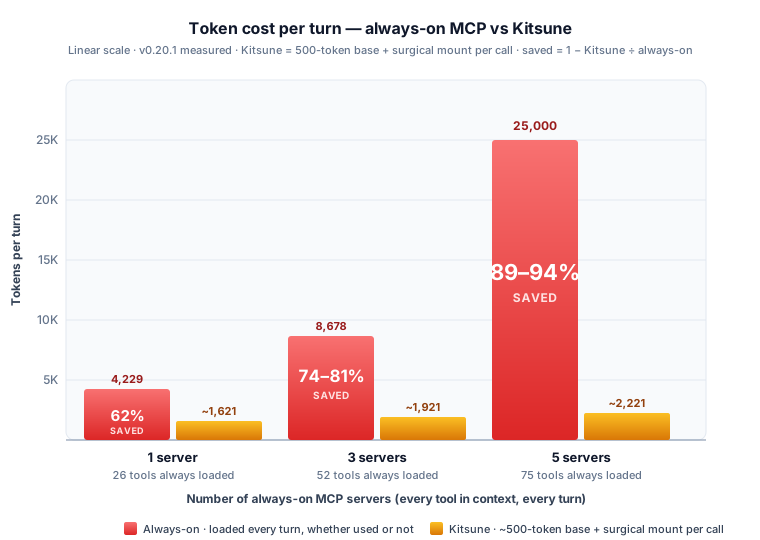
Fewer tools in context also means more reliable answers. Research consistently shows LLM tool-selection degrades as the visible tool count grows — Kitsune keeps the model focused on exactly what the current task needs.
Contents
- Why not just shell out to a CLI?
- Installation
- Quick start
- How it works
- Tool reference
- Server sources
- GATEWAY: context bloat detection
- Performance
- Configuration
- Agent profiles
- Security
- For MCP developers
- Contributing
Installation
pip install kitsune-mcp      # recommended
# or
uvx kitsune-mcp              # isolated env via uv, no venv setup
# or
npx kitsune-mcp              # npm (delegates to uvx internally)
Requirements: Python 3.12+ · node/npx for npm-based servers · uvx from uv for PyPI-based servers
Add to your MCP client config — once, globally:
{
  "mcpServers": {
    "kitsune": { "command": "kitsune-mcp" }
  }
}
Compatible with Claude Desktop, Claude Code, Cursor, Cline, OpenClaw, Continue.dev, Zed, and any MCP-compatible client.
| Client | Config file |
|---|---|
| Claude Desktop (macOS) | ~/Library/Application Support/Claude/claude_desktop_config.json |
| Claude Desktop (Windows) | %APPDATA%\Claude\claude_desktop_config.json |
| Claude Code | ~/.claude/mcp.json |
| Cursor / Windsurf | ~/.cursor/mcp.json |
| Cline / Continue.dev | VS Code settings / ~/.continue/config.json |
Quick start
# Find a server
search("web scraping")

# Mount specific tools, use them, release
shapeshift("notion-hosted", tools=["notion-search"])
call("notion-search", arguments={"query": "roadmap"})
shapeshift()                          # context returns to ~1,321 tokens

# One-shot via auto() — use server_hint for reliable routing
auto("current time in Tokyo", server_hint="mcp-server-time")

# Store a credential, then mount
auth("BRAVE_API_KEY", "sk-...")
shapeshift("brave", tools=["brave_web_search"])
call("brave_web_search", arguments={"query": "MCP protocol 2025"})
shapeshift()
How it works
Kitsune is a dynamic MCP proxy. shapeshift(server_id) connects to a target server via the appropriate transport (stdio subprocess, HTTP, WebSocket), fetches its tools/list, and registers each tool as a native FastMCP tool with the exact schema from the server. The AI client receives a notifications/tools/list_changed event and sees the new tools as first-class — no wrapper, no indirection.
shapeshift() with no args reverses all of it: deregisters the proxy closures, closes the connection, and notifies the client. Context returns to the ~965-token baseline.
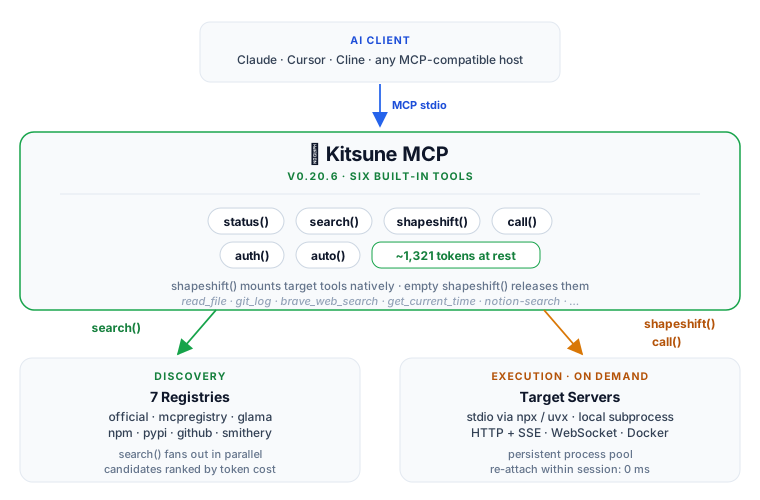
Tool-schema RAG
| Document RAG | Kitsune |
|---|---|
| Index all documents | Registry: 130,000+ servers across 7 sources |
| Query → retrieve relevant chunks | search("notion") → ranked candidates with token estimates |
| Inject only relevant content | shapeshift(server, tools=[...]) → mount only what is needed |
| Model reasons over those chunks | Agent calls those tools natively |
| Evict when done | shapeshift() → context returns to baseline |
Transport selection
| Server source | Transport |
|---|---|
| npm package | npx <package> — spawned locally |
| PyPI package | uvx <package> — spawned locally |
| GitHub repo | npx github:user/repo or uvx --from git+https://... |
| Smithery hosted | HTTP + SSE (requires SMITHERY_API_KEY) |
| WebSocket | ws:// / wss:// |
| Docker | docker run --rm -i --memory 512m <image> |
Tool reference
| Tool | Signature | Description |
|---|---|---|
status() |
— | Provider auth state, GATEWAY bloat detection, session performance stats |
search() |
query, registry?, compare? |
Search for servers across 7 registries; compare=True shows side-by-side token costs |
shapeshift() |
server_id?, tools=[], server_args=[] |
Mount a server's tools (with ID) or unmount current form (no args). tools=[...] for surgical load |
call() |
tool_name, arguments |
Invoke a tool; server_id inferred when shapeshifted |
auth() |
server_or_var, value? |
Check or set env vars; trigger OAuth 2.1 browser flow for hosted servers |
auto() |
task, server_hint=, arguments= |
One-shot: search → mount → call → return result |
Context overhead at rest: ~1,321 tokens for all 6 lean-profile tools (measured via examples/benchmark.py).
auto()note:auto(task, server_hint="server-id")gives reliable results. Withoutserver_hint, routing is best-effort via semantic search and can misfire on ambiguous queries — usesearch()first when unsure.
Server sources
Kitsune searches 7 registries in parallel. No single registry is required.
| Registry | Auth required | registry= value |
|---|---|---|
| modelcontextprotocol/servers | None | official |
| registry.modelcontextprotocol.io | None | mcpregistry |
| Glama | None | glama |
| npm | None | npm |
| PyPI | None | pypi |
| GitHub repos | None | github:owner/repo |
| Smithery | Free API key | smithery |
search() fans out across all no-auth registries by default. Add a SMITHERY_API_KEY to include Smithery's hosted catalog (HTTP servers, no local install required).
GATEWAY: context bloat detection
status() scans your active MCP client configs and reports what other servers are running on every turn:
GATEWAY
  ⚠  1 other server(s) active in claude-desktop (~8 extra tools in context)
     Run setup() to harvest their credentials and reduce bloat
  ⚠  1 other server(s) active in claude-code (~8 extra tools in context)
To consolidate:
setup()                    # preview — shows what can be harvested
setup(action="harvest")    # extract API keys → ~/.kitsune/.env  (non-destructive)
setup(action="absorb")     # register those servers for shapeshift()
setup(project=True)        # write .claude/mcp.json with only Kitsune (this project)
Kitsune never modifies existing configs without explicit confirmation.
Performance
Token overhead: surgical mount vs full mount
Full-mount figures measured live against v0.20.1 via shapeshift() probes. Surgical estimates (~) are proportional approximations based on tool count, not individually measured. To measure Kitsune's own profile size: python examples/benchmark.py.
Saved = 1 − (500 base + surgical) / always-on. Surgical estimates (~) are proportional; full-mount figures are measured.
| Server | Tools | Always-on | Surgical example | 500 + surgical | Saved |
|---|---|---|---|---|---|
mcp-server-time |
2 | 261 | (all tools) | ~761 | — ¹ |
mcp-server-git |
12 | 1,242 | status / diff / log | ~810 | 35% |
@modelcontextprotocol/server-memory |
9 | 2,615 | read_graph / search_nodes | ~1,080 | 59% |
@modelcontextprotocol/server-filesystem |
14 | 3,207 | read / write / edit | ~1,190 | 63% |
brave |
8 | 3,612 | brave_web_search | ~950 | 74% |
@modelcontextprotocol/server-github |
26 | 4,229 | search_repositories | ~800 | 81% |
notion-hosted |
14 | 13,707 | search / fetch | ~2,450 | 82% |
¹ mcp-server-time's full schema (261 tokens) is smaller than Kitsune's base. Kitsune pays off for small servers only when multiple servers share the baseline.
Multi-server compounding
Kitsune's resting cost (~1,321 tokens) is constant regardless of how many servers are registered. Always-on cost grows linearly with each server added.
All figures use servers with measured full-mount costs. Kitsune cost = 965 base + surgical mount for whichever server is active. The range reflects the cheapest (git ~310) to most expensive (Notion ~1,950) surgical call.
| Servers always-on | Always-on/turn | Kitsune per active call | Saved |
|---|---|---|---|
| GitHub only | 4,229 | ~1,265 | 70% |
| GitHub + filesystem + git | 8,678 | ~1,265–1,655 | 81–85% |
| Notion + GitHub + filesystem + git + memory | 25,000 | ~1,265–2,915 | 88–95% |
Tool-selection reliability
LLM tool-selection degrades as the visible tool count grows — a finding consistent across multiple tool-use benchmarks (Gorilla, ToolBench). The failure mode is typically adjacent-name confusion: a model that sees read_file, read_text_file, and read_media_file simultaneously is more likely to call the wrong one than a model that sees only the one it needs.
Kitsune holds 6 tools at rest; 7–9 during active use. A Kitsune-specific benchmark measuring selection accuracy across tool-count conditions does not yet exist — contributions welcome.
Connection latency
Kitsune maintains a persistent process pool — re-attaching to a running server within a session takes 0 ms.
| Transport | Cold start | Warm (pooled) |
|---|---|---|
| HTTP / Smithery hosted | 0–1.4 s | 0.0 s |
Local stdio via npx |
1.7–6.3 s | 0.0 s |
Local stdio via uvx |
1.0–5.2 s | 0.0 s |
Configuration
Env vars and .env files
Kitsune re-reads credentials on every shapeshift() and call(). Add or update a key mid-session — no restart needed.
Search order: CWD/.env → ~/.env → ~/.kitsune/.env (last wins).
# Write a key and activate immediately
auth("BRAVE_API_KEY", "sk-...")    # writes to ~/.kitsune/.env

# Or manage .env directly
echo "BRAVE_API_KEY=sk-..." >> ~/.kitsune/.env
Custom tool surface
Expose only specific tools via KITSUNE_TOOLS:
{
  "mcpServers": {
    "kitsune": {
      "command": "kitsune-mcp",
      "env": { "KITSUNE_TOOLS": "shapeshift,call,auth" }
    }
  }
}
Smithery
{ "env": { "SMITHERY_API_KEY": "your-key" } }
Get a free key at smithery.ai/account/api-keys. Without it, Kitsune is fully functional via npm, PyPI, official registry, and GitHub.
Agent profiles
Research agent — web search + fetch + memory
shapeshift("brave", tools=["brave_web_search"])                              # ~450 tokens
shapeshift("mcp-server-fetch")                                               # ~289 tokens
shapeshift("@modelcontextprotocol/server-memory",
           tools=["read_graph", "search_nodes"])                             # ~580 tokens
# Peak: ~1,300 tokens vs 6,516 always-on  →  80% reduction
Code agent — filesystem + git
shapeshift("@modelcontextprotocol/server-filesystem",
           tools=["read_file", "write_file", "edit_file"],
           server_args=["/path/to/project"])                                 # ~690 tokens
shapeshift("mcp-server-git",
           tools=["git_status", "git_diff", "git_log"])                     # ~310 tokens
# Peak: ~1,000 tokens vs 4,449 always-on  →  78% reduction
Notes / PM agent — Notion + memory
shapeshift("notion-hosted",
           tools=["notion-search", "notion-append-block-children"])         # ~1,950 tokens
shapeshift("@modelcontextprotocol/server-memory",
           tools=["add_memory", "search_nodes"])                            # ~580 tokens
# Peak: ~2,500 tokens vs 16,322 always-on  →  85% reduction
Security
Trust tiers
| Tier | Sources | Label |
|---|---|---|
| High | official (modelcontextprotocol/servers) |
✓ Source: official |
| Medium | mcpregistry, glama, smithery |
✓ Source: smithery |
| Community | npm, pypi, github |
⚠ Source: npm (community — not verified) |
Community servers require confirm=True on shapeshift() — an explicit acknowledgement before running arbitrary code. Set KITSUNE_TRUST=community (via auth("KITSUNE_TRUST", "community") or .env) to skip the gate globally for servers you already trust.
Credential handling
- Credentials stored at
~/.kitsune/.envand~/.kitsune/oauth/with mode0600 - OAuth 2.1 with PKCE S256 and Dynamic Client Registration (RFC 7591) for hosted servers
shapeshift()warns on missing credentials before any tool callauth("server-id", "logout")clears cached OAuth tokens
Process isolation
- stdio servers run as isolated OS subprocesses — no shared memory with Kitsune
- Docker servers run with
--rm -i --memory 512m fetch()blocks private IPs, loopback, and non-HTTPS URLs- Process pool capped at 10 concurrent servers; idle processes evicted after 1 hour
- Install commands validated against shell metacharacter and path-traversal patterns before execution
For MCP developers
The full evaluation suite is available by setting KITSUNE_TOOLS=all:
{ "command": "kitsune-mcp", "env": { "KITSUNE_TOOLS": "all" } }
Additional tools:
| Tool | What it does |
|---|---|
inspect(server_id) |
Schema review + live credential check (✓/✗ per key) + measured token cost |
test(server_id) |
Quality score 0–100 across connectivity, schema correctness, and tool behaviour |
bench(server_id, tool, args) |
Latency benchmark — p50, p95, min, max |
compare(query) |
Side-by-side: token cost, tool count, trust tier, credential status |
craft(name, description, params, url) |
Register a custom HTTP-backed tool; shapeshift() removes it |
Test your server inside real Claude or Cursor sessions — not in an isolated inspector UI.
Why Kitsune?
In Japanese folklore, the Kitsune (狐) is a fox spirit of extraordinary intelligence and magical power. What makes it remarkable is not what it is, but what it can become. With age and wisdom, a Kitsune grows new tails — each one a new ability mastered, a new form borrowed from the world around it. It can shapeshift into anything: a scholar, a warrior, a force of nature. And when the purpose is fulfilled, it casts off that form as easily as it took it on, returning to its true self — ready to become something else entirely.
One fox. Infinite forms. Every power available. Nothing carried that isn't needed.
shapeshift("brave-search") — the fox takes on a new form. Its tools appear as if they were always there.
shapeshift() — it returns to its true shape. Context drops back to baseline. Ready for the next form.
Each server mounted is a new tail. Each capability borrowed cleanly and released when done. One entry in your config. Every server in the MCP ecosystem, on demand — summoned, used, and let go.
I am not Japanese, and I use this name with the highest respect for the mythology and culture it comes from. The parallel felt too precise to ignore — a spirit that shapeshifts between forms, gains new powers, and releases them at will. That is exactly what this tool does.
Contributing
make dev     # install with dev dependencies
make test    # pytest
make lint    # ruff
Issues and PRs: github.com/kaiser-data/kitsune-mcp
See CHANGELOG.md for version history.
MIT License · Python 3.12+ · Built on FastMCP
Project details
Verified details
These details have been verified by PyPIProject links
GitHub Statistics
Maintainers
Release history Release notifications | RSS feed


Download files
Download the file for your platform. If you're not sure which to choose, learn more about installing packages.
Source Distribution
Built Distribution
Filter files by name, interpreter, ABI, and platform.
If you're not sure about the file name format, learn more about wheel file names.
Copy a direct link to the current filters
File details
Details for the file kitsune_mcp-0.20.5.tar.gz.
File metadata
- Download URL: kitsune_mcp-0.20.5.tar.gz
- Upload date:
- Size: 238.8 kB
- Tags: Source
- Uploaded using Trusted Publishing? Yes
- Uploaded via: twine/6.1.0 CPython/3.13.12
File hashes
| Algorithm | Hash digest | |
|---|---|---|
| SHA256 |
29c21defd24a2797287478b4b313d9c215ae00f8d1cd9bcc063a9356cefa638b
|
|
| MD5 |
1876cb22c32efce64374c860550761a4
|
|
| BLAKE2b-256 |
650c241f8d1674e6b2489ad23756f14c38a01d72eb7d7a4efecca84a1d316942
|
Provenance
The following attestation bundles were made for kitsune_mcp-0.20.5.tar.gz:
Publisher:
publish.yml on kaiser-data/kitsune-mcp
-
Statement:
-
Statement type:
https://in-toto.io/Statement/v1 -
Predicate type:
https://docs.pypi.org/attestations/publish/v1 -
Subject name:
kitsune_mcp-0.20.5.tar.gz -
Subject digest:
29c21defd24a2797287478b4b313d9c215ae00f8d1cd9bcc063a9356cefa638b - Sigstore transparency entry: 1553187120
- Sigstore integration time:
-
Permalink:
kaiser-data/kitsune-mcp@66848a543f370134558f1d24e45fec87c040826f -
Branch / Tag:
refs/tags/v0.20.5 - Owner: https://github.com/kaiser-data
-
Access:
public
-
Token Issuer:
https://token.actions.githubusercontent.com -
Runner Environment:
github-hosted -
Publication workflow:
publish.yml@66848a543f370134558f1d24e45fec87c040826f -
Trigger Event:
push
-
Statement type:
File details
Details for the file kitsune_mcp-0.20.5-py3-none-any.whl.
File metadata
- Download URL: kitsune_mcp-0.20.5-py3-none-any.whl
- Upload date:
- Size: 314.7 kB
- Tags: Python 3
- Uploaded using Trusted Publishing? Yes
- Uploaded via: twine/6.1.0 CPython/3.13.12
File hashes
| Algorithm | Hash digest | |
|---|---|---|
| SHA256 |
1b28baf3c68f8327a63c0809245862772d36b24f044118d2ebafb3ef8fc99366
|
|
| MD5 |
ec7ca3df57e6cd409270070dab0e4619
|
|
| BLAKE2b-256 |
19907c69f5f85358a8c5403c312d279923e3175a4d495a05aed085a8e572268c
|
Provenance
The following attestation bundles were made for kitsune_mcp-0.20.5-py3-none-any.whl:
Publisher:
publish.yml on kaiser-data/kitsune-mcp
-
Statement:
-
Statement type:
https://in-toto.io/Statement/v1 -
Predicate type:
https://docs.pypi.org/attestations/publish/v1 -
Subject name:
kitsune_mcp-0.20.5-py3-none-any.whl -
Subject digest:
1b28baf3c68f8327a63c0809245862772d36b24f044118d2ebafb3ef8fc99366 - Sigstore transparency entry: 1553187135
- Sigstore integration time:
-
Permalink:
kaiser-data/kitsune-mcp@66848a543f370134558f1d24e45fec87c040826f -
Branch / Tag:
refs/tags/v0.20.5 - Owner: https://github.com/kaiser-data
-
Access:
public
-
Token Issuer:
https://token.actions.githubusercontent.com -
Runner Environment:
github-hosted -
Publication workflow:
publish.yml@66848a543f370134558f1d24e45fec87c040826f -
Trigger Event:
push
-
Statement type:






