

Knowte
From sources to grounded knowledge.
A local-first workspace for finding information, extracting evidence,
reviewing claims, and building reusable understanding with AI.


✨ What Knowte does
Knowte turns learning into an inspectable knowledge chain:
Sources → Evidence → Claims → Wiki
- Find or import Sources. Search arXiv, OpenAlex, and Semantic Scholar; import links or structured results; then follow citations and academic-graph recommendations from Sources you trust.
- Read and ground. Inspect saved papers and webpages, then preserve exact text passages or visual regions as Evidence.
- Distill with review. Write Claims manually or let a model propose them. Every AI proposal remains pending until you accept, keep as disputed, or discard it.
- Organize and create. Every reviewed active Claim belongs to the global Wiki. Projects select a topic-specific subset and generate focused Articles.
- Keep discovering. Combine Search and subscription Actions in scheduled Plans. Continue from pending Evidence through Claims and Relations to a Projected Wiki without silently accepting any proposals.
The durable knowledge database and captured content stay on your machine. AI and search services are contacted only for features you explicitly configure and use.
⚡ Quick Start
Knowte requires Python 3.9 or newer.
1. Install and run
python -m pip install knowte
knowte
Open http://127.0.0.1:7880. Running knowte is all
that is required for the default local address and port.
Specify them only when needed:
knowte --host 127.0.0.1 --port 8080
To try a clean, separate knowledge library:
knowte --new learning
Open http://127.0.0.1:7880. This library stores its data
in ~/.knowte/learning/ and copies your configuration (including API keys) and custom
skills on creation, but no existing knowledge or Plans. Open it again with
knowte --mount learning. Run knowte (or knowte --mount default) to use
the original default library, which stays in ~/.knowte/ without moving files.
--new rejects existing directories; --mount rejects missing libraries, and the
two options cannot be combined. Replace learning with your own
name (letters, numbers, underscores or hyphens). Model calls are real and may
incur costs. Companion needs separate pairing with this address.
With --config PATH, the named folder is created alongside that configuration;
--port (or PORT) overrides the default port of 7880 for every library.
To run two libraries at once, assign different ports, e.g.
knowte --mount learning --port 7881.
From a source checkout, use:
python -m pip install -e .
knowte
2. Find something
The three academic backends are enabled by default, so the first search needs no account or AI configuration.
- Enter a topic, title, author, or keywords in Search.
- Optionally choose research areas and a year range.
- Choose No model for direct retrieval and click Search.
- Select useful results in the list. The Review panel tracks the selection.
- Click Add selected Sources to save them to the global Source Library.
Use Find More to continue the same retrieval. Knowte reuses cached academic candidates when possible before making another provider request.
For ongoing discovery, Discover → Subscribe offers GitHub, Hacker News, and Others (RSS/Atom, RSSHub, or websites declaring feeds). GitHub supports public account activity and explicitly selected repository scopes (Releases, Commits, Issues, Pull Requests). HN follows keywords or users, fetching posts and comments separately. Save a Channel and add it to a Plan. RSSHub can be connected as an existing service or optionally started locally with Docker. See the channel setup guide for authentication, scope, and limits.
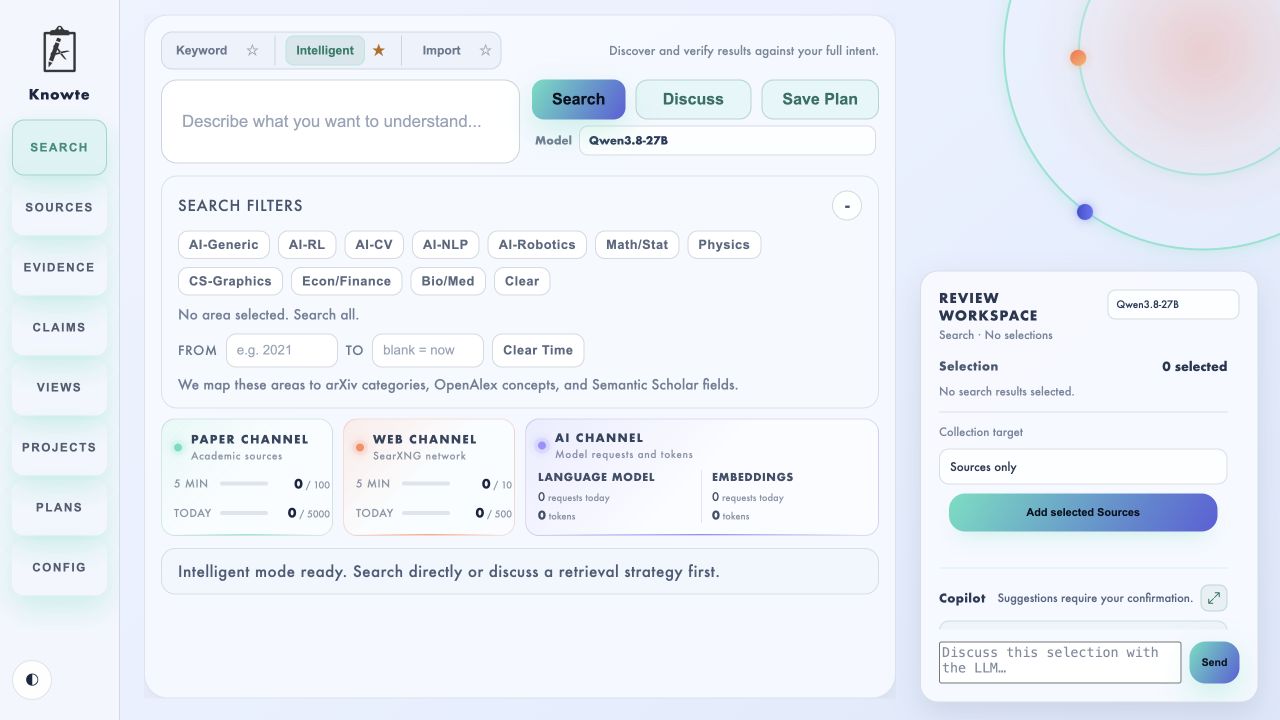
Search directly, discuss a retrieval strategy, or import results from elsewhere.
3. Build the knowledge chain
- Open Sources, select a saved Source, and use the magnifying-glass action to inspect it.
- To expand from trusted papers, select one to three Sources, optionally enter a Focus under Explore related papers, and review the Strong, Possible, and Excluded candidates found through references, citations, and graph recommendations.
- Select text or capture a region to create precise Evidence. You can also select one or more Sources, enter a focus, and choose Propose Evidence via LLM. For documentation websites, Related pages discovers navigation/sitemap links and uses one extra model call to select relevant pages (up to ten total). Combined extraction uses two calls; one-by-one uses N + 1, where N is the selected page count. This is not a full-site crawl. Review shows each page's actual origin; new Sources are saved only when you accept their Evidence.
- Open Evidence to review material across Sources. Select items within the limit configured in Config → Knowledge stages, then write a Claim manually or choose Propose Claims via LLM.
- Open Claims to accept, keep disputed, revise, relate, tag, or withdraw Claims. Reviewed active Claims enter the global Wiki automatically; select a subset when you want to add it to the active Project.
- Open Wiki and choose Organize with AI to structure reviewed Claims in batches (100 by default), or switch to Graph to inspect accepted Claim relations. Use Projects to collect a topic-specific subset and generate an Article.
Tab spinners show work still running. A notification beside a destination Tab means a proposal is ready for review; opening that review queue clears the notification.
🧭 The workflow
Discover
Discover has three entry points, in this order:
-
Search retrieves from the enabled academic backends. Selecting a model adds embedding ranking (when configured) and LLM relevance verification; No model skips that review.
-
Subscribe follows GitHub, Hacker News, or RSS/Atom Channels. Each Channel saves its scope, optional Focus and verification model, and appears in Actions.
-
Import accepts URLs, DOI or arXiv identifiers, and Knowte's structured JSON format. Copy suggested prompt provides instructions you can give to an external LLM.
Upload documents accepts PDF, Markdown, TXT, and DOCX (up to 20 MB each). Choose or drop files, edit their titles, then import them into Sources. Files are parsed before saving; unsupported, unreadable, or empty documents are rejected. PDFs retain their pages, including scanned pages for region capture; Markdown/TXT and DOCX use a text reading view, not full original formatting. Text files must use UTF-8 or UTF-16. Image-only DOCX should be exported to PDF. Duplicate file contents reuse the existing Source. Uploaded originals travel with Wiki/Project packages when their Sources are included.
With AI Review either on or off, Discuss calls the Search Copilot to propose focused academic retrieval queries. You can continue the conversation, edit the proposals, and move candidates into or out of the Top 5 Search list. The confirmed Search list—not the unchanged text in the input—is then executed. With AI Review off, candidates are searched directly and results deduplicated, without embedding or LLM review. Discuss itself still uses the model API. Old Keyword Plans/defaults map to AI Review off; Intelligent ones map to on.
Filters apply to every retrieval action. Save Action preserves reusable search conditions. Actions use the credentials and service endpoints saved in Config.
🔁 Plans and continuous discovery
- Save a Search Action or a subscription Channel in Discover.
- Create a Plan in Plans, select Actions from the Actions list, and add them to the Plan using the selection panel. Reorder or remove them in its details.
- Configure manual, interval, daily or weekly execution and a timezone. Choose the maximum new Sources per Run and how far knowledge processing should continue. Enabled AI stages require an explicit model; Evidence and Claim Focus are optional.
- Click Run now, or enable the schedule. Scheduling works only while Knowte is running; missed schedules catch up once rather than replaying every interval.
- Open Runs to follow the current Action or knowledge stage and inspect results, failures, model usage and deferred work. Repeated discoveries are deduplicated; each Plan maintains independent consumption even when Actions are shared.
Automation can use pending Evidence and Claims to compute downstream proposals and a Projected Wiki, but never marks them accepted. Reviewed only shows reviewed knowledge. Accepting unchanged inputs resolves dependencies; logical edits or rejection mark affected descendants stale or invalid. Recompute can run immediately or on the next enabled Run. Use Ignore only for changes that truly have no logical effect.
Failed batches can resume on a later Run; completed proposals are retained. Provider
limits, feed windows and inaccessible pages mean discovery is not exhaustive. A
partial Run can still contain useful results. Model calls may incur costs even when
no proposal is produced, so start with a small Source limit.
Sources
A Search result becomes durable only after it is added to the global Source Library. A Source preserves what was encountered; model output never silently becomes or rewrites a Source.
- PDFs open in the built-in reader with their original pages.
- Web Sources open in a clean reading view, with Original web available when native layout or interaction matters.
- Refresh captures the latest accessible content again.
- Tags and Annotations can be attached without changing the captured Source.
- Explore related papers follows references, citations, and academic-graph recommendations from one to three selected Seed Sources. An optional Focus guides the shared Strong / Possible / Excluded relevance review. Retrieval is sampled, not exhaustive; the result summary distinguishes retrieved and assessed candidates and flags unavailable paths. Retrieval responses are cached for 15 minutes while Knowte is running, and rate limits trigger a cooldown. Running Explore again still performs a new model review of available candidates.
Sources remain globally shared. Projects select reviewed Claims; their supporting Evidence and Sources follow automatically through provenance.
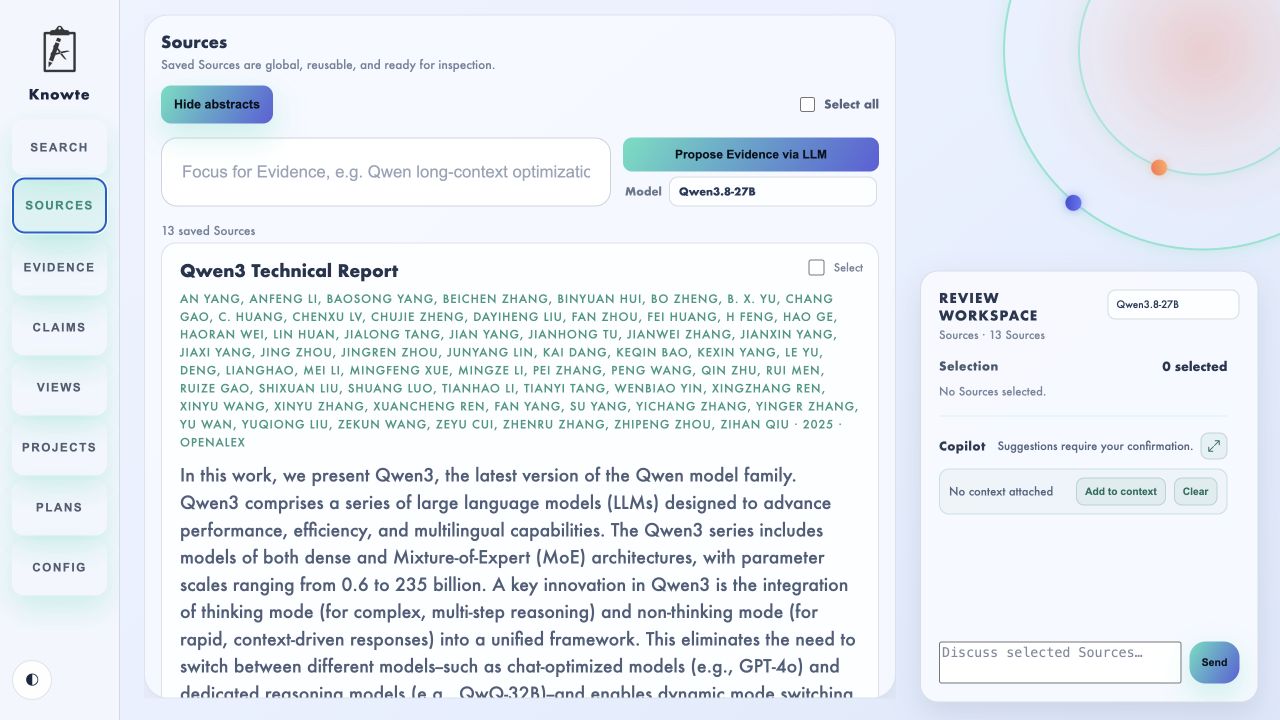
Saved Sources remain global while the active workspace supplies stage-specific actions.
Evidence
Evidence is an addressable excerpt or snapshot grounded in a Source. It can be created directly while inspecting material or proposed from selected Sources by an AI model.
AI-proposed Evidence includes its quotation, location, rationale, and any material caveat. It stays in Awaiting review until accepted or discarded. Accepted Evidence can be opened back at its Source location, tagged in batches, annotated, edited with version history, and reused across Claims. Editing linked Evidence returns affected Claims to an Evidence changed review queue.
Claims
A Claim is an atomic proposition that can be examined and revised. Claims use three user-facing bases:
- Background — accepted prior knowledge intentionally kept without local Evidence;
- Reported — stated directly by linked Evidence;
- Inference — derived from one or more Evidence items.
Evidence may support, contradict, or limit a Claim. Claim-to-Claim relations are supports, contradicts, or related.
Claim proposals consider the selected Evidence together and compare likely existing Claims before suggesting new Claims, links, revisions, or relations. Relations may connect new drafts to each other or to existing Claims. Accept their endpoint Claims first, then review the relations; batch acceptance handles this order. The proposal report shows what was considered and what was skipped. Proposed changes do not enter the knowledge base until reviewed.
Use Audit Claims when you want a broader consistency pass. An audit can cover the entire Library or an Any-of / All-of Tag scope. Knowte first builds a local set of likely pairs, shows the expected number of model batches, and then lets you start, pause, resume, or cancel the review. Its findings enter the same proposal queue rather than changing Claims automatically. It also discovers missing relations and reviews existing links for correction or removal. This is a candidate-based check, not an exhaustive comparison of every possible pair.
Wiki and Projects
These are two projections over the same global knowledge objects:
- Wiki is one global, purpose-neutral encyclopedia containing every reviewed active Claim. New Claims appear under Unorganized until a reviewed structural patch assigns them to Pages.
- Graph is rebuilt deterministically from accepted Claims and their relations, independently of Page hierarchy. Filter by Page or relation type, select a node to inspect its connections, and use Focus selected or Fit. Drag to pan; pinch or hold Ctrl (Windows/Linux) / Cmd (macOS) while scrolling to zoom. Click the selected node again to deselect. No model calls are needed.
- Project selects Claims for one topic and Purpose. Supporting Evidence and Sources follow through Claim provenance. Open a Project to filter the global Claim pool by text, Any-of Tags, and All-of Tags. Add Claims manually or use Recommend Claims to ask a selected model for a reviewable shortlist from that exact same scope. Organize the accepted subset into a reviewable Project Wiki, or generate and save Articles around a specific reading goal without mechanically using every Claim. Article generation happens inside a Project and uses only that Project's Claims.
Export knowledge
Export the global Wiki from Wiki, or export one topic-specific Project from Projects. Each ZIP contains readable Markdown, machine-readable JSON, a versioned manifest, complete upstream provenance, and included Snapshot Evidence images.
Import Wiki and Project packages through their matching workspace; Knowte
rejects a package opened in the wrong place. A Wiki package receives one
complete review in Wiki, then its page tree and all dependent Sources,
Evidence, and Claims are deduplicated and merged into the global knowledge
base. A Project package opens as an isolated Import Review Project; none of its
knowledge is accepted until you approve it there.
These portable packages support sharing and archival snapshots, but a full
copy of ~/.knowte/ remains the complete application backup.
🧠 Configure AI
AI is optional. Search with AI Review off and manual knowledge work remain available without it.
Open Config → AI Models:
- Add one Model profile for every model or endpoint you want to use.
- Choose its provider, Base URL, exact model ID, optional API key, proxy routing, and available capabilities.
- Under AI roles, assign an exact profile to Embeddings, Search (AI Review / Discuss), Review Copilot, Evidence, Claims, Wiki, and Article generation.
- Save Config.
Knowte includes adapters for OpenAI-compatible endpoints, OpenAI, Google
Gemini, Anthropic, DeepSeek, Alibaba Model Studio / Qwen, Moonshot / Kimi, and
advanced Custom Recipes. A local OpenAI-compatible Base URL commonly ends in
/v1, for example:
http://127.0.0.1:8000/v1
Do not append /chat/completions. Enter the exact model ID served by the
endpoint; it is not an arbitrary display name.
Capabilities are conservative and provider-specific. Depending on the adapter and model, Knowte can send extracted text, multiple native documents, source URLs, or provider web-search tools. Unsupported capability controls remain unavailable. Custom Recipe is the advanced escape hatch for a documented request format that does not fit a built-in adapter.
Each profile can use automatic routing, the system proxy, a direct connection, or a custom proxy. Automatic routing keeps local endpoints direct and lets public endpoints use the system proxy.
The Review Copilot is contextual to the active Tab and selection. Its compact panel can expand into the main workspace for detailed context management. Custom instructions and supported request parameters are configurable; stage prompts remain separate so Search discussion, Evidence extraction, Claim review, and Wiki maintenance do not share the wrong task contract.
In Config → Stage skills, select a stage and choose Create custom copy to create
an editable ~/.knowte/skills/<stage>/SKILL.md. Show in Finder / Open folder
opens its location; Reload validates your edits and refreshes the preview.
Edits apply to the next request. Use built-in disables the custom version
without deleting it; Use custom reactivates it. Knowte updates do not
overwrite your files.
Keep the stage and contract_version metadata in the file. Incompatible
versions block the affected stage until you update the Skill or select the
built-in version. Product rules and output contracts are read-only: a custom
Skill changes methods and preferences, not object types, review permissions,
or accepted output fields. Invalid model output is shown for inspection without
an automatic retry. Search Skills also include editable, Area-specific examples;
arbitrary scripts and other referenced files are not executed or loaded.
API keys are stored in ~/.knowte/config.yml, are exposed to the UI only as
configured / not configured, and are never copied into Plans. Choose providers
appropriate for the Sources, Evidence, Claims, and conversation context you
send them.
🧩 Knowte Web Companion
The bundled browser extension lets you create Sources and Evidence while reading an original webpage. Chromium browsers and Firefox are supported for local loading.
- Start Knowte and open Config → Knowte Web Companion.
- Choose Copy extension path.
- Open the browser's extension page and load that folder:
- Chromium:
chrome://extensions, enable Developer mode, then Load unpacked. - Firefox:
about:debugging#/runtime/this-firefox, then load the extension'smanifest.jsontemporarily.
- Chromium:
- In a native folder picker, press
⌘⇧Gon macOS orCtrl+Lon Windows/Linux to paste the copied path directly. - Generate a temporary pairing key in Knowte and enter it in the extension within five minutes.
On a webpage, select text or start a capture from the floating Knowte control.
The default shortcuts are Alt+Shift+K for text and Alt+Shift+X for a
region; browser extension settings can remap them. The inline editor lets you
choose a destination, add Tags or an Annotation, and save without leaving the
page. Save page stores only the current webpage as a Source.
Knowte must be running when the extension pairs or saves. An already loaded extension does not need to be reinstalled after ordinary Knowte restarts.
🔎 Search sources and result limits
| Source | Coverage | Optional configuration |
|---|---|---|
| arXiv | Preprints and open research papers | None |
| OpenAlex | Broad scholarly metadata | Contact email recommended |
| Semantic Scholar | Papers and citation metadata | API key |
Search results (AI Review off) defaults to 100. It is the initial academic target and
the increment used by Find More. Academic providers cap a single request at
100, so Knowte caches surplus candidates and avoids another provider request
while usable cached results remain.
AI-reviewed results defaults to 20 and controls how many Strong or
Possible candidates may pass final model verification. Excluded candidates
remain available in a folded section for inspection. The same three levels are
used by Source-based related-paper discovery.
🔒 Local data
By default, Knowte stores its durable state under ~/.knowte/:
config.yml— configuration and locally stored credentials;knowte.db— Sources, Evidence, Claims, relations, Tags, Annotations, Projects, review proposals, Wiki state, Actions, Plans, Run history and checkpoints;content/— captured documents, webpages, and snapshots;plans.json— retained legacy Search Plans, migrated into SQLite;rsshub-secrets.env— optional managed RSSHub environment file; keep private;usage.json— local request and token counters.
The browser UI has no authentication or multi-user isolation. Keep the default loopback host unless you intentionally want to expose Knowte on another interface.
🛠️ Development
uv pip install -e .
python -m unittest discover -s tests -v
python -m compileall -q knowte tests
node --check knowte/web/app.js
Node.js is needed only for the optional JavaScript syntax check.
🚧 Project status
Knowte is alpha software. The core local workflow, contextual Review Copilot, AI proposal queues, global Wiki, Claim graph, Article generation, Projects, Tags, Annotations, saved Plans, and browser companion are implemented and evolving.
Scheduled Plans run locally while Knowte is open. Authentication and multi-user isolation are not implemented. Expect data models and UI details to continue changing before a stable release. Back up your library directory before upgrading.
Bug reports, ideas, and careful feedback are welcome.
📄 License
Knowte is released under the MIT License.
1 maintainer

Metadata
1 maintainer
Release files for knowte 0.7.0
For a detailed explanation of source distributions (sdists) and built distributions (wheels), please see the package formats documentation.
Source distribution (sdist)
| File | Size | Uploaded | |
|---|---|---|---|
| knowte-0.7.0.tar.gz | 2.7 MB | Details |
Built distribution (wheel)
| File | Interpreter | ABI | Platform | Reset |
|---|---|---|---|---|
| knowte-0.7.0-py3-none-any.whl | Python 3 | none | any | Details |
Total release size: 5.5 MB
Release files / knowte-0.7.0.tar.gz
| Download URL | knowte-0.7.0.tar.gz |
|---|---|
| Size | 2.7 MB |
| Tags | Source |
|
SHA-256 checksum How to use checksums |
82c024c047c58f241ab37b2329d63d640b11783731e3e913b0212fb022144402
|
|
BLAKE2b-256 checksum How to use checksums |
d55297287d04859fc668e5b895a83d24e99196f46c99d82128d86fe0746ac2b3
|
| Upload date | |
|
Uploaded using Trusted Publishing? What is trusted publishing? |
No |
| Uploaded via |
twine/6.1.0 CPython/3.10.12
|
Release files / knowte-0.7.0-py3-none-any.whl
| Download URL | knowte-0.7.0-py3-none-any.whl |
|---|---|
| Size | 2.8 MB |
| Tags | Python 3 |
|
SHA-256 checksum How to use checksums |
42d112e76852509ac59f784c715ee8c5a4701f4b9e73c809ed12d782125f644b
|
|
BLAKE2b-256 checksum How to use checksums |
887ca3f22dd5af0153eb28c6c61b7cdf176fbf2f4f841feca5e4097b5bd4e8dd
|
| Upload date | |
|
Uploaded using Trusted Publishing? What is trusted publishing? |
No |
| Uploaded via |
twine/6.1.0 CPython/3.10.12
|














