

Knowte
Search wider. Read smarter.
Search academic databases and the open web from one local research workspace.


🚀 Spotlight
🔭 One search across research sources
Search arXiv, OpenAlex, Semantic Scholar, and an optional SearXNG web source. Knowte applies your area and year filters, merges the responses, and removes duplicate papers.
🧠 Intent-aware discovery
Connect any OpenAI-compatible cloud or local service. Intelligent Search expands academic retrieval terminology, ranks papers with Embeddings, and asks an LLM to verify the strongest academic and Web candidates against the full intent.
🖥️ A local workspace you control
Knowte runs on your machine. Configuration, captured knowledge, and usage data stay local; cloud or LAN AI services are contacted only when you configure and use AI-assisted features.
⚡ Quick Start
Knowte requires Python 3.9 or newer.
1. Install and start
python -m pip install knowte
knowte
Open http://127.0.0.1:7880 in your browser.
The default address is 127.0.0.1:7880. Specify a different address only
when needed:
knowte --host 127.0.0.1 --port 8080
If you are running Knowte from a source checkout, install it in editable mode instead:
python -m pip install -e .
2. Choose your sources
Knowte enables all three academic backends by default, so you can search immediately. Open Config if you want to change the selected sources:
- arXiv works without additional configuration.
- OpenAlex works immediately; adding your email is recommended.
- Semantic Scholar accepts an optional API key.
- Web Search is off initially and requires SearXNG. See the next section.
Leave Keyword results at its default value unless you want a smaller or larger academic result set. Select Save after changing any Config option.
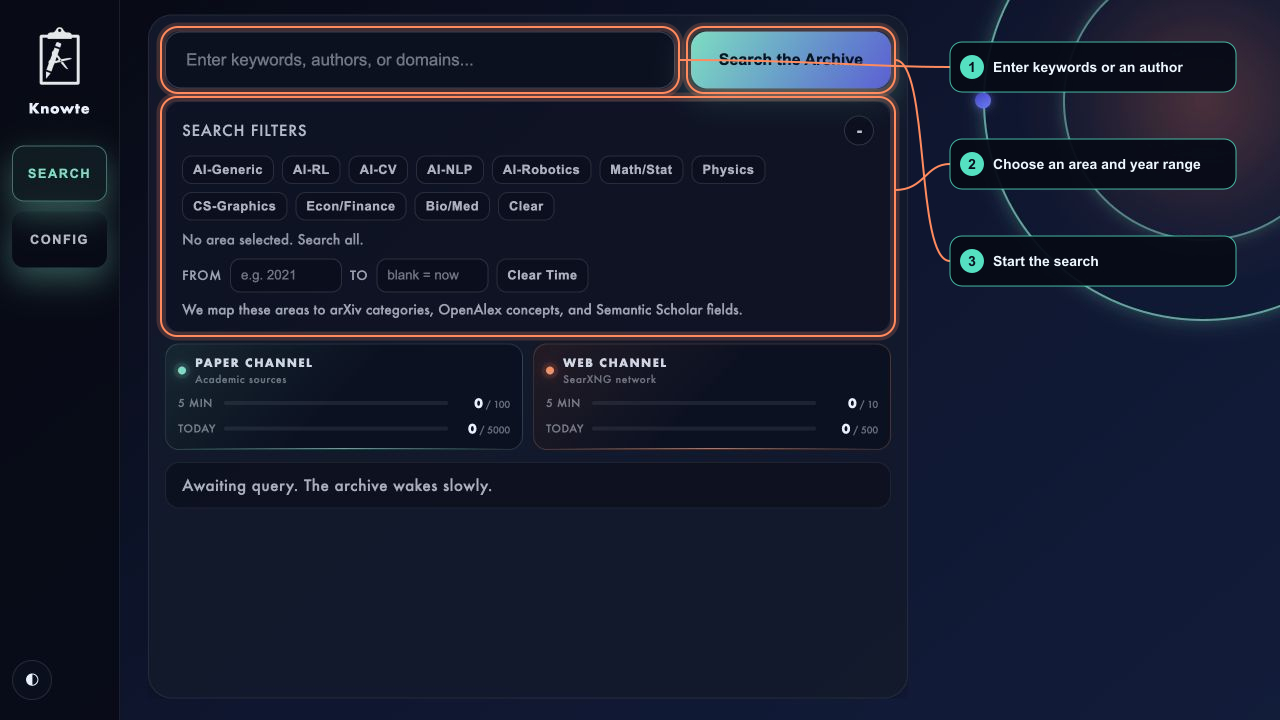
3. Run a search
Return to Search:
- enter keywords, an author, or a research topic;
- optionally choose one or more research areas;
- optionally enter a start and end year;
- choose Keyword or Intelligent, then select Search.
Keyword works without an AI service. Intelligent must first be configured as described below.
Each academic result provides whichever direct links are available: Paper, PDF, and DOI. Web results open their original pages.
Use Find More to continue the same search. Knowte reuses recently fetched academic candidates when possible and requests the next Web page only when needed.
🌍 Read and Capture Sources
Save search results to Sources, then select Inspect to open the Source workspace:
- PDFs retain their original pages and support text or region Evidence.
- Web Sources open in a structured Clean Reader. Use Original web when the site's native layout, images, tables, or interaction matters.
- Text and Snapshot Evidence remain attached to the captured Source version; Annotations and Tags can be added from the Review workspace.
Knowte also includes Knowte Web Companion, a browser extension for working directly on original webpages. It supports Chromium browsers and Firefox. Start Knowte and open Config → Knowte Web Companion:
- Select Copy extension path.
- In the browser's extension page, choose Load unpacked and paste or
navigate to the copied path. In the native folder picker, use
⌘⇧Gon macOS orCtrl+Lon Windows/Linux, paste the path, and confirm the folder. - Generate a temporary pairing key and enter it in the extension within five minutes.
- Select text and press
Alt+Shift+K, or pressAlt+Shift+Xand drag a region. The shortcuts can be customized in the browser's extension settings. - Use the floating editor on the original page to choose a destination, add Tags or an Annotation, and Save or Discard without leaving the page.
Save page stores the current webpage as a Source without creating Evidence. It is useful when the page is worth retaining but no exact passage or region has been selected yet.
Knowte's knowledge workflow uses separate workspaces:
- Search discovers candidates.
- Sources preserves and inspects selected material.
- Evidence reviews precise excerpts and snapshots across Sources.
- Claims turns selected Evidence into explicit, revisable propositions.
- Views turns selected Claims into a living Wiki, a composed Article, or an interactive Claim graph. Views remain editable, retain provenance, and can stand alone or belong to a Project.
Moving forward is explicit: selected inputs appear in an Incoming tray in the next workspace. You can preview or remove them there, or return to their own workspace for deeper editing without losing the draft.
Claims use three Bases: Background for accepted prior knowledge that may lack local Evidence, Reported for a proposition stated directly by Evidence, and Inference for a conclusion derived from Evidence. Evidence can Support, Contradict, or Limit a Claim. AI proposals remain pending until you Accept, Keep disputed, or Discard them.
Chromium users load the folder from chrome://extensions with Developer mode
enabled. Firefox users can load its manifest.json temporarily from
about:debugging#/runtime/this-firefox. Store-packaged browser releases will
follow after the workflow stabilizes.
🧠 Enable Intelligent Search
Knowte can use OpenAI-compatible local services as well as native OpenAI, Google Gemini, Anthropic, and custom request formats.
Open Config → AI Models, add one Model Profile for each model you want to
use, and enter its provider, Base URL, exact model ID, optional API key, and
capabilities. Each profile can use automatic proxy routing, force a direct
connection, or specify its own HTTP(S) proxy. A local OpenAI-compatible Base URL normally ends in /v1, such
as http://127.0.0.1:11434/v1; do not append /chat/completions.
Then assign the exact Model Profile used by each entry under AI roles: Intelligent Search, Review Copilot, Evidence, Claims, Wiki organization, and Article generation. Embedding remains optional. Copilot also offers a temporary model selector in the Review panel without changing its saved role assignment.
The result and verification controls balance coverage, cost, and latency:
- Keyword results also determines the academic candidate batch used by
Intelligent Search. Each confirmed retrieval action requests up to that
value, capped at each provider's one-request maximum of
100. - Intelligent results — target number of results that pass final LLM
verification; default
20. Knowte verifies candidates in batches until it reaches the target or exhausts the candidate pool. - AI timeout — timeout for each LLM or Embedding HTTP request; default
45seconds.
Select Save, return to Search, and choose Intelligent.
Intelligent Search uses the user's text directly unless the user opens Discuss and confirms an editable strategy of up to five Academic/Web retrieval actions. Academic candidates can be ranked with Embeddings before LLM verification. Web results skip Embedding ranking and go from SearXNG recall directly to LLM verification. When an explicit research area is selected, it remains a hard academic filter. Copilot may suggest a different strategy, but it does not silently change or save an area filter.
API keys are stored only in ~/.knowte/config.yml; they are not returned by
the Config API or copied into Plans. The file is written with user-only
permissions on systems that support them. Intelligent Search sends the query,
candidate titles, abstracts or Web snippets to the configured AI service, so
choose a provider appropriate for the material being searched.
If an AI stage fails, Knowte reports the degraded stage and falls back to the best available recall or Embedding order. Keyword Search remains independent of the AI configuration.
🌐 Enable Web Search
Web Search is powered by SearXNG, a separate open-source metasearch engine. Knowte can set up and operate a private local instance, but Docker must already be installed and running.
You need:
- a working Docker CLI;
- Docker Compose;
- a running Docker daemon.
Docker Desktop, Docker Engine, Colima, and compatible alternatives are supported. You do not need to keep the Docker Desktop window open.
Let Knowte set it up
Open Config → Local Web Search and select Set up.
Knowte will pull the official docker.io/searxng/searxng:latest image, create a
local-only service, verify its search API, enable Web Search, and save the
endpoint automatically.
Port 8888 is preferred. If it is unavailable, Knowte tries ports 8889
through 8898. The resulting endpoint is shown and saved in Config.
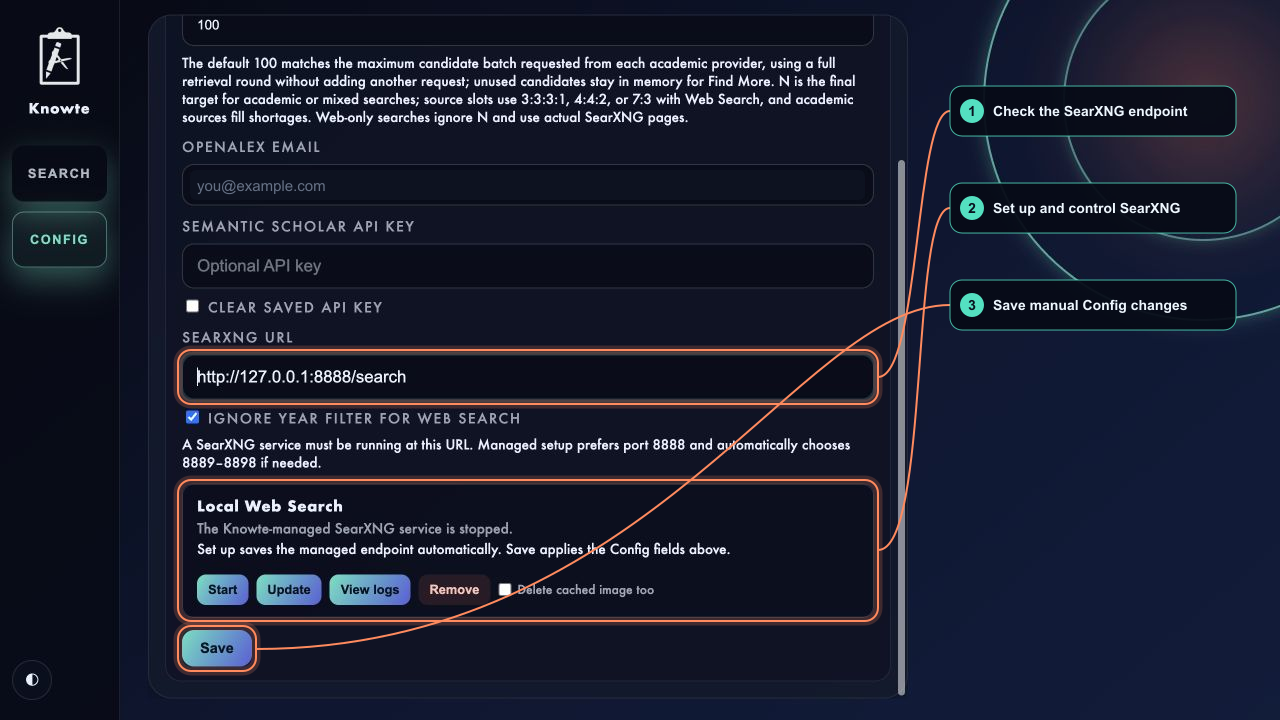
The remaining controls are:
- Start / Stop — control the local SearXNG container.
- Update — pull a newer image and safely recreate the service when needed.
- View logs — toggle recent setup and container output.
- Remove — remove the managed container and its configuration.
The downloaded image remains cached after Remove for faster setup next time. Select Delete cached image too if you also want Docker to remove that image when it is not used elsewhere.
Knowte limits managed container logs to about 30 MB. Image downloads time out after 10 minutes, and a failed first setup is rolled back.
Use an existing SearXNG instance
You can use your own local or remote SearXNG service instead. Follow the
official
SearXNG installation guide
and enable JSON output in settings.yml:
search:
  formats:
    - html
    - json
Then enable Web Search, enter its search endpoint in Config, and select Save:
http://127.0.0.1:8888/search
To verify an endpoint:
curl --noproxy '*' -s \
  'http://127.0.0.1:8888/search?q=alpha&format=json' \
  | python -m json.tool
For custom Docker installations, set KNOWTE_DOCKER_BIN to the Docker
executable. Knowte otherwise uses Docker from the system PATH and common
platform-specific locations.
See the SearXNG Search API documentation for more details. SearXNG is distributed under its own license.
🔎 Search Sources and Results
| Source | Coverage | Optional configuration |
|---|---|---|
| arXiv | Preprints and open research papers | None |
| OpenAlex | Broad scholarly metadata | Contact email |
| Semantic Scholar | Papers and citation metadata | API key |
| SearXNG | General web results | SearXNG endpoint |
Result count
N controls the final target for academic-only and mixed searches. It defaults
to 100, which matches the candidate batch Knowte can request from each
academic provider in one retrieval round.
Web-only searches do not use N. They return the actual number of results in
the requested SearXNG page, and Find More requests the next page without
assuming a fixed page size.
Mixed-source balance
When academic and Web sources are searched together, Knowte initially allocates result slots as follows:
- three academic sources + Web:
3:3:3:1 - two academic sources + Web:
4:4:2 - one academic source + Web:
7:3 - academic sources without Web: equal shares
These ratios are targets, not rigid caps. After filtering and deduplication, available academic results fill shortages from another source.
Recently fetched candidates and Web pages remain in memory for five minutes. Serving results from this cache does not increase request counters; contacting a provider again does.
🛠️ Development
python -m pip install -e .
python -m unittest discover -s tests -v
python -m compileall -q knowte tests
node --check knowte/web/app.js
Node.js is only needed for the optional JavaScript syntax check.
🧭 Project Status
Knowte is currently an alpha local-first research workspace. It supports discovery, persistent Sources, Source inspection, Evidence, durable Claims and relations, saved Views, Project linking, Annotations, Tags, and contextual AI review. The longer-term direction is an end-to-end system for digesting sources, distilling knowledge, and creating durable outputs.
Not implemented yet:
- generated View content and richer multi-source synthesis editing;
- scheduled or recurring Plans;
- authentication or multi-user isolation.
Bug reports, ideas, and careful feedback are welcome.
📄 License
Knowte is released under the MIT License.
1 maintainer

Metadata
1 maintainer
Release files for knowte 0.5.0
For a detailed explanation of source distributions (sdists) and built distributions (wheels), please see the package formats documentation.
Source distribution (sdist)
| File | Size | Uploaded | |
|---|---|---|---|
| knowte-0.5.0.tar.gz | 2.4 MB | Details |
Built distribution (wheel)
| File | Interpreter | ABI | Platform | Reset |
|---|---|---|---|---|
| knowte-0.5.0-py3-none-any.whl | Python 3 | none | any | Details |
Total release size: 4.9 MB
Release files / knowte-0.5.0.tar.gz
| Download URL | knowte-0.5.0.tar.gz |
|---|---|
| Size | 2.4 MB |
| Tags | Source |
|
SHA-256 checksum How to use checksums |
cfc8d2f21440d9525d88cdb43c26cfacf883bc48bc585d0219d42c9c2b2afffa
|
|
BLAKE2b-256 checksum How to use checksums |
5c814e553d4c0b5b06c8a474fd227654f55a2bedcc2d97f6f532617af365f73a
|
| Upload date | |
|
Uploaded using Trusted Publishing? What is trusted publishing? |
No |
| Uploaded via |
twine/6.1.0 CPython/3.10.12
|
Release files / knowte-0.5.0-py3-none-any.whl
| Download URL | knowte-0.5.0-py3-none-any.whl |
|---|---|
| Size | 2.5 MB |
| Tags | Python 3 |
|
SHA-256 checksum How to use checksums |
a6763407e19c32814b29448cea0d623400ab45d0b41eb9e4f475801a75e3af15
|
|
BLAKE2b-256 checksum How to use checksums |
d288ee005c06f22171a6b8fb083d4818e18ee7e4e00855ad0c3a6ed4d7cc204f
|
| Upload date | |
|
Uploaded using Trusted Publishing? What is trusted publishing? |
No |
| Uploaded via |
twine/6.1.0 CPython/3.10.12
|














