
ko-hand-ocr
Reads one line of handwritten Korean + English. A 41M model trained from scratch on synthetic data — no handwriting dataset, no inherited terms.






한국어 · English
photo -> line cutting -> ko-hand-ocr -> "부서 : 포테토뭉부서"
At a glance
| What it reads | One line of handwritten Korean + English, from a photo |
| Model | ViT-Small encoder (ImageNet, Apache-2.0) + 8-layer TrOCR decoder trained from scratch |
| Vocabulary | 229 jamo tokens — not 11,172 syllables, so unseen characters are still writable |
| Parameters | 41M — one fifth of ko-trocr (213.7M) |
| Weights | 156 MB single · 450 MB three-way ensemble (downloaded separately) |
| Package | 98 KB — the code only |
| Speed | 0.25 s per line · 1.31 s for a whole photo — CPU only, no GPU |
| Memory | 1.07 GB single · 1.51 GB ensemble |
| Accuracy | 95.2% mean on six handwriting fonts never seen in training (95.4% ensemble) · worst font 89.5% (90.3% ensemble) |
| Training data | Synthetic — drawn on the fly from OFL fonts. Nothing is stored on disk |
| License | Apache-2.0, weights included — no dataset terms inherited |
| Python | 3.10+ · PyTorch 2.5+ |
What it does — and does not
Does
- Reads a whole photo: finds the lines, cuts them, reads each one (
read_photo) - Reads pre-cut line images, batched (
read) - Constrained decoding — restrict the output to a candidate list, and report whether the free and constrained readings agree (
both) - Ensemble reading — run several checkpoints and take the answer they agree on
- Runs fully offline on CPU. Nothing is sent anywhere
Does not
- Split a table cell into label and value —
read_photoonly cuts down to lines - Handle vertical writing or merged cells
- Stay silent on an empty cell — a cell that is pure scribble still produces something
Why it exists
In practice the only publicly available Korean handwriting OCR model is
ddobokki/ko-trocr, and its training data comes from AI Hub, which places conditions
on purpose of use and on redistribution. That blocks it from being embedded in an
in-house tool or shipped as a public package. So the same capability was rebuilt
from scratch — with a provenance chain that can be audited part by part.

Measured against ko-trocr on the same ruler
The chart above compares terms and footprint. Reading accuracy was measured separately.
A comparison only holds if the model is the only thing that differs.
Photos were cut once with our line cutter (kohandocr.page) and the same
cells were handed to both. Font test sheets were handed over raw,
exactly as synth.render drew them — putting our preprocessing (64×640
letterbox) on them would squash the other model twice. Metric, precision
(float32), beam width (5), GPU and the moment of measurement are all shared.
What was measured and how is spelled out in the header of tools/vs.py, and
every number below comes from the runs/VS.json it leaves behind.
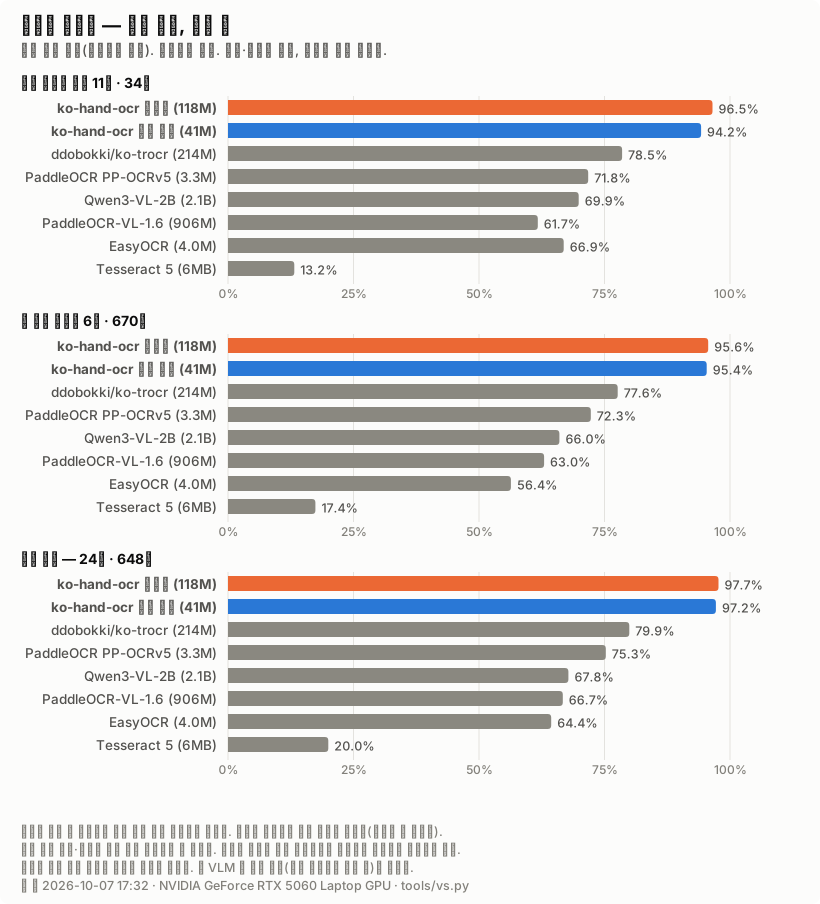
Real handwriting photos · 34 lines, 209 characters
| Jamo similarity | Character error rate | Exact line match | Worst photo | |
|---|---|---|---|---|
| ko-hand-ocr ensemble (118M) | 96.52% | 8.61% | 67.6% | 90.28% |
| ko-hand-ocr single (41M) | 94.95% | 12.44% | 64.7% | 83.03% |
| ddobokki/ko-trocr (214M) | 78.50% | 39.23% | 26.5% | 58.56% |
Six unseen handwriting fonts · 670 lines, 4708 characters
| Jamo similarity | Character error rate | Exact line match | Worst font | |
|---|---|---|---|---|
| ko-hand-ocr ensemble (118M) | 95.65% | 8.28% | 73.0% | 89.83% |
| ko-hand-ocr single (41M) | 95.20% | 8.81% | 71.9% | 88.50% |
| ddobokki/ko-trocr (214M) | 77.62% | 41.67% | 29.4% | 65.24% |
Breadth — 24 more fonts · 648 lines, 3768 characters
| Jamo similarity | Character error rate | Exact line match | Worst font | |
|---|---|---|---|---|
| ko-hand-ocr ensemble (118M) | 97.71% | 3.42% | 85.5% | 92.46% |
| ko-hand-ocr single (41M) | 96.87% | 4.33% | 84.3% | 89.81% |
| ddobokki/ko-trocr (214M) | 79.94% | 32.38% | 42.0% | 46.52% |
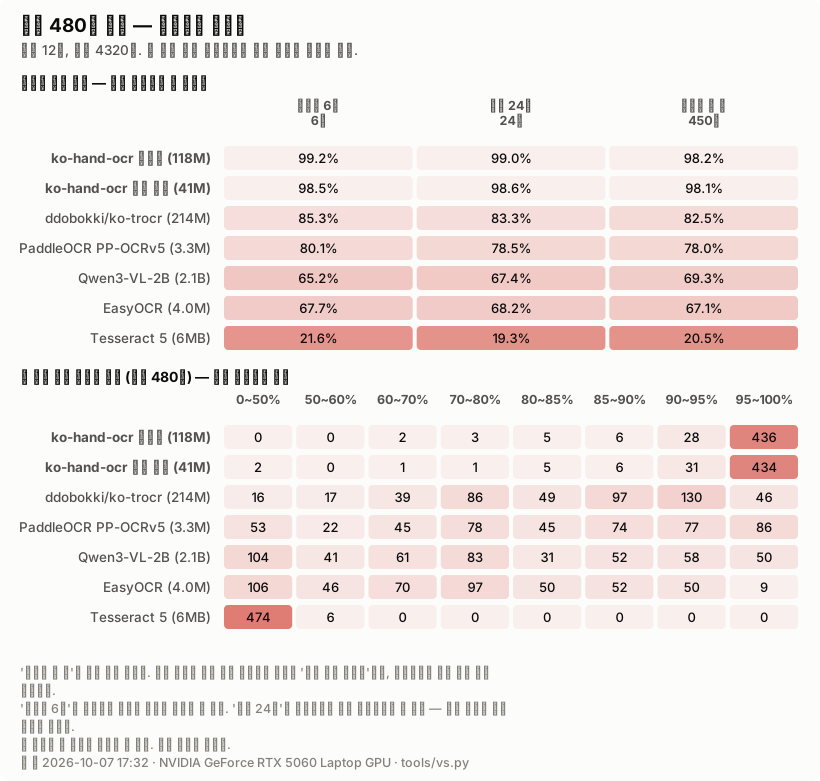
All 480 fonts · 12 lines each, 4320 lines, 22560 characters
| held out (6) 6 |
breadth (24) 24 |
seen in training 450 |
All 480 |
fonts ≥ 95% | fonts < 80% | |
|---|---|---|---|---|---|---|
| ko-hand-ocr ensemble (118M) | 99.15% | 99.00% | 98.22% | 98.27% | 436 | 5 |
| ko-hand-ocr single (41M) | 98.59% | 98.51% | 97.96% | 98.00% | 429 | 4 |
| ddobokki/ko-trocr (214M) | 85.29% | 83.29% | 82.48% | 82.56% | 46 | 158 |
- A single 41M checkpoint already beats the 214M one. On the six unseen fonts, 95.20% against 77.62%.
- Neither model has ever seen the eleven photos. That is the cleanest ground here: 96.52% against 78.50%, with 67.6% of lines read exactly right against 26.5%.
- Run every single font in the folder — all 480 of them — and it is still 98.27% against 82.56%. 436 fonts clear 95% against 46; 5 fall below 80% against 158. The 24 fonts we have never seen (99.00%) score higher than the 450 used in training (98.22%) — so this is not a number propped up by memorisation.
- Some fonts still collapse. The worst of the 480 sits at 63.21% (34.96% in 0.3.0). Six fonts would never have shown that. With only 12 lines per font a single font's score swings hard, so read the herd totals and the distribution, not one row.
- The single checkpoint has a lower photo floor than 0.3.0. Its worst
photo is hand-06 at 83.03% — one line (
전자금융TF서약) of a three-line photo. In the ensemble another checkpoint carries it and it stays at 90.28%.
Where the gap opens
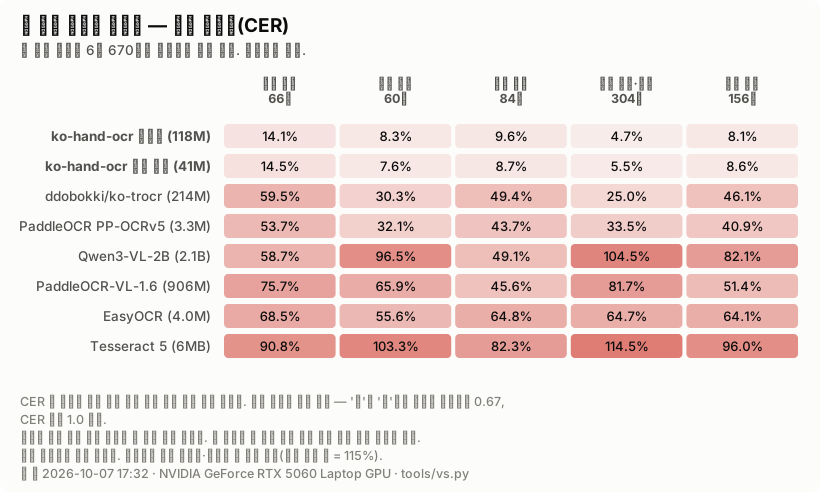
CER by line content — lower is better
| Latin mixed in 66 lines |
form label 60 lines |
digits mixed in 84 lines |
Hangul word / name 304 lines |
Hangul sentence 156 lines |
|
|---|---|---|---|---|---|
| ko-hand-ocr ensemble (118M) | 14.1% | 8.3% | 9.6% | 4.7% | 8.1% |
| ko-hand-ocr single (41M) | 15.3% | 8.6% | 9.1% | 5.7% | 8.7% |
| ddobokki/ko-trocr (214M) | 59.5% | 30.3% | 49.4% | 25.0% | 46.1% |
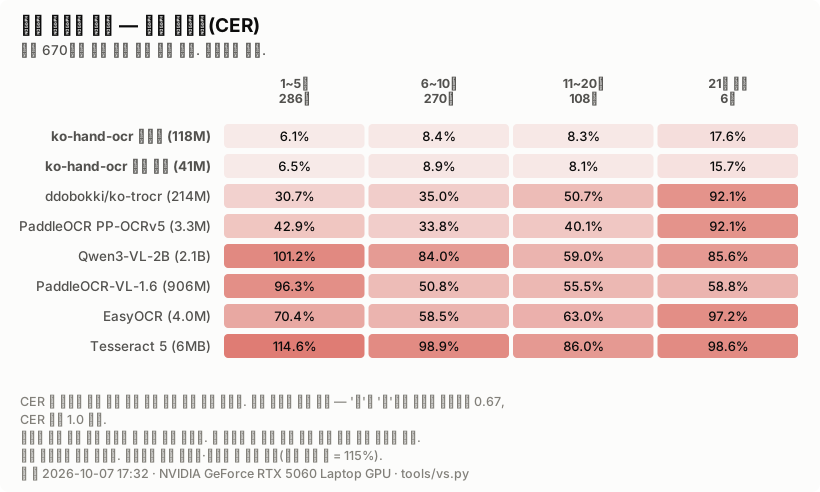
CER by line length — lower is better
| 1-5 chars 286 lines |
6-10 chars 270 lines |
11-20 chars 108 lines |
21+ chars 6 lines |
|
|---|---|---|---|---|
| ko-hand-ocr ensemble (118M) | 6.1% | 8.4% | 8.3% | 17.6% |
| ko-hand-ocr single (41M) | 6.9% | 9.0% | 8.5% | 18.1% |
| ddobokki/ko-trocr (214M) | 30.7% | 35.0% | 50.7% | 92.1% |
- Latin abbreviations split them. 59.5% against 14.1% — 4.2 times. The
Latin that turns up on forms is mostly abbreviations (
TF,OCR,Codex), and the other model mashes those into Hangul. - Longer lines split them further. ko-trocr's encoder is a 384×384 square, so a long line is squashed whole into it; ours is 64×640. The 21+ bucket holds only 6 lines, though — read it as a direction, not a result.
What it costs
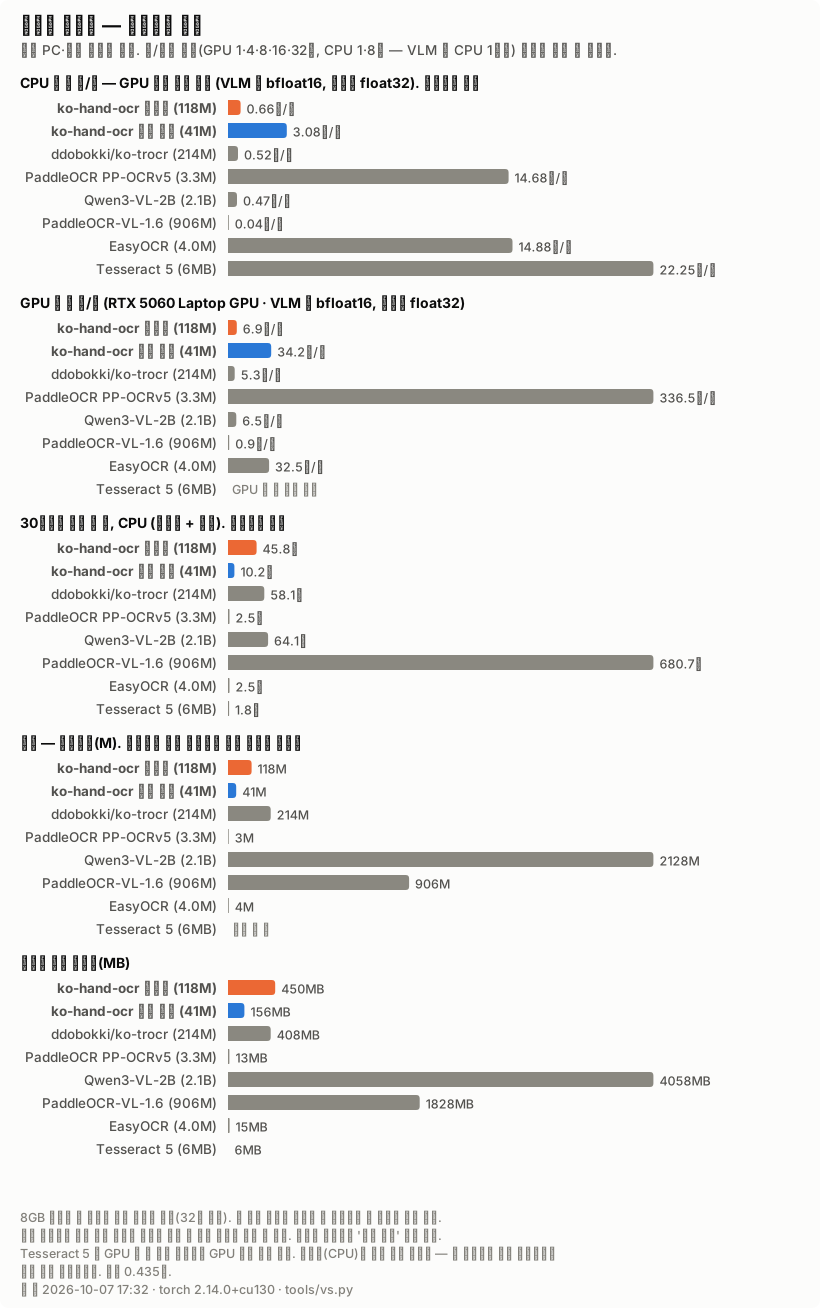
Speed and size
| Parameters | Download | lines/s (GPU) | lines/s (CPU) | 30-line page (GPU) | 30-line page (CPU) | Peak VRAM | |
|---|---|---|---|---|---|---|---|
| ko-hand-ocr ensemble (118M) | 118M | 450MB | 6.6 | 0.6 | 4.93s | 52.0s | 1772MB |
| ko-hand-ocr single (41M) | 41M | 156MB | 37.2 | 3.8 | 1.21s | 8.3s | 1052MB |
| ddobokki/ko-trocr (214M) | 214M | 408MB | 4.7 | 0.5 | 6.80s | 60.2s | 2744MB |
- The ensemble is ahead on GPU too (6.6 against 4.7 lines/s, 1.4×) — and that is while running three checkpoints times three shakes, nine decodes per cell. A single checkpoint runs at 37.2 lines/s, 7.9× ko-trocr. GPU figures ride on the laptop GPU's state that day — in 0.3.0 ko-trocr came out at 6.0 lines/s — so read the ratio measured at the same moment.
- On CPU they part further. A single checkpoint does 3.8 lines/s against 0.5 — 7.6×. A thirty-line page takes 8.3s against 60.2s. Whether it fits on an office PC with no GPU is decided here. Going to an 8-layer decoder shrank this ratio (the 6-layer single was 12.5×).
- Batch size is measured, not guessed. 16 lines is cheapest for our ensemble, 32 for our single checkpoint, 8 for ko-trocr — its 384×384 encoder gets more expensive per line as you batch. A batch that does not fit this card is not timed at all — ko-trocr's 32-line batch is one, and the tool's own reason reads: "앞 묶음 4642MB 의 두 배가 카드 8151MB 를 넘는다". A number that was not measured is not written down as if it were.
What is not equal — and which side it favours
| What | How | Favours |
|---|---|---|
| Test fonts | The six and the twenty-four were held out of our training only. What ko-trocr saw on AI Hub is unknown to us | ko-trocr |
| Length cap | ko-trocr ships max_length: 16 (character tokenizer). It was raised to 64 |
ko-trocr |
| Line cutting | ko-trocr has none. Ours was lent to it | ko-trocr |
| Design intent | ko-trocr was trained on AI Hub's "Korean character OCR" and "public administrative document OCR" sets. It was not built for handwriting alone | — |
| Number of checkpoints | Our ensemble is three checkpoints (one 36M + two 41M, 118M). For a size-matched view read the "single" row | ko-hand-ocr |
| Training fonts | 450 of the 480 fonts are ones we have seen. That is why the herds are reported apart | ko-hand-ocr |
None of this says ko-trocr is a bad model. A model built to read printed administrative documents was handed a line of handwriting, and on that job this one does better. The other direction — whole printed documents — was not measured, and if it were, this model would probably lose.
Measured on: NVIDIA GeForce RTX 5060 Laptop GPU · torch 2.14.0+cu130 · 2026-09-22 12:30.
Install
pip install ko-hand-ocr
Weights ship separately — they are too large for the repository, so they are attached to Releases.
Weights are versioned separately from the package. The current weights are on the v0.4.0 release. Earlier weights stay where they are — the 6-layer v62 on v0.3.0 is faster (0.18 s per line) and has a higher photo floor (worst photo 90.3%); the 4-layer weights on v0.2.0 are faster still (0.16 s per line).
| Download | Size | What it is |
|---|---|---|
ko-hand-ocr-v83.zip |
145MB | A single checkpoint. Enough for most uses. 0.25 s/line |
ko-hand-ocr-ensemble.zip |
417MB | Three checkpoints. Raises the floor, 7x slower |
curl -LO https://github.com/jysvai/ko-hand-ocr/releases/download/v0.4.0/ko-hand-ocr-v83.zip
Pass the unzipped folder straight to Reader(). It must contain config.json,
vocab.json and model.safetensors.
Quick start
from kohandocr.reader import Reader

reader = Reader("ko-hand-ocr-v83", device="cpu")   # the unzipped folder

# A whole photo. Line cutting is included.
reader.read_photo(open("scan.jpg", "rb").read())
# -> ['보안점검표', '부서 : 포테토뭉부서', '이름 : 감자밭']

# If the lines are already cut, hand the images in directly. Batch them for speed.
reader.read([cell_a, cell_b, cell_c])

# Given a candidate list, the output can be constrained to it.
reader.both([cell_b], options=["포테토뭉부서", "감자밭", "김클로드"])
# -> [{'text': '부서 : 포테토뭄부서', 'constrained': '포테토뭉부서', 'agrees': True}]
Do not trust the constrained result on its own. Because it is constrained, the
model must return something from the list. If the true answer is not in the list you
get a confident wrong answer and nothing looks off. When agrees is false, hand it
to a human.
Reading with several checkpoints
Different checkpoints fail on different cells. Train a little longer on the same data and some cells survive while others die — which tells you those cells were being read by a thin margin. So keep several checkpoints and take the answer they agree on.
unzipped/
  config.json  vocab.json  model.safetensors
  also/
    v20b/  config.json  vocab.json  model.safetensors
    v19/   ...
If also/ is present, Reader uses it automatically. The call site does not change.
Combining by confidence was measured and it did not work — the model is sometimes more confident about a wrong answer. So selection is by how much the outputs agree, not by confidence.
How it is built
  64 x 640 line image
          |
   ViT-Small encoder          facebook/deit-small-patch16-224 (ImageNet-1k, Apache-2.0)
   patch 16                   pretrained weights, continued at a lower learning rate
          |
   TrOCR decoder              8 layers, 6 heads — trained from scratch
          |
   229 jamo tokens            ㄱ ㅏ ㅁ ... assembled into 감
          |
      "부서 : 감자밭"
Two decisions carry most of the result.
Jamo, not syllables. Memorising all 11,172 Hangul syllables needs a large output layer and still fails on anything rare. 229 jamo compose into any syllable, so a character the model never saw in training is still writable — which matters for names.
The encoder is not frozen, but it is not shaken either. It already learned to see on ImageNet, so it continues at a lower learning rate while the blank decoder learns fast. Training both at the same rate destroys what the encoder knew.
Accuracy
Measured two ways. Both matter. All figures below come from
python tools/verify.py (about 383 lines per font, 11 photos).
| unseen fonts (mean) | worst font | 11 handwriting photos | worst photo | |
|---|---|---|---|---|
| single (v83) | 95.2% | 89.5% | 95.0% | 83.0% |
| three | 95.4% | 90.3% | 96.6% | 90.3% |
| 0.3.0 single (v62) | 94.6% | 88.5% | 95.4% | 90.3% |
| 0.3.0 three | 95.3% | 90.3% | 95.8% | 90.3% |
What changed since 0.3.0. The single checkpoint moved from 94.6 to 95.2% on the font mean and from 88.5 to 89.5% on the worst font. In exchange its photo floor dropped (hand-06 90.3 -> 83.0%, one line of a three-line photo). The ensemble holds the floor and moves the photo mean from 95.8 to 96.6%. Of the 17 items (6 fonts + 11 photos), the ensemble clears 95% on 12, up from 10.
Similarity is measured per jamo; on the photo side each photo gets one vote.
Do not take the photo number at face value. It is measured on 11 photos (35 cells) taken by the author, so it swings ±5%p. The figure closer to what you would see on someone else's handwriting is the unseen-fonts column — tested only on six font families never used in training, where the swing is half as wide (±2-3%p).
What several checkpoints buy is the floor, not the mean. The mean moves a little (95.4 vs 95.2), but the worst font goes from 89.5% to 90.3%, and a photo one checkpoint dropped to 83.0% (hand-06) comes back at 90.3%. Where one checkpoint reads a cell by a hair, another carries it.
Not every page improves, though. A page one checkpoint read at 100% can come down to 96.7% (hand-08) — when two checkpoints agree on the wrong answer, the one that was right is outvoted. And it is seven times slower. Use three checkpoints where a single page reaching a human is costly, one where you need to sweep a lot of pages.
Per font (400 lines each)
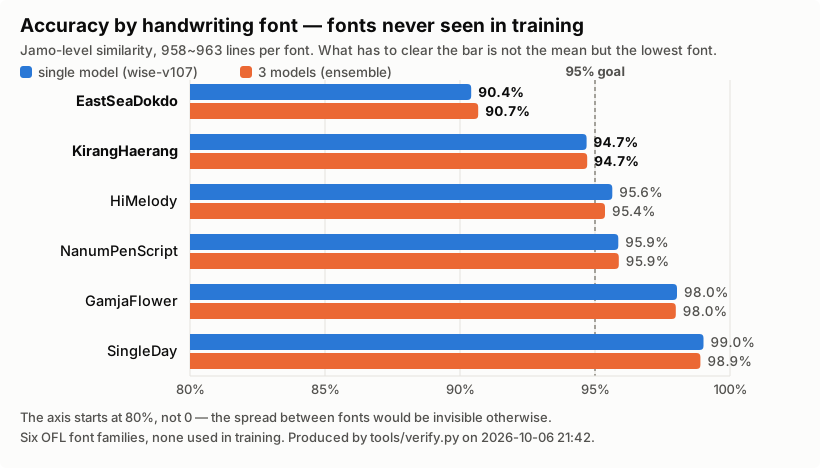
Look only at the average and the font that collapses is hidden. The real spread is 10%p.
| Font | single (v83) | three |
|---|---|---|
| EastSeaDokdo (동해독도) | 89.5% | 90.3% |
| KirangHaerang (기랑해랑) | 94.2% | 94.3% |
| NanumPenScript (나눔펜스크립트) | 95.1% | 95.2% |
| HiMelody (하이멜로디) | 95.4% | 95.4% |
| GamjaFlower (감자꽃) | 98.0% | 97.9% |
| SingleDay (싱글데이) | 99.0% | 99.1% |
What has to clear the bar is not the mean but the lowest font. Once all six passed 90% (2026-09-18) the goal was raised to 95%. Four are over it now; EastSeaDokdo and KirangHaerang are not. Both are hands where strokes merge and get dropped.
All six are fonts never used in training, and all are SIL Open Font License.
python tools/holdout.py <checkpoint-dir> --per-font --sample sample.png
What the test sheet actually looks like
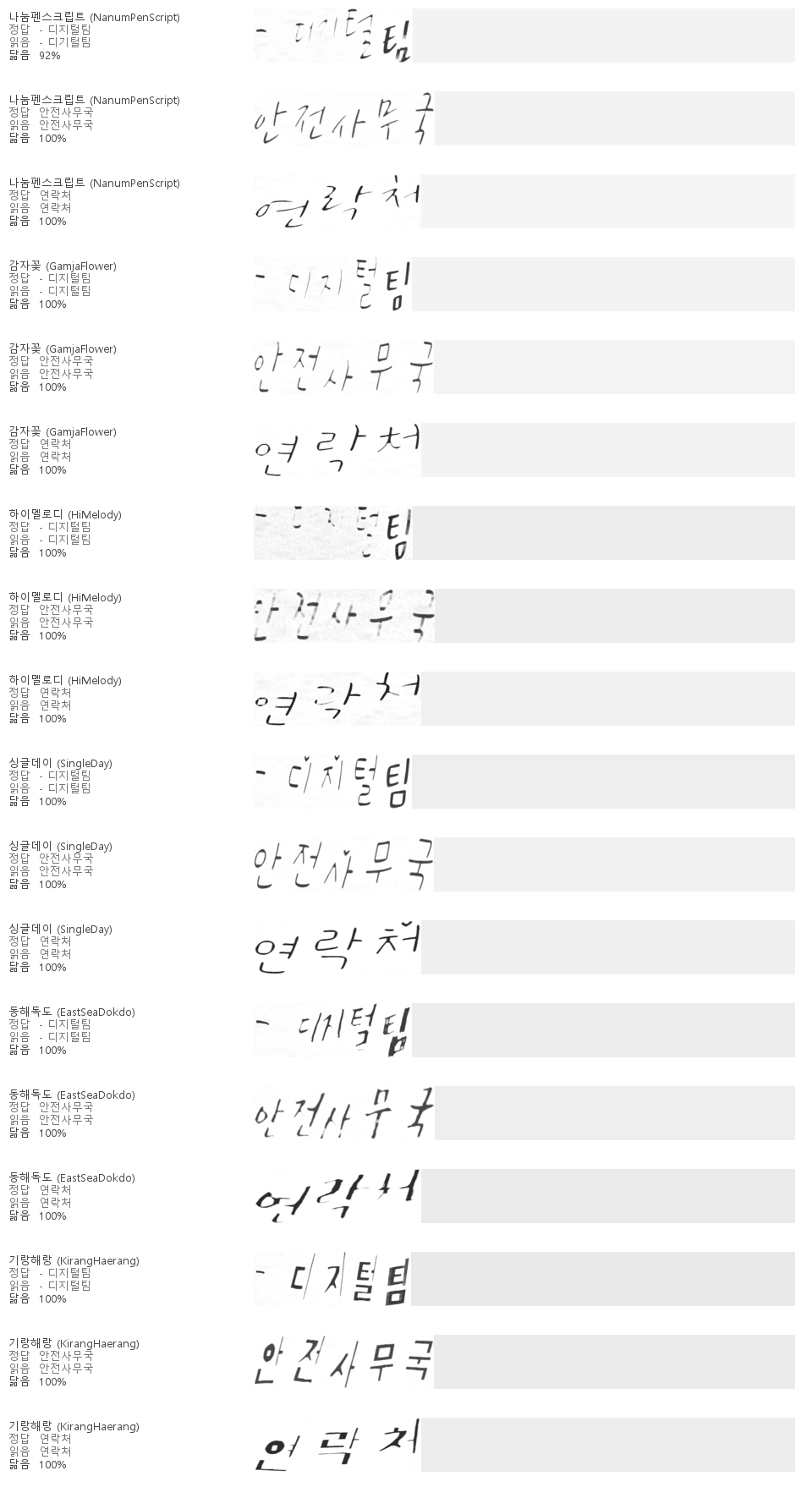
Three lines per font, with the ground truth, what the model read, and the similarity. The pale band on the right is the leftover space from fitting into a 64x640 frame — this is exactly what the model sees.
Every one of the six gets these short form lines right. When the same picture was
produced on 2026-09-02, EastSeaDokdo missed 안전사무국; it does not any more. Where
the fonts pull apart is not lines like these but long sentences and lines no language
knowledge helps with — a third of the sheet is meaningless syllables strung together
(put there on purpose, to train reading from strokes alone), and there a single wrong
jamo has nothing to fall back on.
By shape, SingleDay has well-separated characters and intact strokes, close to print, while EastSeaDokdo and KirangHaerang smear and drop them. That is the difference the table above measures.
This is an image, not a font file. Drawing glyphs with a font is what the OFL
permits; what is not redistributed is the .ttf files themselves
(PROVENANCE.md).
Speed and footprint (measured)
No GPU needed. Emitting jamo one at a time is the bottleneck, so more cores do not help much — and by the same token it does not get slower on a weak machine.
CPU only, median over 11 photos (35 cells). Time is split into cutting and reading — shrinking the model does not shrink cutting, and when a photo holds only three or four lines, cutting is more than half the cost.
| cut | read | one photo (3.2 lines) | per line | 30-line page | |
|---|---|---|---|---|---|
| single, beam 5 | 0.52s | 0.79s | 1.31s | 0.25s | 8.0s |
| single, greedy | 0.51s | 0.36s | 0.86s | 0.11s | 3.9s |
| three, beam 5 | 0.51s | 5.81s | 6.32s | 1.83s | 55.3s |
Memory, as the peak while reading the 11 photos, is about 1.07GB for one checkpoint and about 1.51GB for three. Measured on 2026-09-22.
Eight layers are not free. Re-measuring 0.3.0's 6-layer v62 the same day with the same harness gives 0.18 s per line (beam 5), 0.09 s (greedy) and 1.03GB. The 8-layer checkpoint is about 40% slower at beam 5. If speed comes first, take v62 from v0.3.0.
The right-hand column is not the photo figure multiplied out. Our test photos hold
three or four lines each, while the "page" other people quote is a thirty-line
document. Quoting our seconds-per-page as if it were theirs flatters us by roughly ten
times. So the batch size is raised step by step to measure how far seconds-per-line
falls, and that value is what gets converted (python tools/bench.py --throughput).
Produced with python tools/bench.py --all --device cpu. That harness walks exactly the
path the application walks — a speed measured along a different path is not the speed
the user gets.
Where it runs
Built and tested on Windows. Training and inference were both run on Windows 11 with Python 3.13/3.14.
| Windows | Where it was built. Training and inference both verified |
| macOS | Untested. Inference is pure PyTorch + PIL so it should run, but it has not been confirmed |
| Linux | Not tried yet |
tools/train.ps1 is PowerShell, so it is Windows-only. Elsewhere, call
python -m kohandocr.train directly — all that script does is wait for the previous
run to release the GPU, launch it, and watch the first few steps.
Training
No data is baked ahead of time. A corpus line is generated, drawn with a handwriting font, and fed in on the spot. Nothing is left on disk, and a change to the distribution takes effect from the next step.
python tools/fetch_fonts.py                       # fetch OFL handwriting fonts
python -m kohandocr.train --out runs/v1 --layers 8 \
       --steps 20000 --batch 40 --workers 5 --letters 128 \
       --strike 0.15 --warp 0.5 --digits 0.04
The last three change the training data only. Test sheets are always drawn with the defaults, so switching them on or off leaves the ruler alone (switched off, they do not even draw a random number — a test holds that).
--strike— share of lines that get a crossed-out mark. Four of the 37 photo cells have one.--warp— share of lines whose strokes are bent inside each character (synth._warp). Every earlier distortion moved whole characters, so jamo kept the font's exact shape — yet every photo miss was a single jamo (금->글, 감->갈, 피->회).--digits— share of lines replaced by digit strings that are not dates (corpus.digit_line). The corpus had twice as many date lines as bare digit strings, so a faint digit string got filled in as a date ('816883539' -> '2025-05-19').
Fonts are looked up in this order. No path is hard-coded.
- whatever
--fontswas given - the
KOHAND_FONTSenvironment variable ~/.cache/ko-hand-ocr/fonts
Without --layers you get a 4-layer decoder. The single checkpoint that ships has
8 layers (the ensemble mixes in one 6-layer checkpoint). At 4 layers, thirteen rounds
of changing the recipe left the font mean stuck between 92.8 and 93.4%, and 6 layers
was the first to clear that band. At 6 layers the lowest item then sat at 90.1% for
thirteen rounds; the ensemble only started changing again with 8 layers plus
in-character stroke warping. Going from 6 to 8 layers costs about 40% on CPU
(measured on the same ruler). The encoder and the input size were left alone.
fetch_fonts.py fetches 482 handwriting fonts. Only 452 of them are trained on;
six are the test above and twenty-four are held back for "does it read widely". A font
with the same design as a test font would quietly inflate the score, so they are
compared as images, not by name, and anything scoring 0.7 or above is set aside.
The fonts are not in this repository and are not redistributed. The 109 Nanum handwriting fonts come from clova.ai/handwriting. Details in PROVENANCE.md.
How closely the synthetic images match real handwriting is checked against the measured
distributions recorded in kohandocr/measured.json — nine of them (ink coverage,
density, aspect ratio, margins and so on).
python tools/match.py # target vs current synthesis, side by side
Running longer does not make it better. After changing the synthesis distribution, run short, keep intermediate checkpoints, and pick between them (measured: 15,000 steps was the peak and 30,000 steps was worse).
python tools/pick.py runs/v1-15000 runs/v1-30000 # score the kept checkpoints and pick
How this was built
The engineering behind this model is written up as a 12-page document — why it exists, the four decisions that shaped it, how the training data was produced at zero labelling cost, how the evaluation was designed, and what is still missing.
Engineering write-up — PDF, 12 pages · 한국어판
It includes the parts that are usually left out: the measurement that was wrong, the approach that was tried and failed, and the numbers that have not been measured yet.
License
Apache-2.0, weights included. The licenses of the fonts used in training do not attach to the weights — the weights are not a derivative of the glyph artwork, they are values learned from images. The reasoning is recorded part by part in PROVENANCE.md.
1 maintainer

Metadata
1 maintainer
Release files for ko-hand-ocr 0.4.0
For a detailed explanation of source distributions (sdists) and built distributions (wheels), please see the package formats documentation.
Source distribution (sdist)
| File | Size | Uploaded | |
|---|---|---|---|
| ko_hand_ocr-0.4.0.tar.gz | 112.6 kB | Details |
Built distribution (wheel)
| File | Interpreter | ABI | Platform | Reset |
|---|---|---|---|---|
| ko_hand_ocr-0.4.0-py3-none-any.whl | Python 3 | none | any | Details |
Total release size: 210.3 kB
Release files / ko_hand_ocr-0.4.0.tar.gz
| Download URL | ko_hand_ocr-0.4.0.tar.gz |
|---|---|
| Size | 112.6 kB |
| Tags | Source |
|
SHA-256 checksum How to use checksums |
cef71264a40393db57c6c9f2c31b813044ec67f7f4a0786725ecc29a7b6544c2
|
|
BLAKE2b-256 checksum How to use checksums |
5fd12e3e085729ec164d5a489fd2b47cd77308c6006e9d27f7779b2a033b8680
|
| Upload date | |
|
Uploaded using Trusted Publishing? What is trusted publishing? |
No |
| Uploaded via |
twine/7.0.0 CPython/3.14.7
|
Release files / ko_hand_ocr-0.4.0-py3-none-any.whl
| Download URL | ko_hand_ocr-0.4.0-py3-none-any.whl |
|---|---|
| Size | 97.7 kB |
| Tags | Python 3 |
|
SHA-256 checksum How to use checksums |
2ac28ede40fdebb54a5c03fce9b27212f9b61cf9e5041522f937008f3e800e53
|
|
BLAKE2b-256 checksum How to use checksums |
f0532b3f0079c831e867b16d1f7c6973a10f50272f42f1945422c412a5afe5cb
|
| Upload date | |
|
Uploaded using Trusted Publishing? What is trusted publishing? |
No |
| Uploaded via |
twine/7.0.0 CPython/3.14.7
|














