
A fast and versatile LDAP editor


This is a minimal web interface for LDAP directories. Docker images for linux/amd64 and linux/arm64/v8 are available.
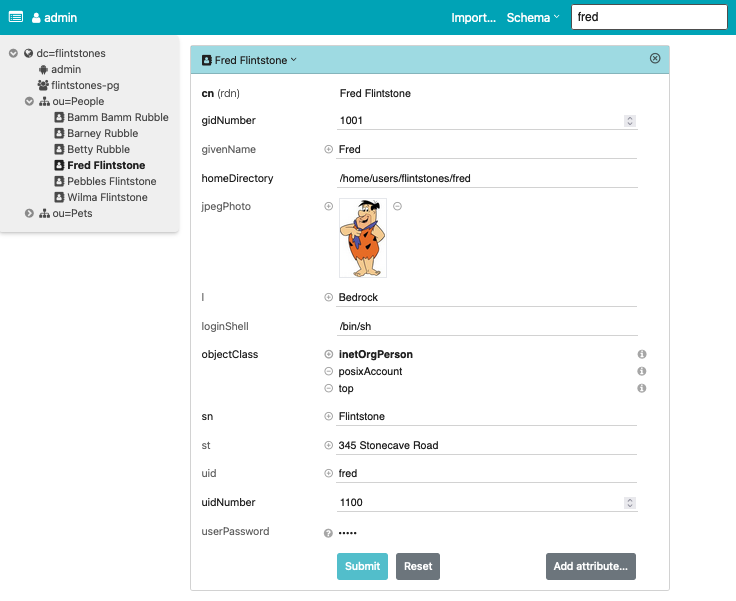
Features:
- Directory tree view
- Entry creation / modification / deletion
- LDIF import / export
- Image support for the
jpegPhotoandthumbnailPhotoattributes - Schema aware
- Simple search (configurable)
- Asynchronous LDAP backend with decent scalability
- Available as Docker image
The app always requires authentication, even if the directory permits anonymous access. User credentials are validated through a simple bind on the directory (SASL is not supported). What a particular user can see (and edit) is governed entirely by directory access rules. The app shows the directory contents, nothing less, nothing more.
Usage
Environment variables
LDAP access is controlled by the following optional environment variables, possibly from a .env file:
LDAP_URL: Connection URL in RFC 4516 format, defaults toldap:///.BASE_DN: Optional search base, e.g.dc=example,dc=org, can also be specified as part of theLDAP_URL.SCHEMA_DN: Optional DN to obtain the directory schema, e.g.cn=subSchema.LOGIN_ATTR: User name attribute, defaults touid.USE_TLS: Enable TLS, defaults to true forldapsconnections. Set it to a non-empty string to forceSTARTTLSonldapconnections.
If BASE_DN or SCHEMA_DN are not provided explicitly, auto-detection from the root DSA is attempted.
For this, the root DSA must be readable anonymously, e.g. with the following ACL line for OpenLDAP:
access to dn.base="" by * read
For finer-grained control, see settings.py.
Docker
For the impatient: Run it with
docker run -p 127.0.0.1:5000:5000 \
    -e LDAP_URL=ldap://your.openldap.server/ \
    dnknth/ldap-ui:latest
For the even more impatient: Start a demo with
docker compose up -d
and go to http://localhost:5000/. You are automatically logged in as Fred Flintstone.
Pip
Install ldap-ui in a virtual environment:
python3 -m venv .venv
source .venv/bin/activate
pip3 install ldap-ui
After a shell rehash (if needed), the command ldap-ui becomes available:
Usage: ldap-ui [OPTIONS]

Options:
  -b, --base-dn TEXT              LDAP base DN. Required unless the BASE_DN
                                  environment variable is set.
  -h, --host TEXT                 Bind socket to this host.  [default:
                                  127.0.0.1]
  -p, --port INTEGER              Bind socket to this port. If 0, an available
                                  port will be picked.  [default: 5000]
  -l, --log-level [critical|error|warning|info|debug|trace]
                                  Log level. [default: info]
  --version                       Display the current version and exit.
  --help                          Show this message and exit.
Development
Prerequisites:
ldap-ui consists of a Vue frontend and a Python backend that translates a subset of the LDAP protocol to a stateless ReST API.
pnpm build assembles the frontend in backend/ldap_ui/statics.
Review the configuration in settings.py. It is short and mostly self-explanatory (also see notes below).
Most settings can (and should) be overridden by environment variables or settings in a .env file; see env.demo or env.example.
Run the backend locally:
make— installs dependencies, builds the frontend if needed, and starts the server.make debug— starts the server in reload mode on port 5000 withDEBUG=true.
The frontend can be developed independently with hot-reload support using pnpm dev.
Notes
Authentication methods
The UI always uses a simple bind operation to authenticate with the LDAP directory. How the bind DN is obtained from a given user name depends on a combination of OS environment variables, possibly from a .env file:
- Search by some attribute. By default, this is the
uid, which can be overridden by the environment variableLOGIN_ATTR, e.g.LOGIN_ATTR=cn. - If the environment variable
BIND_PATTERNis set, then no search is performed. Login with a full DN can be configured withBIND_PATTERN=%s, which for example allows to login as usercn=admin,dc=example,dc=org. If a partial DN likeBIND_PATTERN=%s,dc=example,dc=orgis configured, the corresponding login would becn=admin. If a specific pattern likeBIND_PATTERN=cn=%s,dc=example,dc=orgis configured, the login name is justadmin. - If security is no concern, then a fixed
BIND_DNandBIND_PASSWORDcan be set in the environment. This is for demo purposes only, and probably a very bad idea if access to the UI is not restricted by any other means.
Searching
Search uses a configurable set of criteria
(default: cn, gn, sn, and uid) if the query does not contain =.
Wildcards are supported, e.g. f* will match all cn, gn, sn, and uid starting with f.
Additionally, arbitrary attributes can be searched with an LDAP filter specification, for example sn=F*.
Apart from the search field in the navigation bar, searches are also performed in the entry editor for any DN-valued input field.
Keyboard navigation
The editor and modal dialogs focus the first input when opening, so you can use the ⇥ key to navigate the form. Save or dismiss with the ↩ key.
The following access keys are defined:
| Access Key | UI Element |
|---|---|
| K | Global search at page top |
| A | Add an attribute |
| O | Add an object class |
| R | Reset entry modifications |
| S | Save an entry (same as ↩) |
Caveats
- The software works with OpenLDAP using simple bind. Other directories have not been tested much, although 389 DS works to some extent.
- SASL authentication schemes are presently not supported.
- Passwords are transmitted as plain text. The LDAP server is expected to hash them (OpenLDAP 2.4 does). I strongly recommend to expose the app through a TLS-enabled web server.
- HTTP Basic Authentication is triggered unless the
AUTHORIZATIONrequest variable is already set by some upstream HTTP server.
Q&A
- Q: Why are some fields not editable?
- A: The RDN of an entry is read-only. To change it, rename the entry with a different RDN, then change the old RDN and rename back. To change passwords, click on the question mark icon on the right side. Binary fields (as per schema) are read-only. You do not want to modify them accidentally.
- Q: Why did you write this?
- A: PHPLdapAdmin is no longer actively maintained. I needed a replacement, and wanted to try Vue.
Acknowledgements
The Python backend uses FastAPI. The UI is built with Vue.js and Tailwind CSS. Kudos to the authors of these elegant frameworks!
1 maintainer

Release files for ldap-ui 0.13.6
For a detailed explanation of source distributions (sdists) and built distributions (wheels), please see the package formats documentation.
Source distribution (sdist)
| File | Size | Uploaded | |
|---|---|---|---|
| ldap_ui-0.13.6.tar.gz | 651.7 kB | Details |
Built distribution (wheel)
| File | Interpreter | ABI | Platform | Reset |
|---|---|---|---|---|
| ldap_ui-0.13.6-py3-none-any.whl | Python 3 | none | any | Details |
Total release size: 1.3 MB
Release files / ldap_ui-0.13.6.tar.gz
| Download URL | ldap_ui-0.13.6.tar.gz |
|---|---|
| Size | 651.7 kB |
| Tags | Source |
|
SHA-256 checksum How to use checksums |
1c0561df76037332bcad7bbe4d8006c061d651aef3ee86f32a2c8c7ddbfb19c3
|
|
BLAKE2b-256 checksum How to use checksums |
b2a204945191ea752a7c2ee884f4fcfe9dc9a67032769f4cf21db40cdba0f570
|
| Upload date | |
|
Uploaded using Trusted Publishing? What is trusted publishing? |
No |
| Uploaded via |
uv/0.12.1 {"installer":{"name":"uv","version":"0.12.1","subcommand":["publish"]},"python":null,"implementation":{"name":null,"version":null},"distro":{"name":"macOS","version":null,"id":null,"libc":null},"system":{"name":null,"release":null},"cpu":null,"openssl_version":null,"setuptools_version":null,"rustc_version":null,"ci":null}
|
Release files / ldap_ui-0.13.6-py3-none-any.whl
| Download URL | ldap_ui-0.13.6-py3-none-any.whl |
|---|---|
| Size | 647.4 kB |
| Tags | Python 3 |
|
SHA-256 checksum How to use checksums |
8a1ac8578537ed549c447b13781585de59f99f1a39f191e5c952defebe676894
|
|
BLAKE2b-256 checksum How to use checksums |
4320f97a689eebb88095fa44cd94f81ff890cb83fe1a5c25459778f866e229dc
|
| Upload date | |
|
Uploaded using Trusted Publishing? What is trusted publishing? |
No |
| Uploaded via |
uv/0.12.1 {"installer":{"name":"uv","version":"0.12.1","subcommand":["publish"]},"python":null,"implementation":{"name":null,"version":null},"distro":{"name":"macOS","version":null,"id":null,"libc":null},"system":{"name":null,"release":null},"cpu":null,"openssl_version":null,"setuptools_version":null,"rustc_version":null,"ci":null}
|














