
A fast and versatile LDAP editor



This is a minimal web interface for LDAP directories.
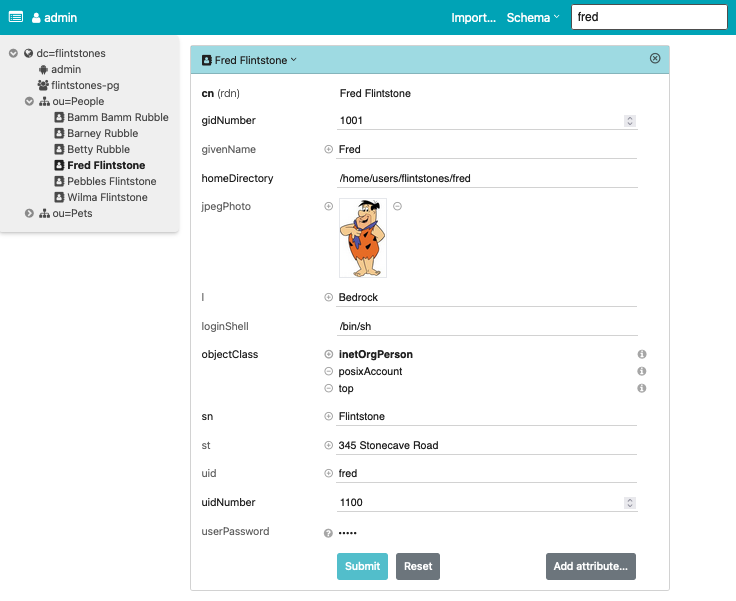
Features:
- Directory tree view
- Entry creation / modification / deletion
- Password management (set, change or remove a user's password, with old-password verification for self-changes)
- LDIF import / export
- Image support for the
jpegPhotoandthumbnailPhotoattributes - Schema aware
- Simple search (configurable)
- Asynchronous LDAP backend with decent scalability
- Available as Docker image
The app always requires authentication, even if the directory permits anonymous access. Credentials are validated through a simple bind on the directory (SASL is not supported). What a user can see and edit is governed entirely by directory access rules.
Usage
Docker
For the impatient: Run it with
docker run -p 127.0.0.1:5000:5000 \
    -e LDAP_URL=ldap://your.openldap.server/ \
    dnknth/ldap-ui:latest
For the even more impatient: Start a demo with
docker compose up -d
then go to http://localhost:5000/ and log in with one of the following accounts:
| UID | Password | Role |
|---|---|---|
admin |
bedrock |
Admin (full access) |
fred |
yabbadabbado |
User (read + self-password-write) |
Pip
Install ldap-ui in a virtual environment:
python3 -m venv .venv
source .venv/bin/activate
pip3 install ldap-ui
After a shell rehash (if needed), the command ldap-ui becomes available:
Usage: ldap-ui [OPTIONS]

Options:
  -b, --base-dn TEXT              LDAP base DN. Required unless the BASE_DN
                                  environment variable is set.
  -h, --host TEXT                 Bind socket to this host.  [default:
                                  127.0.0.1]
  -p, --port INTEGER              Bind socket to this port. If 0, an available
                                  port will be picked.  [default: 5000]
  -l, --log-level [critical|error|warning|info|debug|trace]
                                  Log level. [default: info]
  --version                       Display the current version and exit.
  --help                          Show this message and exit.
Environment variables
LDAP access is controlled by the following optional environment variables, possibly from a .env file:
LDAP_URL: Connection URL in RFC 4516 format, defaults toldap:///.BASE_DN: Optional search base, e.g.dc=example,dc=org, can also be specified as part of theLDAP_URL.SCHEMA_DN: Optional DN to obtain the directory schema, e.g.cn=subSchema.LOGIN_ATTR: User name attribute, defaults touid.USE_TLS: Enable TLS, defaults to true forldapsconnections. Set it to a non-empty string to forceSTARTTLSonldapconnections.
If BASE_DN or SCHEMA_DN are not provided explicitly, auto-detection from the root DSA is attempted.
For this, the root DSA must be readable anonymously, e.g. with the following ACL line for OpenLDAP:
access to dn.base="" by * read
For finer-grained control, see settings.py.
Development
Prerequisites:
ldap-ui consists of a Vue frontend and a Python backend that translates a subset of the LDAP protocol to a stateless ReST API.
pnpm build assembles the frontend in backend/ldap_ui/statics.
Review the configuration in settings.py; it is short and mostly self-explanatory (also see notes below). Most settings can be overridden by environment variables or settings in a .env file.
Run the backend locally:
make— installs dependencies, builds the frontend if needed, and starts the server.make debug— starts the server in reload mode on port 5000 withDEBUG=true.
The frontend can be developed independently with hot-reload support using pnpm dev.
Notes
Authentication methods
The UI always uses a simple bind operation to authenticate with the LDAP directory. How the bind DN is obtained from a given user name depends on a combination of OS environment variables, possibly from a .env file:
- Search by some attribute. By default this is
uid(overridable viaLOGIN_ATTR, e.g.LOGIN_ATTR=cn). The search is anonymous, so the directory must grant anonymous read access to the search attribute within the search base. To avoid that, useBIND_PATTERN(item 2) or require a full-DN login. - If
BIND_PATTERNis set, no search is performed.BIND_PATTERN=%srequires a full DN (e.g. logincn=admin,dc=example,dc=org);BIND_PATTERN=%s,dc=example,dc=orgallowscn=admin;BIND_PATTERN=cn=%s,dc=example,dc=orgallowsadmin.
Searching
Search uses a configurable set of criteria (default: cn, gn, sn, and uid) if the query does not contain =. Wildcards are supported, e.g. f* matches all cn, gn, sn, and uid starting with f. Arbitrary attributes can also be searched with an LDAP filter, e.g. sn=F*.
Apart from the search field in the navigation bar, searches are also performed in the entry editor for any DN-valued input field.
Keyboard navigation
The editor and modal dialogs focus the first input when opening, so you can use the ⇥ key to navigate the form. Save or dismiss with the ↩ key.
The following access keys are defined:
| Access Key | UI Element |
|---|---|
| K | Global search at page top |
| A | Add an attribute |
| O | Add an object class |
| R | Reset entry modifications |
| S | Save an entry (same as ↩) |
Caveats
- The software works with OpenLDAP using simple bind. Other directories have not been tested much, although 389 DS works to some extent.
- SASL authentication schemes are presently not supported.
- Passwords are transmitted as plain text. The LDAP server is expected to hash them (OpenLDAP 2.4 does). I strongly recommend exposing the app through a TLS-enabled web server.
- HTTP Basic Authentication is performed by the app: the login dialog collects credentials and a request interceptor (
src/auth.ts) attachesAuthorization: Basicto every request once logged in. On startup the app probes/api/whoami; if an upstream HTTP server (or a native browser Basic challenge) already supplied theAUTHORIZATIONrequest variable, the session is treated as authenticated and the login dialog is skipped. Otherwise the dialog credentials are used, replacing any upstream-provided header. - LDIF export always includes
userPasswordvalues that carry an RFC 2307 scheme prefix ({SSHA},{SHA},{MD5}, …), but never plaintext: values without a prefix — or explicitly marked{CLEARTEXT}/{PLAIN}— are omitted. So a directory that stores passwords in plaintext cannot leak them through an export.
Q&A
- Q: Why are some fields not editable?
- A: The RDN of an entry is read-only. To change it, rename the entry with a different RDN, then change the old RDN and rename back. To change passwords, click on the question mark icon on the right side. Binary fields (as per schema) are read-only. You do not want to modify them accidentally.
- Q: Why did you write this?
- A: PHPLdapAdmin is no longer actively maintained. I needed a replacement, and wanted to try Vue.
Acknowledgements
The Python backend uses FastAPI. The UI is built with Vue.js and Tailwind CSS. Kudos to the authors of these elegant frameworks!
1 maintainer

Release files for ldap-ui 0.15.3
For a detailed explanation of source distributions (sdists) and built distributions (wheels), please see the package formats documentation.
Source distribution (sdist)
| File | Size | Uploaded | |
|---|---|---|---|
| ldap_ui-0.15.3.tar.gz | 664.5 kB | Details |
Built distribution (wheel)
| File | Interpreter | ABI | Platform | Reset |
|---|---|---|---|---|
| ldap_ui-0.15.3-py3-none-any.whl | Python 3 | none | any | Details |
Total release size: 1.3 MB
Release files / ldap_ui-0.15.3.tar.gz
| Download URL | ldap_ui-0.15.3.tar.gz |
|---|---|
| Size | 664.5 kB |
| Tags | Source |
|
SHA-256 checksum How to use checksums |
e385b5c55865a76e751627c5bd8083f3173f06e6ea46d401b99805808afd00ea
|
|
BLAKE2b-256 checksum How to use checksums |
1848d9725d128b10a7501da89da1321a740c76e2b2220b6ef88cf8769d3dbe24
|
| Upload date | |
|
Uploaded using Trusted Publishing? What is trusted publishing? |
No |
| Uploaded via |
uv/0.12.10 {"installer":{"name":"uv","version":"0.12.10","subcommand":["publish"]},"python":null,"implementation":{"name":null,"version":null},"distro":{"name":"macOS","version":null,"id":null,"libc":null},"system":{"name":null,"release":null},"cpu":null,"openssl_version":null,"setuptools_version":null,"rustc_version":null,"ci":null}
|
Release files / ldap_ui-0.15.3-py3-none-any.whl
| Download URL | ldap_ui-0.15.3-py3-none-any.whl |
|---|---|
| Size | 660.1 kB |
| Tags | Python 3 |
|
SHA-256 checksum How to use checksums |
6567cfe38ac4b7366981f9369ab5c31a7e7ea2d3c3db6a463429e7f86591665b
|
|
BLAKE2b-256 checksum How to use checksums |
d45895f4cc8e1bc2742ffb4d4dd9f3c955d809ee73fbf03fdff58b7bdfaa3103
|
| Upload date | |
|
Uploaded using Trusted Publishing? What is trusted publishing? |
No |
| Uploaded via |
uv/0.12.10 {"installer":{"name":"uv","version":"0.12.10","subcommand":["publish"]},"python":null,"implementation":{"name":null,"version":null},"distro":{"name":"macOS","version":null,"id":null,"libc":null},"system":{"name":null,"release":null},"cpu":null,"openssl_version":null,"setuptools_version":null,"rustc_version":null,"ci":null}
|














