


✍️ 🦜 Collaborative Plugin for Lexical with Loro CRDT
A collaborative editing plugin for Lexical Rich Editor built with Loro CRDT, providing real-time collaborative editing capabilities with conflict-free synchronization.
Core Components
This package provides three main components for building collaborative text editors:
LoroCollaborativePlugin.tsx- A Lexical plugin that integrates Loro CRDT for real-time collaborative editingLexicalModelPython Library - A standalone document model for Lexical content with CRDT capabilitieslexical-loroWebSocket Server - A Python server using loro-py for real-time collaboration
Quick Start
Using the Lexical Plugin
import { LoroCollaborativePlugin } from './src/LoroCollaborativePlugin';

function MyEditor() {
  return (
    <LexicalComposer initialConfig={editorConfig}>
      <RichTextPlugin />
      <LoroCollaborativePlugin
        websocketUrl="ws://localhost:8081"
        docId="my-document"
        username="user1"
      />
    </LexicalComposer>
  );
}
Using the LexicalModel Library
from lexical_loro import LexicalModel

# Create a new document
model = LexicalModel.create_document("my-document")

# Add content
model.add_block({
    "text": "My Document",
    "format": 0,
    "style": ""
}, "heading1")

model.add_block({
    "text": "This is a paragraph.",
    "format": 0,
    "style": ""
}, "paragraph")

# Save to file
model.save_to_file("document.json")

# Load from file
loaded_model = LexicalModel.load_from_file("document.json")
Using the Python Server
# Install the Python package
pip install -e .

# Start the server
lexical-loro-server --port 8081
Examples
For complete working examples, see the src/examples/ directory which contains:
- Full React application with dual editor support
- Server selection interface
- Connection status indicators
- Rich text formatting examples
DISCLAIMER Collaborative Cursors still need fixes, see this issue.
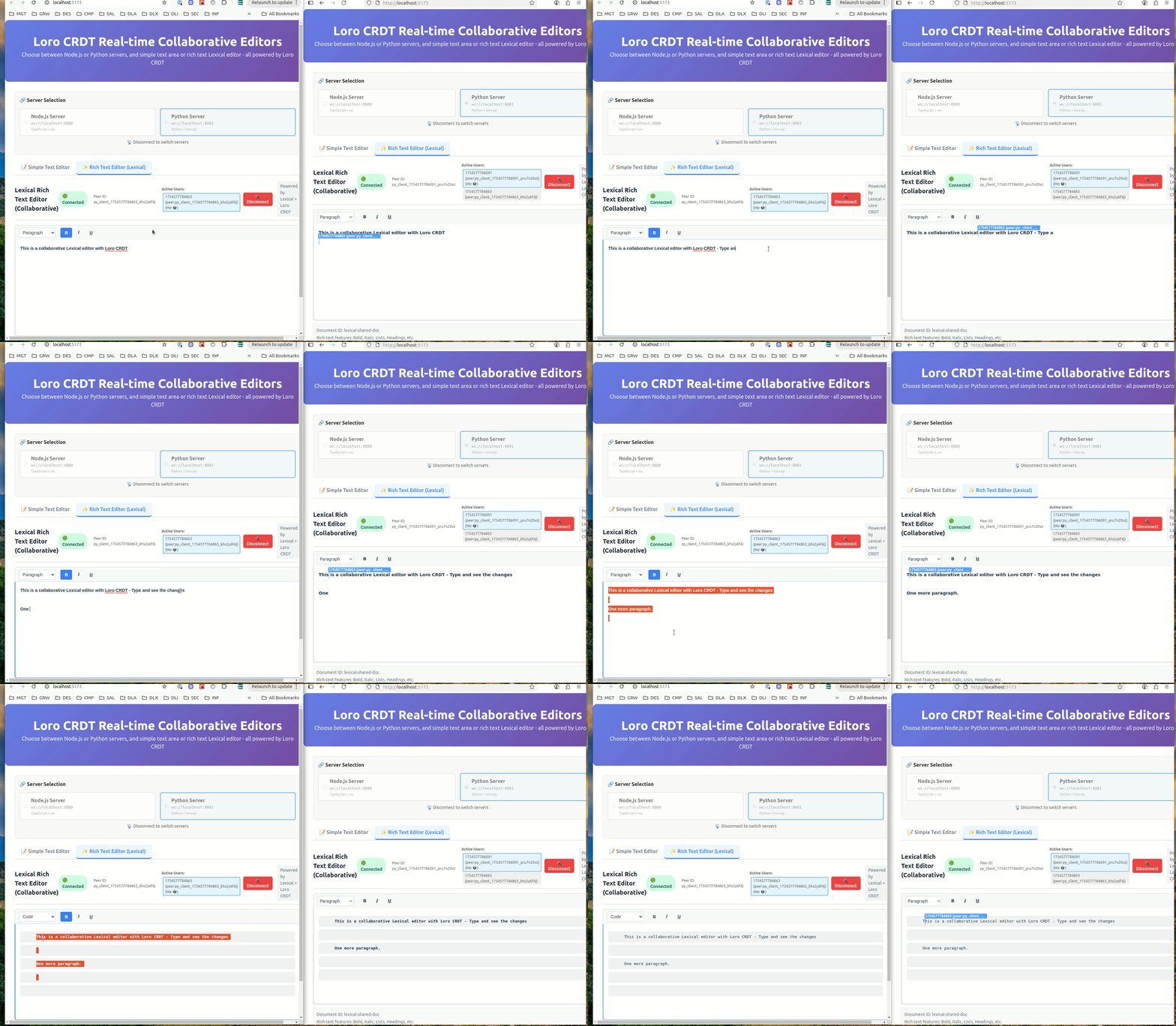
Core Features
- 🔄 Real-time Collaboration: Multiple users can edit the same document simultaneously
- 🚀 Conflict-free: Uses Loro CRDT to automatically resolve conflicts
- 📝 Lexical Integration: Seamless integration with Lexical rich text editor
- 📚 Standalone Library: Use LexicalModel independently for document management
- 🌐 WebSocket Server: Python server for maintaining document state
- 📡 Connection Management: Robust WebSocket connection handling
- ✨ Rich Text Support: Preserves formatting during collaborative editing
- 💾 Serialization: JSON export/import and file persistence
- 🔧 Extensible: Plugin-based architecture for easy customization
Technology Stack
Core Dependencies:
- Lexical: v0.33.1 (Facebook's extensible text editor framework)
- Loro CRDT: v1.5.10 (Conflict-free replicated data types)
- React: 18/19 (for plugin hooks and components)
- Python: 3.8+ with loro-py and websockets
Development Dependencies:
- TypeScript: For type safety
- Vite: For building and development (examples only)
- pytest: Python testing
- ESLint: Code linting
Installation
Core Plugin
The Lexical plugin is a single TypeScript/React component that you can copy into your project:
# Copy the plugin file
cp src/LoroCollaborativePlugin.tsx your-project/src/
Dependencies required:
npm install lexical @lexical/react @lexical/selection loro-crdt react react-dom
Python Server
Install the Python WebSocket server:
# Install from this repository
pip install -e .

# Or install specific dependencies
pip install websockets click loro
Usage
1. Lexical Plugin Integration
Add the plugin to your Lexical editor:
import { LexicalComposer } from '@lexical/react/LexicalComposer';
import { RichTextPlugin } from '@lexical/react/LexicalRichTextPlugin';
import { ContentEditable } from '@lexical/react/LexicalContentEditable';
import { LoroCollaborativePlugin } from './LoroCollaborativePlugin';

const editorConfig = {
  namespace: 'MyEditor',
  theme: {},
  onError: console.error,
};

function CollaborativeEditor() {
  return (
    <LexicalComposer initialConfig={editorConfig}>
      <div className="editor-container">
        <RichTextPlugin
          contentEditable={<ContentEditable className="editor-input" />}
          placeholder={<div className="editor-placeholder">Start typing...</div>}
          ErrorBoundary={() => <div>Error occurred</div>}
        />
        <LoroCollaborativePlugin
          websocketUrl="ws://localhost:8081"
          docId="shared-document"
          username="user123"
        />
      </div>
    </LexicalComposer>
  );
}
2. Standalone LexicalModel Library
Use the LexicalModel library independently for document management:
from lexical_loro import LexicalModel

# Create a new document
model = LexicalModel.create_document("my-document")

# Add different types of content
model.add_block({
    "text": "My Document",
    "format": 0,
    "style": ""
}, "heading1")

model.add_block({
    "text": "This is a paragraph with **bold** text.",
    "format": 0,
    "style": ""
}, "paragraph")

model.add_block({
    "text": "",
    "format": 0,
    "style": ""
}, "list")

# Serialize to JSON
json_data = model.to_json()

# Save to file
model.save_to_file("document.json")

# Load from file
loaded_model = LexicalModel.load_from_file("document.json")

# Access blocks
for block in loaded_model.get_blocks():
    print(f"{block['type']}: {block.get('text', '')}")
For more examples, see:
examples/memory_only_example.py- Basic document creation and manipulationexamples/file_sync_example.py- File persistence and batch operationsexamples/collaboration_example.py- Simulating collaborative editingdocs/LEXICAL_MODEL_GUIDE.md- Comprehensive documentation
3. Python Server Setup
Start the WebSocket server:
# Default port (8081)
lexical-loro-server

# Custom port
lexical-loro-server --port 8082

# With debug logging
lexical-loro-server --port 8081 --log-level DEBUG
4. Programmatic Server Usage
import asyncio
from lexical_loro import LoroWebSocketServer

async def main():
    server = LoroWebSocketServer(port=8081)
    await server.start()
    print("Server running on ws://localhost:8081")

if __name__ == "__main__":
    asyncio.run(main())
Plugin API
For detailed API documentation, see docs/API.md.
Quick Reference
interface LoroCollaborativePluginProps {
  websocketUrl: string;          // WebSocket server URL
  docId: string;                 // Unique document identifier
  username: string;              // User identifier
  userColor?: string;            // User cursor color (optional)
  debug?: boolean;               // Enable debug logging (optional)
}
Initialization Best Practices
⚠️ Important: Always wait for collaboration initialization before enabling other plugins.
See docs/INITIALIZATION_GUIDE.md for comprehensive guidance on:
- Proper plugin ordering
- Initialization callbacks
- Error handling
- Common anti-patterns to avoid
Examples
For complete working examples and demonstrations, see the src/examples/ directory:
# Run the example application
npm install
make example

# This starts both Node.js and Python servers plus a React demo app
# Open http://localhost:3000/split/index.html to see the 2 editors view
The examples include:
- Complete React App: Full collaborative editor with UI
- Server Selection: Switch between Node.js and Python backends
- Dual Editors: Simple text area and rich Lexical editor
- Real-time Demo: Multi-user collaboration testing
See src/examples/README.md for detailed example documentation.
Architecture
EDITOR 1                                           EDITOR 2

loro                                               loro
- node(data: root(1))                              - node(data: root(12))
  - node(data: element(2))                           - node(data: element(22))
    - node(data: text(3))                              - node(data: text(13))
  - node(data: counter(4))                           - node(data: counter(4))

                <---- loro updates via websocket ------>
                <---- loro node ids are the same ------>
             <---- lexical node keys are different ------>

lexical                                            lexical
- root(1)                                          - root(12)
  - element(2)                                       - element(22)
    - text(3)                                          - text(13)
  - counter(4)                                       - counter(49)
Examples
Loro examples
-
http://localhost:3000/?isCollab=true
-
http://localhost:3000/split/?isCollab=true
Y.js examples (for reference)
-
http://localhost:3000/?isCollab=true&useYjs=true
-
http://localhost:3000/split/?isCollab=true&useYjs=true
1 maintainer

Release files for lexical-loro 1.0.7
For a detailed explanation of source distributions (sdists) and built distributions (wheels), please see the package formats documentation.
Source distribution (sdist)
| File | Size | Uploaded | |
|---|---|---|---|
| lexical_loro-1.0.7.tar.gz | 56.0 kB | Details |
Built distribution (wheel)
| File | Interpreter | ABI | Platform | Reset |
|---|---|---|---|---|
| lexical_loro-1.0.7-py3-none-any.whl | Python 3 | none | any | Details |
Total release size: 116.4 kB
Release files / lexical_loro-1.0.7.tar.gz
| Download URL | lexical_loro-1.0.7.tar.gz |
|---|---|
| Size | 56.0 kB |
| Tags | Source |
|
SHA-256 checksum How to use checksums |
2e37d1b3d948070584b1dacdaa46c1fe6419c4fc31978240bfe38f6fbfd07503
|
|
BLAKE2b-256 checksum How to use checksums |
6810e17e228728056a00bf3571b1463b2a865176e91ce3027c3d83517db46d10
|
| Upload date | |
|
Uploaded using Trusted Publishing? What is trusted publishing? |
Yes |
| Uploaded via |
twine/7.0.0 CPython/3.13.14
|
Provenance
Provenance describes where a file came from. On PyPI, provenance is shared via attestations, which provide a verifiable record of the build or publishing details. View details, limitations and caveats.


PyPI Publish Attestation
PyPI verified that this artifact, at this checksum, originated from the publisher listed below.
Signed by GitHub Actions, verified by PyPI on Sep 26, 2026.
Transparency logRelease files / lexical_loro-1.0.7-py3-none-any.whl
| Download URL | lexical_loro-1.0.7-py3-none-any.whl |
|---|---|
| Size | 60.3 kB |
| Tags | Python 3 |
|
SHA-256 checksum How to use checksums |
e332cbb97a4de5cd9ef3fee8948ad1786d7919a8c40c4f20ea2817c03a24a5f1
|
|
BLAKE2b-256 checksum How to use checksums |
d315c9339d2db8d40526f080ae683cec8a24bb3b11d881d8a8e7252f9b4dfe59
|
| Upload date | |
|
Uploaded using Trusted Publishing? What is trusted publishing? |
Yes |
| Uploaded via |
twine/7.0.0 CPython/3.13.14
|
Provenance
Provenance describes where a file came from. On PyPI, provenance is shared via attestations, which provide a verifiable record of the build or publishing details. View details, limitations and caveats.
PyPI Publish Attestation
PyPI verified that this artifact, at this checksum, originated from the publisher listed below.
Signed by GitHub Actions, verified by PyPI on Sep 26, 2026.
Transparency log













