

limax: python utilities for LiMAx







limax is a collection of python utilities for working with LiMAx data with source code available from https://github.com/matthiaskoenig/limax.
The project is developed in collaboration by the Humboldt-University Berlin (Matthias König) and the Jena University Hospital (Hans-Michael Tautenhahn).
Features include:
Anonymisation of LiMAx raw data files
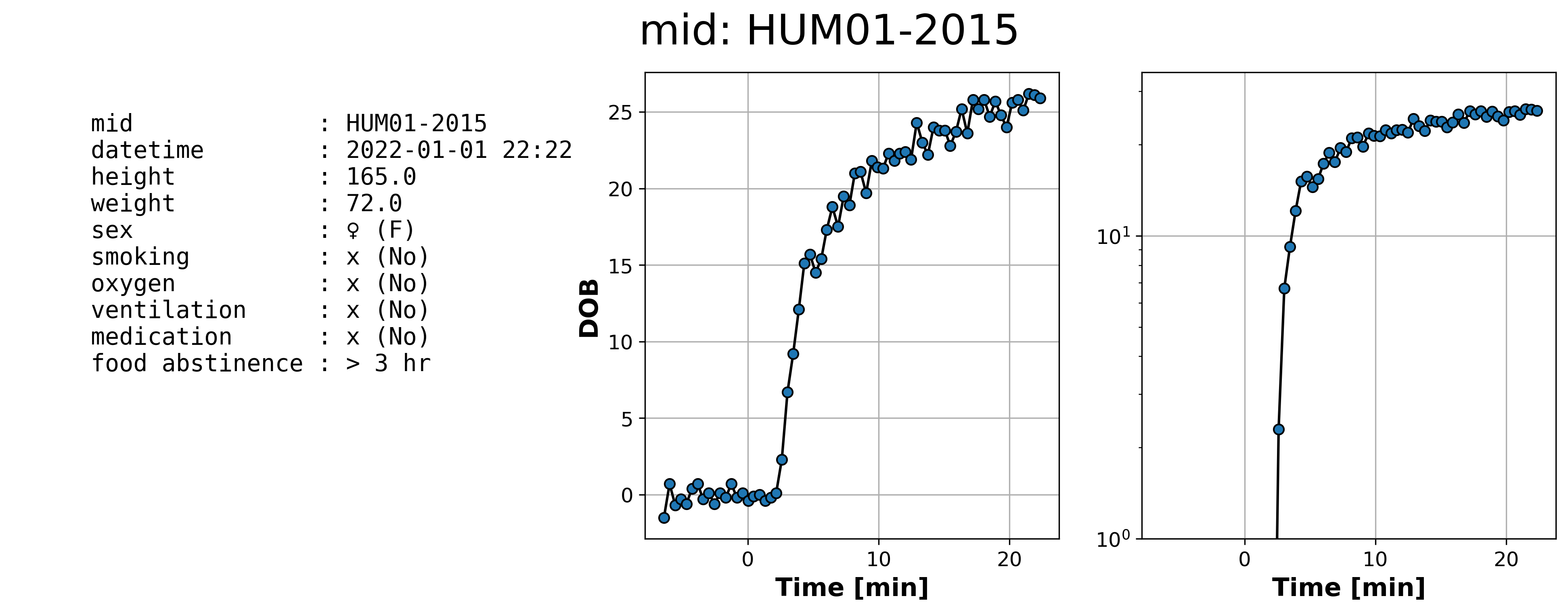
Visualization of LiMAx DOB curves
Calculation of AUC, LiMAx values and other pharmacokinetics parameters from LiMAx DOB curves.
If you have any questions or issues please open an issue.
Example plot
How to cite
Installation
limax is available from pypi and can be installed via:
pip install limax
Best practise is to setup a virtual environment example via conda and install the package. First install anaconda via https://docs.anaconda.com/anaconda/install/index.html. To run the limax tool open a terminal app (e.g. Application -> Utilities -> terminal on MacOS) and create the conda environment
conda create -n limax python=3.10
conda activate limax
(limax) pip install limax --upgrade
Usage
Command line tool
After installation LiMAx analysis can be performed using the limax command line tool
$ limax

────────────────────────────────────────────────────────────────────────────────
💉 LIMAX ANALYSIS 💉
Version 0.3.1 (https://github.com/matthiaskoenig/limax)
Citation https://doi.org/10.5281/zenodo.7382669
────────────────────────────────────────────────────────────────────────────────
Example processing single LiMAx raw file:
    limax -i patient1.csv -o .
Example processing folder with LiMAx raw files:
    limax -i limax_examples -o limax_examples_processed
────────────────────────────────────────────────────────────────────────────────
Required argument '--input' missing.
Usage: commands.py [options]

Options:
  -h, --help            show this help message and exit
  -i INPUT_PATH, --input=INPUT_PATH
                        Path to folder with LiMAx raw files or single LiMAx
                        raw file as '*.csv'.
  -o OUTPUT_DIR, --output_dir=OUTPUT_DIR
                        Path to output folder with processed LiMAx files as
                        '*.json'.
────────────────────────────────────────────────────────────────────────────────
Common problems
On MacOs the terminal app requires permissions to access files, i.e.
PermissionError: [Errno 1] Operation not permittedThis can be solved by changing the permissions of the terminal app via https://stackoverflow.com/questions/58479686/permissionerror-errno-1-operation-not-permitted-after-macos-catalina-update:
Go to System Preference->Security and Privacy.
On the left side click on Full Disk Access
Now click on bottom left lock icon and enter password to make changes, see Label 3
Now click on + sign button
Browse the terminal app from Application -> Utilities
License
Source Code: LGPLv3
Documentation: CC BY-SA 4.0
The limax source is released under both the GPL and LGPL licenses version 2 or later. You may choose which license you choose to use the software under.
This program is free software: you can redistribute it and/or modify it under the terms of the GNU General Public License or the GNU Lesser General Public License as published by the Free Software Foundation, either version 2 of the License, or (at your option) any later version.
This program is distributed in the hope that it will be useful, but WITHOUT ANY WARRANTY; without even the implied warranty of MERCHANTABILITY or FITNESS FOR A PARTICULAR PURPOSE. See the GNU General Public License for more details.
Funding
This project is supported by the Federal Ministry of Education and Research (BMBF, Germany) within the research network Systems Medicine of the Liver (LiSyM, grant number 031L0054) and by the German Research Foundation (DFG) within the Research Unit Programme FOR 5151 “QuaLiPerF (Quantifying Liver Perfusion-Function Relationship in Complex Resection - A Systems Medicine Approach)” by grant number 436883643 and by grant number 465194077 (Priority Programme SPP 2311, Subproject SimLivA).
Develop version
The latest develop version can be installed via:
pip install git+https://github.com/matthiaskoenig/limax.git@develop
Or via cloning the repository and installing via:
git clone https://github.com/matthiaskoenig/limax.git
cd limax
pip install -e .
To install for development use:
pip install -e .[development]
© 2022-2024 Matthias König, Eva Kindler, Anton Schnurpel & Hans-Michael Tautenhahn
1 maintainer

Metadata
1 maintainer
Release files for limax 0.4.3
For a detailed explanation of source distributions (sdists) and built distributions (wheels), please see the package formats documentation.
Source distribution (sdist)
| File | Size | Uploaded | Provenance | Actions |
|---|---|---|---|---|
| limax-0.4.3.tar.gz | 1.3 MB | Without provenance | Details for limax-0.4.3.tar.gz |
Built distribution (wheel)
| File | Interpreter | ABI | Platform | Actions Reset |
|---|---|---|---|---|
| limax-0.4.3-py2.py3-none-any.whl | Python 2, Python 3 | none | any | Details for limax-0.4.3-py2.py3-none-any.whl |
Total release size: 2.7 MB
Release files / limax-0.4.3.tar.gz
| Download URL | limax-0.4.3.tar.gz |
|---|---|
| Size | 1.3 MB |
| Tags | Source |
|
SHA-256 checksum How to use checksums |
aac4b324bfecb8d905c7633cdfb2cc543853fe7651ec5a23aec23c5ab6f5e5a8
|
|
BLAKE2b-256 checksum How to use checksums |
0342f7ca5a84d9dfb1be0eb044e150060230a197a36145c395b4ba5ee437d129
|
| Upload date | |
|
Uploaded using Trusted Publishing? What is trusted publishing? |
Yes |
| Uploaded via |
twine/5.1.0 CPython/3.12.4
|
Release files / limax-0.4.3-py2.py3-none-any.whl
| Download URL | limax-0.4.3-py2.py3-none-any.whl |
|---|---|
| Size | 1.4 MB |
| Tags | Python 2 Python 3 |
|
SHA-256 checksum How to use checksums |
258e0aee338c794842f8e55ad6a07b36cd52e9b06ddf8c32459d5da867b8d1b1
|
|
BLAKE2b-256 checksum How to use checksums |
4cb998d91fec53ca35728b305c72e9bc6ad827e7b7bbb5aeb0c7205d265b71e5
|
| Upload date | |
|
Uploaded using Trusted Publishing? What is trusted publishing? |
Yes |
| Uploaded via |
twine/5.1.0 CPython/3.12.4
|
Security for limax 0.4.3
Provenance
Provenance describes where a file came from. On PyPI, provenance is shared via attestations, which provide a verifiable record of the build or publishing details. View details, limitations and caveats.
No provenance found
None of the files in this release were uploaded with provenance metadata.
A note on package security
PyPI is a repository for distributing packages, not a service for auditing them. While third-party security researchers and our staff do their best to detect and remove malicious packages, PyPI cannot guarantee the quality, security or suitability of any given package.
To learn more about protecting yourself from malicious actors, visit our package security documentation.














